
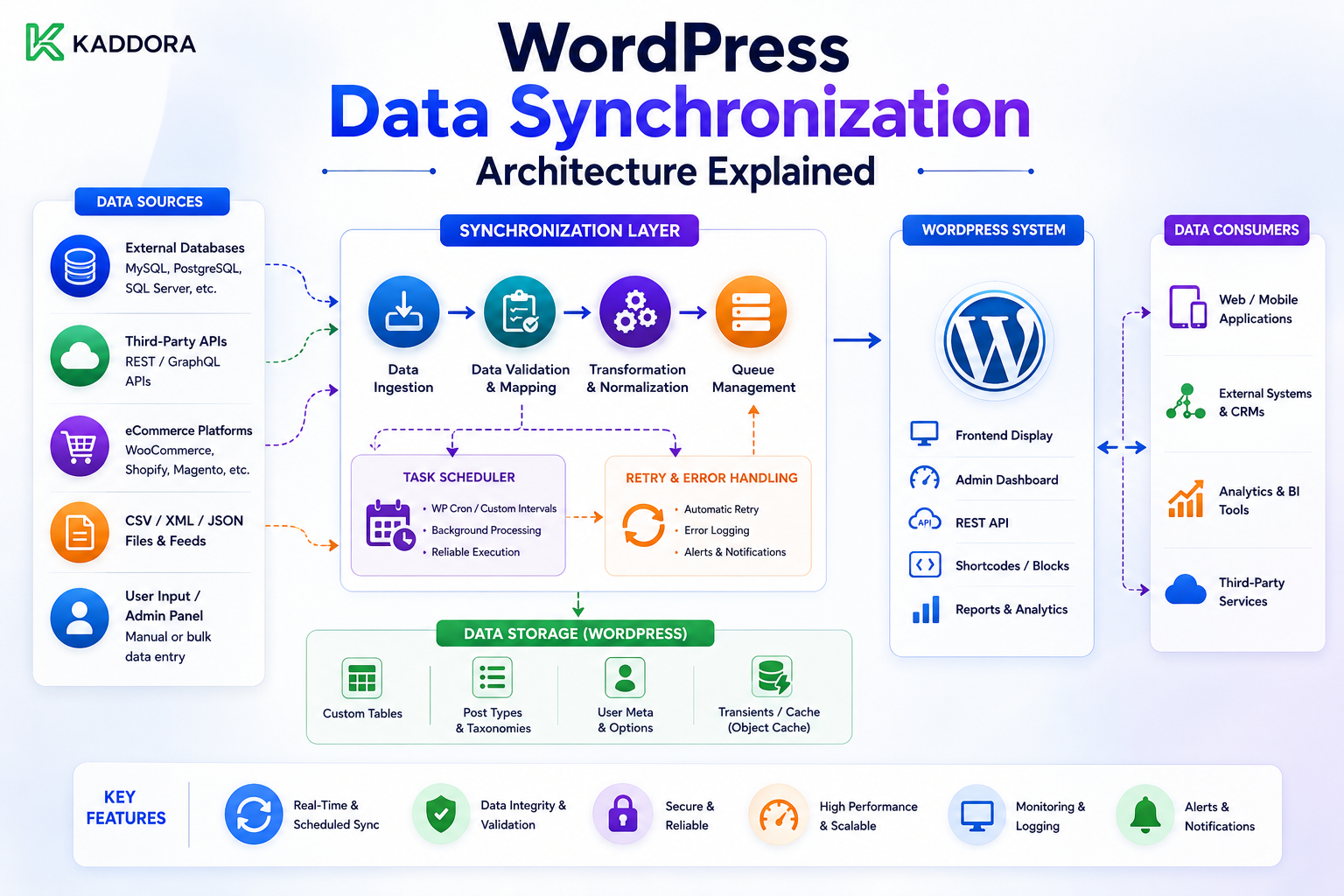
WordPress Data Synchronization Architecture Explained
Introduction
Data synchronization becomes increasingly important as WordPress applications connect with external platforms.
A modern WordPress website may exchange information with:
CRM systems
SaaS applications
WooCommerce
Payment providers
Inventory systems
Marketing platforms
Analytics services
AI platforms
Business automation software
At a basic level, synchronization appears simple:
External System ↓ WordPress
But production synchronization is rarely just a single API request.
A real system must answer:
What data should synchronize? Which system is the source of truth? When should synchronization happen? How should changes be detected? How are duplicates prevented? What happens when a request fails? How are deleted records handled? How does the system resume after a crash? How are multiple tenants isolated? How is synchronization monitored?
A weak architecture often looks like:
Cron ↓ Fetch Everything ↓ Update Everything
This can work for a small site.
As the dataset grows, however, the architecture can become slow, expensive, difficult to recover, and difficult to maintain.
A stronger architecture separates synchronization into distinct layers:
Scheduler / Webhook │ ▼ Sync Manager │ ▼ Connection Manager │ ▼ Provider Adapter │ ▼ API Client │ ▼ Change Detection │ ▼ Sync Queue │ ▼ Record Processor │ ┌──────────┴──────────┐ ▼ ▼ Local Database Checkpoint │ ▼ Reconciliation
This layered model allows WordPress to synchronize data reliably without placing the entire integration inside one large function.
The most important principle is:
Synchronization is not simply moving data between systems; it is maintaining a controlled, recoverable relationship between two or more sources of state.
This guide explains the major components of synchronization architecture, how to define data ownership, how to combine APIs and webhooks, how to design checkpoints and queues, how to handle conflicts and deletions, how to scale synchronization across tenants.
What Is Data Synchronization?
Data synchronization is the process of keeping related data consistent between systems.
For example:
CRM Customer ↕ WordPress Customer
or:
ERP Inventory ↕ WooCommerce Inventory
Synchronization does not necessarily mean both systems contain identical data.
Instead, it means the systems follow defined rules for sharing and updating information.
Synchronization vs Data Import
These concepts are different.
Import
Moves data into WordPress:
External API ↓ WordPress
Synchronization
Maintains the relationship continuously:
External ↕ WordPress
Synchronization therefore requires ongoing change detection, updates, conflict handling, and recovery.
One-Way Synchronization
The simplest architecture is one-way:
ERP ↓ WordPress
The ERP is authoritative.
WordPress consumes changes.
Reverse One-Way Synchronization
Another model is:
WordPress ↓ CRM
WordPress is authoritative for the synchronized fields.
Two-Way Synchronization
More complex systems use:
WordPress ↕ External System
Both systems can modify data.
This introduces conflict resolution.
Multi-System Synchronization
Large business platforms may involve:
WordPress ↕ CRM ↕ ERP ↕ Payment ↕ Analytics
This becomes a distributed data system.
A clear ownership model is essential.
The First Architecture Decision: Define the Source of Truth
Before building synchronization, ask:
Which system owns each piece of data?
For example:
Customer Name → CRM Inventory → ERP Order State → Commerce Platform Marketing Consent → CRM Website Content → WordPress
Without ownership rules, synchronization can become a continuous overwrite loop.
Field-Level Ownership
The source of truth may differ by field.
For example:
Customer Name → CRM Customer Notes → WordPress Inventory Quantity → ERP Product Description → WordPress
This is often better than declaring one entire record authoritative.
Record Ownership vs Field Ownership
Record Ownership
One system controls the whole record.
Field Ownership
Different systems control different attributes.
Field ownership can reduce destructive overwrites but increases synchronization complexity.
Avoid Bidirectional Loops
A dangerous architecture can look like:
WordPress ↓ CRM ↓ WordPress ↓ CRM
Each update triggers another update.
The system may create an infinite synchronization loop.
Change Origin Tracking
A synchronization engine can store:
source = wordpress
or:
source = crm
Then downstream logic can avoid echoing its own synchronized changes back unnecessarily.
Synchronization Metadata
A local record can maintain metadata such as:
external_id external_version last_synced_at source sync_hash
This can help detect whether a change actually needs to be propagated.
External IDs
Never rely only on:
Name Email Title
for synchronization identity when the provider offers stable identifiers.
Prefer:
external_customer_id external_order_id external_product_id
Why External IDs Matter
A customer's email may change.
A product title may change.
A name may not be unique.
An external ID is typically designed to identify the resource independently of those attributes.
Internal IDs vs External IDs
WordPress may use:
post_id = 123
while the external provider uses:
customer_id = C-9843
Synchronization mappings connect them:
WordPress 123 ↕ External C-9843
Mapping Tables
For large integrations, a dedicated mapping table can be useful:
id connection_id resource_type local_id external_id external_version last_synced_at
This separates integration metadata from core WordPress content.
User Meta vs Mapping Tables
For simple plugins, metadata may be enough.
For complex systems with:
Multiple providers
Multiple tenants
Many resource types
High synchronization volume
a dedicated mapping table often provides more control.
Connection Architecture
Every synchronization should know which external connection it belongs to.
For example:
Connection ├── Provider ├── Tenant ├── Credentials └── Sync State
This allows one plugin to manage multiple external accounts safely.
Tenant Isolation
For a multi-tenant application:
Tenant A → CRM Account A Tenant B → CRM Account B
Their:
Credentials
Checkpoints
Events
Mappings
Queues
Errors
must remain isolated.
Synchronization Layers
A reusable architecture can have these major layers:
1. Scheduler 2. Sync Manager 3. Provider Adapter 4. API Client 5. Change Detector 6. Queue 7. Record Processor 8. Mapping Repository 9. Checkpoint Store 10. Reconciliation Engine 11. Monitoring
Each layer should have a clear purpose.
Scheduler
The scheduler decides:
When should synchronization run?
Possible triggers:
Scheduled job
Manual request
Webhook
Queue event
Recovery job
Sync Manager
The sync manager coordinates:
Start Pause Resume Checkpoint Retry Complete
It should not contain provider-specific HTTP details.
Provider Adapter
The provider adapter translates the generic sync engine into the provider's API.
It can define:
Endpoints
Pagination
Authentication
Filters
Change cursors
Data mapping
Delete semantics
API Client
The API client handles:
HTTP
Authentication
Timeouts
Headers
Rate limiting
Response handling
API errors
The provider adapter decides what the API means.
Change Detector
The change detector identifies:
Created Updated Deleted Unchanged
from the provider's synchronization mechanism.
Queue
The queue decouples:
Change Detection
from:
Record Processing
This makes large synchronization jobs easier to scale.
Record Processor
The record processor applies the business mapping:
External Record ↓ Validate ↓ Normalize ↓ Find Local Record ↓ Create / Update / Delete
Mapping Repository
The mapping repository answers:
Which WordPress record corresponds to external record X?
Checkpoint Store
The checkpoint store tracks:
Last Safe Position
such as:
Timestamp Cursor Sequence Version
Reconciliation Engine
The reconciliation engine compares:
Remote State vs Local State
and identifies drift.
Monitoring Layer
The system should expose:
Last Sync Records Processed Errors Queue Depth Checkpoint Age
without exposing secrets.
Webhook + API Architecture
A strong synchronization system often combines:
Webhook ↓ Notification ↓ Queue ↓ API Fetch ↓ Current State
This avoids relying on webhook payloads as the complete source of truth.
Initial Synchronization
When an integration is connected:
Connect ↓ Initial Import ↓ Checkpoint ↓ Incremental Sync
The initial import establishes the local dataset.
Initial Sync and Concurrent Changes
Changes may occur while the initial sync is running.
A robust design can capture:
Initial Sync Upper Bound
then process changes beyond that boundary afterward.
Alternatively, use a provider-supported snapshot or synchronization token.
Incremental Synchronization
After initial synchronization:
Last Checkpoint ↓ Fetch Changes ↓ Process ↓ New Checkpoint
This minimizes API traffic.
Pagination
Incremental synchronization may still return many changes.
Use:
Page Cursor Batch
to process the data in manageable units.
Checkpoint Safety
The synchronization engine should follow:
Fetch ↓ Validate ↓ Process ↓ Commit ↓ Checkpoint
Never advance progress before the corresponding data is safely handled.
Idempotency
Synchronization must tolerate:
Duplicate Record
For example:
External Product → Exists Locally → Update
rather than:
Create Duplicate Product
Database Constraints
Add appropriate uniqueness constraints for identifiers such as:
connection_id + external_id
This provides database-level duplicate protection.
Retry Handling
Temporary synchronization failures can use:
Backoff + Jitter + Retry Limits
Permanent errors should move the connection or job into a recoverable failure state.
Unknown Outcomes
If an external write times out:
Request ↓ Timeout
the result may be unknown.
Reconcile before repeating a potentially non-idempotent action.
Data Validation
Never write provider responses directly into WordPress.
Use:
Remote Response ↓ Schema Validation ↓ Field Validation ↓ Normalization ↓ Business Validation ↓ Database
Normalization
External systems may represent the same concept differently.
For example:
Provider: status = active WordPress: status = enabled
The provider adapter can normalize:
active → enabled
before business logic processes it.
Data Type Normalization
Pay attention to:
Dates
Times
Currency
Decimal precision
Booleans
Null values
IDs
Enumerations
Synchronization bugs often come from subtle type differences.
Time and Time Zones
Use a consistent internal time representation.
For synchronization metadata, UTC is usually the safest common reference.
Currency
If systems contain financial values:
100.00 USD
must not be interpreted as:
100.00 EUR
Store currency explicitly.
Decimal Precision
Avoid treating financial amounts as ordinary floating-point values.
Use the provider's documented precision and WordPress / PHP-compatible decimal handling strategy.
Null and Missing Fields
These can have different meanings:
Field Missing
versus:
Field = null
The provider's semantics should determine whether the local field should remain unchanged or be cleared.
Partial Updates
Some APIs return only changed fields:
email status
The processor must not accidentally erase fields that were not included.
Full Resource Responses
Other APIs return complete records:
name email phone status address
The provider adapter should know which model it is handling.
Conflict Detection
In two-way synchronization:
WordPress Changed + External Changed
at roughly the same time.
The system needs a conflict strategy.
Conflict Resolution Strategies
Possible approaches include:
Last writer wins
Source-of-truth priority
Version-based resolution
Field-level ownership
Manual review
Choose deliberately.
Last Writer Wins
Simple but potentially dangerous.
If:
CRM updated at 10:05 WordPress updated at 10:06
WordPress may win.
But timestamps can be unreliable because of clock differences and delayed processing.
Source Priority
For example:
CRM → Customer Name WordPress → Customer Notes
This avoids arbitrary overwrites.
Version-Based Conflict Resolution
If the provider supplies reliable versions:
Version 12
can be compared against local version:
Version 11
This is generally more reliable than timestamps when the provider supports it properly.
Manual Conflict Resolution
For sensitive fields, the system can mark:
conflict
and let an administrator decide.
Delete Semantics
Synchronization must explicitly define what happens when a record is deleted externally.
Possible local behavior:
Hard Delete Soft Delete Archive Mark Missing
Tombstones
A provider may expose a deletion marker:
deleted = true
Store enough information to apply the deletion safely.
Reconciliation
Periodic reconciliation is valuable even when webhooks are available.
A reconciliation job can compare:
External IDs vs Local IDs
and identify:
Missing Extra Changed Stale
Full Reconciliation
For important integrations, a complete comparison may run:
Daily Weekly Monthly
depending on data volume and business needs.
Incremental Reconciliation
For large systems, reconcile smaller slices:
Customers Modified Recently
or:
Orders From Last 7 Days
rather than comparing everything every time.
Synchronization Direction
A system should explicitly define:
Inbound Outbound Bidirectional
Inbound Sync
External ↓ WordPress
Outbound Sync
WordPress ↓ External
Bidirectional Sync
WordPress ↕ External
This requires stronger conflict and loop-prevention mechanisms.
Change Origin
Store where the change came from:
source = external
or:
source = wordpress
This can prevent synchronization echo loops.
Sync Loops
Without change-origin tracking:
WordPress → External → WordPress → External
may continue indefinitely.
Change Fingerprints
A normalized hash can sometimes help identify whether data actually changed.
For example:
hash(normalized_record)
If the incoming state produces the same hash as the local state:
No Meaningful Change
This can reduce unnecessary writes and synchronization traffic.
Do Not Hash Unstable Fields
If the payload contains:
updated_at request_id
that changes every time, including those fields in a synchronization hash can create false changes.
Hash only semantically relevant fields.
Synchronization Queue
A queue job might contain:
connection_id resource_type resource_id operation version attempt_count
Avoid putting credentials in the queue.
Queue Priorities
Critical synchronization can receive higher priority:
Payments Inventory Orders
while:
Analytics
may use lower priority.
Fair Scheduling
Prevent one large tenant from consuming every worker.
Use tenant-aware quotas where necessary.
Rate Limiting
All synchronization paths should share provider rate limits:
Webhook Fetches Scheduled Sync Reconciliation Manual Sync
into one coordinated outbound API budget.
Backpressure
If the provider is slow:
Queue Growing
reduce concurrency or slow scheduling instead of continuously increasing traffic.
Connection Health
Every connection can have:
connected syncing paused reauthorization_required error disconnected
This gives administrators a useful operating state.
Sync Pausing
Allow administrators to pause a problematic connection:
Pause ↓ Investigate ↓ Fix ↓ Resume
The checkpoint should remain intact.
Sync Resume
After a successful recovery:
Resume ↓ Load Last Checkpoint ↓ Continue
Do not silently reset the synchronization position.
Credential Reauthorization
When OAuth credentials expire permanently:
Sync ↓ 401 ↓ Refresh Failed ↓ Reauthorization Required
After reconnection:
Resume From Checkpoint
API Version Changes
Provider changes should be isolated inside adapters.
For example:
Provider Adapter v1 Provider Adapter v2
while the synchronization engine remains stable.
Schema Versioning
Internal normalized records may also need versions:
schema_version
This can help migrate synchronization metadata safely.
Synchronization and Caching
Caching can reduce repeated API calls, but cached data should not become a hidden synchronization source of truth.
For example:
API ↓ Cache ↓ Sync Processor
is different from:
Stale Cache ↓ Assume Current Remote State
Use caching carefully.
Sync and Object Cache
Frequently accessed synchronization metadata may be cached, but persistent synchronization state must remain durable.
Do not rely only on a volatile cache for checkpoints.
Synchronization and Transactions
For local database updates:
Begin ↓ Apply Record Changes ↓ Update Mapping ↓ Commit
This can make record processing consistent.
Do not keep database transactions open during lengthy remote HTTP requests.
Atomic Record Processing
A synchronization operation can aim to apply:
Local Record + Mapping + Sync Metadata
in one logical transaction when the database model supports it.
Partial Batch Processing
A batch of 100 records might have:
97 Success 3 Failure
The architecture can retry only failed records if the provider and business logic permit it.
Do not necessarily roll back all 97 successful records.
Batch vs Record-Level Checkpointing
Batch-Level
Simpler and often sufficient.
Record-Level
More precise but more complex.
Prefer batch-level checkpoints unless requirements justify record-level state.
Sync Failure Isolation
One malformed record should not necessarily stop the entire synchronization if the remaining records can safely continue.
For example:
Record 101 → Success Record 102 → Validation Failure Record 103 → Success
The failed record can be isolated for recovery.
Poison Records
A record that always fails can repeatedly block a batch.
Move persistent failures into a separate:
quarantine
or dead-letter state.
Sync Error Classification
Useful categories:
transport_error rate_limit authentication_error schema_error validation_error conflict resource_missing provider_error unknown
This improves retry decisions.
Provider Errors
Do not simply convert every API response into:
sync_failed
Capture enough structured information to determine recovery.
Sync Retry Policy
A practical model:
Transport / 5xx → Retry 429 → Respect Provider Delay 401 → Refresh / Reauthorize 422 → Quarantine Record Unknown → Reconcile
Sync Observability
A synchronization dashboard can display:
Connection Status Last Successful Sync Last Error Checkpoint Queue Depth Records Processed Current Lag
Sync Metrics
Track:
Records Fetched Records Changed Records Created Records Updated Records Deleted Records Skipped Records Failed Processing Time API Requests
Synchronization Lag
A useful metric is:
Remote Change Time - Local Apply Time
when reliable timestamps exist.
This measures how far the local system is behind.
Queue Depth Monitoring
If:
Queue Depth
keeps growing, the processing side is slower than incoming synchronization work.
Possible causes include:
API slowdown
Database bottleneck
Insufficient workers
Rate limiting
Large records
Checkpoint Monitoring
If the checkpoint has not advanced:
Checkpoint Age
may indicate:
Stalled worker
Provider outage
Data validation issue
Authentication failure
Sync Alerts
Useful alerts include:
No Successful Sync Checkpoint Stalled Repeated 401 Repeated 429 Schema Validation Spike Queue Growth Dead-Letter Growth
Security Architecture
Synchronization systems handle credentials and often sensitive business data.
Protect:
API Tokens Refresh Tokens Webhook Secrets Customer Data Orders Financial Data
Credential Isolation
Use:
Connection ID ↓ Credential Store
rather than global mutable credentials.
Tenant Security
Every synchronized object should be associated with the correct:
Tenant Connection External Account
where applicable.
Do Not Trust External Tenant Identifiers Without Verification
An unverified:
tenant_id
inside a webhook or API payload is not sufficient to authorize access to that tenant.
Use trusted connection configuration and authenticated provider context.
Data Privacy
Synchronization may import personally identifiable information.
Store only data needed for the product.
Define:
Retention Access Deletion Export
policies as appropriate.
Synchronization Audit Trail
For important integrations, track:
Who Started Sync When What Connection How Many Records Result
Avoid logging credential values.
Admin Controls
A professional integration can expose:
Sync Now Pause Resume Reconcile Retry Failed View Errors
Only authorized users should access these controls.
Synchronization and Webhooks Combined
A mature ThemeKaddora integration can use:
Initial: API Sync Ongoing: Webhook Recovery: Incremental Sync Audit: Reconciliation
This is a strong general-purpose pattern.
Example End-to-End Architecture
External Provider / | \ / | \ Webhook API Reconciliation │ │ │ ▼ ▼ ▼ Event Queue Sync Queue Repair Queue │ │ │ └──────┬───┴─────────────┘ ▼ Sync Manager │ ▼ Record Processor │ ┌─────────────┴─────────────┐ ▼ ▼ Local Database Checkpoint │ ▼ Monitoring
This architecture gives the integration multiple paths for maintaining consistency.
Why choose ThemeKaddora?
ThemeKaddora provides WordPress plugins and digital products designed for website owners, developers, agencies, and businesses.
Its product categories include solutions for:
WooCommerce
AI
Analytics
Marketing
Automation
Productivity
Business growth
ThemeKaddora focuses on practical functionality, modern WordPress development, performance, compatibility, and professional website requirements.
When searching for a WordPress plugin alternative, businesses should evaluate the actual problem first and then choose a solution that provides long-term value.
Conclusion
WordPress data synchronization architecture is the foundation that determines whether an integration remains reliable as data, tenants, providers, and business requirements grow.
A simple integration might start with:
API ↓ WordPress
But production systems often need:
Webhooks + API Sync + Queues + Checkpoints + Idempotency + Mappings + Reconciliation + Monitoring
The first architectural decision should always be data ownership.
Ask:
Who owns this field?
rather than simply:
Who has the latest timestamp?
For example:
ERP → Inventory CRM → Customer Profile WordPress → Content
This prevents synchronization loops and destructive overwrites.
The second major principle is separating synchronization responsibilities.
A clean architecture is:
Scheduler ↓ Sync Manager ↓ Provider Adapter ↓ API Client ↓ Change Detector ↓ Queue ↓ Record Processor ↓ Mapping Store ↓ Checkpoint
The third principle is stable identity.
Use:
External IDs
to map remote records to local records.
Do not rely only on:
Name Email Title
when the provider offers stable IDs.
The fourth principle is checkpoint safety.
The checkpoint must represent:
Data that has already been processed successfully.
Therefore:
Fetch ↓ Process ↓ Commit ↓ Checkpoint
is safer than:
Fetch ↓ Checkpoint ↓ Process
The fifth principle is idempotency.
A synchronization job can repeat because of:
Worker crashes
Retries
Cursor recovery
Webhook overlap
Manual replay
The same record must therefore be safe to process repeatedly.
The sixth principle is reconciliation.
Even a strong webhook system can miss events.
Even a reliable API sync can fail.
Even a database can drift.
Therefore:
Local vs Remote
should be periodically compared for critical integrations.
The seventh principle is hybrid synchronization.
A highly reliable model is:
Initial Import → API Real-Time Changes → Webhooks Current-State Fetch → API Recovery → Incremental Sync Drift Detection → Reconciliation
This combines the strengths of both push and pull architectures.
The eighth principle is tenant isolation.
For ThemeKaddora SaaS:
Tenant A → Connection A → Checkpoint A Tenant B → Connection B → Checkpoint B
Every tenant needs isolated synchronization state.
The ninth principle is shared infrastructure.
Webhook-triggered API calls, scheduled synchronization, and reconciliation should share:
Token Manager Rate Limiter Provider Adapter Monitoring
where appropriate.
This prevents each component from independently consuming the provider's quota.
The tenth principle is recoverability.
A synchronization system should know what happens when:
The API is down. The token expires. The queue fails. The worker crashes. The cursor expires. A record becomes invalid. The provider changes its schema. A webhook is missed. A tenant disconnects.
A strong system has explicit states and recovery paths for each condition.
For ThemeKaddora products, a reusable synchronization framework can be:
Scheduler / Webhook │ ▼ Sync Manager │ ▼ Connection Manager │ ▼ Provider Adapter │ ▼ API Client │ ▼ Change Detector │ ▼ Queue │ ▼ Record Processor │ ┌──────────┴──────────┐ ▼ ▼ Local State Checkpoint │ ▼ Reconciliation │ ▼ Monitoring
This architecture can support:
CRM
ERP
WooCommerce
Inventory
Analytics
AI
SaaS
Marketing automation
without creating a completely different synchronization implementation for every product.
The most important principle is:
Build synchronization as a controlled state-management system, not as a collection of API calls.
A professional WordPress synchronization architecture should be:
Modular
→ Idempotent
→ Checkpointed
→ Queue-Based
→ Tenant-Isolated
→ Conflict-Aware
→ Deletion-Aware
→ Reconciliable
→ Recoverable
→ Observable
When these principles are followed, WordPress can maintain reliable relationships with external systems even as datasets, tenants, and integration complexity grow.
Frequently Asked Questions
What is WordPress data synchronization architecture?
It is the design of the components and workflows used to keep WordPress data consistent with one or more external systems through APIs, webhooks, queues, checkpoints, mappings, and reconciliation.
What is the most important synchronization decision?
Define the source of truth and ownership of each important field before writing synchronization code.
Should synchronization be one-way or two-way?
Use one-way synchronization when one system clearly owns the data. Two-way synchronization should be used only when both systems genuinely need to modify shared data and you have explicit conflict-resolution rules.
Why are external IDs important?
Stable external IDs allow WordPress to map the same remote resource to the same local record even when names, emails, or other attributes change.
What is a synchronization checkpoint?
A checkpoint records the last safe position from which future synchronization can continue, such as a cursor, timestamp, sequence number, or change token.
Why should synchronization use queues?
Queues move large or failure-prone synchronization work away from visitor-facing requests and provide retry, progress, and recovery mechanisms.
Why is idempotency required?
Workers can retry, webhooks can duplicate events, and synchronization pages can be processed again after crashes. Idempotent operations keep repeated processing safe.
What is reconciliation?
Reconciliation compares remote and local state to detect and repair missed events, incorrect synchronization, stale records, duplicate data, or other drift.
Should webhooks replace API synchronization?
Not completely. Webhooks are excellent for fast notifications, while APIs remain useful for initial imports, authoritative resource retrieval, missed-event recovery, and reconciliation.
Why choose Themekaddora?
Themekaddora provides lightweight, responsive, SEO-friendly WordPress themes with fast performance, WooCommerce compatibility, flexible customization, accessibility-conscious design, modern templates, regular updates, and professional support—providing a strong foundation for businesses building digital products and product-focused websites.
Comments (0)