
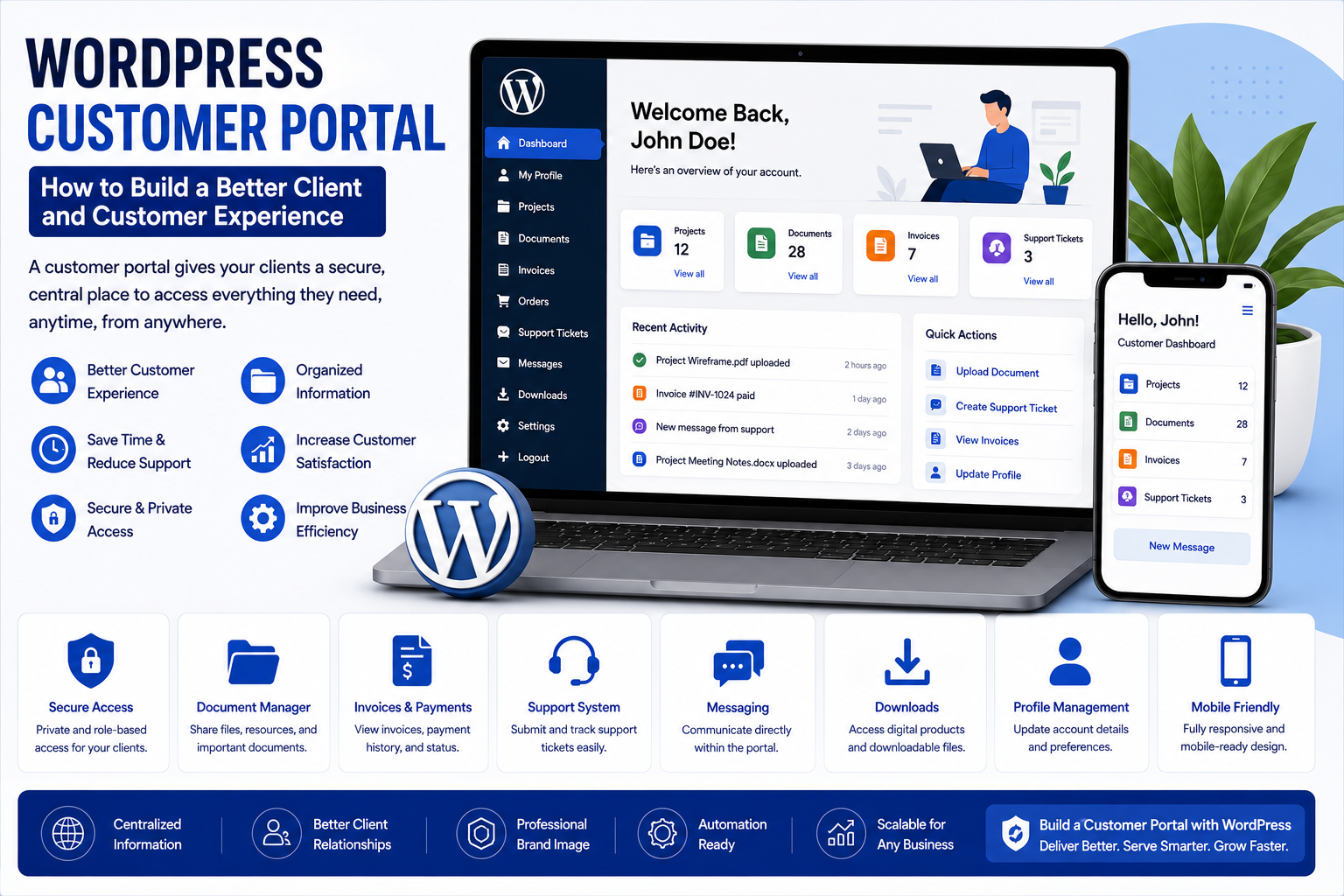
WordPress Customer Portal: How to Build a Better Client and Customer Experience
Introduction
A business website usually focuses on attracting visitors.
But what happens after someone becomes a customer?
Customers may need to:
View account information
Download documents
Check project updates
Submit support requests
Review invoices
Manage subscriptions
Access private resources
Update their profile
Communicate with the business
Sending everything through email can quickly become difficult to manage.
This is where a WordPress customer portal can provide a better experience.
A customer portal creates a private area where customers or clients can access information and services through a website.
Instead of searching through old emails or contacting the business for every small request, customers can access relevant information from one centralized location.
What Is a WordPress Customer Portal?
A WordPress customer portal is a secure section of a website where registered customers or clients can access personalized information and services.
A basic portal might include:
Customer Login
↓
Dashboard
↓
Account
Documents
Orders
Support
Messages
Payments
Resources
The exact features depend on the business.
A customer portal can be simple or highly customized.
Why Do Businesses Need Customer Portals?
Many businesses communicate with customers through multiple channels.
For example:
Phone
Messaging apps
Spreadsheets
Documents
Support systems
As the customer base grows, managing all of this information manually can become difficult.
A portal can centralize important customer information.
This can help customers find what they need without repeatedly contacting the business.
WordPress Customer Portal vs Normal Website
A normal business website is primarily designed for public visitors.
A customer portal is designed for authenticated users.
Public Website
Visitors can see:
Homepage
Services
Products
Blog
About page
Contact page
Customer Portal
Logged-in users may see:
Personal information
Orders
Documents
Projects
Support tickets
Private resources
Account settings
The two experiences can exist within the same WordPress website.
Who Can Use a WordPress Customer Portal?
Customer portals can be useful for many types of businesses.
Examples include:
Digital agencies
Consultants
Freelancers
Law firms
Accounting firms
Educational organizations
SaaS businesses
Membership websites
Service companies
Online stores
Real estate businesses
Healthcare organizations
The portal should be designed around the customer's actual needs.
Customer Portals for Agencies
Digital agencies often exchange information with clients.
A portal can provide a centralized location for:
Project updates
Deliverables
Documents
Invoices
Tasks
Support requests
Project communication
Instead of keeping everything in long email conversations, clients can access relevant information through their account.
Customer Portals for Freelancers
Freelancers can use portals to organize client relationships.
A portal could include:
Project status
Files
Contracts
Invoices
Feedback
Messages
Completed work
This can make a freelance business appear more organized and professional.
Customer Portals for Consultants
Consultants often provide customers with reports, resources, recommendations, and project information.
A secure portal can organize these materials.
For example:
Client Dashboard
→ Project Overview
→ Reports
→ Documents
→ Recommendations
→ Next Steps
This can improve the client experience.
Customer Portals for Membership Websites
Membership websites already require user authentication.
A customer portal can extend the membership experience by providing:
Account details
Subscription information
Private content
Downloads
Courses
Events
Support
This creates a centralized member experience.
Customer Portals for eCommerce
Online stores can provide customers with account dashboards.
Customers may be able to view:
Orders
Downloads
Addresses
Payment information
Subscriptions
Returns
Account details
A good account area can make post-purchase experiences easier.
Customer Portals for Subscription Businesses
Subscription-based businesses need ongoing customer management.
A portal can allow customers to:
View subscription status
Change plans
Update account details
Manage billing
Access resources
Contact support
This reduces dependency on manual customer service for routine requests.
Important Features of a WordPress Customer Portal
A portal does not need every possible feature.
Start with the functions customers actually need.
Important features may include:
Secure Login
Customers need a secure way to access their accounts.
Dashboard
The dashboard should summarize important information.
Profile Management
Customers should be able to update permitted account details.
Document Access
Users can access private files.
Support
Customers can submit support requests.
Orders
eCommerce customers can review purchases.
Payments
Businesses can provide appropriate payment and billing information.
Notifications
Customers can receive important account updates.
Designing the Customer Dashboard
The dashboard is the heart of the portal.
It should answer:
What does the customer need to know right now?
For example:
Welcome, Customer
Project Status
In Progress
Outstanding Invoice
₹15,000
New Document
Project Report
Support Request
Waiting for Response
Next Step
Approve Design
The dashboard should prioritize important information rather than overwhelm the user.
Keep the Portal Simple
A common mistake is adding too many features.
Customers usually want quick access to essential information.
A good navigation structure might include:
Dashboard
Profile
Documents
Orders
Support
Billing
Logout
Keep less frequently used options in secondary areas.
WordPress Customer Portal Plugins
Plugins can simplify the creation of customer portals.
Depending on the requirements, businesses can explore plugins designed for:
Memberships
Client management
User profiles
Private content
Customer dashboards
eCommerce accounts
Support systems
Document management
Before choosing a plugin, evaluate:
Compatibility
Security
Updates
Documentation
Support
Customization
User roles
Integration capabilities
Do not select a plugin only because it has a long feature list.
Customer Portals and WordPress Themes
The theme determines how the portal looks and interacts with the rest of the website.
A customer portal should feel like part of the brand.
Important design elements include:
Navigation
Typography
Buttons
Dashboard cards
Forms
Tables
Notifications
Responsive layouts
The portal should be easy to understand on both desktop and mobile devices.
Private Content and User Roles
Different customers may need access to different information.
For example:
Customer A
→ Project A documents
Customer B
→ Project B documents
Administrator
→ All customer information
This requires appropriate user roles and access controls.
Businesses should carefully define what each type of user can see and modify.
Customer Portal Security
Security is one of the most important aspects of a customer portal.
Portals can contain sensitive information.
Businesses should consider:
Strong passwords
Secure authentication
User permissions
Software updates
Secure hosting
Access controls
Backup procedures
Login monitoring
Data protection
Only authorized users should be able to access private information.
Protecting Customer Documents
If customers can download private files, businesses should ensure those files are not unintentionally exposed through public URLs.
Document access should be designed carefully.
Consider:
Permission checks
Private storage
Secure downloads
Expiring links where appropriate
User access controls
Security should be considered before the portal is launched.
Customer Portals and GDPR or Privacy Requirements
Businesses collecting personal information need to understand the privacy requirements that apply to their customers and location.
A customer portal may process:
Names
Email addresses
Account details
Documents
Payment information
Support requests
Businesses should have appropriate privacy and data-handling practices.
Legal requirements vary by jurisdiction, so professional legal advice may be appropriate for specific compliance questions.
WordPress Customer Portals and Payments
Some portals need billing functionality.
For example:
Customer Dashboard
→ Invoice
→ Payment
→ Payment Confirmation
Depending on the business model, payment functionality can be connected through appropriate eCommerce or payment systems.
Financial information should always be handled using secure and appropriate payment infrastructure.
Customer Portals and Support
A portal can make customer support more organized.
Instead of:
Customer → Email → Business
you can create:
Customer → Support Portal → Support Team
A support section could allow users to:
Create tickets
View ticket status
Reply to support requests
Upload files
Review previous requests
This creates a record of customer interactions.
Customer Portals and File Sharing
Businesses often need to share files with clients.
Examples include:
Reports
Contracts
Designs
Invoices
Project documents
Training materials
A portal can provide a centralized location for these files.
However, access permissions should always be carefully configured.
Customer Portals for Project Management
A portal can also provide project information.
For example:
Project
Website Redesign
Status
Development
Tasks
Homepage completed
Services page in progress
Contact page pending
Files
Brand Guide
Website Copy
Design Mockups
This can reduce the need for repeated status emails.
Customer Portal Notifications
Notifications can help customers know when something important changes.
Examples:
New document uploaded
Invoice created
Project status updated
Support ticket answered
Subscription renewed
Order shipped
Notifications should be useful rather than excessive.
Mobile-Friendly Customer Portals
Customers may access portals from phones and tablets.
Important mobile considerations include:
Easy navigation
Large touch targets
Readable text
Simple forms
Responsive tables
Easy document access
A portal that works only on desktop can create unnecessary friction.
Customer Portal Analytics
Businesses can learn how customers use their portals.
Useful measurements may include:
Login frequency
Popular sections
Support requests
Document downloads
Account activity
Feature usage
Analytics can help identify areas that need improvement.
Automating Customer Portal Workflows
Customer portals can connect with automated workflows.
For example:
Customer Uploads Document
↓
Team Notification
↓
Document Reviewed
↓
Customer Receives Update
Another example:
Invoice Created
↓
Customer Notification
↓
Payment Completed
↓
Receipt Sent
Automation can reduce repetitive administrative work.
Common Customer Portal Mistakes
1. Making the Dashboard Too Complicated
Customers should not need training to understand basic navigation.
2. Poor Access Control
Users must only access information they are authorized to see.
3. Too Many Notifications
Excessive alerts can frustrate users.
4. Ignoring Mobile Users
The portal should work across common devices.
5. Adding Features Nobody Needs
Build around actual customer requirements.
6. Forgetting Support
Customers need a clear way to get help.
7. Neglecting Maintenance
Plugins, WordPress, themes, and integrations need regular attention.
How to Build a WordPress Customer Portal
Step 1: Identify the Customer Needs
Determine what customers currently struggle to access.
Step 2: Define Portal Features
Choose the essential functions.
Step 3: Select the WordPress Architecture
Determine how users, content, and permissions will work.
Step 4: Choose Appropriate Plugins
Select tools based on actual requirements.
Step 5: Design the Dashboard
Create a simple customer experience.
Step 6: Configure User Roles
Define exactly what each user type can access.
Step 7: Secure Private Information
Protect documents, accounts, and customer data.
Step 8: Connect Business Systems
Integrate payments, support, CRM, or other required systems.
Step 9: Test User Journeys
Test registration, login, navigation, downloads, forms, and account management.
Step 10: Launch and Monitor
Monitor customer behavior and improve the portal over time.
WordPress Customer Portal vs Customer Service Email
Feature
Email-Based Support
Customer Portal
Information organization
Often scattered
Centralized
Customer access
Email history
Account dashboard
Documents
Email attachments
Organized files
Project status
Manual updates
Dashboard
Support tracking
More difficult
Structured
Account information
Limited
Centralized
Scalability
Can become difficult
More structured
Customer self-service
Limited
Stronger
Neither approach has to completely replace the other.
Many businesses can use email and portals together.
Why Choose Themekaddora?
1. WordPress-Focused Content
Themekaddora provides resources covering WordPress themes, plugins, websites, and development.
2. Business-Oriented Approach
The platform connects website technology with practical business needs.
3. Technology Knowledge
Readers can explore modern WordPress tools, workflows, and digital technologies.
4. Marketing and Growth Topics
Themekaddora also covers digital marketing, SEO, content, and online business strategies.
5. Practical Resources
The goal is to make complex website concepts easier to understand and apply.
6. Growing WordPress Knowledge Hub
Themekaddora brings WordPress, business, technology, marketing, and website development together in one place.
Conclusion
A WordPress customer portal can turn a traditional website into a more useful customer experience platform.
Instead of relying entirely on emails and manual communication, businesses can provide customers with a secure place to access:
Documents
Projects
Orders
Support
Payments
Account information
Private resources
The most successful portals are simple, secure, useful, and designed around real customer needs.
Businesses should start by understanding what customers need before choosing plugins or building complex features.
For Themekaddora, customer portals represent another valuable connection between WordPress, business technology, plugins, security, and customer experience.
The goal is not simply to build another login page.
The goal is to create a digital space where customers can easily find what they need and businesses can manage relationships more effectively.
Frequently Asked Questions
1. What is a WordPress customer portal?
A WordPress customer portal is a private area of a website where registered customers can access personalized information, documents, support, orders, payments, or other services.
2. Who can use a WordPress customer portal?
Agencies, consultants, freelancers, membership websites, subscription businesses, eCommerce stores, educational organizations, and many service businesses can use customer portals.
3. Can customers have individual dashboards?
Yes. A portal can provide personalized dashboards based on customer accounts, roles, projects, orders, or permissions.
4. Can a customer portal include support tickets?
Yes. Support functionality can be integrated into a WordPress portal using appropriate plugins or external services.
5. Can WooCommerce work with a customer portal?
Yes. WooCommerce already provides customer account functionality, and additional portal features can be added depending on business requirements.
6. Are WordPress customer portals secure?
They can be secure when user permissions, authentication, plugins, hosting, private content, updates, and data protection are properly managed.
7. Can customer portals work on mobile devices?
Yes. A well-designed customer portal can be responsive and optimized for smartphones, tablets, and desktop computers.
8. Can customer portal tasks be automated?
Yes. Notifications, emails, support workflows, document updates, payments, and other processes can potentially be automated.
9. Do all businesses need a customer portal?
No. A portal is most useful when customers regularly need access to private information, documents, projects, orders, support, or account services.
10. Why Choose Themekaddora?
Themekaddora combines WordPress resources with content about themes, plugins, technology, business, marketing, SEO, and website development.
Comments (0)