
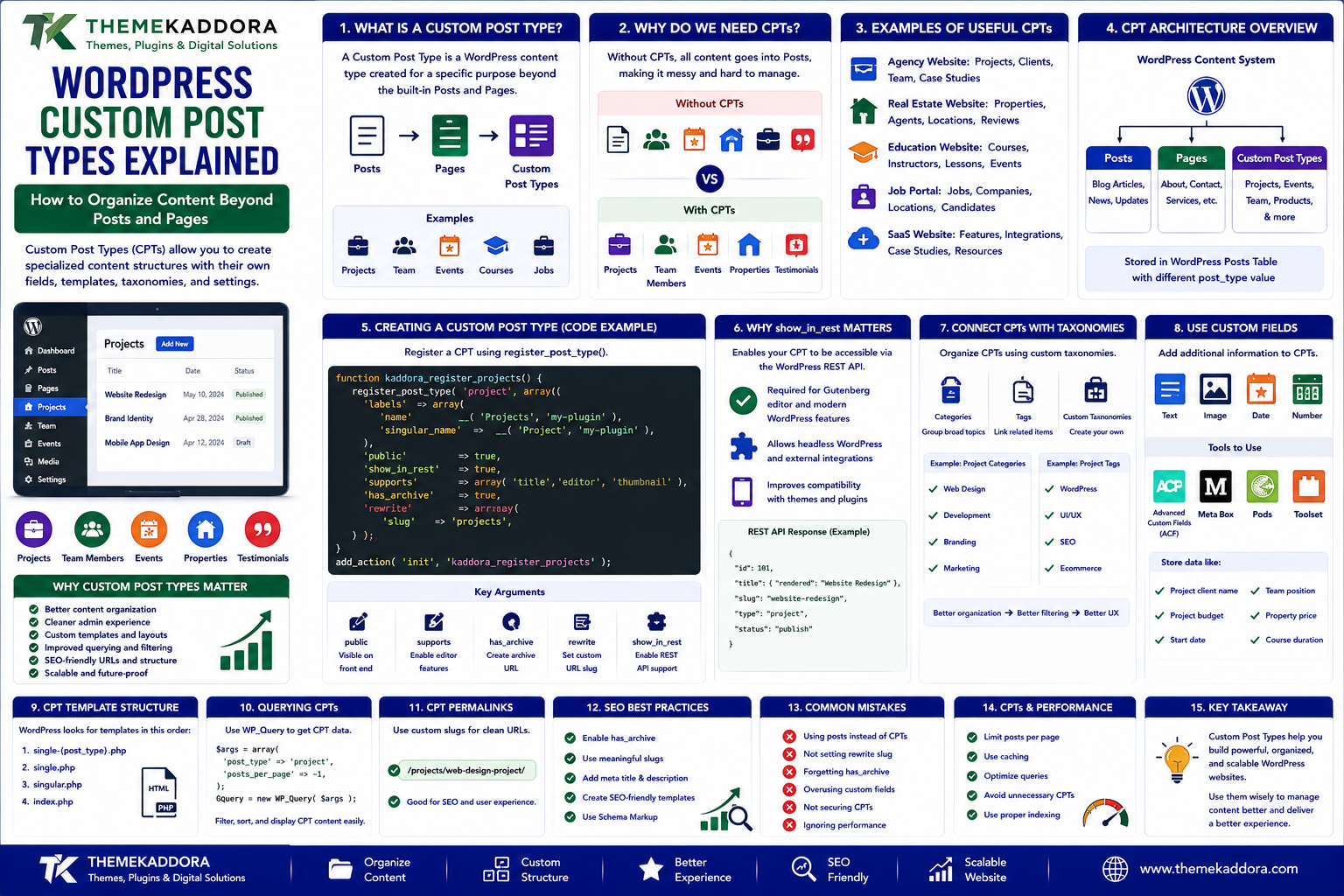
WordPress Custom Post Types Explained: How to Organize Content Beyond Posts and Pages
Introduction
WordPress was originally designed around a simple publishing model:
- Posts
- Pages
- Media
This structure works extremely well for blogs and standard business websites.
But modern WordPress websites often need to manage much more specialized information.
For example, a business website might need:
- Team members
- Projects
- Testimonials
- Events
- Courses
- Properties
- Products
- Case studies
- Job listings
- Locations
- Documentation
Putting all of these into ordinary blog posts can quickly become difficult to manage.
This is where WordPress Custom Post Types, commonly called CPTs, become useful.
A Custom Post Type allows developers to create a dedicated content structure for a specific type of information.
Instead of:
Posts ├── Project ├── Team Member ├── Project ├── Testimonial └── Event
you can create:
Projects Team Members Testimonials Events
Each content type can have its own:
URL structure
Templates
Taxonomies
Custom fields
Admin interface
Permissions
Queries
This can transform WordPress from a simple publishing platform into a flexible content management system.
In this guide, you'll learn what Custom Post Types are, how they work, when to use them, how to connect taxonomies and custom fields, how to make them SEO-friendly, and the most common mistakes developers should avoid.
1. What Is a WordPress Custom Post Type?
A Custom Post Type is a WordPress content type created for a specific purpose beyond the built-in Posts and Pages.
Examples include:
Projects Properties Events Courses Team Members Case Studies Jobs Locations
A Custom Post Type is still stored using WordPress's post system, but it has its own post_type value.
Conceptually:
WordPress Content | ┌────┼──────────────┐ ↓ ↓ ↓ Posts Pages Custom Post Types | ┌─────┼─────┐ ↓ ↓ ↓ Projects Events Jobs
This allows WordPress to organize different kinds of content separately.
2. Why Custom Post Types Matter
Without Custom Post Types, developers often create complicated systems using regular posts.
For example:
Posts ├── Blog ├── Team Member ├── Event ├── Property └── Project
This makes administration and querying harder.
A Custom Post Type creates a clearer content model:
Posts → Blog Articles Projects → Portfolio Projects Events → Upcoming Events Team → Team Members
This improves:
Content organization
Administration
Template control
Querying
URL structure
Scalability
3. Posts vs Pages vs Custom Post Types
Understanding the difference is important.
Posts
Best suited for frequently published chronological content.
Examples:
Blog articles
News
Updates
Pages
Best suited for relatively permanent site content.
Examples:
About
Contact
Services
Privacy Policy
Custom Post Types
Best suited for structured content with its own purpose.
Examples:
Projects
Properties
Events
Jobs
Courses
The choice should be based on the content model rather than simply how the content appears visually.
4. Examples of Useful Custom Post Types
Custom Post Types are useful across many industries.
Agency Website
Projects Clients Team Case Studies Testimonials
Real Estate Website
Properties Agents Locations Property Reviews
Education Website
Courses Instructors Lessons Events
Job Portal
Jobs Companies Locations Candidates
SaaS Website
Features Integrations Case Studies Resources
The key is that each content type has distinct information and behavior.
5. Creating a Custom Post Type With Code
Developers can register a Custom Post Type using register_post_type().
A simplified example is:
function kaddora_register_projects() { register_post_type( 'project', array( 'labels' => array( 'name' => __( 'Projects', 'my-plugin' ), 'singular_name' => __( 'Project', 'my-plugin' ), ), 'public' => true, 'show_in_rest' => true, 'supports' => array( 'title', 'editor', 'thumbnail', ), 'has_archive' => true, 'rewrite' => array( 'slug' => 'projects', ), ) ); } add_action( 'init', 'kaddora_register_projects' );
This creates a basic project content type.
The exact configuration should be adapted to the actual project requirements.
6. Why show_in_rest Matters
The show_in_rest argument is particularly important in modern WordPress development.
When enabled:
'show_in_rest' => true,
the Custom Post Type can be exposed through the WordPress REST API.
This can support:
Gutenberg
Block-based workflows
JavaScript applications
Headless WordPress
External integrations
Custom admin interfaces
For modern plugin development, developers should consider whether the Custom Post Type needs REST API support.
7. Choosing What the Editor Can Add
The supports setting controls which editing features are available.
For example:
'supports' => array( 'title', 'editor', 'thumbnail', 'excerpt', )
Possible features include:
Title
Editor
Featured image
Excerpt
Author
Revisions
Custom fields
Comments
Only enable the features the content type actually needs.
A simple content type should not expose unnecessary controls.
8. Custom Post Type Admin Experience
A good CPT should provide a useful admin interface.
For example:
Projects ├── All Projects ├── Add New └── Project Categories
Compare this with mixing projects into normal posts:
Posts ├── Blog ├── Project ├── Blog ├── Project
The dedicated interface makes content management much clearer.
Good plugin and theme development should focus on the editor experience as well as the code.
9. Custom Post Type URLs
A CPT can have its own URL structure.
For example:
example.com/projects/ example.com/projects/website-redesign/
The rewrite configuration can control the URL slug.
A good URL structure should be:
Descriptive
Consistent
Short
Human-readable
Stable
Avoid changing CPT slugs unnecessarily after the site has accumulated search traffic.
10. CPT Archives
Custom Post Types can have archive pages.
For example:
example.com/projects/
The archive can display all project entries.
An archive might include:
Projects Project A Project B Project C Project D
Archive templates can be customized to match the website's design.
11. CPT Templates
Themes can provide dedicated templates for Custom Post Types.
A traditional WordPress theme might use templates such as:
single-project.php archive-project.php
This allows projects to have a unique layout without changing ordinary posts.
For example:
Single Project Project Title Featured Image Client Industry Services Description Results Gallery
A dedicated template can make structured content significantly easier to present.
12. Custom Post Types and Taxonomies
CPTs become much more powerful when combined with taxonomies.
For example:
Projects | ├── Industry │ ├── Healthcare │ ├── Finance │ └── Education │ └── Technology ├── WordPress ├── Laravel └── SaaS
Taxonomies provide a structured way to group and filter content.
WordPress includes built-in:
Categories
Tags
Developers can also register custom taxonomies.
13. What Is a Custom Taxonomy?
A Custom Taxonomy is a classification system created for a specific content type.
For example:
Custom Post Type: Properties Taxonomies: Location Property Type Amenity
A property might have:
Location: Delhi Type: Apartment Amenity: Parking Gym Security
This structure makes filtering and browsing easier.
14. Hierarchical vs Non-Hierarchical Taxonomies
Custom taxonomies can be hierarchical or non-hierarchical.
Hierarchical
Works similarly to categories.
Example:
Location ├── India │ ├── Delhi │ └── Mumbai └── UK └── London
Non-Hierarchical
Works more like tags.
Example:
Technology: WordPress Laravel Redis WooCommerce
Choose based on how the information should be organized.
15. Custom Fields and Custom Post Types
A CPT defines the content type.
Custom fields store additional information about each item.
For a Property CPT, fields might include:
Property Name Price Bedrooms Bathrooms Area Location Property ID
For a Job CPT:
Job Title Salary Location Employment Type Experience Application Deadline
Custom fields turn a basic post into a structured business record.
16. Custom Post Types vs Custom Fields
These solve different problems.
Custom Post Type
Answers:
"What kind of content is this?"
Example:
Property
Custom Field
Answers:
"What information does this property contain?"
Example:
Price = ₹85,00,000 Bedrooms = 3 Area = 1,500 sq ft
Using both together creates a more structured content architecture.
17. Custom Post Types and Search
WordPress's default search behavior may not always provide the experience required for a custom content model.
A website may need searches such as:
Search Projects Search Properties Search Jobs Search Courses
Developers may need to customize:
Search queries
Filters
Taxonomy filters
Custom field filters
REST API queries
For large directories, specialized search infrastructure may eventually become useful.
18. Custom Post Types and REST API
A well-designed CPT can integrate with the WordPress REST API.
For example:
GET /wp-json/wp/v2/project
This can enable:
JavaScript frontends
Mobile applications
Headless WordPress
External integrations
Reporting systems
REST exposure should be designed carefully, particularly when content contains private or sensitive information.
19. Custom Post Types and Gutenberg
When show_in_rest is enabled, CPTs can integrate with the block editor.
This allows editors to manage custom content using modern WordPress tools.
For example:
Project ↓ Block Editor ├── Title ├── Description ├── Images ├── Results └── CTA
Developers can also create custom blocks specifically designed for their CPT.
20. Custom Post Types and SEO
CPTs can be SEO-friendly when structured properly.
Important considerations include:
Clean URLs
Indexable content
Unique titles
Useful descriptions
Internal linking
Structured data where appropriate
Archive optimization
Canonical URLs
XML sitemaps
Do not create a Custom Post Type simply to create more URLs.
Every indexed content type should have a genuine purpose.
21. CPT and Structured Data
Some Custom Post Types represent content that can benefit from structured data.
Examples include:
Events
Courses
Jobs
Products
Local businesses
The appropriate schema depends on the content.
For example, an Event CPT could contain:
Event Name Start Date Location Description Organizer
These fields can support structured-data implementation.
Structured data should reflect the actual visible and authoritative page content.
22. Custom Post Types and Permissions
Some CPTs require different user permissions.
For example:
Admin → Manage Everything Editor → Manage Projects Author → Create Projects Viewer → Read Only
WordPress allows developers to define custom capabilities for more advanced content models.
This becomes especially important for:
Job portals
Membership sites
ERP-style applications
Internal tools
Editorial teams
Permissions should follow the principle of least privilege.
23. Should Custom Post Types Be in a Theme or Plugin?
This is an important architecture decision.
Generally, site functionality should belong in a plugin, while the visual presentation belongs in a theme.
For example:
Plugin
Project Post Type Project Taxonomy Project Fields Project API
Theme
Project Layout Project Templates Project Styling
Why?
If you switch themes, the content type should ideally remain available.
Otherwise, changing the design could make important business data disappear from the admin interface.
24. CPTs and Plugin Deactivation
If a plugin registers a Custom Post Type, deactivating the plugin can affect how those URLs and content types behave.
Developers should consider:
Data retention
Rewrite rules
Migration
Deactivation behavior
Uninstall behavior
Plugin data should not be deleted simply because a plugin is deactivated unless that behavior is explicitly intended and appropriately handled.
25. Custom Post Type Query Performance
A website with thousands or millions of CPT records can develop performance problems.
Queries may involve:
Taxonomies
Custom fields
Sorting
Filtering
Pagination
Performance can be improved through:
Proper query design
Appropriate indexes where applicable
Pagination
Caching
Search optimization
Reducing unnecessary metadata queries
Do not assume that creating a CPT automatically creates an efficient directory system.
Large content models require performance planning.
26. Custom Post Types for Directory Websites
Directories are one of the most common CPT use cases.
For example:
Business Directory Business ├── Name ├── Address ├── Phone ├── Website ├── Category └── Location
The directory can then support:
Search
Filtering
Categories
Locations
Reviews
Maps
Featured listings
This structure is much easier to manage when businesses are represented as a dedicated Custom Post Type.
27. Custom Post Types for Membership Websites
Membership websites may use CPTs for:
Courses
Lessons
Resources
Events
Members
Certifications
For example:
Course ↓ Lessons ↓ Resources ↓ Quiz
Custom post types can provide the foundation for structured educational content.
Access control should then determine which members can view each item.
28. Custom Post Types for Business Websites
A corporate or agency website can use CPTs to structure:
Case studies
Team members
Testimonials
Projects
Locations
Events
This can make content easier for non-technical administrators to manage.
Instead of editing a generic post with unclear fields, an administrator can see:
Add New Project Project Name Client Industry Services Image Description Results
This creates a more intuitive content-management experience.
29. Common Custom Post Type Mistakes
Avoid these problems:
Using Posts for Everything
This creates poorly structured content.
Creating Too Many CPTs
Not every content variation needs a separate post type.
Putting CPT Logic in the Theme
Business data should generally survive theme changes.
Ignoring Taxonomies
Structured classifications can make content easier to organize.
No REST Support When Needed
Modern applications may require API access.
Poor URL Planning
Changing public slugs later can create unnecessary redirects.
Ignoring Permissions
Sensitive content may need custom capabilities.
Creating Large Unoptimized Queries
Directories and archives can become slow at scale.
30. Custom Post Type Best Practices
A strong CPT implementation should:
Define a clear content purpose.
Use a unique post-type key.
Use descriptive labels.
Enable only necessary editor features.
Consider REST API support.
Plan URL structure carefully.
Use taxonomies appropriately.
Define custom fields clearly.
Consider permissions.
Keep functionality in a plugin where appropriate.
Create dedicated templates.
Test archive and single views.
Optimize large queries.
Document the content model.
Good content architecture makes WordPress easier to scale.
31. A Practical Custom Post Type Workflow
A structured development process can look like:
Define Content Type ↓ Identify Fields ↓ Define Taxonomies ↓ Design URL Structure ↓ Register CPT ↓ Register Taxonomies ↓ Build Admin UI ↓ Create Templates ↓ Add SEO ↓ Add REST API if Needed ↓ Test ↓ Deploy
This avoids creating a CPT first and figuring out the content architecture later.
32. When Should You Use a Custom Post Type?
Use a CPT when the content represents a distinct entity with its own:
Structure
Lifecycle
Fields
URLs
Queries
Taxonomies
Templates
Examples include:
Projects
Properties
Jobs
Events
Courses
Case studies
Team members
Do not create a CPT simply because another website has one.
The content model should reflect your actual business requirements.
Why Choose ThemeKaddora?
At ThemeKaddora, we believe WordPress should be more than a platform for publishing ordinary blog posts.
With the right content architecture, WordPress can support:
Business directories
Portfolios
Job boards
Course platforms
Membership sites
Event websites
Agency websites
SaaS content systems
WooCommerce extensions
Custom Post Types provide one of the core mechanisms for building these structured experiences.
ThemeKaddora focuses on practical WordPress, WooCommerce, SaaS, AI, automation, and digital solutions designed around real business requirements.
Conclusion
WordPress Custom Post Types provide a powerful way to organize specialized content.
Instead of forcing every piece of information into Posts or Pages, you can create dedicated content types for:
Projects
Events
Jobs
Courses
Properties
Team members
Case studies
Directories
When combined with:
Custom taxonomies
Custom fields
Dedicated templates
REST APIs
Structured data
Appropriate permissions
CPTs can transform WordPress into a much more structured content management system.
However, good implementation requires planning.
Do not create a Custom Post Type simply because it is technically possible.
First define:
What is the entity?
What information does it contain?
How is it categorized?
Who can manage it?
How will users find it?
How will it scale?
How should it behave if the theme changes?
The best WordPress content architecture is not the one with the most Custom Post Types. It is the one that represents the business's actual information clearly and efficiently.
Frequently Asked Questions
1. What is a WordPress Custom Post Type?
A Custom Post Type is a WordPress content type created for a specific purpose beyond the built-in Posts and Pages.
2. Why use Custom Post Types?
They organize specialized content into dedicated structures with their own fields, URLs, taxonomies, templates, and management interfaces.
3. What is the difference between a CPT and a custom field?
A CPT defines the type of content, while custom fields store additional information about an individual item.
4. What is a Custom Taxonomy?
A Custom Taxonomy is a classification system used to organize and filter content within a Custom Post Type.
5. Should a CPT be registered in a plugin or theme?
Business functionality is generally better placed in a plugin so the content remains available when the theme changes.
6. What does show_in_rest do?
It allows a Custom Post Type to be exposed through the WordPress REST API, which can support the block editor and external applications.
7. Can WooCommerce use Custom Post Types?
WooCommerce has its own content architecture, so custom integrations should be designed carefully rather than replacing WooCommerce's core data structures unnecessarily.
8. Are Custom Post Types good for SEO?
They can be SEO-friendly when they contain useful content, have clean URLs, proper internal linking, appropriate metadata, and technically sound templates.
9. Can Custom Post Types be used for directories?
Yes. Directories, listings, properties, jobs, events, and portfolios are common CPT use cases.
10. Why choose Themekaddora?
Themekaddora provides lightweight, responsive, SEO-friendly WordPress themes with fast performance, WooCommerce compatibility, flexible customization, accessibility-conscious design, modern templates, regular updates, and professional support—providing a strong foundation for businesses building digital products and product-focused websites.
Comments (0)