
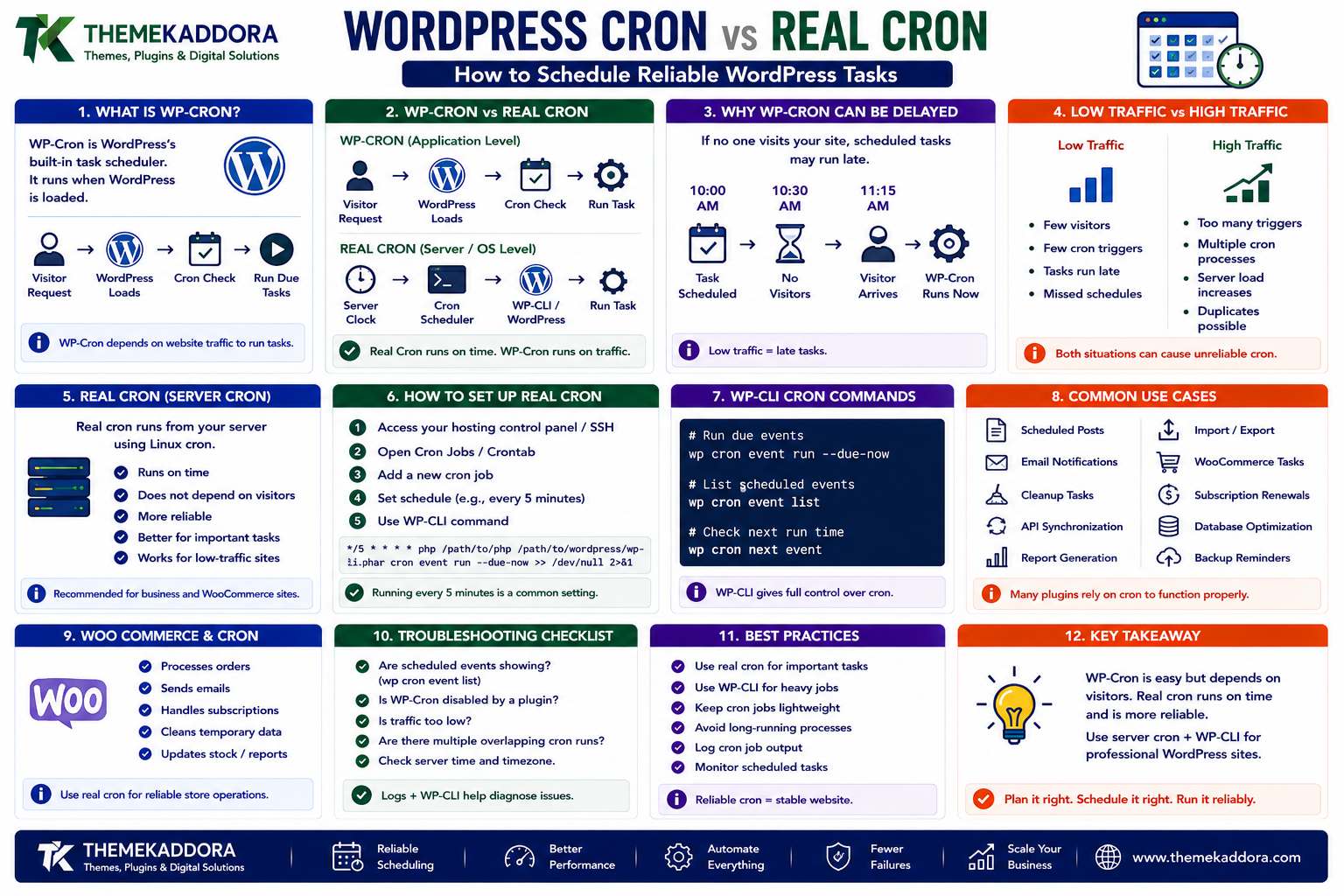
WordPress Cron vs Real Cron: How to Schedule Reliable WordPress Tasks
Introduction
Many WordPress websites need to perform tasks automatically.
For example:
Send scheduled emails
Publish scheduled posts
Clean temporary data
Synchronize products
Import external data
Generate reports
Process WooCommerce tasks
Send renewal reminders
Refresh API data
Run database maintenance
The administrator should not have to manually start these jobs every time.
WordPress provides a scheduling system called WP-Cron.
At first glance, it looks similar to the cron scheduler available on Linux servers.
But there is an important difference:
WP-Cron is application-level scheduling, while real cron is an operating-system-level scheduler.
This distinction becomes increasingly important for:
High-traffic websites
Low-traffic websites
WooCommerce stores
Membership websites
SaaS-connected WordPress sites
API integrations
Websites with business-critical scheduled tasks
A simplified WP-Cron workflow is:
Visitor Request ↓ WordPress ↓ Check Scheduled Events ↓ Run Due Tasks
A real server cron workflow is different:
Operating System ↓ Scheduled Cron ↓ WP-CLI / WordPress ↓ Run Task
The difference can have a major effect on reliability.
For a small blog, WP-Cron may work perfectly well.
For a business-critical WooCommerce store, relying entirely on visitor-triggered execution may not be ideal.
In this guide, you'll learn how WP-Cron works, why scheduled events can be delayed, how real server cron works, how to configure WordPress to use a system cron, how WP-CLI can help, how WooCommerce scheduled tasks fit into the architecture, how to troubleshoot missed jobs, and how to build a reliable WordPress automation system.
1. What Is WP-Cron?
WP-Cron is WordPress's built-in scheduling mechanism.
It can schedule tasks for specific times or recurring intervals.
Examples include:
Publish Scheduled Post Send Notification Clean Temporary Data Run Plugin Task
A simplified model is:
Scheduled Event ↓ WP-Cron ↓ Callback ↓ Task
Plugins can register their own scheduled events.
2. WP-Cron Is Not the Same as Linux Cron
This is the most important distinction.
Linux / Server Cron
The operating system starts the job based on a schedule.
Server Clock ↓ Cron Scheduler ↓ Command
WP-Cron
WordPress checks for due events when WordPress is loaded.
Visitor / Request ↓ WordPress Loaded ↓ Cron Check ↓ Due Event ↓ Task
Therefore, WP-Cron is often called a pseudo-cron system.
It behaves like scheduled execution, but the trigger mechanism is application traffic rather than the operating-system scheduler.
3. Why WP-Cron Can Be Delayed
Imagine a website receives very little traffic.
A task is scheduled for:
10:00 AM
But the next visitor arrives at:
11:15 AM
Depending on the environment, the task may not execute exactly at 10:00.
Conceptually:
10:00 Scheduled 10:01 No Request 10:30 No Request 11:15 Visitor Arrives 11:15 WP-Cron Runs
This is one of the main limitations of visitor-triggered cron.
4. Low-Traffic Websites and WP-Cron
Ironically, low-traffic websites can have more obvious scheduling delays.
Consider:
Small Website ↓ Few Visitors ↓ Few Cron Triggers ↓ Delayed Scheduled Tasks
This can affect:
Scheduled posts
Email campaigns
Cleanup jobs
API synchronization
Reports
For business websites, delayed tasks may become noticeable.
5. High-Traffic Websites Have a Different Problem
High traffic can create a different type of WP-Cron challenge.
If WordPress receives thousands of requests, cron checks can also happen frequently.
This can create:
High Traffic ↓ Many Requests ↓ Repeated Cron Checks ↓ Additional Server Work
The impact depends on the WordPress configuration and task workload.
This is one reason some high-traffic sites disable normal WP-Cron triggering and use a real scheduler instead.
6. What Are Scheduled Events?
WordPress maintains scheduled events that contain information such as:
Hook name
Scheduled time
Recurrence
Arguments
Conceptually:
Event ├── Hook ├── Time ├── Recurrence └── Arguments
When the scheduled time arrives, WordPress attempts to execute the associated hook.
7. How Plugins Use WP-Cron
A plugin can schedule work such as:
Daily Report Hourly Sync Weekly Cleanup
The workflow might be:
Plugin Activation ↓ Schedule Event ↓ Wait ↓ Event Becomes Due ↓ Callback Runs
A good plugin should also carefully handle:
Activation
Deactivation
Rescheduling
Unscheduling
Errors
Duplicate scheduling
8. Avoid Scheduling the Same Event Repeatedly
A common plugin mistake is scheduling an event every time WordPress loads.
Bad architecture:
Every Request ↓ Schedule Event
This can create duplicate scheduled tasks.
A safer pattern is:
Plugin Activation ↓ Check Existing Event ↓ Schedule If Missing
The plugin should verify whether an event is already scheduled before creating another one.
9. WordPress Cron Recurrence
Tasks can be scheduled at recurring intervals.
Common patterns include:
Hourly Daily Twice Daily Weekly
Plugins can also define custom intervals when appropriate.
For example:
Every 15 Minutes Every 30 Minutes
However, adding very frequent scheduled tasks can increase server workload.
Choose the least frequent interval that satisfies the business requirement.
10. Scheduled Events Should Be Lightweight
A cron callback should not blindly perform enormous amounts of work in one request.
For example:
10,000 Products ↓ One Cron Request ↓ Process Everything
may create:
Memory pressure
Timeouts
Long-running PHP requests
API failures
A better design might use batches:
10,000 Products ↓ Batch 1 ↓ Batch 2 ↓ Batch 3
Background tasks should be designed for incremental processing.
11. Batch Processing for Large Tasks
Suppose a plugin needs to synchronize 50,000 products.
Instead of:
Cron ↓ Process 50,000 ↓ Done
use:
Cron ↓ Process 500 ↓ Save Progress ↓ Schedule Next Batch ↓ Repeat
This makes the system more resilient.
It also makes it easier to retry failed batches.
12. WP-Cron and API Synchronization
Plugins often use cron to synchronize data with external APIs.
For example:
Every 15 Minutes ↓ CRM API ↓ Fetch Changes ↓ WordPress
Potential problems include:
API timeouts
Rate limits
Authentication failures
Large responses
Partial synchronization
A reliable sync should track progress rather than assuming every API call succeeds.
13. WP-Cron and Email Automation
Email plugins frequently depend on scheduled events.
Examples include:
Abandoned cart reminders
Renewal notifications
Digest emails
Scheduled newsletters
Reminder messages
A delayed cron system can therefore become a delayed customer-communication system.
For important business emails, reliable scheduling is particularly valuable.
14. WP-Cron and WooCommerce
WooCommerce has many background and scheduled operations.
Depending on the store and installed extensions, tasks can involve:
Subscription-related jobs
Emails
Cleanup
Webhooks
Analytics processing
Order-related scheduled actions
WooCommerce also has a dedicated scheduled-action system for background processing.
For stores with significant order volume, understanding scheduled tasks becomes an important part of operations.
15. Scheduled Actions vs WP-Cron
WooCommerce's scheduled-action system is designed to manage background jobs.
The architecture can be thought of as:
WooCommerce Task ↓ Scheduled Action ↓ Action Runner ↓ Background Processing
WP-Cron may still participate in triggering background processing depending on the environment.
For large stores, administrators should monitor scheduled actions separately rather than treating all background work as ordinary WP-Cron events.
16. What Is Real Server Cron?
Real cron is a scheduler provided by the server operating system.
On Linux, a cron service can execute commands according to a schedule.
For example:
Every 5 Minutes ↓ Cron ↓ Command
This does not depend on visitors opening the website.
That makes it more predictable for scheduled automation.
17. WordPress + Real Cron Architecture
A common production architecture is:
Server Cron ↓ WP-CLI ↓ WordPress ↓ Scheduled Tasks
Instead of relying on visitors to trigger WP-Cron, the server explicitly invokes WordPress cron processing.
This can improve scheduling reliability.
18. Why Some Sites Disable WP-Cron on Page Requests
On business-critical or high-traffic websites, administrators may disable the default visitor-triggered cron behavior.
The general architecture becomes:
Website Request ↓ WordPress ↓ WP-Cron Automatically Triggered? ↓ No Server Cron ↓ Scheduled WordPress Cron
The exact configuration depends on the hosting environment.
The goal is to move scheduling responsibility from unpredictable web traffic to a predictable system scheduler.
19. Using WP-CLI to Run Cron
WP-CLI provides commands for working with scheduled events and cron processing.
For example, a server scheduler can invoke WordPress through WP-CLI.
Conceptually:
Linux Cron ↓ wp cron event run ↓ WordPress ↓ Due Tasks
This is especially useful on servers where command-line access is available.
WP-CLI also makes cron troubleshooting much easier.
20. Example Real Cron Schedule
A typical strategy might run WordPress cron every few minutes.
For example:
Every 5 Minutes ↓ WP-CLI ↓ Process Due Events
The exact frequency should depend on:
Task urgency
Server capacity
Cron volume
Hosting limits
Business requirements
Do not choose an aggressive frequency without measuring the workload.
21. Server Cron vs WP-Cron
WP-Cron
Real Cron
Triggered by WordPress requests
Triggered by OS scheduler
Can be delayed by low traffic
Predictable schedule
Easy to configure inside WordPress
Requires server access
Convenient for small sites
Better for controlled production scheduling
Traffic can trigger checks
Runs independently of visitors
Less infrastructure control
More operational control
Neither is universally better.
The right approach depends on the environment.
22. When WP-Cron Is Enough
WP-Cron may be perfectly adequate when:
The site has modest traffic.
Scheduled tasks are not time-sensitive.
Tasks are lightweight.
Hosting does not provide convenient cron access.
Occasional delays are acceptable.
For a small blog:
Simple Site + Lightweight Tasks = WP-Cron May Be Enough
23. When Real Cron Is Better
Consider real cron when:
Tasks must run reliably.
The site has low traffic.
The site has high traffic.
WooCommerce background work is important.
API synchronization is business-critical.
Email delivery depends on precise scheduling.
Large background jobs are involved.
You control the server environment.
For business-critical automation:
Business Process ↓ Scheduled Task ↓ Real Cron
can provide a more predictable execution model.
24. How to Troubleshoot WP-Cron Problems
When a scheduled task does not run:
Task Did Not Run ↓ Is Event Scheduled? ↓ Is Event Due? ↓ Is Cron Triggered? ↓ Does Callback Work? ↓ Are There Errors?
Check:
Scheduled events
Hook names
Recurrence
Server logs
PHP errors
Plugin conflicts
External API errors
WP-Cron configuration
The failure may be in scheduling or in the task itself.
25. Checking Scheduled Events
Developers can inspect scheduled events using appropriate WordPress tools or WP-CLI.
A useful investigation is:
Event Name Scheduled Time Recurrence Status
This helps answer:
Is the problem that the event never ran, or that the callback failed?
Those are two different problems.
26. Cron Locking and Duplicate Execution
Scheduled tasks should be designed to avoid two workers processing the same job simultaneously.
For example:
Worker A ↓ Start Job Worker B ↓ Same Job? ↓ Must Not Process Again
Use appropriate locking or job-state mechanisms for tasks where duplicate execution would cause problems.
This is especially important for:
Payments
Emails
Inventory updates
API synchronization
Order processing
27. Idempotent Cron Jobs
A cron job should ideally be safe to run again if necessary.
For example:
Sync Product 123
If it runs twice, it should not create two duplicate records.
This is the same principle used by reliable webhook systems.
A useful architecture is:
Scheduled Task ↓ Check State ↓ Already Processed? ├── Yes → Skip └── No → Process
Idempotency makes retries safer.
28. Cron and Long-Running Jobs
A long-running PHP process may hit:
Execution time limits
Memory limits
Network timeouts
Hosting restrictions
For large workloads, consider:
Cron ↓ Queue ↓ Worker ↓ Batch ↓ Next Batch
A queue-based architecture can be much more reliable than processing everything in one cron request.
29. Cron and Background Processing
A modern WordPress automation architecture may look like:
Scheduler ↓ Queue ↓ Worker ↓ Business Logic ↓ External API
This separates scheduling from processing.
The scheduler decides when something should happen.
The worker decides how it should happen.
This makes complex systems easier to scale.
30. Cron Security
Cron tasks can perform powerful operations.
For example:
Update databases
Sync customers
Send emails
Modify orders
Delete temporary data
Protect scheduled processes through:
Proper permissions
Secure server access
Validated task parameters
Safe credentials
Logging
Monitoring
Never expose administrative cron functionality through an unauthenticated public endpoint without appropriate security.
31. Cron and External APIs
A scheduled API sync should handle:
Authentication
Rate limiting
Timeouts
Retries
Partial failures
Duplicate data
Pagination
For example:
Cron ↓ API Request ↓ Timeout ↓ Retry ↓ Success
Do not assume that an external API will always respond successfully.
32. Cron and AI Workflows
AI features may also require scheduled processing.
For example:
Nightly ↓ Analyze Sales Data ↓ AI ↓ Generate Summary ↓ Save Report ↓ Email Manager
AI jobs can be computationally expensive, so batch processing and caching can become important.
Avoid making thousands of AI calls in one unbounded cron request.
33. Cron Monitoring
A production website should monitor important scheduled tasks.
Track:
Last successful run
Next scheduled run
Failure count
Runtime
Retry count
Queue size
For example:
Daily Report Last Run: 08:00 Status: Success Inventory Sync Last Run: 08:05 Status: Failed
Monitoring turns scheduled automation into an observable system.
34. Alerting for Failed Cron Jobs
Important tasks should generate alerts when repeated failures occur.
For example:
3 Consecutive Failures ↓ Email / Slack / Monitoring Alert
Not every failure needs an immediate human alert.
A transient API error may recover automatically.
Alert when the failure becomes operationally significant.
35. Common WordPress Cron Mistakes
Avoid these problems:
Assuming Scheduled Means Exact
WP-Cron can be delayed.
Scheduling the Same Event Repeatedly
This can create duplicate executions.
Running Huge Jobs in One Request
Large tasks can time out.
No Error Logging
Failures become difficult to diagnose.
No Retry Strategy
Temporary failures become permanent.
No Idempotency
Retries may create duplicates.
Relying on Visitor Traffic for Critical Processes
Business-critical tasks need more predictable scheduling.
36. WordPress Cron Best Practices
A strong scheduling strategy should:
Use WP-Cron for suitable lightweight tasks.
Use real cron for business-critical schedules when appropriate.
Avoid duplicate event registration.
Keep cron callbacks lightweight.
Process large datasets in batches.
Make jobs idempotent.
Handle API failures and retries.
Monitor scheduled tasks.
Log important failures without exposing sensitive data.
Use queues or workers for expensive jobs.
Test cron behavior in staging.
Define recovery procedures for missed jobs.
The scheduling layer should be designed around reliability, not simply convenience.
37. A Practical Production Cron Architecture
For a complex WooCommerce or business website:
Linux Cron ↓ WP-CLI ↓ Scheduled Events ↓ Queue ↓ Worker ↓ Business Logic ├── Database ├── WooCommerce ├── CRM ├── ERP ├── Email └── AI
This architecture separates:
Scheduling
Processing
External integrations
Business logic
That makes troubleshooting and scaling easier.
38. WordPress Cron and Multisite
Multisite installations can contain many scheduled events across sites.
A network-level automation strategy should consider:
Number of sites
Task volume
Resource usage
Site-specific schedules
Shared infrastructure
For example:
100 Sites ↓ Thousands of Scheduled Events ↓ Cron Processing
Without careful scheduling, tasks can compete for the same server resources.
39. When Should You Replace WP-Cron With Real Cron?
Consider doing so when:
Tasks are frequently delayed.
The site has low visitor traffic.
The site experiences cron-trigger overhead.
Scheduled jobs are business-critical.
WooCommerce processing needs predictable execution.
API synchronization must run on schedule.
You have reliable server or container-level scheduling.
You do not need to replace WP-Cron simply because real cron sounds more professional.
The change should solve a measurable operational problem.
Why Choose ThemeKaddora?
At ThemeKaddora, we believe WordPress automation should be designed for reliable execution rather than simply scheduled execution.
Modern WordPress and WooCommerce products may depend on:
Scheduled jobs
API synchronization
Emails
CRM updates
AI processing
Analytics
Inventory updates
Background queues
A strong automation architecture should prioritize:
Reliability
Observability
Security
Performance
Scalability
Maintainability
ThemeKaddora focuses on practical WordPress, WooCommerce, SaaS, AI, automation, themes, plugins, and digital solutions designed around real business requirements.
Conclusion
WP-Cron is one of WordPress's most useful automation mechanisms, but it is important to understand what it actually is.
It is not the same as an operating-system cron scheduler.
The key difference is:
WP-Cron depends on WordPress requests to trigger scheduled work.
Real cron runs independently according to the server's schedule.
For simple websites, WP-Cron may be perfectly adequate.
For larger WordPress, WooCommerce, SaaS, and business applications, real cron combined with WP-CLI, queues, and workers can provide a more predictable architecture.
The strongest production model is often:
Scheduler → Queue → Worker → Business Logic → Monitoring
Not every website needs this level of complexity.
But when scheduled tasks become business-critical, predictable execution becomes much more important.
The goal is not simply to run tasks automatically. The goal is to make sure important tasks run at the right time, can recover from failure, avoid duplicate processing, and remain observable as the website grows.
Frequently Asked Questions
1. What is WP-Cron?
WP-Cron is WordPress's built-in scheduling system for running scheduled tasks and plugin callbacks.
2. Is WP-Cron the same as Linux cron?
No. WP-Cron is triggered through WordPress requests, while Linux cron is an operating-system scheduler.
3. Why can WordPress scheduled tasks be delayed?
WP-Cron may depend on website requests, so low traffic or unusual server conditions can cause tasks to run later than their scheduled time.
4. What is real cron?
Real cron is a server-level scheduling system that runs commands according to predefined schedules without depending on website visitors.
5. Should I disable WP-Cron?
Some high-traffic or business-critical sites replace visitor-triggered WP-Cron with real cron, but the decision should be based on the site's actual workload and hosting environment.
6. Can WP-CLI run WordPress cron tasks?
Yes. WP-CLI can be used to inspect and execute scheduled WordPress tasks and can be integrated with server cron.
7. Can WooCommerce use scheduled tasks?
Yes. WooCommerce and its extensions can use background scheduling for various store operations.
8. How should large cron jobs be handled?
Use batching, queues, or background workers rather than processing thousands of records in one long-running PHP request.
9. Why is idempotency important for cron jobs?
It prevents repeated execution or retries from creating duplicate business actions.
10. Why choose Themekaddora?
Themekaddora provides lightweight, responsive, SEO-friendly WordPress themes with fast performance, WooCommerce compatibility, flexible customization, accessibility-conscious design, modern templates, regular updates, and professional support—providing a strong foundation for businesses building digital products and product-focused websites.
Comments (0)