
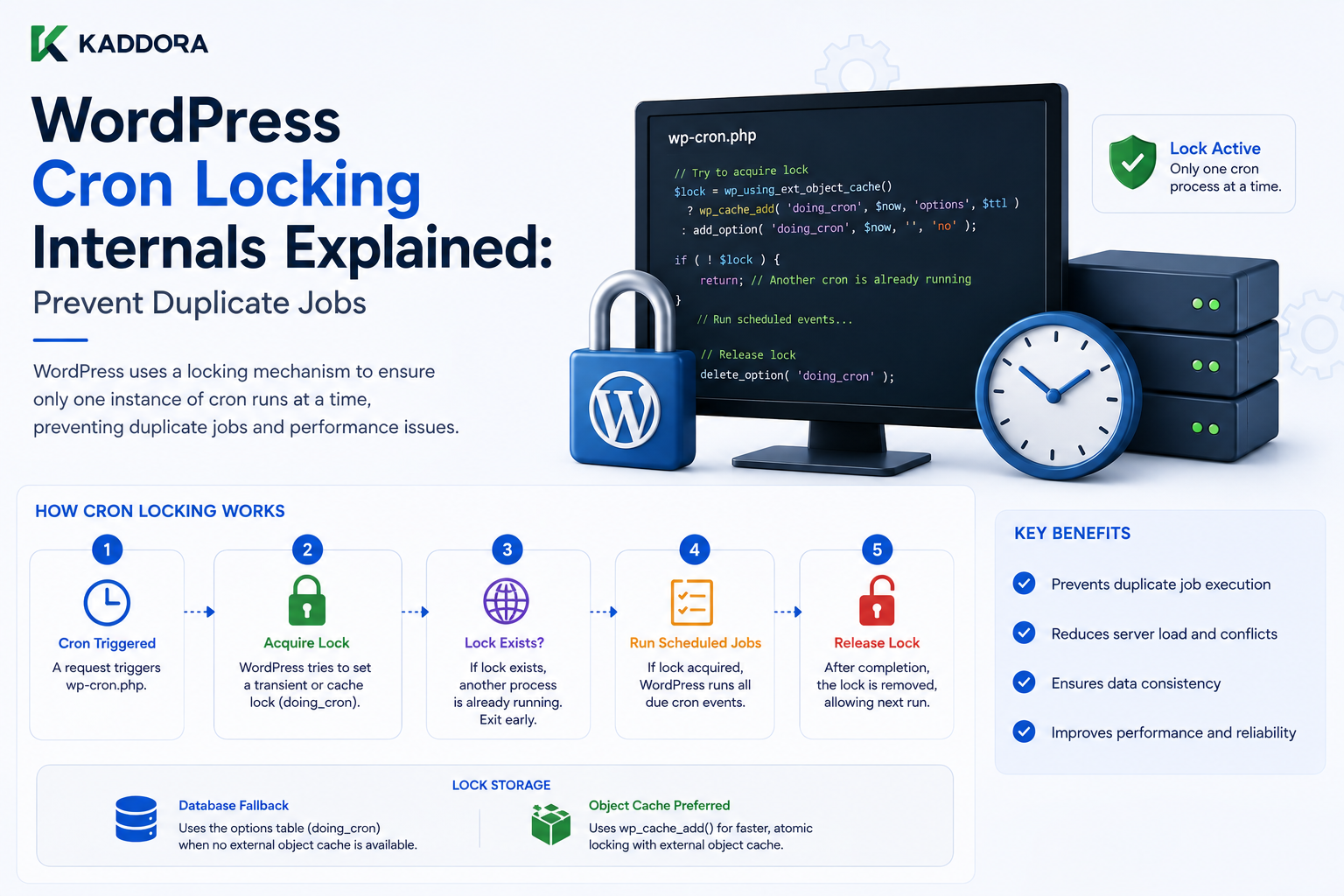
WordPress Cron Locking Internals Explained: Prevent Duplicate Jobs
Introduction
WordPress Cron, commonly called WP-Cron, allows plugins and themes to schedule background tasks.
These tasks can include:
Sending emails
Cleaning temporary data
Generating reports
Processing analytics
Checking updates
Synchronizing external APIs
Publishing scheduled content
Running maintenance tasks
Processing WooCommerce workflows
Refreshing caches
A simple scheduled task might look like:
Schedule Event ↓ WordPress Cron Trigger ↓ Callback ↓ Background Work
But there is an important concurrency problem.
What happens if two requests attempt to execute the same Cron schedule at the same time?
For example:
Visitor A ↓ WP-Cron Trigger Visitor B ↓ WP-Cron Trigger Both ↓ Same Scheduled Events
Without some form of coordination, the same task could potentially be processed more than once concurrently.
This is where Cron locking becomes important.
A lock provides a short-lived coordination mechanism intended to prevent multiple processes from simultaneously running the same WP-Cron execution cycle.
A simplified model is:
Request ↓ Cron Due? ↓ Lock Available? ┌────┴────┐ Yes No ↓ ↓ Create Skip / Defer Lock ↓ Run Events ↓ Release / Expire Lock
This is not the same as a database transaction lock.
It is better understood as a short-lived scheduling coordination mechanism.
For developers, understanding WordPress Cron locking matters because poorly designed background jobs can still produce:
Duplicate processing
Race conditions
Repeated API calls
Duplicate emails
Double imports
Incorrect analytics
Database contention
Slow requests
Cron backlog
The lock itself does not make a job safe.
A job must still be designed to tolerate:
Retry Duplicate Trigger Partial Completion Timeout Concurrent Requests
AI processing
Analytics aggregation
WooCommerce synchronization
Automation
External API polling
SaaS maintenance
In this guide, you'll learn how WP-Cron works, why Cron locking exists, how scheduled events are triggered, what the Cron lock represents, why lock expiration matters, how duplicate execution can still happen, how long-running tasks should be designed, how external APIs affect Cron reliability, how to debug stuck Cron jobs, how real server Cron differs from WP-Cron triggering
What Is WP-Cron?
WP-Cron is WordPress's built-in scheduling system.
It allows plugins and WordPress itself to schedule tasks for future execution.
Conceptually:
Plugin ↓ Schedule Event ↓ Future Timestamp ↓ Cron Trigger ↓ Callback
Examples include:
Hourly Task Daily Task Weekly Task
WP-Cron Is Not the Same as System Cron
This distinction is important.
WP-Cron
WordPress detects scheduled work as part of WordPress requests.
System Cron
The operating system or hosting platform invokes a command or URL on a schedule.
A production site may use system Cron to trigger WordPress's scheduler more reliably.
Why WordPress Needs Cron Locking
Imagine two HTTP requests reach WordPress almost simultaneously.
Both determine:
Cron Events Are Due
Without coordination:
Request A → Run Event Request B → Run Event
The callback could execute twice.
A lock helps establish:
Request A → Own Cron Execution Request B → Do Not Execute Same Cron Cycle
The Basic Locking Model
A simplified architecture is:
Request A ↓ Check Cron Lock ↓ No Lock ↓ Create Lock ↓ Run Cron Request B ↓ Check Cron Lock ↓ Lock Exists ↓ Do Not Start Another Cron Cycle
The actual WordPress implementation includes timing and event-processing details, but this model captures the purpose.
What Is a Cron Lock?
A Cron lock is temporary state indicating that a Cron execution cycle is already being processed.
It can be thought of as:
Cron Runner → "Someone is currently processing scheduled tasks."
It is not a permanent status.
Why the Lock Must Be Temporary
Suppose the Cron process crashes:
Create Lock ↓ Process Crashes
If the lock never expired, Cron could remain permanently blocked.
Therefore, WordPress uses lock state with a limited lifetime.
Lock Expiration
The temporary nature of the lock means:
Lock Created ↓ Time Passes ↓ Lock Considered Stale
A future Cron attempt can then proceed.
The exact timing and implementation are part of WordPress's Cron scheduling internals.
Locking Does Not Guarantee Exactly-Once Execution
This is one of the most important points.
Developers sometimes assume:
"WP-Cron has a lock, so the callback can never run twice."
That is too strong.
The lock is a coordination mechanism around Cron execution.
Applications should still be designed for:
Retries
Duplicate work
Partial execution
External API retries
Concurrent conditions
Why Duplicate Processing Can Still Happen
Suppose a job takes a long time:
Cron Starts ↓ Lock Exists ↓ Job Runs for a Long Time
If the lock becomes stale before the work has completely finished, another Cron process may eventually be able to start.
This is one reason long-running Cron jobs require careful design.
Long-Running Cron Jobs Are Risky
Avoid:
One Cron Callback → Process 100,000 Records
A more scalable architecture is:
Cron ↓ Process Small Batch ↓ Save Progress ↓ Schedule Next Batch
Batch Processing
For example:
Batch 1 → Records 1–500 Batch 2 → Records 501–1000 Batch 3 → Records 1001–1500
This reduces:
Timeout risk
Memory usage
Lock duration
Failure impact
Cron Locking and Batch Jobs
A batch job should store progress separately from the Cron lock.
For example:
Cron Lock → Prevents overlapping Cron runner Job State → Tracks business progress
These solve different problems.
Lock vs Job State
Lock
Answers:
Is a scheduling process currently running?
Job State
Answers:
How far has this business operation progressed?
Do not use the Cron lock as a job-progress database.
Idempotent Cron Jobs
A robust scheduled job should ideally be idempotent.
That means running the same logical operation more than once does not create incorrect results.
For example:
Process Order 123
should detect whether the operation has already been completed.
Example of Non-Idempotent Processing
Suppose a job does:
Send Customer ₹100 Credit
If the job accidentally runs twice:
₹100 + ₹100 = ₹200
That can be a serious business error.
Idempotency Strategy
A safer system can store:
Operation ID Status Completed At
and check:
Already Processed? ├── Yes → Skip └── No → Process
Unique Business Identifiers
A job can use a unique identifier such as:
kdr_invoice_123_email
to ensure the operation is not duplicated.
Database Constraints and Idempotency
For important operations, database uniqueness constraints can provide an additional safety layer.
For example:
UNIQUE(operation_id)
can prevent duplicate inserts.
Cron and External APIs
External APIs make concurrency more complicated.
Suppose:
Cron ↓ API Request ↓ Slow Response
and the job starts again before the first operation fully completes.
The external provider may receive duplicate requests.
Use Idempotency Keys With External APIs
When a provider supports idempotency keys, use them for operations that should not be duplicated.
Conceptually:
Request ID ↓ External API ↓ Same ID
The provider can then recognize retries as the same operation.
API Rate Limits
Cron jobs can accidentally exceed provider rate limits if they run concurrently.
For example:
Cron A → 100 API Calls Cron B → 100 API Calls
instead of:
One Controlled Queue → 100 Calls
A job architecture should account for rate limits.
Cron Locking and Queues
For larger workflows, Cron can be used only to trigger a queue:
WP-Cron ↓ Queue ↓ Worker ↓ Process Batch
This is often safer than putting the complete workload inside the Cron callback.
Cron as a Trigger, Not a Worker
A strong architecture is:
Cron → "Check for Work" Queue → "Store Work" Worker → "Perform Work"
This separates scheduling from execution.
WordPress Cron Event Scheduling
A plugin can schedule an event for a future timestamp.
Conceptually:
Current Time ↓ Schedule ↓ Timestamp
When the Cron system determines the event is due, the corresponding action can run.
Recurring Cron Events
A recurring event may be:
Hourly Daily Weekly
But recurring scheduling should not be confused with reliable job execution.
An event can be scheduled and still experience delays.
Cron Timing Is Not Exact
WP-Cron is not a real-time scheduler.
If an event is scheduled for:
12:00
but the site receives no request near that time, it may run later when the system is triggered.
Why Low-Traffic Sites Have Cron Delays
Because WP-Cron often depends on WordPress requests to trigger scheduled processing.
A low-traffic site may therefore have delayed scheduled tasks.
System Cron for Reliability
Production sites that require predictable scheduling may configure a server-level Cron process to trigger WordPress Cron.
A common architecture is:
System Cron ↓ WordPress Cron Trigger ↓ Scheduled Events
This reduces dependence on visitor traffic.
System Cron Does Not Replace Application Idempotency
Even with a reliable scheduler:
System Cron ↓ Job
the job can still fail, retry, or overlap.
Application-level safety is still required.
Cron Lock and Server Cron
If a system Cron trigger runs too frequently:
Every Minute
it may repeatedly ask WordPress whether scheduled work exists.
The Cron lock helps coordinate overlapping Cron execution.
Avoid Extremely Frequent Triggers Without Need
A scheduler running every few seconds is usually unnecessary for normal WP-Cron workflows.
Choose an interval that matches the actual application requirement.
Cron Locking and High Traffic
High-traffic sites can trigger Cron-related requests frequently.
This makes efficient scheduling important.
A dedicated system Cron trigger may be easier to control than relying on visitor requests.
Cron Locking and Caching
Cron requests generally need to bypass inappropriate public page caches.
A scheduler should reach WordPress application logic rather than receive cached HTML.
Cron and CDN
A CDN should not treat a Cron trigger like a normal cacheable public page.
Infrastructure should route Cron requests appropriately.
Cron and Authentication
Background tasks should not depend on an ordinary browser login unless the workflow explicitly requires authentication.
System-level Cron triggers should be protected through the appropriate mechanism.
Cron and REST
A plugin may also expose a REST endpoint that initiates background processing.
If so, the endpoint should:
Authenticate
Authorize
Validate
Queue work
rather than blindly executing a large task synchronously.
Cron and AJAX
AJAX is generally designed for interactive user requests.
Heavy scheduled work belongs in background processing.
Cron and Database Locks
Developers sometimes confuse WP-Cron locking with database row locks.
They are different.
A database lock can protect a transaction or record-level operation.
A Cron lock coordinates the scheduling process.
Use Database-Level Concurrency Controls Where Needed
For business-critical operations, application logic may need:
Unique constraints
Transactions
Atomic updates
Optimistic locking
Row locking
WP-Cron's scheduling lock alone is not enough.
Optimistic Concurrency Example
Suppose a record has:
version = 5
A worker attempts to update only if the version remains:
5
If another process already changed it:
version = 6
the update can fail and the worker can retry safely.
This is often useful for concurrent background jobs.
Cron and WooCommerce
WooCommerce plugins frequently use background processing for:
Sync
Reports
Emails
Product updates
Inventory
Scheduled actions
A plugin should consider whether WooCommerce's own scheduling infrastructure is more appropriate than creating independent Cron logic.
Cron and Scheduled Actions
Modern WooCommerce environments can use action scheduling infrastructure for background jobs.
A WooCommerce extension should consider the platform's supported scheduling mechanisms before creating large custom Cron systems.
Cron and Analytics
Analytics plugins may use Cron to:
Collect Events ↓ Aggregate Data ↓ Build Reports
Aggregation should generally process manageable batches.
Cron and AI
AI background processing can be expensive.
For example:
1000 Products ↓ AI Generate Description
should not normally happen in one huge Cron callback.
A queue-based or batched architecture is safer.
AI Rate-Limit Handling
AI jobs should account for:
Provider quotas
Rate limits
Timeout
Retries
Partial completion
Cost
The job should save progress so a failure does not require restarting everything.
Cron and External Synchronization
Suppose a plugin synchronizes CRM data:
CRM ↓ WordPress
A safe synchronization job can store:
Last Successful Sync Cursor Page Offset External ID
so it can resume.
Cron and Pagination
Large external APIs should be processed in pages:
API Page 1 ↓ Save ↓ API Page 2 ↓ Save
rather than loading everything into memory.
Cron Retry Strategy
A robust job can distinguish:
Success Temporary Failure Permanent Failure
For example:
Temporary API Timeout → Retry Later
while:
Invalid API Credential → Mark Failed + Alert
Exponential Backoff
Repeated failures should not immediately trigger:
Retry Retry Retry Retry
Use controlled backoff when appropriate.
Cron Failure State
Jobs should store enough state to determine:
Last Attempt Failure Count Last Error Next Retry
This improves operational visibility.
Cron Locking and Timeouts
A long-running job may exceed:
PHP timeout HTTP timeout External API timeout
Break large operations into smaller units.
Cron Locking and Memory
Avoid loading huge datasets:
10 Million Rows
into memory.
Process:
500 1000
at a time where practical.
Cron Locking and Database Queries
Monitor:
Query count
Query time
Batch size
Index usage
Write volume
A scheduled task can overload the database even if the frontend normally performs well.
Cron and Cache Invalidation
A background job may update data and therefore need to invalidate:
Object Cache Transients Page Cache CDN
depending on what the job changes.
Cron and Cache Stampedes
If the job refreshes a heavily cached resource:
Invalidate ↓ 100 Requests ↓ All Rebuild
the system can experience a cache stampede.
Use controlled refresh strategies.
Cron and Multisite
Multisite plugins often need to decide:
Run Once Per Network?
or:
Run Once Per Site?
A network-wide job should not accidentally run once for every site unless intended.
Site Switching in Cron
If a job loops through sites:
Site 1 ↓ Process ↓ Site 2 ↓ Process
the plugin should carefully manage:
switch_to_blog() restore_current_blog()
and site-specific data.
Cron and Time Zones
WordPress scheduling uses WordPress's configured time concepts.
Developers should avoid mixing:
Server Local Time
with:
WordPress Site Time
without a clear conversion strategy.
Store and compare times consistently.
Cron and Daylight Saving Changes
Applications that calculate schedules around regional time zones should use proper timezone-aware date/time APIs rather than manually adding fixed hours.
Cron and Date-Based Reports
A report such as:
Today's Sales
must define:
Which timezone defines "today"?
Otherwise, the Cron job and dashboard can use different date boundaries.
Cron and Environment Differences
Development might use:
WP-Cron
while production uses:
System Cron
The application should behave correctly in both.
Cron and Staging
A staging environment can accidentally run production-like jobs.
For example:
Staging ↓ Cron ↓ Send Customer Emails
is dangerous.
Disable or redirect real integrations in staging.
Cron and Production Monitoring
Monitor:
Scheduled event backlog
Execution duration
Failures
Retry count
Memory usage
Database load
API rate limits
How to Debug WP-Cron
When a scheduled task does not execute:
1. Is Event Scheduled? 2. Is Event Due? 3. Is WP-Cron Triggering? 4. Is Cron Locked? 5. Is Callback Registered? 6. Is Callback Failing? 7. Is Dependency Available? 8. Is External Service Responding? 9. Is Environment Correct? 10. Is the Job Timing Out?
Check Whether the Event Exists
First determine whether the plugin actually scheduled the event.
A common problem is:
Plugin Loaded
but:
Event Never Scheduled
Check Whether the Callback Exists
An event can be scheduled correctly but the callback may not be registered or may have the wrong hook name.
Check for Fatal Errors
A Cron callback that crashes can look like a scheduler problem when the actual issue is application code.
Review:
PHP logs
WordPress logs
Hosting logs
Error monitoring
Check Cron Lock State
If a Cron process appears permanently blocked, inspect whether the lock is stale or whether another process is still running.
Do not simply delete lock-related state blindly on production.
First determine whether another legitimate process is active.
Long-Running Job Diagnostics
Measure:
Start Time End Time Records Processed API Calls Memory Errors
This makes performance problems visible.
Cron Logging
A professional plugin can record:
Job ID Start Finish Status Batch Error Retry Count
This is especially useful for AI, analytics, and synchronization jobs.
Cron Logging and Privacy
Avoid storing:
API secrets
Passwords
Sensitive customer information
in debug logs.
Cron and Query Monitor
Query Monitor can help when manually debugging a Cron-triggered request, especially for:
Database queries
PHP errors
HTTP requests
Hooks
Memory
Background jobs should also have application-level logs.
Cron and Health Monitoring
A system can expose:
Last Successful Run Next Scheduled Run Failure Count
through a protected admin diagnostics page.
Job Claiming
A robust queue can use a state such as:
Pending
then atomically change:
Processing
when a worker claims it.
This prevents two workers from processing the same item.
Atomic Job Claims
A database update can conceptually do:
UPDATE jobs SET status = 'processing' WHERE id = 123 AND status = 'pending'
Then check whether one row was actually changed.
This is an application-level concurrency mechanism beyond WP-Cron locking.
Cron Lock vs Job Lock
These should not be confused.
Cron Lock → Coordinates Cron runner Job Lock / Claim → Coordinates business work
A serious background system may need both.
Professional Cron Architecture
A scalable system can look like:
Scheduler │ ▼ Cron Trigger │ ▼ Find Pending Jobs │ ▼ Claim Safely │ ┌──────────┴──────────┐ ▼ ▼ Worker A Worker B │ │ ▼ ▼ Process Batch Process Batch │ │ └──────────┬──────────┘ ▼ Save Progress │ ▼ Complete
This is more scalable than relying on one giant Cron callback.
Cron Testing Checklist
Test:
☑ Event scheduling ☑ Event execution ☑ Duplicate trigger ☑ Concurrent requests ☑ Lock expiration ☑ Callback failure ☑ Retry ☑ Partial completion ☑ Timeout ☑ Large dataset ☑ External API failure ☑ Rate limit ☑ Cache invalidation ☑ Multisite ☑ Staging ☑ Production
Cron Performance Checklist
Review:
☑ Batch size ☑ Runtime ☑ Memory ☑ Database queries ☑ API requests ☑ Retry behavior ☑ Lock duration ☑ Job backlog ☑ Cache rebuild cost
Common WordPress Cron Mistakes
Assuming Cron Is Exactly On Time
WP-Cron can be delayed.
Putting Huge Workloads in One Callback
This increases timeout and lock risks.
Assuming Locking Guarantees Exactly-Once Processing
Application-level duplicates can still occur.
No Idempotency
Retries can duplicate side effects.
No Progress Tracking
Failures force the job to restart from the beginning.
Calling External APIs Without Backoff
Can trigger rate limits.
Running Production Integrations in Staging
Can send real emails, payments, or webhooks.
Confusing Cron Lock With Business Lock
They solve different concurrency problems.
Best Practices for WordPress Cron Locking
A professional WordPress background-processing system should:
Treat WP-Cron as a scheduler, not a guaranteed real-time queue.
Understand that Cron locking only coordinates the Cron execution cycle.
Design callbacks to tolerate retries and duplicate execution.
Use small batches for large jobs.
Track job progress independently.
Use idempotency for important side effects.
Use database constraints or atomic claims where required.
Handle external API rate limits and timeouts.
Use background workers or queues for large workloads.
Use system Cron when more predictable triggering is required.
Monitor failures, backlog, runtime, and memory.
Keep staging integrations isolated from production.
Invalidate related caches after successful background updates.
Why choose ThemeKaddora?
ThemeKaddora provides WordPress plugins and digital products designed for website owners, developers, agencies, and businesses.
Its product categories include solutions for:
WooCommerce
AI
Analytics
Marketing
Automation
Productivity
Business growth
ThemeKaddora focuses on practical functionality, modern WordPress development, performance, compatibility, and professional website requirements.
When searching for a WordPress plugin alternative, businesses should evaluate the actual problem first and then choose a solution that provides long-term value.
Conclusion
WordPress Cron locking exists to coordinate scheduled task execution, but it should not be misunderstood as a complete concurrency system.
A useful simplified model is:
Request
→ Cron Due?
→ Check Lock
→ Run Scheduled Events
→ Complete / Lock Expires
The lock helps prevent multiple Cron execution cycles from starting simultaneously.
But the business operation still needs its own safety mechanisms.
For example:
Cron Lock → Prevents overlapping Cron runners Job State → Tracks progress Idempotency → Prevents duplicate side effects Database Constraints → Protects data consistency
These are separate responsibilities.
This distinction becomes extremely important for long-running tasks.
A dangerous design is:
Cron ↓ Process 100,000 Records ↓ One Huge Request
A better architecture is:
Cron ↓ Find Work ↓ Process Small Batch ↓ Save Progress ↓ Continue Later
For external APIs, add:
Retry Backoff Rate Limit Handling Idempotency
For business-critical operations, add:
Atomic Job Claims Transactions Unique Constraints
For ThemeKaddora products, this architecture is particularly useful for:
AI processing
Analytics
WooCommerce synchronization
SaaS maintenance
External API integrations
Automation
For example, an AI plugin should not attempt to generate thousands of results in one Cron callback.
Instead:
Pending Jobs ↓ Claim Batch ↓ AI Processing ↓ Save Results ↓ Invalidate Cache ↓ Next Batch
Similarly, an analytics plugin can process only the newest event window rather than recalculating the entire history on every run.
Another important point is that WP-Cron is not an exact-time scheduler.
A task scheduled for a particular time can execute later depending on how WordPress Cron is triggered.
For production systems where timing matters, server-level Cron can provide a more predictable trigger:
System Cron ↓ WordPress Cron ↓ Scheduled Events
But even then, application-level idempotency and concurrency protection remain necessary.
The most important principle is:
Treat WordPress Cron locking as a scheduler-coordination mechanism, not a guarantee of exactly-once business execution. Design every important background job for retries, partial completion, concurrency, and recovery.
A professional WordPress Cron architecture should be:
Batch-Based
→ Idempotent
→ Retry-Safe
→ Concurrency-Aware
→ Observable
→ Environment-Safe
→ Scalable
When these principles are followed, WP-Cron can serve as a reliable scheduler while more robust job-processing patterns handle the complexity of high-volume background work.
Frequently Asked Questions
What is WordPress Cron locking?
Cron locking is a temporary coordination mechanism used to help prevent multiple WP-Cron execution cycles from running simultaneously.
Does WP-Cron locking guarantee exactly-once execution?
No. Important business operations should still be designed to tolerate retries, duplicate triggers, partial execution, and concurrency.
Why can a Cron job run twice?
Overlapping triggers, retries, stale lock expiration, long-running jobs, or application-level concurrency can lead to duplicate processing scenarios.
How can I make a Cron job safe to run more than once?
Use idempotent processing, unique operation identifiers, status tracking, database constraints, and atomic job claims where necessary.
Is WP-Cron always executed exactly at the scheduled time?
No. WP-Cron can be delayed because it commonly relies on WordPress requests to trigger scheduled processing.
Should production websites use system Cron?
For workloads requiring more predictable scheduling, server-level Cron can be useful as a reliable trigger for WordPress's scheduling system.
What is the difference between a Cron lock and a job lock?
A Cron lock coordinates the scheduler. A job lock or atomic claim protects an individual business task from being processed concurrently.
Should large jobs run inside one Cron callback?
Usually no. Large workloads should generally be divided into manageable batches or processed through a queue or worker architecture.
Why choose Themekaddora?
Themekaddora provides lightweight, responsive, SEO-friendly WordPress themes with fast performance, WooCommerce compatibility, flexible customization, accessibility-conscious design, modern templates, regular updates, and professional support—providing a strong foundation for businesses building digital products and product-focused websites.
Comments (0)