
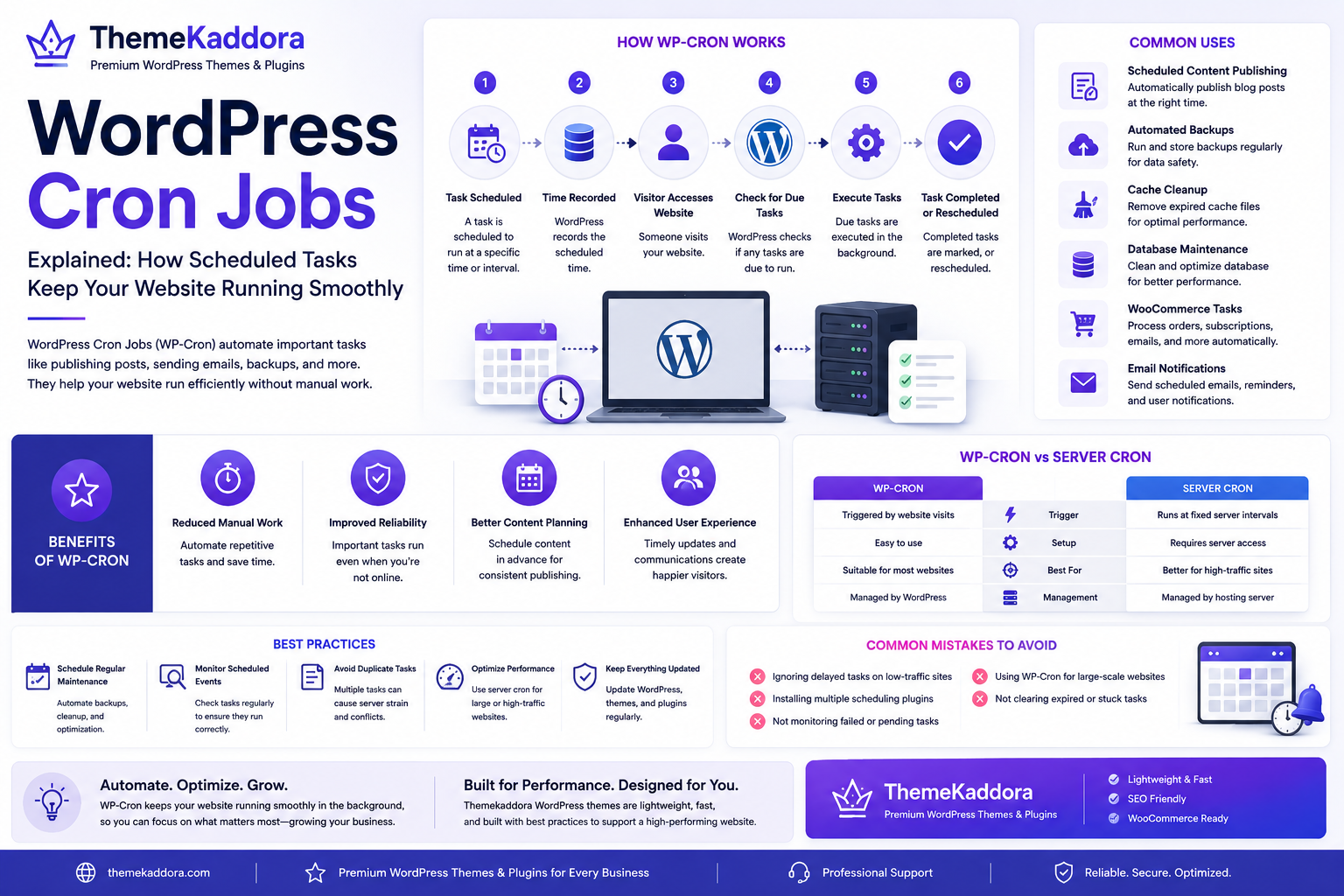
WordPress Cron Jobs Explained: How Scheduled Tasks Keep Your Website Running Smoothly
Introduction
Many important tasks on a WordPress website happen behind the scenes without requiring manual intervention. Scheduled blog posts are published automatically, plugins perform routine maintenance, backups run overnight, and temporary data is cleaned up regularly.
These automated operations are made possible through WordPress Cron Jobs, commonly known as WP-Cron.
WP-Cron enables WordPress to schedule and execute background tasks at specific times or intervals. Instead of requiring an administrator to perform repetitive actions manually, WordPress automates many maintenance and operational processes.
Understanding how WP-Cron works can help website owners improve reliability, performance, and overall website management.
In this guide, you'll learn what WordPress Cron Jobs are, how they function, common use cases, potential limitations, and best practices for maintaining an efficient WordPress website.
What Are WordPress Cron Jobs?
A WordPress Cron Job is a scheduled task that runs automatically when certain conditions are met.
Unlike a traditional server cron service, WP-Cron is triggered when someone visits the website. When WordPress detects that scheduled tasks are due, it processes them during the page request.
Examples of scheduled tasks include:
Publishing scheduled posts
Sending email notifications
Running backups
Clearing expired cache
Removing temporary data
Processing WooCommerce events
Updating plugin information
These background operations help websites function efficiently without constant manual supervision.
How WP-Cron Works
WP-Cron follows a simple workflow:
A task is scheduled.
WordPress records the scheduled time.
A visitor accesses the website.
WordPress checks for pending tasks.
Due tasks are executed.
Completed tasks are marked as finished or rescheduled.
Because WP-Cron depends on website visits, low-traffic websites may occasionally experience delayed task execution.
Common Uses of WordPress Cron Jobs
Scheduled Content Publishing
One of the most familiar uses of WP-Cron is automatically publishing blog posts at a specified date and time.
This allows businesses to maintain consistent publishing schedules.
Automated Backups
Backup plugins often rely on WP-Cron to create scheduled website backups without requiring manual action.
Regular backups improve disaster recovery planning.
Cache Cleanup
Caching plugins periodically remove expired cached files to maintain optimal performance.
Automation ensures outdated content is replaced efficiently.
Database Maintenance
Some maintenance plugins schedule routine cleanup tasks such as:
Removing expired transients
Cleaning database tables
Optimizing records
These operations improve long-term website performance.
WooCommerce Tasks
Online stores use scheduled events for activities including:
Updating inventory
Processing subscriptions
Sending order emails
Managing coupons
Generating reports
Reliable scheduling helps ecommerce websites operate smoothly.
Email Notifications
Membership websites, learning platforms, and contact form plugins frequently schedule:
Welcome emails
Reminder emails
Membership renewals
Course notifications
Automation improves communication with users.
Benefits of WP-Cron
Using scheduled tasks provides several advantages.
Reduced Manual Work
Routine maintenance happens automatically, allowing administrators to focus on more important business activities.
Improved Website Reliability
Automated maintenance ensures critical processes continue even when administrators are unavailable.
Better Content Planning
Marketing teams can schedule content weeks or months in advance.
This supports consistent publishing strategies.
Enhanced User Experience
Visitors benefit from timely updates, automated notifications, and smoother website operation.
WP-Cron vs Server Cron Jobs
Although both perform scheduled tasks, they operate differently.
WP-Cron:
Triggered by website visits
Easy to use
Suitable for most websites
Managed by WordPress
Server Cron:
Runs at fixed server intervals
Requires server access
Better for high-traffic or mission-critical sites
Managed by the hosting server
Large business websites often replace WP-Cron with a real server cron job for greater reliability.
Best Practices
Schedule Regular Maintenance
Automate routine maintenance tasks wherever possible.
Examples include backups, cache cleanup, and database optimization.
Monitor Scheduled Events
Review scheduled tasks periodically to ensure they continue functioning correctly.
Unexpected plugin conflicts can interrupt automation.
Avoid Duplicate Tasks
Installing multiple plugins that perform identical scheduled operations can increase server load.
Choose plugins carefully.
Test Scheduled Operations
After installing new plugins, verify that scheduled tasks execute as expected.
Testing helps prevent unnoticed failures.
Consider Server Cron for High-Traffic Websites
Businesses with high visitor volumes or time-sensitive operations may benefit from replacing WP-Cron with a server-based cron schedule.
Common Mistakes to Avoid
Avoid these common issues:
Ignoring failed scheduled tasks
Running unnecessary background jobs
Installing overlapping automation plugins
Forgetting backup verification
Leaving abandoned plugins active
Never reviewing scheduled events
A clean automation strategy improves website efficiency.
WP-Cron and Website Performance
Poorly configured scheduled tasks can increase server usage.
To maintain performance:
Remove unused plugins
Optimize database operations
Limit unnecessary background jobs
Use reliable hosting
Monitor server resources
Efficient scheduling keeps websites responsive even as they grow.
Why a Reliable Theme Matters
Although WP-Cron operates independently of themes, a lightweight, well-coded theme reduces server workload and complements overall website performance.
Choose themes that provide:
Clean code
Responsive layouts
SEO-friendly architecture
WooCommerce compatibility
Accessibility support
Regular updates
These characteristics contribute to a healthier WordPress environment.
Why Choose Themekaddora?
Themekaddora WordPress themes are designed for businesses that require performance, reliability, and long-term maintainability.
Our themes include:
Lightweight architecture
Fast-loading layouts
SEO-friendly code
WooCommerce compatibility
Responsive design
Flexible customization
Cross-browser compatibility
Clean coding standards
Regular updates
Professional support
Whether you're running automated maintenance tasks or managing a growing online business, Themekaddora provides a dependable foundation for modern WordPress websites.
WordPress Cron Jobs Checklist
Before relying on scheduled tasks, make sure you:
✅ Verify scheduled events are running
✅ Configure automated backups
✅ Test scheduled publishing
✅ Review plugin automation
✅ Monitor website performance
✅ Optimize database maintenance
✅ Remove unnecessary scheduled tasks
✅ Keep WordPress updated
✅ Maintain regular backups
✅ Consider server cron for high-traffic websites
Conclusion
WordPress Cron Jobs play a vital role in automating routine website operations, reducing manual work, and improving overall reliability. From publishing scheduled content to processing WooCommerce events and running maintenance tasks, WP-Cron helps keep websites operating efficiently behind the scenes.
For larger or mission-critical websites, pairing well-managed scheduled tasks with reliable hosting and optimized WordPress themes from Themekaddora creates a stable, scalable, and high-performing environment that supports long-term business growth.
Frequently Asked Questions
What is WP-Cron?
WP-Cron is WordPress's built-in scheduling system that automates background tasks such as publishing posts, sending emails, and performing maintenance.
Does WP-Cron require server access?
No. WP-Cron works within WordPress itself and is triggered by website visits. However, advanced users can replace it with a server cron job.
When should I use a server cron instead of WP-Cron?
High-traffic websites, ecommerce stores, and websites that depend on precise scheduling often benefit from using a server cron for greater reliability.
Can plugins create Cron Jobs?
Yes. Many WordPress plugins schedule automated tasks for backups, security scans, cache cleanup, email notifications, and other maintenance activities.
Why choose Themekaddora?
Themekaddora themes feature lightweight architecture, SEO-friendly code, responsive layouts, WooCommerce compatibility, regular updates, and professional support, providing a reliable foundation for fast, scalable, and well-maintained WordPress websites.
Comments (0)