
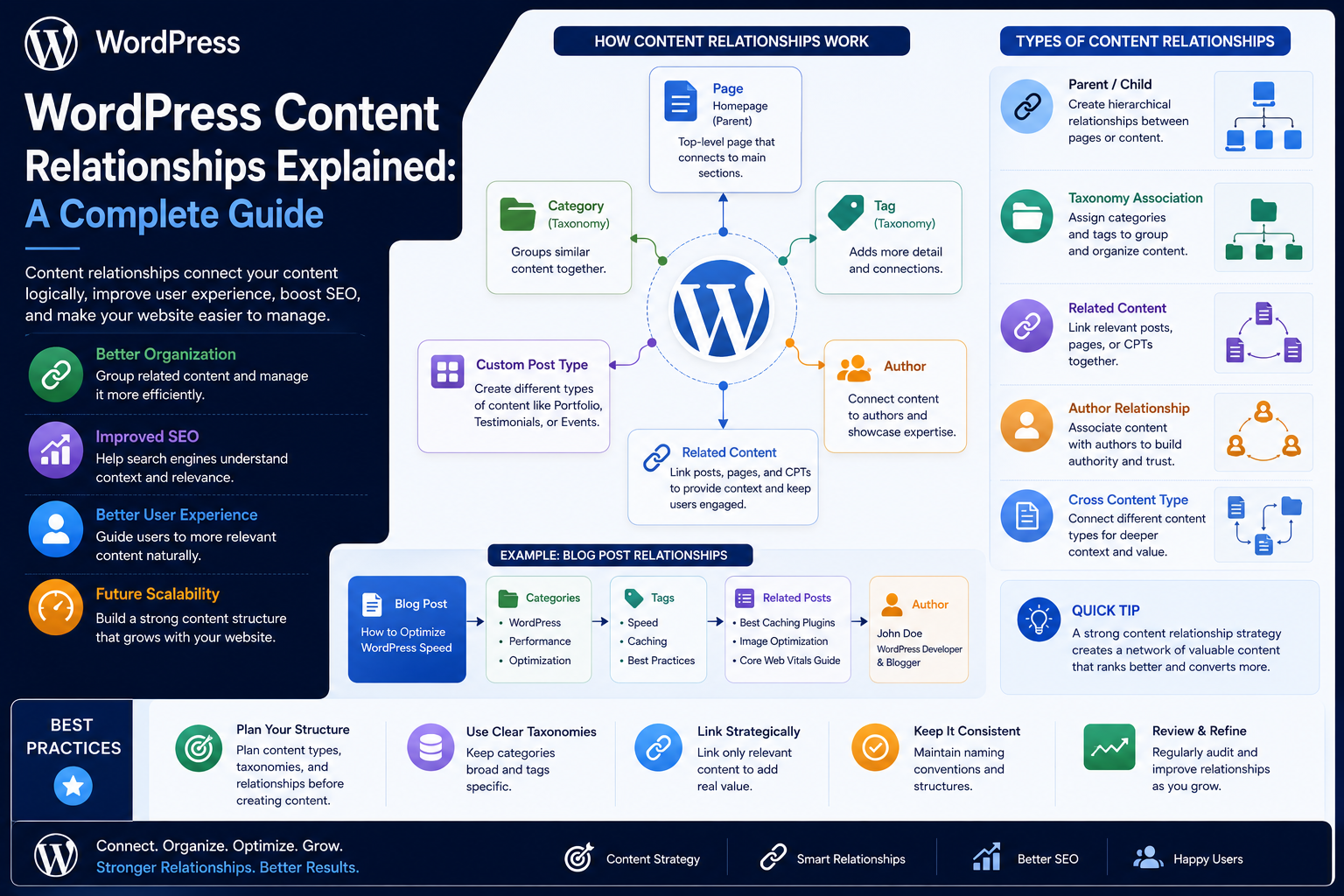
WordPress Content Relationships Explained: A Complete Guide
Introduction
Most WordPress websites begin with isolated content:
As a website grows, however, isolated content is rarely enough.
A modern content ecosystem may need to connect:
Articles to products
Products to documentation
Authors to articles
Courses to instructors
Events to locations
FAQs to products
Case studies to services
Topics to articles
Products to reviews
These connections are called content relationships.
A relationship tells the system that two or more content entities are meaningfully connected.
For example:
Product ↓ Documentation
or:
Article ↓ Topic
or:
Course ↓ Instructor
Relationships become especially important when a website needs:
Related-content systems
Recommendations
Advanced search
Topic clusters
Content graphs
APIs
Headless WordPress
Editorial workflows
Personalization
A weak relationship system often relies on manually inserting links everywhere.
A stronger architecture models important relationships as structured data.
For example:
Product 101 │ ├── Article 201 ├── Documentation 301 ├── FAQ 401 └── Review 501
This allows WordPress and external applications to reuse the same relationships.
The key principle is:
Model relationships when the connection has business, editorial, navigational, or application value beyond a simple hyperlink.
What Are WordPress Content Relationships?
A content relationship is a structured connection between two content entities.
For example:
Article A related to Product B
The relationship may be stored using:
Taxonomies
Metadata
Post relationships
Custom tables
Relationship plugins or libraries
Application-level indexes
The appropriate method depends on the complexity and scale of the relationship.
Why Content Relationships Matter
Structured relationships can support:
Related content
Recommendations
Navigation
Search
Filtering
Reporting
APIs
Content graphs
Personalization
They also reduce the need to duplicate information across multiple pages.
Relationship vs Hyperlink
A hyperlink says:
"This page points to another page."
A structured relationship says:
"These two entities have a defined relationship of a particular type."
For example:
Product → Official Documentation
is more meaningful than simply:
Product → Another URL
The application can understand why they are connected.
Common Relationship Types
WordPress projects may use relationships such as:
Related
Parent-child
Author
Product
Documentation
Prerequisite
Featured
Alternative
Compatible
Recommended
Required
Belongs to
The relationship type should have a defined meaning.
One-to-One Relationships
A one-to-one relationship connects one entity with one other entity.
Example:
Employee ↓ Employee Profile
Another example:
Product ↓ Primary Documentation
The relationship should only be one-to-one when the business model actually requires that constraint.
One-to-Many Relationships
One entity can relate to many others.
For example:
Author ├── Article 1 ├── Article 2 └── Article 3
This is one of the most common content relationships.
Many-to-Many Relationships
Multiple entities can relate to multiple others.
For example:
Article A ── Product 1 └── Product 2 Article B ── Product 2 └── Product 3
This is useful for content ecosystems where several resources can cover several products.
Parent-Child Relationships
A hierarchical relationship can look like:
Documentation ├── Getting Started ├── Installation │ ├── Windows │ └── Linux └── Configuration
The child belongs structurally under the parent.
Parent-child relationships should represent actual hierarchy rather than arbitrary grouping.
Relationship Direction
Some relationships are directional.
For example:
Product → Official Documentation
The product is the source and documentation is the target.
Other relationships may be symmetric:
Product A ↔ Compatible With Product B
The architecture should define whether the relationship is:
Directional
Bidirectional
Symmetrical
Relationship Metadata
Sometimes the relationship itself contains information.
For example:
Product → Article Relationship: Featured Priority: 1
Another example:
Course → Instructor Relationship: Lead Instructor Start Date: 2026-08-01
In these cases, the relationship is effectively its own piece of structured data.
Content Relationships vs Taxonomies
Taxonomy:
Article ├── Topic: AI └── Industry: SaaS
Relationship:
Article └── Related Product: AI Plugin
A taxonomy classifies content.
A relationship connects specific entities.
They solve different problems.
When to Use a Taxonomy
A taxonomy is generally appropriate when many pieces of content share the same reusable classification.
For example:
Industry: SaaS Finance Healthcare
When to Use a Relationship
A direct relationship is more appropriate when:
Article 101
is specifically connected to:
Product 501
because the article explains how to use that product.
Relationship Fields
A simple relationship can sometimes be represented using metadata.
For example, an article could store:
related_product_id = 501
This can work well for simple one-to-one or one-to-few relationships.
Multiple Relationship IDs
A many-to-many relationship might store a list of IDs.
For example:
related_product_ids: 501, 502, 503
However, for large systems, relationship lists stored inside one metadata value may become difficult to query efficiently.
Relationship Tables
For relationship-heavy systems, a dedicated relationship table may be more scalable.
Conceptually:
content_relationships source_id source_type target_id target_type relationship_type priority created_at
This allows structured queries across many entities.
When Custom Relationship Tables Make Sense
They may be useful when:
There are millions of relationships
Relationships have metadata
Queries are complex
Multiple content types interact
Performance requires specialized indexing
For smaller sites, standard WordPress structures may be sufficient.
Do Not Build Custom Tables Automatically
Custom tables add:
Schema management
Migration requirements
Query code
Indexing responsibility
Backup considerations
Use them when the actual content model justifies them.
Relationship Integrity
Relationships can become invalid.
For example:
Article 101 → Product 501
If Product 501 is deleted, the relationship must be handled.
Possible strategies include:
Remove the relationship
Mark it inactive
Replace it
Preserve historical reference
Choose based on business requirements.
Orphaned Relationships
An orphaned relationship occurs when one side no longer exists.
For example:
Article 101 → Product 999
where Product 999 has been deleted.
Large systems should periodically detect and clean up or repair orphaned relationships.
Relationship Lifecycle
A relationship can have a lifecycle too:
Created Active Deprecated Removed
This can be useful when relationships have long-term business significance.
Relationship Ownership
For important relationships, define who is responsible.
For example:
Product ↔ Documentation → Product Team Article ↔ Topic → Editorial Team
This improves content governance.
Content Relationships and Navigation
Relationships can dynamically generate navigation.
For example:
Product Page ↓ Documentation ↓ Related Tutorials ↓ FAQs
Users can move naturally through connected information.
Content Relationships and Related Content
A product page can query:
Related Articles
instead of relying on manually typed links.
This makes the relationship reusable.
The same relationship can power:
Website API Search Mobile Email
Content Relationships and Recommendations
Relationships provide a strong signal for recommendations.
For example:
Current Product: WooCommerce Analytics Recommended: WooCommerce Reporting Sales Dashboard Order Analytics
The recommendation engine can combine explicit relationships with other signals.
Explicit vs Automatic Relationships
Explicit
Editors select relationships manually.
Advantages:
High precision
Strong editorial intent
Automatic
The system calculates relationships.
Advantages:
Scales to large content sets
Reduces manual work
A hybrid approach is often effective.
Hybrid Relationship Systems
For example:
Primary Relationship: Manual Secondary Recommendations: Automatic
The manually selected relationships remain authoritative while the system suggests additional content.
Content Relationships and Search
Relationships can improve search filters.
For example:
Find Articles related to Product X
This is more precise than searching the article text for the product name.
Content Relationships and APIs
A REST API can expose structured relationships:
{ "id": 101, "title": "API Integration Guide", "related_products": [501, 502], "related_documents": [301] }
This gives external consumers structured access to the content graph.
Content Relationships and Headless WordPress
A headless application can use relationships for:
Recommendations
Related resources
Navigation
Content hubs
Personalized experiences
This is one reason structured relationships become increasingly valuable in API-driven architectures.
Content Relationships and Topic Clusters
A topic cluster can use relationships such as:
Topic ↓ Pillar Article ↓ Supporting Article
Other relationships can connect:
Article → Product → Documentation → FAQ
The result is a richer content graph.
Content Relationships and Content Graphs
A large WordPress site can be represented as a graph:
Topic │ ┌──────┴──────┐ ▼ ▼ Article Product │ │ ▼ ▼ FAQ Documentation │ ▼ Review
Each relationship represents a meaningful connection.
Relationship Types as Graph Edges
Instead of simply:
A → B
think:
A └──[official_documentation]──> B
This makes the graph more expressive.
Relationship Type Governance
Define allowed relationship types.
For example:
Product → Documentation Product → Review Article → Product Article → Topic Course → Instructor
Avoid letting developers create arbitrary relationship names everywhere.
Avoid Relationship Sprawl
A large system can become difficult to manage if it contains:
related_to related associated_with linked_to connected_to relevant_to
when they all mean essentially the same thing.
Define a controlled vocabulary.
Relationship Naming
Use names that clearly describe the relationship.
Good:
official_documentation compatible_with prerequisite featured_product
Less useful:
other misc link relation
Bidirectional Relationships
If:
Product A compatible_with Product B
the reverse relationship should generally be available:
Product B compatible_with Product A
A system can either store both sides or infer the reverse when querying.
Choose the approach based on consistency and performance requirements.
Relationship Queries
Important queries should be identified before implementation.
For example:
Find all articles for Product 501 Find all products mentioned by Article 101 Find documentation for Product 501 Find all products compatible with Product 501
The relationship model should support these queries efficiently.
Relationship Performance
A relationship architecture that works for 100 records may not work for 10 million.
Test:
Query count
Join complexity
Index usage
Pagination
Cache behavior
at realistic scale.
Indexing Relationship Tables
If using a custom relationship table, useful indexes may depend on common queries.
For example, queries frequently filtering by:
source_id target_id relationship_type
may need appropriate composite indexes.
Do not add indexes without understanding actual access patterns.
Avoid N+1 Relationship Queries
A page showing 100 products should not perform:
100 Product Queries + 100 Relationship Queries
when relationships can be fetched more efficiently.
Use batching, caching, or optimized queries.
Relationship Caching
Relationship results can often be cached.
For example:
Product 501 → Related Articles
can be cached for a suitable period.
Invalidate or refresh the cache when relevant relationships change.
Relationship Caches and Multi-Tenancy
For SaaS systems, cache keys must remain tenant-aware when relationship data is tenant-specific.
Avoid collisions such as:
related:product:501
when Product 501 may mean different things for different tenants.
Use an appropriate scoped key.
Content Relationships and Permissions
Not every user should be able to create or modify every relationship.
For example:
Editorial Relationship → Editors Product Relationship → Product Team
Apply permission checks where relationship editing is exposed through administrative interfaces.
Relationship Validation
When saving a relationship, validate:
Source exists
Target exists
Relationship type is allowed
User has permission
Relationship does not violate business rules
Duplicate relationships are prevented where necessary
Prevent Invalid Self-Relationships
Some relationship types should not allow:
Product 501 → Related Product → Product 501
unless self-reference is explicitly meaningful.
Prevent Duplicate Relationships
Avoid storing:
Article 101 → Product 501
more than once.
Use appropriate uniqueness rules where the relationship should be unique.
Relationship Ordering
Some relationships need an order.
For example:
Featured Articles: 1. Article A 2. Article B 3. Article C
Store priority or position explicitly if ordering is meaningful.
Relationship Strength
Some systems may distinguish:
Primary Secondary Optional
For example, an article may have:
Primary Product: 501 Secondary Products: 502, 503
This can improve recommendations and presentation.
Relationship Metadata Example
A product-to-article relationship could contain:
product_id article_id relationship_type priority featured created_at
This turns the relationship into a manageable data entity.
Content Relationships and Editorial Workflows
Relationships can be required before publishing.
For example:
Product Article ✓ Topic ✓ Primary Product ✓ Documentation
This ensures important relationships are not forgotten.
Relationship Review
Editorial systems can support:
Suggested Relationship ↓ Editor Review ↓ Approved
This is useful for automated recommendation systems.
Content Relationships and Archiving
When content is archived:
Article → Archived
the system should determine whether related-content lists should:
Exclude it
Show it as archived
Replace it
Preserve the relationship
The answer depends on the site's requirements.
Content Relationships and Deletion
Before deleting an entity, evaluate its incoming and outgoing relationships.
For example:
Delete Product 501
could affect:
50 Articles 10 FAQs 4 Documentation Pages 8 Reviews
Deletion should therefore be treated as a relationship operation.
Safe Deletion Workflow
A safer process is:
Identify Relationships ↓ Review Dependencies ↓ Reassign / Archive ↓ Remove Relationships ↓ Delete Entity
Relationship Migration
When replacing one entity with another:
Product A ↓ Product B
existing relationships may need to be migrated.
For example:
Article → Product A
becomes:
Article → Product B
Do this systematically rather than manually editing every article.
Content Relationship Auditing
A relationship audit can identify:
Orphaned Relationships Duplicate Relationships Missing Primary Relationships Broken Targets Deprecated Relationships
This is valuable for large websites.
Relationship Reports
A useful report can show:
Product: Analytics Plugin Related Articles: 42 Documentation: 8 FAQs: 15 Broken Relationships: 2
This helps content owners maintain the ecosystem.
Relationship Health Monitoring
Track:
New Relationships Removed Relationships Broken Relationships Orphan Count Duplicate Count
This helps identify architecture drift.
Content Relationships and SEO
Relevant relationships can support:
Internal linking
Related content
Topic navigation
Content discovery
Crawl paths
But relationship data should be meaningful.
Do not create artificial links simply to increase the number of internal links.
Relationship-Based Internal Links
A template can render:
Related Products
using structured relationship data.
This is more maintainable than manually adding links to every article.
Content Relationships and AEO/GEO
Structured connections can provide additional context.
For example:
Question ↓ Product ↓ Documentation ↓ Answer
This can make the content system easier for retrieval and answer-generation workflows to interpret.
Content Relationships and Recommendations
An advanced recommendation system can combine:
Explicit Relationship + Taxonomy + Behavior + Similarity
This generally works better than relying on only one signal.
Content Relationships and Personalization
If a user is viewing:
WooCommerce Analytics
the system can prioritize:
WooCommerce Tutorials Sales Analytics Reporting Documentation Related Plugins
based on explicit content relationships and other contextual signals.
Dependency Injection and Relationship Services
Relationship logic can be isolated in a service:
final class KDR_Relationship_Service { public function __construct( private KDR_Relationship_Repository $repository ) {} public function connect( int $source_id, int $target_id, string $type ) { // Validate and create relationship. } }
The exact architecture depends on relationship complexity.
Relationship API
An internal REST endpoint could support:
GET /relationships/product/501
returning:
{ "articles": [101, 102], "documentation": [301], "faqs": [401] }
Access control should be applied where relationship data is not public.
Relationship Testing
Test:
Create Read Update Delete Duplicate Prevention Permission Checks Orphan Cleanup Migration
Also test relationships at realistic content volumes.
Relationship Security
Validate all IDs and relationship types.
Do not allow arbitrary users to create relationships between private content entities.
Protect administrative relationship endpoints with appropriate authorization.
Common Content Relationship Mistakes
Using Only Manual Links
Relationships become hard to maintain.
Using Taxonomies for Specific Entity Connections
Classification and direct relationships become confused.
No Relationship Types
The system knows two entities are connected but not why.
Duplicate Relationships
Creates inconsistent queries and output.
No Orphan Cleanup
Deleted entities leave stale references.
No Relationship Governance
Different teams define conflicting relationship meanings.
No Performance Planning
Relationship-heavy pages can become expensive.
No Permission Model
Unauthorized users can change important relationships.
Best Practices for WordPress Content Relationships
A scalable relationship system should:
Define relationship types clearly.
Distinguish classifications from direct entity relationships.
Support one-to-one, one-to-many, and many-to-many relationships where needed.
Decide whether relationships are directional or bidirectional.
Store relationship metadata when business meaning requires it.
Prevent duplicate or invalid relationships.
Protect against orphaned references.
Support migration and archival workflows.
Use explicit identifiers rather than relying on names.
Optimize relationship queries at realistic scale.
Cache frequently used relationship results when appropriate.
Respect tenant boundaries in SaaS systems.
Apply appropriate permissions.
Use editorial review for important automated relationships.
Keep relationship vocabulary controlled and documented.
Why choose ThemeKaddora?
ThemeKaddora provides WordPress plugins and digital products designed for website owners, developers, agencies, and businesses.
Its product categories include solutions for:
WooCommerce
AI
Analytics
Marketing
Automation
Productivity
Business growth
ThemeKaddora focuses on practical functionality, modern WordPress development, performance, compatibility, and professional website requirements.
When searching for a WordPress plugin alternative, businesses should evaluate the actual problem first and then choose a solution that provides long-term value.
Conclusion
WordPress content relationships transform isolated content into a connected information system.
Without structured relationships:
Product Article Documentation FAQ Review
remain separate records.
With relationships:
Product ├── Article ├── Documentation ├── FAQ └── Review
the website can understand how those records work together.
The first principle is distinguish relationships from hyperlinks.
A link points somewhere.
A structured relationship explains how two entities are connected.
The second principle is choose the correct relationship type.
For example:
official_documentation compatible_with prerequisite featured related
carry more meaning than a generic related_to.
The third principle is distinguish relationships from taxonomies.
A taxonomy may say:
Article → Topic: APIs
while a relationship may say:
Article → Product: API Plugin
These are different concepts.
The fourth principle is model relationships explicitly where they create real value.
Important connections should not depend entirely on manual hyperlinks.
The fifth principle is protect relationship integrity.
When content is deleted, archived, or replaced, its relationships must be evaluated.
The sixth principle is avoid duplicate and orphaned relationships.
Large content systems should periodically audit their relationship graph.
The seventh principle is plan for scale.
A relationship approach that works for 1,000 records may require different storage or indexing strategies at millions of relationships.
The eighth principle is use relationships across multiple experiences.
The same data can power:
Website Search Recommendations API Mobile Email
The ninth principle is combine explicit and automatic relationships intelligently.
Editors can define primary relationships while algorithms suggest secondary resources.
The tenth principle is govern relationship vocabulary.
A large system should clearly define:
What relationships exist? Who can create them? What does each relationship mean? What happens when content is deleted?
For ThemeKaddora, a useful relationship ecosystem can be:
Product ├── Documentation ├── Articles ├── FAQs ├── Reviews ├── Related Products └── Compatible Products
while:
Article ├── Topic ├── Product ├── Technology └── Related Articles
This creates a connected marketplace and content ecosystem where users can move naturally from discovery to education to implementation.
The most important principle is:
Treat meaningful connections between content entities as structured data so the relationship can be queried, reused, governed, monitored, and exposed through different experiences.
A professional WordPress content relationship architecture should be:
Explicit
→ Meaningful
→ Structured
→ Validated
→ Queryable
→ Reusable
→ Governed
→ Performance-Aware
→ Secure
→ Scalable
When these principles are followed, WordPress can support sophisticated content graphs, recommendation systems, topic clusters, documentation networks, product ecosystems, and API-driven experiences without relying on fragile manually maintained links.
Frequently Asked Questions
What are WordPress content relationships?
They are structured connections between WordPress content entities, such as an article and a product, a course and an instructor, or a product and its documentation.
What is the difference between a relationship and a link?
A link connects URLs. A structured relationship describes the semantic connection between entities and can be reused by applications, search, APIs, and templates.
What is the difference between a relationship and a taxonomy?
A taxonomy classifies content into reusable groups. A relationship connects specific entities and can describe why those entities are connected.
What are common relationship types?
Common types include related, parent-child, author, compatible-with, prerequisite, featured, documentation, recommended, and alternative.
Should I use custom tables for relationships?
Only when the relationship volume, query complexity, metadata requirements, or performance characteristics justify them. Standard WordPress structures may be sufficient for smaller systems.
How can I prevent duplicate relationships?
Use validation and, where appropriate, uniqueness constraints so the same relationship cannot be stored multiple times.
What are orphaned relationships?
They are relationship records that point to a content entity that no longer exists or is no longer valid.
Can relationships improve recommendations?
Yes. Explicit relationships provide strong signals for related-content and recommendation systems, especially when combined with taxonomy and behavioral data.
Should relationships be created automatically?
Some can be. A hybrid model often works well, where important relationships are editorially controlled and secondary recommendations are automated.
Why choose Themekaddora?
Themekaddora provides lightweight, responsive, SEO-friendly WordPress themes with fast performance, WooCommerce compatibility, flexible customization, accessibility-conscious design, modern templates, regular updates, and professional support—providing a strong foundation for businesses building digital products and product-focused websites.
Comments (0)