
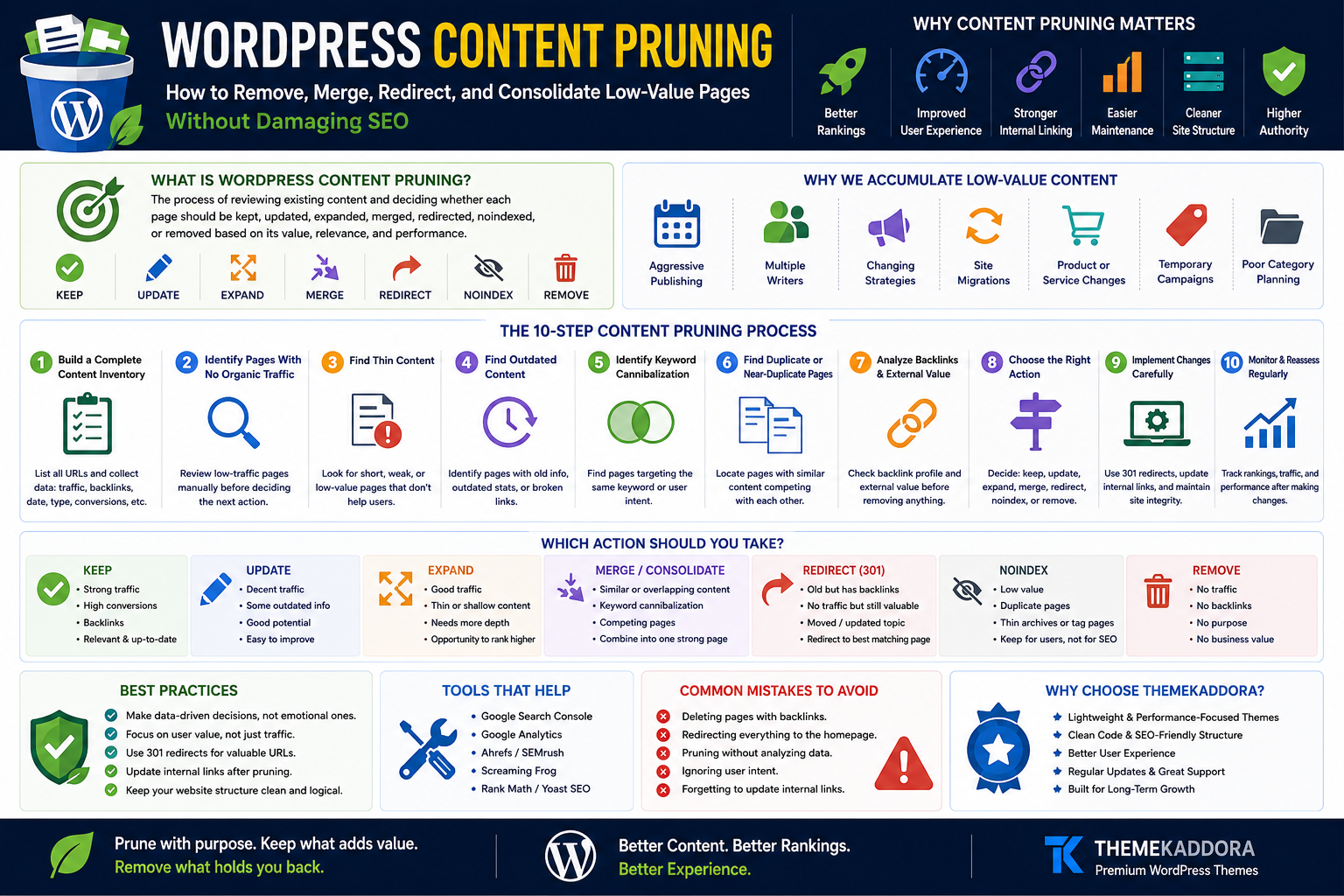
WordPress Content Pruning: How to Remove, Merge, Redirect, and Consolidate Low-Value Pages Without Damaging SEO
Introduction
Publishing more content is easy.
Managing everything you have already published is harder.
Over time, a WordPress website can accumulate hundreds or thousands of URLs:
Old blog posts
Thin category pages
Outdated tutorials
Duplicate landing pages
Expired campaign pages
Weak tag archives
Discontinued product pages
Nearly identical articles
Pages with no traffic
Content targeting outdated topics
At first, this may seem harmless.
More pages can feel like more opportunities to rank.
But a growing content library can become difficult to maintain, confusing for visitors, and strategically unfocused.
This is where content pruning becomes useful.
Content pruning is the process of reviewing existing pages and deciding whether each one should be:
Kept
Updated
Expanded
Merged
Redirected
Noindexed
Removed
The goal is not to delete content simply because it is old or receives little traffic.
The goal is to improve the overall quality, usefulness, clarity, and maintainability of your website.
In this guide, you'll learn how to prune WordPress content carefully without making reckless SEO decisions.
What Is WordPress Content Pruning?
WordPress content pruning is the systematic process of evaluating existing website content and taking appropriate action based on its quality, relevance, performance, and strategic value.
A page may be:
Preserved
Improved
Consolidated
Redirected
Removed
Think of content pruning as website maintenance.
A healthy content library requires more than continuous publishing.
It also requires review.
Why WordPress Websites Accumulate Low-Value Content
Content libraries grow for many reasons.
A business may publish:
Weekly blog posts
Seasonal campaigns
Product announcements
Event pages
SEO landing pages
News updates
Tag archives
Temporary offers
Years later, many of these pages remain online even when their original purpose has disappeared.
Common causes include:
No content governance
Aggressive publishing schedules
Multiple writers
Changing SEO strategies
Website migrations
Product changes
Rebranding
Poor category planning
Without maintenance, content clutter grows naturally.
Is More Content Always Better for SEO?
No.
More content is useful when it provides genuine value and serves meaningful search or user needs.
Publishing large numbers of weak pages can create problems such as:
Topic overlap
Keyword cannibalization
Maintenance burden
Outdated information
Confusing internal links
Poor user journeys
Quality and purpose matter more than raw page count.
Content Pruning vs Content Decay
These concepts are related but different.
Content Decay
A previously successful page gradually loses performance.
The solution may involve refreshing or improving it.
Content Pruning
A broader process of reviewing the entire content library and deciding what should remain, change, merge, or disappear.
A decaying page may still be valuable.
A pruning candidate may never have been valuable.
Content Pruning vs Deleting Content
Content pruning does not mean mass deletion.
Deletion is only one possible action.
A strong pruning strategy may involve:
Updating 20 pages
Merging 10 pages
Redirecting 5 pages
Removing 3 pages
Keeping 50 pages unchanged
The correct action depends on evidence.
1. Build a Complete Content Inventory
Start by identifying the URLs on your website.
Include:
Posts
Pages
Products
Categories
Tags
Landing pages
Author archives
Custom post types
Create a spreadsheet or database.
Useful columns include:
URL
Page title
Content type
Publication date
Last updated date
Organic traffic
Impressions
Backlinks
Conversions
Recommended action
A complete inventory prevents random decisions.
2. Identify Pages With No Organic Traffic
Pages with little or no search traffic deserve review.
But do not delete them automatically.
A page may still:
Generate leads
Support customers
Earn backlinks
Assist conversions
Serve navigation
Traffic is only one signal.
3. Find Thin Content
Thin content may provide little meaningful value.
Examples include:
Extremely short pages with no clear purpose
Empty category archives
Weak location pages
Duplicate product descriptions
Low-value tag pages
Ask whether the page genuinely helps a visitor.
4. Find Outdated Content
Old content can become inaccurate.
Review:
Statistics
Screenshots
Software instructions
Pricing
Product features
Regulations
External links
Outdated information can damage trust.
5. Identify Keyword Cannibalization
Keyword cannibalization can occur when multiple pages target similar intent.
Example:
Best WordPress SEO Tips
WordPress SEO Guide
Improve WordPress SEO
Complete SEO Tips for WordPress
If these pages substantially overlap, consolidation may be appropriate.
6. Find Duplicate or Near-Duplicate Pages
Duplicate content may appear through:
Multiple landing pages
Tag archives
Filter URLs
Printer versions
Migrated copies
Repeated product descriptions
Not every duplicate URL requires deletion, but duplication should be understood.
7. Review Pages With Declining Traffic
A declining page may need:
Updated information
Better examples
Improved intent alignment
Stronger internal links
Better structure
Do not remove valuable pages simply because performance has declined.
8. Find Orphan Pages
An orphan page has few or no internal links pointing to it.
These pages may be difficult for visitors to discover.
For valuable orphan pages:
Add contextual links
Include them in relevant hubs
Improve navigation
For low-value orphan pages:
Review whether they should remain.
9. Review Low-Quality Tag Archives
WordPress websites often create many tag pages.
Examples:
SEO
SEO Tips
WordPress SEO
Search Optimization
These may overlap heavily.
Consider whether each archive provides genuine navigational value.
10. Review Empty Category Pages
A category with one weak post may provide little value.
Possible actions include:
Merge categories
Reassign posts
Improve the archive
Remove unnecessary categories
Keep taxonomy simple and meaningful.
The KEEP Framework
Every page should receive a clear action.
Use this framework:
K — Keep
The page is useful and performing well.
Action:
Leave it mostly unchanged.
E — Enhance
The page has value but needs improvement.
Action:
Update, expand, restructure, or optimize.
E — Eliminate Overlap
The page competes with another page.
Action:
Merge or differentiate.
P — Prune
The page has no meaningful value and no strong reason to remain.
Action:
Remove carefully.
When Should You Keep a Page?
Keep a page when it:
Generates traffic
Earns backlinks
Converts visitors
Supports customers
Serves important navigation
Provides unique value
Strengthens topical coverage
A page does not need massive traffic to deserve preservation.
When Should You Update a Page?
Update when:
Information is outdated
Search intent has evolved
Examples are weak
Screenshots are old
Internal links are missing
The topic remains valuable
Refreshing can preserve existing strengths.
When Should You Expand a Page?
Expand when the page is useful but incomplete.
Add:
Examples
Steps
FAQs
Comparisons
Visuals
Practical advice
Avoid adding filler merely to increase word count.
When Should You Merge Pages?
Merge pages when:
They target the same intent
They overlap heavily
Neither page is strong alone
Rankings fluctuate between URLs
Users would benefit from one complete resource
Choose the strongest final destination.
How to Merge Two WordPress Articles
A practical process:
Select the strongest URL
Review both articles
Preserve unique useful information
Rewrite duplicate sections
Improve structure
Update internal links
Redirect the retired URL
Test the redirect
Do not simply copy and paste everything together.
Create a coherent final page.
When Should You Redirect a Page?
Redirect when:
A relevant replacement exists
Two pages are merged
A URL changes
A discontinued page has a close alternative
The destination should satisfy similar intent.
Why You Should Not Redirect Everything to the Homepage
This is a common mistake.
If an old article about:
WooCommerce Checkout Optimization
is removed, redirecting it to a generic homepage may not help the visitor.
A better destination may be:
Updated checkout guide
WooCommerce optimization hub
Closely related resource
Relevance matters.
When Should You Remove a Page Without a Redirect?
Removal may be appropriate when:
No relevant replacement exists
The content has no meaningful traffic
It has no valuable backlinks
It serves no user purpose
It is outdated beyond repair
Not every removed page needs a forced redirect.
When Should You Use Noindex?
Noindex may be considered for pages that need to remain accessible but are not intended for search visibility.
Examples may include certain:
Internal search results
Utility pages
Account pages
Thin archives
Implementation should match the website's technical setup and purpose.
How to Evaluate Backlinks Before Removing Content
Before deleting a page, check whether external websites link to it.
A page with strong backlinks may have significant value even if traffic is low.
Possible actions include:
Improve the page
Merge it
Redirect carefully
Never ignore backlink value.
How to Evaluate Conversions Before Pruning
A page may receive only 50 visits per month but generate valuable leads.
Another page may receive 5,000 visits and generate nothing.
Review:
Leads
Sales
Assisted conversions
Product discovery
Newsletter signups
Traffic alone can be misleading.
How Internal Links Affect Pruning Decisions
Before removing a page, identify internal links pointing to it.
Update those links to:
New destination
Merged page
Relevant alternative
Do not leave unnecessary internal redirects or broken links.
Content Pruning for WooCommerce
Online stores require special care.
Review:
Discontinued products
Empty categories
Filter pages
Duplicate descriptions
Seasonal products
A discontinued product may still:
Receive traffic
Earn backlinks
Help customers find alternatives
Do not automatically delete it.
Content Pruning for Blogs
Blog pruning candidates may include:
Outdated news
Duplicate tutorials
Thin posts
Old announcements
Overlapping guides
Focus on building a stronger content library.
Content Pruning for Business Websites
Review:
Old service pages
Former team pages
Expired campaigns
Outdated locations
Legacy landing pages
Business changes often leave abandoned content behind.
Content Pruning for Large Websites
Large websites should prioritize by impact.
Start with:
High-traffic sections
Large duplicate clusters
Outdated topic areas
Important commercial pages
Weak taxonomy
Avoid attempting to review thousands of pages randomly.
Create a Content Pruning Score
Score each page based on:
Organic traffic
Backlinks
Conversions
Relevance
Accuracy
Uniqueness
Internal links
Example:
High Value
Keep or improve.
Medium Value
Review carefully.
Low Value
Consider merging or pruning.
A scoring model creates consistency.
Common Content Pruning Mistakes
Avoid:
Deleting based only on traffic
Removing old pages automatically
Ignoring backlinks
Ignoring conversions
Mass deleting content
Redirecting everything to the homepage
Changing URLs unnecessarily
Forgetting internal links
Pruning during a major migration without coordination
Expecting immediate results
Content pruning requires patience.
WordPress Content Pruning Checklist
Before taking action, confirm:
✅ Complete URL inventory created
✅ Organic traffic reviewed
✅ Search impressions reviewed
✅ Backlinks checked
✅ Conversions checked
✅ Internal links reviewed
✅ Search intent evaluated
✅ Duplicate pages identified
✅ Outdated content identified
✅ Redirect plan created
✅ Backups available
A 30-Day WordPress Content Pruning Plan
Week 1: Inventory
Collect:
URLs
Traffic
Rankings
Backlinks
Conversions
Week 2: Classify
Assign:
Keep
Update
Expand
Merge
Redirect
Remove
Week 3: Improve
Start with high-impact pages.
Merge overlapping content.
Update outdated information.
Week 4: Implement and Monitor
Complete:
Redirects
Internal link updates
Sitemap cleanup
Performance monitoring
Continue reviewing results.
How to Measure Content Pruning Results
Track:
Organic traffic
Search impressions
Rankings
Indexed pages
Conversions
Crawl errors
Internal link quality
Evaluate the website as a whole, not only individual deleted URLs.
Why Your WordPress Theme Matters
A well-structured theme supports content management through:
Clear navigation
Logical archives
Responsive layouts
Fast performance
Flexible content templates
Strong internal discovery
Poor theme architecture can make content clutter harder to manage.
Why Choose Themekaddora for Content-Focused WordPress Websites?
Themekaddora WordPress themes provide a modern foundation for blogs, businesses, agencies, and online stores.
Key benefits include:
Lightweight architecture
Responsive layouts
SEO-friendly code
Fast loading performance
WooCommerce compatibility
Flexible customization
Clean HTML5 and CSS3 standards
Cross-browser compatibility
Regular updates
Professional support
These features help businesses build cleaner, faster, and easier-to-manage WordPress websites.
Final Content Pruning Decision Matrix
Use this simple framework:
Strong Traffic + Strong Value
Keep and protect.
Weak Traffic + Strong Value
Improve and promote.
Strong Traffic + Weak Value
Review intent and conversion potential.
Weak Traffic + Weak Value
Consider merging, redirecting, or removing.
Strong Backlinks + Weak Traffic
Preserve, improve, or redirect carefully.
High Conversions + Low Traffic
Protect the page.
This prevents simplistic decisions.
Conclusion
A successful WordPress content strategy is not only about publishing more.
It is also about maintaining what already exists.
Over time, websites accumulate:
Outdated posts
Duplicate pages
Weak archives
Overlapping topics
Expired campaigns
Thin content
Content pruning helps you review these pages strategically.
Some should be updated.
Some should be expanded.
Some should be merged.
Some should be redirected.
And some may no longer deserve to exist.
The goal is not a smaller website.
The goal is a stronger website.
Themekaddora WordPress themes provide lightweight architecture, responsive design, SEO-friendly code, WooCommerce compatibility, and flexible customization to help businesses build clean, scalable, content-focused websites.
Publish thoughtfully.
Maintain consistently.
Prune carefully.
And make every important page earn its place.
Frequently Asked Questions (FAQs)
What is WordPress content pruning?
WordPress content pruning is the process of reviewing existing pages and deciding whether to keep, update, expand, merge, redirect, noindex, or remove them.
Does deleting old content improve SEO?
Not automatically. Deleting valuable content can harm traffic, backlinks, and user experience. Decisions should be based on evidence.
Should I delete blog posts with no traffic?
Not necessarily. A low-traffic post may still support customers, conversions, internal linking, or topical coverage.
What is the difference between content pruning and content updating?
Content updating improves an existing page. Content pruning is a broader process that may include updating, merging, redirecting, or removing pages.
Should deleted pages always use a 301 redirect?
No. Use a redirect when a relevant replacement exists. Avoid sending unrelated deleted pages to the homepage.
How often should I perform a content audit?
The right frequency depends on website size and publishing activity. Large or frequently updated websites may benefit from more regular reviews.
Can content pruning fix keyword cannibalization?
It can help when overlapping pages compete for similar search intent. Merging or differentiating pages may create clearer targeting.
Why choose Themekaddora WordPress themes?
Themekaddora themes provide lightweight architecture, responsive layouts, SEO-friendly code, fast performance, WooCommerce compatibility, and flexible customization, supporting scalable content-focused WordPress websites.
Comments (0)