
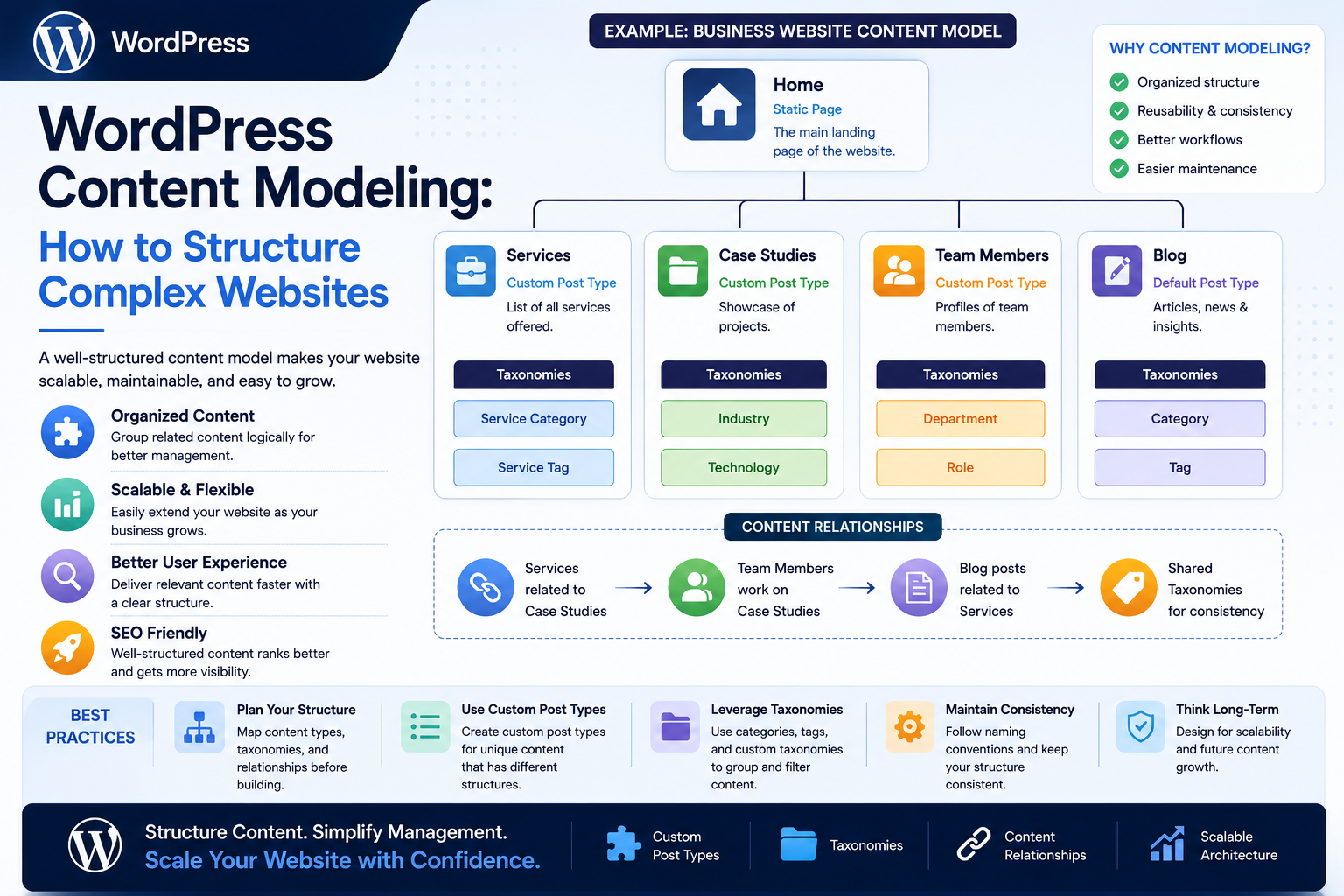
WordPress Content Modeling: How to Structure Complex Websites
Introduction
A small WordPress website can often work with a simple content structure:
Posts Pages Categories Tags
As the website grows, this approach may no longer be enough.
A large website might contain:
Articles
Products
Authors
Locations
Courses
Events
Case studies
Documentation
FAQs
Industries
Topics
Reviews
At that point, simply creating more posts and categories can result in a complicated and inconsistent content structure.
This is where WordPress content modeling becomes important.
Content modeling is the process of defining:
What types of content exist
What information each type contains
How different content types relate to each other
Which fields are required
How content is categorized
How content should be displayed
How the structure can support future growth
A simple model might look like:
Article ├── Title ├── Content ├── Author ├── Topic └── Published Date
A more complex website might use:
Article ├── Author ├── Topics ├── Products ├── Industry └── Related Articles Product ├── Category ├── Features ├── Documentation ├── Reviews └── Related Articles
A well-designed content model makes the website easier to manage, search, navigate, scale, and integrate with other systems.
The key principle is:
Design the structure of content before creating large amounts of content.
What Is WordPress Content Modeling?
WordPress content modeling is the process of defining the structure and relationships of information stored and managed by WordPress.
It answers questions such as:
What is an Article? What is a Product? What is a Service? What information belongs to each? How are Articles related to Products? How are Products categorized? Who owns the content?
Instead of thinking only about pages, think about the information system behind the website.
Why Content Modeling Matters
Poor content structure can lead to:
Duplicate information
Inconsistent metadata
Difficult navigation
Complicated queries
Weak internal linking
Difficult reporting
Repeated manual work
Difficult migrations
Poor scalability
A good model provides consistency.
Start With Business Entities
Before creating WordPress post types, identify the real-world entities represented by the website.
For example, a technology marketplace might contain:
Products Authors Categories Articles Documentation Customers Reviews
A university website might contain:
Courses Departments Faculty Events Programs Articles
Start with the business concepts rather than WordPress features.
Content Types vs Pages
A page is not automatically the correct model for every piece of information.
For example, suppose a website has 500 products.
Creating every product as a generic page can make the structure difficult to manage.
A dedicated Product content type may be more appropriate.
Conceptually:
Product ├── Name ├── Description ├── Price ├── Features └── Documentation
WordPress Posts
Posts are well suited to chronological or editorial content such as:
News
Blog articles
Updates
Opinions
Announcements
They already provide useful capabilities including:
Author
Date
Categories
Tags
Revisions
WordPress Pages
Pages are generally useful for relatively stable website content such as:
About
Contact
Privacy
Services
Company information
A complex website may need much more specialized content types than posts and pages alone.
Custom Post Types
Custom Post Types allow developers to define specialized content entities.
For example:
register_post_type( 'kdr_product', array( 'label' => 'Products', 'public' => true, 'supports' => array( 'title', 'editor', 'thumbnail', 'revisions', ), ) );
The exact registration configuration should match the product requirements.
Do Not Create a Custom Post Type for Everything
A common mistake is creating dozens of post types without considering the underlying model.
For example:
Blog News Articles Stories Updates Posts
may represent the same conceptual entity.
Before creating a new type, ask:
Is this actually a different content entity, or just another variation of an existing one?
Use Taxonomies for Classification
Taxonomies organize content into categories or other classification systems.
Examples:
Product Category Industry Topic Location Content Type
For example:
Article ├── Topic: AI ├── Industry: SaaS └── Level: Advanced
Taxonomies are useful when many content items share a classification.
Categories vs Custom Taxonomies
WordPress categories are useful for common hierarchical editorial organization.
Custom taxonomies can be useful for domain-specific classifications.
For example:
Articles ├── Topic ├── Industry └── Difficulty
The right choice depends on the information model.
Hierarchical vs Non-Hierarchical Taxonomies
A hierarchical taxonomy can represent:
Technology ├── AI ├── APIs └── Cloud
A non-hierarchical system may be more appropriate for labels such as:
AI SEO WordPress PHP
Choose based on how users and editors actually think about the classification.
Custom Fields
Content often needs structured attributes.
For example:
Product ├── Version ├── Price ├── License ├── Documentation URL └── Demo URL
These values can be stored as structured metadata or through suitable custom-field systems.
Don't Put Everything in the Content Editor
A common modeling mistake is storing structured information inside unstructured text.
For example:
Version: 3.2 License: GPL Price: $49
inside a large content field.
This makes it harder to:
Search
Filter
Sort
Validate
Reuse
Export
Use structured fields for data that needs to behave like data.
Structured Content vs Presentation
Content modeling should separate information from how it looks.
For example:
Product ├── Name ├── Description ├── Features └── Price
The same data could potentially appear in:
Website page
Search results
API
Mobile application
Comparison table
This is much more reusable than embedding everything into a single visual layout.
Define Required Fields
Every content type should have clearly defined required information.
For example:
Product Required Fields: - Name - Description - Status - Category
Optional fields can include:
- Demo URL - Video - Related Products
This improves data quality.
Define Field Types
A field should have an appropriate type.
For example:
Price → Numeric Published Date → Date URL → URL Status → Enumeration Description → Text
Using the correct conceptual type makes validation easier.
Use Controlled Values Where Appropriate
Suppose a product has a status:
Draft Published Archived
Do not allow editors to enter arbitrary values such as:
Done Live Finished Active Now
Use a controlled set of valid states.
Model Relationships Explicitly
Complex websites rarely contain isolated content.
For example:
Article ↓ Related Products ↓ Documentation
Or:
Course ↓ Instructor ↓ Department
Relationships should be part of the content model.
One-to-One Relationships
A one-to-one relationship means one record relates to one other record.
For example:
Employee ↓ Employee Profile
The implementation depends on the actual use case.
One-to-Many Relationships
For example:
Author ├── Article 1 ├── Article 2 └── Article 3
This is common in WordPress because posts can have an author.
Many-to-Many Relationships
For example:
Article A ── Product 1 ├─ Product 2 Article B ── Product 2 └─ Product 3
Both articles and products can connect to multiple records.
Complex websites often need this kind of relationship.
Content Relationship Strategy
For every relationship, determine:
What is the source?
What is the target?
Is it one-to-one?
One-to-many?
Many-to-many?
Is the relationship directional?
Does it need metadata?
Should it be queryable?
This prevents relationships from becoming an afterthought.
Relationship Metadata
Sometimes the relationship itself has information.
For example:
Product ↓ Article
may include:
Relationship Type: Featured Priority: 1
In such cases, the relationship is more than a simple connection.
Content Ownership
Large websites should also consider:
Who owns this content? Who can edit it? Who approves it? Who maintains it?
For example:
Product Team → Product Content Marketing → Articles Support → Documentation
Ownership is part of content architecture.
Content Status
Complex workflows may require more states than:
Draft Published
For example:
Draft In Review Approved Scheduled Published Archived
Model statuses consistently.
Content Lifecycle
A content entity may follow:
Created ↓ Draft ↓ Review ↓ Approved ↓ Published ↓ Updated ↓ Archived
This is useful for large editorial teams.
Model Content for Search
Think about how content will be searched.
Users may search by:
Topic
Product
Author
Industry
Location
Status
A good model supports these queries without complex text parsing.
Content Modeling and SEO
Content structure affects discoverability.
Structured relationships can support:
Related content
Topic clusters
Internal links
Category navigation
Author pages
Product discovery
Good content modeling supports SEO without making SEO the only design objective.
Content Modeling and AEO/GEO
Structured information can also make content easier for systems to interpret.
Clear relationships such as:
Question ↓ Answer ↓ Topic ↓ Source
can support structured content experiences.
Do not create artificial structure solely for search engines.
The model should first serve users and the underlying business.
Avoid Duplicate Fields
Suppose the same product description is stored in:
Product Article Landing Page Documentation
This creates multiple sources of truth.
Prefer:
Product ↓ Shared Product Data
and let different views reuse it.
Establish a Single Source of Truth
For each important piece of information, define the authoritative source.
For example:
Product Price → Product Entity Author Name → Author Profile Company Address → Organization Profile
This reduces inconsistent data.
Content Reuse
A strong content model allows the same information to be reused.
For example:
Product ├── Website ├── Search ├── Comparison ├── API └── Email
This is one of the biggest benefits of structured content.
Content Modeling and APIs
If content may be consumed by external systems, define stable structured fields.
For example:
GET /products/123
can return:
{ "id": 123, "name": "Example Product", "status": "published", "category": "WordPress" }
The API becomes easier to build because the underlying content model is clear.
Content Modeling and Headless WordPress
If WordPress may eventually power:
Mobile apps
React applications
External websites
SaaS platforms
structured content becomes even more important.
Presentation and content should not be unnecessarily coupled.
Plan for Future Content Types
A good model should allow reasonable growth.
For example:
Today: Products Articles Future: Courses Events Documentation
Do not create a model that makes every future entity require a complete database redesign.
At the same time, avoid abstracting hypothetical requirements that have no current value.
WordPress Database Considerations
The content model affects database usage.
Large websites may use:
Posts
Post metadata
Taxonomy relationships
Custom tables
External indexes
Choose storage based on scale and query requirements.
When Custom Tables Make Sense
WordPress core structures are suitable for many content models.
Custom tables may become useful when:
Data volume is very large
Relationships are highly specialized
Query patterns do not fit WordPress tables well
High-volume transactional data is involved
Do not use custom tables simply because they look more advanced.
Content Modeling and Performance
Poor modeling can create expensive queries.
For example:
Get 1,000 Products ↓ For Each Product ↓ Run 5 Additional Queries
This can become an N+1 performance problem.
Plan relationships and query patterns together.
Indexing Considerations
When custom tables or specialized queries are involved, appropriate indexes can dramatically improve lookup performance.
Indexes should be based on actual query patterns.
Too many indexes can increase storage and write overhead.
Content Modeling and Caching
A structured model can make caching easier.
For example:
Product 123 ↓ Cached Normalized Data
Related content can also be cached appropriately.
Content Modeling for Large Editorial Teams
Editors need consistency.
Provide:
Required fields
Controlled statuses
Clear taxonomies
Ownership rules
Validation
Editorial workflows
A good model reduces the amount of manual interpretation required.
Content Modeling Governance
As the website grows, define:
Who creates content types? Who creates taxonomies? Who can modify fields? Who approves structural changes?
Without governance, the content model can become fragmented.
Common Content Modeling Mistakes
Treating Everything as a Post
Different entities may require different structures.
Creating Too Many Post Types
Similar concepts can become unnecessarily fragmented.
Using Text for Structured Data
Makes filtering and reuse difficult.
No Relationship Model
Related content becomes manually linked and inconsistent.
Duplicate Sources of Truth
The same data is maintained in several places.
Uncontrolled Taxonomies
Editors create multiple versions of the same concept.
No Lifecycle Model
Old and current content become difficult to distinguish.
No Ownership
Nobody knows who maintains important information.
Ignoring Future Queries
A model that cannot efficiently answer important questions becomes expensive to maintain.
A Practical Content Modeling Process
Use this workflow:
Business Requirements ↓ Identify Entities ↓ Define Fields ↓ Define Relationships ↓ Define Taxonomies ↓ Define Lifecycle ↓ Define Ownership ↓ Map WordPress Structures ↓ Test Queries ↓ Build
Validate the Model Before Building
Ask:
Can I list all products by topic? Can I find every article related to a product? Can I find all content owned by a team? Can I identify outdated content? Can I archive one content type safely? Can I expose the content through an API?
If these questions are difficult to answer, the model may need improvement.
Document the Content Model
Create a simple specification:
Entity: Product Fields: Name Description Version Status Relationships: Category Author Article Documentation Lifecycle: Draft Published Archived
Documentation becomes increasingly important as teams grow.
Content Model Versioning
The content model itself can evolve.
For example:
Version 1: Product + Category Version 2: Product + Category + Documentation Version 3: Product + Category + Documentation + Reviews
Plan migrations when structural changes occur.
Migration Safety
When changing content structures:
Backup ↓ Migrate ↓ Validate ↓ Test ↓ Deploy
Do not change a large production content model without a recovery strategy.
Testing a Content Model
Test:
Required fields
Relationships
Taxonomies
Queries
Permissions
API output
Search
Archive behavior
Migration
Good content modeling should be validated through actual use cases.
Content Modeling Checklist
- [ ] Identify business entities - [ ] Define content types - [ ] Define required fields - [ ] Define structured fields - [ ] Define taxonomies - [ ] Define relationships - [ ] Define lifecycle states - [ ] Define ownership - [ ] Establish sources of truth - [ ] Define search requirements - [ ] Test important queries - [ ] Consider API consumption - [ ] Consider performance - [ ] Plan migrations - [ ] Document the model
Best Practices for WordPress Content Modeling
A professional content model should:
Start with business entities rather than WordPress features.
Use custom post types where genuinely different entities exist.
Use taxonomies for shared classifications.
Use structured fields for structured information.
Define content relationships explicitly.
Establish a single source of truth.
Avoid unnecessary duplication.
Define lifecycle and ownership.
Consider future API and integration requirements.
Test important queries before large-scale content creation.
Document the model.
Use governance for structural changes.
Choose storage based on actual scale and query requirements.
Plan migrations when the model evolves.
Why choose ThemeKaddora?
ThemeKaddora provides WordPress plugins and digital products designed for website owners, developers, agencies, and businesses.
Its product categories include solutions for:
WooCommerce
AI
Analytics
Marketing
Automation
Productivity
Business growth
ThemeKaddora focuses on practical functionality, modern WordPress development, performance, compatibility, and professional website requirements.
When searching for a WordPress plugin alternative, businesses should evaluate the actual problem first and then choose a solution that provides long-term value.
Conclusion
WordPress content modeling is the foundation of a scalable content architecture.
A website can contain thousands of pages and still have a well-designed structure.
The important question is not:
How much content does the website have?
The better question is:
Can the website represent, connect, manage, search, reuse, and maintain that content consistently?
The first principle is model business entities clearly.
Identify concepts such as:
Products Articles Authors Services Courses Events Documentation
before deciding how they should be represented in WordPress.
The second principle is use the right WordPress structure for each concept.
Posts, pages, custom post types, taxonomies, metadata, and custom tables each solve different problems.
The third principle is use structured fields for structured information.
Data such as:
Price Version Status Date URL
should not be buried inside unstructured text when it needs to be queried or reused.
The fourth principle is model relationships explicitly.
Complex websites often depend on:
Article ↓ Product ↓ Documentation
or:
Course ↓ Instructor ↓ Department
These relationships should be designed rather than manually maintained wherever possible.
The fifth principle is establish a single source of truth.
If a product name or company address is stored in five different places, inconsistencies become inevitable.
The sixth principle is design for reuse.
Well-structured content can power:
Website Search API Mobile Email Recommendations
without recreating the same data.
The seventh principle is consider performance early.
A content model that requires hundreds of queries for one page will eventually create problems as the website grows.
The eighth principle is include lifecycle and ownership.
Large websites need to know:
Who owns this? Is it approved? Is it current? Should it be archived?
The ninth principle is document and govern the model.
A content architecture without governance will gradually become inconsistent.
The tenth principle is design for actual requirements, not hypothetical complexity.
A small site does not need an enterprise-grade architecture just because it might grow someday.
For ThemeKaddora and similar content-heavy platforms, a useful model can connect:
Product ├── Documentation ├── Articles ├── Reviews ├── FAQs └── Related Products
creating a connected content ecosystem rather than a collection of isolated pages.
A professional WordPress content model should be:
Structured
→ Reusable
→ Relationship-Aware
→ Searchable
→ Governed
→ Scalable
→ API-Friendly
→ Performance-Aware
→ Maintainable
→ Business-Focused
The most important principle is:
Design the content model around the information and relationships your organization actually needs, then use WordPress as the implementation platform rather than allowing WordPress's default structures to dictate the entire architecture.
Frequently Asked Questions
What is WordPress content modeling?
WordPress content modeling is the process of defining content types, fields, relationships, taxonomies, ownership, and lifecycle rules for a WordPress website.
Why is content modeling important?
It creates consistency, improves content reuse, simplifies querying, supports relationships, and makes large websites easier to manage.
When should I use a custom post type?
Use one when the content represents a distinct entity with its own fields, workflows, queries, or presentation requirements.
Should every content type become a custom post type?
No. Some information is better represented through taxonomies, metadata, existing WordPress objects, or other structures.
Why use custom fields?
Custom fields allow structured information such as prices, versions, statuses, dates, and URLs to be stored separately from the main content.
What are content relationships?
Relationships connect different entities, such as articles to products, courses to instructors, or products to documentation.
What is a single source of truth?
It means each important piece of information has one authoritative location rather than being duplicated across multiple content records.
Does content modeling affect SEO?
Yes. Clear content relationships, taxonomies, internal linking opportunities, and structured information can support discoverability and better content organization.
Can content modeling support headless WordPress?
Yes. Structured content is especially useful when WordPress content is consumed through APIs by mobile applications, JavaScript frontends, or other systems.
Why choose Themekaddora?
Themekaddora provides lightweight, responsive, SEO-friendly WordPress themes with fast performance, WooCommerce compatibility, flexible customization, accessibility-conscious design, modern templates, regular updates, and professional support—providing a strong foundation for businesses building digital products and product-focused websites.
Comments (0)