
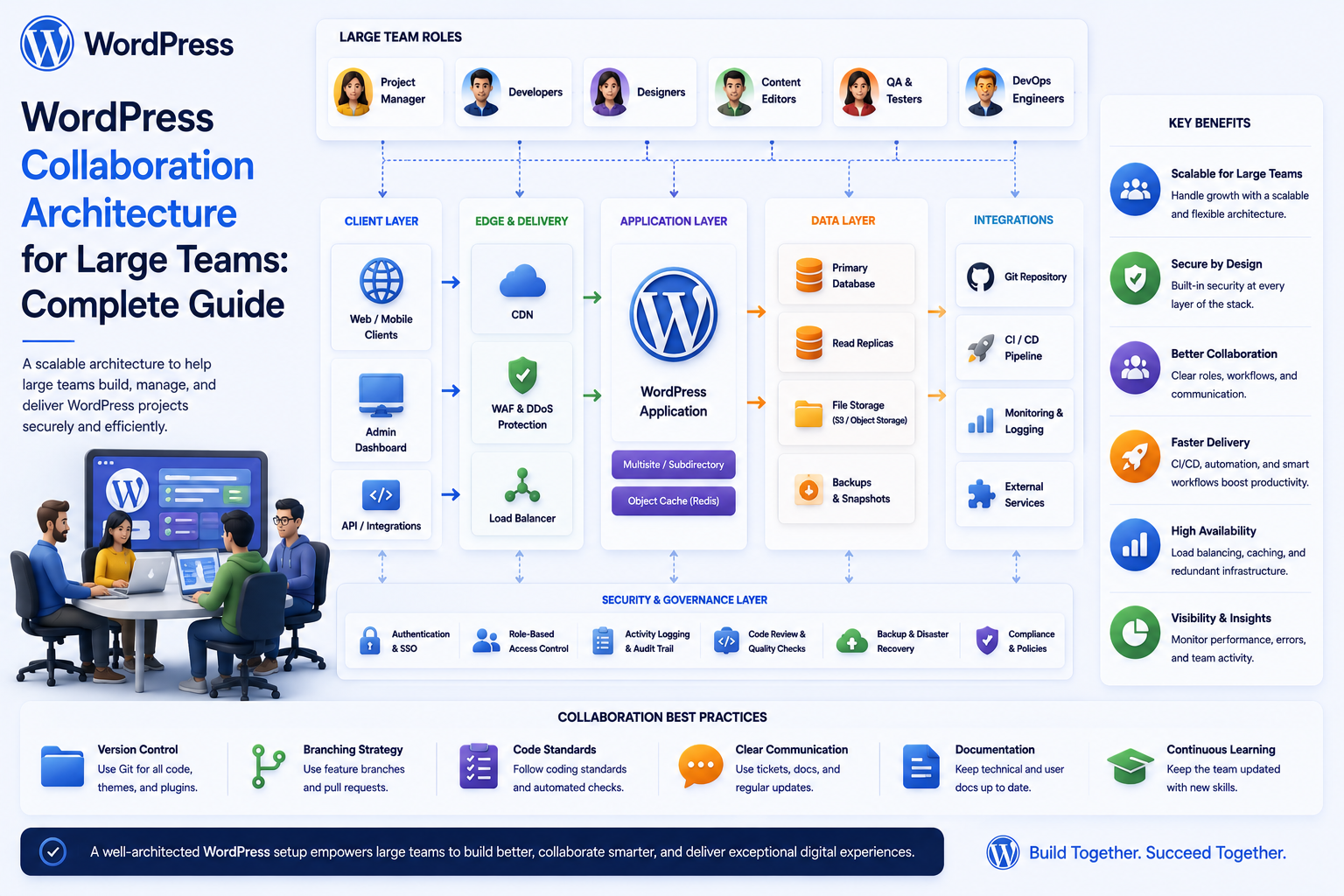
WordPress Collaboration Architecture for Large Teams: Complete Guide
Introduction
WordPress collaboration is easy when a website has:
1 Admin 1 Writer A Few Posts
The architecture becomes much more complicated when an organization has:
Hundreds or Thousands of Users Multiple Departments Multiple Teams Multiple Projects Internal Documents Editorial Workflows Approvals Tasks Clients Multiple Organizations External Integrations
At that point, simply adding more plugins is not enough.
The system needs an intentional architecture.
A large collaboration platform may look like:
Organization ↓ Department ↓ Team ↓ Project ↓ Content / Tasks / Documents ↓ Comments / Approvals / Notifications ↓ Reports / Search / Audit
The platform must also answer:
Who can see this? Who can edit it? Who can approve it? Which department owns it? Which team is responsible? Which tenant does it belong to? What happens when the user changes teams? How does the system behave at scale?
A small WordPress installation can sometimes answer these questions through simple roles and plugin settings.
A large collaboration system usually needs explicit:
Identity Authorization Organization Scope Resource Ownership Workflow State Data Models Event Processing Search Caching Audit Monitoring
The goal is not to make WordPress unnecessarily complex.
The goal is to make the collaboration model predictable as the organization grows.
The key principle is:
Large-team WordPress collaboration requires a clear separation between identity, organizational structure, permissions, resources, workflows, communication, and infrastructure so the platform can scale without turning access control and business logic into an unmaintainable collection of plugin-specific rules.
What Is WordPress Collaboration Architecture?
WordPress collaboration architecture is the technical design used to allow multiple users and teams to work together around shared content, tasks, documents, projects, approvals, and business workflows.
It includes:
Users Organizations Departments Teams Projects Tasks Documents Comments Approvals Notifications Reports APIs Audit
Why Large Teams Need a Different Architecture
A five-person team can often coordinate informally.
A 500-person organization cannot rely on:
Email Chat Spreadsheets Memory Manual Access Changes
The number of relationships increases quickly:
Users × Teams × Projects × Resources × Permissions
Without structure, access rules become difficult to reason about.
The Core Collaboration Model
A useful foundation is:
Organization ↓ Department ↓ Team ↓ Project ↓ Resource
Resources can include:
Content Task Document Customer Request Approval Report
Organization
The organization is the top business boundary.
For example:
Kaddora Tech
In a multi-tenant SaaS application, multiple organizations may exist:
Company A Company B Company C
Department
Departments group related business functions:
Marketing Sales Engineering Finance HR Support Operations
Department membership can influence access and reporting.
Team
Departments can contain teams:
Engineering ├── Backend ├── Frontend └── QA
Teams often provide a more practical collaboration boundary than departments.
Project
A project connects people from one or more teams around a shared objective:
Website Redesign
Project membership should be explicit.
Resource
Projects contain resources:
Tasks Documents Content Comments Approvals Reports
Every resource needs a defined ownership and visibility model.
Separate Organization From WordPress Role
A WordPress role such as:
Editor
does not explain:
Which Company? Which Department? Which Team? Which Project?
For large collaboration systems, business organization should be modeled separately.
Role vs Capability
A role can group permissions.
A capability represents an action.
For example:
Role: Content Manager Capabilities: assign_content approve_content manage_editorial_tasks view_team_reports
This makes authorization more explicit.
Capability vs Scope
A user may have:
approve_content
but only inside:
Marketing Department
Therefore:
Capability + Scope
is more powerful than a role alone.
Resource-Level Authorization
A user may have permission to view tasks:
view_tasks
but only for:
Project A
The server must evaluate access to the actual resource.
Avoid Global Permission Assumptions
Do not implement:
User has manager role = User sees all departments
unless organization policy genuinely requires it.
Multi-Tenant Architecture
For SaaS applications, the strongest boundary is often:
Tenant ↓ All Resources
Every relevant query must preserve that boundary.
Tenant-Aware Data Model
Important resources may include:
tenant_id
alongside their own identifiers.
But storing a tenant ID alone does not enforce security.
The server must validate tenant membership and scope.
Tenant Context Resolver
A useful architecture is:
Authenticated User ↓ Resolve Membership ↓ Determine Current Tenant ↓ Load Allowed Scope ↓ Execute Query
Never trust the browser to define tenant authority.
Cross-Tenant Isolation
A user from Tenant A should not be able to retrieve:
Tenant B
through:
ID Manipulation Search Reports Exports Notifications APIs Files
Collaboration Data Model
Core models may include:
User Organization Department Team Project Membership Task Comment Document Approval Notification Audit Event
Membership Is a Core Concept
A membership record can connect:
User + Organization + Department + Team + Role + Status
This allows a user to belong to multiple groups without duplicating user accounts.
Multiple Team Membership
A user may belong to:
SEO Team
and:
Content Team
simultaneously.
The authorization system must determine which resources each membership permits.
Project Membership
Project membership can be separate:
User Project Role Status
This helps support cross-team projects.
Temporary Membership
A contractor can receive:
Project Membership Start: August 25 End: September 30
Access should expire automatically according to policy.
Role Assignment Architecture
Roles can exist at different scopes:
Organization Role Department Role Team Role Project Role
The application should define precedence carefully when multiple scopes are involved.
Don't Create Hundreds of WordPress Roles
A common architectural mistake is creating a new WordPress role for every business combination:
Marketing Manager Marketing SEO Manager Finance Manager Finance Approver Project A Editor Project B Editor
This quickly becomes difficult to maintain.
Prefer:
Capabilities + Membership + Scope
where practical.
Permission Evaluation
A useful conceptual model is:
Is Authenticated? ↓ Has Capability? ↓ Within Organization? ↓ Within Department / Team? ↓ Member of Project? ↓ Owns or Can Access Resource? ↓ Action Allowed
Permission Denial
When access is denied, do not expose unnecessary information.
Avoid revealing:
"This secret document exists but you cannot access it."
When appropriate, return a generic not-found or unauthorized result according to the application's security model.
Collaboration Resources
Large teams often collaborate around several resource types:
Content Tasks Projects Documents Customers Requests Approvals
Each resource needs consistent authorization conventions.
Unified Resource Policy
A resource policy can define:
View Create Edit Delete Assign Approve Export Share
This reduces inconsistent permission checks across modules.
Content Collaboration
Content resources can include:
Posts Pages Products Custom Post Types
with workflow data such as:
Assignee Reviewer Deadline Approval
Task Collaboration
Tasks may include:
Assignee Project Status Priority Due Date Comments
Document Collaboration
Documents may include:
Owner Version Visibility Department Project Review Date
Comment Collaboration
Comments should inherit or explicitly define access to:
Parent Resource Project Team Tenant
A user should not gain comment access simply because they know a comment ID.
Approval Collaboration
Approvals should represent:
Request Approver Status Decision Timestamp
The requester should not automatically become the approver.
Workflow Architecture
A large collaboration platform benefits from explicit workflows.
For example:
Draft ↓ Review ↓ Changes Requested ↓ Approved ↓ Published
State Machines
Instead of allowing arbitrary status values:
status = anything
define valid transitions:
Draft → Review Review → Approved Review → Changes Requested Changes Requested → Draft
State Transition Permissions
A transition can require:
Capability + Scope + Current State
For example:
approve_content + Marketing Project + State = Review
Avoid Direct Status Manipulation
Do not rely on:
POST status=approved
without validating whether the current actor is allowed to perform that transition.
Collaboration Events
Useful events include:
task.created task.assigned task.completed comment.created approval.requested approval.completed document.updated membership.changed
Event-Driven Architecture
Events can feed:
Notifications Audit Reports Search Indexes Automation Integrations
This reduces tight coupling between modules.
Event Idempotency
A failed job may retry the same event.
For example:
task.completed
should not accidentally produce multiple:
Notifications Reports External API Calls
where duplication matters.
Use stable event identifiers and idempotent consumers.
Queue Architecture
Background processing is useful for:
Email Notifications Reports Exports Search Indexing AI Summaries External Synchronization
Authorization in Queued Jobs
A queued operation may execute later than when it was created.
Permissions may have changed.
For sensitive operations, revalidate authorization when the job executes.
Notification Architecture
Notifications should be generated from authoritative events:
Event ↓ Notification Policy ↓ Recipient Validation ↓ Queue ↓ Delivery
Don't Use Email as the Source of Truth
The system state should remain in:
Task Approval Request Project
Email is only a delivery mechanism.
Notification Preferences
Users may customize:
Email In-App Push Digest
according to organization policy.
Search Architecture
Large collaboration systems often need global search across:
Content Tasks Projects Documents People Knowledge Requests
Search must be authorization-aware.
Secure Search Pipeline
Use:
Current User ↓ Authorized Scope ↓ Search Index ↓ Filter / Retrieval ↓ Results
Do not expose restricted titles or snippets.
Search Index Strategy
A large system may use:
WordPress Database Search
for smaller installations and:
Dedicated Search Infrastructure
for larger datasets.
The search layer must preserve the same access rules as the source data.
Search Index Synchronization
When permissions change:
Membership Removed ↓ Search Scope Updated
Restricted content should no longer appear in results.
Dashboard Architecture
Different users can receive:
Employee Dashboard Manager Dashboard Department Dashboard Project Dashboard Client Dashboard
But each widget must independently enforce authorization.
Widget Registry
A widget may contain:
Key Title Permission Scope Provider Cache Policy
Dashboard Performance
Avoid one query per widget when possible.
Prefer:
Batch Queries Aggregations Precomputed Metrics
for large dashboards.
Data Aggregation
Large organizations may use derived metrics:
Daily Task Counts Weekly Completion Approval Totals
These can improve dashboard performance.
Don't Lose the Source Data
Aggregated tables should remain derived data.
Detailed records remain necessary for:
Investigation Audit Reporting Reconciliation
Collaboration Files
Large teams often share:
Documents Screenshots Reports Designs Contracts
File permissions should be aligned with resource permissions.
Protect File Previews
A secure application must protect:
Download Preview Thumbnail Search Index File Metadata
not just the original file URL.
File Versioning
Documents may have:
Version 1 Version 2 Version 3
Keep the current version clearly identifiable.
Document Ownership
When an employee leaves:
Employee ↓ Owned Documents ↓ Reassign Ownership
The organization should avoid losing important knowledge.
Collaboration and Employee Offboarding
Offboarding is an architectural concern.
A complete process may include:
Disable Account ↓ Revoke Sessions ↓ Remove Memberships ↓ Reassign Tasks ↓ Transfer Documents ↓ Cancel Notifications ↓ Review External Access ↓ Audit
Collaboration and Team Transfer
When a user moves:
Marketing ↓ Engineering
the system should recalculate:
Tasks Projects Documents Reports Notifications Search Visibility
Collaboration and Tenant Transfer
If a consultant changes:
Tenant A ↓ Tenant B
old tenant resources must no longer appear unless explicitly authorized.
Reporting Architecture
Large teams may need reports by:
Department Team Project Assignee Status Date
Report access must follow the same scope rules as the underlying data.
Report Builder
A controlled report builder can provide:
Approved Data Sources Metrics Filters Grouping Date Range
Avoid exposing arbitrary database queries.
Scheduled Reports
Scheduled reports should recheck:
Recipient Permissions Department Tenant
at execution time.
Export Architecture
A secure export workflow:
Request ↓ Authorization ↓ Generate ↓ Protected Storage ↓ Short-Lived Download ↓ Audit
Bulk Operations
Large collaboration systems often provide:
Bulk Assign Bulk Update Bulk Approve Bulk Export
These should have stronger validation because one authorization bug can affect many records.
Bulk Operation Scope
Verify each target or use a query whose authorization scope is explicitly constrained.
Do not trust:
selected_ids
as the complete security boundary.
Import Architecture
Bulk imports can create:
Users Teams Projects Tasks Documents
Use:
Upload ↓ Validate ↓ Preview ↓ Approve ↓ Commit ↓ Audit
External Integrations
Large collaboration systems may connect with:
HRMS CRM ERP Email Cloud Storage SSO AI APIs Project Management
Use explicit integration services instead of scattering API calls through UI code.
Integration Secrets
Keep:
API Keys OAuth Secrets Database Credentials Webhook Secrets
on the server.
Never place them in frontend JavaScript.
Integration Ownership
Document:
Which System Owns Which Data?
For example:
HRMS: Employee Status WordPress: Portal Profile ERP: Financial Records
Avoid Dual Sources of Truth
If both systems independently edit:
Employee Department
the organization may eventually get conflicting values.
Define one authoritative owner.
Caching Architecture
Caching can improve performance, but large collaboration platforms need careful cache boundaries.
Examples:
Public Knowledge: Shared Cache User Tasks: Private / User-Scoped Cache Tenant Metrics: Tenant-Scoped Cache
Cache Invalidation
Permission changes may require cache invalidation:
Team Membership Removed ↓ Invalidate Team Dashboard Cache ↓ Invalidate Search Scope
Never Cache Private Data Globally
Especially avoid global caches for:
My Tasks My Notifications Private Notes Private Documents
Real-Time Collaboration
WebSockets can support:
Presence Task Updates Comments Notifications Approval Updates
But the real-time connection must recognize current access.
Real-Time Access Revocation
If access changes:
Permission Revoked ↓ Close / Restrict Relevant Channel
and subsequent requests must fail authorization.
Audit Architecture
A central audit service can receive:
Authentication Events Authorization Changes Assignment Changes Approvals Exports Impersonation Document Access
Audit Immutability
Users should not be able to casually:
Delete Modify Hide
their own sensitive audit events.
Audit Actor Context
For delegated access or impersonation:
Real Actor + Effective User + Action
must remain distinguishable.
Monitoring
Monitor:
Error Rate API Latency Queue Backlog Database Load Search Latency Export Volume Authorization Failures
Security Monitoring
High-confidence events may include:
Repeated Access Denials Unusual Export Volume Privilege Changes Cross-Tenant Attempts Mass Downloads
Avoid Alert Fatigue
Not every denied request should become a security incident.
Use severity and aggregation.
Database Architecture
At scale, the collaboration layer may need dedicated tables for:
Tasks Memberships Comments Notifications Audit Events Approvals Deadlines
rather than storing every relationship in generic post metadata.
Post Meta vs Dedicated Tables
Post meta can work well for simple extensions.
Dedicated tables are often more appropriate when data requires:
High Volume Complex Relationships Frequent Filtering Aggregations Reporting Indexes
Database Indexing
Common indexing dimensions include:
tenant_id department_id team_id project_id user_id status due_at created_at
Indexes should be based on actual query patterns.
Avoid Over-Indexing
Every index can increase:
Storage Write Cost Maintenance
Use real query patterns to guide index design.
Database Transactions
For multi-step updates:
Assignment + Notification + Audit
consider transactional consistency where the workflow requires it.
Do not create a task successfully while silently failing to record critical state changes without an explicit recovery strategy.
Data Consistency
A collaboration system should define what happens when:
Task Update: Success Notification: Failure
Normally the task remains authoritative while notification retries separately.
Concurrency
Large teams can edit the same resource simultaneously.
Potential conflicts include:
Two Users ↓ Same Task ↓ Different Updates
Use appropriate locking, version checks, or conflict strategies where necessary.
Optimistic Concurrency
A record can include:
version = 7
A client submitting an update based on:
version = 6
can be rejected if the resource has already changed.
Prevent Lost Updates
Concurrency controls can prevent:
User A Update ↓ User B Update ↓ User A Change Lost
Collaboration and Performance
Large teams increase:
Queries Notifications Searches Events Reports
Performance should therefore be treated as part of architecture rather than a final optimization step.
Pagination Everywhere
Use pagination for:
Tasks Comments Users Documents Reports Notifications Activity
Do not return massive result sets by default.
Lazy Loading
Load detailed information only when needed.
For example:
Dashboard ↓ Load Summary User Opens Project ↓ Load Project Tasks
Background Jobs
Move expensive work away from request-response paths:
Large Export Search Reindex Notification Digest Analytics Aggregation AI Summary
API Response Design
Return only the fields needed by the current interface.
Avoid:
Full Employee Object + All User Meta + All Projects + All Permissions
in every API response.
Data Minimization
Expose:
Required Fields
instead of everything the backend knows.
This improves both security and performance.
Internal API Service Layer
A large WordPress application can benefit from service classes or modules for:
Authorization Tasks Teams Projects Notifications Reports Files
This helps prevent business logic from becoming scattered across templates and hooks.
Avoid Plugin-to-Plugin Permission Assumptions
One plugin should not assume another plugin's role or internal metadata always means the same thing.
Use explicit integration contracts.
Custom REST APIs as Integration Boundaries
A dedicated API can expose supported business operations:
Tasks Assignments Projects Approvals Knowledge Reports
rather than letting external code manipulate internal database structures directly.
API Versioning
Long-lived business integrations benefit from:
/kdr/v1/
and later:
/kdr/v2/
where breaking changes require a new contract.
Backward Compatibility
When changing an API:
Existing Clients
should not unexpectedly break.
Document deprecation timelines where necessary.
Collaboration Architecture and AI
AI can assist with:
Task Summaries Knowledge Search Assignment Suggestions Report Summaries Meeting Notes Content Recommendations
But AI should operate within the same authorization boundaries as human users.
AI Retrieval Boundary
Use:
User ↓ Authorization ↓ Allowed Resources ↓ AI Context
not:
AI ↓ Entire Database
AI Actions
If AI can trigger actions:
Create Task Assign User Approve Request Send Message
those actions must pass through normal authorization and workflow validation.
AI should not become a privileged service account.
AI Action Confirmation
High-impact AI actions may require:
Recommendation ↓ Human Confirmation ↓ Execution
especially for:
Financial Security Permission External Communication
operations.
Collaboration Architecture Testing
Test the architecture at multiple levels:
Unit Integration API Permission Tenant Performance Security Workflow
Authorization Testing
Test:
Employee Manager Department Manager Admin Client Contractor
against every major resource.
Cross-Team Testing
Test:
Team A User ↓ Team B Resource
and reject unauthorized access.
Cross-Tenant Testing
Test:
Tenant A User ↓ Tenant B Resource
across:
Pages Tasks Documents Search Reports Files Notifications APIs
IDOR Testing
Manipulate:
user_id team_id department_id project_id task_id document_id report_id
and verify authorization.
Privilege Escalation Testing
Test whether a lower-privilege user can:
Approve Export Assign Impersonate Grant Permissions
outside their scope.
Concurrency Testing
Test simultaneous:
Assignment Updates Comments Approvals Status Changes
to identify race conditions and lost updates.
Load Testing
Simulate:
100 Users 1,000 Users 10,000 Users
and measure:
Requests Database Queries Queue Backlog Search Latency Dashboard Load
Disaster Recovery Testing
Test:
Backup Restore Database Recovery File Recovery Queue Recovery Search Rebuild
A recovery plan should be tested, not merely documented.
Migration Strategy
When migrating from a simpler WordPress collaboration system:
Existing Data ↓ Map Users ↓ Map Teams ↓ Map Projects ↓ Map Tasks ↓ Map Permissions ↓ Validate ↓ Migrate ↓ Verify
Don't Migrate Permissions Blindly
A legacy plugin may have permissions that do not match the new architecture.
Map:
Old Permission → New Capability + Scope
explicitly.
Collaboration Architecture Documentation
Document:
Data Models Permission Model Tenant Model API Contracts Events Queues Caching Integrations Recovery
Future developers need to understand why the architecture works the way it does.
Architecture Decision Records
Important decisions can be documented:
Why dedicated task tables? Why tenant IDs? Why event queues? Why separate approvals? Why API versioning?
This helps prevent future architectural drift.
Avoid a Giant Plugin
A large collaboration platform can become difficult if every feature is placed into one enormous plugin with:
Hundreds of Unrelated Classes Global Hooks Mixed Authorization Mixed Data Models Mixed UI
Use clear module boundaries.
Modular Plugin Architecture
A possible structure:
Core ├── Identity ├── Organizations ├── Teams ├── Permissions ├── Projects ├── Tasks ├── Comments ├── Approvals ├── Notifications ├── Search ├── Reports └── Audit
Modules should communicate through explicit interfaces.
Core vs Optional Modules
Some installations may not need:
Finance HR CRM Advanced Reporting AI
Keep optional functionality modular where practical.
Common Large-Team Collaboration Architecture Mistakes
Using WordPress Roles for Everything
Business scope becomes impossible to model cleanly.
No Membership Layer
Teams and projects become hard-coded into users.
Global Permissions
One manager sees everything.
Shared Database Assumptions
Tenant isolation becomes fragile.
Giant Plugin Architecture
Every module becomes tightly coupled.
One Massive API Endpoint
Authorization and performance become difficult.
No Event Model
Notifications and integrations become tangled.
No Queue Architecture
Heavy work blocks user requests.
Global Cache
Private dashboard data leaks.
Search Without Authorization
Restricted documents appear in results.
AI Gets the Whole Database
AI becomes a data-access bypass.
No Offboarding Model
Former employees retain project access.
WordPress Collaboration Architecture Checklist
- [ ] Define organizations - [ ] Define tenants - [ ] Define departments - [ ] Define teams - [ ] Define projects - [ ] Define memberships - [ ] Define capabilities - [ ] Define resource permissions - [ ] Define workflow states - [ ] Define state transitions - [ ] Define tasks - [ ] Define comments - [ ] Define documents - [ ] Define approvals - [ ] Define notifications - [ ] Define events - [ ] Define queues - [ ] Define search - [ ] Define reports - [ ] Define exports - [ ] Define caching - [ ] Define audit - [ ] Define integrations - [ ] Define offboarding - [ ] Define temporary access - [ ] Add API versioning - [ ] Add monitoring - [ ] Add backups - [ ] Test IDOR - [ ] Test privilege escalation - [ ] Test cross-team access - [ ] Test cross-tenant access - [ ] Test cache leakage - [ ] Test concurrency - [ ] Load test - [ ] Test disaster recovery
Best Practices for WordPress Collaboration Architecture for Large Teams
A professional large-team architecture should:
Separate identity, organization, department, team, project, resource, and workflow concepts.
Use memberships to model organizational relationships rather than creating an unmanageable number of WordPress roles.
Use capabilities for actions and scope rules for where those actions apply.
Make tenant isolation a first-class design concern for SaaS and multi-company environments.
Use resource-level authorization instead of trusting IDs, UI visibility, or broad role assumptions.
Model workflow states explicitly and restrict state transitions according to authorization and business rules.
Use dedicated data models or tables for high-volume collaboration records such as tasks, memberships, notifications, and audit events.
Use event-driven processing for notifications, reporting, search indexing, integrations, and other asynchronous workflows.
Apply idempotency to event consumers so retries do not create duplicate business effects.
Use queues and background processing for expensive work such as exports, aggregation, indexing, and AI processing.
Keep search authorization-aware and exclude unauthorized titles, snippets, metadata, and files before results are returned.
Protect files at every delivery path, including previews, thumbnails, downloads, and exports.
Use scope-aware caching and never globally cache personalized or tenant-sensitive collaboration data.
Design onboarding, team transfers, tenant changes, and offboarding into the authorization lifecycle.
Maintain explicit integration contracts and identify the source of truth for every major business data domain.
Keep third-party credentials server-side and minimize integration permissions.
Apply API versioning and modular service boundaries as the collaboration platform grows.
Use audit trails for sensitive workflow, access, approval, export, and impersonation events.
Design reporting around meaningful business questions instead of collecting excessive employee activity.
Keep AI downstream of authorization and require normal business permissions for AI-triggered actions.
Document architectural decisions, recovery procedures, permission models, and data ownership.
Test IDOR, privilege escalation, cross-team access, cross-tenant isolation, cache leakage, concurrency, API bypasses, search leakage, and disaster recovery.
Why choose ThemeKaddora?
ThemeKaddora provides WordPress plugins and digital products designed for website owners, developers, agencies, and businesses.
Its product categories include solutions for:
WooCommerce
AI
Analytics
Marketing
Automation
Productivity
Business growth
ThemeKaddora focuses on practical functionality, modern WordPress development, performance, compatibility, and professional website requirements.
When searching for a WordPress plugin alternative, businesses should evaluate the actual problem first and then choose a solution that provides long-term value.
Conclusion
Large-team collaboration changes the architectural problem.
A small WordPress site can rely heavily on:
Users Roles Posts Plugins
A large collaboration platform needs:
Organizations ↓ Departments ↓ Teams ↓ Projects ↓ Resources ↓ Permissions ↓ Workflows ↓ Events ↓ Queues ↓ Search ↓ Reports ↓ Audit
The first principle is model the organization explicitly.
Departments, teams, projects, and memberships should not be hidden inside scattered user metadata or role names.
The second principle is separate capability from scope.
A person may be allowed to perform an action without being allowed to perform it across every department, project, or tenant.
The third principle is treat tenant isolation as architecture.
It should not be added as a last-minute filter to queries.
The fourth principle is design resource authorization consistently.
Tasks, documents, projects, comments, approvals, reports, and files should follow recognizable access-control patterns.
The fifth principle is use workflows rather than arbitrary status values.
State transitions should be controlled and auditable.
The sixth principle is use events and queues as the platform grows.
Heavy work and cross-module reactions should not make every user request slower.
The seventh principle is make search secure by design.
Restricted information should never enter a user's result set just because the search engine found it.
The eighth principle is treat caching as part of security.
A fast cache that exposes another user's private dashboard is a security failure.
The ninth principle is design lifecycle management.
Employees join, change teams, receive temporary access, leave projects, and eventually leave the organization.
The tenth principle is keep the architecture modular.
Large collaboration platforms become difficult to maintain when every business capability is tightly coupled into one massive plugin.
For ThemeKaddora, a scalable collaboration architecture can support:
Enterprise Content Teams Agency Platforms Employee Portals SaaS Workspaces Department Systems Client Collaboration Support Operations Approval Platforms Internal Knowledge Business Workflows
The most important principle is:
Large-team WordPress collaboration should be designed as a business application architecture—not as a collection of unrelated plugins—so identity, scope, permissions, workflows, data, events, and infrastructure remain understandable as the organization grows.
A professional collaboration architecture should be:
Modular
→ Scope-Aware
→ Permission-Driven
→ Tenant-Secure
→ Event-Driven
→ Auditable
→ Searchable
→ Performant
→ Recoverable
→ Maintainable
When these principles are applied, WordPress can serve as a strong foundation for large-team collaboration while preserving the security boundaries, operational reliability, and maintainability required by growing organizations.
Frequently Asked Questions
What is WordPress collaboration architecture?
It is the technical structure used to organize users, teams, departments, projects, tasks, documents, approvals, permissions, notifications, search, reports, and other collaboration features within a WordPress-based application.
Can WordPress support large teams?
Yes, but large teams require deliberate architecture around permissions, data models, organizational scope, performance, search, queues, caching, and auditing.
Should I create a WordPress role for every business role?
Usually not. A combination of capabilities and organizational memberships is generally more maintainable than creating a huge number of highly specific WordPress roles.
What is the difference between capability and scope?
A capability answers what an actor can do. Scope determines where they can do it, such as within a particular department, team, project, or tenant.
How should multi-tenant WordPress collaboration work?
Tenant membership should establish the user's organizational boundary, and every relevant query, API, file, search result, report, notification, and background operation should enforce that boundary.
Should tasks and comments use WordPress posts?
They can for simple implementations, but high-volume or highly relational collaboration data may be better represented with dedicated data models and appropriately indexed storage.
How should large collaboration systems handle notifications?
Use events, queues, recipient validation, idempotency, and asynchronous delivery while keeping the underlying task, request, or approval as the authoritative source of truth.
How should search work in a large collaboration platform?
Search should retrieve only data the current user is authorized to discover. Restricted titles, snippets, metadata, and files should be excluded before results are returned.
How should caching work?
Public data can use shared caching, but personalized and tenant-sensitive data requires private or scope-aware caching to prevent cross-user and cross-tenant leakage.
How should employee offboarding affect collaboration?
Offboarding should disable the account, revoke sessions, remove memberships, reassign work, transfer important documents, cancel inappropriate notifications, and review external access.
Can AI be part of the collaboration architecture?
Yes. AI can assist with search, summaries, task recommendations, and reporting, but it must receive only authorized data and cannot bypass normal workflow permissions.
Should AI be allowed to perform business actions?
It can be, but actions should pass through the same authorization, validation, approval, and auditing layers used by human users. High-impact actions may require explicit human confirmation.
How can large collaboration platforms stay fast?
Use indexed queries, bounded result sets, pagination, aggregation, background processing, caching, queues, lazy loading, and dedicated search infrastructure when the scale justifies it.
Why choose Themekaddora?
Themekaddora provides lightweight, responsive, SEO-friendly WordPress themes with fast performance, WooCommerce compatibility, flexible customization, accessibility-conscious design, modern templates, regular updates, and professional support—providing a strong foundation for businesses building digital products and product-focused websites.
Comments (0)