
WordPress Child Themes Explained: Why They Matter and When You Should Use One
Introduction
One of the biggest advantages of WordPress is how easily you can customize your website. Whether you're changing styles, adding functionality, or modifying templates, WordPress gives you plenty of flexibility.
However, editing a theme directly can create a major problem.
When the theme receives an update, your custom changes may be overwritten.
This is where a WordPress child theme becomes valuable.
A child theme allows you to customize a website while keeping the original (parent) theme intact. It provides a safe and organized way to make changes without affecting future updates.
In this guide, you'll learn what a child theme is, how it works, when to use one, and best practices for managing it.
What Is a WordPress Child Theme?
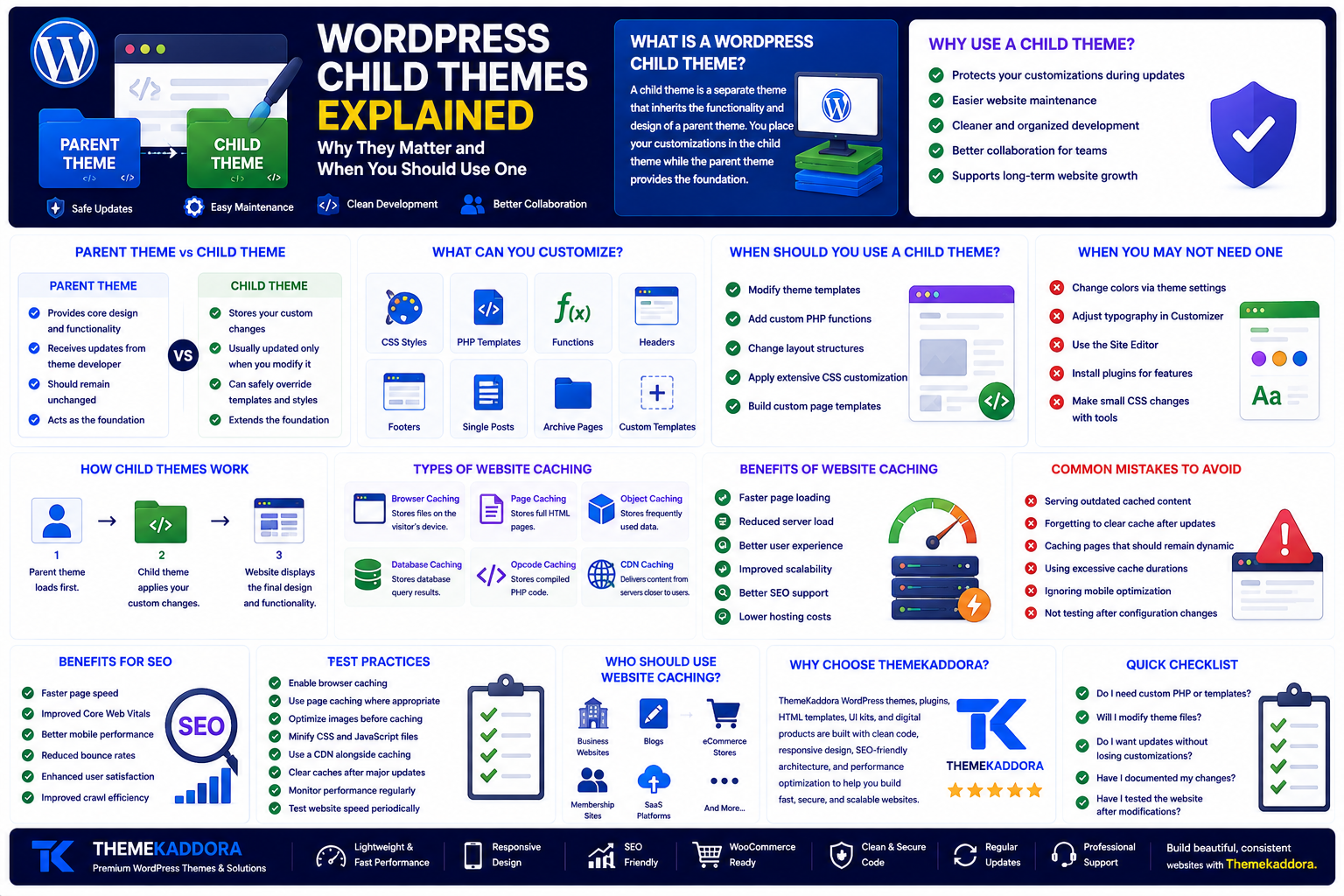
A child theme is a separate WordPress theme that inherits the functionality and design of another theme, known as the parent theme.
Instead of modifying the parent theme directly, you place your customizations inside the child theme.
WordPress loads the parent theme first and then applies any changes from the child theme.
This means you can safely customize your website while continuing to receive updates for the parent theme.
Parent Theme vs Child Theme
Parent Theme:
Provides the core design and functionality
Receives updates from the theme developer
Should remain unchanged
Acts as the foundation
Child Theme:
Stores your custom changes
Usually updated only when you modify it
Can safely override templates and styles
Extends the foundation
This separation makes website maintenance much easier.
Why Use a Child Theme?
Safe Theme Updates
The biggest benefit is protecting your customizations.
Without a child theme, updating the parent theme may erase custom code and design changes.
With a child theme, updates can be installed without losing your work.
Easier Maintenance
Keeping custom code separate from the parent theme makes your website easier to manage.
Developers can quickly identify what has been customized without searching through the original theme files.
Cleaner Development
A child theme keeps modifications organized.
Instead of changing multiple core files, you only customize the files that need adjustment.
Better Collaboration
If multiple developers work on the same project, a child theme creates a cleaner workflow and reduces the risk of accidental changes to the parent theme.
What Can You Customize?
A child theme allows you to customize many parts of your website, including:
CSS styles
PHP template files
Functions
Headers
Footers
Single post layouts
Archive pages
Custom page templates
You only need to override the files you want to change.
When Should You Use a Child Theme?
A child theme is recommended when you plan to:
Modify theme templates
Add custom PHP functions
Change layout structures
Apply extensive CSS customization
Build custom page templates
These changes are easier to maintain when separated from the parent theme.
When You May Not Need a Child Theme
Not every website requires one.
You may not need a child theme if you only:
Change colors using theme settings
Adjust typography through the Customizer
Use the Site Editor
Install plugins for additional features
Make small CSS changes using built-in customization tools
Modern WordPress themes often include extensive customization options that reduce the need for a child theme.
Child Themes and WordPress Updates
Keeping themes updated is essential for:
Security
Performance
Compatibility
Bug fixes
A child theme allows you to install updates confidently while preserving your customizations.
This makes long-term maintenance much simpler.
Best Practices for Child Themes
Follow these recommendations:
Keep the parent theme updated.
Only override files that require changes.
Document custom code.
Remove unused customizations.
Test updates before deploying them to a live website.
Use version control when possible.
These practices improve reliability and reduce maintenance issues.
Common Mistakes to Avoid
Avoid these common problems:
Editing the parent theme directly
Copying unnecessary template files
Overriding too many files
Ignoring documentation
Forgetting to test updates
Leaving unused code inside the child theme
Keeping the child theme simple makes it easier to manage.
Child Themes and Modern WordPress
With the introduction of the Block Editor, Global Styles, and Full Site Editing, many visual customizations can now be handled without editing theme files.
However, child themes remain valuable for advanced development tasks, particularly when working with custom PHP, template overrides, or unique functionality.
They continue to be an important part of the WordPress development workflow.
How a Good Parent Theme Helps
A well-built parent theme reduces the amount of customization required.
Look for themes that provide:
Flexible layouts
Responsive design
SEO-friendly code
Global style controls
WooCommerce compatibility
Frequent updates
Clean documentation
A quality parent theme makes child theme development easier and more efficient.
Why Choose Themekaddora?
Themekaddora WordPress themes are built with clean, maintainable code that supports safe customization and long-term growth.
Our themes include:
Lightweight architecture
Responsive layouts
SEO-friendly code
WooCommerce compatibility
Modern templates
Flexible customization options
Cross-browser compatibility
Regular updates
Professional support
Whether you customize through built-in settings or create a child theme for advanced development, Themekaddora provides a reliable foundation.
WordPress Child Theme Checklist
Before creating a child theme, ask yourself:
✅ Do I need custom PHP or template changes?
✅ Will I modify theme files?
✅ Do I want updates without losing customizations?
✅ Have I documented my changes?
✅ Have I tested the website after modifications?
Related Reading
Continue exploring:
How to Choose a WordPress Theme
WordPress Design Systems Explained
The WordPress Plugin Ecosystem Explained
WordPress Website Audit
Website Planning 101
These guides provide a complete understanding of building, customizing, and maintaining professional WordPress websites.
Conclusion
A WordPress child theme is one of the safest ways to customize a website without sacrificing future updates.
By separating your custom code from the parent theme, you create a cleaner, more maintainable, and more scalable website.
While modern WordPress offers many built-in customization tools, child themes remain an essential technique for developers and businesses that require deeper control over their websites.
Starting with a well-built parent theme like those from Themekaddora makes customization simpler today while ensuring your website remains easy to maintain in the future.
Frequently Asked Questions (FAQs)
What is a WordPress child theme?
A WordPress child theme is a separate theme that inherits the functionality and design of a parent theme while allowing safe customizations.
Will updating the parent theme delete my changes?
No. If your customizations are stored in a child theme, updating the parent theme will not overwrite them.
Do beginners need a child theme?
Not always. If you're only using built-in customization options, a child theme may not be necessary. It becomes more useful for advanced modifications.
Can I use a child theme with any WordPress theme?
Most well-coded WordPress themes support child themes, although it's always a good idea to review the theme documentation.
Why choose Themekaddora?
Themekaddora themes provide clean code, responsive layouts, SEO-friendly architecture, flexible customization, WooCommerce compatibility, regular updates, and professional support, making them an excellent foundation for both standard and child theme development.
Comments (0)