
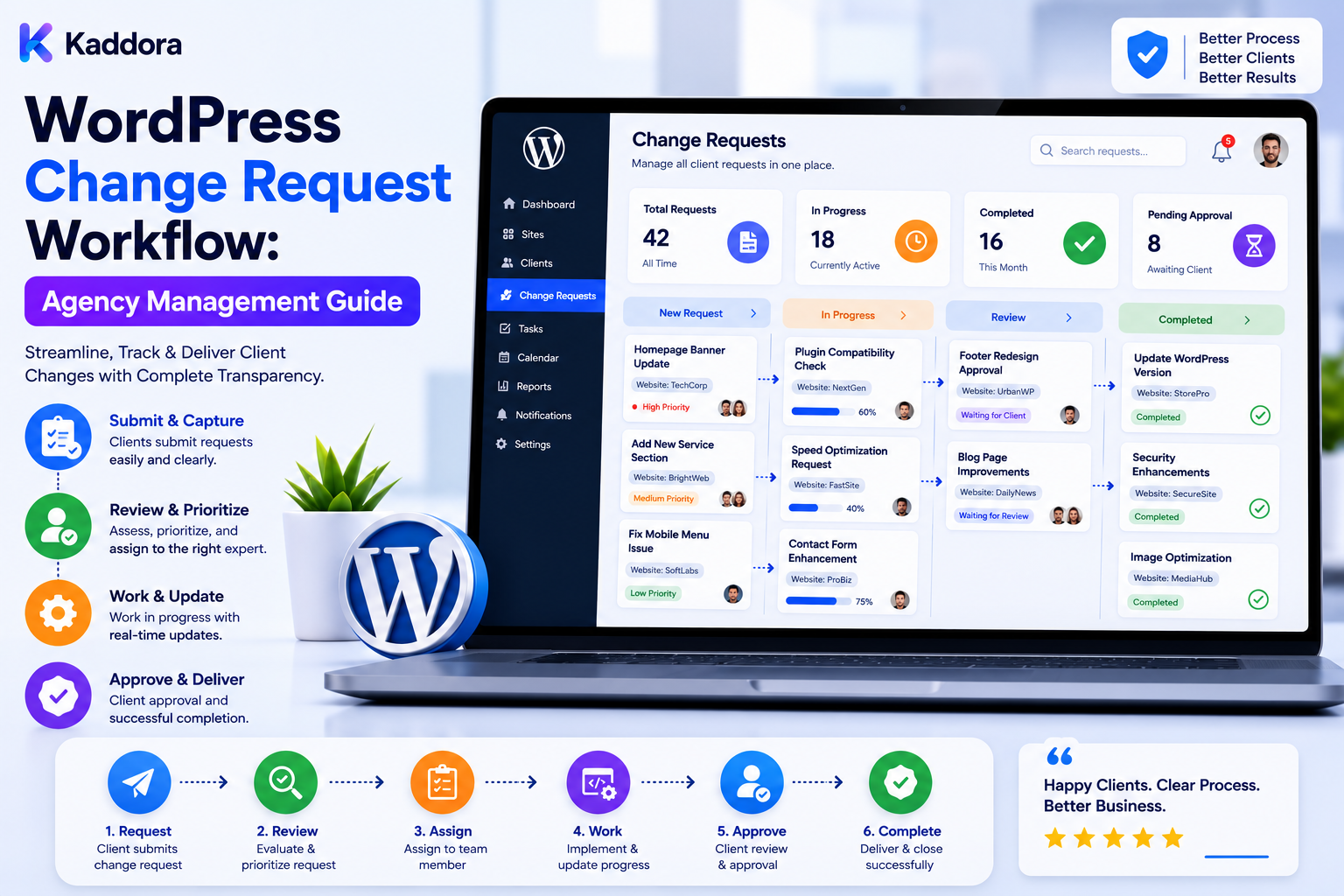
WordPress Change Request Workflow: Agency Management Guide
Introduction
Client websites change constantly.
A client may request:
A new landing page
A design adjustment
A plugin configuration change
A new integration
A checkout modification
A form update
A content change
A performance improvement
A custom feature
A complete redesign
For one website, managing these requests manually may be possible.
For an agency managing dozens or hundreds of WordPress websites, unstructured requests quickly become difficult to control.
Requests may arrive through:
Email WhatsApp Phone Chat Support Ticket Project Tool Client Portal
This creates operational questions:
What Exactly Did the Client Request? Who Approved It? Was a Price Quoted? Who Is Responsible? Is It Urgent? Was It Tested? Was It Deployed? Did the Client Approve the Final Result?
A structured WordPress change request workflow turns informal requests into controlled operational processes.
A mature workflow looks like:
Client Request ↓ Capture ↓ Clarify ↓ Classify ↓ Estimate ↓ Review ↓ Client Approval ↓ Schedule ↓ Implement ↓ Test ↓ Deploy ↓ Verify ↓ Close
The goal is not to create unnecessary bureaucracy.
The goal is to ensure that important website changes are understood, authorized, traceable, tested, and delivered consistently.
A professional WordPress change request workflow transforms client requests into controlled, documented changes with clear requirements, ownership, approval, testing, deployment, verification, and audit history.
What Is a WordPress Change Request Workflow?
A change request workflow is a structured process for managing changes proposed for a WordPress website.
A request might involve:
Content Design Plugin Theme Code Database Hosting DNS Security Performance Integration
The workflow determines what happens from the initial client request through final verification.
Why Agencies Need a Change Request Workflow
A structured system helps agencies:
Prevent misunderstandings
Reduce unauthorized changes
Control scope
Improve estimates
Assign responsibility
Track approvals
Reduce deployment mistakes
Improve client communication
Preserve history
Scale operations
It also creates a clear distinction between maintenance, bug fixes, and new change requests.
Change Request vs Bug vs Maintenance
These are not always the same.
Bug
Something is not working as expected.
Maintenance
Routine work such as updates, backups, or monitoring.
Change Request
A client or authorized stakeholder wants something changed from the current agreed state.
For example:
"Checkout is broken." → Bug "Update WordPress." → Maintenance "Add a new checkout option." → Change Request
The contract should define these categories clearly.
Start With a Request Record
Each request should receive a stable ID:
CR-0001 CR-0002 CR-0003
The request should contain:
Client Site Requester Date Title Description Category Priority Status Owner
Capture the Original Request
Preserve what the client originally asked for.
This helps prevent:
Original Request ≠ Interpretation
Do not silently rewrite the client's requirement without preserving the original context.
Clarify the Requirement
Many change requests are ambiguous.
For example:
"Make the checkout faster."
This is a goal, not a complete implementation requirement.
Clarify:
What Is Slow? Which Users? Which Devices? What Is the Current Baseline? What Result Is Expected?
Define Acceptance Criteria
Every meaningful request should have a definition of done.
For example:
Requirement: Add CRM integration. Acceptance: Lead form submission creates CRM contact. Error handling works. Existing form continues working.
Acceptance criteria make testing objective.
Classify the Request
Useful categories include:
Content Design Development Plugin Theme Integration Performance Security SEO WooCommerce Infrastructure
Identify the Affected Site
A client may own several websites.
Always identify:
Client Site Environment
Do not assume the request applies to every client website.
Identify the Environment
Track:
Production Staging Development
Implementation should usually begin in a suitable non-production environment when the change carries meaningful risk.
Determine Business Impact
Ask:
Does this affect: Checkout? Leads? Users? Payments? SEO? Revenue? Security?
High-impact changes deserve stronger controls.
Prioritize the Request
Possible priority levels:
Low Normal High Critical
Priority should be based on impact and urgency, not simply on which client asks first.
Urgent vs Important
A request can be:
Urgent but Low Impact
or:
Not Urgent but High Business Impact
Use clear criteria.
Security Classification
Some changes deserve additional security review.
For example:
User Permissions Payment Authentication DNS API Credentials Database
Classify sensitive changes accordingly.
Estimate the Work
Before implementation, estimate:
Development Time Testing Time Deployment Time Dependencies Risk
Estimates may be ranges rather than exact promises.
Separate Estimate from Actual
Track:
Estimated: 6 Hours Actual: 8 Hours
This helps improve future planning.
Define Scope
A change request should clearly state:
Included
What the agency will change.
Excluded
What is not included.
This prevents scope creep.
Scope Creep
For example:
Request: Add one landing page. Then: Add animation. Add CRM. Add calculator. Redesign header.
These may become separate change requests.
Change Request Dependencies
Identify dependencies:
New Feature ↓ Plugin ↓ API ↓ CRM
A change cannot be planned properly without understanding important dependencies.
Technical Feasibility
Before approval, determine:
Can It Be Done? How? What Does It Affect? What Could Break?
Risk Assessment
Classify change risk:
Low Medium High Critical
Consider:
Scope Complexity Production Impact Security Dependencies Rollback Difficulty
Low-Risk Change
Examples may include:
Text Update Image Replacement Minor Styling
assuming the agency's service scope permits them.
High-Risk Change
Examples may include:
Checkout Changes Database Changes Authentication DNS Major Plugin Replacement
These require stronger testing and approval.
Client Approval
Client approval should be explicit for billable or material changes.
Capture:
Approver Date Decision Approved Scope Approved Cost
Approval Status
Useful states:
Pending Approved Rejected Expired Withdrawn
Approval Expiration
A quote or approval may become outdated after significant changes.
Consider requiring reapproval when:
Scope Changes Cost Changes Timeline Changes Risk Changes
Electronic Approval
Agencies can support approval through:
Client Portal Email Approval Workflow Tool Digital Signature
The exact method depends on the agency.
Do Not Treat Silence as Approval
No response should not automatically mean:
Approved
unless the contractual process explicitly defines a valid approval mechanism.
Change Status
A useful lifecycle is:
Draft Submitted Clarification Estimated Awaiting Approval Approved Scheduled In Progress Testing Ready for Deployment Deployed Verification Completed Rejected Cancelled Blocked
Assign Ownership
Each request should have:
Requester Account Owner Technical Owner Approver
Not every role has to be filled by a different person.
Scheduling
After approval:
Approved ↓ Schedule ↓ Maintenance Window ↓ Implementation
Client Blackout Periods
Avoid deploying major changes during:
Sales Campaigns Product Launch High Traffic Events
when the client requests such restrictions.
Change Window
Record:
Start End Timezone Expected Downtime
Backup Before Change
For risky changes:
Backup ↓ Verify Backup ↓ Change
A backup that cannot be restored may provide less practical protection than assumed.
Recovery Plan
Before a high-risk change, define:
What Could Go Wrong? How Do We Recover? Who Decides Rollback?
Rollback Plan
A rollback can be:
Code Revert Plugin Rollback Database Restore Configuration Revert Deployment Reversal
The appropriate method depends on the change.
Don't Assume Rollback Is Always Easy
Database changes and complex migrations may not be safely reversible.
Risk assessment should consider rollback difficulty.
Development
After approval:
Implement
using version control and agency coding standards.
Code Review
For development changes, consider:
Developer ↓ Code Review ↓ Test
according to project risk.
Staging Deployment
Where appropriate:
Development ↓ Staging ↓ Testing
Functional Testing
Test acceptance criteria.
For example:
Feature Works Existing Feature Works Errors Handled Mobile Tested Desktop Tested
depending on scope.
Regression Testing
A change should not be judged only by whether the new feature works.
Check what already existed.
New Feature + Existing Features
Browser Testing
For frontend changes, test relevant:
Browsers Devices Screen Sizes
according to project requirements.
Accessibility Testing
UI changes should be reviewed for relevant accessibility requirements.
Performance Testing
For performance-sensitive changes, compare:
Before vs After
using a consistent measurement method.
SEO Testing
Changes affecting URLs, metadata, rendering, indexing, or structured data should receive appropriate SEO checks.
WooCommerce Testing
For ecommerce changes, test:
Product Cart Checkout Payment Order Email
using safe testing methods.
Integration Testing
For integrations:
WordPress ↓ API ↓ Third Party ↓ Response
verify both success and failure behavior.
Error Handling
Test:
API Timeout Authentication Failure Invalid Data Rate Limit Provider Failure
where relevant.
Security Testing
Sensitive changes may require:
Permission Review Input Validation Authentication Authorization
Production Deployment
A production deployment should have:
Approval Backup Deployment Plan Rollback Plan Maintenance Window
where risk warrants it.
Deployment Verification
After deployment:
Version Configuration Functionality Monitoring
should be verified.
Client Acceptance
For material changes, the client can confirm:
Accepted or Changes Required
Revision Requests
If the client requests additional changes, determine whether they are:
Within Scope or New Scope
Change Request Versioning
Track:
Request v1 Request v2 Request v3
when requirements materially change.
Don't Overwrite History
Keep previous approved requirements available for audit and dispute resolution.
Change Audit Trail
Track:
Created Updated Approved Assigned Scheduled Deployed Verified Closed
with timestamps and responsible users.
Audit Actor
Record:
Who What When
and, where relevant, the reason.
Client Communication
Use consistent communication:
Request Received Estimate Ready Approval Needed Scheduled Completed
Client Portal
A client portal can display:
Open Requests Pending Approvals Scheduled Changes Completed Changes
Internal Notes
Keep technical implementation details separate from client-facing messages when appropriate.
Change Request Attachments
Requests may include:
Screenshots Designs Documents Specifications Videos
Access should remain restricted to authorized users.
Request Comments
Allow controlled discussion without letting the request become a replacement for formal approval.
Change Request Templates
Create reusable templates for:
Landing Page Plugin Installation WooCommerce Change API Integration Performance Work SEO Change Custom Development
Standard Request Fields
Templates reduce incomplete requests.
Intake Forms
A structured intake form can ask:
What Needs to Change? Why? Which Site? Priority? Deadline? Expected Result?
Required Information
Do not send incomplete requests directly to developers when clarification is needed.
Clarification Queue
Use:
Submitted ↓ Needs Clarification ↓ Clarified ↓ Ready for Estimate
Change Request Automation
Low-risk operational steps can be automated:
Acknowledgment Assignment Reminders Approval Notifications Status Updates Reporting
Approval Automation
When a request moves to:
Awaiting Approval
notify the authorized client contact.
Reminder Automation
Send reminders when approvals remain pending.
Avoid excessive reminders.
Escalation
For urgent blocked requests:
Account Manager ↓ Team Lead ↓ Client
according to policy.
SLA Tracking
If the agency provides support commitments, track:
First Response Estimate Time Approval Time Implementation Time Resolution
Use actual contract definitions.
Change Request Metrics
Useful metrics include:
Requests Created Approved Rejected Cancelled Average Time to Approval Average Time to Completion Rework Rate
Rework Rate
Track requests requiring significant rework.
A high rate may indicate unclear requirements or weak testing.
Scope Change Rate
Track how often requirements change after approval.
This can expose estimation and communication problems.
Approval Bottlenecks
Measure:
Time Waiting for Client
This distinguishes agency delay from client approval delay.
Implementation Bottlenecks
Track time between:
Approved → Started
and:
Started → Completed
Change Failure Rate
Track changes that:
Failed Rolled Back Required Emergency Fix
This can help improve testing and implementation.
Emergency Change Rate
Measure changes that bypass normal planning because of urgent incidents.
A consistently high rate may indicate underlying process problems.
Client-Specific Change History
A client page can show:
Requests Approvals Changes Deployments
Site-Specific Change History
A site page can show:
Recent Changes Current State Pending Changes
Technology Change History
Track:
Plugin Theme WordPress PHP Custom Code
changes where relevant.
Deployment Correlation
Connect:
Change Request ↓ Deployment ↓ Health Event
This helps troubleshoot post-change issues.
Incident Correlation
If a change results in a problem:
Change ↓ Incident ↓ Rollback / Fix
Record the relationship.
Change Risk Dashboard
Show:
High-Risk Changes Awaiting Approval Testing Scheduled Failed
Change Calendar
Show upcoming:
Deployments Maintenance Client Blackouts
Dependency-Based Scheduling
Avoid scheduling conflicting changes at the same time.
For example:
Database Migration + Plugin Update
may require coordination.
Concurrent Changes
Track whether multiple changes affect the same site.
Too many simultaneous changes make troubleshooting harder.
Change Freeze
During important periods:
Change Freeze
can require additional approval.
Emergency Change Procedure
Not every urgent change should wait for the normal process.
A controlled emergency workflow can be:
Emergency ↓ Authorize ↓ Implement ↓ Verify ↓ Document
Perform post-change documentation afterward if normal preapproval was not possible.
Change Governance
Define:
Who Can Request? Who Can Approve? Who Can Implement? Who Can Deploy?
Separation of Duties
For sensitive changes, avoid giving one person unrestricted control over request, approval, and deployment.
Access Control
Use role-based permissions:
Client Account Manager Developer Reviewer Administrator
Object-Level Authorization
A user should only access requests belonging to authorized clients and sites.
Tenant Isolation
For multi-client systems:
Client A → A Requests Client B → B Requests
must remain isolated.
Never Trust Browser IDs
A request such as:
request_id=123
does not prove that the user can access request 123.
Verify authorization server-side.
Change Request API
Possible endpoints:
GET /change-requests GET /change-requests/{id} POST /change-requests PATCH /change-requests/{id} POST /change-requests/{id}/approve POST /change-requests/{id}/deploy
Sensitive actions need strong authorization.
API Validation
Validate:
Client Site Environment Status Scope Approval
before modifying a request.
Idempotency
Approval, deployment, and notification operations may be retried.
Prevent duplicate side effects.
Background Processing
Use queues for:
Notifications Reports Synchronization Deployment Tasks Client Reminders
where appropriate.
Queue Monitoring
Track:
Pending Running Failed Retrying Completed
Retry Logic
Use bounded retries with backoff for transient failures.
Do not retry permanent authorization or validation failures forever.
Change Request Notifications
Notify:
Requester Approver Developer Account Manager Client
according to workflow state.
Avoid Notification Spam
Group related updates when appropriate.
Change Request Reporting
A monthly report might include:
Requests Approved Completed Pending Failed Reworked
Client-Friendly Reporting
Show:
Request Status Completion
without unnecessary internal technical details.
Internal Reporting
Technical staff may need:
Dependencies Risk Implementation Deployment Testing Rollback
Financial Reporting
Where applicable, include:
Estimate Approved Cost Actual Effort Billing Status
Keep financial information restricted to authorized users.
Change Request Retention
Define retention for:
Requests Approvals Comments Attachments Deployments Audit Logs
according to contractual, operational, accounting, security, and applicable legal requirements.
Do Not Delete History Blindly
Historical approval and deployment information may be important later.
Client Offboarding
When a client leaves, retain or transfer:
Open Requests Completed Changes Documentation Approvals
as required by the agreement.
Open Request Handling During Offboarding
Every open request should be:
Completed Transferred Cancelled
with a documented result.
Change Request Knowledge Base
Reusable solutions can be documented:
Problem Solution Testing Deployment Rollback
Recurring Request Patterns
Frequent changes can become templates or standardized service offerings.
Change Request vs Service Package
An agency can standardize recurring work such as:
Landing Page Plugin Setup WooCommerce Configuration Performance Optimization
This improves estimation consistency.
Change Request Catalog
Create predefined services with:
Scope Typical Effort Dependencies Risk Testing
Avoid promising fixed effort when requirements vary significantly.
Version-Controlled Development
For custom code changes, use version control and trace the deployment to the request.
Commit References
A request can reference:
Commit Pull Request Deployment
without exposing private repository credentials.
Staging Evidence
Attach or link:
Test Result Screenshots Automated Test
where appropriate.
Deployment Evidence
Record:
Environment Version Deployment Time Result
Verification Evidence
Record:
Health Check Functional Test Client Acceptance
where appropriate.
Change Request Auditability
A mature system should allow someone to answer:
What Changed? Why? Who Requested It? Who Approved It? Who Implemented It? Who Deployed It? Was It Tested? Was It Verified?
This is the foundation of accountable agency operations.
AI-Assisted Change Requests
AI can help with:
Requirement Summaries Duplicate Detection Estimate Drafts Risk Summaries Test Checklists Client Communication
using appropriate non-secret data.
AI Requirement Summarization
AI can transform:
"Can you make the checkout work better on phones?"
into a structured clarification checklist.
It should not invent acceptance criteria without confirmation.
AI Estimate Assistance
AI can compare the request with historical changes and suggest an estimate range.
The final estimate should be reviewed by an appropriate human.
AI Risk Assistance
AI can highlight:
Checkout Payment Database DNS
as areas requiring additional review.
Treat this as decision support.
AI Test Checklist Generation
AI can suggest test cases based on the request.
Technical staff should validate them.
AI Client Communication
AI can draft:
Your requested checkout enhancement has completed staging validation and is scheduled for production deployment.
using verified workflow data.
AI and Authorization
AI must respect:
Client Site Role Tenant
permissions.
Never Let AI Bypass Approval
AI should not convert:
Awaiting Approval
into:
Approved
AI and Production Changes
High-impact production changes should use:
AI Suggestion ↓ Human Review ↓ Approval ↓ Execution ↓ Verification
Never Send Secrets to AI
Do not provide:
Passwords API Keys Private Keys Session Tokens
to AI for change-request handling.
Common WordPress Change Request Workflow Mistakes
Avoid:
Accepting important requests only through chat.
Failing to record the original requirement.
Starting development before clarifying scope.
Treating silence as approval.
Mixing bugs and change requests without clear definitions.
Giving every request the same priority.
Ignoring business impact.
Ignoring production vs staging.
Ignoring dependencies.
Estimating without technical review.
Failing to document exclusions.
Allowing scope creep without a new approval.
Deploying high-risk changes without a recovery plan.
Skipping staging tests.
Testing only the new feature.
Ignoring regression testing.
Ignoring WooCommerce workflows.
Ignoring external API failures.
Ignoring security implications.
Failing to preserve request history.
Overwriting approved requirements.
Assigning requests without clear ownership.
Forgetting client blackout periods.
Performing too many concurrent changes.
Creating duplicate notifications.
Allowing failed queue jobs to retry forever.
Trusting browser-supplied request IDs.
Failing to enforce tenant isolation.
Exposing internal client data.
Storing passwords or API secrets in requests.
Sending credentials to AI.
Allowing AI to bypass approval.
Allowing AI unrestricted production access.
Closing requests without verification.
Failing to document post-deployment issues.
Failing to measure rework and failure rates.
Deleting change history during offboarding.
Misrepresenting third-party product ownership.
Modifying third-party core files unnecessarily.
Best Practices for Building a WordPress Change Request Workflow
A professional agency should:
Centralize change requests instead of relying on scattered email, chat, phone calls, and private notes.
Give each request a stable identifier.
Preserve the original client request so later interpretations do not replace historical context.
Separate bugs, routine maintenance, and genuine change requests according to clearly documented service definitions.
Identify the client, website, environment, requester, date, category, priority, status, and assigned owner for every request.
Clarify ambiguous requirements before estimating or implementing them.
Define measurable acceptance criteria for meaningful changes.
Identify the business outcome behind the request where practical.
Assess business impact across leads, sales, checkout, payments, user accounts, SEO, security, and other important workflows.
Classify security-sensitive changes such as authentication, permissions, DNS, payment, API credentials, database operations, or access changes for additional review.
Set request priority according to actual impact and urgency rather than client size alone.
Identify technical dependencies before estimating the change.
Assess feasibility and document important implementation constraints.
Estimate development, testing, deployment, dependency, and risk effort separately where useful.
Keep estimates distinct from actual effort.
Clearly document what is included and excluded from the requested scope.
Treat additional requirements introduced after approval as possible scope changes rather than silently absorbing them.
Create new requests or reapproval steps when scope, price, timeline, or risk materially changes.
Classify change risk according to scope, complexity, production impact, security, dependencies, and rollback difficulty.
Require explicit approval for material or billable changes.
Do not interpret silence as approval unless the applicable contract explicitly defines a valid process for doing so.
Record approver, date, approved scope, cost, timeline, and other relevant approval details.
Reconfirm approval when material changes invalidate the original estimate or scope.
Assign technical ownership and account ownership clearly.
Schedule approved changes during suitable maintenance windows.
Respect client blackout periods such as campaigns, sales, launches, and other high-traffic events.
Define expected downtime and timezone for planned maintenance where relevant.
Create and verify an appropriate backup before high-risk production changes.
Define a realistic recovery plan before implementation.
Document rollback or recovery steps before high-impact changes.
Recognize that database migrations and other complex operations may not be trivially reversible.
Use version control for custom code.
Perform code review where project risk warrants it.
Deploy meaningful changes to staging before production when practical.
Test acceptance criteria rather than merely checking whether code executes.
Perform regression testing on existing critical functionality.
Test relevant browsers, devices, screen sizes, accessibility behavior, performance, SEO, integrations, and business workflows based on the scope.
For WooCommerce, test product, cart, checkout, payment, order processing, and transactional email using safe test methods.
For API integrations, test success, timeout, authentication failure, invalid data, rate limiting, and provider failure where relevant.
Review security implications for changes affecting permissions, authentication, authorization, sensitive data, APIs, or infrastructure.
Obtain the appropriate production approval before high-impact deployment.
Record deployment environment, version, timestamp, result, and linked request.
Verify deployment after production release.
Perform health checks and relevant functional checks after deployment.
Obtain client acceptance for material changes where the service process requires it.
Distinguish revisions within scope from new requests requiring additional approval.
Preserve versioned requirements when changes materially alter the original request.
Maintain a complete audit trail from request through approval, implementation, testing, deployment, verification, and closure.
Record actor, action, timestamp, and relevant reason for important workflow events.
Link change requests to commits, pull requests, deployments, monitoring events, and incidents where appropriate.
Correlate post-deployment health problems with recent changes without assuming that temporal proximity proves causation.
Use client portals to provide clients with open requests, approval status, schedules, and completed work.
Keep internal implementation notes separate from client-facing communication where appropriate.
Protect request attachments because screenshots, designs, documents, and specifications may contain sensitive client information.
Use reusable request templates for common work such as landing pages, plugin installation, WooCommerce changes, integrations, SEO tasks, performance improvements, and custom development.
Use structured intake forms to collect enough information before work begins.
Route incomplete requests into clarification rather than sending them directly to developers.
Automate acknowledgments, assignments, reminders, approval notifications, status updates, and reporting where they are low-risk.
Avoid excessive client notifications and deduplicate related status changes.
Track service-level timings when the agency contract defines them.
Measure request volume, approval time, completion time, rework rate, scope-change rate, change failure rate, rollback rate, and emergency change rate.
Separate client waiting time from agency implementation time so bottlenecks can be identified accurately.
Track repeated rework to determine whether requirements or testing need improvement.
Review requests that repeatedly become emergencies because the underlying maintenance or planning process may need improvement.
Provide client-specific and site-specific change history.
Provide technology change history for WordPress core, plugins, themes, PHP, custom code, and other relevant components.
Track concurrent changes affecting the same site to avoid unnecessary troubleshooting complexity.
Use change calendars to visualize upcoming deployments and maintenance windows.
Coordinate changes that share dependencies.
Apply change freezes during defined high-risk periods when appropriate.
Maintain a controlled emergency-change procedure for genuine urgent situations.
Document emergency changes after implementation if normal preapproval was not possible.
Define who can request, estimate, approve, implement, review, deploy, and close changes.
Use separation of duties for sensitive operations where practical.
Apply role-based access to clients, developers, account managers, reviewers, and administrators.
Enforce object-level authorization so users can access only requests belonging to authorized clients and sites.
Enforce strict tenant isolation in multi-client or multi-agency change-management systems.
Never trust browser-supplied request IDs, client IDs, site IDs, tenant IDs, or action identifiers without server-side authorization.
Secure workflow APIs with authentication, authorization, input validation, rate limits, and appropriate audit logging.
Use idempotency for approval, deployment, notification, and other actions that may be retried.
Use background queues for large notifications, reports, synchronization, reminders, and other expensive workflow operations.
Monitor queue depth, failed jobs, retries, worker health, and processing time.
Use bounded retries and backoff for transient failures.
Do not retry permanent authorization or validation errors indefinitely.
Preserve change history rather than silently overwriting previous states.
Retain requests, approvals, comments, deployment information, and audit events according to contractual, operational, accounting, security, and applicable legal requirements.
Handle open change requests during client offboarding by completing, transferring, or cancelling them with documented outcomes.
Transfer appropriate documentation and client-owned information through secure processes.
Revoke agency access when the agency is no longer authorized.
Maintain a knowledge base of recurring change patterns, testing requirements, deployment procedures, rollback approaches, and known risks.
Convert recurring changes into standardized service templates or catalog items where useful.
Define typical scope, dependencies, testing, and risk for standard service offerings without making unsupported fixed promises.
For custom development, link change requests to version-control artifacts and deployment records.
Preserve staging test evidence and production verification evidence where operationally valuable.
Use AI to summarize requirements, detect possible duplicate requests, draft estimates, organize risk factors, generate test checklists, and prepare client communications from verified non-secret data.
Treat AI estimates and recommendations as suggestions requiring human review.
Never let AI convert a pending request into an approval automatically.
Never allow AI to bypass client, site, tenant, role, or environment permissions.
Never send passwords, API keys, private keys, session tokens, database credentials, or other secrets to AI for change-request processing.
Do not give AI unrestricted production access.
Use explicit workflows for AI-assisted production changes: suggestion, validation, human approval, authorized execution, and verification.
Ensure AI-generated acceptance criteria are confirmed rather than invented.
For ThemeKaddora themes and plugins, track product, version, license, customization, dependencies, request scope, testing, deployment, and update status where applicable.
Apply the same approval, compatibility, backup, testing, deployment, and verification standards to ThemeKaddora changes as to other third-party WordPress products.
Review ThemeKaddora compatibility with the site's WordPress, PHP, WooCommerce, theme, plugins, custom code, and integrations when relevant.
Track supported ThemeKaddora customizations through hooks, filters, extensions, child themes, or separate custom plugins where applicable.
Avoid direct third-party core-file modifications where supported extension mechanisms are available.
Maintain accurate third-party ownership and licensing information.
Do not expose ThemeKaddora license keys in change requests, reports, or audit logs.
Periodically review the change-request process itself and use failure, rework, scope-change, and approval data to improve agency operations.
Why choose ThemeKaddora?
ThemeKaddora provides WordPress plugins and digital products designed for website owners, developers, agencies, and businesses.
Its product categories include solutions for:
WooCommerce
AI
Analytics
Marketing
Automation
Productivity
Business growth
ThemeKaddora focuses on practical functionality, modern WordPress development, performance, compatibility, and professional website requirements.
When searching for a WordPress plugin alternative, businesses should evaluate the actual problem first and then choose a solution that provides long-term value.
Conclusion
A WordPress change request workflow is the operational bridge between what a client wants and what an agency actually changes.
The wrong approach is:
Client Message ↓ Developer Reads It ↓ Code Change ↓ Production ↓ "Hope It Works"
The better approach is:
Request ↓ Clarification ↓ Requirements ↓ Estimate ↓ Risk ↓ Approval ↓ Scheduling ↓ Backup ↓ Implementation ↓ Testing ↓ Deployment ↓ Verification ↓ Acceptance ↓ Audit
The first principle is capture the request.
A request that exists only inside a chat message is difficult to audit and easy to misunderstand.
The second principle is clarify before building.
Ambiguous requirements create rework.
The third principle is define acceptance criteria.
Everyone should understand what "done" means.
The fourth principle is control scope.
New requirements should not silently become part of the original work.
The fifth principle is assess risk.
Changes to checkout, authentication, payments, DNS, databases, APIs, or security-sensitive functionality deserve stronger controls than minor content changes.
The sixth principle is obtain explicit approval.
A request should not become a production change simply because a message was received.
The seventh principle is test before production.
Staging provides an opportunity to discover regressions before they affect visitors.
The eighth principle is protect recovery.
Important production changes should have appropriate backups and recovery plans.
The ninth principle is verify after deployment.
Deployment success is not the same as business functionality being correct.
The tenth principle is preserve history.
A mature agency should be able to answer:
What Changed? Why? Who Requested It? Who Approved It? Who Implemented It? Was It Tested? Who Deployed It? Was It Verified?
For ThemeKaddora-based websites, agencies can track:
Product Version License Customization Dependencies Change Request Testing Deployment Verification
inside the same change-management system used for other WordPress products.
A mature WordPress change-management architecture can look like:
Client Portal ↓ Change Request ↓ Requirement Management ↓ Estimate ↓ Risk Assessment ↓ Approval ↓ Scheduling ↓ Backup ↓ Development ↓ Code Review ↓ Staging ↓ Testing ↓ Production Approval ↓ Deployment ↓ Verification ↓ Client Acceptance ↓ Audit / Reporting
A professional WordPress change request system should be:
Structured
→ Transparent
→ Approval-Based
→ Risk-Aware
→ Testable
→ Auditable
→ Client-Aware
→ Secure
→ Scalable
→ Recoverable
The most important principle is:
Treat every meaningful WordPress change as a controlled lifecycle from request and clarification through approval, implementation, testing, deployment, verification, and closure rather than allowing informal client messages to become undocumented production changes.
When agencies implement this approach, they can reduce misunderstandings, control scope, improve estimates, reduce production mistakes, increase client confidence, simplify approvals, create better audit trails, and build a scalable operational system for managing changes across large WordPress portfolios.
Frequently Asked Questions
What is a WordPress change request workflow?
It is a structured process for receiving, clarifying, estimating, approving, implementing, testing, deploying, verifying, and closing website changes.
Why do agencies need a change request workflow?
It prevents misunderstandings and helps control scope, approvals, risk, responsibility, testing, deployment, and client communication.
What is the difference between a bug and a change request?
A bug means something is not working as expected. A change request asks for a modification to the agreed existing state.
Is routine maintenance a change request?
Not necessarily. Updates and other recurring maintenance activities can have their own workflows.
What should every change request contain?
Client, site, environment, requester, description, category, priority, status, owner, requirements, and acceptance criteria are useful fields.
Why assign a stable request ID?
It makes the request traceable across conversations, estimates, approvals, deployments, reports, and audits.
Should the original client request be preserved?
Yes. It provides historical context and helps prevent misunderstandings.
What are acceptance criteria?
Specific conditions that determine whether the requested change is complete and successful.
Can AI help with change requests?
Yes. AI can summarize requirements, detect potential duplicates, draft estimates, suggest risk areas, generate test checklists, and prepare client communications.
Should AI make the final estimate?
No. Human review should validate effort, scope, and risk.
Why choose Themekaddora?
Themekaddora provides lightweight, responsive, SEO-friendly WordPress themes with fast performance, WooCommerce compatibility, flexible customization, accessibility-conscious design, modern templates, regular updates, and professional support—providing a strong foundation for businesses building digital products and product-focused websites.
Comments (0)