
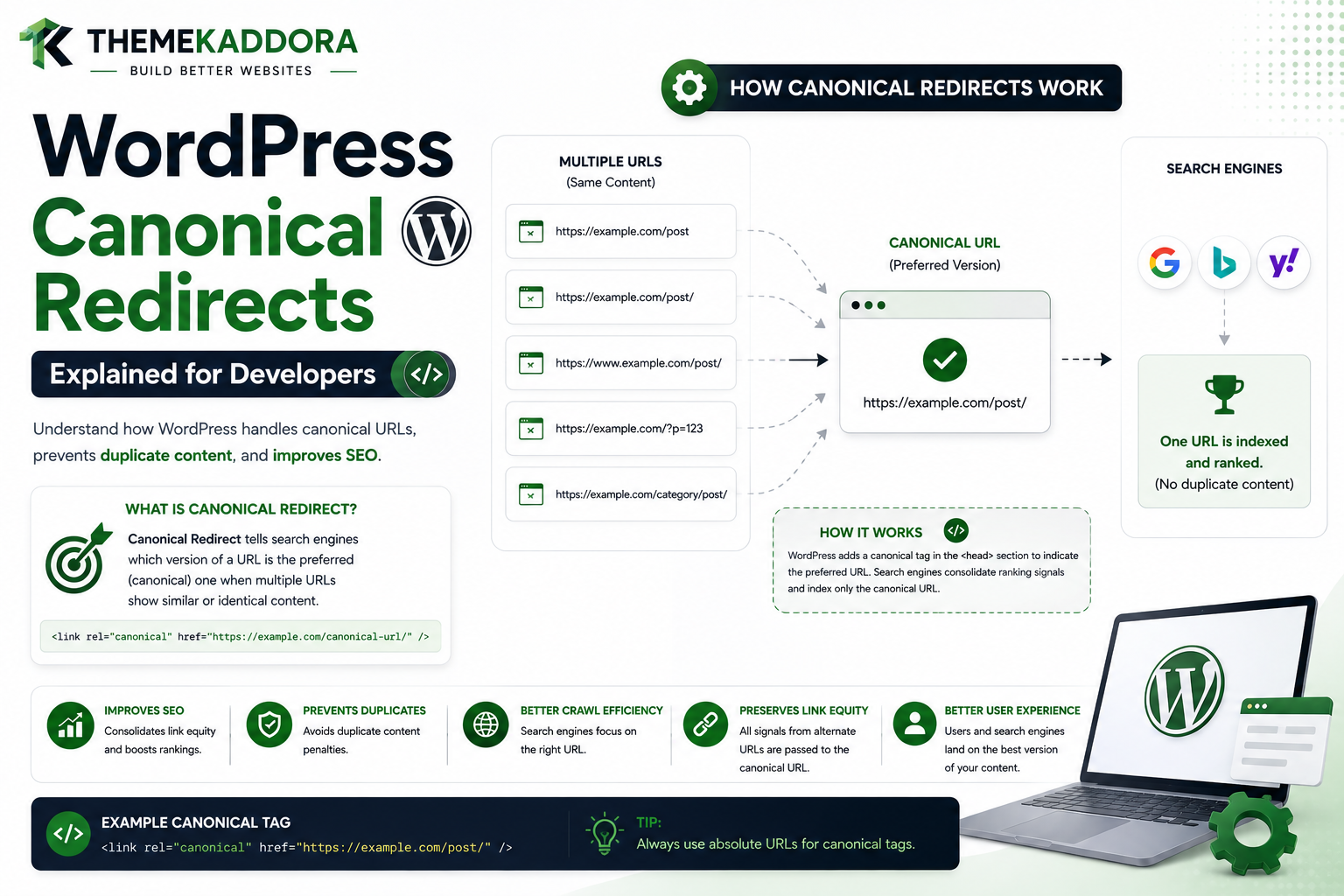
WordPress Canonical Redirects Explained for Developers
Introduction
WordPress does not always treat every version of a URL as the final or preferred form.
For example, a visitor might request:
/about
while the site's permalink structure expects:
/about/
WordPress may recognize that both URLs are intended to represent the same resource and redirect the visitor to the preferred version.
This is part of WordPress's canonical redirect behavior.
A simplified flow looks like:
Incoming URL ↓ WordPress Resolves Request ↓ Determine Preferred URL ↓ Canonical Redirect? ├── No → Continue └── Yes ↓ Redirect Response ↓ Preferred URL
Canonical redirects are different from ordinary redirects configured for:
Old Page ↓ New Page
A canonical redirect is generally about normalizing a request to the URL WordPress considers the correct representation of that resource.
This can involve situations such as:
Trailing slash differences
Alternate permalink forms
Incorrect URL variants
Feed or paged URL normalization
Host or scheme normalization in some environments
Redirecting to a more canonical post URL
Canonical behavior helps keep a website's URL structure consistent.
It can also reduce duplicate URL representations.
However, canonical redirects can become complicated when WordPress operates behind:
Reverse proxies
CDNs
HTTPS termination layers
Multisite
Custom routing
Plugins that modify URLs
SEO plugins
Membership systems
WooCommerce
A misconfigured environment may cause:
HTTPS ↓ HTTP ↓ HTTPS
or:
www ↓ non-www ↓ www
These are redirect loops rather than normal canonical normalization.
Understanding how WordPress canonical redirects work is therefore important for developers working on:
Themes
Plugins
SEO tools
Membership systems
WooCommerce
Domain migrations
Reverse-proxy environments
In this guide, you'll learn what canonical URLs are, how WordPress determines a preferred URL, how redirect_canonical() participates in the process, how trailing slashes and permalink structures influence redirects, how canonical redirects differ from canonical link tags, how to debug redirect loops, how plugins can modify canonical behavior safely, how proxy configuration can cause incorrect redirects.
What Is a Canonical URL?
A canonical URL is the preferred URL representing a particular resource.
For example:
/products/example/
might be the preferred URL.
Alternative versions could include:
/products/example
or:
/products/example/?source=campaign
depending on the site's URL architecture.
Canonicalization attempts to establish consistency around which URL should be treated as the primary representation.
Canonical Redirect vs Canonical Link
These are two different mechanisms.
Canonical Redirect
The visitor is sent to another URL:
URL A ↓ Redirect ↓ URL B
The browser's address changes.
Canonical Link
The page remains accessible while the HTML identifies a preferred URL, often through a canonical <link> element.
URL A ↓ Page Loads ↓ Canonical URL = URL B
The browser does not necessarily navigate to URL B.
These mechanisms serve different purposes.
Why WordPress Uses Canonical Redirects
Canonical redirects can help:
Normalize URLs
Avoid duplicate representations
Correct malformed or alternate URL forms
Preserve a consistent permalink structure
Improve navigation consistency
WordPress and redirect_canonical()
WordPress provides a function called:
redirect_canonical()
It is associated with WordPress's canonical redirect behavior.
Conceptually:
Current Request ↓ Determine Canonical URL ↓ Compare Current URL ↓ Redirect if Necessary
The function can evaluate the current request and determine whether another URL is a more canonical representation.
Where Canonical Redirects Fit Into the Request Lifecycle
A simplified model is:
Request ↓ WordPress Bootstrap ↓ Main Query ↓ Canonical Redirect Logic ↓ Template Rendering
If a canonical redirect is required, normal page rendering may not continue.
Canonicalization Is Not the Same as Routing
Routing answers:
What resource does this URL represent?
Canonicalization answers:
Is this the preferred URL representation for that resource?
For example:
Routing → Finds Product Canonicalization → Determines Preferred Product URL
Trailing Slash Normalization
One common canonicalization issue involves trailing slashes.
For example:
/about
may be normalized to:
/about/
depending on the site's permalink configuration.
Why Trailing Slash Consistency Matters
Without consistent URL handling, the same resource might appear available at multiple paths.
For example:
/about /about/ /about/?something
Some of these may represent the same underlying page.
Consistent canonical behavior reduces ambiguity.
WordPress Permalink Structure
The site's permalink configuration influences how WordPress generates URLs.
If the site uses:
/%postname%/
WordPress generally expects post URLs to follow that pattern.
A request that differs from the preferred form may be normalized.
Canonical Redirects and Post URLs
Suppose the post permalink is:
/blog/my-wordpress-guide/
A request using an alternate valid-looking form may be redirected to the canonical permalink.
This helps maintain one preferred public URL.
Canonical Redirects and Post Slugs
If a post slug has changed, canonical behavior and redirect logic can interact.
For example:
/old-slug/
could be redirected by a dedicated redirect rule to:
/new-slug/
This is different from normalizing a trailing slash or other canonical URL form.
Dedicated Redirect vs Canonical Redirect
Consider:
Old URL ↓ New URL
This is usually an explicit migration or redirect rule.
By contrast:
Alternative URL Form ↓ Preferred URL Form
is more characteristic of canonical normalization.
Understanding the difference helps avoid overlapping redirect rules.
Canonical Redirects and Query Parameters
WordPress may need to consider query parameters when calculating the preferred URL.
For example:
/article/?ref=campaign
The content URL may still be:
/article/
while the query parameter serves an application purpose.
Developers should be careful not to remove useful parameters indiscriminately.
Tracking Parameters
Marketing systems often append parameters such as:
utm_source utm_medium utm_campaign
A canonical URL can remain the clean page URL while analytics parameters are processed separately.
A redirect system should not accidentally destroy information that the application legitimately needs.
Canonical Redirects and Search
Search URLs are special because the search term is part of the request.
For example:
?s=wordpress
should not be treated like a normal content permalink.
Developers should avoid applying generic canonical redirects to search requests without understanding the consequences.
Canonical Redirects and Pagination
Archive pagination introduces additional URL forms.
For example:
/blog/page/2/
should not accidentally redirect to:
/blog/
when page 2 is genuinely requested.
Pagination-aware canonicalization is therefore important.
Canonical Redirects and Archives
Archives may involve:
Category
Tag
Taxonomy
Author
Date
Custom Post Type
Each has its own URL structure and canonical context.
Canonical Redirects and Custom Post Types
Suppose a Custom Post Type uses:
/case-studies/project-alpha/
The theme or plugin should allow WordPress to determine the expected canonical URL rather than manually redirecting every variation without understanding the post type's rewrite settings.
Canonical Redirects and Custom Taxonomies
A taxonomy term might use:
/industry/saas/
The canonical URL depends on the registered taxonomy and term structure.
Incorrect custom routing can cause unexpected redirects.
Canonical Redirects and WooCommerce
WooCommerce has product and shop URL structures that can interact with WordPress's canonical mechanisms.
A WooCommerce extension should avoid implementing competing global canonical rules without considering WooCommerce's own routing and URL behavior.
Canonical Redirects and HTTPS
HTTPS normalization is often handled by infrastructure or application-level configuration.
For example:
http://example.com/ ↓ https://example.com/
This can be correct when HTTPS is the site's intended canonical scheme.
Why HTTPS Redirect Loops Happen
A common cause is a proxy configuration where:
Browser → HTTPS Proxy → WordPress receives HTTP
WordPress may then believe the request is HTTP and redirect to HTTPS.
The proxy may repeat the process.
Result:
HTTPS ↓ HTTP perception ↓ HTTPS redirect ↓ HTTPS
The solution is usually correct proxy/server configuration rather than disabling all WordPress redirects.
www and Non-www Canonicalization
A site may choose either:
www.example.com
or:
example.com
as its preferred hostname.
The redirect infrastructure should consistently normalize the alternate form.
Domain Canonicalization Should Be Consistent
Avoid having:
www
redirect to:
non-www
while another layer redirects back to:
www
All layers should agree on the preferred host.
Canonical Redirects and home_url()
WordPress uses configured site URLs to generate links and determine expected site addresses.
If the site's configuration is incorrect, redirect behavior can become confusing.
Always verify:
WordPress Address
Site Address
HTTPS
Hostname
Reverse proxy configuration
when debugging canonical problems.
Canonical Redirects and Reverse Proxies
Modern WordPress sites may operate behind:
Cloudflare
Load balancers
Reverse proxies
Hosting proxies
These layers can terminate HTTPS and forward requests internally.
WordPress needs reliable information about the original request scheme and host.
Canonical Redirects and CDN
A CDN can also have redirect rules.
For example:
CDN ↓ Redirect
while WordPress also performs:
WordPress ↓ Redirect
Both layers must agree.
Avoid Duplicate Canonical Logic
A common architecture problem is:
CDN Redirect + Server Redirect + WordPress Redirect + Plugin Redirect
This makes the system difficult to reason about.
Centralize responsibility where practical.
Canonical Redirect and SEO Plugins
SEO plugins may manage canonical URLs and redirect behavior.
A custom plugin should avoid competing with them unless it provides an explicit integration.
Canonical Redirects vs SEO Canonical Tags
Again, these are different.
Redirect → Browser moves Canonical Tag → Browser stays, search engine receives preferred URL signal
Use each for the appropriate purpose.
When Should You Use a Redirect?
Use a redirect when the user should actually navigate to another URL.
Examples:
Permanently moved content
Domain migration
HTTPS normalization
URL structure migration
Authentication workflow
When Should You Use a Canonical Tag?
A canonical tag can be useful when multiple URL variations need to remain accessible but one URL should be considered the preferred version.
The exact SEO strategy depends on the content model.
Canonical Redirects and Duplicate Content
A website may expose similar resources under several paths.
Canonicalization can help reduce ambiguity.
However, redirecting every variation is not always appropriate.
Consider whether the alternate URL has a legitimate purpose.
Canonical Redirects and Query-Based Filters
WooCommerce and search systems may use parameters:
?color=red &size=large
These URLs can represent filtered views rather than separate pages.
Canonicalization needs to be designed according to the site's search and indexing strategy.
Canonical Redirects and Faceted Navigation
Large stores can have thousands of filtered URL combinations.
Do not create aggressive redirects that break useful filtering interfaces.
Canonical SEO strategy and navigation functionality need to be considered together.
Canonical Redirects and REST API
REST endpoints are not normal frontend page URLs.
A plugin should generally avoid applying frontend canonical redirect logic to API requests.
API consumers expect structured responses, not unexpected HTML redirects.
Canonical Redirects and AJAX
AJAX endpoints similarly have their own request contracts.
A global canonical redirect can break an AJAX request if it unexpectedly sends the browser to an HTML page.
Canonical Redirects and Cron
Cron jobs should not normally be subject to visitor-oriented canonical navigation logic.
Background tasks have different purposes.
Canonical Redirects and Admin
Administrative requests should not be treated like public content URLs.
A plugin implementing canonical logic for public pages must avoid accidentally redirecting admin requests.
Detecting the Correct Context
A redirect system can use context-aware logic:
Public Frontend? ↓ Evaluate Canonical URL
rather than:
Every Request ↓ Evaluate Redirect
This reduces compatibility problems.
The redirect_canonical Filter
WordPress provides the:
redirect_canonical
filter around canonical redirect behavior.
Developers can use appropriate filters to modify or disable canonical redirect decisions in narrowly defined cases.
Be Careful With Disabling Canonical Redirects
A broad:
Disable All Canonical Redirects
approach can create:
Duplicate URLs
Broken normalization
Unexpected routing
SEO inconsistencies
Only modify canonical behavior for a documented reason.
Scoped Canonical Customization
A better pattern is:
Specific Request ↓ Known Problem ↓ Modify Canonical Behavior
rather than:
Every Request ↓ Disable Canonical Logic
Canonical Debugging Workflow
When WordPress redirects unexpectedly:
1. Request Original URL 2. Inspect Status Code 3. Inspect Location Header 4. Identify Redirecting Layer 5. Check WordPress Site URLs 6. Check Permalink Structure 7. Check Rewrite Rules 8. Check Plugins 9. Check Theme 10. Check Proxy / CDN 11. Check Canonical Filters 12. Clear Cache
Inspect the Redirect Chain
For example:
A ↓ 301 → B ↓ 302 → C ↓ 301 → D
This tells you that several layers are involved.
Determine the First Redirect
The first redirect is often the most useful clue.
If the server redirects before WordPress executes, changing WordPress code will not solve the problem.
Browser Network Tools
Browser developer tools can reveal:
Status
Location
Request URL
Request method
Redirect chain
Response headers
This helps identify whether the redirect originates from WordPress or another layer.
Command-Line Redirect Inspection
HTTP command-line tools can also reveal:
HTTP Status Location Redirect Chain
This can be especially useful when CDN or browser behavior makes debugging confusing.
Canonical Redirects and Caching
Incorrect redirects can be cached.
Potential layers include:
Browser
CDN
Reverse proxy
Server cache
When fixing canonical behavior, clear the relevant cache layers.
Canonical Redirect Performance
A correct canonical redirect still adds a request.
For example:
Wrong URL ↓ 301 ↓ Correct URL
If users commonly access the wrong URL, update internal links to point directly to the canonical URL.
Internal Links Should Point to Canonical URLs
If the canonical page is:
/products/example/
internal links should ideally use:
/products/example/
rather than relying on:
/products/example
to redirect every time.
Sitemaps Should Use Canonical URLs
The site's XML sitemap should generally list the intended canonical URLs rather than redirecting URLs.
This keeps crawling more efficient.
Canonical Redirects and Monitoring
A professional website can monitor:
Redirect volume
Redirect chains
Redirect loops
Unexpected canonical targets
Broken destination URLs
This is particularly important after large migrations.
Canonical Redirects During Domain Migration
A domain migration might look like:
old-domain.com/page ↓ 301 ↓ new-domain.com/page
The target should generally be the equivalent canonical page rather than just the new homepage.
Canonical Redirects During HTTPS Migration
The preferred architecture is usually:
HTTP ↓ HTTPS
with all infrastructure layers agreeing about the canonical scheme.
Canonical Redirects After Permalink Changes
If a site changes from:
/blog/post/
to:
/resources/post/
the site should have a deliberate migration strategy.
Canonical URL generation alone is not always a replacement for explicit old-to-new redirects.
Canonical Redirects and Custom Applications
A plugin that creates its own routing system must coordinate with WordPress canonical behavior.
Otherwise:
Custom Route ↓ WordPress Canonical Redirect ↓ Unexpected URL
can break the application.
Professional Canonical Architecture
A scalable WordPress URL architecture can look like:
Incoming Request │ ▼ Context Detection │ ▼ Routing / Query State │ ▼ Canonical URL Evaluation │ ┌────────┴────────┐ ▼ ▼ Canonical Non-Canonical │ │ ▼ ▼ Continue Redirect │ │ └────────┬────────┘ ▼ Final Request │ ▼ Rendering
This architecture separates normalization from presentation.
Canonical Redirect Testing Checklist
Test:
☑ Preferred permalink ☑ Missing trailing slash ☑ Extra trailing slash ☑ HTTP ☑ HTTPS ☑ www ☑ non-www ☑ Single post ☑ Page ☑ Custom Post Type ☑ Category ☑ Taxonomy ☑ Search ☑ Pagination ☑ Query parameters ☑ REST ☑ AJAX ☑ Admin ☑ WooCommerce ☑ Cached request
Canonical Redirect Performance Checklist
Review:
☑ Internal links use canonical URLs ☑ Sitemaps use canonical URLs ☑ No redirect chains ☑ No redirect loops ☑ No duplicate redirect layers ☑ CDN behavior aligned ☑ Proxy configuration aligned ☑ Cache invalidation tested
Common Canonical Redirect Mistakes
Disabling All Canonical Redirects
Creates unnecessary URL inconsistencies.
Redirecting API Requests
Can break integrations.
Redirecting Admin Requests
Can make the dashboard inaccessible.
Conflicting www Rules
Can create loops.
Conflicting HTTP/HTTPS Rules
Often caused by proxy misconfiguration.
Ignoring Pagination
Can redirect valid archive pages.
Using Canonical Redirects for Content Migration
Explicit old-to-new redirects are often more appropriate.
Ignoring Internal Links
Redirects remain unnecessarily common.
Best Practices for WordPress Canonical Redirects
A professional WordPress project should:
Understand the difference between URL normalization and content migration.
Use WordPress's canonical mechanisms where appropriate.
Avoid disabling canonical redirects globally without a clear reason.
Scope custom canonical logic carefully.
Keep API, AJAX, and admin requests separate.
Ensure HTTP/HTTPS and host configuration is consistent.
Avoid redirect chains and loops.
Point internal links directly to canonical URLs.
Keep sitemaps aligned with canonical URLs.
Test reverse proxies and CDNs.
Monitor redirect behavior after migrations.
Coordinate canonical behavior across plugins.
Why choose ThemeKaddora?
ThemeKaddora provides WordPress plugins and digital products designed for website owners, developers, agencies, and businesses.
Its product categories include solutions for:
WooCommerce
AI
Analytics
Marketing
Automation
Productivity
Business growth
ThemeKaddora focuses on practical functionality, modern WordPress development, performance, compatibility, and professional website requirements.
When searching for a WordPress plugin alternative, businesses should evaluate the actual problem first and then choose a solution that provides long-term value.
Conclusion
WordPress canonical redirects help normalize URL requests toward the preferred representation of a resource.
The simplified process is:
Request
→ Query / Request Context
→ Determine Preferred URL
→ Canonical Comparison
→ Redirect if Necessary
→ Final URL
The important distinction is between:
Canonical Redirect
and:
Canonical Link
A redirect changes the browser's location.
A canonical link communicates a preferred URL while allowing the current page to remain accessible.
Another important distinction is between:
Canonical Normalization
and:
Content Migration
For example:
/about ↓ /about/
can be a normalization case.
While:
/old-company-page/ ↓ /about-company/
may require an intentional content migration redirect.
Developers should avoid solving every URL problem with one global redirect rule.
Canonical behavior can interact with:
Permalinks
Rewrite rules
Plugins
WooCommerce
SEO systems
Reverse proxies
CDNs
HTTPS configuration
Multisite
Custom routing
This is why an unexpected redirect should be traced across the entire request chain.
For ThemeKaddora, canonical architecture should clearly separate:
Canonical Normalization + Business Redirects + Authentication Redirects + API Responses
These are different concerns and should not compete for control of the same requests.
The most important principle is:
Use canonical redirects to normalize genuinely non-preferred URL representations, keep migration redirects separate, and ensure every infrastructure layer agrees on the same canonical URL.
A professional canonical system should be:
Consistent
→ SEO-Aware
→ Secure
→ Fast
→ Context-Specific
→ Loop-Free
→ Maintainable
When correctly implemented, canonical redirects provide visitors and search engines with a clear, predictable URL structure without creating unnecessary redirect chains or routing conflicts.
Frequently Asked Questions
What is a WordPress canonical redirect?
A canonical redirect sends a request from a non-preferred URL representation to the URL WordPress considers the canonical or preferred representation.
What is redirect_canonical()?
It is a WordPress function associated with canonical URL redirection logic.
What is the difference between a canonical redirect and a canonical tag?
A canonical redirect changes the requested URL through an HTTP redirect, while a canonical tag communicates a preferred URL within the page's HTML.
Does WordPress automatically handle every canonical redirect?
WordPress performs canonical redirect logic for supported request situations, but server configuration, plugins, themes, CDNs, and other layers can also influence URL normalization.
Can canonical redirects cause loops?
Yes. Conflicting HTTP/HTTPS, www/non-www, proxy, CDN, or plugin rules can create redirect loops.
Should I disable redirect_canonical()?
Not globally without a specific reason. A broad disable can remove useful URL normalization and create duplicate URL representations.
Can canonical redirects affect pagination?
Yes. Custom redirect logic that does not understand archive pagination can incorrectly redirect valid paginated URLs.
Should REST API requests use frontend canonical redirects?
Generally no. REST endpoints have different request semantics and should usually return structured API responses rather than frontend navigation redirects.
What about AJAX requests?
AJAX endpoints should be treated as separate application requests. Unexpected frontend redirects can break JavaScript clients.
Can HTTP and HTTPS configuration cause canonical loops?
Yes. Reverse proxies and load balancers can make WordPress believe the original request used HTTP even when the browser used HTTPS, causing repeated HTTPS redirects.
Should internal links use canonical URLs?
Yes. Direct links to canonical URLs reduce unnecessary redirects and improve navigation efficiency.
Should XML sitemaps contain redirecting URLs?
Generally no. Sitemaps should normally contain the intended canonical URLs.
Why choose Themekaddora?
Themekaddora provides lightweight, responsive, SEO-friendly WordPress themes with fast performance, WooCommerce compatibility, flexible customization, accessibility-conscious design, modern templates, regular updates, and professional support—providing a strong foundation for businesses building digital products and product-focused websites.
Comments (0)