
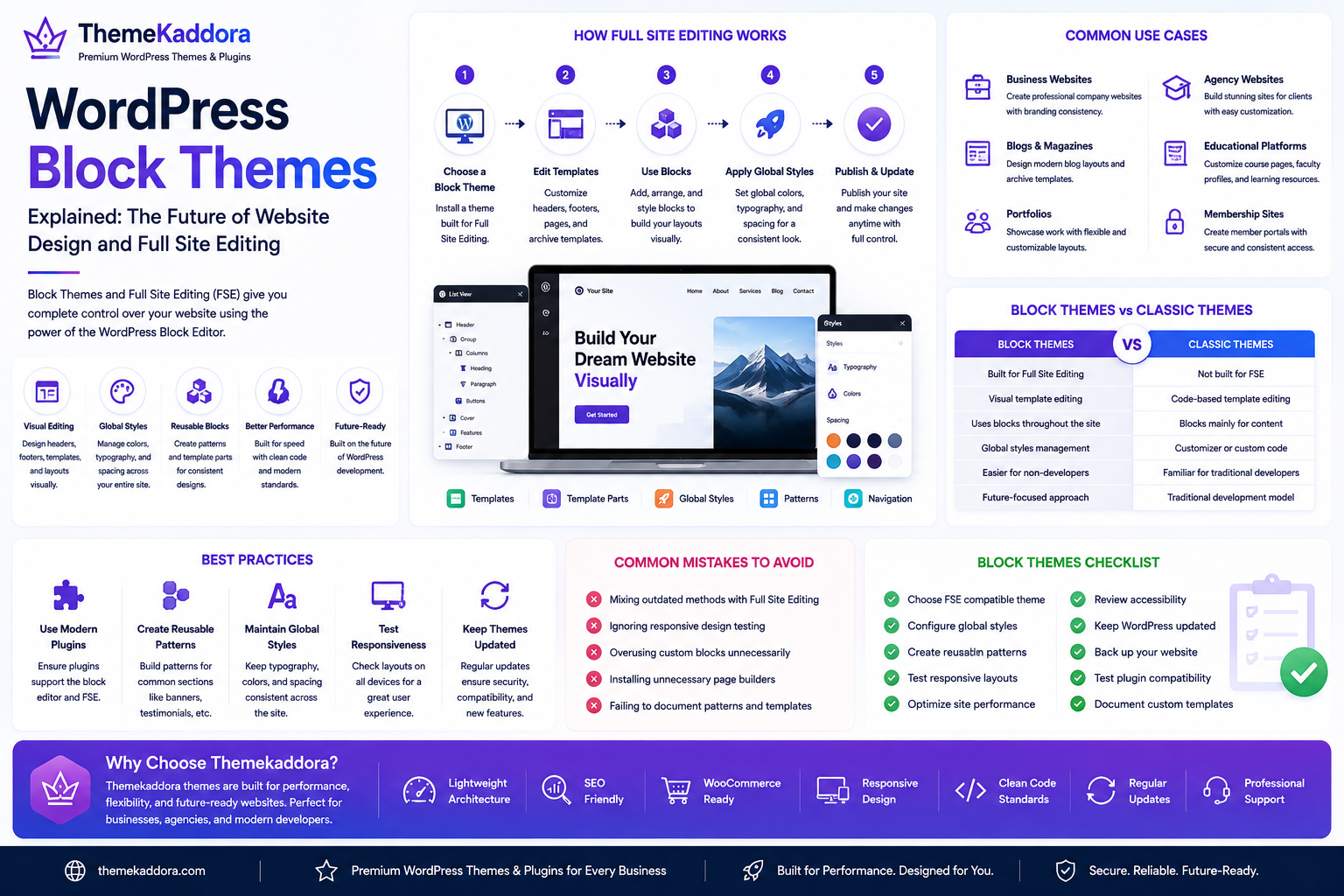
WordPress Block Themes Explained: The Future of Website Design and Full Site Editing
Introduction
WordPress has evolved from a simple blogging platform into a powerful website-building system. One of the biggest changes in recent years is the introduction of Block Themes and Full Site Editing (FSE), which give users greater control over every part of a website without relying heavily on custom code.
Unlike classic WordPress themes that use PHP template files for layouts, Block Themes are built around the WordPress Block Editor. This allows website owners to customize headers, footers, templates, navigation, and global styles through a visual editing experience.
For businesses, freelancers, agencies, and developers, Block Themes represent a modern approach to building flexible and maintainable websites.
In this guide, you'll learn what WordPress Block Themes are, how they work, their advantages, common use cases, limitations, and best practices.
What Are WordPress Block Themes?
A WordPress Block Theme is a theme designed to work with the WordPress Site Editor and Full Site Editing features.
Instead of depending primarily on PHP template files, Block Themes use HTML-based templates and reusable blocks to build website layouts.
Users can visually customize many parts of their website, including:
Headers
Footers
Homepage layouts
Blog templates
Archive pages
Single post templates
Navigation menus
Global typography
Color schemes
This makes website customization more accessible for users without advanced coding knowledge.
How Full Site Editing Works
Full Site Editing extends the Block Editor beyond posts and pages.
With FSE, users can modify:
Site-wide templates
Template parts
Global styles
Navigation blocks
Reusable design patterns
Theme layouts
Changes are made through a visual interface, allowing faster design adjustments without editing theme files directly.
Benefits of WordPress Block Themes
Visual Website Customization
Users can edit entire website layouts through an intuitive interface instead of manually editing template files.
Consistent Design
Global styles help maintain consistent typography, spacing, and colors across the website.
This simplifies branding and improves design consistency.
Reduced Dependence on Page Builders
Many layouts that previously required third-party page builders can now be created using built-in WordPress functionality.
This may reduce plugin dependency and simplify website maintenance.
Improved Developer Workflow
Developers can create reusable patterns and templates that clients can customize safely without affecting core functionality.
Better Future Compatibility
Block Themes align with WordPress's long-term development direction, making them a future-focused choice for many new projects.
Common Business Use Cases
Block Themes are well suited for:
Business Websites
Create professional company websites with customizable layouts and branding.
Blogs
Design engaging article templates and category pages with minimal coding.
Portfolio Websites
Build flexible portfolio layouts using reusable blocks and design patterns.
Agency Websites
Offer clients easy-to-manage websites with consistent branding.
Educational Platforms
Customize course pages, instructor profiles, and learning resources using reusable templates.
Block Themes vs Classic Themes
Block Themes:
Built for Full Site Editing
Visual template editing
Uses blocks throughout the site
Global styles management
Easier for non-developers
Classic Themes:
Built with PHP templates
Code-based template editing
Blocks mainly for content
Theme Customizer or custom code
Familiar workflow for traditional developers
Choosing between the two depends on project requirements and user preferences.
Limitations of Block Themes
While Block Themes offer many advantages, they also present some considerations.
Examples include:
Learning a new editing workflow
Compatibility differences with older plugins
Fewer legacy customization methods
Additional planning for highly customized enterprise websites
Understanding these factors helps organizations select the right approach.
Best Practices
Use Modern Plugins
Choose plugins that actively support the Block Editor and Full Site Editing ecosystem.
Create Reusable Patterns
Design reusable block patterns for frequently used sections such as testimonials, pricing tables, and call-to-action areas.
Maintain Consistent Global Styles
Define typography, spacing, and colors centrally to create a cohesive design system.
Test Responsive Layouts
Verify designs across desktop, tablet, and mobile devices to ensure a consistent user experience.
Keep Themes Updated
Regular updates improve compatibility, security, and access to new WordPress features.
Common Mistakes to Avoid
Avoid these common issues:
Mixing outdated customization methods with Full Site Editing
Ignoring responsive testing
Overusing custom blocks
Installing unnecessary page builder plugins
Failing to document reusable design patterns
A structured approach leads to cleaner and more maintainable websites.
Block Themes and Performance
Block Themes can contribute to improved performance when built with clean code and optimized assets.
Performance still depends on:
Hosting quality
Image optimization
Caching
Plugin selection
Efficient coding practices
A holistic optimization strategy remains important.
Why Choose Themekaddora?
Themekaddora develops modern WordPress themes that focus on flexibility, performance, and long-term maintainability.
Our themes provide:
Lightweight architecture
Responsive layouts
SEO-friendly code
WooCommerce compatibility
Clean development standards
Flexible customization
Accessibility-ready design
Cross-browser compatibility
Regular updates
Professional support
Whether you prefer traditional WordPress themes or modern Block Theme workflows, Themekaddora delivers solutions designed to help businesses build professional, scalable websites.
WordPress Block Themes Checklist
Before launching a Block Theme website, make sure you:
✅ Choose a Full Site Editing compatible theme
✅ Configure global styles
✅ Create reusable block patterns
✅ Test responsive layouts
✅ Optimize website performance
✅ Review accessibility
✅ Keep WordPress updated
✅ Back up your website
✅ Test plugin compatibility
✅ Document custom templates
Conclusion
WordPress Block Themes represent an important step in the evolution of WordPress website development. By combining visual editing, reusable design patterns, and Full Site Editing, they provide a flexible and modern way to build websites without sacrificing performance or scalability.
While traditional themes remain suitable for many projects, Block Themes offer an increasingly powerful workflow for businesses, agencies, and developers looking to embrace the future of WordPress.
With modern, performance-focused solutions from Themekaddora, organizations can confidently build websites that are easy to customize, maintain, and grow over time.
Frequently Asked Questions
What is a WordPress Block Theme?
A WordPress Block Theme is a theme built for Full Site Editing, allowing users to customize templates, layouts, and global styles using the WordPress Block Editor.
What is Full Site Editing?
Full Site Editing (FSE) extends the Block Editor to the entire website, enabling visual customization of headers, footers, templates, navigation, and other site-wide elements.
Are Block Themes better than Classic Themes?
Both have strengths. Block Themes provide greater visual flexibility, while Classic Themes remain familiar for many traditional development workflows.
Can businesses use Block Themes?
Yes. Block Themes are suitable for business websites, blogs, portfolios, agencies, educational platforms, and many other types of websites.
Why choose Themekaddora?
Themekaddora offers lightweight, SEO-friendly, responsive WordPress themes with WooCommerce compatibility, clean coding standards, regular updates, and flexible customization, making them an excellent choice for both traditional and modern WordPress websites.
Comments (0)