
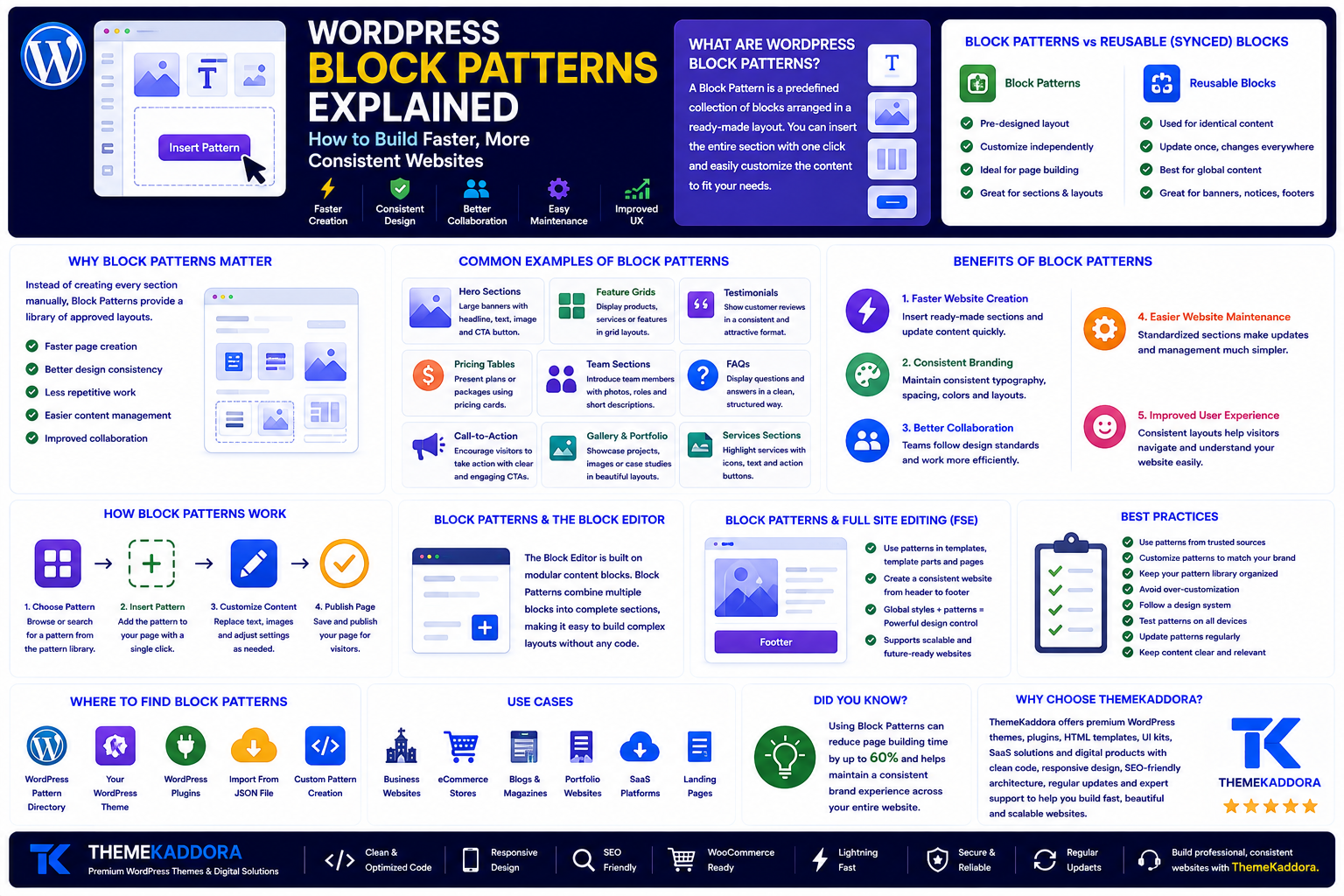
WordPress Block Patterns Explained: How to Build Faster, More Consistent Websites
Introduction
Modern WordPress has evolved far beyond a traditional blogging platform. Today, it enables businesses, agencies, freelancers, and content creators to build professional websites using the Block Editor without relying heavily on custom code or third-party page builders.
One of the most powerful features behind this evolution is WordPress Block Patterns.
Instead of creating every page from scratch, Block Patterns let you insert professionally designed sections with a single click. Hero banners, pricing tables, testimonials, FAQs, call-to-action sections, and feature grids can all be reused across your website while maintaining a consistent design.
For businesses, this means faster content creation, better brand consistency, and a more efficient publishing workflow.
In this guide, you'll learn what Block Patterns are, how they work, their benefits, common use cases, and best practices for building scalable WordPress website.
What Are WordPress Block Patterns?
A WordPress Block Pattern is a predefined collection of blocks arranged into a ready-made layout.
Instead of adding individual blocks one by one, you can insert an entire section that already includes:
Layout
Typography
Images
Buttons
Columns
Spacing
Colors
After inserting the pattern, you simply replace the placeholder content with your own text and images.
Think of Block Patterns as reusable page sections rather than complete pages.
Block Patterns vs Reusable Blocks
These two features are often confused.
Block Patterns
Insert a pre-designed layout
Can be customized independently after insertion
Ideal for page building
Great for landing pages and marketing sections
Reusable (Synced) Blocks
Used for identical content across multiple pages
Updating the original updates every synced instance
Best for banners, contact details, announcements, and legal notices
In short, Block Patterns focus on layout, while synced blocks focus on shared content.
Why Block Patterns Matter
Creating every section manually takes time and often results in inconsistent designs.
Block Patterns solve this by giving teams a library of approved layouts.
Benefits include:
Faster page creation
Better design consistency
Less repetitive work
Easier content management
Improved collaboration
Instead of reinventing the same layouts repeatedly, editors can build pages using proven components.
Common Examples of Block Patterns
Almost every business website can benefit from reusable sections.
Popular examples include:
Hero Sections
A large banner with a headline, supporting text, image, and call-to-action button.
Feature Grids
Display products, services, or business features using cards arranged in columns.
Testimonials
Present customer reviews in a consistent and attractive layout.
Pricing Tables
Show service plans or product packages using reusable pricing cards.
Team Sections
Introduce staff members with photos, job titles, and biographies.
FAQs
Display frequently asked questions using structured layouts that improve readability.
Call-to-Action Sections
Encourage visitors to request a quote, book a consultation, subscribe, or make a purchase.
Benefits of WordPress Block Patterns
1. Faster Website Creation
Instead of building layouts repeatedly, editors insert ready-made sections and update the content.
This significantly reduces the time needed to publish new pages.
2. Consistent Branding
Using the same approved layouts across the website creates a consistent visual identity.
Visitors experience:
Consistent typography
Matching spacing
Uniform buttons
Standardized layouts
Consistency builds trust.
3. Better Collaboration
Large teams often have multiple people creating content.
Block Patterns provide clear design standards without requiring everyone to be a designer.
Editors simply choose approved layouts and focus on the content.
4. Easier Website Maintenance
Updating a design system becomes easier when pages are built from reusable patterns.
Instead of creating unique layouts for every page, businesses can standardize the most common sections.
5. Improved User Experience
Consistent layouts help visitors understand your website more quickly.
Predictable navigation and familiar page structures reduce confusion and improve usability.
Block Patterns and the WordPress Block Editor
The Block Editor was designed around modular content.
Each paragraph, image, heading, button, and gallery is an individual block.
Block Patterns take this concept further by combining multiple blocks into reusable sections.
This allows editors to build complex layouts without writing code.
Block Patterns and Full Site Editing
Modern WordPress themes that support Full Site Editing (FSE) make Block Patterns even more valuable.
Patterns can be used throughout the website to create consistent:
Landing pages
Blog layouts
Product pages
Service pages
Marketing campaigns
Combined with Global Styles, Block Patterns help maintain a consistent website while still allowing flexibility.
Best Practices for Using Block Patterns
To get the most value from Block Patterns, follow these recommendations.
Keep Patterns Modular
Each pattern should solve one specific design problem.
For example:
Hero section
Feature list
Testimonial section
Contact section
Avoid creating patterns that try to build an entire page.
Use Clear Names
Name patterns descriptively.
Examples include:
Two Column Hero
Pricing Table
Team Members
Contact Banner
Newsletter Signup
Clear names make patterns easier to find.
Limit Variations
Too many similar patterns create confusion.
Instead of twenty hero layouts, maintain a smaller library of well-designed options.
Quality is more valuable than quantity.
Prioritize Mobile Responsiveness
Every pattern should be tested on:
Smartphones
Tablets
Desktop computers
A responsive layout ensures visitors receive a consistent experience regardless of screen size.
Follow Accessibility Standards
Design patterns should include:
Proper heading hierarchy
Sufficient color contrast
Readable typography
Descriptive button labels
Accessible images with alt text
Accessibility should be built into every reusable component.
Mistakes to Avoid
Many websites fail to benefit from Block Patterns because they are poorly managed.
Common mistakes include:
Creating duplicate patterns
Using inconsistent spacing
Overcomplicating layouts
Ignoring mobile optimization
Using too many fonts or colors
Building patterns without accessibility in mind
A simple, organized pattern library is easier to maintain and scale.
Who Benefits Most from Block Patterns?
Small Businesses
Publish professional pages faster without hiring developers for every update.
Marketing Teams
Launch campaigns quickly using pre-approved landing page sections.
Agencies
Reduce project time by reusing proven layouts across multiple client websites.
Ecommerce Stores
Standardize product promotions, category introductions, testimonials, and promotional banners.
Content Creators
Maintain consistent blog layouts while focusing on writing instead of page design.
Block Patterns and Theme Quality
Even the best Block Patterns rely on a well-built WordPress theme.
A quality theme should provide:
Responsive layouts
Fast loading performance
Clean code
Flexible typography
Global Styles support
Accessibility features
WooCommerce compatibility
When the theme and patterns work together, editors can create professional pages with minimal effort.
Why Choose Themekaddora?
Themekaddora WordPress themes are designed to take full advantage of the modern Block Editor.
Our themes provide:
Lightweight architecture
Responsive layouts
SEO-friendly code
Flexible page templates
Global design controls
Reusable content sections
WooCommerce compatibility
Cross-browser compatibility
Regular updates
Professional support
By combining clean design with reusable layouts, Themekaddora helps businesses build websites that are faster to manage, easier to scale, and consistent across every page.
WordPress Block Patterns Checklist
Before publishing your website, review this checklist:
✅ Create reusable hero sections
✅ Standardize testimonials
✅ Build reusable pricing tables
✅ Design consistent call-to-action sections
✅ Optimize every pattern for mobile
✅ Follow accessibility guidelines
✅ Keep your pattern library organized
✅ Use descriptive pattern names
✅ Test layouts across browsers
✅ Update patterns as your design system evolves
Conclusion
WordPress Block Patterns have transformed the way modern websites are built.
Instead of recreating layouts repeatedly, businesses can use reusable, professionally designed sections that save time while improving consistency.
Whether you're building a company website, an online store, a portfolio, or a content-driven platform, Block Patterns simplify page creation and support long-term scalability.
Combined with a high-quality WordPress theme like those from Themekaddora, Block Patterns provide a powerful foundation for creating fast, professional, and easy-to-manage websites.
Frequently Asked Questions
What are WordPress Block Patterns?
WordPress Block Patterns are pre-designed groups of blocks that can be inserted into pages or posts as reusable layouts.
Are Block Patterns the same as reusable blocks?
No. Block Patterns are reusable layouts that can be customized after insertion, while synced reusable blocks are designed for identical content shared across multiple pages.
Do Block Patterns require coding?
No. They can be inserted and customized using the WordPress Block Editor without writing code.
Can Block Patterns improve website consistency?
Yes. Using approved layouts helps maintain consistent spacing, typography, colors, and overall design across the website.
Why choose Themekaddora?
Themekaddora themes are optimized for the modern Block Editor with responsive layouts, SEO-friendly code, reusable content sections, Global Styles support, WooCommerce compatibility, and lightweight performance, making them an ideal foundation for websites built with WordPress Block Patterns.
Comments (0)