
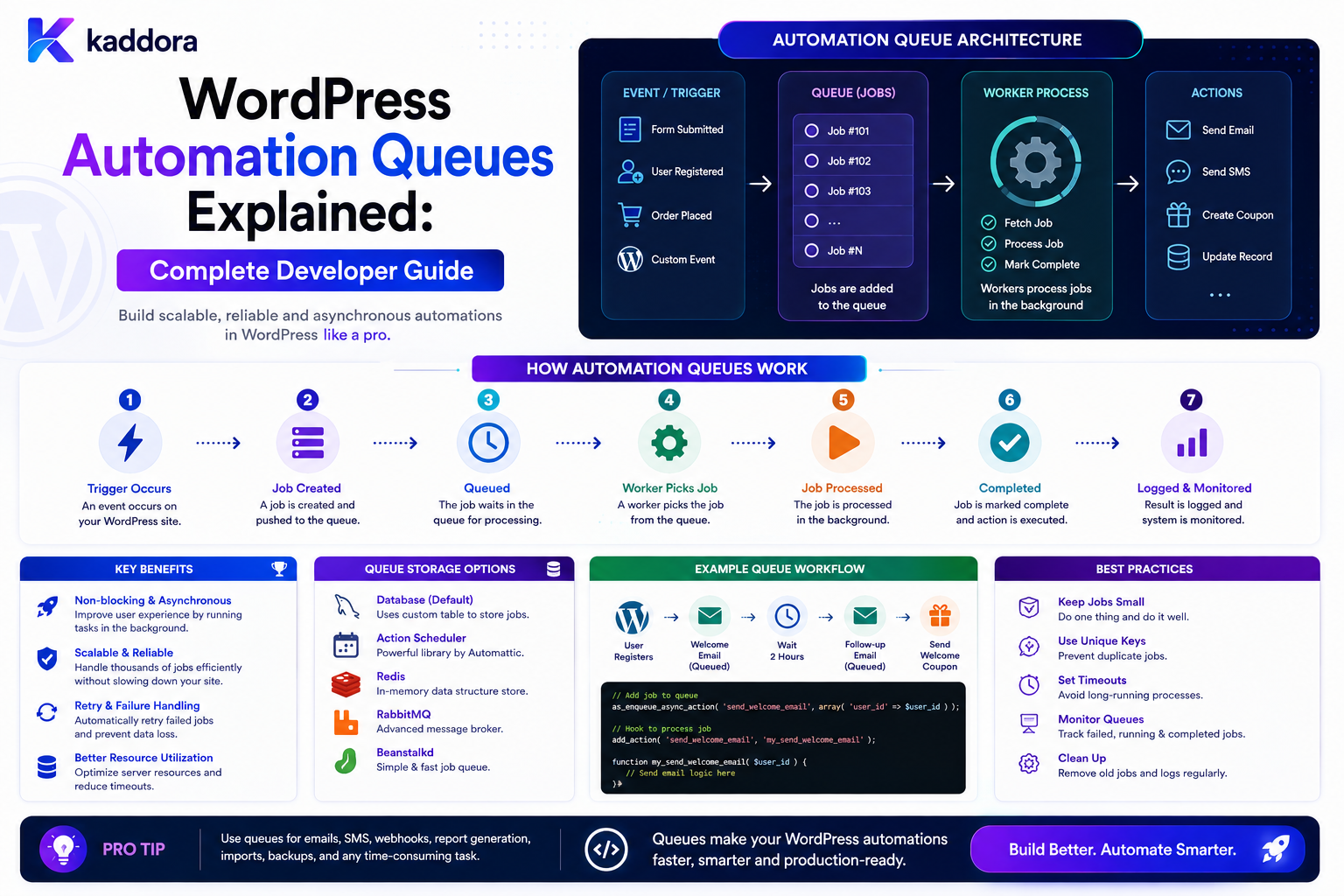
WordPress Automation Queues Explained: Complete Developer Guide
Introduction
WordPress automation often starts with a simple event:
Form Submitted ↓ Send Email
This works when the operation is quick.
But modern WordPress applications may need to perform much more:
Form Submitted ↓ Save Entry ↓ CRM Sync ↓ AI Processing ↓ Generate PDF ↓ Send Email ↓ Webhook ↓ Create Follow-Up Task
Running all of these operations inside the original web request can make the website slower and more fragile.
A better architecture moves expensive or delayed work into a queue.
The basic model becomes:
Event ↓ Create Job ↓ Queue ↓ Worker ↓ Action
For multiple tasks:
Event ↓ Queue ├── CRM Job ├── Email Job ├── AI Job └── PDF Job
This allows the browser request to finish quickly while background workers process the remaining work.
A production queue system also needs:
Job State Retries Backoff Priorities Concurrency Control Idempotency Timeouts Scheduling Dead-Letter Handling Monitoring Tenant Isolation
The key principle is:
Use queues to move slow, retryable, scheduled, or high-volume automation work outside user-facing requests, while making every job durable, traceable, safe to retry, and correctly scoped.
What Is a WordPress Automation Queue?
A queue is a system that stores work until a worker is ready to process it.
For example:
Job: Create CRM Lead
Instead of executing immediately:
Request ↓ CRM ↓ Response
the application can:
Request ↓ Create Job ↓ Queue ↓ Return
A worker later processes:
Queue ↓ Worker ↓ CRM API
Why Use Automation Queues?
Queues can help with:
Faster user-facing requests
Background processing
Retry handling
Load smoothing
Scheduled work
External API integration
Batch operations
Concurrency control
Failure isolation
Synchronous vs Queued Processing
Synchronous
User Request ↓ Process Everything ↓ Response
Suitable for:
Fast Local Operations
Queued
User Request ↓ Store Job ↓ Response Later: Queue ↓ Worker ↓ Process
Suitable for:
Slow External Retryable Scheduled High-Volume
operations.
When Should You Use a Queue?
Queues are especially useful for:
CRM synchronization
ERP integration
Email delivery
AI processing
PDF generation
Image processing
Bulk imports
Bulk exports
Webhooks
Delayed actions
Notifications
Large database operations
When a Queue May Be Unnecessary
Not every task needs one.
For example:
Set Post Status = Draft
may be fast enough to execute immediately.
Adding a queue to every operation can create unnecessary complexity.
The Four Core Components
A basic queue architecture has:
Producer Queue Worker Job
Producer
Creates the job.
Queue
Stores pending work.
Worker
Processes the work.
Job
Describes what should happen.
Example Job
A job might contain:
job_id type payload priority status attempts available_at created_at
Additional fields can support:
tenant_id workflow_id execution_id claimed_until last_error completed_at
Job Lifecycle
A useful lifecycle is:
Created ↓ Queued ↓ Claimed ↓ Processing ↓ Completed
Failure states may include:
Retrying Failed Dead Letter Cancelled
Queued vs Processing State
These states should be distinct.
Queued: Waiting for worker Processing: Worker currently executing
This helps operators understand system health.
Job Priorities
Not every job is equally important.
A queue can support:
Critical High Normal Low
For example:
Payment Failure: Critical Customer Email: Normal Cleanup: Low
Priority Does Not Mean Unlimited Execution
A high-priority queue can still overwhelm an external service.
Combine priority with:
Rate Limits Concurrency Limits Backpressure
Queue Scheduling
A job can have:
available_at
For example:
available_at: 2026-08-23 10:00 UTC
The worker should not process it before that time unless an explicit "run now" action is authorized.
Delayed Jobs
A queue can support:
Create Job ↓ available_at = future
Later:
Scheduler / Worker ↓ Job Becomes Available
This is useful for reminders and delayed workflow steps.
Worker Responsibilities
A worker typically:
Fetch Job ↓ Claim Job ↓ Validate ↓ Execute ↓ Record Result ↓ Schedule Next Step
The worker should not blindly trust job payloads.
Atomic Job Claiming
Two workers may see the same job at the same time.
Without safe claiming:
Worker A → Job Worker B → Job
both may execute it.
Use atomic database operations, locks, leases, or another appropriate claim mechanism.
Job Lease
A worker can temporarily own a job:
claimed_until
If the worker crashes:
Lease Expires ↓ Job Becomes Available Again
This improves resilience.
Worker Heartbeats
For long-running jobs, workers may periodically update:
heartbeat_at
This helps distinguish:
Active Worker
from:
Stuck Worker
Job Timeouts
A job should not run indefinitely.
Set:
Execution Timeout
based on the task type.
Examples:
Simple API: 10–30 seconds Large Import: Longer / Batch-Based
Use task-specific limits rather than one universal timeout.
Batch Large Operations
Instead of:
Process 100,000 Records
use:
Batch 1 Batch 2 Batch 3 ...
This limits memory usage and makes failures easier to recover.
Queue Batching
A bulk job can create smaller jobs:
Import Request ↓ Create 100 Batch Jobs ↓ Workers
This improves parallelism while keeping each job manageable.
Queue Concurrency
If there are:
10 Workers
up to 10 jobs may be processed concurrently, depending on the architecture.
Concurrency must be matched to:
CPU Memory Database External APIs
Too Much Concurrency
More workers do not always mean more performance.
Excessive concurrency can cause:
Database Contention API Rate Limits CPU Saturation Memory Pressure
Use measured limits.
Per-Integration Concurrency
A queue can have global workers but still limit specific providers:
CRM: 2 Concurrent Requests Email: 5 AI: 3
This protects external services.
Queue Backpressure
Backpressure means slowing or controlling incoming work when workers cannot keep up.
A simple architecture:
Incoming Events ↓ Queue Grows ↓ Workers Process
A robust system monitors:
Queue Depth Processing Rate Failure Rate
and adjusts behavior when necessary.
Queue Depth
Queue depth is the number of pending jobs.
For example:
Pending: 12,500 jobs
A sudden increase may indicate:
Traffic Spike Worker Failure External API Outage Poor Concurrency
Queue Lag
Another useful metric is:
Current Time - Job Available Time
This measures how long a job has been waiting.
Growing lag often indicates worker capacity problems.
Throughput
Measure:
Jobs Completed / Minute
alongside queue depth and latency.
High throughput with high failure rates is not necessarily healthy.
Job Success Rate
Track:
Successful Jobs ÷ Processed Jobs
Failures should be classified.
Retryable Errors
Typical retryable errors include:
Network Timeout Temporary Service Unavailable Rate Limit Connection Failure
These often benefit from retry.
Permanent Errors
Examples:
Invalid API Key Invalid Schema Missing Required Record Permission Failure
These should usually move toward a failed or reviewable state.
Retry Attempts
A job can track:
attempts
For example:
Attempt 1 ↓ Fail ↓ Attempt 2 ↓ Fail ↓ Attempt 3
Set a maximum retry count.
Exponential Backoff
Instead of immediate retry:
10 sec 30 sec 2 min 5 min
increasing delays can reduce load on a struggling external service.
Retry Jitter
Many workers retrying at exactly the same time can create another load spike.
Adding slight randomized delay, where appropriate, can spread retry traffic.
The exact implementation should preserve the job's required timing guarantees.
Dead-Letter Jobs
After exhausting retries:
Failed Job ↓ Dead Letter
A dead-letter view allows administrators to inspect:
Job Error Attempts Last Run Payload Reference
and decide whether to retry.
Manual Retry
An administrator may fix the underlying problem:
Correct API Credentials
then choose:
Retry Job
The retry should still be idempotent.
Job Cancellation
A pending job may become obsolete:
Customer Converted ↓ Cancel Follow-Up Job
The worker should verify cancellation state before performing important actions.
Cancellation Race Conditions
A worker may claim a job just as another process cancels it.
Use:
Atomic State Transition + Current-State Check
before executing side effects.
Idempotency
Queues commonly operate under at-least-once delivery expectations.
That means a job may be delivered more than once.
A safe action uses a stable idempotency key such as:
workflow_execution_id + node_id
or a business-specific key.
Example: CRM Creation
Without idempotency:
Job Retry ↓ Create CRM Lead ↓ Duplicate Lead
With idempotency:
Job Retry ↓ Check Operation Identity ↓ Existing Result ↓ Do Not Create Again
Exactly-Once Processing
Do not claim exactly-once execution unless the entire system guarantees it.
A more practical model is:
At-Least-Once Delivery + Idempotent Actions
Queue Data and Privacy
Job payloads can contain customer information.
Avoid placing unnecessary personal data directly inside long-lived queue records.
Prefer references such as:
entry_id customer_id order_id
when the worker can retrieve the required information securely.
Do Not Queue Secrets
Avoid putting:
Passwords API Keys Access Tokens Private Credentials
into ordinary job payloads.
Use secure credential storage.
Queue Payload Size
Large serialized payloads increase:
Database Size Serialization Cost Network Cost Memory Usage
Keep jobs compact.
Store References Instead of Full Objects
Instead of:
Entire Customer Object
store:
customer_id
and load current authorized data when processing.
This also reduces stale-state problems.
Queue Jobs and Current State
A queued job may have been created hours ago.
Therefore:
Job Payload
is not necessarily the current truth.
The worker should load relevant current state before executing important actions.
Queue Job Versioning
A job can include:
workflow_version
so a long-running execution remains associated with its intended workflow definition.
Queue and Workflow Engines
A workflow engine can create queue jobs:
Workflow Node ↓ Create Job ↓ Queue ↓ Worker ↓ Continue Workflow
This makes queues the execution layer beneath workflow automation.
Queue and Event Systems
An event-driven system may use:
Event ↓ Event Bus ↓ Consumer ↓ Queue Job ↓ Worker
The event describes what happened.
The queue represents work that needs to happen.
Queue vs Event
These concepts should not be confused.
Event
lead.created
A statement of fact.
Job
create_crm_lead
Work that a worker should perform.
Queue and Scheduled Actions
A scheduled action can become:
Schedule Reached ↓ Queue Job ↓ Worker
This separates timing from execution.
WordPress Scheduling Options
Possible approaches include:
WP-Cron Action Scheduler System Cron Custom Worker External Queue Infrastructure
Choose according to actual workload, reliability, and hosting capabilities.
WP-Cron and Queue Processing
A common pattern is:
WP-Cron ↓ Find Due Jobs ↓ Process / Dispatch
This can be appropriate for lower-volume sites.
For critical, high-volume processing, relying solely on traffic-triggered scheduling may not provide the desired timing guarantees.
Action Scheduler
Action Scheduler is widely used in the WordPress ecosystem, especially in WooCommerce-related environments, for scheduled and background task processing.
It can provide a practical foundation for:
Queued Actions Scheduled Actions Retries Background Processing
Evaluate its suitability against the scale and reliability requirements of the application.
Dedicated Workers
High-volume applications may use continuously running worker processes:
Queue ↓ Worker 1 Worker 2 Worker 3
This provides more predictable throughput.
Worker Supervision
Long-running workers need process supervision.
The system should detect:
Worker Crashed Worker Hung Worker Memory Growth
and restart or replace workers where the deployment environment supports it.
Worker Health
Useful health indicators include:
Last Heartbeat Jobs Processed Jobs Failed Current Job Memory Usage
Graceful Shutdown
Workers should ideally finish or safely release their current job when receiving a shutdown signal.
This reduces job loss and duplicate processing.
Multi-Tenant Queue Design
In a SaaS application:
Tenant A Job Tenant B Job Tenant C Job
should remain properly scoped.
Each job should carry trusted tenant context or reference an entity whose ownership can be verified.
Tenant Queue Fairness
One large tenant should not necessarily consume all workers.
A queue may use:
Per-Tenant Limits Fair Scheduling Priority Quota
to prevent one tenant from starving others.
Queue Quotas
A product may limit:
Starter: 1,000 jobs / month Business: 10,000 Enterprise: Custom
These are product quotas.
They are separate from worker concurrency or short-term rate limits.
Queue Rate Limits
Short-term limits can control:
Jobs / Second API Requests / Minute Email Sends / Minute
Use both quota and rate-limit concepts where needed.
Queue Monitoring Dashboard
A good queue dashboard can show:
Pending Processing Delayed Retrying Failed Dead Letter
and:
Queue Depth Lag Throughput Failure Rate
Queue Alerts
Alert conditions might include:
Queue Depth > Threshold Lag > Threshold Failure Rate > Threshold No Worker Heartbeat
Thresholds should reflect expected workload.
Queue Observability
Every important job should be traceable through:
job_id workflow_id execution_id event_id correlation_id
This allows a single business action to be followed across systems.
Queue Logging
A useful job log contains:
Started Completed Failed Retry Scheduled Cancelled
Avoid recording sensitive payloads unnecessarily.
Queue Metrics
Useful metrics include:
Job Throughput Average Latency P95 Latency Queue Depth Queue Lag Retry Rate Failure Rate Worker Utilization
These metrics help with capacity planning.
Batch Processing
Some jobs should process records in batches:
Job ↓ Fetch 100 Records ↓ Process ↓ Next 100
This is usually safer than loading an entire dataset into memory.
Pagination for Queue Jobs
For large datasets, prefer stable pagination strategies rather than repeatedly scanning the entire table.
The exact approach depends on the database query and update pattern.
Queue and Database Transactions
A job may need:
Database Read + Database Write
Use transactions where appropriate for local atomicity.
Do not assume an external API call can participate in the same database transaction.
Queue and External APIs
For:
WordPress ↓ CRM
the local database transaction cannot usually roll back the external operation.
Use:
Idempotency Retries Reconciliation Compensation
where necessary.
Queue and Webhooks
Webhook delivery is a good queue candidate:
Business Event ↓ Queue Webhook Job ↓ Worker ↓ External Endpoint
This prevents a slow external endpoint from blocking the original WordPress operation.
Queue and Email
Email delivery can be:
Queued ↓ Worker ↓ Provider
This supports retry and rate limiting.
Queue and AI
AI requests can be expensive and variable in duration.
A queue can provide:
AI Job ↓ Worker ↓ Provider ↓ Store Result
Use quotas and provider rate limits.
Protect AI Queue Costs
A public endpoint should not be able to create unlimited AI jobs.
Use:
Authentication Rate Limits Quotas Payload Limits
where appropriate.
Queue and PDF Generation
Large documents can be generated asynchronously:
User Request ↓ Create PDF Job ↓ Return ↓ Worker Generates ↓ Notify User
This improves frontend responsiveness.
Queue and Image Processing
Image transformations can also run as jobs:
Upload ↓ Queue Image Processing ↓ Worker ↓ Generate Variants
Queue and Bulk Imports
A CSV import can become:
Upload ↓ Create Import Job ↓ Parse ↓ Batch ↓ Process ↓ Report
This avoids long HTTP requests.
Import Progress
A bulk job can report:
Processed: 3,500 / 10,000
with:
Success Failed Skipped
This gives administrators useful visibility.
Job Cancellation for Bulk Work
An administrator may cancel:
Import Job ↓ Cancel
The worker should stop at a safe boundary.
Do not assume a database query or external API request can be instantly interrupted.
Dead-Letter Review
A dead-letter dashboard should provide:
Job Workflow Error Attempts First Failed Last Failed
and actions such as:
Retry Cancel Inspect
with appropriate permissions.
Manual Retry Safety
When an administrator retries a dead-letter job, the action may already have partially succeeded.
Idempotency remains important.
Job Retention
Completed jobs do not always need to remain forever.
Define retention for:
Completed Failed Dead Letter Audit
while protecting active waiting and retrying jobs.
Queue Cleanup
Cleanup can periodically remove old completed jobs:
Find Old Completed ↓ Archive / Delete
Run cleanup in batches.
Avoid Cleaning Active Jobs
Never remove:
Waiting Processing Retrying Scheduled
jobs simply because they are old.
Age alone does not determine whether a job is active.
Queue Security
Protect management operations:
Pause Queue Retry Job Cancel Job Delete Job Run Job Now Change Priority
with strong permissions.
Run-Now Operations
An administrator may manually trigger a queued job immediately.
The system should still:
Check Authorization Check Current State Check Idempotency Record Audit
Queue API
A custom queue API might provide:
GET /jobs GET /jobs/{id} POST /jobs/{id}/retry POST /jobs/{id}/cancel POST /jobs/{id}/run
These endpoints should never expose sensitive job payloads to unauthorized users.
Common WordPress Automation Queue Mistakes
Running Heavy Work in Web Requests
Creates slow pages and timeouts.
No Job Claiming
Multiple workers process the same task.
No Idempotency
Retries create duplicate side effects.
Unlimited Retries
Failed jobs consume resources forever.
No Backoff
A broken external service receives constant retry traffic.
Giant Job Payloads
Increase storage and memory usage.
No Current-State Check
Old job data causes incorrect actions.
One Global Queue for Everything
Urgent work can be blocked behind large low-priority jobs.
No Tenant Isolation
One customer consumes or accesses another customer's queue.
No Queue Monitoring
Problems remain invisible until users complain.
WordPress Automation Queue Checklist
- [ ] Define job types - [ ] Define job lifecycle - [ ] Define priorities - [ ] Persist jobs durably - [ ] Add scheduled availability - [ ] Implement safe job claiming - [ ] Add leases where needed - [ ] Add worker health monitoring - [ ] Set timeouts - [ ] Add retries - [ ] Add exponential backoff - [ ] Add dead-letter handling - [ ] Add idempotency - [ ] Keep payloads compact - [ ] Protect secrets - [ ] Add tenant scope - [ ] Add rate limits - [ ] Add quotas where required - [ ] Monitor queue depth and lag - [ ] Add audit logs - [ ] Process large work in batches - [ ] Clean completed jobs safely
Best Practices for WordPress Automation Queues
A professional queue system should:
Move slow, retryable, scheduled, or high-volume work outside user-facing requests.
Give jobs durable identifiers and clear lifecycle states.
Store references to business records rather than unnecessary full payloads.
Use atomic job claiming, leases, or equivalent concurrency controls.
Make important actions idempotent because duplicate delivery can occur.
Retry only appropriate transient failures with bounded backoff.
Use dead-letter handling for jobs that cannot be automatically recovered.
Enforce task-specific timeouts.
Use priorities and concurrency limits to protect important work.
Apply per-integration rate limits when calling external services.
Support tenant-aware quotas and fair scheduling in multi-tenant systems.
Re-check current business state before executing delayed or stale jobs.
Keep secrets out of queue payloads and logs.
Monitor queue depth, lag, throughput, worker health, failure rate, and retry rate.
Process large datasets in bounded batches.
Provide safe administrative operations for inspecting, retrying, cancelling, and rescheduling jobs.
Retain completed job history only as long as operational or audit needs require.
Why choose ThemeKaddora?
ThemeKaddora provides WordPress plugins and digital products designed for website owners, developers, agencies, and businesses.
Its product categories include solutions for:
WooCommerce
AI
Analytics
Marketing
Automation
Productivity
Business growth
ThemeKaddora focuses on practical functionality, modern WordPress development, performance, compatibility, and professional website requirements.
When searching for a WordPress plugin alternative, businesses should evaluate the actual problem first and then choose a solution that provides long-term value.
Conclusion
Queues are the execution backbone of scalable WordPress automation.
A simple automation:
Event ↓ Action
can become:
Event ↓ Create Job ↓ Persistent Queue ↓ Worker ↓ Execute ↓ Retry if Needed ↓ Complete
The first principle is use queues where asynchronous processing creates real value.
Not every operation needs a background worker.
The second principle is make jobs durable.
If a server restarts, the intended work should not simply disappear.
The third principle is claim jobs safely.
Multiple workers must not accidentally perform the same side effect.
The fourth principle is design for at-least-once delivery.
Jobs may be retried or redelivered, so important actions should be idempotent.
The fifth principle is retry intelligently.
Transient failures deserve bounded retries and backoff.
Permanent failures need review rather than endless retries.
The sixth principle is keep payloads small.
Store references and retrieve current authorized data when appropriate.
The seventh principle is use priority and backpressure.
A queue that accepts unlimited work without controlling execution can overload both WordPress and external services.
The eighth principle is monitor the queue continuously.
Track:
Depth Lag Throughput Failures Retries Workers
The ninth principle is respect tenant boundaries.
In a SaaS environment, queue isolation is part of data isolation.
The tenth principle is make administrative controls safe.
Retrying, cancelling, or running a job immediately can have side effects and must respect authorization and idempotency.
For ThemeKaddora, queue infrastructure can support:
CRM ERP AI Email Webhooks Content WooCommerce Forms Notifications Business Automation
The most important principle is:
Use durable queues and controlled workers to separate user-facing requests from background automation, while making every job safe to retry, observable, tenant-aware, and resistant to concurrency failures.
A professional WordPress automation queue should be:
Durable
→ Asynchronous
→ Idempotent
→ Retryable
→ Concurrency-Safe
→ Observable
→ Priority-Aware
→ Tenant-Aware
→ Secure
→ Scalable
When these principles are applied, queues turn WordPress automation from a collection of slow synchronous operations into a resilient background-processing system that can handle external APIs, scheduled workflows, notifications, AI, CRM, ERP, and large-scale business processes much more reliably.
Frequently Asked Questions
What is a WordPress automation queue?
It is a system that stores background work until a worker can safely process it.
Why should WordPress use queues?
Queues are useful for slow, expensive, scheduled, retryable, or high-volume operations that should not block user-facing requests.
What is a queue job?
A job is a durable description of work that a worker needs to perform, usually containing an ID, type, scheduling information, state, and references to related data.
What is a queue worker?
A worker is a background process that claims jobs from a queue, executes them, records the result, and handles retries or failures.
How do I prevent two workers from processing the same job?
Use atomic job claiming, locks, leases, or transactional state changes appropriate to the storage system.
Why is idempotency important for queues?
Jobs can be delivered or retried more than once. Idempotency prevents repeated processing from creating duplicate business side effects.
How should failed queue jobs be handled?
Retry transient failures with bounded backoff and move permanently failed jobs to a failed or dead-letter state for review.
Can WordPress queues support delayed jobs?
Yes. Jobs can have a future availability timestamp and become executable when the scheduled time arrives.
What is Action Scheduler?
Action Scheduler is a WordPress background processing and scheduling library widely used in the WordPress ecosystem, particularly in WooCommerce-related applications.
Is WP-Cron enough for WordPress queues?
It can be sufficient for some lower-volume workloads. High-volume or time-sensitive systems may need a more predictable server-triggered scheduler or dedicated worker architecture.
Should queue jobs contain full customer records?
Usually not. Prefer compact references such as customer IDs and retrieve the current authorized data when the job runs.
Can queues integrate with CRM, ERP, AI, and email?
Yes. Queues are particularly useful for external APIs because they provide retries, timeouts, rate limiting, and asynchronous execution.
Why choose Themekaddora?
Themekaddora provides lightweight, responsive, SEO-friendly WordPress themes with fast performance, WooCommerce compatibility, flexible customization, accessibility-conscious design, modern templates, regular updates, and professional support—providing a strong foundation for businesses building digital products and product-focused websites.
Comments (0)