
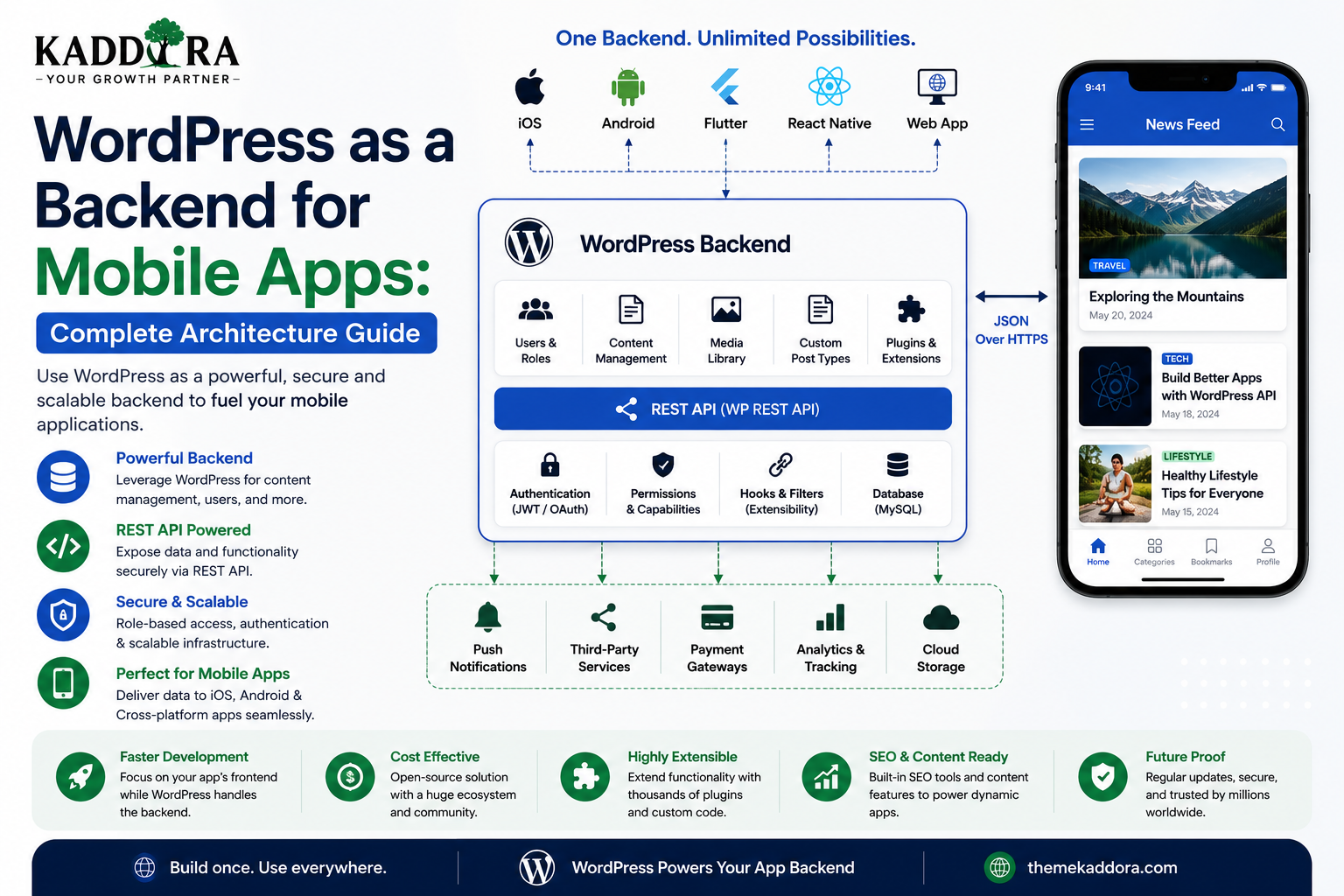
WordPress as a Backend for Mobile Apps: Complete Architecture Guide
Introduction
WordPress is usually associated with websites, blogs, and content management.
But WordPress can also serve as the backend for mobile applications.
Instead of building a separate content-management system from scratch, developers can use WordPress to manage:
Users
Content
Media
Categories
Products
Custom data
APIs
Administration
A mobile application can then communicate with WordPress through an API.
A simplified architecture looks like:
Mobile App ↓ API ↓ WordPress ↓ Database ↓ Business Logic
This approach can be useful for content apps, membership platforms, education applications, marketplaces, business applications, customer portals, and other products that benefit from WordPress's administration ecosystem.
However, using WordPress as a mobile backend requires more than simply connecting an app to /wp-json/.
Developers must carefully design authentication, permissions, API endpoints, data structures, media handling, notifications, caching, security, performance, and app-specific workflows.
In this guide, you'll learn how WordPress can power mobile applications, how the architecture works, how mobile apps communicate with WordPress, how to build custom APIs, handle authentication, manage users and media, secure private data, support push notifications, scale the backend, and decide when WordPress is the right backend choice.
Can WordPress Be Used as a Mobile App Backend?
Yes.
A mobile application can communicate with WordPress through its REST API or through custom APIs provided by plugins.
For example:
iOS App ↓ WordPress REST API Android App ↓ WordPress REST API
Both applications can consume the same backend.
This means a single WordPress installation can potentially serve:
Website
iOS application
Android application
Admin dashboard
Other external integrations
Why Use WordPress as a Mobile Backend?
WordPress already provides a large amount of backend functionality.
Instead of building every administrative feature from zero, developers can reuse:
User management
Media management
Content management
Taxonomies
Roles
Capabilities
Plugin architecture
REST API
Database abstraction
Administration dashboard
This can significantly reduce development effort for certain projects.
When WordPress Makes a Good Mobile Backend
WordPress can be a strong backend choice when the application depends heavily on:
Content
Articles
Pages
Courses
Products
Media
User accounts
Editorial workflows
WordPress plugins
Custom content types
Examples include:
News applications
Education apps
Membership apps
Content platforms
Product catalogs
Business portals
Community applications
When WordPress May Not Be the Best Backend
WordPress may be less suitable when the application primarily requires:
Extremely high-frequency transactions
Complex real-time processing
Massive event streams
Specialized distributed systems
Heavy computational workloads
Very large transactional databases
In these cases, a specialized backend architecture may be more appropriate.
The correct choice depends on the application's actual requirements.
Basic Mobile App Architecture
A simple architecture might look like:
┌─────────────┐ │ iOS App │ └──────┬──────┘ │ │ ┌──────▼──────┐ │ WordPress │ │ REST API │ └──────┬──────┘ │ ┌──────▼──────┐ │ WordPress │ │ Backend │ └──────┬──────┘ │ ┌──────▼──────┐ │ Database │ └─────────────┘ Android App │ └──────→ Same API
The mobile application should communicate with the backend through defined APIs rather than accessing the WordPress database directly.
Never Connect the Mobile App Directly to the Database
A mobile application should not connect directly to MySQL or another WordPress database.
Avoid:
Mobile App ↓ Database
Use:
Mobile App ↓ Secure API ↓ WordPress ↓ Database
The backend needs to control:
Authentication
Authorization
Validation
Business rules
Data access
Direct database access would expose an extremely dangerous security boundary.
WordPress REST API for Mobile Apps
The WordPress REST API provides a standard communication layer.
Common endpoints include:
/wp-json/wp/v2/posts /wp-json/wp/v2/pages /wp-json/wp/v2/media /wp-json/wp/v2/users
Mobile apps can request JSON data through HTTPS.
For example:
Mobile App ↓ GET /wp-json/wp/v2/posts ↓ JSON ↓ Mobile Interface
Custom REST APIs for Mobile Applications
Standard WordPress endpoints are not always enough.
A mobile application might need:
/wp-json/kaddora/v1/login /wp-json/kaddora/v1/profile /wp-json/kaddora/v1/dashboard /wp-json/kaddora/v1/orders /wp-json/kaddora/v1/notifications
A plugin can create custom REST routes tailored to the application's requirements.
This is usually better than forcing the mobile app to understand internal WordPress implementation details.
Create an API Layer Specifically for the App
A useful design is:
Mobile App ↓ Mobile API ↓ WordPress Services ↓ Database
The API becomes a controlled contract between the mobile application and WordPress.
This makes future frontend changes easier.
Designing API Endpoints
Good endpoints should communicate their purpose clearly.
Examples:
/customers /orders /products /profile /notifications
Avoid vague endpoints such as:
/doStuff /data /process
Clear endpoint design makes APIs easier to maintain.
Authentication for Mobile Apps
Authentication is one of the most important parts of mobile integration.
A mobile app needs to identify its users before accessing protected resources.
A simplified flow is:
Login ↓ Authentication Service ↓ Credential / Token ↓ Mobile App ↓ Authenticated API Requests
The exact authentication mechanism depends on the application.
Application Passwords and Mobile Apps
WordPress Application Passwords can authenticate API requests, but they are not automatically appropriate for distributing credentials inside a mobile application.
A credential embedded in a mobile app may be extracted.
Therefore:
Shared Privileged Credential ↓ Mobile App ↓ Potential Exposure
is a poor architecture for most consumer-facing apps.
Application Passwords are generally more suitable for controlled server-to-server integrations where credentials remain protected.
OAuth for Mobile Applications
For multi-user mobile applications, OAuth-style delegated authentication may be more appropriate depending on the architecture.
A conceptual flow is:
Mobile App ↓ Authorization ↓ Identity / Authentication Service ↓ Access Token ↓ WordPress API
This can provide a more appropriate authentication model for applications with many independent users.
The exact implementation should be selected according to the identity architecture and supported WordPress integrations.
JWT Authentication
Some WordPress projects use JSON Web Tokens for API authentication.
A simplified architecture is:
Login ↓ JWT Token ↓ Mobile App ↓ Authorization Header ↓ WordPress API
JWT can work in mobile architectures, but token creation, validation, expiration, storage, revocation strategy, and transport security must all be designed carefully.
Don't adopt JWT simply because it is popular.
Session-Based Authentication
Session-based authentication can also be used in certain architectures, particularly when the mobile application and backend are closely integrated.
The right model depends on:
Native app architecture
Identity provider
Token lifecycle
Refresh mechanism
Security requirements
Number of clients
Use HTTPS Everywhere
Mobile applications should communicate with WordPress using HTTPS.
Avoid sending authentication credentials or sensitive business data over plain HTTP.
A secure architecture is:
Mobile App ↓ HTTPS ↓ WordPress API
HTTPS protects data while it is being transmitted.
User Registration
A mobile application may need to allow users to create accounts.
The backend can provide an endpoint such as:
/wp-json/kaddora/v1/register
The server should validate:
Password
Username
Required profile data
Registration rules
Never trust mobile-side validation alone.
Login Security
A login endpoint should consider:
Rate limiting
Strong passwords
Account lockout or throttling strategies
Abuse prevention
Secure responses
Authentication token handling
Don't return unnecessary account information from a login request.
Password Reset
Mobile applications often need password-reset functionality.
A secure flow might be:
User Requests Reset ↓ Verification ↓ Temporary Reset Mechanism ↓ New Password ↓ Confirmation
Never return a user's existing password.
Passwords should never be retrievable in plaintext.
User Profiles
WordPress user metadata can support app profiles.
For example:
User ├── Name ├── Avatar ├── Department ├── Location ├── Preferences └── Notification Settings
Only expose fields that the authenticated user is allowed to see.
Role-Based Access
Mobile apps may have different user types.
For example:
Admin Manager Employee Customer Member
The API should enforce capabilities server-side.
Do not rely on the app's UI to determine permissions.
API Authorization
A secure endpoint follows:
API Request ↓ Authenticate ↓ Identify User ↓ Check Capability ↓ Validate Request ↓ Process ↓ Response
The authorization check must happen on the server.
Mobile App and Custom Post Types
WordPress custom post types can provide structured backend data for mobile applications.
For example:
Courses Events Properties Products Jobs Services
A mobile app can request this data through custom REST endpoints or appropriately exposed post-type endpoints.
Example: Education App
WordPress can manage:
Courses ├── Title ├── Description ├── Instructor ├── Lessons ├── Duration └── Media
The mobile application can display:
Course List ↓ Course Details ↓ Lessons ↓ Progress
The backend handles content and user permissions.
Example: News Application
A news app could use:
WordPress ├── Articles ├── Categories ├── Authors └── Media ↓ API ↓ Mobile App
Editors can publish through WordPress while readers consume content through the mobile application.
Example: Membership App
A membership app might contain:
User ↓ Subscription ↓ Protected Content ↓ Mobile Dashboard
WordPress handles membership information while the API controls access to protected resources.
Example: WooCommerce Mobile App
WooCommerce can provide backend commerce functionality.
A mobile application may need:
Products Cart Checkout Customers Orders Payments Shipping
Commerce APIs require especially careful security because they process sensitive information and business operations.
The mobile app should not directly manipulate orders or payment states without backend authorization.
Mobile Cart Architecture
A cart might work like:
Mobile App ↓ Add Product ↓ Commerce API ↓ Server-Side Cart ↓ Response
The backend remains authoritative about:
Prices
Availability
Discounts
Taxes
Inventory
Never trust a mobile client to calculate final prices.
Mobile Payment Architecture
Payment processing should occur through appropriate payment providers and secure backend integrations.
Avoid:
Mobile App ↓ Directly Store Payment Secrets
Instead:
Mobile App ↓ Secure Payment Flow ↓ Payment Provider ↓ Server Verification ↓ WordPress Order
The exact flow depends on the payment provider.
Media for Mobile Apps
WordPress's Media Library can manage:
Images
Videos
Audio
Documents
A mobile app can retrieve media information through APIs.
For example:
WordPress Media ↓ API ↓ Mobile App
Use appropriate image sizes and formats for mobile devices.
Mobile Image Optimization
Sending huge desktop images to mobile devices wastes:
Bandwidth
Battery
Memory
Loading time
Use:
Responsive image sizes
Compression
Modern formats where supported
CDN delivery
Appropriate dimensions
The API can provide multiple image sources if designed appropriately.
Push Notifications
WordPress can act as the backend that triggers events, while a dedicated notification service handles delivery.
A common architecture is:
WordPress Event ↓ Notification Service ↓ APNs / FCM ↓ Mobile Device
Apple and Android ecosystems commonly use platform notification services such as Apple Push Notification service and Firebase Cloud Messaging.
A WordPress plugin can integrate with these services without directly implementing the entire push infrastructure itself.
Notification Tokens
A mobile app may send its notification token to WordPress.
For example:
Mobile App ↓ Device Token ↓ WordPress ↓ User Profile
Tokens should be stored and managed securely.
Expired or invalid tokens should be removed or refreshed.
Background Processing
Mobile applications may trigger tasks that take time.
For example:
Import 50,000 Records ↓ API Request ↓ Background Job ↓ Process ↓ Notification
Don't force large operations into a single synchronous HTTP request.
Use appropriate background processing architecture.
WordPress Cron and Mobile Applications
WordPress scheduled tasks can be useful for:
Synchronization
Cleanup
Notifications
Data imports
Reports
However, WordPress cron is not the same as a specialized high-throughput job queue.
For demanding workloads, external scheduling or background-job infrastructure may be more appropriate.
API Pagination for Mobile
Mobile applications should avoid downloading large datasets at once.
Use:
Page 1 20 records Page 2 20 records Page 3 20 records
Pagination improves:
Network usage
Memory
Battery efficiency
Rendering performance
API Filtering
Mobile applications often require filters.
For example:
Products Filter: Category = Shoes Price < ₹5,000 Stock = Available
The backend should perform appropriate filtering rather than sending the entire product database to the phone.
API Sorting
Sorting should also be available where useful.
For example:
sort=price order=asc
The exact API design should be documented and validated server-side.
API Versioning
Mobile apps can remain installed for long periods.
This creates a major backend compatibility challenge.
Suppose:
App v1 ↓ API v1 App v2 ↓ API v2
If the backend changes without maintaining compatibility, older app versions may break.
API versioning is therefore particularly important for mobile applications.
Why API Versioning Matters More for Mobile
Website frontend deployments can often be updated quickly.
Mobile apps are different.
Users may keep older versions installed for weeks or months.
Therefore:
Mobile App ↓ Long-Lived Client ↓ Stable API Contract
The backend should avoid breaking old clients unexpectedly.
Backward-Compatible API Changes
Prefer additive changes when possible.
For example:
Existing: name email New: name email avatar
This is safer than renaming:
email ↓ contact_email
without maintaining compatibility.
API Error Responses
Mobile apps need predictable errors.
For example:
{ "code": "invalid_request", "message": "The requested product is unavailable." }
A consistent error structure makes client-side handling easier.
Avoid exposing raw PHP errors or database messages.
Rate Limiting
Public APIs can be abused.
Consider rate limits for:
Login
Registration
Password reset
Search
Expensive reports
File uploads
Bulk operations
Rate limiting can reduce brute-force attempts and excessive resource usage.
API Caching
Public content can often be cached.
For example:
Mobile App ↓ CDN / Cache ↓ WordPress
Caching reduces repeated backend processing.
Personalized data should be cached carefully because responses may differ by user.
Database Performance
A mobile API may expose WordPress to more traffic than the website alone.
Optimize:
Queries
Metadata usage
Custom tables
Indexes
Pagination
Caching
Avoid returning thousands of records in one request.
Mobile API and Custom Tables
For high-volume applications, custom database tables may be appropriate.
Examples include:
Events Transactions Analytics Messages Activity Logs Queue Jobs
WordPress post metadata may not be the right storage model for every dataset.
Choose the data architecture based on query volume and structure.
Security for Mobile APIs
A professional mobile backend should implement:
HTTPS
Authentication
Authorization
Input validation
Rate limiting
Secure credentials
API versioning
Error handling
Logging
Monitoring
Security should be designed into the API rather than added after the application is complete.
Never Trust Device Data
A mobile client can be modified or compromised.
For example, never trust:
price role discount permission order status
coming directly from the device.
The server must calculate or verify important values.
Mobile App and WordPress Webhooks
If WordPress needs to notify another backend about an event:
Order Created ↓ Webhook ↓ External Service
Authenticate webhook requests and validate their payloads.
Do not rely on a secret-looking URL alone.
Logging Mobile API Requests
API logs can help diagnose issues such as:
Invalid authentication
Slow requests
Server errors
Unexpected usage
Integration failures
But don't log sensitive credentials or unnecessary personal data.
Use structured logging where appropriate.
Monitoring API Health
A production mobile backend should monitor:
Response Time Error Rate Requests Authentication Failures Database Load External API Failures
This helps identify problems before they affect large numbers of users.
WordPress as a Mobile Backend for SaaS
A WordPress-powered mobile SaaS system could contain:
User Account ↓ Subscription ↓ Dashboard ↓ Usage ↓ Reports
WordPress can handle accounts, APIs, content, and integrations, while the mobile app provides the user interface.
For large SaaS systems, however, specialized backend services may eventually become necessary.
WordPress as a Mobile Backend for ThemeKaddora Products
ThemeKaddora products could use a WordPress backend to support mobile applications for:
CRM ERP Analytics AI eCommerce Learning Business Automation Customer Portals
A possible architecture is:
iOS \ → Kaddora API → WordPress / Android
The same backend can also serve:
Web Dashboard Admin Panel External Integrations
This can create a unified product ecosystem.
Common WordPress Mobile Backend Mistakes
Exposing the Database
Mobile apps should communicate through APIs.
Using One Administrator Credential
Use an appropriate authentication architecture.
No API Versioning
Old mobile apps can break after backend changes.
Trusting Mobile Input
The server must validate everything important.
Returning Too Much Data
Return only what the mobile screen requires.
No Pagination
Large API responses waste bandwidth and memory.
No Rate Limiting
Authentication and expensive APIs need abuse protection.
Exposing Secrets
Never put privileged credentials inside the mobile application.
No Error Contract
Inconsistent API responses make mobile development harder.
Best Practices for WordPress Mobile Backends
Professional developers should:
Use HTTPS everywhere.
Design explicit API contracts.
Create custom REST endpoints when necessary.
Keep business logic server-side.
Enforce capabilities and authorization.
Use secure authentication.
Version mobile APIs.
Paginate large datasets.
Filter data server-side.
Optimize images.
Use caching appropriately.
Rate-limit sensitive endpoints.
Protect payment operations.
Secure push-notification integrations.
Monitor API health.
Avoid logging secrets.
Maintain backward compatibility.
Recommended Mobile API Architecture
A scalable structure can look like:
Mobile App ↓ API Gateway / HTTPS ↓ Authentication ↓ WordPress REST Layer ↓ Permission Layer ↓ Business Services ↓ Database / External Services
This structure keeps responsibilities separated.
When to Move Beyond WordPress
A WordPress backend can work extremely well at small and medium scale.
But monitor the application's actual requirements.
Consider specialized services when you encounter:
Very high transaction volume
Large event streams
Complex distributed workloads
Heavy real-time requirements
Specialized search requirements
Large-scale background processing
Migration should be based on measured requirements rather than assumptions.
Why choose ThemeKaddora?
ThemeKaddora provides WordPress plugins and digital products designed for website owners, developers, agencies, and businesses.
Its product categories include solutions for:
WooCommerce
AI
Analytics
Marketing
Automation
Productivity
Business growth
ThemeKaddora focuses on practical functionality, modern WordPress development, performance, compatibility, and professional website requirements.
When searching for a WordPress plugin alternative, businesses should evaluate the actual problem first and then choose a solution that provides long-term value.
Conclusion
WordPress can serve as a capable backend for many types of mobile applications when the application's requirements align with WordPress's strengths.
It can provide:
Content Management
→ Users
→ Media
→ Roles
→ Capabilities
→ APIs
→ Administration
A mobile application can then consume these capabilities through secure REST endpoints or another suitable API architecture.
The most important part is designing the API correctly.
A professional WordPress mobile backend should provide:
Secure Authentication
→ Server-Side Authorization
→ Validated Input
→ Versioned APIs
→ Pagination
→ Caching
→ Rate Limiting
→ Monitoring
→ Backward Compatibility
WordPress is not the perfect backend for every mobile product.
But for content-driven apps, membership systems, education platforms, business tools, eCommerce applications, CRM systems, and many other products, it can provide a powerful starting point while reducing the amount of backend infrastructure that developers need to build from scratch.
For ThemeKaddora, this architecture can also create a common backend foundation for web applications, mobile apps, SaaS products, and business automation systems.
Frequently Asked Questions
Can WordPress be used as a backend for a mobile app?
Yes. Mobile applications can communicate with WordPress through REST APIs, custom endpoints, or other API architectures.
Can an Android app connect to WordPress?
Yes. An Android application can communicate with WordPress through HTTPS APIs.
Can an iOS app connect to WordPress?
Yes. iOS applications can use WordPress APIs to retrieve and update authorized data.
Should a mobile app connect directly to the WordPress database?
No. A mobile app should communicate through a secure API so that authentication, authorization, validation, and business logic remain on the server.
Is the WordPress REST API suitable for mobile applications?
Yes. The REST API can provide structured JSON responses that mobile applications can consume.
Can WordPress handle mobile app user accounts?
Yes. WordPress provides user management and can be extended with custom profile information and authentication workflows.
Should I use Application Passwords in a mobile app?
Generally, don't embed privileged Application Passwords directly inside a mobile application because mobile application packages can potentially be inspected. Use an authentication architecture appropriate for mobile users.
Can WordPress support push notifications?
Yes. WordPress can trigger notification workflows and integrate with notification services such as platform-specific push notification infrastructure.
Can WooCommerce power a mobile shopping app?
Yes. WooCommerce can serve as a commerce backend, but cart, checkout, payment, customer, order, and shipping workflows require careful API and security design.
Do mobile APIs need versioning?
Yes. Mobile applications can remain installed for long periods, so backward-compatible APIs and versioning are particularly important.
Can WordPress handle large mobile applications?
It depends on the workload. WordPress can support many applications, but extremely high-volume transactional or real-time systems may eventually require specialized backend services.
Should mobile API responses return all available data?
No. Return the data required for the current operation or screen and use pagination and filtering for large datasets.
Can WordPress be the backend for a SaaS mobile app?
Yes. WordPress can manage users, content, business data, APIs, and integrations while a mobile application provides the user interface.
Why choose Themekaddora?
Themekaddora provides lightweight, responsive, SEO-friendly WordPress themes with fast performance, WooCommerce compatibility, flexible customization, accessibility-conscious design, modern templates, regular updates, and professional support—providing a strong foundation for businesses building digital products and product-focused websites.
Comments (0)