
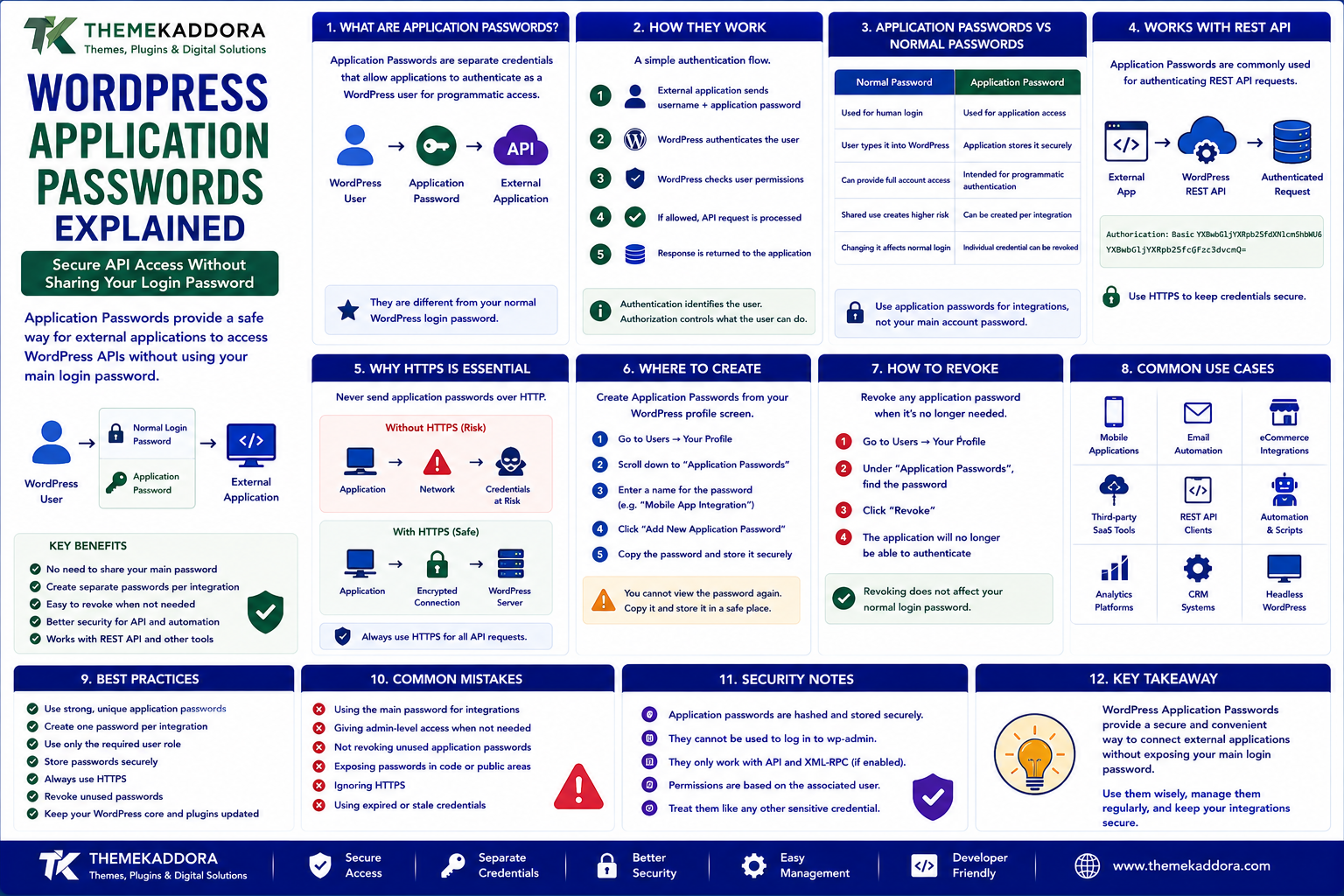
WordPress Application Passwords Explained: Secure API Access Without Sharing Your Login Password
Introduction
Modern WordPress websites increasingly connect with other applications.
A WordPress website may need to communicate with:
Mobile applications
SaaS platforms
CRM systems
Automation tools
External dashboards
REST API clients
Development tools
WooCommerce integrations
These systems may need authenticated access to WordPress.
A common mistake is to give an external application a user's normal WordPress account password.
That creates unnecessary risk.
If the external integration only needs API access, sharing the user's primary login password gives it more information than it actually needs.
WordPress provides a safer built-in mechanism for certain API and integration scenarios called Application Passwords.
An Application Password is a separate credential associated with a WordPress user account. It can be used for authenticated programmatic access without exposing the user's normal WordPress login password to the application.
For example:
WordPress User | ├── Normal Login Password | └── Application Password ↓ External App
If the integration is no longer needed, the specific Application Password can be revoked without changing the user's main WordPress password.
This makes Application Passwords particularly useful for:
REST API integrations
Automation
External applications
Development tools
WordPress management scripts
Headless WordPress projects
In this guide, you'll learn what WordPress Application Passwords are, how they work, how to create and revoke them, how REST API authentication works, security considerations, automation use cases, and common mistakes.
1. What Are WordPress Application Passwords?
WordPress Application Passwords are separate credentials that allow applications to authenticate as a WordPress user for programmatic access.
They are different from the user's normal WordPress login password.
Conceptually:
Administrator ↓ Creates Application Password ↓ "Mobile App Integration" ↓ External Application ↓ WordPress API
The application uses the generated credential for API authentication.
The user can later revoke that individual credential without changing the primary account password.
2. Why Application Passwords Are Useful
Suppose an external application needs access to WordPress.
One approach would be:
External Application ↓ WordPress Username + Normal WordPress Password
This is undesirable because the external application now holds the user's main login credential.
A better approach is:
External Application ↓ WordPress Username + Application Password
This creates separation between:
Human authentication
Programmatic authentication
That separation makes credential management easier.
3. Application Passwords vs Normal Passwords
The two credentials serve different purposes.
Normal Password
Application Password
Used for human login
Used for application access
User types it into WordPress
Application stores it securely
Can provide normal account access
Intended for programmatic authentication
Shared use creates higher risk
Can be created per integration
Changing it affects normal login
Individual credential can be revoked
A good security practice is to avoid sharing your primary WordPress password with third-party tools whenever a dedicated application credential can perform the required task.
4. How WordPress Application Passwords Work
A simplified authentication flow looks like:
External Application ↓ Username + Application Password ↓ WordPress ↓ Authenticate User ↓ Check Permissions ↓ Allow API Request
Authentication identifies the WordPress user.
Authorization still determines whether that user is allowed to perform the requested operation.
An Application Password does not automatically grant unlimited permissions beyond the associated user's capabilities.
5. Application Passwords and the WordPress REST API
One of the common use cases is authenticating REST API requests.
For example:
External App ↓ WordPress REST API ↓ Authenticated Request
A client may send credentials using the authentication method supported by the WordPress environment.
A common HTTP pattern is:
Authorization: Basic ...
The exact transport security matters greatly.
Credentials should be transmitted over HTTPS so they are protected during network communication.
6. Why HTTPS Is Essential
Application Passwords should be treated like sensitive credentials.
Without HTTPS:
Application ↓ HTTP ↓ Network ↓ Credentials at Risk
With HTTPS:
Application ↓ HTTPS ↓ Encrypted Connection ↓ WordPress
Always use HTTPS for authenticated API communication.
If an API integration requires credentials over an unencrypted connection, the architecture should be reconsidered.
7. How to Create a WordPress Application Password
In a WordPress environment that supports Application Passwords, the credential is managed from the user's profile.
A typical workflow is:
WordPress Dashboard ↓ Users ↓ Profile ↓ Application Passwords ↓ Enter Name ↓ Add New Application Password
The application name should identify the integration.
Examples:
Mobile App CRM Integration ERP Connector Backup Script Reporting Tool
Use descriptive names so credentials can be identified later.
8. Why Naming Application Passwords Matters
Suppose an administrator creates:
Integration 1 Integration 2 Integration 3 Integration 4
Months later, it may be difficult to determine which credential belongs to which application.
Instead, use names such as:
Kaddora CRM Sync Mobile App Production ERP Production Reporting Automation Staging Integration
Clear naming makes credential auditing and revocation much easier.
9. How to Store Application Passwords Securely
After generating an Application Password, treat it like a secret.
Do not store it in:
Public Git repositories
JavaScript source code
Public documentation
Screenshots
Client-visible HTML
Chat messages
Unencrypted configuration files
Better approaches include:
Environment variables
Secret managers
Secure server configuration
Encrypted credential storage
For example:
APP_WP_USERNAME=... APP_WP_PASSWORD=...
The exact secret-storage mechanism depends on the application environment.
10. Never Put Application Passwords in Frontend JavaScript
A frequent mistake is using an Application Password directly in browser-side code.
For example:
Browser ↓ JavaScript ↓ Application Password
This exposes the credential to users.
Anyone who can inspect the browser could potentially obtain it.
Instead, sensitive credentials should usually remain on a trusted backend.
A safer pattern is:
Browser ↓ Your Backend ↓ WordPress API
The backend stores the Application Password securely.
11. Application Passwords and External SaaS Integrations
Suppose a SaaS platform needs to retrieve WordPress content.
A typical architecture may be:
SaaS Backend ↓ WordPress REST API ↓ Application Password ↓ WordPress
The SaaS backend can authenticate using a dedicated credential created specifically for that integration.
If the integration is later removed:
Revoke SaaS Credential ↓ SaaS Access Stops ↓ Normal WordPress Login Still Works
This is one of the practical benefits of using separate credentials.
12. Application Passwords for ERP and CRM Integrations
Business platforms often need to communicate with WordPress or WooCommerce.
For example:
ERP ↓ WordPress REST API ↓ Products / Customers / Content
or:
CRM ↓ WordPress API ↓ Leads / Users / Forms
A dedicated Application Password can be associated with the integration account.
The associated WordPress user should have only the capabilities needed for the integration.
Avoid using a full Super Admin or Administrator account when a lower-privilege user can perform the required operations.
13. Application Passwords and Least Privilege
Application Password security is not only about the credential itself.
The associated WordPress user matters too.
For example:
Integration User ↓ Required Capability ↓ API Access
Instead of:
Administrator ↓ Everything
A dedicated integration user can reduce the impact of credential compromise.
The principle is:
Give the integration only the permissions it actually needs.
14. Application Passwords for Automation
Automation systems can use Application Passwords to perform WordPress tasks.
Examples include:
Publishing content
Updating pages
Creating posts
Uploading media
Synchronizing data
Triggering workflows
Updating custom content
For example:
Automation ↓ Authenticated API Request ↓ Create WordPress Post ↓ Response
Automation should still validate responses and handle errors correctly.
Authentication does not guarantee that every request will succeed.
15. Application Passwords and Headless WordPress
In headless WordPress architectures, a frontend may communicate with WordPress through the REST API.
For public content:
Frontend ↓ Public REST API ↓ WordPress
For protected operations:
Backend ↓ Application Password ↓ Authenticated WordPress API
Sensitive operations should generally be performed by a trusted backend rather than exposing credentials to the public frontend.
16. Application Passwords for Development Tools
Developers may use Application Passwords with tools that need authenticated WordPress access.
Examples include:
Local development scripts
Deployment utilities
Testing tools
API clients
Automation scripts
For example:
Development Tool ↓ WordPress REST API ↓ Application Password
Use separate credentials for development and production whenever possible.
This prevents a development credential from becoming a direct path into the production environment.
17. Separate Staging and Production Credentials
A strong deployment strategy should avoid sharing the same credential across environments.
Instead:
Staging ↓ Staging Application Password Production ↓ Production Application Password
If a staging environment is compromised, the production credential remains isolated.
This separation is particularly important for:
SaaS integrations
ERP systems
CI/CD tools
Automated publishing
Development platforms
18. How to Revoke an Application Password
If an integration is no longer required, revoke its Application Password.
A typical process is:
WordPress Profile ↓ Application Passwords ↓ Find Integration ↓ Revoke
This is useful when:
A vendor relationship ends
An application is retired
A developer leaves
A server is decommissioned
Credentials may have been exposed
Revocation should be part of normal access management.
19. What Happens When an Application Password Is Revoked?
The associated application should no longer be able to authenticate using that credential.
However:
The WordPress user remains.
The user's normal login password remains unchanged.
Other Application Passwords remain active unless separately revoked.
This provides useful isolation between integrations.
20. Application Password Rotation
Credential rotation means replacing credentials periodically or after specific security events.
A rotation strategy might be:
Create New Credential ↓ Update Integration ↓ Test ↓ Revoke Old Credential
This avoids downtime when possible.
Rotation is particularly important when:
Staff change
Infrastructure changes
A credential may have leaked
Security policy requires rotation
An external vendor is replaced
The exact rotation schedule should reflect the organization's risk model.
21. What If an Application Password Is Exposed?
Treat an exposed Application Password as compromised.
Do not wait to confirm whether someone used it.
A practical response is:
Credential Exposed ↓ Revoke Credential ↓ Review Logs ↓ Investigate Activity ↓ Create Replacement ↓ Update Integration
Also investigate whether the associated WordPress user had more permissions than necessary.
Credential exposure should be treated as a security incident.
22. Application Passwords and API Permissions
Even with a valid Application Password, the API request should still be checked against WordPress permissions.
For example:
Valid Credential ↓ User Identity ↓ Capability Check ↓ Allowed? ├── Yes → Continue └── No → Reject
A valid credential does not bypass WordPress authorization rules.
This is important when designing custom REST API endpoints and integrations.
23. Application Passwords and Custom REST API Endpoints
Suppose a plugin creates:
/wp-json/kaddora/v1/reports
The endpoint may require a specific capability.
A secure architecture can be:
Application Password ↓ Authenticate User ↓ Check Capability ↓ Custom Endpoint
The endpoint should define an appropriate permission callback rather than allowing every authenticated user to access sensitive information.
24. Application Passwords and WooCommerce
WooCommerce integrations may require access to:
Products
Orders
Customers
Inventory
Categories
Store information
Depending on the integration, WooCommerce-specific API credentials or authentication mechanisms may be more appropriate than general WordPress Application Passwords.
Do not automatically use Application Passwords simply because the website is WordPress-based.
Choose the authentication mechanism that matches the API being used.
25. Application Passwords vs WooCommerce API Credentials
These credentials can serve different purposes.
WordPress Application Password
Useful for authenticated access to WordPress functionality and APIs associated with a WordPress user.
WooCommerce API Authentication
Designed specifically around WooCommerce REST API access and store data.
The correct choice depends on:
Endpoint
API
Required permissions
Integration architecture
Always follow the security model recommended for the API you are consuming.
26. Application Passwords and Logging
API integrations should be monitored.
Useful log information can include:
Request timestamp
Endpoint
User
Response status
Integration identifier
Error type
Never log the actual Application Password.
Avoid logging:
Credentials
Authorization headers
Authentication tokens
Sensitive customer data
Security logs should provide enough information to investigate incidents without creating a second credential-exposure risk.
27. Application Passwords and Failed Login Attempts
Repeated failed API authentication may indicate:
Incorrect configuration
Expired credential
Revoked credential
Brute-force activity
Integration failure
Monitor suspicious patterns where appropriate.
For public-facing APIs, additional protections may include:
Rate limiting
WAF rules
IP restrictions
Network controls
Monitoring
Application Passwords are credentials, not a complete API security system.
28. Application Passwords and Multisite
WordPress Multisite environments require additional consideration.
A user may have access to:
One site
Multiple sites
Network-level functionality
An Application Password authenticates the user, but access remains subject to that user's permissions within the network.
For integrations operating in Multisite:
Application ↓ Application Password ↓ WordPress User ↓ Site / Network Permissions
Test the integration carefully to ensure it can access only what it is intended to manage.
29. Common Application Password Mistakes
Avoid these problems:
Sharing Normal WordPress Passwords
Use dedicated credentials for programmatic access.
Exposing Credentials in JavaScript
Keep secrets on a trusted backend.
Using Administrator Accounts for Everything
Use a dedicated least-privileged account where appropriate.
Reusing One Credential Everywhere
Separate staging, testing, and production.
Never Revoking Old Credentials
Remove credentials that are no longer needed.
Logging Authorization Headers
Never store secrets in application logs.
Ignoring HTTPS
Credentials should be transmitted securely.
No Incident Response Plan
Know how to revoke and replace a compromised credential quickly.
30. Application Password Security Best Practices
A secure implementation should:
Use HTTPS exclusively.
Create separate credentials per integration.
Use descriptive credential names.
Apply least-privilege user permissions.
Store credentials in secure secret storage.
Never expose credentials in frontend code.
Separate staging and production credentials.
Revoke unused credentials.
Rotate credentials when appropriate.
Monitor failed authentication.
Avoid logging secrets.
Use rate limiting where necessary.
Review access regularly.
The goal is to make every integration independently manageable.
31. A Practical Application Password Workflow
A reliable integration process can look like:
Define Integration ↓ Create Dedicated WordPress User ↓ Assign Required Permissions ↓ Generate Application Password ↓ Store Secret Securely ↓ Connect API ↓ Test ↓ Monitor ↓ Rotate / Revoke When Needed
This creates a clean lifecycle for API credentials.
32. When Should You Use WordPress Application Passwords?
They can be useful when:
An external application needs authenticated WordPress access.
A server-side integration uses the WordPress REST API.
Automation needs to perform WordPress operations.
A development tool needs programmatic access.
A headless backend needs authenticated WordPress operations.
They may not be appropriate when:
The API provides a more suitable dedicated authentication mechanism.
Public content requires no authentication.
A more specialized integration credential is required.
Choose the authentication mechanism according to the API and security requirements.
Why Choose ThemeKaddora?
At ThemeKaddora, we believe secure integrations are an important part of modern WordPress development.
WordPress websites increasingly communicate with:
- SaaS platforms
- ERP systems
- CRM systems
- Mobile applications
- Automation tools
- WooCommerce services
- AI platforms
- External APIs
Secure authentication helps prevent these integrations from becoming unnecessary security risks.
ThemeKaddora focuses on practical WordPress, WooCommerce, SaaS, AI, automation, and digital solutions designed around:
Security
Performance
Compatibility
Maintainability
Scalable integrations
Conclusion
WordPress Application Passwords provide a useful way to give external applications separate credentials for programmatic access.
Instead of sharing a user's normal WordPress password, an integration can use a dedicated Application Password that can be independently revoked.
The strongest approach combines:
Dedicated credential → Least privilege → HTTPS → Secure storage → Monitoring → Revocation
Application Passwords are especially useful for server-side REST API integrations and automation, but they should not be treated as a complete security system.
Choose the authentication mechanism appropriate for the API, protect credentials carefully, and keep production access separate from development and staging environments.
The goal is not simply to make an API connection work. The goal is to create an integration that remains secure and manageable throughout its entire lifecycle.
Frequently Asked Questions
1. What are WordPress Application Passwords?
They are separate credentials associated with a WordPress user that allow programmatic authentication without sharing the user's normal login password.
2. Are Application Passwords the same as my WordPress password?
No. They are separate credentials created specifically for application access.
3. Can Application Passwords be used with the WordPress REST API?
Yes. They can be used for authenticated REST API requests when the WordPress environment and endpoint support the authentication method.
4. Are Application Passwords secure?
They can be secure when used over HTTPS, stored safely, associated with appropriately permissioned users, and revoked when no longer needed.
5. Should I use an Administrator account for API integrations?
Not automatically. A dedicated user with only the capabilities required by the integration is generally safer.
6. Can I revoke an Application Password without changing the main password?
Yes. Individual Application Passwords can be revoked independently.
7. Should Application Passwords be stored in JavaScript?
No. Secrets should generally remain on a trusted backend rather than being exposed to browser users.
8. Should staging and production use the same Application Password?
No. Separate environments should use separate credentials whenever possible.
9. Are Application Passwords the same as WooCommerce API keys?
No. They serve different authentication models. Use the credential system appropriate for the API you are integrating with.
10. Why choose Themekaddora?
Themekaddora provides lightweight, responsive, SEO-friendly WordPress themes with fast performance, WooCommerce compatibility, flexible customization, accessibility-conscious design, modern templates, regular updates, and professional support—providing a strong foundation for businesses building digital products and product-focused websites.
Comments (0)