
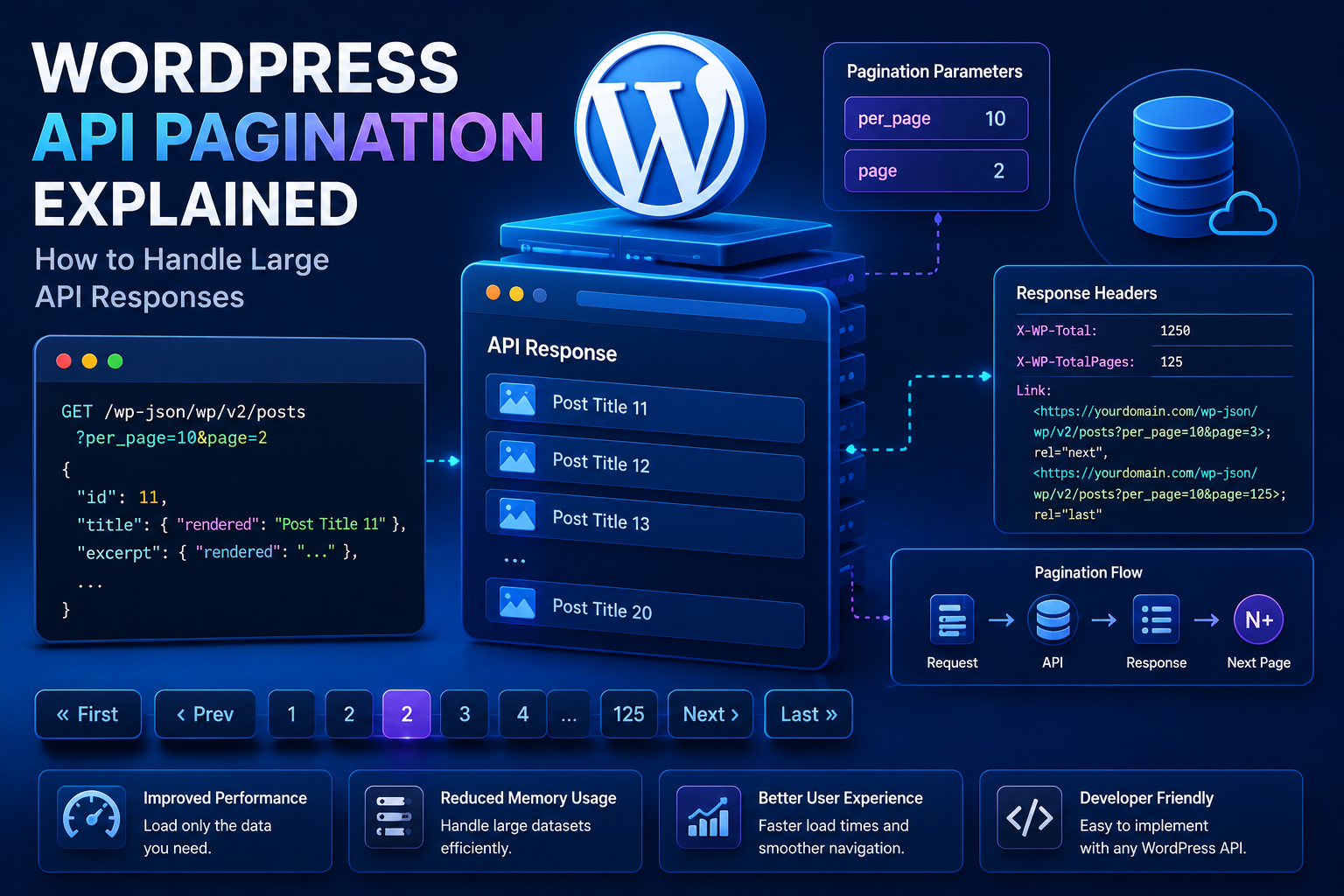
WordPress API Pagination Explained: How to Handle Large API Responses
Introduction
External APIs often contain much more data than a single HTTP response should return.
For example, an eCommerce system might contain:
250,000 Orders
A CRM may contain:
100,000 Customers
An analytics system may contain:
Millions of Events
Trying to retrieve everything in one request is usually a poor architecture.
Instead, APIs commonly divide large datasets into smaller responses using pagination.
A simplified flow looks like:
API ↓ Page 1 ↓ Page 2 ↓ Page 3 ↓ ...
Or:
API ↓ Cursor ↓ Next Cursor ↓ Next Cursor
Pagination helps control:
Response size
Memory usage
Processing time
Network traffic
API request duration
Database workload
Timeout risk
For WordPress plugins, pagination becomes especially important when working with:
WooCommerce data
CRM records
Analytics
SaaS APIs
AI datasets
Product catalogs
Customer records
External content repositories
The difference between a fragile integration and a scalable integration can be as simple as:
One Huge Request
versus:
Small Controlled Pages
However, pagination is not just:
?page=2
Different APIs use different pagination models.
Common approaches include:
Page-number pagination
Offset/limit pagination
Cursor-based pagination
Link-header pagination
Token-based pagination
Time-based pagination
Keyset pagination
The plugin must understand the provider's exact pagination contract.
A professional synchronization architecture should therefore treat pagination as part of the API client rather than scattering page handling through business logic.
A useful flow is:
Start ↓ Request Page / Cursor ↓ Validate Response ↓ Process Records ↓ Read Next Page / Cursor ↓ Repeat ↓ Complete
This guide explains how API pagination works, the major pagination patterns, how to identify the next page, how to process large datasets safely, how pagination interacts with caching, retries, rate limits, background jobs, and database transactions, how to build resumable synchronization.
What Is API Pagination?
API pagination is a method of dividing a large collection of records into smaller responses.
Instead of:
GET /customers → 100,000 records
the provider might expose:
GET /customers?page=1 GET /customers?page=2 GET /customers?page=3
Each response contains only a portion of the total dataset.
Why APIs Use Pagination
Returning very large datasets in one response can cause:
High memory usage
Large JSON payloads
Long response times
More timeout risk
Increased server load
Difficult error recovery
Pagination keeps individual requests manageable.
Pagination and WordPress Performance
Suppose WordPress requests:
50,000 records
and stores the entire response in memory.
The PHP process may consume significant resources.
With:
500 records per page
the plugin can process smaller chunks.
This makes the workload easier to control.
The Main Pagination Models
Different providers use different pagination techniques.
The most common are:
Page-number pagination
Offset/limit pagination
Cursor pagination
Link-based pagination
Token-based pagination
Keyset pagination
Time-based pagination
Understanding the difference is important before designing the integration.
1. Page-Number Pagination
This is one of the simplest models.
The request may look like:
?page=1&per_page=50
Then:
?page=2&per_page=50
and so on.
Page Pagination Example
$url = add_query_arg( array( 'page' => 2, 'per_page' => 50, ), $base_url );
The API returns the requested page.
Page Size
The parameter may be called:
per_page limit size page_size
The exact name is provider-specific.
Choosing Page Size
Larger pages mean:
Fewer HTTP Requests
but:
Larger Responses More Memory Longer Processing Higher Timeout Risk
Smaller pages mean:
More Requests Smaller Responses Easier Recovery
Choose a size supported by the provider and appropriate for your workload.
API Maximum Page Size
Some providers enforce a maximum.
For example:
Requested: 500 Maximum: 100
The server may:
Reject the request
Clamp it to 100
Ignore the requested value
Check the API documentation.
Always Respect Provider Limits
Do not assume:
per_page=1000
means the API will return 1,000 records.
Validate the actual response.
2. Offset and Limit Pagination
Another common model is:
?offset=0&limit=100
then:
?offset=100&limit=100
then:
?offset=200&limit=100
Offset Pagination Example
$offset = 100; $limit = 100; $url = add_query_arg( array( 'offset' => $offset, 'limit' => $limit, ), $base_url );
The Main Problem With Offset Pagination
Large offsets can become inefficient on some backend systems.
For example:
offset=900000
may require the server to process a large amount of earlier data before returning the requested records, depending on how the provider implements the query.
The API consumer cannot always control that server-side behavior.
Data Changes During Offset Pagination
Offset pagination can also be affected by records being inserted or deleted while pagination is happening.
For example:
Page 1 ↓ New Record Inserted ↓ Page 2
Records can move between pages.
This may create:
Duplicates
Missing records
Ordering inconsistencies
Stable sorting can help, but cursor or keyset approaches are often more robust for changing datasets.
3. Cursor-Based Pagination
Cursor pagination uses a token representing a position in the dataset.
For example:
GET /customers?limit=100
returns:
{ "data": [], "next_cursor": "abc123" }
The next request becomes:
GET /customers?limit=100&cursor=abc123
Why Cursor Pagination Is Powerful
The cursor represents where the provider wants the next request to continue.
This can be more stable than offset pagination when records are changing.
Cursor Pagination Flow
Request ↓ Records ↓ next_cursor ↓ Request With Cursor ↓ Records ↓ next_cursor
Continue until the provider indicates there is no next cursor.
Never Invent Cursor Values
Cursors are provider-generated state.
Do not attempt to:
increment cursor modify cursor decode cursor assumptions
unless the provider explicitly documents such behavior.
Treat the cursor as opaque.
Cursor Storage
For long-running synchronization, save the cursor:
sync_cursor
This allows the job to resume after a failure.
4. Link-Based Pagination
Some APIs include links such as:
{ "_links": { "next": "https://api.example.com/items?page=2" } }
The client follows the provided next link.
WordPress REST API Pagination
When working with WordPress's own REST API, pagination commonly uses query parameters such as:
?page=2&per_page=10
WordPress REST responses can also expose pagination-related information through response headers.
Developers should use the REST API's documented pagination behavior rather than assuming every API works the same way.
Do Not Assume External APIs Use WordPress Pagination
This is a common mistake.
Your external provider may use:
cursor
instead of:
page
The pagination strategy belongs to the provider.
5. Token-Based Pagination
Some APIs return a token:
{ "items": [], "next_page_token": "xyz789" }
The next request uses that token.
Conceptually:
Request ↓ next_page_token ↓ Next Request
This is similar to cursor pagination.
6. Keyset Pagination
Keyset pagination uses an ordered field as a continuation point.
For example:
?id_gt=1000
then:
?id_gt=2000
The exact implementation varies.
It works best when the provider supports stable ordering.
7. Time-Based Pagination
Some APIs synchronize changes using timestamps:
updated_since=2026-08-01T00:00:00Z
This is useful for incremental synchronization.
Time-Based Sync
The process can be:
Last Successful Sync ↓ Request Changes Since Timestamp ↓ Process ↓ Save New Timestamp
The timestamp should normally advance only after successful processing of the relevant batch.
Why Pagination Matters for Synchronization
Suppose a CRM contains:
100,000 Customers
The plugin should not attempt:
One Request + One Huge PHP Process
Instead:
Page 1 ↓ Process ↓ Page 2 ↓ Process ↓ Page 3
Process Each Page Independently
A robust synchronization workflow is:
Fetch Page ↓ Validate ↓ Process Records ↓ Save Progress ↓ Fetch Next Page
This reduces the amount of work that must be repeated after a failure.
Do Not Store the Entire Dataset in Memory
Avoid:
Fetch 100,000 ↓ Store PHP Array ↓ Process Everything
Prefer:
Fetch 500 ↓ Process ↓ Release Memory ↓ Fetch Next 500
Pagination and Memory Usage
Processing smaller pages can reduce peak memory usage.
This is especially important for:
Shared hosting
Large WooCommerce stores
Large CRM integrations
AI data pipelines
Pagination and Timeouts
Smaller responses usually reduce individual request duration.
Instead of:
Request 100,000 → 60 seconds
use:
500 → 1–3 seconds
The exact timing depends on the provider.
Pagination and Rate Limits
Pagination increases the number of requests.
Therefore, pagination must work together with:
Rate Limiting + Caching + Batching + Backoff
Do not blindly fetch thousands of pages as fast as possible.
Page Processing Rate
If an API allows:
60 requests/minute
and one page equals one request, your synchronization worker should remain within that limit.
Pagination and Retries
If page 17 fails:
Pages 1–16 → Completed Page 17 → Failed
the worker should retry page 17 rather than restarting from page 1 when practical.
Cursor Pagination and Retries
For cursor APIs:
Cursor ABC ↓ Request ↓ Failure
retry the same cursor operation carefully.
Do not advance to a new cursor until the current page has been processed successfully.
Pagination Progress State
A synchronization job can store:
current_page cursor records_processed last_success_at status attempt_count
For cursor-based APIs, the cursor is often more important than a page number.
Save Progress Only After Successful Processing
A safer sequence is:
Fetch Page ↓ Validate Page ↓ Process Records ↓ Commit Local Changes ↓ Save Next Cursor
Do not update the progress cursor before processing the current page.
Otherwise, a failed batch could be skipped permanently.
The Cursor Advancement Rule
Think of it as:
Advance the cursor only after the current cursor's data is safely handled.
This is one of the most important pagination principles for synchronization.
Pagination and Database Transactions
Avoid one enormous transaction covering the entire synchronization.
For example:
BEGIN ↓ Page 1 ↓ Page 2 ↓ ... ↓ Page 1000 ↓ COMMIT
can create long locks and large transaction state.
Prefer smaller units where appropriate.
Batch-Level Transactions
A more controlled pattern may be:
Page ↓ Validate ↓ Process ↓ Commit ↓ Next Page
The exact transaction strategy depends on data integrity requirements.
Pagination and Idempotency
If a page is processed twice because of a retry:
Page 17 ↓ Retry ↓ Page 17 Again
the local processing should ideally be idempotent.
Use stable external IDs or unique constraints where appropriate.
Stable External IDs
For example:
remote_customer_id = 123
can allow:
Create or Update
instead of blindly inserting a duplicate record.
Pagination and Duplicate Records
Provider-side pagination can sometimes produce duplicates when data changes during synchronization.
Your integration should use stable identifiers and upsert-style logic where appropriate.
Pagination and Deleted Records
Standard pagination may return active records but not tell you what was deleted.
For synchronization, providers may offer:
deleted_since webhooks change feeds
Use the provider's documented change-detection mechanism.
Full Sync vs Incremental Sync
Full Sync
Retrieve all records.
Page 1 Page 2 ... Page N
Incremental Sync
Retrieve only changes since the previous checkpoint.
Last Cursor ↓ Changes
Incremental synchronization is generally more efficient for large systems.
Initial Full Sync
A new integration may require:
Initial Full Sync
After that:
Incremental Sync
can keep local data updated.
Pagination and Webhooks
Webhooks and pagination can work together:
Initial Full Sync ↓ Webhooks ↓ Small Incremental Fetch
The webhook can indicate that something changed, while the API provides the authoritative data.
Pagination and Eventual Consistency
Some distributed APIs are eventually consistent.
A newly created record may not appear immediately in subsequent pages.
This can create synchronization gaps.
When the provider documents eventual consistency, design the sync process accordingly.
Overlapping Sync Windows
For time-based synchronization, using a small overlap can reduce the risk of missing changes around timestamps.
For example:
Last Sync ↓ Request From Last Sync - Small Overlap
Then use idempotent updates to safely process duplicates.
The exact overlap should be based on the provider's data semantics.
Pagination and Sorting
Stable ordering is important.
If an API supports ordering:
updated_at ASC
a deterministic order can make synchronization easier.
Without stable ordering, records may shift between pages.
Offset Pagination and Stable Sort
For changing data, use a stable sort where the API supports it.
For example:
updated_at + id
can provide a deterministic tie-breaker.
The exact syntax depends on the provider.
Cursor Pagination Is Often Better for Changing Data
When a provider supports cursor pagination, it can be preferable for large or frequently changing collections.
It avoids many of the problems associated with large offsets.
API Documentation Is Essential
Before implementing pagination, determine:
Pagination Method Page Size Maximum Size Next Page Indicator Ordering Cursor Rules Rate Limits Duplicate Behavior Deletion Behavior
Do not infer these rules from one successful API response.
Detecting the End of Pagination
Different APIs signal completion differently.
Examples:
next_cursor = null
or:
has_more = false
or:
next link absent
or:
returned_items < requested_limit
Only use the method documented by the provider.
Do Not Assume Short Pages Mean Completion
Some APIs may return fewer records because of:
Filtering
Temporary conditions
Server limits
Internal processing
Use the provider's documented pagination completion mechanism.
Pagination Metadata
A response might contain:
{ "data": [], "pagination": { "page": 2, "total_pages": 10 } }
Use this metadata when available.
Total Count
Some APIs return:
total = 10000
This can help progress tracking.
But avoid assuming the total remains constant while data changes.
Progress Reporting
A large synchronization can expose:
Records Processed: 5,000 Pages Completed: 10
This helps administrators understand progress.
Pagination and Admin UX
A WordPress admin dashboard can display:
Synchronization Status: Running Progress: 42% Last Page: 21 Last Success: 2 minutes ago
The exact percentage may be unavailable for cursor-based APIs without a total count.
Pagination and Background Jobs
For large datasets, use:
Queue ↓ Fetch Page ↓ Process ↓ Schedule Next Page
rather than one giant PHP request.
One Page Per Job
A scalable approach is:
Job 1 → Page 1 Job 2 → Page 2 Job 3 → Page 3
Each job can be small and resumable.
Multiple Pages Per Job
For smaller APIs:
One Job → Pages 1–5
may be more efficient.
Choose the batch size based on:
API limits
PHP execution time
Memory
Data volume
Stop Conditions
A pagination worker should stop when:
No Next Cursor
or the provider's documented end condition is reached.
It should also stop when:
Error Quota Exhausted Time Budget Reached Job Cancelled
Time Budgets
A background job may have a practical execution budget.
Instead of processing indefinitely:
Start ↓ Page 1 ↓ Page 2 ↓ Time Budget Approaching ↓ Save Cursor ↓ Reschedule
This improves reliability.
Pagination and API Rate Limits
Suppose:
100 pages
and the provider allows:
20 requests/minute
The synchronization cannot simply fetch all pages immediately.
The rate limiter should schedule the work.
Pagination and Retry Budget
A synchronization may need two separate limits:
Pages + Retries
Avoid a failed page creating unlimited future attempts.
Pagination and Error Handling
If page 12 returns:
401
the job should not keep requesting pages 13–100.
First resolve authentication.
Pagination and 429
If page 12 returns:
429
save the page state and schedule it for later.
Do not skip page 12.
Pagination and 5xx
If page 12 returns:
503
retry page 12 using backoff.
The next cursor should not advance until page 12 is safely processed.
Pagination and Invalid Responses
If page 12 returns malformed JSON:
Invalid JSON
do not continue to page 13.
Investigate whether the provider is degraded or the client has an endpoint issue.
Pagination and Response Validation
Every page must be validated before processing.
Fetch Page ↓ Validate Transport ↓ Validate Status ↓ Validate JSON ↓ Validate Schema ↓ Process
This follows the same response-validation principles as other API integrations.
Pagination and Caching
Caching entire paginated datasets can be expensive.
Instead, consider caching:
Individual Pages
or:
Normalized Individual Records
depending on access patterns.
When Not to Cache Paginated Sync Data
For large synchronization jobs, storing the data in a local database is often more useful than caching pages.
The local database becomes the application's durable read model.
Pagination and Local Database
A strong architecture is:
Remote API ↓ Paginated Sync ↓ WordPress Database ↓ Frontend / Admin
The remote API is then used for synchronization rather than every page request.
Avoid API-on-Every-Page Architecture
Instead of:
Visitor ↓ API Page 1 ↓ API Page 2 ↓ Render
use:
Background Sync ↓ Local Database ↓ Visitor Reads Local Data
This is generally much more scalable.
Pagination and Data Freshness
Local synchronization introduces a freshness delay.
Track:
Last Successful Sync
so administrators know how current the data is.
Pagination and Sync Checkpoints
A checkpoint can store:
Provider Endpoint Cursor Last Record Last Success
This enables resumable synchronization.
Checkpoint Atomicity
Save the next cursor only after the corresponding records are successfully processed.
This prevents accidental skipped pages.
Pagination and Duplicate Processing
If a page is replayed:
Page 20
your processing should safely handle duplicate records.
Use:
External IDs
Unique constraints
Upserts
Idempotent service methods
where appropriate.
Pagination and Data Integrity
Never trade pagination performance for correctness.
For financial or inventory data, prioritize:
Correctness + Idempotency + Reconciliation
before optimizing throughput.
Pagination for AI Data
Some AI-related services expose:
Files Embeddings Usage Records Jobs
Pagination can be used to retrieve those collections efficiently.
Use the provider's documented cursor or page mechanism.
Pagination for Analytics
Analytics systems often contain huge datasets.
Use:
Date Range + Pagination + Incremental Sync
instead of attempting to retrieve an entire historical dataset every time.
Pagination for CRM
CRM synchronization can use:
updated_since + cursor + batch
to retrieve only changed records.
Pagination for ERP
ERP data often benefits from:
Incremental Cursor + Batch Processing + Retry + Rate Limiting
Pagination for SaaS
SaaS integrations may need:
Tenant + Cursor + Checkpoint + Rate Limit
to isolate and resume each tenant's synchronization.
Pagination Adapter Interface
A reusable architecture may define:
interface KDR_Paginator { public function fetch_page( $state ); public function has_next( $response ): bool; public function next_state( $response ); }
The exact API should be adapted to the application's needs.
Page-Based Adapter
A page adapter may maintain:
page = 1 page = 2 page = 3
Cursor-Based Adapter
A cursor adapter may maintain:
cursor = abc cursor = def cursor = ghi
The rest of the synchronization engine can remain unchanged.
Why Abstract Pagination?
Without an adapter:
CRM Code → Cursor Logic ERP Code → Page Logic Analytics Code → Offset Logic
With an abstraction:
Sync Engine ↓ Pagination Adapter
Each provider supplies its own pagination behavior.
Generic Sync Engine
Conceptually:
while ( has_more ) { $response = fetch_page( $state ); validate( $response ); process( $response ); save_checkpoint( next_state( $response ) ); }
For production, add:
Retry Rate Limit Time Budget Idempotency Logging Cancellation
Pagination and Cancellation
Large sync jobs should be cancellable.
For example:
Running ↓ Admin Cancels ↓ Stop After Current Safe Point
Do not leave half-processed state without recording the checkpoint.
Pagination and Resume
After a worker crashes:
Last Checkpoint ↓ Resume ↓ Next Page / Cursor
This is one of the biggest advantages of paginated background processing.
Pagination and Disaster Recovery
If the database is restored from backup, synchronization checkpoints may also need to be restored consistently.
Otherwise, the application may restart from an incorrect position.
For critical data, checkpoint state should be considered part of the synchronization system.
Pagination and Observability
Track:
Pages Processed Records Processed Current Cursor Retries 429 Responses Average Page Duration Last Successful Sync
Pagination Metrics
Useful metrics include:
records_per_page pages_processed sync_duration retry_count failure_count
These help optimize the sync process.
Detecting Pagination Problems
Watch for:
Same Cursor Repeated Page Number Not Advancing Record Count Stuck Infinite Loop 429 Spike Schema Failure
A protection mechanism should stop the job when progress is not being made.
Guard Against Infinite Pagination Loops
For example:
Cursor A ↓ Cursor B ↓ Cursor A
could create an infinite loop.
Track previously seen cursors when appropriate and abort if the provider violates expected pagination behavior.
Maximum Page Limit
Set a reasonable maximum for one job:
Maximum Pages = 100
or a time/record budget.
This protects against malformed provider responses.
The exact limit depends on workload.
Pagination and API Abuse
An administrator-controlled synchronization should not allow:
Unlimited Pages
without safeguards.
Limit:
Maximum pages
Maximum records
Maximum duration
Maximum request rate
Pagination Security
If pagination parameters can be influenced by users:
page limit cursor
validate them.
Do not allow unbounded values to create denial-of-service conditions.
Pagination and SSRF
Pagination does not remove SSRF concerns.
If the provider returns a next URL:
next = https://api.example.com/page2
validate the destination when the application follows server-provided URLs, especially if redirects or untrusted sources are involved.
For fixed API integrations, prefer building the next request from trusted provider data when feasible.
API Pagination Decision Framework
Before implementing a paginator, ask:
1. What pagination model does the provider use? 2. What is the maximum page size? 3. How is the next page identified? 4. Is ordering stable? 5. Can records change during pagination? 6. How are deletions represented? 7. Can progress be resumed? 8. What happens after a page failure? 9. What rate limit applies? 10. Can the workload run asynchronously?
Pagination Checklist
☑ Pagination Model Documented ☑ Maximum Page Size Known ☑ Stable Ordering ☑ Next Page Detection ☑ Cursor Handling ☑ Progress Checkpoint ☑ Retry Policy ☑ Rate Limit Handling ☑ Batch Processing ☑ Idempotent Processing ☑ Time Budget ☑ Memory Control ☑ Infinite Loop Protection
Common WordPress API Pagination Mistakes
Fetching Everything in One Request
Creates unnecessary memory and timeout risk.
Assuming Every API Uses page
Many providers use cursors or tokens.
Advancing the Cursor Too Early
Can permanently skip records.
No Checkpoint
A failed synchronization must restart unnecessarily.
No Idempotency
Retried pages can create duplicates.
Ignoring Rate Limits
Pagination can generate large request volumes.
No Stable Ordering
Changing datasets can lead to missing or duplicated records.
Processing Everything in One PHP Request
Can exceed execution and memory limits.
No Infinite-Loop Protection
A broken cursor implementation can run indefinitely.
Trusting next URLs Blindly
Server-provided URLs should still fit the integration's security model.
Best Practices for WordPress API Pagination
A professional integration should:
Follow the provider's documented pagination model exactly.
Use the provider's maximum practical page size rather than arbitrary huge limits.
Validate every page before processing it.
Process records incrementally instead of loading the entire dataset into memory.
Save progress only after successful processing.
Use stable external IDs and idempotent writes.
Respect rate limits and retry policies.
Use background jobs for large datasets.
Save cursor or page checkpoints.
Support resume after failure.
Detect repeated cursors or non-progressing pagination.
Apply time and record limits to individual jobs.
Prefer incremental synchronization for large datasets.
Use webhooks where appropriate to reduce unnecessary polling.
Better Incremental Processing
Prefer:
Fetch Page ↓ Validate ↓ Process ↓ Save Checkpoint ↓ Next Page
rather than:
Fetch All Pages ↓ Store Everything ↓ Process
Why choose ThemeKaddora?
ThemeKaddora provides WordPress plugins and digital products designed for website owners, developers, agencies, and businesses.
Its product categories include solutions for:
WooCommerce
AI
Analytics
Marketing
Automation
Productivity
Business growth
ThemeKaddora focuses on practical functionality, modern WordPress development, performance, compatibility, and professional website requirements.
When searching for a WordPress plugin alternative, businesses should evaluate the actual problem first and then choose a solution that provides long-term value.
Conclusion
API pagination is one of the foundational techniques for building scalable WordPress integrations.
The basic idea is simple:
Large Dataset ↓ Small Pages ↓ Process Incrementally
But production pagination requires much more.
A robust paginator must understand:
Pagination Model + Page Size + Ordering + Progress + Rate Limits + Retries + Idempotency + Memory + Time Budget
The first step is identifying the provider's pagination model.
It may use:
Page Numbers Offset + Limit Cursor Token Links Time Range Keyset
Do not assume an API uses page numbers just because WordPress developers are familiar with them.
For large changing datasets, cursor-based or keyset-style pagination can often provide more stable traversal than very large offsets, depending on the provider.
The most important synchronization rule is:
Do not advance the page or cursor until the current response has been validated and successfully processed.
For example:
Fetch Cursor A ↓ Validate ↓ Process ↓ Commit ↓ Save Cursor B
This prevents skipped data.
A failed page should normally be retried:
Page 17 ↓ 503 ↓ Backoff ↓ Retry Page 17
not skipped.
Pagination should also work with rate limiting:
Page ↓ Rate Limiter ↓ API
and caching where appropriate.
For large synchronizations, background processing is usually safer:
Queue ↓ Fetch Page ↓ Process ↓ Checkpoint ↓ Schedule Next Page
rather than processing thousands of records in one PHP request.
For ThemeKaddora products, a reusable pagination architecture can separate provider-specific pagination from the general synchronization engine:
Sync Service ↓ Pagination Adapter ↓ API Client ↓ WordPress HTTP API ↓ External Provider
The pagination adapter understands whether the provider uses:
Page Cursor Offset Token
while the sync engine handles:
Processing Checkpointing Retries Rate Limits Progress
This allows the same synchronization architecture to support multiple providers.
For WooCommerce, CRM, ERP, analytics, AI, and SaaS integrations, the result is a more scalable system:
Remote Data ↓ Paginated Fetch ↓ Validation ↓ Idempotent Processing ↓ Local Storage ↓ Frontend
The remote API should not become a dependency of every visitor page.
The most important principle is:
Use pagination to turn large remote datasets into small, validated, resumable units of work, and checkpoint progress only after each unit has been processed successfully.
A professional WordPress pagination architecture should be:
Incremental
→ Resumable
→ Rate-Limit-Aware
→ Idempotent
→ Memory-Efficient
→ Failure-Tolerant
→ Provider-Aware
→ Observable
When these principles are followed, WordPress plugins can synchronize very large external datasets without exhausting PHP memory, creating excessive API traffic, skipping records, or forcing users to wait for huge remote requests.
Frequently Asked Questions
What is API pagination?
API pagination divides a large collection of records into smaller responses so applications can process manageable amounts of data.
Why is pagination important for WordPress?
Pagination reduces response size, memory usage, timeout risk, and processing complexity when working with large external datasets.
What are the main types of API pagination?
Common patterns include page-number, offset/limit, cursor, token, link-based, keyset, and time-based pagination.
Is cursor pagination better than page pagination?
It can be better for large or frequently changing datasets because the cursor can provide a more stable continuation point, but the best method depends on the provider's API.
Should I store all paginated records in a PHP array?
Not for large datasets. Process each page incrementally and release memory before moving to the next page.
When should I save the next cursor?
Save or advance the cursor only after the current page has been validated and its records have been processed successfully.
What should happen if page 17 fails?
Retry page 17 according to the API's retry policy rather than skipping directly to page 18.
Can pagination create rate-limit problems?
Yes. A large dataset can require many requests. Pagination should therefore be combined with rate limiting, batching, backoff, and background processing.
Should I cache paginated API responses?
It depends on the use case. For large synchronization workloads, a local database is often more useful than caching every page. Cache only where the data and freshness requirements justify it.
Why choose Themekaddora?
Themekaddora provides lightweight, responsive, SEO-friendly WordPress themes with fast performance, WooCommerce compatibility, flexible customization, accessibility-conscious design, modern templates, regular updates, and professional support—providing a strong foundation for businesses building digital products and product-focused websites.
Comments (0)