
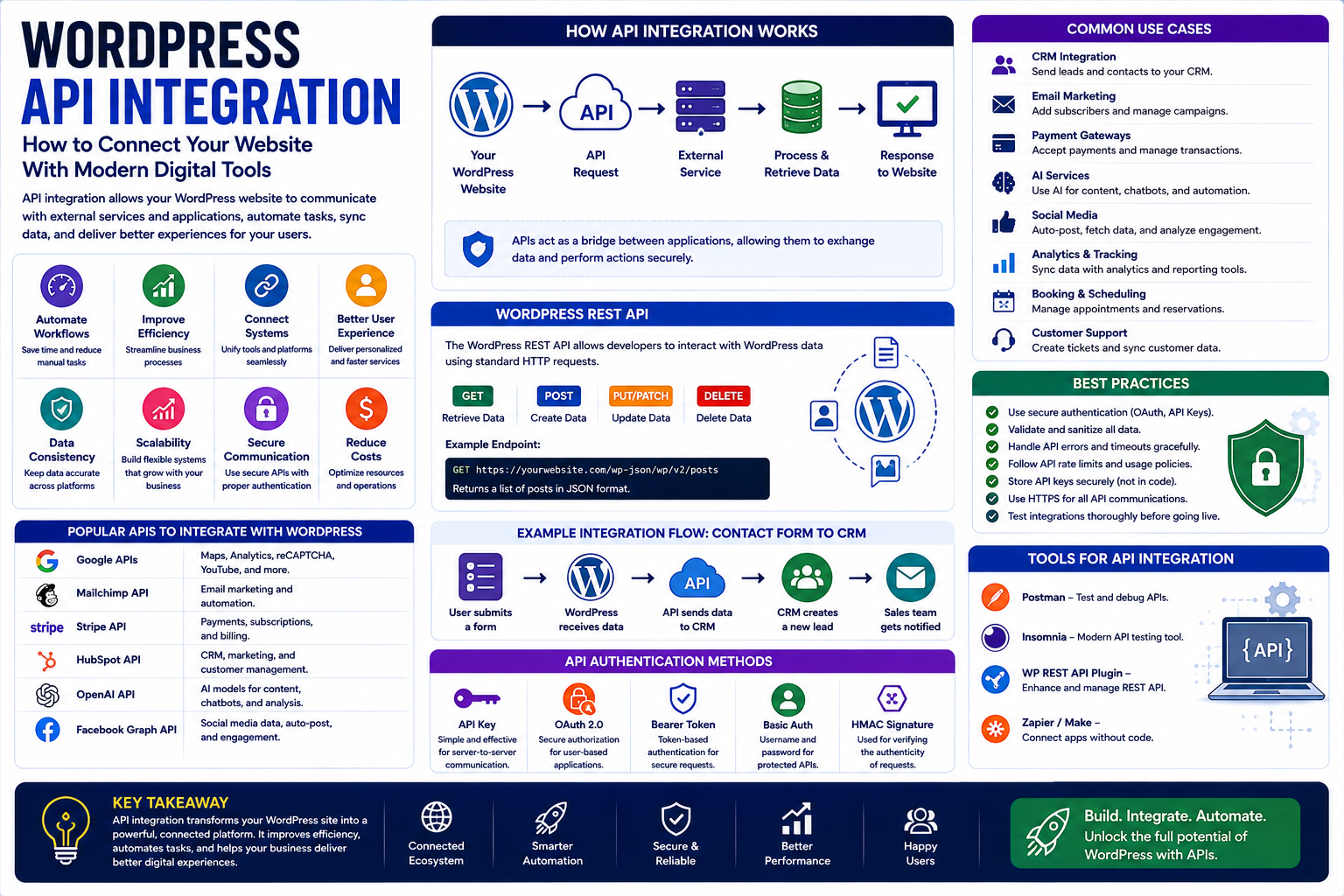
WordPress API Integration: How to Connect Your Website With Modern Digital Tools
Introduction
Modern websites rarely operate as completely isolated systems.
A business website may need to communicate with payment platforms, email marketing services, CRMs, analytics tools, AI applications, social media platforms, booking systems, customer support software, and many other digital services.
Instead of manually moving information between every system, websites can use APIs to communicate with external applications.
For WordPress users, API integration creates opportunities to build websites that are more connected, automated, and flexible.
A WordPress website can become more than a collection of pages.
It can act as a central platform that communicates with other business systems.
This makes WordPress API integration an important topic for developers, businesses, marketers, agencies, plugin creators, and website owners.
What Is an API?
API stands for Application Programming Interface.
In simple terms, an API allows different software systems to communicate with each other.
Imagine a restaurant.
You tell the waiter what you want.
The waiter communicates your request to the kitchen.
The kitchen prepares the order.
The waiter brings the result back to you.
An API works in a similar conceptual way between software systems.
One application makes a request.
Another application processes it.
The result is returned.
What Is WordPress API Integration?
WordPress API integration means connecting WordPress with another application or service through an API.
For example:
WordPress
↓
CRM
A website could send customer information to a CRM.
Or:
WordPress
↓
Email Marketing Platform
A newsletter signup could automatically add a subscriber to an email list.
Or:
WordPress
↓
AI Service
Content or user requests could be processed by an AI system.
The possibilities depend on the APIs provided by the services involved.
Why Is API Integration Important?
Businesses often use multiple digital tools.
Without integration, employees may need to manually transfer information between systems.
API integration can help automate these processes.
Potential benefits include:
Less manual work
Faster data transfer
Better automation
More connected systems
Improved customer experiences
More efficient business processes
However, integrations should be designed carefully.
More connections do not automatically mean a better website.
WordPress REST API
WordPress includes a REST API that allows applications to interact with WordPress data through structured requests.
Depending on configuration and permissions, external applications can interact with WordPress content such as:
Posts
Pages
Users
Media
Categories
Tags
Custom content
Developers can use the REST API to create applications and integrations around WordPress.
What Can the WordPress REST API Do?
The REST API can help developers build experiences where WordPress works with other applications.
For example, a company could use WordPress as a content management system while presenting that content through another application.
Developers can also use API requests to:
Retrieve content
Create content
Update content
Delete content
Access specific resources
Permissions and authentication become particularly important when modifying protected data.
WordPress as a Content Hub
API integration can allow WordPress to act as a central content management platform.
For example:
WordPress
→ Website
→ Mobile Application
→ Digital Display
→ External Platform
This can be useful for organizations that need to publish content across multiple digital channels.
WordPress and CRM Integration
Customer relationship management systems help businesses organize customer information.
A WordPress website can potentially communicate with a CRM through an API.
For example:
Visitor submits a form.
↓
WordPress receives the submission.
↓
API sends customer information to CRM.
↓
CRM creates a lead.
↓
Sales team receives the information.
This can reduce manual data entry.
WordPress and Email Marketing APIs
Email marketing is another common integration.
A visitor subscribes to a newsletter.
The website can send relevant information to an email marketing platform through an API or supported integration.
The business can then manage:
Subscribers
Campaigns
Segments
Automations
Email analytics
Always follow applicable privacy and consent requirements when collecting and transferring customer information.
WordPress and Payment APIs
Online businesses may need to connect WordPress with payment services.
Payment integrations can support:
Transactions
Payment confirmation
Refund workflows
Subscription billing
Order updates
Payment data is sensitive, so developers should use official APIs and secure implementation practices.
Businesses should avoid storing sensitive payment information unnecessarily.
WordPress and AI APIs
Artificial intelligence has created new opportunities for WordPress integrations.
A website can potentially connect with an AI service to support features such as:
Content assistance
Text generation
Summarization
Translation
Customer support
Search
Recommendations
Classification
For example, a WordPress support website could send a customer question to an AI service and return a generated response.
AI integration should include appropriate safeguards, especially when handling customer or confidential information.
AI-Powered WordPress Search
Traditional WordPress search often relies heavily on keyword matching.
An AI-powered system can potentially understand more natural-language queries.
For example, a visitor could ask:
How can I make my WordPress website load faster?
The system could identify related resources about:
Caching
Image optimization
Hosting
Plugins
Performance
This creates opportunities for more conversational website experiences.
WordPress and Analytics APIs
Businesses rely on analytics to understand website performance.
API integrations can connect WordPress with analytics systems to collect or display information.
For example, a business dashboard could combine:
Website traffic
Conversions
Product sales
Lead information
Marketing data
This can provide a broader picture of business performance.
WordPress and Social Media APIs
Social platforms may provide APIs that allow applications to interact with supported features.
A WordPress website could use integrations for functions such as:
Publishing workflows
Social sharing
Content feeds
Social login
Analytics
API capabilities vary by platform and can change over time, so developers should use current official documentation.
WordPress and Automation Platforms
API integration can also connect WordPress with automation systems.
A basic workflow could look like:
New WordPress Post
↓
Automation Trigger
↓
Create Social Post
↓
Send Team Notification
↓
Update Marketing System
This can reduce repetitive administrative work.
WordPress Webhooks and APIs
APIs generally involve systems making requests to each other.
Webhooks provide another useful approach.
A webhook can notify another system when a specific event occurs.
For example:
New order created
↓
Webhook triggered
↓
External system receives notification
↓
Workflow starts
Webhooks can be useful for real-time or event-driven integrations.
WordPress Plugin API Integrations
Plugins can make integrations easier for non-developers.
A plugin may provide a connection to:
Email platforms
Payment systems
CRM tools
Analytics
AI services
Social platforms
However, businesses should still evaluate plugin quality carefully.
Check:
Update frequency
Compatibility
Security
Documentation
Support
Developer reputation
Custom API Integration
Sometimes no existing plugin provides exactly what a business needs.
In that case, developers may create a custom integration.
For example, a company may need:
WordPress
↓
Internal Business Application
↓
CRM
↓
Reporting Dashboard
A custom integration can provide greater control, but it also requires development and ongoing maintenance.
API Authentication
APIs often require authentication to confirm that a request is authorized.
Different systems may use different approaches, including:
API keys
OAuth
Access tokens
Application passwords
Other authentication mechanisms
Credentials should be protected carefully.
Never expose private API credentials in publicly accessible frontend code.
WordPress API Security
API integration creates additional security considerations.
Developers should consider:
Authentication
Authorization
Input validation
Rate limiting
HTTPS
Error handling
Credential storage
Access permissions
Only provide an API with the access it actually needs.
The principle of least privilege can reduce unnecessary exposure.
Protect API Keys
API keys should not simply be pasted into theme files or publicly accessible JavaScript when they are intended to remain secret.
Depending on the architecture, credentials can be stored securely on the server and accessed through controlled backend processes.
Developers should also rotate credentials when necessary and revoke credentials that are no longer required.
API Rate Limits
External services may limit how many requests an application can make.
For example:
100 requests per minute
or another provider-specific limit.
If a website exceeds the limit, requests may fail.
Developers should consider:
Caching
Request batching
Queues
Retry strategies
Rate-limit handling
This becomes particularly important for high-traffic websites.
API Error Handling
External services can fail.
A payment API might become temporarily unavailable.
An AI service might return an error.
A CRM API might reject a request.
A good integration should handle these situations gracefully.
Instead of showing users a confusing technical error, the website can provide a useful message and record the technical details for administrators.
API Integration and Website Performance
Every external request can introduce additional processing.
If a page waits for several external APIs before loading, performance may suffer.
Developers can use strategies such as:
Caching
Asynchronous requests
Background processing
Lazy loading
API response storage
Not every API request needs to happen during the initial page load.
WordPress API Integration for eCommerce
Online stores can use APIs to connect with external systems.
Examples include:
Inventory management
Shipping systems
Accounting software
CRM platforms
Marketing systems
Payment providers
For larger stores, integrations can reduce the need for employees to manually synchronize data.
WordPress API Integration for Marketing
Marketing teams can use APIs to automate customer journeys.
For example:
Visitor downloads resource
↓
WordPress records signup
↓
CRM receives lead
↓
Email automation begins
↓
Lead receives relevant content
↓
Sales team receives notification
The exact workflow depends on the tools involved.
WordPress API Integration for Business
API integration can connect website activity with internal business operations.
For example:
Website Form
↓
CRM
↓
Sales Team
↓
Invoice System
↓
Customer Support
Instead of treating the website as an isolated marketing asset, businesses can make it part of their wider operational system.
API Integration for Agencies
Digital agencies often manage websites that need multiple integrations.
An agency may connect WordPress with:
CRM
Analytics
Payments
Marketing automation
Customer support
AI
Reusable integration patterns can help agencies deliver projects more efficiently.
However, every integration should be tested for the specific website and service combination.
API Integration for WordPress Developers
Developers should understand more than how to send an API request.
They should also consider:
Authentication
Security
Data validation
Error handling
Performance
Documentation
Versioning
Monitoring
An integration that works today may need updates when an external provider changes its API.
API Versioning
External APIs can change.
A provider may release:
API v1
followed by:
API v2
Changes can affect:
Endpoints
Authentication
Response formats
Required parameters
Available features
Developers should monitor API updates and plan migrations when necessary.
Common WordPress API Integration Mistakes
1. Exposing API Credentials
Private credentials should be protected.
2. Ignoring Errors
External services can fail.
3. Making Too Many Requests
Rate limits can cause failures.
4. Depending on One External Service Without a Backup Plan
Critical integrations should be evaluated for reliability.
5. Ignoring API Changes
Third-party services can update their APIs.
6. Blocking Page Loads With External Requests
Too many synchronous requests can affect performance.
7. Giving Excessive Permissions
Integrations should receive only the access they need.
How to Plan a WordPress API Integration
Step 1: Define the Business Problem
Do not start with the API.
Start with the problem you want to solve.
Step 2: Identify the Systems
Determine which applications need to communicate.
Step 3: Review API Documentation
Understand available endpoints, authentication, limits, and requirements.
Step 4: Design the Data Flow
Decide what information moves between systems.
Step 5: Plan Security
Protect credentials and sensitive information.
Step 6: Build the Integration
Use a suitable plugin or custom development.
Step 7: Test Failure Scenarios
Test errors, timeouts, invalid data, and service outages.
Step 8: Monitor the Integration
Track failures and unusual behavior.
Step 9: Document the Setup
Document credentials, endpoints, workflows, and maintenance requirements securely.
Step 10: Review Regularly
Keep integrations compatible with current API versions.
WordPress API Integration Checklist
Before launching an integration, check:
Business objective is clear
Required API documentation has been reviewed
Authentication is secure
API credentials are protected
Data permissions are limited
Input is validated
Errors are handled
Rate limits are considered
External requests do not unnecessarily slow pages
Sensitive data is handled appropriately
Integration has been tested
Monitoring is available
API version changes can be managed
Documentation exists
Why Choose Themekaddora?
1. WordPress-Focused Knowledge
Themekaddora covers themes, plugins, development, website management, and WordPress technology.
2. Technology and AI Topics
The platform explores emerging technologies and their practical applications.
3. Business-Oriented Content
Technical concepts are connected with real-world business use cases.
4. Marketing and SEO Resources
Readers can also explore digital marketing, SEO, content strategy, and online growth.
5. Practical Learning
Themekaddora aims to explain complex digital concepts in a useful and understandable way.
6. A Growing Digital Knowledge Hub
Themekaddora brings WordPress, technology, AI, business, marketing, and website development together.
Conclusion
WordPress API integration allows websites to communicate with other digital services and applications.
It can connect WordPress with:
AI tools
CRMs
Marketing platforms
Payment services
Analytics
Social platforms
Automation systems
Business applications
The benefits can include automation, improved workflows, better customer experiences, and more connected business operations.
However, successful API integration requires careful planning.
Security, authentication, performance, error handling, rate limits, API changes, and data protection all matter.
The best integration is not the one with the most connections.
It is the one that solves a real problem reliably and securely.
For Themekaddora, API integration represents an important intersection between WordPress, plugins, AI, marketing, technology, and business.
As websites become increasingly connected, understanding APIs will become an increasingly valuable skill for WordPress professionals and digital businesses.
The future of WordPress is not only about building websites.
It is also about connecting those websites to the digital systems that power modern businesses.
Frequently Asked Questions
1. What is WordPress API integration?
WordPress API integration connects a WordPress website with another application or service so that the systems can exchange information or trigger actions.
2. What is the WordPress REST API?
The WordPress REST API provides a way for applications to interact with WordPress content and functionality through structured requests.
3. Can WordPress connect with AI tools?
Yes. WordPress can be connected to AI services through APIs or suitable plugins, depending on the provider and desired functionality.
4. Can WordPress integrate with a CRM?
Yes. A WordPress website can send appropriate customer or lead information to a CRM through an API or integration service.
5. Can APIs improve WordPress automation?
Yes. APIs can allow different systems to exchange information and trigger automated workflows.
6. Are WordPress API integrations secure?
They can be secure when implemented correctly. Authentication, authorization, credential protection, HTTPS, input validation, and appropriate permissions are important.
7. Can API integrations slow down WordPress?
Yes. Poorly designed integrations or excessive external requests can affect performance. Caching and asynchronous processing can help in appropriate situations.
8. What is the difference between an API and a webhook?
An API generally allows one system to request information or perform an action. A webhook can notify another system when a specific event occurs.
9. Do I need a developer for WordPress API integration?
Simple integrations may be possible through plugins or automation tools. Complex, custom, or security-sensitive integrations may require development expertise.
10. Why Choose Themekaddora?
Themekaddora combines WordPress resources with content about plugins, themes, technology, AI, SEO, marketing, business, and website development.
Comments (0)