
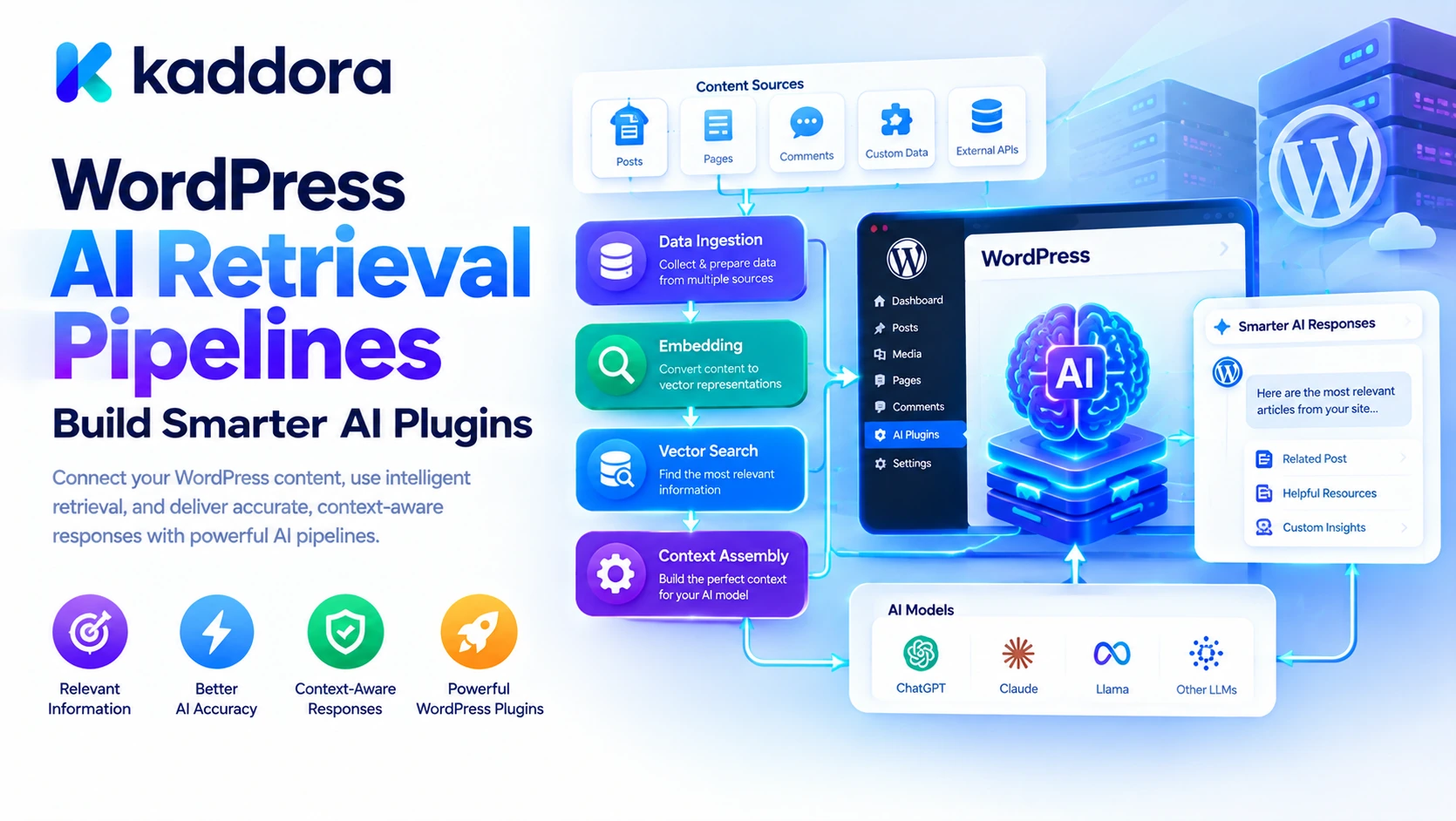
Introduction
WordPress websites often contain more information than a simple AI prompt can effectively handle.
A business website may contain hundreds of pages, a WooCommerce store may have thousands of products, and a documentation portal may include articles, FAQs, product manuals, technical guides, and support resources.
When users ask questions about this content, an AI model needs a reliable way to find the information that matters.
For example, a visitor might ask:
Which WooCommerce plan supports automated inventory synchronization?
A basic chatbot may generate a plausible answer from general knowledge. A properly designed AI retrieval system can instead search the website's approved documentation, retrieve relevant passages, and use them to construct a more grounded response.
This process is known as AI retrieval, and it is an important foundation for building context-aware WordPress plugins.
A retrieval pipeline connects website content to an AI model through a sequence of operations:
WordPress Content ↓ Content Ingestion ↓ Parsing and Cleaning ↓ Text Chunking ↓ Indexing and Embeddings ↓ Search and Retrieval ↓ Ranking and Filtering ↓ Context Assembly ↓ AI Response ↓ Validation and References
Each stage affects the usefulness, accuracy, security, and performance of the final answer.
This guide explains how to design WordPress AI retrieval pipelines, from collecting website content to retrieving relevant information and producing reliable AI-generated responses.
What Is an AI Retrieval Pipeline?
An AI retrieval pipeline is a system that finds relevant information from a knowledge source and makes it available to an AI model for a particular task.
In a WordPress plugin, the knowledge source may include:
Published posts and pages
WooCommerce products
Product attributes and categories
Custom post types
FAQs and documentation
Approved business policies
Selected metadata
External documents
Other authorized application data
The retrieval pipeline does not necessarily generate the final answer itself. Its primary responsibility is to find and prepare useful information for the generation stage.
For example:
User: How do I return a purchased product? ↓ Retrieval Pipeline ↓ Find Relevant Return Policy ↓ Retrieve Applicable Instructions ↓ AI Model ↓ Explain the Policy
This architecture is particularly useful when an AI assistant needs access to information that changes frequently or is specific to a business.
What Is Retrieval-Augmented Generation (RAG)?
Retrieval-Augmented Generation, commonly called RAG, combines information retrieval with AI-generated responses.
Instead of asking a model to answer a question from its existing knowledge alone, the application first retrieves relevant information and supplies it as context.
The process is:
Question ↓ Search Knowledge Base ↓ Retrieve Relevant Content ↓ Build Context ↓ AI Generates an Answer ↓ Return the Response
For WordPress, RAG can support customer support assistants, product recommendation systems, documentation chatbots, AI SEO tools, and administrative copilots.
OpenAI's Retrieval documentation describes semantic search over indexed data, while its File Search guide explains how retrieval can be connected to model responses using indexed files.
A WordPress plugin can use a managed retrieval service, build its own search infrastructure, or combine WordPress's existing search capabilities with specialized retrieval tools.
The right choice depends on content volume, search requirements, privacy needs, budget, and operational complexity.
Why WordPress AI Plugins Need Retrieval Pipelines
Without a dedicated retrieval layer, an AI plugin may have to choose between two unsatisfactory approaches.
The first is sending large amounts of website content to the model. This can increase cost, latency, and irrelevant information.
The second is relying on the user's question alone, even when the model does not know the website's specific policies, products, or documentation.
A retrieval pipeline offers a more targeted approach.
More Relevant Answers
The system can retrieve content connected to the user's question rather than supplying unrelated documents.
Access to Website-Specific Knowledge
The model can use current product records, documentation, FAQs, and approved policies.
Better Context Efficiency
Only relevant passages need to be added to the generation context.
Support for Growing Content Libraries
The retrieval infrastructure can index new content without requiring every document to be included in every request.
Greater Control Over Data
The application can determine which documents are searchable and which users may access them.
Retrieval does not guarantee that an AI answer will be correct. Its effectiveness depends on content quality, search relevance, access controls, and how the retrieved information is used.
The Main Stages of a WordPress AI Retrieval Pipeline
1. Content Ingestion
Content ingestion is the process of collecting information from approved sources and preparing it for indexing.
In WordPress, the initial sources may include posts, pages, products, custom post types, and selected metadata.
The WordPress REST API provides resource-oriented endpoints for working with WordPress content, including posts and pages. Within a plugin, developers can also use appropriate WordPress and WooCommerce APIs directly.
A content ingestion process might retrieve:
Post ID Post Type Title Content Excerpt Taxonomies Modified Date Permalink Publication Status
For WooCommerce products, the pipeline may also need relevant attributes, categories, descriptions, and other approved fields.
Do not collect every available field automatically. Select the data that contributes to the intended retrieval task.
For example, a product-description assistant may need product specifications and category information, but it generally does not need private customer records or payment credentials.
2. Content Filtering and Cleaning
Raw WordPress content may contain markup, shortcodes, navigation fragments, repeated headers, hidden elements, or irrelevant formatting.
Before indexing, normalize the content so that retrieval operates on meaningful information.
Common preparation tasks include:
Removing irrelevant markup
Resolving or filtering shortcodes
Normalizing whitespace
Removing duplicate text
Extracting meaningful headings
Preserving useful links and metadata
Excluding unwanted or unauthorized content
Identifying empty or low-value records
The goal is not to remove all formatting indiscriminately. Headings, lists, tables, and product attributes often provide useful structure.
For example, a product specification table may contain critical information that would be lost if the parser simply removed every HTML element.
Preserve the meaning of the source content while eliminating noise.
3. Document Classification
Not every WordPress record should be treated identically.
An article, product, FAQ, policy document, and customer review may require different retrieval strategies.
A useful system classifies documents by their type and intended use.
For example:
Content Type
Typical Retrieval Purpose
Blog post
Educational questions
Documentation page
Technical support
Product
Product details and comparisons
FAQ
Common customer questions
Return policy
Store policy queries
Product category
Category-level discovery
Approved internal document
Authorized administrative assistance
Classification also helps enforce access rules.
A public chatbot should not retrieve private drafts or internal business documents simply because they exist in the WordPress database.
The retrieval pipeline should apply publication status, user permissions, site boundaries, and other relevant restrictions before returning content.
4. Text Chunking
Large documents often need to be divided into smaller sections before indexing.
This process is called chunking.
For example, a long WordPress article could be divided into sections based on headings rather than being treated as one enormous block.
Full Article ↓ Introduction ↓ Section 1 ↓ Section 2 ↓ Section 3 ↓ Conclusion
Smaller chunks can make it easier to retrieve the specific part of a document that answers a question.
However, chunks that are too small may lose important context. A paragraph discussing a policy exception may not make sense when separated from the heading or preceding explanation.
Chunks that are too large can contain a mixture of relevant and irrelevant information.
A practical approach is to experiment with chunk sizes and boundaries using representative questions from the actual website.
For WordPress content, heading-based chunking is often a useful starting point because article headings already provide meaningful subject divisions.
5. Metadata and Source Tracking
Every indexed chunk should retain enough metadata to identify its source and determine how it can be used.
Useful fields may include:
Document ID Post ID Content Type Chunk ID Title URL Category Publication Status Last Modified Access Scope
For example, a retrieved chunk from a return policy should retain the identity of the source policy page.
This allows the application to generate source references, update or remove outdated content, and apply the relevant access rules.
Metadata can also help filter search results. A query about products may prioritize product records, while a support question may search documentation and FAQs.
Do not rely on metadata alone to authorize access. The application must verify permissions against its trusted data and policy rules.
6. Embeddings and Semantic Indexing
One retrieval method uses embeddings to represent the meaning of text as numerical vectors.
Texts with related meanings may have vectors that are similar in the embedding space, which allows a semantic search system to retrieve content even when the query uses different words from the original text.
For example, a visitor asks:
How can I get my money back?
The relevant policy section may use the phrase "refund procedure" rather than "get my money back."
Semantic retrieval can help identify the related passage even when the wording differs.
A typical embedding workflow is:
Prepared Text Chunk ↓ Embedding Model ↓ Vector Representation ↓ Vector Index ↓ Semantic Search
WordPress developers can use a suitable external vector store, a database with vector-search capabilities, or a managed retrieval service.
OpenAI's Retrieval guide explains how vector stores can index content for semantic search.
Embeddings do not understand permissions or guarantee factual correctness. The application must still filter records appropriately and validate how retrieved information is used.
7. Keyword and Hybrid Search
Semantic search is useful, but it may not always retrieve the best result by itself.
A question involving an exact product SKU, error code, order identifier, or plugin function name may benefit from exact keyword matching.
Keyword search can help find literal matches, while semantic search can find related concepts.
A hybrid retrieval pipeline combines the two:
User Query ↓ Keyword Search + Semantic Search ↓ Combine Candidate Results ↓ Remove Duplicates ↓ Rank Relevant Content
Anthropic's article on Contextual Retrieval discusses combining lexical search methods such as BM25 with semantic retrieval and ranking techniques.
For WordPress, hybrid retrieval may be useful when the knowledge base contains technical documentation, product catalogs, support articles, and content with exact identifiers.
Not every plugin needs hybrid search from the beginning. Start with a simple retrieval method and add complexity when testing reveals a real limitation.
8. Retrieval Ranking and Filtering
Retrieval systems may return several candidate documents or chunks.
Not all results will be equally relevant.
The pipeline can rank candidates using signals such as:
Search relevance
Content type
Exact keyword matches
Publication status
Document recency
Category relevance
Source quality
Permission eligibility
For example, if a user asks about the current price of a product, the latest authorized product record should generally be preferred over an old blog post mentioning an earlier price.
A reranking step can help order candidate passages more effectively before context assembly.
However, ranking scores are not guarantees of truth. The application should maintain authoritative data sources for important facts and resolve conflicts according to explicit rules.
9. Context Assembly
After retrieval, the plugin must decide which results are suitable for the AI request.
This stage combines relevant passages with the user question, trusted instructions, and other required task information.
For example:
Trusted Instructions + User Question + Relevant Policy Excerpts + Source References ↓ AI Context
Context assembly should focus on relevance, clarity, and token efficiency.
Avoid copying every search result into the prompt. Deduplicate overlapping passages, retain essential source information, and enforce a maximum context size.
For a product query, the context may need only a few verified fields. For a complex documentation question, several related passages may be appropriate.
The final context should also distinguish trusted application instructions from retrieved content, which must be treated as reference material rather than authority over the AI's behavior.
10. AI Response Generation
Once the context is assembled, the application can pass it to the selected AI model.
The model can then generate an answer grounded in the retrieved information.
A useful response policy should instruct the model to:
Answer using the supplied evidence when appropriate.
Avoid inventing missing information.
Acknowledge uncertainty.
Distinguish source facts from recommendations.
Provide references when available.
Avoid claiming that an action was completed without confirmation.
These instructions improve consistency, but the application should not rely solely on prompting to guarantee correctness.
For important actions or factual outputs, use deterministic validation and trusted application data whenever possible.
11. Source References and Answer Validation
A useful retrieval pipeline should make it possible to identify where important information came from.
For a WordPress article, the final answer may include the source title and link.
For a product assistant, it may refer to the relevant product record or documentation page.
This improves traceability and helps users verify important information.
Validation can also check that:
The cited page still exists.
The user is allowed to access the source.
The source is published or otherwise authorized.
Important figures match the authoritative data.
The output does not contain unsupported claims.
Source references should point to the actual records used during retrieval. Do not ask the model to invent URLs or citations.
Keeping the Retrieval Index Up to Date
WordPress content changes constantly.
Posts are edited, products are repriced, policies are updated, and pages are unpublished or deleted.
If the retrieval index does not reflect these changes, the AI may return outdated information.
A robust pipeline should track content updates and index changes.
WordPress Content Changes ↓ Detect the Change ↓ Reprocess Affected Content ↓ Update or Remove Indexed Chunks ↓ Refresh the Search Index ↓ Use Current Indexed Content
For smaller websites, scheduled synchronization may be sufficient. Larger installations may benefit from WordPress hooks that trigger indexing jobs after relevant content changes.
Use bounded background tasks for large reindexing workloads so that normal WordPress requests are not overloaded.
When an item is unpublished or deleted, remove or restrict its indexed representation appropriately. Do not allow removed content to remain available through stale retrieval results.
Security and Privacy in WordPress Retrieval Pipelines
A retrieval pipeline can expose information if it indexes content indiscriminately.
Security should be built into ingestion, indexing, retrieval, and response generation.
Important safeguards include:
Filter content before indexing. Decide which post types, statuses, fields, and data sources are allowed.
Enforce access control at query time. Do not assume a record is accessible merely because it exists in the index.
Minimize sensitive data. Avoid indexing unnecessary personal information, credentials, payment details, or internal secrets.
Protect external API credentials. Keep model and retrieval-service credentials server-side.
Treat retrieved content as untrusted. Content may contain prompt injection or misleading instructions.
Validate tool actions separately. Retrieval should not automatically grant permission to modify WordPress data.
Define retention and deletion rules. Include a process for removing stale or unauthorized indexed content.
Monitor retrieval activity. Record appropriate diagnostic information while avoiding unnecessary storage of complete prompts or sensitive content.
For example, an AI assistant answering public product questions should not retrieve internal supplier notes simply because the notes share keywords with the question.
The same principle applies to WordPress multisite installations and multi-tenant environments, where content from one site or customer must not leak into another user's context.
How to Build a WordPress AI Retrieval Pipeline
A practical implementation process can be divided into stages.
Step 1: Define the Use Case
Start with one clear purpose, such as:
Answering questions about documentation
Searching WooCommerce products
Building a customer support chatbot
Providing AI-assisted SEO recommendations
Retrieving approved internal knowledge
The use case determines which content sources should be indexed and how retrieval quality will be evaluated.
Step 2: Select the Content Sources
Choose the WordPress data relevant to the task.
For example, a documentation assistant may need published posts, knowledge-base articles, and FAQs. A product assistant may need WooCommerce products, categories, attributes, and approved store policies.
Step 3: Implement Content Ingestion
Retrieve the selected content through appropriate WordPress or WooCommerce APIs.
Normalize the content, preserve useful structure, record metadata, and exclude unauthorized or irrelevant fields.
Step 4: Build the Index
For a simple use case, start with WordPress search or a suitable full-text search implementation.
For semantic retrieval, prepare chunks and generate embeddings using a selected embedding service.
Store the index with enough metadata to identify sources, apply filters, and update records.
Step 5: Implement Retrieval
Take the user query and retrieve relevant content.
Apply the required access rules, ranking, deduplication, and result limits before proceeding.
Step 6: Assemble the Context
Combine the best retrieved passages with the user request and relevant trusted instructions.
Keep the context focused and preserve source references.
Step 7: Generate the Response
Send the prepared context to the selected AI model.
Define how the model should handle uncertainty, conflicting information, unsupported questions, and source references.
Step 8: Validate the Output
Verify important facts and references against the authoritative records.
If the AI requests a tool operation, validate the tool and its parameters and perform all required authorization checks before execution.
Step 9: Monitor Performance
Track retrieval relevance, response latency, API usage, errors, stale records, and output quality.
Use these measurements to improve the pipeline gradually rather than introducing complex infrastructure without a demonstrated need.
Testing Your WordPress Retrieval Pipeline
Testing should cover the complete path from the user question to the final answer.
Useful test scenarios include:
Direct-match questions: Can the pipeline retrieve content containing the same terminology as the question?
Semantic questions: Can it find relevant content when the user uses different wording?
Ambiguous questions: Does the pipeline retrieve enough information or ask for clarification?
Missing-information questions: Does the AI acknowledge when the knowledge base does not contain an answer?
Outdated information: Are changed or deleted records removed from the index?
Permission tests: Can users retrieve only records they are authorized to access?
Prompt injection: Can malicious content in a document manipulate the assistant or its tools?
Scale tests: Can retrieval and indexing handle larger content collections without excessive latency or resource use?
Citation tests: Do source references point to the actual documents used?
Cost tests: Are retrieval results and context sizes kept within reasonable limits?
Build a repeatable evaluation set using realistic questions from your website. Evaluate both whether the correct content was retrieved and whether the final answer used that content accurately.
Common WordPress AI Retrieval Mistakes
1. Indexing Everything
Indexing every database record can create irrelevant results and expose unnecessary data.
Better approach: Define an explicit content inclusion policy.
2. Using Poor Chunk Boundaries
Chunks that are too large contain excessive information, while chunks that are too small may lose meaning.
Better approach: Test chunking strategies that preserve headings, sections, and relationships.
3. Depending Exclusively on Semantic Search
Exact product codes, error identifiers, and technical terms may require literal matching.
Better approach: Evaluate keyword search or hybrid retrieval when exact matches matter.
4. Ignoring Content Updates
Stale indexes can cause outdated answers.
Better approach: Design incremental updates, deletion handling, and index refresh workflows.
5. Sending Too Much Context
Excessive context increases cost and can distract the model.
Better approach: Rank, filter, deduplicate, and limit retrieved results.
6. Trusting AI Citations Without Verification
A model may reference a source incorrectly or make unsupported claims.
Better approach: Preserve source identifiers and validate citations against actual retrieved records.
7. Treating Retrieval as Authorization
A relevant document is not necessarily accessible to every user.
Better approach: Enforce permissions independently of search relevance.
Who Can Benefit From WordPress AI Retrieval Pipelines?
AI retrieval pipelines can support:
WordPress plugin developers
WooCommerce stores
Customer support assistants
AI SEO plugins
Documentation portals
AI-powered site search
Membership websites
Educational platforms
Business knowledge assistants
Marketing automation tools
WordPress agencies
Custom AI agent development
They are especially useful when answers must be based on information stored in a website rather than on general model knowledge alone.
Why Choose Kaddora?
Kaddora focuses on practical WordPress plugin development, AI-powered functionality, WooCommerce solutions, and digital workflow automation.
Retrieval pipelines can help context-aware plugins connect AI models with verified WordPress content, product information, approved policies, documentation, and structured business data.
For developers, a well-designed retrieval layer provides a clear boundary between content ingestion, indexing, search, context assembly, and AI response generation. This makes the system easier to test, monitor, and improve as the knowledge base grows.
The objective is not to build the most complex search infrastructure possible. It is to create a retrieval workflow that supplies relevant, authorized, and current information to the AI model.
Conclusion
WordPress AI Retrieval Pipelines provide the infrastructure needed to turn website content into relevant information that AI systems can use.
A reliable pipeline combines content ingestion, cleaning, chunking, metadata, indexing, retrieval, ranking, context assembly, response generation, and validation.
The core workflow is:
WordPress Content ↓ Ingestion and Preparation ↓ Indexing ↓ Relevant Retrieval ↓ Context Assembly ↓ AI Generation ↓ Validation and References
For smaller plugins, WordPress search and focused queries may be enough. Larger knowledge bases may benefit from semantic search, embeddings, hybrid retrieval, reranking, background indexing, and dedicated retrieval infrastructure.
Regardless of implementation, the most important principles are to keep indexed content current, retrieve only authorized information, maintain useful source references, and validate important outputs.
A well-designed retrieval pipeline helps AI-powered WordPress plugins move from generic responses toward answers grounded in the website's actual content—while keeping performance, security, and maintainability under control.
Frequently Asked Questions
What is a WordPress AI retrieval pipeline?
It is a system that collects WordPress content, prepares and indexes it, retrieves relevant information for a query, and supplies that information to an AI model to support its response.
What content can be indexed from WordPress?
Depending on the use case and permissions, the index may include published posts, pages, WooCommerce products, FAQs, custom post types, documentation, and approved business records.
Why is chunking important?
Chunking divides large documents into smaller retrieval units. Well-designed chunks preserve enough context to be understood while allowing the system to retrieve relevant sections.
What is hybrid retrieval?
Hybrid retrieval combines keyword-based search with semantic search to improve the chances of finding relevant content, particularly when exact identifiers and broader conceptual matches both matter.
How can I keep a retrieval index up to date?
Use a synchronization process that detects content changes, reprocesses affected records, updates or deletes indexed chunks, and prevents stale content from appearing in future results.
How can retrieval pipelines prevent data leakage?
Filter content before indexing, enforce access controls during retrieval, minimize sensitive data, keep site or tenant boundaries explicit, and validate access independently of the AI model.
Can a retrieval pipeline work with WooCommerce?
Yes. A pipeline can retrieve authorized product details, attributes, categories, documentation, and other relevant store information to support AI-powered product discovery and customer assistance.
How can I improve retrieval quality?
Test realistic queries, refine chunk boundaries, use appropriate metadata filters, evaluate ranking, remove duplicate content, and consider hybrid search when exact and semantic matching are both important.
Why choose ThemeKaddora?
ThemeKaddora provides a marketplace for WordPress plugins, themes, and website templates. Website owners and developers can explore its catalog to find tools suited to their projects and technical requirements.
Comments (0)