
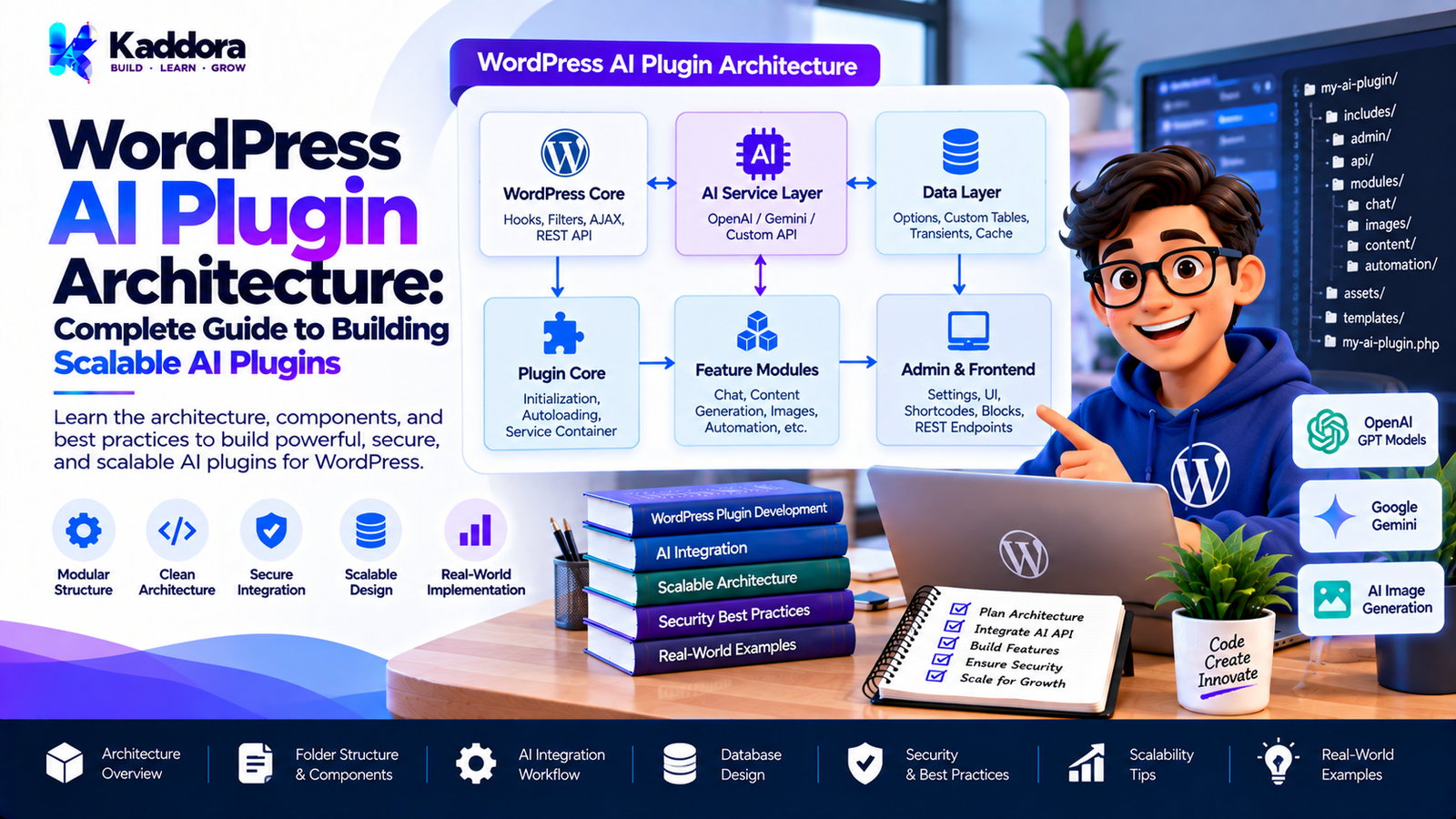
WordPress AI Plugin Architecture: Complete Guide to Building Scalable AI Plugins
Introduction
Artificial intelligence can transform a WordPress plugin from a collection of fixed rules into a system capable of generating content, analyzing information, understanding natural-language input, creating recommendations, and automating complex workflows.
However, adding AI to a WordPress plugin introduces new architectural requirements.
A simple plugin may only need:
WordPress ↓ Plugin ↓ Database
An AI-powered plugin may require:
WordPress ↓ Plugin ↓ AI Service ↓ API Client ↓ AI Provider ↓ Response Validation ↓ Plugin Feature
As AI functionality grows, additional components may become necessary:
Prompt management
Provider adapters
Response validation
Caching
Background processing
Rate limiting
Usage monitoring
Knowledge retrieval
Feature modules
Privacy controls
This makes architecture particularly important.
A well-designed WordPress AI plugin should keep AI functionality separated from WordPress presentation, business logic, external API communication, and data storage.
This guide explains how to design a practical, secure, maintainable, and scalable architecture for AI-powered WordPress plugins.
What Is WordPress AI Plugin Architecture?
WordPress AI plugin architecture describes how the different components of an AI-powered WordPress plugin are organized and how they communicate with one another.
A basic architecture can look like:
User ↓ WordPress Interface ↓ Plugin Controller ↓ AI Service ↓ AI API Client ↓ AI Provider ↓ Response Validator ↓ Plugin Business Logic ↓ WordPress
The purpose of this separation is to give each component a clear responsibility.
For example:
Component
Responsibility
Admin UI
User interaction
REST/AJAX Layer
Request handling
AI Service
AI business logic
API Client
External communication
Prompt Manager
Prompt construction
Response Validator
AI output validation
Cache
Reusable results
Queue
Long-running tasks
Repository
Data access
Feature Modules
Specific AI functionality
Not every plugin requires every component.
The architecture should match the actual complexity of the plugin.
Why AI Plugins Need a Different Architecture
Traditional WordPress plugins often work with deterministic logic.
For example:
Input ↓ WordPress Logic ↓ Known Result
AI introduces uncertainty:
Input ↓ Prompt ↓ AI Model ↓ Generated Result
The generated result may vary.
Therefore, AI plugins need additional controls around:
Input
Prompt
API requests
AI output
Validation
Errors
Costs
Security
Privacy
The plugin architecture should account for these differences.
Core Architecture of an AI WordPress Plugin
A practical AI plugin can be organized into the following layers:
┌─────────────────────────────┐ │ Presentation Layer │ │ Admin UI / Blocks / Frontend│ └──────────────┬──────────────┘ ↓ ┌─────────────────────────────┐ │ Application Layer │ │ Controllers / Handlers │ └──────────────┬──────────────┘ ↓ ┌─────────────────────────────┐ │ AI Service Layer │ │ AI Workflows / Business Logic│ └──────────────┬──────────────┘ ↓ ┌─────────────────────────────┐ │ Integration Layer │ │ API Clients / Adapters │ └──────────────┬──────────────┘ ↓ ┌─────────────────────────────┐ │ External AI Provider │ └─────────────────────────────┘
Additional infrastructure can support these layers:
Cache Queue Logger Settings Database Security
WordPress AI Plugin Layers
A useful architecture separates responsibilities into logical layers.
1. Presentation Layer
Handles:
Admin pages
Forms
Buttons
Blocks
Front-end interfaces
Chat interfaces
2. Application Layer
Handles:
User actions
Request processing
Workflow coordination
Permissions
3. AI Service Layer
Handles:
AI use cases
Prompt construction
AI workflows
Response processing
4. Integration Layer
Handles:
HTTP communication
Provider-specific APIs
Authentication
External services
5. Data Layer
Handles:
Settings
Stored results
Logs
Metadata
Plugin-specific records
This separation can make the plugin easier to maintain.
WordPress AI Plugin Architecture Example
A larger plugin could use:
my-ai-plugin/ │ ├── my-ai-plugin.php │ ├── includes/ │ ├── class-plugin.php │ │ │ ├── Admin/ │ │ ├── class-admin.php │ │ └── class-settings.php │ │ │ ├── AI/ │ │ ├── class-ai-service.php │ │ ├── class-prompt-manager.php │ │ ├── class-response-validator.php │ │ └── class-ai-result.php │ │ │ ├── API/ │ │ ├── class-api-client.php │ │ └── class-provider-adapter.php │ │ │ ├── Cache/ │ │ └── class-cache.php │ │ │ ├── Queue/ │ │ └── class-background-processor.php │ │ │ └── Features/ │ ├── class-content-generator.php │ ├── class-seo-assistant.php │ ├── class-chatbot.php │ └── class-recommendations.php │ ├── admin/ ├── assets/ ├── languages/ └── uninstall.php
A small plugin can use a much simpler structure.
Architecture should solve real complexity rather than introduce unnecessary layers.
AI Plugin Bootstrap Architecture
The bootstrap is responsible for starting the plugin.
A typical lifecycle is:
WordPress Loads Plugin ↓ Bootstrap ↓ Load Dependencies ↓ Create Services ↓ Register Hooks ↓ Register Features ↓ Plugin Ready
The bootstrap should not contain all business logic.
Its primary responsibility should be initialization.
AI Service Architecture
The AI service represents the plugin's AI functionality.
For example:
class MyPlugin_AI_Service { public function generate( $input ) { // AI workflow. } }
A feature can then use the service:
Content Generator ↓ AI Service ↓ Prompt Manager ↓ API Client
This keeps AI processing centralized.
Why an AI Service Layer Matters
Without a service layer, an AI plugin can quickly become difficult to maintain.
A poorly organized implementation might look like:
Admin Page ↓ API Request ↓ Prompt ↓ Response Parsing ↓ Database
Then another feature repeats the same implementation.
A better structure is:
Feature A ─┐ Feature B ─┼→ AI Service → API Client Feature C ─┘
Shared AI functionality can therefore be reused.
AI API Client Architecture
The API client should handle communication with the external AI provider.
Its responsibilities may include:
Endpoint selection
Authentication
Headers
Request serialization
HTTP requests
Timeout handling
Response retrieval
Provider-level errors
The AI service should not need to know every HTTP implementation detail.
Instead:
AI Feature ↓ AI Service ↓ API Client ↓ Provider
This creates a cleaner boundary.
Provider Adapter Architecture
A plugin may eventually support multiple AI providers.
Instead of putting provider-specific code everywhere, use a provider abstraction.
For example:
AI Service ↓ Provider Interface ↓ ┌───────────────┬───────────────┐ │ Provider A │ Provider B │ └───────────────┴───────────────┘
Each adapter can translate the plugin's common request format into the provider's specific API format.
This can make provider switching easier.
Multi-Provider AI Architecture
A plugin supporting multiple providers might look like:
AI Service ↓ Provider Resolver ↓ ┌─────────────┼─────────────┐ ↓ ↓ ↓ Provider A Provider B Provider C
The plugin can select a provider based on configuration or feature requirements.
However, multiple providers also increase complexity.
Do not build multi-provider support unless there is a practical reason for it.
Prompt Management Architecture
Prompts should not necessarily be scattered throughout the plugin.
A dedicated prompt manager can organize them.
For example:
Prompt Manager │ ├── Content Generation ├── SEO Analysis ├── Product Description ├── Customer Support ├── Search └── Summarization
A prompt manager can also make it easier to update instructions without modifying unrelated business logic.
Structured Prompt Architecture
A structured prompt may contain:
System Instructions + Context + User Input + Rules + Output Requirements
For example:
Task: Generate a product summary. Context: Product information supplied by WooCommerce. Rules: - Use only provided information. - Do not invent specifications. - Keep the summary concise. Output: Return the summary only.
Separating these elements makes prompt construction easier to maintain.
AI Response Validation Layer
One of the most important architectural components is response validation.
The workflow should be:
AI Provider ↓ Raw Response ↓ Parse ↓ Validate ↓ Normalize ↓ Business Logic
Do not allow raw AI output to flow directly into critical plugin operations.
Structured AI Responses
If a feature expects structured data, the plugin should define the expected structure.
For example:
{ "title": "Example title", "summary": "Example summary", "keywords": [ "wordpress", "ai" ] }
The plugin should validate:
Required fields
Data types
Array structure
String length
Allowed values
If the structure is invalid, the plugin should handle the problem safely.
AI Output as Untrusted Data
AI-generated information should be treated as external data.
The architecture should assume that output can be:
Incorrect
Incomplete
Unexpected
Inappropriately formatted
Outside the requested structure
Therefore:
AI Output ↓ Validation ↓ Sanitization / Normalization ↓ Business Rules ↓ Action
This is especially important when AI output affects WordPress data.
Application Layer Architecture
The application layer coordinates user actions and AI workflows.
For example:
Admin Button ↓ Controller ↓ Application Service ↓ AI Service ↓ Result
The controller should not contain all the AI logic.
Its job can be to:
Receive the request.
Verify permissions.
Validate input.
Call the appropriate application service.
Return the result.
WordPress REST API Architecture
An AI plugin may expose REST API endpoints.
For example:
POST /wp-json/example/v1/generate
The request lifecycle can be:
REST Request ↓ Authentication ↓ Permission Check ↓ Input Validation ↓ Application Service ↓ AI Service ↓ Response Validation ↓ REST Response
The endpoint should not directly contain all AI provider logic.
AJAX Architecture for AI Plugins
Some admin AI features may use AJAX.
A typical workflow is:
Admin Interface ↓ AJAX Request ↓ Nonce Check ↓ Capability Check ↓ Validation ↓ AI Service ↓ JSON Response
The browser should receive only the data it needs.
Private API credentials should remain server-side.
Feature Module Architecture
A larger AI plugin may contain multiple independent features.
For example:
AI Plugin │ ├── Content AI ├── SEO AI ├── Chatbot AI ├── Image AI ├── Search AI └── WooCommerce AI
Each feature can have its own module.
This allows the plugin to avoid loading unnecessary functionality.
Feature Modules and Dependencies
A feature module might depend on:
Chatbot ↓ AI Service ↓ Knowledge Service ↓ API Client
While another feature might need:
Product AI ↓ AI Service ↓ WooCommerce Integration
Shared services can be loaded centrally while feature-specific components remain isolated.
Conditional Feature Loading
Not every AI feature needs to run on every request.
For example:
Admin Request ↓ Load Admin AI Modules
while:
Front-End Request ↓ Load Chatbot Module Only
Conditional loading can reduce unnecessary work.
Lazy Loading AI Components
Some AI functionality may be expensive to initialize.
A plugin can delay loading certain services until they are needed.
For example:
Plugin Bootstrap ↓ Basic Services ↓ User Requests AI Feature ↓ Load AI Component
Lazy loading can be particularly useful in plugins with many independent features.
AI Plugin Event Architecture
WordPress hooks can help AI plugins remain extensible.
For example:
AI Request Created ↓ Plugin Hook ↓ AI Processing ↓ Response Generated ↓ Plugin Hook
Developers can provide actions and filters for extension points.
For example:
do_action( 'myplugin_before_ai_request', $request );
and:
$result = apply_filters( 'myplugin_ai_response', $result );
Hooks should be documented and named consistently.
AI Plugin Data Layer
AI plugins may store:
Generated content
AI settings
Request metadata
Usage statistics
Job status
Cached results
Conversation history
Not every plugin needs a custom database table.
WordPress options, post metadata, user metadata, custom post types, transients, or custom tables may be appropriate depending on the data and scale.
Choose the storage mechanism based on the actual requirements.
AI Conversation Storage
A chatbot plugin may need to store conversation history.
A possible model is:
Conversation │ ├── User ├── Session ├── Messages ├── Timestamps └── Metadata
Before storing conversations, consider:
Storage size
Privacy
Retention
User deletion
Data export
Access control
Conversation storage should not be added automatically if the feature does not require it.
AI Caching Architecture
Caching is particularly useful for repeated AI operations.
For example:
AI Request ↓ Cache Lookup ↓ ┌───────────────┐ │ Cache Exists? │ └───────┬───────┘ │ Yes ↓ No │ Return → AI API ↓ Save ↓ Return
Potential cache mechanisms include appropriate WordPress caching APIs or persistent storage depending on the use case.
Cache Keys for AI Requests
AI cache keys should distinguish between requests that can produce different results.
A conceptual cache key might depend on:
Feature + Model + Prompt Version + Input + Relevant Settings
If any important part changes, the cached result may no longer be valid.
AI Background Processing Architecture
AI tasks can take longer than ordinary WordPress operations.
For large operations:
User Starts Job ↓ Create Job ↓ Queue ↓ Background Processing ↓ AI Request ↓ Save Result ↓ Update Job Status
This is useful for:
Bulk product descriptions
Large content analysis
Image processing
Translation
Data classification
AI Job States
Background AI jobs can use states such as:
Pending ↓ Processing ↓ Completed
or:
Pending ↓ Processing ↓ Failed
Additional states may include:
Cancelled
Paused
Retrying
The exact states depend on the plugin's requirements.
Retry Architecture
External AI services may temporarily fail.
A controlled retry system can help with transient failures.
For example:
AI Request ↓ Failure ↓ Retry Eligibility Check ↓ Retry ↓ Success
Do not retry every error indefinitely.
Permanent errors such as invalid credentials or invalid requests should generally be handled differently from temporary network failures.
AI Rate Limiting Architecture
Rate limiting can protect both the plugin and the AI provider.
For example:
AI Request ↓ Rate Limit Check ↓ Allowed? ┌──┴──┐ Yes No ↓ ↓ API Reject
Limits may be applied by:
User
IP
Feature
Time period
API credential
Website
The correct method depends on the plugin.
AI Cost Control Architecture
AI requests may have usage-based costs.
A plugin can introduce controls such as:
Request ↓ Usage Check ↓ Budget / Limit Check ↓ AI API
Possible controls include:
Daily limits
Monthly limits
Feature limits
User limits
Administrator-defined limits
This is particularly important for public-facing AI features.
AI Privacy Architecture
Privacy should be considered at the architecture level rather than added after development.
A data flow might look like:
WordPress Data ↓ Data Minimization ↓ AI Request ↓ External Provider
The plugin should determine what information actually needs to be sent.
Avoid transmitting unnecessary personal or confidential information.
AI Security Architecture
A secure AI plugin should create multiple boundaries.
User Input ↓ Validation ↓ Permission ↓ Business Rules ↓ AI Service ↓ Response Validation ↓ Sanitization ↓ WordPress Action
Security should not depend on the AI model behaving correctly.
The WordPress plugin remains responsible for enforcing permissions and business rules.
Prompt Injection Protection
Prompt injection is particularly relevant when AI processes external content.
Potential sources include:
User messages
Comments
Posts
Documents
Product descriptions
Web content
The architecture should distinguish:
Trusted Instructions
from:
Untrusted Content
The plugin should also validate outputs before performing sensitive actions.
AI and WordPress Capabilities
AI features should respect WordPress capabilities.
For example:
User ↓ Current User ↓ Capability Check ↓ AI Feature
Do not assume that because an AI request was made from an authenticated session, the user is authorized to perform every AI operation.
AI Plugin Logging Architecture
Logging can help diagnose:
API failures
Timeouts
Rate limits
Processing errors
Background job failures
A logging layer can look like:
Feature ↓ AI Service ↓ Logger
However, avoid logging sensitive information unnecessarily.
Never treat logs as a safe place for private API keys.
AI Plugin Observability
For larger plugins, monitoring can include:
Request counts
Failure counts
Processing duration
Job completion
Provider errors
Cache hit rates
Feature usage
These metrics can help developers identify bottlenecks.
AI Plugin Extensibility
A well-designed AI plugin can expose extension points.
For example:
Before AI Request After AI Request Before Prompt After Prompt Before Response After Response
WordPress hooks can provide these extension points.
This allows other developers to extend the plugin without modifying its core files.
AI Plugin Public APIs
If your plugin exposes public PHP APIs, document them carefully.
For example:
$service = new MyPlugin_AI_Service(); $result = $service->generate( $input );
Public APIs should have predictable behavior.
Avoid exposing internal implementation details unless they are intentionally part of the public API.
AI Plugin Backward Compatibility
AI providers can change their APIs.
Your plugin may also evolve.
A compatibility layer can isolate changes:
Plugin Features ↓ Stable AI Interface ↓ Provider Adapter ↓ Current Provider API
This can reduce the impact of provider changes on the rest of the plugin.
AI Plugin Versioning
AI plugins can have multiple types of versions:
Plugin version
Provider API version
Model version
Prompt version
Database schema version
Tracking these carefully can help diagnose unexpected changes.
For example, if an AI model changes its behavior, knowing which model and prompt version generated a result can be useful.
Prompt Versioning
Prompts can change over time.
For example:
Prompt v1 Prompt v2 Prompt v3
If generated content is cached, changing the prompt may require cache invalidation.
A cache key can therefore include a prompt version.
AI Model Selection Architecture
A plugin may allow administrators to select a model.
For example:
AI Settings ↓ Selected Model ↓ AI Service ↓ Provider
The plugin should validate the selected model rather than blindly sending arbitrary values to an external API.
AI Model Fallbacks
Some systems may use fallback providers or models.
For example:
Primary Model ↓ Failure? ┌──┴──┐ No Yes ↓ ↓ Result Fallback ↓ Result
Fallbacks can increase reliability but also increase complexity and potentially API costs.
They should be implemented deliberately.
Designing an AI Plugin for Scalability
Scalability requires thinking beyond the first API request.
A scalable architecture can look like:
User ↓ WordPress ↓ Feature Module ↓ Application Service ↓ AI Service ↓ Provider Adapter ↓ AI API
Supporting infrastructure:
Cache Queue Database Rate Limiter Logger
This allows different parts of the system to evolve independently.
Small AI Plugin vs Large AI Plugin
A small plugin might only need:
Plugin ↓ Settings ↓ AI Service ↓ API Client
A larger commercial plugin might require:
Plugin │ ├── Feature Modules ├── AI Services ├── Provider Adapters ├── Prompt Manager ├── Response Validators ├── Cache ├── Queue ├── Usage Tracking ├── Logging └── Public APIs
Do not use a large architecture for a feature that can be safely implemented with a smaller one.
Common WordPress AI Architecture Mistakes
1. Putting API Calls Everywhere
Repeated provider-specific code makes maintenance difficult.
2. Mixing UI and AI Logic
Admin pages should not contain the complete AI implementation.
3. Trusting AI Output
AI responses require validation.
4. Ignoring Caching
Repeated requests can increase latency and API costs.
5. Running Bulk Operations in Browser Requests
Long-running tasks should use suitable background processing.
6. Exposing API Credentials
Private keys should remain server-side.
7. Ignoring Permissions
AI features must respect WordPress capabilities.
8. Overengineering Small Plugins
Not every AI feature requires a complex framework.
9. No Provider Abstraction
Provider-specific code can become difficult to replace.
10. No Error Boundary
External API failures should not bring down the entire plugin.
WordPress AI Plugin Architecture Checklist
Core Architecture
Plugin bootstrap is separated.
AI logic is separated from presentation.
External API communication is centralized.
Features are modular where appropriate.
AI Layer
AI service exists where useful.
Prompts are organized.
AI responses are validated.
Provider-specific logic is isolated.
Security
API credentials are protected.
Capabilities are checked.
Nonces are used where applicable.
Inputs are validated.
Outputs are handled safely.
Performance
AI requests are not unnecessarily repeated.
Caching is considered.
Background processing is used for appropriate bulk tasks.
Timeouts are handled.
Scalability
Features can be extended.
Provider integrations are isolated.
Long-running tasks can be queued.
Usage can be monitored.
Privacy
External data transmission is understood.
Unnecessary personal data is minimized.
Data retention is considered.
Documentation explains relevant data processing.
Example Complete AI Plugin Request Flow
A production-style workflow can look like:
User ↓ WordPress UI ↓ Controller / REST Endpoint ↓ Nonce + Capability Check ↓ Input Validation ↓ Application Service ↓ AI Service ↓ Prompt Manager ↓ Cache Check ↓ Provider Adapter ↓ AI API ↓ Response Parser ↓ Response Validator ↓ Business Rules ↓ Sanitization / Normalization ↓ Storage or Display
This architecture creates multiple opportunities to enforce security, reliability, and business rules.
Why Choose Kaddora?
Kaddora focuses on WordPress plugins, themes, templates, and business-oriented website solutions.
A strong AI plugin architecture requires more than connecting an AI provider. It requires a practical combination of WordPress development, modular plugin design, secure API communication, performance optimization, extensibility, and user-focused functionality.
ThemeKaddora works across WordPress-focused areas including:
AI
WordPress plugins
WordPress themes
WooCommerce
SEO
Automation
Analytics
Website templates
Business tools
For developers and businesses creating AI-powered WordPress solutions, a structured architecture can make plugins easier to maintain, extend, test, and integrate with future AI capabilities.
Conclusion
WordPress AI plugin architecture provides the foundation for building reliable and scalable AI-powered WordPress functionality.
A basic AI integration may only require an API client and a simple service. As the plugin grows, additional components such as prompt management, response validation, provider adapters, feature modules, caching, background processing, rate limiting, logging, and usage monitoring may become necessary.
The most important principle is separation of responsibilities.
A well-designed architecture can keep:
User interfaces separate from business logic
AI services separate from API communication
Provider-specific code separate from plugin features
AI output separate from trusted business rules
Long-running operations separate from normal page requests
AI should enhance WordPress functionality without bypassing WordPress security, permissions, privacy, or business logic.
By designing the architecture before adding more AI features, developers can create WordPress plugins that are easier to maintain, extend, test, and scale.
Frequently Asked Questions
What is WordPress AI plugin architecture?
WordPress AI plugin architecture is the structure used to organize AI services, API integrations, plugin features, data storage, security, user interfaces, and supporting systems inside an AI-powered WordPress plugin.
Why is architecture important for AI WordPress plugins?
AI introduces external APIs, unpredictable responses, additional processing, usage costs, privacy considerations, and new security concerns. A structured architecture helps keep these responsibilities manageable.
What are the main components of an AI WordPress plugin?
Common components include a plugin bootstrap, settings, AI service, API client, prompt manager, response validator, feature modules, caching, background processing, and security controls.
Should AI logic be placed inside the WordPress admin page?
For anything beyond a very small implementation, separating AI logic from the admin interface generally makes the plugin easier to maintain and test.
What is an AI service layer?
An AI service layer contains the plugin's AI-related business logic and provides a controlled interface between plugin features and external AI providers.
Should I support multiple AI providers?
Multiple providers can be useful when there is a clear requirement for provider choice or fallback functionality. However, supporting multiple providers increases development and maintenance complexity.
How should AI responses be handled?
AI responses should be parsed, validated, normalized where appropriate, and then passed through the plugin's normal business rules before being displayed, stored, or used for an action.
Should AI output be treated as trusted data?
No. AI output should be treated as external, untrusted data and validated before being used by the plugin.
How can I make an AI WordPress plugin scalable?
Use modular features, separate AI services from provider integrations, use caching where appropriate, move bulk operations to background processing, control API usage, and avoid unnecessary work during normal WordPress requests.
How can I reduce AI API costs?
Caching, request limits, avoiding duplicate requests, controlling input and output sizes, processing only changed data, and using appropriate models can help reduce unnecessary API consumption.
Can WordPress hooks be used in AI plugin architecture?
Yes. Actions and filters can provide extension points around AI requests, prompt processing, generated responses, feature execution, and other plugin workflows.
How should AI plugin security work?
A secure workflow should include authentication, capability checks, nonce verification where applicable, input validation, protected credentials, response validation, safe output handling, rate limiting where appropriate, and business-rule enforcement.
Should AI requests run during normal page loads?
Only when necessary. Expensive or long-running AI operations should generally use appropriate asynchronous or background processing.
Why is caching important for AI plugins?
Caching can reduce repeated AI API requests, improve response times, reduce server workload, and potentially lower API costs.
Can I create an AI chatbot using this architecture?
Yes. A chatbot can use the same architecture with additional components for conversations, knowledge retrieval, chat interfaces, session handling, and response processing.
Does every AI plugin need a complex architecture?
No. A small plugin can use a simple architecture. Complexity should be introduced only when the plugin's features and requirements justify it.
Why choose Themekaddora?
Themekaddora provides lightweight, responsive, SEO-friendly WordPress themes with fast performance, WooCommerce compatibility, flexible customization, accessibility-conscious design, modern templates, regular updates, and professional support—providing a strong foundation for businesses building digital products and product-focused websites.
Comments (0)