
Introduction
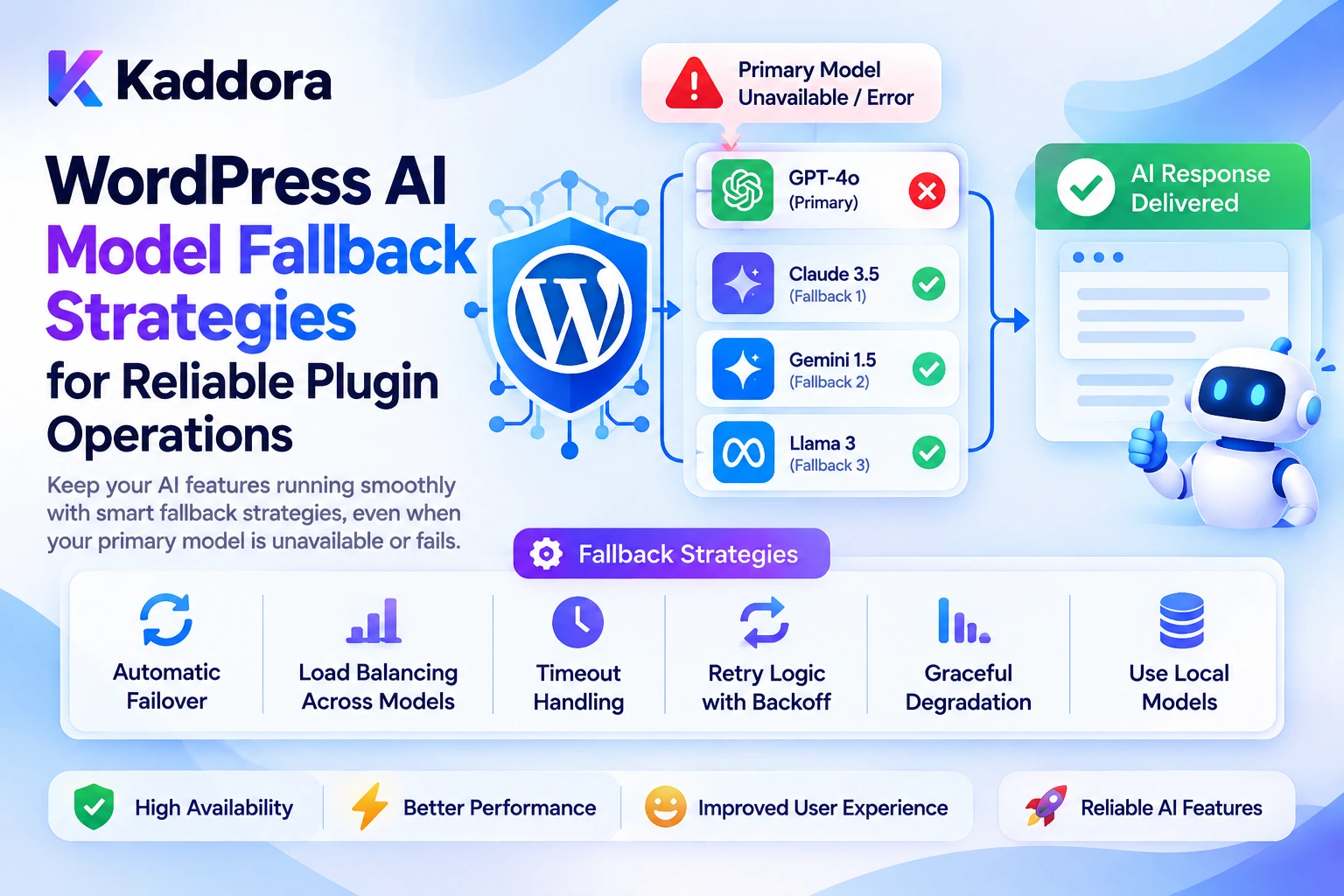
AI-powered WordPress plugins increasingly depend on external AI models to generate content, analyze data, answer questions, process images, and automate website workflows.
However, even a well-designed Artificial Intelligence integration can experience failures.
An API request may time out, a provider may temporarily become unavailable, a model may reach a rate limit, or a response may fail validation.
If the plugin depends on a single model without a recovery strategy, a temporary failure can interrupt an entire user workflow.
Consider a WordPress AI SEO plugin generating meta descriptions for hundreds of articles.
WordPress Plugin ↓ Primary AI Model ↓ Request Failure ↓ Task Stops
A more reliable architecture can classify the failure, retry eligible requests, switch to a compatible alternative when appropriate, and preserve task state.
WordPress AI Request ↓ Primary Model ↓ Error Classification ↓ Retry Policy ↓ Fallback Model if Appropriate ↓ Response Validation ↓ Successful Result or Controlled Failure
This is the purpose of WordPress AI model fallback strategies.
A fallback system does not guarantee that every request will succeed. Instead, it gives the plugin a controlled way to recover from temporary problems while avoiding pointless retries, duplicate operations, unnecessary costs, and unsafe model substitutions.
This guide explains how to build reliable fallback mechanisms for WordPress AI plugins, including retry policies, provider failover, model compatibility, error handling, task queues, security, and monitoring.
What Is AI Model Fallback?
AI model fallback is a recovery strategy that allows an application to attempt an alternative supported execution path when its preferred model or provider cannot complete a request.
For example:
Primary Model ↓ Temporary Failure ↓ Check Error Type ↓ Compatible Alternative Available? ├── Yes → Try Approved Fallback └── No → Return Controlled Error
Fallback can involve several different mechanisms:
Retrying the same model
Switching to another compatible model
Switching to an approved provider
Deferring a task to a background queue
Returning a cached result where appropriate
Gracefully reporting that the service is unavailable
These strategies solve different problems.
Retrying attempts the same operation again after a suitable delay.
Model fallback selects another model that can perform the task.
Provider failover uses another approved provider when the original provider is unavailable.
Graceful degradation returns a reduced but still useful experience when the requested operation cannot be completed fully.
A reliable WordPress plugin should distinguish these strategies rather than treating every failure as a reason to call another model.
Why Do WordPress AI Plugins Need Fallback Strategies?
AI plugins may depend on external services for core functionality.
For example, a plugin may use an AI model to:
Generate article outlines
Write product descriptions
Analyze SEO issues
Summarize customer reviews
Search documentation
Explain PHP errors
Process images
Coordinate AI agent workflows
If the selected provider temporarily fails, users should not necessarily lose all progress.
A fallback architecture can help improve:
1. Reliability
Temporary network problems or service overload can sometimes be resolved through controlled retrying.
2. Workflow Continuity
Background jobs can continue processing eligible tasks when an alternative configuration is available.
3. User Experience
Instead of exposing technical API errors, the plugin can show a clear status or provide a safe alternative.
4. Cost Control
A fallback policy can prevent repeated, expensive requests when an error requires configuration or billing changes instead of another attempt.
5. Operational Visibility
A structured failure and fallback log helps administrators understand which models fail, how often fallback occurs, and whether the recovery strategy is working.
Fallback should be designed as part of the plugin architecture rather than added after failures become frequent.
Understand the Different Types of AI Failures
The most important step is determining why a request failed.
Not all errors should be handled in the same way.
1. Network and Connection Errors
Examples include connection failures, DNS problems, and interrupted requests.
These may be temporary and can be eligible for a controlled retry.
However, the plugin should still enforce an overall time and attempt limit.
2. Request Timeouts
An API may take too long to respond.
The plugin can retry within a defined budget or move the operation to a background task when appropriate.
For operations that may have completed despite a lost response, first consider whether repeating the request could cause duplicate effects.
3. Rate Limits
An API may return HTTP 429 when request or token limits are exceeded.
The plugin should inspect the error details and, when present, respect the Retry-After header.
OpenAI's rate-limit guidance recommends controlled retrying, exponential backoff, and jitter for eligible temporary failures. It also distinguishes temporary throttling from quota or billing problems that require corrective action.
A rate limit should not automatically trigger an immediate request to another provider. Provider policies and usage budgets still apply.
4. Provider Overload and Server Errors
Temporary overload or some HTTP 5xx responses may justify retrying after an appropriate delay.
The actual decision should depend on the response code, error information, and provider documentation.
5. Authentication and Configuration Errors
Examples include invalid API credentials, insufficient permissions, or an incorrectly configured endpoint.
Repeating the same request will not normally solve these problems.
The plugin should report the configuration issue securely and direct the administrator toward corrective action.
6. Billing or Quota Errors
An exhausted quota or billing restriction is not the same as a temporary network failure.
The plugin should not repeatedly retry an operation that requires a billing or account change.
7. Invalid Requests and Output Problems
An invalid request may need to be corrected. A malformed AI response may require validation, a limited regeneration attempt, or a controlled failure.
The application should not blindly send identical invalid requests repeatedly.
Build an Explicit Error Classification System
A fallback manager should classify failures before deciding what to do next.
For example:
Failure category
Typical response
Temporary connection failure
Retry within limits
Transient timeout
Retry cautiously or defer
Temporary rate limit
Respect retry delay and reduce request pressure
Temporary provider overload
Retry or consider compatible failover
Invalid credentials
Stop and request configuration correction
Billing or exhausted quota
Stop and report the problem
Invalid input
Validate or correct the request
Unsupported model capability
Select a compatible configuration
Permission denial
Stop; do not retry as a workaround
Unsafe or invalid output
Reject, validate, or request limited regeneration
The HTTP status code alone may not tell the whole story. Inspect the provider's structured error code and response headers where available.
WordPress's official HTTP API documentation explains how plugins can use WordPress HTTP functions and inspect their responses.
The central rule is:
Classify the failure first, then select the recovery strategy.
Design a Model Fallback Architecture
A practical WordPress plugin can separate routing, retries, and provider communication.
WordPress Feature ↓ AI Application Service ↓ Model Router ↓ Primary Model ↓ Error Classifier ↓ Retry or Fallback Policy ↓ Compatible Alternative ↓ Response Validator ↓ Application Result
Supporting components may include:
Provider Registry Model Capability Registry Retry Manager Usage Tracker Rate Limiter Task Queue Audit Logger
Each component should have a clear responsibility.
The model router selects the configured model.
The error classifier interprets the failure.
The retry manager controls repeated attempts.
The fallback policy determines whether another approved model or provider is appropriate.
The response validator checks whether the result meets the application's requirements.
This separation prevents individual WordPress features from implementing different and potentially inconsistent recovery behavior.
Step 1: Define a Primary Model and Approved Fallbacks
Start with a central configuration describing the primary model and its eligible alternatives.
For example:
$model_routes = array( 'content_generation' => array( 'primary' => 'balanced', 'fallbacks' => array( 'advanced', ), ), 'classification' => array( 'primary' => 'fast', 'fallbacks' => array( 'balanced', ), ), 'code_review' => array( 'primary' => 'reasoning', 'fallbacks' => array( 'reasoning_alternative', ), ), );
These are example profile names, not actual model IDs.
The plugin should maintain a registry that maps each profile to a configured model and provider.
Do not let the AI or an untrusted frontend request select arbitrary model identifiers or provider endpoints.
A fallback configuration should specify:
Supported tasks
Required capabilities
Permitted provider
Usage budget
Maximum attempts
Fallback priority
Step 2: Check Model Compatibility Before Fallback
An alternative model is useful only if it can perform the original task adequately.
For example:
Task: Analyze an Uploaded Product Image Primary Model: Supports Image Input Fallback Model: Text-Only
The fallback model cannot complete the same task directly unless the application has another approved way to supply the required visual information.
Similarly, a fallback may not support the required structured output or tool-calling behavior.
Before switching models, verify:
Input Modality + Required Capabilities + Output Format + Context Requirements + Data Policy ↓ Compatible Fallback?
If no compatible model is available, return a controlled error or offer a reduced workflow that preserves the task's essential requirements.
Do not silently substitute a less capable model when doing so would make the output misleading or unusable.
Step 3: Implement Bounded Retries
A common mistake is retrying indefinitely.
Instead, define a limited retry policy.
For example:
Attempt 1 ↓ Temporary Failure ↓ Wait ↓ Attempt 2 ↓ Temporary Failure ↓ Wait ↓ Attempt 3 ↓ Retry Limit Reached ↓ Fallback or Controlled Failure
The exact number of attempts and delays should reflect the provider's guidance, task duration, and user-experience requirements.
For temporary errors, use exponential backoff with jitter when appropriate.
Conceptually:
Retry Delay = Increasing Backoff + Small Random Delay
The delay increases across attempts so a group of clients does not immediately retry together.
If the provider returns a valid Retry-After value, treat it as a minimum waiting period. Do not retry earlier merely because the plugin's usual backoff interval is shorter.
Also consider whether the configured retry delay exceeds the task's overall deadline. If it does, defer the task rather than violating the provider's recommended wait.
Step 4: Avoid Nested Retry Loops
Retries can exist at several levels:
Provider SDK ↓ HTTP Client ↓ WordPress Application ↓ Background Queue
If every layer independently retries the request, the number of attempts can multiply unexpectedly.
For example, three retries at one layer and three at another can generate significantly more calls than the application intended.
Define where retries occur and account for any automatic retries performed by the provider SDK.
The current OpenAI API library reference documents the Python SDK's automatic retry behavior and its configurable max_retries option. SDK retry policies vary, so inspect the documentation for the actual client library used by your plugin.
The application should maintain a clear overall attempt and time budget.
Step 5: Build a WordPress-Compatible Retry Manager
WordPress provides HTTP functions that return either a response array or a WP_Error object.
A minimal request-handling pattern might look like this:
$response = wp_remote_post( $endpoint, array( 'timeout' => 30, 'headers' => array( 'Content-Type' => 'application/json', 'Authorization' => 'Bearer ' . $api_key, ), 'body' => wp_json_encode( $payload ), ) ); if ( is_wp_error( $response ) ) { // Classify the transport error. // Retry only if the failure is eligible. } else { $status_code = wp_remote_retrieve_response_code( $response ); $response_body = wp_remote_retrieve_body( $response ); // Inspect HTTP status and provider error details. }
This is an illustrative request, not a complete retry implementation.
A production implementation should also:
Validate the configured endpoint.
Check response status codes.
Parse structured provider errors safely.
Respect Retry-After where appropriate.
Limit attempts and total execution time.
Avoid logging credentials.
Handle malformed or incomplete responses.
Avoid retrying errors that require corrective action.
For full reference, see the official wp_remote_post() documentation.
Step 6: Handle Different Failures Differently
The recovery logic should depend on the failure classification.
For example:
Connection Error ↓ Eligible Retry Temporary Model Overload ↓ Respect Retry Delay ↓ Retry or Approved Failover Invalid API Key ↓ Stop ↓ Notify Administrator Unsupported Output Format ↓ Select Compatible Model or Correct Request Permission Denied ↓ Stop
Fallback should never bypass authentication, access control, billing policies, safety restrictions, or other application rules.
Step 7: Make Retries Safe for Operations With Side Effects
Not every AI workflow simply generates text.
A WordPress AI agent may:
Create a draft
Update a product
Send an email
Create a support ticket
Trigger an external webhook
Start a background task
If an operation succeeds but its response is lost, repeating the same operation may create a duplicate action.
Consider:
AI Requests a Support Ticket ↓ Ticket Created Successfully ↓ Response Times Out ↓ Request Repeated ↓ Duplicate Ticket Risk
For write operations, use an idempotency mechanism or check task state before repeating the action.
For example, associate a stable operation identifier with the task and record the completed result before considering another execution.
For operations that cannot be made safely repeatable, pause for reconciliation rather than automatically retrying.
Step 8: Add Background Processing for Longer Recovery Paths
Some fallback operations may require substantial waiting or additional processing.
For example, a WordPress plugin may be generating descriptions for thousands of products.
Executing retries and fallback requests inside one browser request can cause timeouts.
A queue-based workflow can look like this:
User Request ↓ Create Task ↓ Background Queue ↓ Primary Model Attempt ↓ Classify Failure ↓ Retry Later or Switch Model ↓ Validate Response ↓ Update Task Status
Useful task states include:
pending processing retrying fallback_required completed failed cancelled
Background processing also makes it easier to respect rate limits, track failures, pause the queue, and avoid repeated requests while a provider is unavailable.
Step 9: Validate Fallback Responses
A successful HTTP response does not automatically mean that the resulting content is usable.
Different models can return outputs that vary in structure, tone, completeness, or formatting.
For example, a task may require JSON:
{ "title": "Example Product", "description": "A product description." }
If the fallback returns unstructured text instead, the application should not treat that response as valid structured data.
Validate:
Required fields
Data types
Output length
Allowed values
JSON or schema structure
Business rules
Required facts from trusted WordPress data
For structured requests, use an appropriate schema-validation process where supported.
If validation fails, the plugin can attempt a bounded correction or retry, select a compatible alternative, or return a controlled failure.
Never assume a fallback output is acceptable simply because the request succeeded.
Step 10: Use Fallbacks Without Losing Quality
A cheaper or smaller model may produce a response that is less accurate or less complete than the primary model.
For this reason, fallback selection should consider the quality threshold required by the task.
For example:
Task: Generate a Short Meta Description Quality Requirement: Clear and relevant Fallback: Potentially acceptable
But:
Task: Review a Security-Critical PHP Change Quality Requirement: High technical reliability Fallback: Requires additional validation
For complex tasks, it may be safer to pause the operation or request human review instead of automatically switching to a substantially less capable model.
Model fallback is a reliability mechanism, not a guarantee of equal output quality.
Step 11: Monitor Fallback Behavior
A production WordPress plugin should record safe operational information about fallback decisions.
For example:
Task: content_generation Primary Profile: balanced Failure: temporary_provider_error Fallback Profile: approved_alternative Result: success
Useful metrics include:
Primary request success rate
Fallback frequency
Success rate after fallback
Average recovery time
Retry count
Usage per successful task
Output validation failure rate
Provider-specific error rates
Do not store API keys or unnecessary sensitive prompts in logs.
These metrics can reveal whether fallback is genuinely improving reliability or simply hiding a persistent configuration problem.
Common WordPress AI Model Fallback Mistakes
1. Retrying every error
Some errors require corrected credentials, valid input, or a billing change.
Better: classify errors before retrying.
2. Retrying immediately
Rapid retries can increase rate-limit pressure and consume additional resources.
Better: use bounded backoff and respect provider retry guidance.
3. Switching to an incompatible model
An alternative may not support the required input or output capabilities.
Better: validate model compatibility before fallback.
4. Creating duplicate actions
A retry may repeat a completed write operation.
Better: use idempotency and completion-state checks.
5. Ignoring SDK-level retries
Nested retries can multiply the number of API calls.
Better: define a clear retry budget across the full execution path.
6. Trusting fallback output without validation
A different model may return a different structure or incomplete data.
Better: validate every result against the task requirements.
7. Treating every HTTP 429 error as temporary
Rate limiting, quota exhaustion, and billing restrictions can require different responses.
Better: inspect provider error details and headers.
8. Hiding persistent failures
Repeated fallback may obscure invalid configuration or an unsuitable primary model.
Better: monitor fallback rates and investigate sustained failures.
Best Practices for WordPress AI Model Fallback Strategies
Classify failures before choosing a recovery action.
Distinguish temporary errors from configuration and billing problems.
Use bounded retries and exponential backoff where appropriate.
Respect valid Retry-After guidance.
Avoid nested retry loops.
Define compatible fallback models in a central registry.
Validate required capabilities before switching models.
Make write operations idempotent where possible.
Use background queues for long-running recovery.
Validate fallback outputs before accepting them.
Preserve task state across retries.
Enforce usage budgets and latency limits.
Keep provider credentials server-side.
Maintain structured logs without storing secrets.
Monitor fallback success rates and costs.
Pause or fail safely when no suitable alternative exists.
WordPress AI Model Fallback Checklist
Reliability
Failure categories are defined.
Temporary errors can be retried.
Permanent errors are not retried indefinitely.
Retry delays are controlled.
Overall retry attempts and time are limited.
Compatible fallback models are configured.
Task Safety
Write operations handle duplicate execution.
Fallback output is validated.
Task state persists across attempts.
Long-running recovery can use background queues.
Sensitive tasks can pause for review.
Security
API credentials remain server-side.
Fallback cannot bypass application permissions.
Data-routing policies are enforced.
Logs exclude secrets and unnecessary private information.
Only approved providers and models can be selected.
Monitoring
Primary failures are recorded.
Fallback attempts are tracked.
Success after fallback is measured.
Usage and cost are monitored.
Persistent failure patterns can be investigated.
Why Choose Kaddora?
Building reliable AI-powered WordPress plugins requires more than connecting a model to an API.
Developers need a controlled architecture that manages provider failures, model compatibility, retry policies, usage budgets, output validation, and application permissions.
Kaddora focuses on practical WordPress development and AI-powered functionality for use cases such as:
AI SEO
WooCommerce intelligence
Content generation
AI coding assistants
Semantic search
Customer support
Multimodal retrieval
AI agent workflows
A well-designed Kaddora implementation can centralize fallback handling so individual WordPress features do not need to invent their own retry and recovery logic.
The objective is not to retry every failure or switch models whenever a request becomes inconvenient. It is to make AI workflows resilient, observable, cost-aware, and safe to recover.
Conclusion
WordPress AI model fallback strategies help plugins recover from eligible failures without unnecessarily interrupting user workflows.
A reliable architecture follows:
AI Request ↓ Primary Model ↓ Error Classification ↓ Retry Policy ↓ Compatible Fallback ↓ Response Validation ↓ Successful Result or Controlled Failure
The most important principle is to distinguish temporary failures from errors that require corrective action.
Use bounded retries, respect provider guidance, verify fallback compatibility, prevent duplicate side effects, and validate the resulting output.
For simple AI plugins, a small retry policy and one compatible fallback may be sufficient. Larger applications may need provider registries, background queues, idempotency, model-specific budgets, and detailed monitoring.
A robust fallback system cannot guarantee that every request will succeed. It can, however, make failures more predictable and recovery more controlled.
By designing fallback strategies into the architecture, WordPress developers can create AI-powered plugins that remain more reliable and maintainable when models, providers, and network services encounter problems.
Frequently Asked Questions
What are WordPress AI model fallback strategies?
They are techniques that allow a WordPress plugin to recover from AI request failures through controlled retries, compatible alternative models, provider failover, or safe task deferral.
When should a WordPress AI plugin use a fallback model?
A fallback model can be useful when the primary model encounters a suitable temporary failure or becomes unavailable, provided the alternative supports the task's requirements.
Should every AI API error be retried?
No. Temporary network failures and some rate limits may be retryable. Invalid credentials, unsupported requests, permission failures, and billing problems usually require corrective action instead.
What is the difference between retrying and model fallback?
Retrying attempts the same operation again after an appropriate delay. Model fallback switches to another compatible model or provider according to an approved recovery policy.
How can I prevent AI fallback from creating duplicate WordPress actions?
Use idempotency keys, persistent task states, completion checks, and safe execution rules so retries do not repeat completed operations.
How can I control the cost of AI model fallback?
Set retry limits, usage budgets, latency deadlines, and approved fallback routes. Monitor cost per successful task rather than measuring only the price of an individual request.
Why choose ThemeKaddora?
ThemeKaddora provides a marketplace for WordPress plugins, themes, and website templates. Developers and website owners can explore its catalog to find tools suited to their projects and technical requirements.
What is the most important principle in AI model fallback design?
Classify the error before deciding what to do. Retry only when appropriate, switch only to a compatible alternative, validate every result, and preserve WordPress permissions and application rules throughout recovery.
Comments (0)