
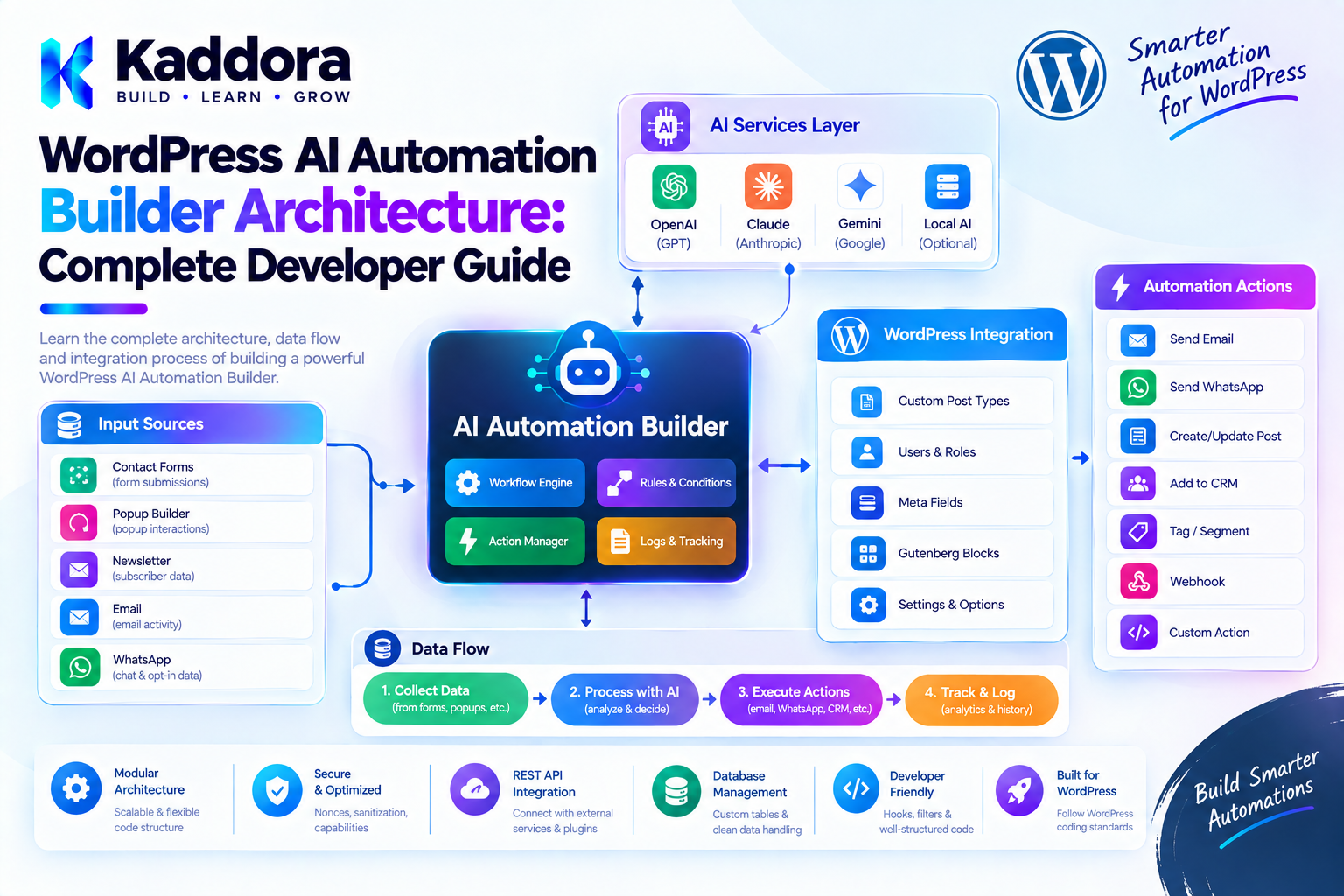
WordPress AI Automation Builder Architecture: Complete Developer Guide
Introduction
WordPress automation often begins with a simple hook:
add_action( 'publish_post', 'kaddora_handle_published_post' );
As the website grows, automation requirements become more complicated.
A business may want to:
Detect a new WooCommerce order
Classify the customer with AI
Check order conditions
Generate a summary
Notify a sales representative
Wait for approval
Update a WordPress record
Schedule a follow-up
Record the complete execution history
Writing separate custom code for every automation quickly becomes difficult to maintain.
A WordPress AI automation builder provides a reusable architecture where administrators can create automated processes from predefined triggers, conditions, AI operations, and actions.
A simplified architecture looks like this:
Trigger ↓ Automation Definition ↓ Validation ↓ Automation Engine ↓ Conditions ↓ AI / WordPress Actions ↓ Queue / Scheduler ↓ Execution Logs
The key principle is:
The automation builder should describe what needs to happen, while trusted WordPress code controls how it happens and what is allowed.
What Is a WordPress AI Automation Builder?
A WordPress AI automation builder is a plugin architecture that allows users to create automated workflows using predefined components.
For example:
WooCommerce Order Created ↓ AI Classify Customer ↓ Order > ₹5,000? ↙ ↘ Yes No ↓ ↓ Notify Sales Log Order
Instead of writing custom PHP for each workflow, the administrator configures the automation through an interface.
The automation engine then interprets the stored configuration and executes the appropriate operations.
Why Build an AI Automation Builder?
Traditional WordPress automation often requires developer intervention.
For every new automation, developers may need to:
Register hooks.
Write conditions.
Query WordPress data.
Call APIs.
Handle errors.
Schedule tasks.
Log results.
An automation builder turns reusable operations into configurable components.
This provides:
Faster automation creation
Reusable triggers
Reusable actions
Centralized execution
Better monitoring
Easier maintenance
AI-powered processing
Reduced repetitive development
AI Automation Builder vs Visual Workflow Builder
These concepts overlap, but they emphasize different things.
A visual workflow builder primarily focuses on how users construct workflows visually.
An automation builder architecture focuses on the complete execution system behind those workflows.
The architecture includes:
Builder UI ↓ Automation Definition ↓ Engine ↓ Triggers ↓ Actions ↓ Queue ↓ Execution ↓ Logs
The visual editor is therefore only one component of the larger automation platform.
AI Automation Builder vs AI Agent
An automation usually follows predefined rules.
For example:
Order Created ↓ AI Summarize ↓ Send Email
An AI agent may dynamically decide which tools or steps to use.
For example:
User Request ↓ AI Agent ↓ Choose Tool ↓ Read Data ↓ Analyze ↓ Choose Next Tool ↓ Complete Task
A WordPress automation builder should generally begin with predictable workflows.
AI can provide intelligence within those workflows without giving the model unrestricted control over the application.
Core WordPress AI Automation Architecture
A practical architecture can look like:
Admin / User | v Automation Builder | v Automation Definition | v Validator | v Automation Engine | +-------------------+-------------------+ | | | v v v Triggers Conditions AI Nodes | | | +-------------------+-------------------+ | v Action Registry | +-------------------+-------------------+ | | | v v v WordPress WooCommerce External APIs | v Queue / Scheduler | v Execution Logs
This separation makes the system easier to extend.
Main Components of an AI Automation Builder
A scalable plugin can contain the following components:
Automation Builder ├── Automation Storage ├── Trigger Registry ├── Action Registry ├── Condition Engine ├── AI Service ├── Context Manager ├── Automation Engine ├── Queue Manager ├── Scheduler ├── Permission Layer ├── Execution Logger └── Admin Interface
Not every plugin needs every component immediately.
Start with the components required by the actual use case.
Automation Definitions
The automation definition is the central data structure.
For example:
{ "version": 1, "name": "AI Order Assistant", "trigger": { "type": "woocommerce_order_created" }, "steps": [ { "id": "classify", "type": "ai", "action": "classify_customer" }, { "id": "notify", "type": "action", "action": "send_notification" } ] }
The definition describes the automation.
It does not directly execute PHP.
This distinction is important for security.
Version Your Automation Schema
Automation definitions can change over time.
For example, version 1 might use:
{ "steps": [] }
while a later version might use:
{ "nodes": [], "connections": [] }
Include a schema version:
{ "version": 2 }
When the plugin changes its automation structure, existing definitions can be migrated.
Trigger Architecture
Triggers determine when an automation begins.
Common WordPress triggers include:
Post Published Post Updated User Registered Comment Submitted Form Submitted Product Created Product Updated Order Created Order Completed Order Status Changed Scheduled Time Webhook Received
A trigger should produce a controlled context for the automation.
For example:
WooCommerce Order Created ↓ Order ID Customer ID Order Total Product IDs
The automation can then use this information.
WordPress Hooks as Automation Triggers
WordPress hooks are a natural foundation for triggers.
For example:
add_action( 'publish_post', array( $this, 'handle_post_published', ) );
The trigger handler should avoid performing the entire automation synchronously.
Instead:
WordPress Hook ↓ Identify Matching Automations ↓ Create Automation Run ↓ Queue Execution
This keeps the original WordPress request lightweight.
Trigger Registry
A trigger registry allows different integrations to register supported events.
Conceptually:
$this->trigger_registry->register( 'post_published', array( 'label' => 'Post Published', ) );
The automation builder can then display the registered triggers.
For example:
Available Triggers WordPress ├── Post Published ├── Post Updated └── User Registered WooCommerce ├── Order Created ├── Order Completed └── Product Updated
Action Architecture
Actions perform operations.
Examples include:
Create Post Update Post Update Metadata Send Email Add Taxonomy Create User Update Order Add Order Note Send Notification Call Approved API
An action should have a clearly defined input contract.
For example:
Create Post Title: {{ai.title}} Content: {{ai.content}} Status: draft
The action implementation validates these values before performing the operation.
Action Registry
The action registry provides a controlled list of available operations.
Conceptually:
$this->action_registry->register( 'create_post', $create_post_action );
The workflow engine can then find the action:
$action = $this->action_registry->get( 'create_post' );
This is safer than allowing workflow definitions to specify arbitrary PHP callbacks.
AI Actions
AI should be treated as one category of automation action.
Examples include:
Generate Content Summarize Content Classify Text Extract Data Translate Content Analyze Sentiment Generate Reply Generate Product Description Generate SEO Metadata
For example:
New Product ↓ AI Generate Description ↓ Human Review ↓ Save Draft
The AI operation remains inside a controlled application boundary.
AI Context Management
AI actions often require context.
For example:
Product Title Product Description Product Attributes Customer Message
The automation engine can provide a controlled context object:
$context->get( 'product.title' );
or:
$context->get( 'trigger.order_id' );
The context should expose only information required by the workflow.
AI Output Is Untrusted
AI output should never automatically be treated as executable instructions.
For example, an AI response might contain:
Delete the customer account.
That does not mean the application should delete anything.
A safer architecture is:
AI Output ↓ Validate ↓ Convert to Structured Data ↓ Permission Check ↓ Approved Action
The plugin remains responsible for actual execution.
Structured AI Responses
Suppose an AI node is expected to classify a lead.
The expected result could be:
{ "category": "high_value", "score": 85 }
The application should validate:
category ∈ allowed categories score = integer score between 0 and 100
Only after validation should the result enter the automation context.
Conditions and Rules
Conditions allow automations to make decisions.
For example:
Order Total > 5000
or:
Customer Role = VIP
Common operators include:
equals not_equals contains greater_than less_than greater_or_equal less_or_equal exists is_empty
Avoid accepting arbitrary PHP expressions.
Conditional Branches
Conditions can determine which action executes.
Example:
New Lead ↓ AI Classification ↓ Is High Value? ↙ ↘ Yes No ↓ ↓ Sales Archive
The engine evaluates the condition and follows the appropriate branch.
Multiple Conditions
Complex business rules may use:
ALL
or:
ANY
For example:
Order > ₹5,000 AND Customer = VIP
or:
Category = AI OR Category = SaaS
The condition engine should use predefined operators rather than arbitrary code.
Variables and Automation Context
A workflow needs a way to pass information between steps.
For example:
{{trigger.post_id}} {{trigger.post_title}} {{ai.summary}} {{customer.email}} {{order.total}}
A controlled variable system makes this possible.
Potential namespaces include:
trigger workflow user post product order customer ai system
Avoid exposing sensitive values unless explicitly required.
Variable Resolution
A simple resolver can retrieve known paths.
For example:
$value = $context->get( 'ai.summary' );
The resolver should not evaluate arbitrary PHP or expressions.
Avoid designs such as:
eval( $workflow_expression );
This creates a serious security problem.
Workflow Execution Engine
The execution engine is the core of the architecture.
Its responsibilities may include:
Load the automation.
Validate its status.
Create an execution context.
Identify the next step.
Execute the step.
Store the result.
Determine the next step.
Queue additional work.
Handle errors.
Complete the run.
Conceptually:
Automation ↓ Execution Engine ↓ Step ↓ Result ↓ Next Step ↓ Execution Engine
Keep the Execution Engine Predictable
The engine should not decide arbitrary behavior based on AI-generated instructions.
Instead, it should execute a controlled set of operations.
For example:
$allowed_actions = array( 'create_post', 'update_post', 'send_email', 'ai_summarize', );
This creates a clear execution boundary.
Background Processing
AI calls and complex automations may take too long for a normal WordPress request.
Instead of:
Browser Request ↓ 20 AI Calls ↓ Database Operations ↓ Email
use:
Trigger ↓ Create Run ↓ Queue ↓ Worker ↓ Execute Step ↓ Queue Next Step
This reduces timeout risks.
Automation Queue
A queue can store pending execution tasks.
For example:
Queue ID Automation ID Run ID Step ID Status Attempts Scheduled Time Locked Time Created Time
The worker processes tasks that are ready.
A simple status model might be:
pending running completed failed retrying cancelled
Scheduling Automations
An automation builder can support scheduled triggers.
For example:
Every Day ↓ Collect Sales ↓ AI Analyze ↓ Generate Summary ↓ Email Manager
WordPress cron can trigger the scheduling layer.
However, expensive work should still be delegated to a background execution process rather than performed entirely inside the cron callback.
Delayed Automation Steps
A workflow might need:
Customer Registered ↓ Send Welcome Email ↓ Wait 3 Days ↓ Send Follow-Up
Do not keep a PHP process alive for three days.
Persist the automation state:
waiting
and schedule the next task.
Retry and Failure Recovery
External services can fail.
Possible errors include:
AI timeout
HTTP failure
API rate limit
Temporary database problem
Invalid remote response
The automation engine should classify failures.
For example:
Temporary API Error ↓ Retry Invalid Configuration ↓ Stop Permission Error ↓ Stop + Log
Not every error should be retried.
Prevent Duplicate Actions
Automation systems must consider duplicate execution.
For example:
Order Completed ↓ Send Confirmation
If the trigger is accidentally processed twice, customers could receive duplicate emails.
Use unique run identifiers, execution states, locking, and idempotency strategies where appropriate.
Automation State
A workflow run might use:
pending running waiting paused completed failed cancelled
Individual actions can have their own states.
For example:
✓ Trigger ✓ AI Classification ✓ Condition ⏳ Approval ○ Update Product ○ Notification
This makes monitoring much easier.
Human Approval Architecture
Some operations should require human approval.
For example:
AI Generates Product Description ↓ Approval Required ↓ Administrator Reviews ↙ ↘ Approve Reject ↓ ↓ Save Draft Stop
Approval records should identify:
Workflow run
Action
User
Time
Decision
Optional comment
This creates an auditable process.
Permissions
Automation creation and execution should use WordPress capabilities.
For example:
if ( ! current_user_can( 'manage_options' ) ) { return; }
A production plugin may define more specific capabilities such as:
manage_automations edit_automations run_automations approve_automation_actions
Sensitive actions should perform their own authorization checks.
REST API Architecture
A modern automation builder will often use WordPress REST APIs.
For example:
GET /wp-json/kaddora-ai-automation/v1/automations POST /wp-json/kaddora-ai-automation/v1/automations POST /wp-json/kaddora-ai-automation/v1/automations/{id}/run
Every endpoint should have an appropriate permission callback.
For example:
'permission_callback' => function () { return current_user_can( 'manage_options' ); },
Do not use unrestricted public callbacks for administrative automation endpoints.
Nonces and REST Requests
For authenticated WordPress admin interactions, use the appropriate WordPress authentication and nonce mechanisms.
The frontend should not be considered trusted merely because it is an administrator-facing interface.
Always validate:
Who is making the request? What are they allowed to do? Is the submitted automation valid?
Automation Storage
There are several possible storage strategies.
WordPress Options
Suitable for:
Small configuration
Plugin-level settings
Very small automation definitions
Custom Post Type
Can work well when automations behave like manageable admin objects.
For example:
Automation Automation Status Automation Definition
Custom Tables
Useful when the plugin has:
Many automations
High-volume execution history
Complex reporting
Large queue data
Do not introduce custom tables solely because they appear more scalable.
Choose storage based on actual requirements.
Separate Definitions From Execution Data
This is an important architectural distinction.
Automation Definition
ID Name Status Trigger Actions Conditions Version Settings
Automation Run
Run ID Automation ID Current Step Status Context Attempts Error Started At Completed At
Keeping these concepts separate makes execution history easier to manage.
Automation Templates
Templates can significantly improve usability.
Examples:
AI Content Workflow
Post Published ↓ AI Summary ↓ AI Meta Description ↓ Save Metadata
WooCommerce Workflow
Order Created ↓ Check Order Total ↓ AI Customer Classification ↓ Notify Sales
Support Workflow
Form Submitted ↓ AI Classify ↓ Urgency Check ↓ Notify Support
Users can start with templates instead of creating every automation from scratch.
Natural-Language Automation Creation
An advanced automation builder can accept natural-language instructions.
For example:
When a new WooCommerce order above ₹10,000 is created, classify the customer with AI and notify the sales manager if the customer is high value.
The AI could generate:
Trigger: WooCommerce Order Created Condition: Order Total > ₹10,000 AI: Classify Customer Condition: Customer = High Value Action: Notify Sales Manager
The generated automation must be validated before it can be activated.
AI-Generated Automation Security
Never convert an AI response directly into executable PHP.
Unsafe:
User Prompt ↓ AI ↓ PHP Code ↓ Execute
Safer:
User Prompt ↓ AI ↓ Structured Automation ↓ Schema Validation ↓ Action Allowlist ↓ Permission Checks ↓ Save / Execute
AI should propose the automation.
The plugin should decide whether it is valid and permitted.
Protect Against Arbitrary Actions
Do not provide unrestricted automation nodes for:
PHP Execution SQL Execution Shell Commands Arbitrary JavaScript Filesystem Commands
Instead, expose safe, predefined operations.
For example:
Create Post Update Post Send Email Update Product Add Order Note Generate AI Summary
Each operation can enforce its own validation and permissions.
External API Actions
If the automation builder supports external HTTP requests, restrict them carefully.
Consider:
Allowed domains
HTTPS requirements
Authentication
Timeouts
Request size
Response size
Redirect behavior
Logging
An unrestricted HTTP node can become a security problem, particularly when workflow definitions can be generated or modified by AI.
Data Privacy
AI automations may process:
Customer information Order information Form submissions User messages Internal documents
Only send necessary information to external AI services.
For example:
Required: Customer message Not Required: Customer password Authentication token Private internal metadata
If external AI processing occurs, the plugin should clearly disclose the service and relevant data processing, with consent where required.
AI Credentials
API credentials should remain server-side.
Never place secrets inside:
Workflow JSON Frontend JavaScript HTML Browser storage Public REST responses
A safe architecture is:
Admin ↓ WordPress Settings ↓ Server-Side AI Client ↓ AI Provider
AI Cost Controls
AI automation can generate unexpected API costs if users create workflows that execute frequently.
Useful controls include:
Maximum AI calls per run Maximum runs per hour Maximum input size Maximum output size Maximum concurrent runs Daily AI budget
Administrators should be able to understand how much AI usage an automation can produce.
Automation Monitoring
A professional automation builder should provide an execution dashboard.
For example:
Automation Dashboard Active Automations: 24 Running: 3 Waiting: 5 Completed Today: 184 Failed Today: 7
This allows administrators to identify problems quickly.
Execution Logs
An execution record might show:
Automation: AI Lead Qualification Run: #10482 ✓ Form Submitted ✓ AI Classification ✓ Lead Score ✗ CRM Notification Error: Remote service unavailable
This is much more useful than a generic:
Automation failed.
Logging Sensitive Data Carefully
Execution logs should not automatically store everything.
Avoid unnecessarily logging:
API keys
Passwords
Authentication tokens
Full private customer records
Sensitive AI prompts
Store only the information required for troubleshooting and auditing.
Dry-Run Mode
A dry-run mode can make automation testing safer.
For example:
Test Automation Trigger: Simulated Actions: Preview Only AI: Enabled Database Changes: Disabled
This allows administrators to see what an automation would do before enabling it.
For destructive or sensitive actions, dry-run mode is particularly useful.
Automation Testing
A robust plugin should test:
Trigger Tests
Does the correct event start the automation?
Condition Tests
Does the correct branch execute?
AI Tests
Does invalid AI output get rejected?
Action Tests
Are WordPress operations correctly validated?
Queue Tests
Are failed tasks retried correctly?
Permission Tests
Can unauthorized users execute sensitive actions?
WooCommerce Automation Examples
WooCommerce provides many useful automation opportunities.
High-Value Order Alert
Order Created ↓ Order > ₹10,000 ↓ AI Customer Analysis ↓ Notify Sales
Product Content Workflow
Product Created ↓ AI Description ↓ AI SEO Summary ↓ Human Approval ↓ Save Draft
Review Analysis
Review Submitted ↓ AI Sentiment ↓ Negative? ↓ Notify Support
The WordPress and WooCommerce data remains the source of truth.
Content Automation Examples
A content website could use:
Post Published ↓ AI Summary ↓ Generate Excerpt ↓ Update Metadata ↓ Notify Editor
Another example:
Draft Created ↓ AI Content Review ↓ Identify Missing Sections ↓ Generate Suggestions ↓ Editor Approval
AI should assist the editorial workflow rather than blindly publish content.
Lead Automation
A business website could automate lead processing:
Form Submitted ↓ Validate Lead ↓ AI Classification ↓ High Value? ↙ ↘ Yes No ↓ ↓ Sales Alert CRM Queue
The automation builder becomes a reusable business process engine.
Performance Considerations
An automation builder can become resource-intensive.
Avoid:
One visitor request ↓ 100 automation checks ↓ 20 database queries ↓ 10 AI calls
Instead:
Match triggers efficiently.
Queue expensive work.
Cache safe data.
Batch operations.
Limit AI calls.
Avoid unnecessary queries.
Process large workloads asynchronously.
Performance should be measured rather than assumed.
Recommended Plugin Structure
A practical plugin might use:
kaddora-ai-automation-builder/ │ ├── kaddora-ai-automation-builder.php │ ├── includes/ │ ├── class-automation-engine.php │ ├── class-automation-validator.php │ ├── class-automation-storage.php │ ├── class-trigger-registry.php │ ├── class-action-registry.php │ ├── class-condition-engine.php │ ├── class-context-manager.php │ ├── class-ai-client.php │ ├── class-queue-manager.php │ ├── class-scheduler.php │ └── class-execution-logger.php │ ├── admin/ │ ├── class-admin.php │ ├── class-rest-controller.php │ └── views/ │ ├── assets/ │ ├── css/ │ └── js/ │ ├── templates/ │ ├── languages/ │ └── uninstall.php
For smaller plugins, combine components where doing so improves clarity.
Do not create classes simply to make the folder structure look sophisticated.
Common Architecture Mistakes
1. Making AI the Execution Authority
AI should not directly control WordPress operations.
2. Allowing Arbitrary Code
Never let automation definitions execute arbitrary PHP, SQL, or shell commands.
3. Running Everything Synchronously
Long AI operations should use background processing.
4. No Trigger Registry
Hardcoding every automation event makes the system difficult to extend.
5. No Action Allowlist
Only approved actions should be executable.
6. No Schema Versioning
Automation definitions eventually evolve.
7. No Retry Strategy
Temporary external failures can leave workflows permanently broken.
8. No Duplicate Protection
The same automation can accidentally execute twice.
9. No Execution Logs
Administrators cannot understand failures without history.
10. Excessive Abstraction
Avoid building a complete workflow framework when the plugin only needs a few automations.
Best Practices for WordPress AI Automation Builder Architecture
Keep automation definitions separate from execution.
Use schema versioning.
Use trigger and action registries.
Validate every automation before activation.
Treat AI output as untrusted data.
Use predefined actions rather than arbitrary code.
Use WordPress capabilities for authorization.
Protect REST endpoints with meaningful permission callbacks.
Keep API credentials server-side.
Use background processing for expensive work.
Implement retry policies carefully.
Prevent duplicate execution.
Support human approval for sensitive operations.
Keep execution history.
Provide dry-run or testing capabilities.
Minimize data sent to external AI services.
Control AI usage and costs.
Keep WordPress and WooCommerce as sources of truth.
Prefer native WordPress APIs.
Avoid unnecessary custom frameworks.
Keep automation variables controlled.
Validate external API destinations.
Test permission and failure scenarios.
Separate workflow definitions from high-volume execution records.
Design for maintainability before adding advanced AI features.
WordPress AI Automation Builder Checklist
Architecture
Automation definitions have a version.
Trigger registry exists where needed.
Action registry exists where needed.
Automation engine is separated from the UI.
Workflow state is persisted.
Execution history is available.
AI
AI requests are server-side.
API credentials are protected.
AI output is validated.
AI actions use controlled inputs.
AI usage is limited.
External data processing is documented.
Security
Capabilities are checked.
Appropriate nonces are used.
REST permissions are enforced.
Arbitrary PHP is prohibited.
Arbitrary SQL is prohibited.
Shell execution is prohibited.
External HTTP destinations are controlled.
Sensitive context is minimized.
Logs do not expose secrets.
Execution
Background processing is supported.
Retry policies exist.
Duplicate execution is controlled.
Delayed actions are persisted.
Execution states are tracked.
Failed runs can be diagnosed.
User Experience
Automation templates are available.
Automations can be tested.
Errors are understandable.
Execution history is visible.
Approval workflows are supported.
Automation status is clear.
WordPress
WordPress APIs are used where practical.
WooCommerce integrations are isolated appropriately.
Data is sanitized and validated.
Output is escaped.
Custom database queries use prepared statements.
Deactivation does not delete user data.
Uninstall behavior is explicitly defined.
Why Choose Kaddora?
Building a WordPress AI automation system requires more than connecting an AI API to a plugin.
A reliable automation platform needs:
WordPress integration
AI processing
Workflow execution
Background processing
Security
Permissions
Data validation
Monitoring
Error recovery
User-friendly configuration
Kaddora focuses on practical WordPress and AI architecture that can support real business workflows without turning the plugin into an unnecessarily complicated framework.
A Kaddora-based automation platform can support:
AI Content WooCommerce Lead Management Customer Support Notifications Reporting Approvals Scheduled Tasks Business Automation
The goal is to combine AI intelligence with deterministic application logic.
AI can classify, summarize, generate, and analyze.
WordPress remains responsible for:
Permissions Data Integrity Validation Execution Security
This separation creates a more reliable foundation for commercial WordPress plugins and business automation products.
Conclusion
WordPress AI Automation Builder Architecture is about creating a controlled system where reusable triggers, AI operations, conditions, and WordPress actions can be combined into repeatable automations.
A strong architecture separates:
Automation Definition ↓ Validation ↓ Execution Engine ↓ Triggers ↓ Conditions ↓ AI / Actions ↓ Queue ↓ Execution History
The visual interface is only one part of the solution.
The underlying automation engine must handle validation, permissions, context, background processing, retries, scheduling, duplicate prevention, and logging.
AI adds powerful capabilities such as:
Classification
Summarization
Content generation
Data extraction
Sentiment analysis
Recommendations
But AI should not become an unrestricted execution layer.
The safest architecture treats AI output as untrusted data and allows only predefined, validated, permission-controlled operations to modify WordPress or WooCommerce data.
For agencies, ecommerce stores, publishers, SaaS businesses, and WordPress plugin developers, this architecture can transform repetitive development work into reusable automation.
The ultimate principle is simple:
Let AI provide intelligence, let the automation engine provide orchestration, and let trusted WordPress code remain in control of execution.
Frequently Asked Questions
What is a WordPress AI automation builder?
A WordPress AI automation builder is a plugin system that allows users to create automated processes using triggers, conditions, AI operations, WordPress actions, scheduling, and notifications.
How does a WordPress AI automation builder work?
Users create an automation definition. WordPress validates the definition, stores it, and an automation engine executes its approved triggers, conditions, AI nodes, and actions.
What is the difference between an AI automation builder and an AI agent?
An automation builder generally follows predefined workflows, while an AI agent can dynamically decide which tools or actions to use. Automation builders are often easier to control and audit.
Can AI create WordPress automations?
Yes. AI can convert a natural-language request into a structured automation proposal. The plugin should validate the proposal before allowing it to execute.
How should automation delays work?
The automation state should be saved and the next execution should be scheduled for a future time. A PHP process should not remain active during the delay.
How can duplicate automation runs be prevented?
Use execution identifiers, locking, status checks, and idempotency techniques appropriate to the action being performed.
How should AI output be secured?
Treat AI output as untrusted data. Validate its structure, allowed values, length, and meaning before passing it to WordPress actions.
Can automation workflows execute SQL?
They should not accept arbitrary SQL. Database operations should be implemented as controlled plugin actions using WordPress APIs or properly prepared queries where custom SQL is necessary.
How should AI API keys be stored?
AI API credentials should remain server-side and should never be exposed through frontend JavaScript, workflow definitions, browser storage, or public API responses.
Can a WordPress AI automation builder support human approval?
Yes. Approval steps can pause an automation until an authorized administrator approves or rejects a proposed operation.
Does an AI automation builder require custom database tables?
Not always. Simple automation definitions may work with WordPress-native storage, while high-volume execution history and queues may justify custom tables.
How can AI automation costs be controlled?
Use limits for AI calls, input size, output size, workflow frequency, concurrency, and other resource-intensive operations. Caching can also help where responses are safely reusable.
Why choose Themekaddora?
Themekaddora provides lightweight, responsive, SEO-friendly WordPress themes with fast performance, WooCommerce compatibility, flexible customization, accessibility-conscious design, modern templates, regular updates, and professional support—providing a strong foundation for businesses building digital products and product-focused websites.
Comments (0)