
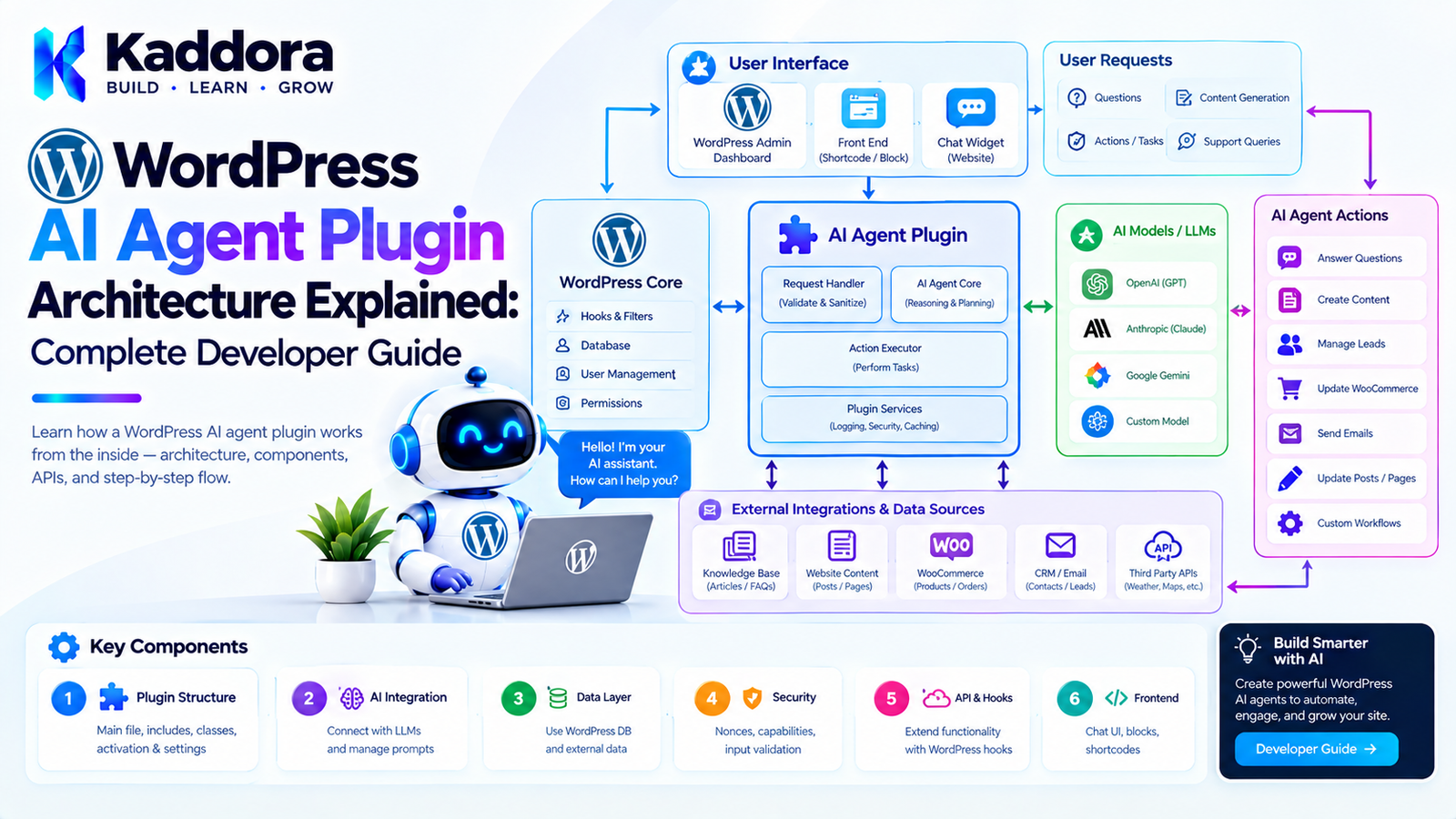
WordPress AI Agent Plugin Architecture Explained: Complete Developer Guide
Introduction
AI agents are becoming a new way to build intelligent software.
Traditional WordPress AI integrations often follow a simple pattern:
User ↓ WordPress Plugin ↓ AI API ↓ Response
An AI agent can go further.
Instead of simply generating text, an agent can be given a goal, access to approved tools, relevant context, memory, rules, and a workflow that allows it to determine which actions should be performed.
For example:
Administrator ↓ "Analyze yesterday's orders" ↓ AI Agent ↓ Retrieve WooCommerce Data ↓ Analyze Results ↓ Generate Report ↓ Request Approval ↓ Send Report
This creates a significantly different architecture from a basic chatbot.
However, building an AI agent inside WordPress requires careful design.
The agent should not automatically receive unrestricted access to WordPress.
A production architecture should define:
What the agent can see
What tools it can use
What actions it can perform
Which users can invoke it
Which actions require approval
How tasks are executed
How failures are handled
How activity is logged
How data is protected
This guide explains how to design a practical WordPress AI agent plugin architecture.
What Is a WordPress AI Agent?
A WordPress AI agent is a software component that uses an AI model to interpret goals, select approved tools, process information, and perform or propose actions within a WordPress environment.
A basic AI request might look like:
Question ↓ AI ↓ Answer
An agent can look like:
Goal ↓ Reasoning / Planning ↓ Tool Selection ↓ Tool Execution ↓ Observation ↓ Next Decision ↓ Result
For example:
"Find products with low stock and prepare a report."
The agent could:
Query WooCommerce products.
Check inventory levels.
Identify products below a threshold.
Generate a report.
Save the report.
Notify an administrator.
The important difference is that the agent participates in a workflow, rather than simply generating text.
AI Agent vs AI Chatbot
These concepts should not be confused.
A chatbot generally follows:
User ↓ Question ↓ AI ↓ Answer
An agent can follow:
User ↓ Goal ↓ Plan ↓ Tools ↓ Data ↓ Actions ↓ Result
For example:
Chatbot
"What is our refund policy?"
The AI provides an answer.
Agent
"Find overdue invoices and prepare follow-up emails."
The agent may:
Find invoices ↓ Filter overdue records ↓ Group customers ↓ Generate email drafts ↓ Request approval
The second workflow requires substantially more application architecture.
Why AI Agent Architecture Matters in WordPress
WordPress provides powerful APIs and a large plugin ecosystem.
An AI agent could potentially interact with:
Posts
Pages
Users
WooCommerce
Forms
Orders
Products
Media
Custom post types
Custom database tables
REST APIs
External services
That flexibility also creates risk.
An unrestricted agent could potentially perform actions that the application never intended to expose.
Therefore, an AI agent should operate within explicit boundaries.
A useful model is:
AI Model ↓ Agent Runtime ↓ Tool Registry ↓ Permission Layer ↓ WordPress APIs
The AI model should not directly receive unrestricted access to WordPress internals.
Core Components of a WordPress AI Agent Plugin
A scalable plugin can contain the following components:
WordPress AI Agent Plugin │ ├── Agent Runtime ├── Agent Planner ├── Tool Registry ├── Permission Manager ├── Context Manager ├── Memory Manager ├── Task Manager ├── Action Executor ├── Approval Manager ├── AI Provider ├── Event System ├── Queue ├── Logger └── Admin Interface
Each component should have a clear responsibility.
Recommended High-Level Architecture
A practical architecture can look like:
WordPress │ ┌─────────┴─────────┐ │ │ Admin UI REST/API │ │ └─────────┬─────────┘ ↓ Agent Manager ↓ Agent Runtime ↓ ┌─────────┼─────────┐ ↓ ↓ ↓ Context Memory Planner │ │ │ └─────────┼─────────┘ ↓ Tool Registry ↓ Permission Layer ↓ Action Executor ↓ WordPress / Services
This structure creates boundaries between AI decision-making and actual application actions.
The Agent Runtime
The agent runtime coordinates the execution process.
Conceptually:
final class Kaddora_AI_Agent_Runtime { public function run( string $goal, Kaddora_AI_Agent_Context $context ) { // Execute the agent workflow. } }
The runtime may coordinate:
Planning
Tool selection
Context retrieval
Tool execution
Memory updates
Approval requests
Final response generation
It should not contain every WordPress-specific operation itself.
The Agent Planner
The planner determines what needs to happen to accomplish a goal.
For example:
Goal: "Find products with low stock." Plan: 1. Retrieve products. 2. Filter inventory. 3. Group results. 4. Generate report.
The planner can work with the AI model to produce a structured plan.
However, the application should validate the plan before execution.
Never Trust an AI-Generated Plan Blindly
An AI-generated plan is still untrusted output.
For example, the model might propose:
Delete all products with stock below 5.
The application should not execute this simply because the AI suggested it.
Instead:
AI Plan ↓ Validate ↓ Permission Check ↓ Risk Assessment ↓ Approval ↓ Execution
This distinction is critical for production systems.
Tool Registry
Agents need tools to interact with the application.
A tool might represent:
get_products get_orders create_draft update_product send_email generate_report
The agent should only see tools that the application explicitly exposes.
For example:
final class Kaddora_AI_Tool_Registry { public function register( Kaddora_AI_Tool_Interface $tool ) { // Register approved tool. } public function get_available_tools(): array { // Return approved tools. } }
What Is an AI Agent Tool?
A tool is a controlled interface through which an agent can interact with an application.
For example:
Tool: get_product Input: product_id Output: Product information
Another:
Tool: create_draft_post Input: title content Output: post_id
The tool defines exactly what the agent is allowed to request.
Tool Contracts
Tools should have explicit contracts.
For example:
interface Kaddora_AI_Tool_Interface { public function get_name(): string; public function get_description(): string; public function get_schema(): array; public function execute( array $arguments ); }
This makes tools easier to register, validate, test, and audit.
Example WordPress AI Tool
A simplified tool might look like:
final class Kaddora_Get_Product_Tool implements Kaddora_AI_Tool_Interface { public function get_name(): string { return 'get_product'; } public function get_description(): string { return 'Retrieve a WooCommerce product.'; } public function get_schema(): array { return array( 'product_id' => array( 'type' => 'integer', ), ); } public function execute( array $arguments ) { $product_id = absint( $arguments['product_id'] ?? 0 ); // Retrieve and return approved product data. } }
The tool controls what information is exposed.
Tool Permissions
Not every agent should have access to every tool.
For example:
Content Agent ├── get_posts ├── create_draft └── update_draft WooCommerce Agent ├── get_products ├── get_orders └── generate_report
An agent designed for content management should not automatically receive payment or user-management tools.
Tool Risk Levels
Tools can also be categorized by risk.
For example:
LOW Read posts Read products Generate report MEDIUM Create draft Update metadata Schedule content HIGH Delete content Change user roles Modify orders Process refunds
This allows the plugin to apply different approval requirements.
Read Tools vs Write Tools
A useful distinction is:
Read Tool ↓ Retrieve information
versus:
Write Tool ↓ Change application state
Read tools can often be executed automatically within the agent's permission scope.
Write tools should generally receive additional validation.
High-impact write operations may require explicit approval.
WordPress Capability Checks
AI agents should never bypass WordPress authorization.
For example:
if ( ! current_user_can( 'edit_posts' ) ) { throw new RuntimeException( 'Permission denied.' ); }
The capability check should happen in the application layer or tool execution boundary.
Do not rely on the AI model to decide whether a user has permission.
Agent Permission Architecture
A useful flow is:
User ↓ WordPress Authentication ↓ Capability Check ↓ Agent Permission ↓ Tool Permission ↓ Action
For example:
Administrator ↓ Content Agent ↓ Create Draft Tool ↓ Allowed
while:
Editor ↓ User Management Tool ↓ Denied
Agent Context
An agent needs context to make useful decisions.
Context might include:
Current user
Current site
Current post
Current WooCommerce product
Relevant settings
Previous tool results
Task state
For example:
Agent Context ├── Site ID ├── User ID ├── User Capabilities ├── Current Task ├── Relevant Data └── Tool Results
Only provide the context that the agent actually needs.
Context Should Be Minimized
Avoid sending the entire WordPress database into an AI request.
Instead:
User Request ↓ Determine Required Data ↓ Retrieve Relevant Information ↓ Build Minimal Context ↓ AI
This reduces:
Token usage
API cost
Latency
Privacy exposure
Unnecessary context
Agent Memory
Some agents need memory.
For example:
User: "Use my preferred report format." Agent: Stores preference. Later: User: "Generate this month's report." Agent: Uses the stored preference.
Memory can be divided into different types.
Short-Term Memory
Short-term memory can contain the current task.
For example:
Task ↓ Tool Result ↓ Next Step ↓ Tool Result
It only needs to exist during the current workflow.
Long-Term Memory
Long-term memory can store persistent information where appropriate.
Examples include:
User preferences
Approved configuration
Workflow preferences
Relevant historical context
Long-term memory should be carefully scoped and protected.
Memory Should Not Become an Uncontrolled Data Store
Do not allow the AI to store arbitrary sensitive information simply because it can.
Memory should have:
Data types
Retention rules
Access controls
Deletion mechanisms
Clear ownership
Auditability
For example:
Preference ↓ Approved ↓ Stored
rather than:
Everything AI sees ↓ Permanent Memory
Agent Task Management
Long-running agent tasks should not depend entirely on a single browser request.
For example:
Analyze 50,000 products
could take significant time.
Instead:
Create Task ↓ Queue ↓ Batch Processing ↓ Progress ↓ Completion
Background Processing
WordPress AI agents can use background processing for long-running operations.
For example:
Agent Task ↓ Action Scheduler / Queue ↓ Worker ↓ Tool ↓ Result
This is generally more reliable than keeping a browser request open indefinitely.
Agent Task States
A task can have states such as:
pending running waiting approval_required completed failed cancelled
This makes workflows easier to monitor.
Human Approval
Human approval is one of the most important controls for AI agents.
For example:
Agent: "I want to publish this article." ↓ Approval Required ↓ Administrator [Approve] [Reject]
Only after approval should the action execute.
High-Risk Actions Should Require Approval
Potentially sensitive actions include:
Deleting content
Deleting users
Changing permissions
Issuing refunds
Changing prices
Sending mass emails
Publishing content
Modifying site settings
A useful architecture is:
AI Proposal ↓ Risk Classification ↓ Approval ↓ Execution
Agent Action Executor
The executor is responsible for running validated tools.
For example:
final class Kaddora_AI_Action_Executor { public function execute( Kaddora_AI_Tool_Interface $tool, array $arguments ) { // Validate. // Authorize. // Execute. // Log. } }
The executor should become an important security boundary.
Agent Audit Logs
Every important agent action should be traceable.
For example:
Agent: WooCommerce Assistant User: Administrator Task: Inventory analysis Tool: get_products Result: 1,245 products Action: Generated report Time: 2026-09-24 15:30
Logs make debugging and auditing easier.
What Should Be Logged?
Useful information can include:
Agent ID
User ID
Task ID
Tool name
Timestamp
Action status
Approval status
Error information
Execution duration
Avoid logging secrets or unnecessary personal information.
Agent Error Handling
Agents can fail for many reasons.
For example:
AI API Failure Tool Failure Permission Failure Invalid Arguments Timeout External API Failure Database Failure
The runtime should distinguish these errors.
For example:
Tool Error ↓ Retry? Yes → Retry No → Fail Task
Retry Strategies
Not every failure should be retried.
A temporary network error may be retryable.
A permission error should not be retried repeatedly.
For example:
Network Timeout → Retry Rate Limit → Delayed Retry Invalid Permission → Fail Invalid Tool Arguments → Validate / Replan
Agent Failure Recovery
A production agent should be able to stop safely.
For example:
Task ↓ Step 1 ✓ Step 2 ✓ Step 3 ✗
The system can record the completed steps.
A recovery mechanism can then decide whether to:
Retry Step 3
or:
Resume From Step 3
rather than starting the entire workflow again.
Agent Planning and Replanning
An agent may discover that its original plan no longer works.
For example:
Plan: Find products ↓ Update stock ↓ Generate report
If the product API fails:
Failure ↓ Replan ↓ Use alternative data source
However, replanning should remain inside application-defined boundaries.
AI Agent Events
An agent system can expose events such as:
agent_started agent_tool_called agent_tool_completed agent_approval_requested agent_approval_granted agent_approval_rejected agent_failed agent_completed
WordPress actions and filters can be used to integrate with other plugin functionality.
Extensibility Through WordPress Hooks
For example:
do_action( 'kaddora_ai_agent_started', $task );
Another plugin could listen:
add_action( 'kaddora_ai_agent_completed', function ( $task ) { // Integration. } );
This allows the AI agent plugin to remain extensible.
AI Provider Abstraction
Avoid tightly coupling the entire plugin to one provider.
A provider interface could look like:
interface Kaddora_AI_Provider_Interface { public function generate( array $messages, array $options = array() ); }
Then:
Agent Runtime ↓ AI Provider Interface ↓ Provider Adapter ↓ AI API
This makes future provider changes easier.
Model Selection
Different tasks may require different models.
For example:
Simple Classification ↓ Lower-cost Model Complex Planning ↓ More Capable Model
The plugin can define model-selection rules.
However, model selection should remain configurable rather than hard-coded throughout the application.
AI Agent Cost Management
Agents can make multiple AI calls.
For example:
Task ↓ Planning Call ↓ Tool Call ↓ Analysis Call ↓ Second Tool Call ↓ Final Response
One user request could therefore generate several API calls.
Track usage per:
User
Agent
Task
Site
Feature
This helps prevent unexpected costs.
Agent Usage Limits
A plugin can implement limits such as:
Maximum Tasks Per Hour Maximum Tool Calls Per Task Maximum AI Tokens Maximum Execution Time Maximum Background Jobs
These limits provide operational safety.
WordPress Multisite
AI agents should explicitly support multisite requirements when necessary.
Consider:
Network ├── Site A ├── Site B └── Site C
Questions include:
Is the agent network-wide?
Are tools site-specific?
Which administrator can access it?
Where is memory stored?
Are usage limits site-specific?
Which site owns the task?
Do not assume a single-site architecture automatically works for multisite.
AI Agent Database Design
For complex plugins, custom tables may be useful.
For example:
wp_kaddora_ai_agents wp_kaddora_ai_tasks wp_kaddora_ai_tool_runs wp_kaddora_ai_memory wp_kaddora_ai_approvals wp_kaddora_ai_logs
The exact schema should depend on the plugin's requirements.
Do not create custom tables simply because an agent exists.
Example Task Table
A conceptual task table might contain:
id agent_id user_id status goal started_at completed_at created_at
Tool executions can be stored separately.
This makes task history easier to query.
WordPress AI Agent Plugin File Structure
A practical plugin could use:
kaddora-ai-agents/ │ ├── kaddora-ai-agents.php │ ├── src/ │ ├── Agent/ │ │ ├── Agent.php │ │ ├── Runtime.php │ │ ├── Planner.php │ │ └── Context.php │ │ │ ├── Tools/ │ │ ├── ToolInterface.php │ │ └── ToolRegistry.php │ │ │ ├── Memory/ │ │ └── MemoryManager.php │ │ │ ├── Security/ │ │ └── PermissionManager.php │ │ │ ├── Tasks/ │ │ └── TaskManager.php │ │ │ ├── Approval/ │ │ └── ApprovalManager.php │ │ │ ├── AI/ │ │ └── ProviderInterface.php │ │ │ ├── Logging/ │ │ └── AgentLogger.php │ │ │ └── Infrastructure/ │ ├── admin/ ├── assets/ ├── languages/ ├── uninstall.php └── readme.txt
The exact structure should remain proportional to the plugin's complexity.
Example Agent Flow
Suppose an administrator asks:
Find products with stock below 5 and create a report.
The system could execute:
User Request ↓ Permission Check ↓ Agent Runtime ↓ Planner ↓ get_products Tool ↓ Inventory Filtering ↓ Report Generation ↓ Approval? ↓ Save Report ↓ Notify Administrator
The AI does not need direct database access.
It works through controlled tools.
Example Tool Flow
AI Agent ↓ "get_products" ↓ Tool Registry ↓ Permission Manager ↓ WooCommerce API ↓ Product Data ↓ Agent
This provides an important security boundary.
AI Should Not Receive Direct $wpdb Access
Avoid architectures where the model can construct arbitrary SQL:
AI ↓ Raw SQL ↓ $wpdb
Instead:
AI ↓ Approved Tool ↓ Validated Arguments ↓ Repository ↓ $wpdb
This dramatically reduces the potential attack surface.
AI Agent and WordPress REST API
Agents may use WordPress REST APIs through controlled adapters.
For example:
Agent ↓ Post Tool ↓ WordPress API ↓ Post
The tool should enforce:
Authentication
Capabilities
Input validation
Allowed operations
AI Agent and WooCommerce
WooCommerce provides many potential tools.
Examples include:
get_product get_orders get_customer get_inventory create_product_draft generate_sales_report
High-risk operations should receive additional safeguards.
For example:
process_refund change_price cancel_order
could require explicit confirmation.
AI Agent and Content Management
A content agent might support:
Research Topic ↓ Create Outline ↓ Draft Article ↓ Check Structure ↓ Create Draft ↓ Human Review ↓ Publish
The publishing step can require approval.
AI Agent and Site Operations
A site-management agent could monitor:
Plugin Updates Error Logs Performance Metrics Failed Tasks Storage
It could generate a daily report.
Rather than automatically making changes, it could recommend actions:
Issue Detected ↓ Recommendation ↓ Administrator ↓ Approve
AI Agent and Automation
AI agents become particularly useful when multiple WordPress systems must work together.
For example:
Form Submission ↓ AI Classification ↓ CRM Record ↓ Email Draft ↓ Task Creation
The agent coordinates the workflow while each operation remains controlled by an application service.
AI Agent vs Traditional Automation
Traditional automation:
IF condition THEN action
AI agent:
Goal ↓ Interpret Context ↓ Select Tool ↓ Execute ↓ Observe ↓ Continue
Traditional automation is often more predictable.
AI agents are useful when the workflow requires interpretation or flexible decision-making.
A strong WordPress architecture can combine both.
Combine AI With Deterministic Rules
For example:
AI: Classify customer request. WordPress Rules: If refund > permitted threshold, require manager approval.
The deterministic rule remains authoritative.
This is safer than asking the AI to determine whether a sensitive action is allowed.
Agent Observability
A production AI agent needs visibility.
Useful metrics include:
Tasks started
Tasks completed
Failed tasks
Tool calls
Average execution time
AI API calls
Token usage
Approval rate
Retry count
Cost estimates
An admin dashboard can make these metrics easier to understand.
Agent Debug Mode
Developers may need detailed execution information.
For example:
Task #182 Plan: 1. Get products 2. Filter stock 3. Generate report Tool: get_products Status: Success Next: Generate report
Debug information should not expose sensitive credentials or private data.
Testing WordPress AI Agents
Testing should cover more than AI output.
Test:
Agent Planning
Does the agent receive the correct tools?
Permissions
Can unauthorized users access restricted tools?
Tool Validation
Are invalid arguments rejected?
Workflow
Does the task move through the expected states?
Failure Recovery
Does a temporary failure retry correctly?
Approval
Can high-risk actions be blocked?
Logging
Are important actions recorded?
Unit Testing Tools
Each tool should be independently testable.
For example:
$tool = new Kaddora_Get_Product_Tool(); $result = $tool->execute( array( 'product_id' => 123, ) );
You can test:
Valid ID
Invalid ID
Missing ID
Permission failure
Product not found
Integration Testing
Integration tests should verify that:
Agent ↓ Tool ↓ WordPress
works correctly.
For WooCommerce integrations:
Agent ↓ Product Tool ↓ WooCommerce ↓ Product
This catches problems that unit tests alone may not identify.
Common AI Agent Architecture Mistakes
1. Giving the Agent Too Much Access
An agent should only have the tools it needs.
2. Allowing Arbitrary SQL
Never allow AI-generated SQL to execute directly.
3. Skipping Permission Checks
AI should never bypass WordPress authorization.
4. Automatically Executing High-Risk Actions
Use approval controls.
5. Storing Unlimited Memory
Memory needs retention and privacy controls.
6. Running Long Tasks in Browser Requests
Use background processing where appropriate.
7. No Audit Trail
Important agent actions should be traceable.
8. Trusting AI Output
AI-generated plans and arguments must be validated.
9. Hard-Coding One AI Provider
A provider abstraction can make future changes easier.
10. Building an Agent When Rules Would Be Better
Simple deterministic workflows do not always need an AI agent.
When Should You Use an AI Agent?
An AI agent can be useful when:
The workflow contains variable steps.
Natural-language goals need interpretation.
Multiple tools must be coordinated.
Context affects the next action.
Human approval is part of the workflow.
The workflow requires flexible decision-making.
For simple operations, traditional WordPress automation may be better.
When Should You Avoid an AI Agent?
Avoid using an agent for tasks that are:
Simple Deterministic High-risk Highly predictable Performance-critical
For example:
If stock = 0 then mark product unavailable.
This does not need an AI agent.
A normal WordPress rule is more predictable.
Recommended WordPress AI Agent Architecture
A balanced architecture is:
User ↓ WordPress Interface ↓ Agent Manager ↓ Agent Runtime ↓ ┌────────────┼────────────┐ ↓ ↓ ↓ Context Memory Planner │ │ │ └────────────┼────────────┘ ↓ Tool Registry ↓ Permission Layer ↓ Approval Layer ↓ Action Executor ↓ ┌────────────┼────────────┐ ↓ ↓ ↓ WordPress WooCommerce External APIs ↓ Audit Logs
This architecture provides flexibility without giving the AI unrestricted control.
WordPress AI Agent Development Checklist
Before releasing an AI agent plugin, verify:
Architecture
Agent runtime is separated from WordPress interfaces.
Tools have explicit contracts.
AI provider access is abstracted.
Long-running tasks use appropriate background processing.
Agent state is persistent where necessary.
Security
WordPress capabilities are enforced.
Tool permissions are enforced.
AI-generated arguments are validated.
Raw SQL is never exposed to the AI.
Sensitive operations require additional controls.
Credentials are protected.
Sensitive data is minimized.
Workflow
Tasks have clear states.
Failed tasks can be handled safely.
Retry behavior is defined.
Approval workflows exist where needed.
Actions are auditable.
AI
Model selection is configurable.
API usage is monitored.
Context is minimized.
Prompt versions can be managed.
AI output is treated as untrusted input.
WordPress
Hooks are used for extensibility.
REST endpoints are protected.
Nonces are used where appropriate.
Input is sanitized and validated.
Output is escaped.
Multisite requirements are considered.
Why Choose Kaddora?
Building a WordPress AI agent requires more than connecting an AI API to a plugin.
An agent can potentially interact with content, WooCommerce, users, forms, databases, APIs, and other WordPress systems. That makes architecture, permissions, validation, and observability especially important.
Kaddora focuses on practical WordPress plugin architecture that can combine:
AI integrations
WordPress APIs
WooCommerce workflows
Automation
Background processing
Custom plugin functionality
Security controls
Administrative tools
A well-designed AI agent should not replace the application's security model.
Instead, the agent should operate inside the application's existing rules.
The AI decides which approved capability may help accomplish a goal. The WordPress application decides whether that capability is actually permitted.
This separation creates a more maintainable architecture:
AI ↓ Intent ↓ Agent ↓ Approved Tool ↓ Permission ↓ Application Logic ↓ WordPress
The result is an AI system that can be flexible without becoming uncontrolled.
Conclusion
WordPress AI agent plugin architecture is fundamentally about creating safe boundaries between an AI model and the WordPress application.
A basic AI integration may only need:
WordPress ↓ AI API ↓ Response
An AI agent requires considerably more:
Goal ↓ Agent Runtime ↓ Planning ↓ Context ↓ Tools ↓ Permissions ↓ Approval ↓ Execution ↓ Logging
The most important principle is that AI should not receive unrestricted access to WordPress.
Instead, expose specific capabilities through controlled tools.
Use WordPress capabilities and application-level permissions.
Validate every tool argument.
Separate read operations from write operations.
Require human approval for high-impact actions.
Use background processing for long-running tasks.
Track agent tasks and tool executions.
Protect credentials and minimize sensitive data.
And maintain an abstraction between the agent and the underlying AI provider.
AI agents can make WordPress plugins significantly more capable when they are used for workflows that genuinely benefit from flexible decision-making.
However, not every automation problem requires an agent.
Simple, deterministic operations are often better implemented using traditional WordPress code.
The strongest architecture combines both:
Deterministic Rules + AI Reasoning + Controlled Tools + Human Oversight
That approach allows WordPress AI plugins to become more intelligent while remaining secure, testable, maintainable, and understandable.
Frequently Asked Questions
What is a WordPress AI agent?
A WordPress AI agent is an AI-powered software component that can interpret a goal, use approved tools, retrieve information, perform controlled actions, and complete a workflow within a WordPress environment.
What is the difference between an AI agent and a chatbot?
A chatbot primarily responds to conversations. An AI agent can interpret a goal, select tools, execute actions, observe results, and continue a workflow.
Can an AI agent modify WordPress content?
Yes, if the plugin explicitly provides a content-management tool and the current user has the necessary permissions. High-impact actions should generally include additional validation or approval.
Should an AI agent have direct database access?
No. A safer architecture exposes controlled application tools rather than allowing the AI to execute arbitrary SQL or access the database directly.
Should an AI agent directly call WordPress functions?
The agent itself should generally operate through controlled application tools or services. Those tools can then call appropriate WordPress APIs.
Can one WordPress AI plugin support multiple AI providers?
Yes. A provider abstraction can separate the agent runtime from individual AI provider implementations.
Why is AI provider abstraction useful?
It can make it easier to change models or providers without rewriting the agent, tool, permission, and workflow layers.
How can AI agent costs be controlled?
Track AI usage by agent, task, user, site, or feature and implement limits for tokens, tool calls, execution time, and task frequency where appropriate.
Can AI agents work with WordPress multisite?
Yes, but the architecture should explicitly define site-level versus network-level permissions, data, tools, memory, tasks, and usage limits.
How should AI agent activity be logged?
Important events can include task creation, tool calls, approvals, failures, execution status, and completion. Logs should avoid unnecessary sensitive information.
Why choose Themekaddora?
Themekaddora provides lightweight, responsive, SEO-friendly WordPress themes with fast performance, WooCommerce compatibility, flexible customization, accessibility-conscious design, modern templates, regular updates, and professional support—providing a strong foundation for businesses building digital products and product-focused websites.
Comments (0)