
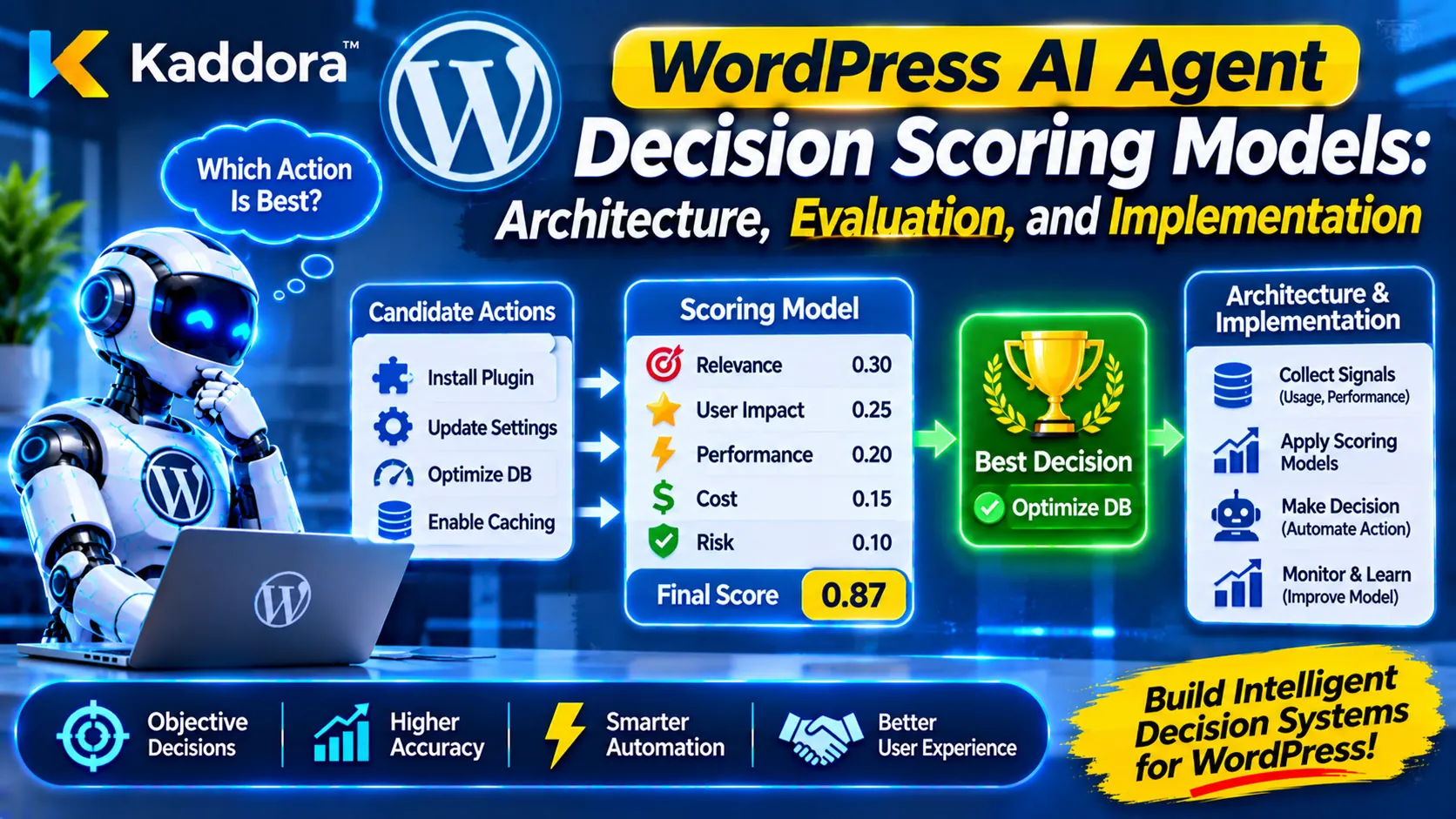
Introduction
AI agents are becoming an important part of modern WordPress plugins. They can analyze website activity, interpret user requests, retrieve information, generate recommendations, and coordinate automated workflows. However, generating a response or identifying a possible action does not automatically mean that an AI agent has selected the best decision.
An AI agent may generate several possible solutions for the same problem. One solution may be faster but expensive, another may be more reliable but require additional configuration, and a third may be simpler but provide limited results. Without a consistent evaluation process, the agent may select an unsuitable option.
This is where WordPress AI Agent Decision Scoring Models become useful.
A decision scoring model evaluates candidate decisions against predefined criteria, assigns measurable scores, considers constraints, and helps determine which option is most appropriate. Instead of allowing an AI model to select an action based only on generated reasoning, a WordPress plugin can use a structured scoring process to support more consistent and explainable decisions.
For example, an AI-powered WooCommerce plugin might identify three ways to improve checkout completion. A scoring model can compare their expected effectiveness, implementation complexity, security implications, compatibility, and estimated cost before recommending an approach.
In this guide, we will explore how WordPress AI Agent Decision Scoring Models work, how to design their architecture, which scoring techniques can be used, and how developers can implement a controlled decision evaluation system inside WordPress plugins.
What Are WordPress AI Agent Decision Scoring Models?
WordPress AI Agent Decision Scoring Models are evaluation frameworks that assign numerical values to possible AI-generated decisions based on predefined criteria.
The purpose is to compare different actions using a consistent evaluation process rather than relying entirely on an AI-generated preference.
A typical scoring model evaluates each candidate decision using factors such as:
Expected effectiveness.
Evidence quality.
Confidence level.
Implementation complexity.
Estimated execution cost.
Security risk.
WordPress compatibility.
Reversibility.
Business impact.
Policy compliance.
Each criterion receives a score or rating. The system combines these values according to a predefined scoring strategy and produces an overall evaluation.
For example, consider an AI agent recommending three actions to improve a WordPress website's performance:
Candidate decision
Effectiveness
Complexity
Security
Optimize image delivery
9/10
8/10
9/10
Replace the caching system
8/10
5/10
7/10
Modify database queries
7/10
4/10
8/10
These values are illustrative. A real system should calculate scores from validated measurements, technical constraints, and documented evaluation rules.
The scoring model can combine the criteria to determine which option should be investigated or recommended first.
Importantly, a high score does not automatically authorize execution. Permission checks, security policies, and approval requirements must remain separate from the scoring process.
Why Do WordPress AI Agents Need Decision Scoring Models?
AI agents can generate multiple reasonable responses, but not all responses have the same practical value.
Without a scoring framework, decision-making can become inconsistent. The agent might prioritize a solution because it sounds convincing rather than because it is technically appropriate.
A structured scoring model helps address this problem.
Improve Decision Consistency
A scoring framework evaluates similar decisions using the same criteria.
For example, a WordPress maintenance plugin can evaluate different database optimization recommendations using consistent measurements. This makes recommendations easier to compare across multiple diagnostic sessions.
Reduce Unnecessary AI Decisions
Not every generated alternative deserves execution.
Scoring models help filter weak, unsupported, duplicate, or unsuitable candidates before they reach the execution stage.
Make AI Recommendations Explainable
A scoring system can show why a particular recommendation ranked higher than another.
Instead of returning only a final answer, the plugin can explain that a recommendation received a higher score because it had stronger evidence, lower implementation complexity, and fewer compatibility risks.
Support Risk-Aware Automation
Some decisions have greater consequences than others.
Changing a display preference is different from modifying payment settings, user permissions, or database records. Scoring models can incorporate risk assessments and route sensitive decisions for human approval.
Improve Resource Allocation
An AI agent may have limited execution time, API credits, or processing resources.
Decision scoring can consider estimated cost and expected value when selecting which tasks should receive priority.
Core Components of a WordPress AI Agent Decision Scoring Architecture
A reliable decision scoring architecture should separate candidate generation, evaluation, policy enforcement, and execution.
This prevents an AI-generated recommendation from directly controlling privileged WordPress operations.
Candidate Decision Generator
The candidate generator creates possible actions based on the current problem and available context.
For example, an AI SEO plugin detecting a decrease in organic traffic might generate these alternatives:
Review recent content changes.
Inspect indexing and crawlability.
Analyze search query performance.
Check internal linking.
Investigate technical SEO errors.
The generator should return structured candidate information instead of unrestricted natural-language instructions.
Context and Evidence Collector
The evidence collector gathers information required to evaluate the candidates.
Depending on the plugin, this may include:
WordPress configuration.
Relevant plugin settings.
WooCommerce analytics.
Website performance measurements.
Search Console data obtained through an authorized integration.
Previous execution results.
Error logs and diagnostic records.
Every evidence item should have a source, collection time, and validation status.
The scoring engine should distinguish verified information from assumptions or incomplete evidence.
Decision Criteria Manager
The criteria manager defines which factors matter for a particular decision.
For a performance optimization task, relevant criteria might include expected speed improvement, compatibility, implementation effort, and rollback difficulty.
For a security recommendation, the criteria might include threat severity, exposure, confidence, and potential operational impact.
Different decision categories should not automatically share identical scoring weights.
Scoring Engine
The scoring engine calculates the score for each candidate.
It receives normalized criterion values, applies configured weights, and generates an evaluation result.
The engine should be deterministic wherever possible. The same validated inputs and scoring configuration should produce the same result.
Policy and Constraint Validator
A candidate with a high score may still violate security or operational requirements.
The policy validator checks whether the candidate:
Is allowed for the current user.
Is supported by the plugin.
Has the required evidence.
Respects the site's configuration.
Meets capability and ownership requirements.
Requires additional approval.
Violates any mandatory safety constraint.
Hard restrictions should not be treated as ordinary negative scoring factors. A prohibited operation must remain prohibited even if its calculated score is high.
Decision Ranking and Selection
After evaluation and policy validation, eligible candidates can be ranked.
The system may select the highest-scoring candidate, present several alternatives, or request human approval.
A useful implementation should preserve the score breakdown and selection explanation for later review.
Execution and Feedback Manager
The execution manager performs only approved, explicitly supported operations.
After execution, it collects the result and compares the outcome with the original expectation.
This information can help refine future scoring criteria, thresholds, and evaluation rules.
Common Decision Scoring Techniques for WordPress AI Agents
Different scoring techniques are useful for different types of AI decisions. Developers should select a method according to the problem rather than assuming one formula will work for every plugin.
Weighted Sum Scoring
Weighted sum scoring is one of the simplest methods.
Each criterion receives a normalized score and a weight. The model multiplies the criterion score by its weight and adds the results.
The formula is:
Overall Score = Σ (Criterion Score × Criterion Weight)
For example:
Criterion
Score
Weight
Effectiveness
9
0.35
Evidence quality
8
0.25
Compatibility
9
0.20
Implementation simplicity
7
0.10
Reversibility
8
0.10
The resulting score is:
(9 × 0.35) + (8 × 0.25) + (9 × 0.20) + (7 × 0.10) + (8 × 0.10) = 8.45
The candidate receives an overall score of 8.45 out of 10.
Weighted scoring is easy to implement and explain. However, it can hide important weaknesses if a high score in one category compensates for a critical failure in another.
For this reason, mandatory constraints should be evaluated separately.
Rule-Based Scoring
Rule-based scoring uses explicit conditions to assign scores or eligibility statuses.
For example:
If required evidence is missing, mark the candidate as incomplete.
If the operation is unsupported, reject it.
If the candidate requires administrator approval, mark it as approval-required.
If compatibility checks fail, prevent execution.
Rule-based evaluation is particularly useful for security-sensitive WordPress operations because developers can inspect and test the rules directly.
Confidence-Based Scoring
Confidence-based scoring estimates how strongly available evidence supports a decision.
A candidate supported by verified website measurements may receive a stronger evidence assessment than a candidate based only on an AI-generated assumption.
However, model-reported confidence should not be treated as proof of correctness. It should be considered alongside evidence quality, validation results, and uncertainty.
Multi-Criteria Decision Analysis
Multi-Criteria Decision Analysis (MCDA) compares alternatives across several dimensions.
It is useful when no single factor can determine the best decision.
For example, an AI agent selecting a backup strategy may need to consider reliability, storage requirements, restoration time, cost, and operational complexity.
MCDA provides a structured way to compare competing priorities.
Dynamic Scoring
Dynamic scoring adjusts criteria or weights according to the decision context.
For example, a performance plugin may prioritize expected speed improvement during a performance audit but prioritize compatibility and reversibility when working on a production website.
Dynamic scoring should use controlled configuration rules. Allowing the AI model to freely change scoring weights can make decisions difficult to reproduce and audit.
How to Design a Decision Scoring Workflow in WordPress
A practical scoring workflow should follow a clear sequence.
Identify the Decision Problem
Start by defining the problem the AI agent needs to solve.
For example, a WooCommerce store owner reports that checkout completion has decreased.
The plugin should identify the relevant objective, such as investigating checkout friction and recommending safe improvements.
Generate Candidate Solutions
The AI agent creates a limited set of possible solutions.
Examples include:
Analyze checkout errors.
Review payment gateway failures.
Investigate mobile checkout usability.
Examine shipping configuration.
Review recent checkout-related plugin updates.
Candidates should be converted into a structured format before evaluation.
Collect and Validate Evidence
The plugin retrieves the information required to evaluate each candidate.
For example, payment failure logs may support a payment gateway investigation, while mobile usability measurements may support a responsive checkout review.
The plugin should record which evidence supports each candidate and identify missing information.
Normalize Scoring Criteria
Different measurements may use different scales.
A cost estimate may be expressed in currency, implementation time in hours, and compatibility as a percentage.
The scoring engine should convert these measurements into a consistent evaluation scale before applying weights.
For example, a cost score can be designed so that lower estimated costs receive higher scores.
Calculate Candidate Scores
The scoring engine evaluates each candidate against the configured criteria.
It should store:
Individual criterion scores.
Criterion weights.
Total score.
Evidence references.
Missing information.
Evaluation status.
Scoring configuration version.
This makes the result easier to understand and reproduce.
Apply Mandatory Policies
The policy validator checks whether each candidate is eligible for recommendation or execution.
A high-scoring candidate should still be rejected if it requires an unsupported operation or violates a mandatory security restriction.
Rank and Recommend Decisions
Eligible candidates are ranked according to their calculated scores.
The plugin can return the highest-ranked option along with alternative recommendations and a clear explanation.
If the scores are close or evidence is insufficient, the system can request additional information rather than presenting a misleadingly precise winner.
Execute With Appropriate Authorization
The execution layer checks WordPress capabilities, ownership, nonce validity where applicable, and any required approval.
A scoring result must never replace authorization.
Evaluate the Outcome
After an approved operation, the plugin checks whether the expected result occurred.
If a recommendation was intended to reduce checkout errors, the system should compare relevant error measurements before and after execution.
This feedback can improve future evaluation without automatically allowing an AI model to rewrite security policies.
Implementing a WordPress AI Agent Decision Scoring Model With PHP
A practical implementation can use a dedicated PHP class to evaluate structured candidate decisions.
The following example demonstrates a basic weighted scoring engine. It is an architectural starting point, not a complete production decision system.
Define Candidate Decision Data
Each candidate should contain structured criterion scores and a consistent set of weights.
$candidates = array( array( 'id' => 'optimize_checkout', 'title' => 'Optimize checkout experience', 'scores' => array( 'effectiveness' => 9, 'evidence' => 8, 'compatibility' => 9, 'simplicity' => 7, ), 'eligible' => true, ), array( 'id' => 'replace_payment_gateway', 'title' => 'Replace payment gateway', 'scores' => array( 'effectiveness' => 8, 'evidence' => 7, 'compatibility' => 6, 'simplicity' => 4, ), 'eligible' => true, ), ); $weights = array( 'effectiveness' => 0.35, 'evidence' => 0.25, 'compatibility' => 0.25, 'simplicity' => 0.15, );
The example uses illustrative values. In a real plugin, scores should be derived from validated measurements or explicitly defined evaluation rules.
Create a Weighted Decision Scoring Class
A dedicated class keeps scoring logic separate from AI generation and WordPress execution.
class Kaddora_AI_Decision_Scoring_Engine { /** * Calculate a weighted score for a candidate. * * @param array $candidate Candidate decision. * @param array $weights Scoring weights. * @return array|WP_Error Evaluation result. */ public function calculate_score( $candidate, $weights ) { if ( empty( $candidate['scores'] ) || ! is_array( $candidate['scores'] ) || empty( $weights ) || ! is_array( $weights ) ) { return new WP_Error( 'invalid_decision_data', 'Candidate scores or weights are invalid.' ); } $total_weight = 0; $weighted_sum = 0; foreach ( $weights as $criterion => $weight ) { if ( ! isset( $candidate['scores'][ $criterion ] ) || ! is_numeric( $candidate['scores'][ $criterion ] ) || ! is_numeric( $weight ) || $weight < 0 ) { return new WP_Error( 'invalid_scoring_criterion', 'A scoring criterion is missing or invalid.' ); } $score = (float) $candidate['scores'][ $criterion ]; $weight = (float) $weight; if ( $score < 0 || $score > 10 ) { return new WP_Error( 'score_out_of_range', 'Criterion scores must be between 0 and 10.' ); } $weighted_sum += $score * $weight; $total_weight += $weight; } if ( $total_weight <= 0 ) { return new WP_Error( 'invalid_weight_total', 'The total scoring weight must be greater than zero.' ); } return array( 'candidate_id' => isset( $candidate['id'] ) ? sanitize_key( $candidate['id'] ) : '', 'score' => round( $weighted_sum / $total_weight, 2 ), 'eligible' => ! empty( $candidate['eligible'] ), ); } }
This implementation validates the input structure and normalizes the result by total weight. It also rejects negative weights and criterion scores outside the defined scale.
For production use, developers should additionally validate candidate identifiers, require a trusted criteria configuration, define handling for missing evidence, and version the scoring configuration.
Rank Eligible Decisions
Once candidates have been scored, the plugin can rank them.
class Kaddora_AI_Decision_Ranker { /** * Rank evaluated decisions. * * @param array $results Scoring results. * @return array */ public function rank_decisions( $results ) { $eligible_results = array(); foreach ( $results as $result ) { if ( ! is_array( $result ) || empty( $result['eligible'] ) || ! isset( $result['score'] ) ) { continue; } $eligible_results[] = $result; } usort( $eligible_results, function ( $first, $second ) { return $second['score'] <=> $first['score']; } ); return $eligible_results; } }
The ranking process excludes candidates that have not passed the eligibility stage.
A production implementation should also use a deterministic tie-breaking rule, such as stronger evidence quality or lower implementation risk.
Add a Separate Decision Policy
Scoring and authorization should remain independent.
A separate policy class can determine whether a candidate is permitted to proceed.
class Kaddora_AI_Decision_Policy { /** * Check whether the current user can manage AI decisions. * * @return bool */ public function can_manage_decisions() { return current_user_can( 'manage_options' ); } /** * Check whether a candidate is eligible for approval. * * @param array $candidate Candidate decision. * @return bool */ public function is_candidate_allowed( $candidate ) { if ( ! $this->can_manage_decisions() ) { return false; } if ( empty( $candidate['eligible'] ) ) { return false; } if ( empty( $candidate['scores'] ) || ! is_array( $candidate['scores'] ) ) { return false; } return true; } }
This is a simplified example of policy separation. Real plugins must use the correct capability for each operation, check object-level permissions, validate the candidate against an allowlist, and enforce authorization again immediately before execution.
A nonce should also be verified for state-changing requests, but a nonce does not replace capability checks.
How to Choose the Right Scoring Weights
Scoring weights determine how much influence each criterion has on the final result.
Poorly selected weights can make a scoring model appear objective while producing unsuitable recommendations.
Developers should define weights according to the plugin's purpose and the consequences of each decision.
Use Task-Specific Weights
A WordPress performance plugin may prioritize effectiveness and implementation simplicity.
A security plugin may prioritize threat reduction and evidence quality.
A WooCommerce automation plugin may prioritize business impact, compatibility, and operational risk.
The scoring configuration should reflect the actual decision category.
Keep Weights Transparent
Store the criteria and their weights in a documented configuration.
Administrators and developers should be able to understand why a criterion influences the final score.
Avoid Arbitrary Weight Changes
AI models should not silently modify scoring weights during evaluation.
If dynamic weights are required, implement controlled rules, record the reason for each change, and preserve the configuration version.
Test With Realistic Scenarios
Use historical cases and representative test data to determine whether the scoring model produces sensible rankings.
Test unusual situations, including missing evidence, conflicting signals, high-risk alternatives, and closely matched scores.
Handling Confidence, Uncertainty, and Missing Evidence
Decision scoring should not create a false impression of certainty.
A candidate may receive a high numerical score while relying on incomplete or outdated information.
For this reason, the scoring system should evaluate evidence quality separately from the candidate's expected effectiveness.
Distinguish Confidence From Quality
Model confidence, evidence quality, and calculated decision score are different concepts.
Model confidence: How strongly the model expresses its own assessment.
Evidence quality: How reliable and relevant the supporting information is.
Decision score: How well the candidate performs against configured evaluation criteria.
These values should not be treated as interchangeable.
Handle Missing Information
If a required criterion is unavailable, the system should not automatically assign a favorable score.
Depending on the task, it can:
Mark the candidate as incomplete.
Request additional evidence.
Use a documented neutral value where appropriate.
Exclude the candidate from ranking.
Route the decision for human review.
Use Decision Thresholds Carefully
Thresholds can classify results into categories such as:
High priority.
Suitable for review.
Low priority.
Insufficient evidence.
Not eligible.
Thresholds should be calibrated against actual use cases. A score of 8.5 does not have universal meaning across every plugin or decision category.
Security Considerations for AI Decision Scoring
Decision scoring systems can influence important website operations. Their design must account for the security risks associated with AI-generated recommendations and external information.
Never Treat AI Scores as Authorization
A high score must not grant permission to perform an operation.
The plugin should independently check WordPress capabilities, object ownership, and configured permissions.
Validate AI-Generated Data
AI-generated candidate information should be treated as untrusted input.
Validate candidate identifiers, supported action types, criterion names, numerical ranges, and required fields before scoring.
Prevent Prompt Injection From Influencing Policies
Retrieved documents, website content, user-submitted text, and external API responses may contain malicious instructions.
Such content must not be allowed to rewrite scoring criteria, bypass restrictions, or change execution permissions.
Protect Sensitive Evidence
Evidence used for scoring may include customer information, order details, user records, or security logs.
Collect only necessary information, restrict access, and avoid sending sensitive data to external AI providers without appropriate authorization and disclosure.
Maintain Audit Logs
Record important evaluation events, including:
Candidate identifier.
Scoring configuration version.
Criterion scores and weights.
Evidence references.
Eligibility result.
Final ranking.
Approval details.
Execution outcome.
Avoid storing unnecessary personal information or sensitive payloads in logs.
Support Human Approval
High-impact operations should require explicit authorization where appropriate.
Examples include changing payment configurations, modifying user roles, deleting records, or altering important website settings.
Practical Use Cases of WordPress AI Agent Decision Scoring Models
Decision scoring models can support many WordPress automation scenarios.
AI SEO Plugins
An SEO agent can compare recommendations such as updating content, improving internal links, correcting metadata, or investigating indexing issues.
The scoring model can evaluate expected SEO impact, evidence quality, implementation effort, and risk.
WooCommerce Automation
A WooCommerce agent can compare checkout improvements, inventory recommendations, pricing suggestions, and customer retention strategies.
Business impact, compatibility, operational risk, and implementation cost can help determine which recommendation deserves attention.
WordPress Performance Optimization
A performance agent can evaluate image optimization, caching adjustments, script loading improvements, and database maintenance recommendations.
It can prioritize options based on measured performance opportunities and potential compatibility issues.
AI Security Monitoring
A security agent can rank suspicious events based on evidence, severity, affected resources, and potential impact.
However, security alerts should also follow deterministic detection rules. A low AI score must never suppress a mandatory security control.
AI Customer Support
A support agent can compare possible responses based on relevance, policy compliance, available documentation, and confidence in the supporting information.
Sensitive or uncertain cases can be routed to a human support representative.
Testing and Monitoring Decision Scoring Models
A scoring model should be tested before it becomes part of an automated workflow.
Developers should create representative test cases with known expected outcomes.
Important tests include:
Correct weighted score calculations.
Invalid and missing criterion values.
Negative or zero scoring weights.
Ineligible candidate filtering.
Equal-score tie handling.
Missing or outdated evidence.
Policy violations.
Unauthorized execution attempts.
Unexpected AI-generated fields.
Changes in scoring configuration.
WordPress plugin developers can use PHPUnit for unit tests and WordPress integration tests for capability checks, REST API requests, database interactions, and other application-level behavior.
Monitoring should also track ranking changes, approval rates, rejected candidates, execution outcomes, and cases where the highest-ranked candidate does not produce the expected result.
If the scoring model changes, preserve the previous configuration and compare the new results against a representative test set before deployment.
Common Mistakes When Building AI Decision Scoring Models
Treating the Highest Score as the Automatically Correct Decision
A high score is an evaluation result, not proof that an action is safe or correct.
Better approach: Combine scoring with evidence validation, policy checks, and appropriate approval requirements.
Using the Same Weights for Every Task
Different WordPress workflows have different priorities.
Better approach: Maintain task-specific scoring configurations with documented criteria.
Ignoring Evidence Quality
A candidate may appear effective while relying on assumptions or outdated information.
Better approach: Evaluate evidence provenance, freshness, relevance, and reliability.
Allowing AI to Control Its Own Restrictions
An AI model should not be allowed to remove mandatory restrictions simply because an alternative receives a high score.
Better approach: Enforce security and eligibility policies through deterministic application code.
Failing to Preserve Score Explanations
A final score without a breakdown makes debugging and auditing difficult.
Better approach: Store individual criterion scores, weights, evidence references, and configuration versions.
Skipping Post-Execution Evaluation
A recommended action may not produce the expected outcome.
Better approach: Compare actual results with expected results and use the findings to improve future evaluation.
Best Practices for WordPress AI Agent Decision Scoring Models
Developers should follow a consistent set of practices when implementing decision scoring systems.
Define the decision objective before generating alternatives.
Use structured candidate data rather than unrestricted AI instructions.
Select criteria relevant to the specific workflow.
Normalize different measurements before combining them.
Document scoring weights and configuration versions.
Keep evidence quality separate from model confidence.
Treat missing evidence as uncertainty, not automatic approval.
Apply mandatory security restrictions outside the scoring formula.
Validate all AI-generated candidate fields.
Use WordPress capabilities and object-level authorization.
Require approval for sensitive or irreversible operations.
Preserve score breakdowns and decision explanations.
Test ranking behavior with realistic and edge-case scenarios.
Monitor execution outcomes and scoring accuracy.
Reassess scoring rules when plugin functionality or business requirements change.
Why Choose Kaddora?
Kaddora focuses on building digital products and technology solutions that support WordPress websites, business workflows, automation, and AI-powered functionality.
Developing reliable AI agents requires more than connecting a language model to a WordPress plugin. It involves structured architecture, secure data handling, controlled automation, meaningful evaluation, and maintainable implementation.
Through ThemeKaddora, developers and website owners can explore WordPress plugins, themes, HTML templates, and other digital products designed for practical website and business requirements.
When developing AI-powered WordPress functionality, a structured decision scoring approach can help create more transparent recommendations, consistent evaluations, and controlled automation workflows.
Conclusion
WordPress AI Agent Decision Scoring Models provide a structured way to evaluate multiple possible actions before an AI agent recommends or performs a task.
By combining weighted scoring, evidence evaluation, rule-based validation, decision ranking, and independent security policies, developers can build AI agents that make more consistent and explainable recommendations.
The most important principle is that scoring and authorization must remain separate. A numerical score can help identify a promising solution, but it cannot replace permission checks, security validation, or human approval when required.
For WordPress plugin developers, implementing a transparent and testable scoring architecture creates a stronger foundation for intelligent automation. With reliable evidence, task-specific criteria, and continuous outcome monitoring, AI agents can make better-informed decisions while remaining under application-level control.
Frequently Asked Questions
What Are WordPress AI Agent Decision Scoring Models?
They are evaluation frameworks that assign numerical scores to AI-generated decisions using criteria such as effectiveness, evidence quality, compatibility, complexity, and risk.
Why Are Decision Scoring Models Important for WordPress AI Plugins?
They help plugins compare alternatives consistently, identify unsuitable recommendations, explain decision rankings, and support controlled automation.
What Is Weighted Scoring in AI Decision-Making?
Weighted scoring assigns importance to different evaluation criteria and combines their values into an overall score. It helps compare alternatives using predefined priorities.
How Is AI Decision Confidence Different From a Decision Score?
Confidence represents the strength of an assessment, while a decision score measures how well a candidate performs against configured criteria. Neither guarantees correctness.
Can WordPress AI Agents Use Multiple Scoring Methods?
Yes. Developers can combine weighted scoring, rule-based evaluation, confidence assessment, and multi-criteria decision analysis according to the requirements of the workflow.
How Can Developers Prevent Incorrect AI Decisions?
Developers should validate evidence, normalize scoring inputs, enforce deterministic policies, check user permissions, and require approval for sensitive operations.
Can Decision Scoring Models Work With WooCommerce?
Yes. They can compare recommendations involving checkout optimization, inventory management, customer retention, product recommendations, and other supported WooCommerce workflows.
Should AI Agents Automatically Execute the Highest-Scoring Decision?
No. The highest-scoring candidate should still pass security checks, authorization requirements, compatibility validation, and any necessary human approval before execution.
Why Choose ThemeKaddora?
ThemeKaddora offers WordPress plugins, themes, HTML templates, and digital products for developers, website owners, and businesses looking for practical tools to build and improve their online projects.
Comments (0)