
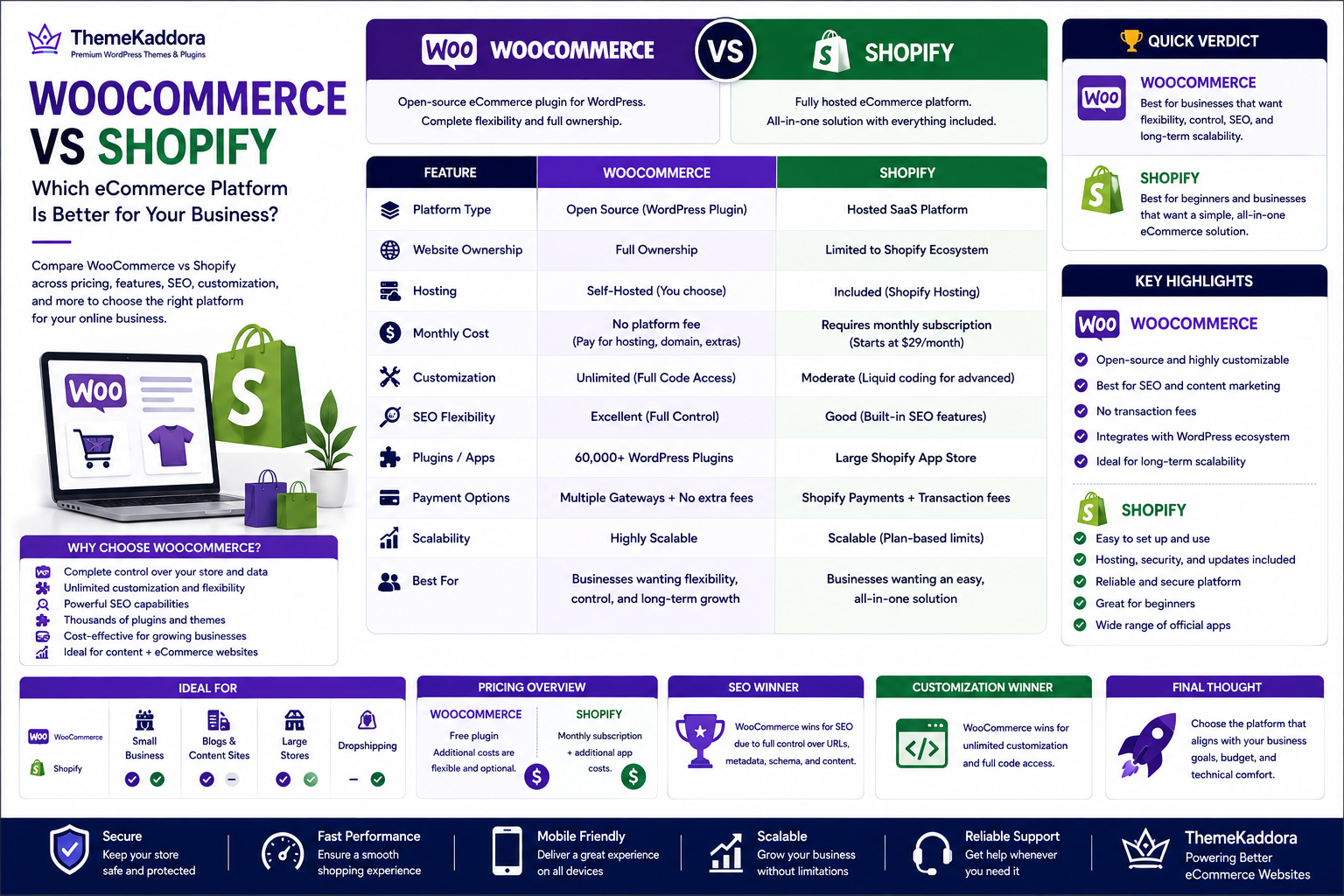
WooCommerce vs Shopify: Which eCommerce Platform Is Better for Your Business?
Introduction
Choosing the right eCommerce platform is one of the most important decisions you'll make when starting or growing an online business. The platform you choose affects everything from website performance and search engine rankings to customization, scalability, and long-term operating costs.
Two of the most popular options available today are WooCommerce and Shopify. Both platforms power millions of online stores worldwide and provide powerful tools for selling products online. However, they follow very different approaches.
WooCommerce is an open-source eCommerce plugin built for WordPress, giving users complete ownership and flexibility over their online stores. Shopify, on the other hand, is a fully hosted platform designed to simplify store management by handling hosting, security, and infrastructure for you.
So, which platform is the better choice?
The answer depends on your business goals, technical requirements, budget, and future growth plans.
In this comprehensive comparison, we'll examine WooCommerce and Shopify across pricing, customization, SEO, performance, security, payment options, scalability, and more to help you make an informed decision.
What Is WooCommerce?
WooCommerce is a free, open-source eCommerce plugin for WordPress that allows you to transform a standard WordPress website into a fully functional online store.
Since it's open source, you have complete control over every aspect of your website.
WooCommerce supports:
Physical products
Digital downloads
Memberships
Subscriptions
Bookings
Online courses
Services
Because it runs on WordPress, WooCommerce also benefits from one of the largest plugin and theme ecosystems available.
What Is Shopify?
Shopify is a fully hosted eCommerce platform that provides everything needed to create and manage an online store without handling hosting or server maintenance.
It includes:
Website hosting
Security updates
SSL certificates
Store management tools
Payment processing
Inventory management
Shopify is particularly popular among beginners because of its simplicity and guided setup process.
WooCommerce vs Shopify at a Glance
Feature:
Platform Type
Website Ownership
Hosting
Monthly Subscription
Customization
SEO Flexibility
Plugins & Apps
Best For
WooCommerce:
Open Source
Full
Self-hosted
No platform fee
Extensive
Excellent
60,000+ WordPress plugins
Businesses wanting flexibility and control
Shopify:
Hosted SaaS
Limited to Shopify ecosystem
Included
Required
Moderate
Good
Large Shopify App Store
Businesses wanting an all-in-one solution
Ease of Use
Both platforms are designed to help users build online stores, but they differ significantly in how much control they provide.
WooCommerce
WooCommerce requires:
Purchasing hosting
Installing WordPress
Installing WooCommerce
Configuring settings
Although the initial setup takes a little longer, you gain complete ownership and flexibility.
Shopify
Shopify offers a guided setup process where hosting, updates, and security are already managed.
This makes Shopify easier for complete beginners who prefer an all-in-one solution.
Pricing Comparison
Cost is one of the biggest factors when choosing an eCommerce platform.
WooCommerce Pricing
WooCommerce itself is free.
However, you'll typically pay for:
Domain name
Web hosting
Premium themes (optional)
Premium plugins (optional)
Maintenance services (if required)
This flexible pricing model allows you to control expenses based on your business needs.
Shopify Pricing
Shopify uses a subscription model.
Monthly costs generally include:
Shopify plan
Premium apps
Premium themes (optional)
Transaction fees (depending on the payment gateway)
While predictable, these recurring costs can increase as your store grows.
Design and Customization
A professional design helps build trust and improve conversions.
WooCommerce
WooCommerce offers virtually unlimited design flexibility through WordPress themes and custom development.
Benefits include:
Thousands of themes
Full code access
Custom layouts
Advanced page builders
Complete branding control
Developers can customize nearly every aspect of the store.
Shopify
Shopify provides professionally designed templates with an easy-to-use customization interface.
While customization is straightforward, deeper modifications often require Shopify's Liquid templating language and are generally more constrained than WooCommerce.
Features and Extensions
Every online business has unique requirements.
WooCommerce
The WordPress ecosystem provides an enormous collection of plugins covering:
SEO
Marketing
Security
Memberships
Booking systems
CRM integration
Analytics
AI automation
Inventory management
This extensive ecosystem allows businesses to build highly customized solutions.
Shopify
Shopify also has a strong App Store with thousands of applications.
Popular categories include:
Marketing
Reviews
Shipping
Email automation
Customer support
Inventory management
Many advanced features, however, require paid apps that add to ongoing costs.
SEO Capabilities
Search engine optimization plays a major role in attracting organic traffic.
WooCommerce
WooCommerce is widely regarded as one of the strongest eCommerce platforms for SEO because it inherits WordPress's powerful content management capabilities.
Advantages include:
Custom URLs
Full metadata control
Advanced schema support
Image optimization
Blog integration
Complete internal linking control
SEO plugins like Yoast SEO and Rank Math
Businesses focused on long-term organic growth often prefer WooCommerce because of its flexibility.
Shopify
Shopify includes built-in SEO features such as editable title tags, meta descriptions, XML sitemaps, and SSL support.
While it performs well for many stores, some technical SEO elements are less customizable compared to WooCommerce.
Performance and Speed
Website speed directly affects user experience, search engine rankings, and conversion rates. Both WooCommerce and Shopify are capable of delivering fast-loading websites, but performance depends on different factors.
WooCommerce
WooCommerce performance largely depends on your hosting provider, theme quality, plugins, and optimization techniques.
You can improve performance by:
Choosing high-performance hosting
Using a lightweight WooCommerce theme
Optimizing images
Enabling page caching
Using a Content Delivery Network (CDN)
Optimizing your database
Reducing unnecessary plugins
With proper optimization, WooCommerce stores can achieve excellent Core Web Vitals scores and handle high traffic efficiently.
Shopify
Shopify provides managed hosting and automatically handles infrastructure optimization.
Benefits include:
Built-in CDN
Automatic caching
Managed servers
Automatic updates
Reliable uptime
Because Shopify controls the hosting environment, store owners have fewer performance-related tasks but also less flexibility.
Security
Protecting customer data is essential for every online business.
WooCommerce
WooCommerce gives you complete control over website security.
Recommended security practices include:
Install SSL certificates
Keep WordPress, WooCommerce, and plugins updated
Use strong passwords
Enable two-factor authentication
Perform regular backups
Install a trusted security plugin
Security largely depends on proper website management.
Shopify
Shopify handles many security responsibilities automatically, including:
SSL certificates
PCI DSS compliance
Server security
Platform updates
Infrastructure monitoring
This makes Shopify attractive for users who prefer a managed environment.
Payment Gateways
Providing multiple payment methods improves customer convenience and increases conversions.
WooCommerce
WooCommerce supports a wide variety of payment gateways, including:
PayPal
Stripe
Razorpay
Square
Authorize.Net
Bank Transfers
Cash on Delivery
Store owners have complete freedom to choose their preferred payment providers.
Shopify
Shopify supports:
Shopify Payments
PayPal
Stripe (where supported)
Third-party payment gateways
Depending on your payment method and subscription plan, additional transaction fees may apply.
Scalability
Your eCommerce platform should grow alongside your business.
WooCommerce
WooCommerce is highly scalable when paired with quality hosting and proper optimization.
It supports:
Large product catalogs
High traffic websites
Multiple languages
Multiple currencies
Membership websites
Subscription businesses
Marketplace solutions
Businesses have complete control over scaling resources as needed.
Shopify
Shopify also scales well and offers plans suitable for businesses of different sizes, including Shopify Plus for enterprise-level stores.
However, scaling often means upgrading to higher-priced subscription plans and purchasing additional apps.
Pros and Cons
WooCommerce
Pros
Free and open source
Complete website ownership
Unlimited customization
Excellent SEO capabilities
Huge plugin ecosystem
Flexible payment gateways
Strong blogging features
No platform lock-in
Cons
Requires separate hosting
More initial setup
Ongoing maintenance responsibility
Performance depends on hosting quality
Shopify
Pros
Easy setup
Managed hosting
Automatic updates
Strong security
Beginner-friendly interface
Reliable infrastructure
Cons
Monthly subscription fees
Additional app costs
Less customization
Limited control over server configuration
Potential transaction fees
Which Platform Should You Choose?
The right choice depends on your business goals.
Choose WooCommerce if you:
Want complete ownership of your website
Need advanced customization
Prioritize SEO and content marketing
Already use WordPress
Plan to scale with custom functionality
Prefer long-term flexibility
Choose Shopify if you:
Want a fully managed solution
Prefer a simpler setup process
Have limited technical experience
Don't want to manage hosting or server maintenance
For businesses that value flexibility, customization, and long-term growth, WooCommerce is often the stronger choice.
Why Choose ThemeKaddora?
At ThemeKaddora, we specialize in creating high-performance WordPress themes and WooCommerce solutions designed to help businesses grow.
Our products are built with a focus on:
Lightweight, optimized code
Fast loading speeds
Mobile-first responsive design
WooCommerce compatibility
SEO-friendly architecture
Easy customization
Secure development practices
AI-powered plugins for automation and business growth
Whether you're launching your first online store or migrating from another platform, ThemeKaddora provides the tools and expertise needed to build a scalable, conversion-focused WooCommerce website.
Conclusion
Both WooCommerce and Shopify are excellent eCommerce platforms, but they serve different types of businesses.
Shopify offers convenience through its fully hosted environment, making it a strong option for users who want a simple, managed solution.
WooCommerce, however, provides unmatched flexibility, complete ownership, extensive customization, and exceptional SEO capabilities. For businesses focused on long-term growth, branding, and content-driven marketing, WooCommerce is often the preferred platform.
Before making your decision, evaluate your budget, technical requirements, customization needs, and future business goals. Choosing the right platform today will create a strong foundation for your online success tomorrow.
With ThemeKaddora's performance-focused WooCommerce themes and AI-powered plugins, you can build an online store that is fast, secure, SEO-friendly, and designed to convert visitors into loyal customers.
Frequently Asked Questions
1. Is WooCommerce better than Shopify?
WooCommerce offers greater flexibility, ownership, and customization, while Shopify provides a simpler, fully managed experience. The better choice depends on your business needs.
2. Which platform is more affordable?
WooCommerce has no platform fee but requires hosting and a domain. Shopify charges a monthly subscription and may involve additional app and transaction costs.
3. Which platform is easier for beginners?
Shopify is generally easier to set up because hosting, security, and updates are managed for you.
4. Which platform is better for SEO?
WooCommerce offers more advanced SEO flexibility through WordPress, making it an excellent choice for businesses focused on organic search traffic.
5. Can I migrate from Shopify to WooCommerce?
Yes. Various migration tools and services allow you to transfer products, customers, and orders from Shopify to WooCommerce.
6. Which platform offers more customization?
WooCommerce provides significantly more customization because it is open source and fully integrated with WordPress.
7. Does WooCommerce require coding?
No. Most WooCommerce stores can be created without coding, although developers can customize every aspect if needed.
8. Which platform scales better?
Both platforms scale well, but WooCommerce provides greater flexibility for businesses that require advanced functionality and custom development.
9. Which platform has lower transaction fees?
WooCommerce itself does not charge transaction fees. Costs depend on the payment gateway you choose. Shopify may charge additional transaction fees if Shopify Payments is not used.
10. Why choose ThemeKaddora?
ThemeKaddora offers fast, SEO-friendly WordPress themes and AI-powered WooCommerce plugins built to improve performance, user experience, and long-term business growth.
Comments (0)