
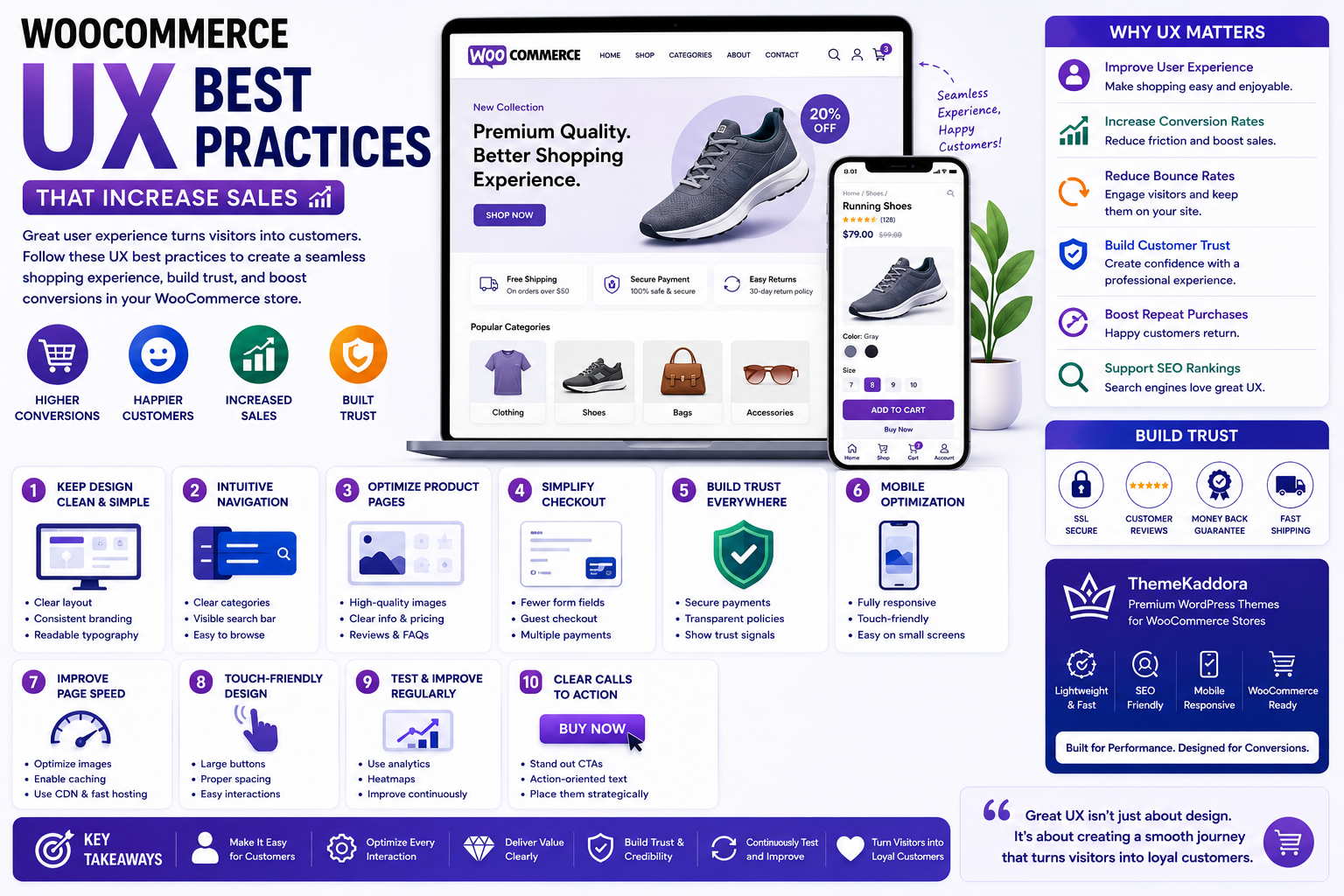
WooCommerce UX Best Practices That Increase Sales
Introduction
A visually appealing WooCommerce store is important, but great design alone is not enough to increase sales. The true measure of a successful online store is how easily customers can browse products, find information, add items to their cart, and complete their purchases without confusion or frustration. This is where User Experience (UX) plays a vital role.
User Experience refers to every interaction a customer has with your website, from landing on the homepage to completing checkout and even returning for future purchases. A well-designed UX reduces friction, builds trust, and encourages visitors to become loyal customers.
Even small improvements such as clearer navigation, faster page loading, better product layouts, and simplified checkout can significantly improve conversion rates and customer satisfaction. Conversely, poor UX often leads to higher bounce rates, abandoned carts, and lost revenue.
In this guide, you'll discover practical WooCommerce UX best practices that help create a seamless shopping experience, improve customer engagement, and ultimately increase online sales.
1. Why UX Matters in WooCommerce
Every interaction on your website influences whether a visitor becomes a customer.
A positive user experience helps:
Increase conversion rates
Improve customer satisfaction
Reduce bounce rates
Increase Average Order Value (AOV)
Encourage repeat purchases
Build customer trust
Improve customer retention
Support better search engine rankings
Customers are more likely to purchase from stores that are easy to navigate and pleasant to use.
2. Keep Your Design Clean and Simple
An uncluttered design allows visitors to focus on your products instead of unnecessary distractions.
A clean WooCommerce store should include:
Consistent branding
Clear typography
Balanced whitespace
Organized layouts
Readable product information
Limited visual clutter
Consistent color palette
Avoid overcrowding pages with excessive banners, animations, or promotional messages that compete for attention.
3. Make Navigation Intuitive
Navigation is one of the most important aspects of a successful WooCommerce store.
Customers should be able to locate products within a few clicks.
Navigation best practices include:
Clear category structure
Logical menu organization
Sticky navigation
Visible search bar
Breadcrumb navigation
Product filters
Simple mega menus when necessary
The easier it is for customers to browse your store, the more likely they are to continue shopping.
4. Improve Product Page Usability
Product pages should provide all the information customers need to make confident purchasing decisions.
Include:
High-quality product images
Multiple product views
Clear pricing
Product availability
Product specifications
Customer reviews
Frequently asked questions
Related products
A well-structured product page minimizes uncertainty and encourages conversions.
5. Simplify the Checkout Experience
Checkout is one of the most critical points in the customer journey. Every unnecessary step increases the risk of cart abandonment.
Improve checkout usability by:
Offering guest checkout
Reducing form fields
Supporting auto-fill
Displaying multiple payment options
Showing order summaries
Providing clear progress indicators
A streamlined checkout process helps customers complete purchases more quickly and with greater confidence.
6. Build Trust Throughout the Shopping Journey
Trust is essential for converting visitors into customers.
Display trust signals consistently across your website, including:
SSL security indicators
Customer reviews
Money-back guarantees
Secure payment badges
Transparent shipping policies
Easy return policies
Contact information
When customers feel confident in your business, they are far more likely to complete a purchase.
7. Optimize for Mobile Users
A significant percentage of WooCommerce traffic comes from smartphones and tablets. If your store is difficult to use on mobile devices, you risk losing customers before they even reach the checkout page.
To improve mobile user experience:
Use a fully responsive WooCommerce theme.
Design touch-friendly buttons and menus.
Keep navigation simple and intuitive.
Optimize images for faster loading.
Make text readable without zooming.
Ensure forms are easy to complete on smaller screens.
A smooth mobile experience encourages visitors to browse more products, spend more time on your website, and complete purchases with confidence.
8. Improve Website Speed
Website speed is one of the most important UX factors. Even a few seconds of delay can negatively affect user engagement and conversion rates.
Improve your WooCommerce store's performance by:
Compressing and optimizing images.
Enabling browser caching.
Minifying CSS and JavaScript files.
Removing unnecessary plugins.
Using a Content Delivery Network (CDN).
Choosing high-performance hosting.
Optimizing your WooCommerce database.
A fast-loading website improves customer satisfaction while supporting better search engine visibility.
9. Test and Improve UX Regularly
User experience is an ongoing process rather than a one-time task. Customer expectations change over time, making regular testing essential.
Evaluate your WooCommerce store by monitoring:
Customer feedback
Heatmaps
Session recordings
Search behavior
Conversion funnels
Cart abandonment reports
Page speed metrics
Mobile usability
Regular analysis helps identify opportunities to improve the shopping journey and remove obstacles that prevent conversions.
10. Common UX Mistakes
Many WooCommerce stores lose potential sales because of avoidable usability issues.
Common mistakes include:
Cluttered page layouts
Complicated navigation
Slow-loading pages
Poor mobile responsiveness
Hidden shipping costs
Long checkout forms
Unclear calls-to-action
Difficult product filtering
Missing trust signals
Inconsistent design elements
Addressing these issues creates a smoother shopping experience and helps customers complete purchases more easily.
Why Choose ThemeKaddora?
At ThemeKaddora, we design WordPress themes and WooCommerce solutions with user experience at the center of every project.
Our products are built with:
Mobile-first responsive design
Lightweight and optimized code
Fast loading performance
WooCommerce compatibility
SEO-friendly architecture
Secure coding practices
Conversion-focused layouts
Easy customization
AI-ready development
Whether you're launching a new online store or improving an existing one, ThemeKaddora helps you create a shopping experience that is fast, intuitive, and built for long-term growth.
Conclusion
An exceptional user experience is one of the most effective ways to increase WooCommerce sales. Customers are more likely to trust, explore, and purchase from stores that are easy to navigate, load quickly, and provide a seamless shopping journey.
By keeping your design simple, improving navigation, optimizing product pages, simplifying checkout, building trust, enhancing mobile usability, and continuously testing your store, you create an environment where customers enjoy shopping and feel confident making purchases.
Combined with ThemeKaddora's performance-focused WooCommerce themes and WordPress solutions, these UX best practices provide a strong foundation for improving customer satisfaction, increasing conversions, and growing your online business.
Frequently Asked Questions
1. What is WooCommerce UX?
WooCommerce UX refers to the overall experience customers have while interacting with your online store, including browsing products, navigating pages, and completing purchases.
2. Why is UX important for WooCommerce stores?
A positive user experience improves customer satisfaction, reduces friction, increases conversions, and encourages repeat purchases.
3. How does UX affect conversion rates?
An intuitive shopping experience helps customers find products quickly, builds trust, and reduces obstacles during checkout, leading to higher conversion rates.
4. What are the most common WooCommerce UX mistakes?
Slow page speed, poor navigation, cluttered layouts, confusing checkout processes, and weak mobile optimization are among the most common usability issues.
5. How can I improve product page usability?
Use high-quality images, clear descriptions, transparent pricing, customer reviews, FAQs, and prominent call-to-action buttons.
6. Why is mobile UX important?
Many customers shop using smartphones. A mobile-friendly store improves usability, engagement, and sales while supporting mobile-first search indexing.
7. Does website speed affect UX?
Yes. Faster websites improve customer satisfaction, reduce bounce rates, and contribute to better search engine rankings.
8. How often should I evaluate my store's UX?
Review your store regularly using analytics, customer feedback, usability testing, and performance reports, especially after major updates or design changes.
9. Which UX metrics should I monitor?
Track bounce rate, conversion rate, average session duration, cart abandonment rate, page load time, and customer satisfaction to evaluate UX performance.
10. Why choose ThemeKaddora?
ThemeKaddora develops fast, secure, SEO-friendly, and conversion-focused WordPress themes and WooCommerce solutions that help businesses create exceptional shopping experiences and achieve sustainable growth.
Comments (0)