
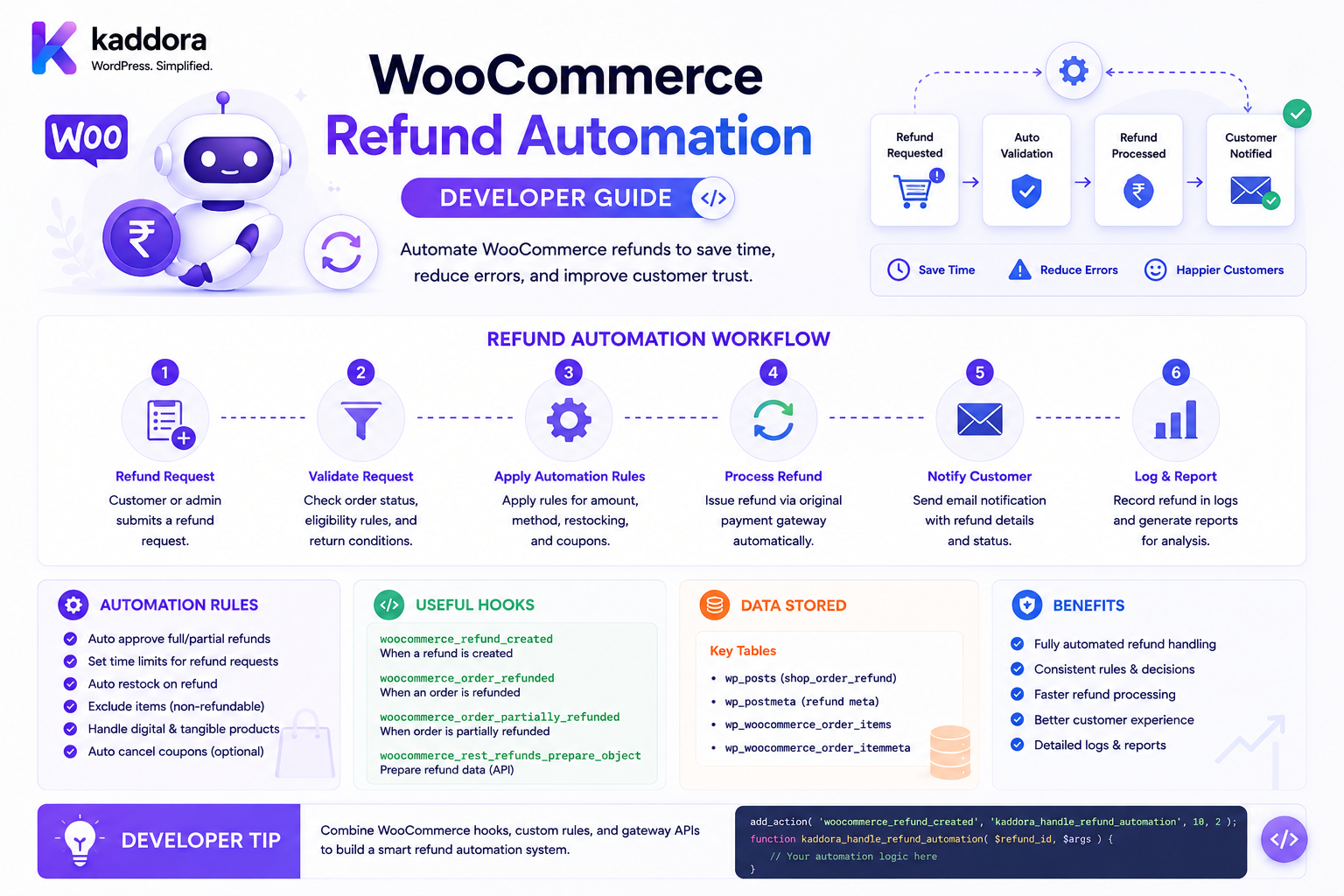
WooCommerce Refund Automation:Developer Guide
Introduction
Refund processing can become difficult when an ecommerce business receives hundreds or thousands of requests.
A manual workflow might look like:
Customer Requests Refund ↓ Support Reviews Order ↓ Manager Approves ↓ Administrator Issues Refund ↓ Payment Gateway ↓ Customer Notified
This can work for a small store.
As order volume increases, businesses may need automation:
Refund Request ↓ Eligibility Rules ↓ Refund Calculation ↓ Approval Rules ↓ Refund Creation ↓ Payment Gateway ↓ Webhook / Confirmation ↓ ERP / Accounting ↓ Inventory Workflow ↓ Customer Notification
The objective is not to automate every refund blindly.
A better goal is:
Automate predictable, low-risk refunds while routing exceptions and high-risk cases to human review.
A production refund automation system needs to understand:
Order State Payment State Refund History Return State Refund Amount Items Taxes Shipping Discounts Fees Gateway Capabilities Customer History Inventory Fraud Risk Approval Rules ERP Notifications
The key principle is:
Refund automation should make deterministic decisions from authoritative order and payment data while keeping financial actions idempotent, auditable, and reversible where possible.
What Is WooCommerce Refund Automation?
WooCommerce refund automation means using software rules and integrations to automatically evaluate and process eligible refunds.
For example:
Order: ₹1,000 Reason: Duplicate Payment Gateway: Refund Supported Risk: Low → Automatic Refund
While another request may require human review:
Order: ₹80,000 Reason: Customer Dispute Risk: High → Manual Approval
Refund Automation vs Manual Refund
Manual
Support Agent + Admin Action
Automated
Rule Engine + Gateway API
The automated workflow must still enforce:
Authorization Validation Limits Idempotency Audit
Why Automate WooCommerce Refunds?
Refund automation can help:
Reduce support workload
Speed up customer refunds
Standardize decisions
Reduce manual mistakes
Improve refund consistency
Integrate payment gateways
Connect returns with refunds
Synchronize accounting systems
Provide better refund tracking
When Should Refunds Be Automated?
Good candidates include:
Duplicate Payment Cancelled Before Fulfillment Approved Low-Value Refund System Error Automatic Return Approval
More complex cases may require manual review:
Fraud Suspicion High-Value Refund Disputed Delivery Repeated Refund History Partial Item Damage Contract Customer
Refund Automation Architecture
A scalable architecture is:
Customer Request ↓ Refund Service ↓ Eligibility Engine ↓ Risk / Approval Engine ↓ Refund Calculator ↓ Refund Processor ↓ Payment Gateway ↓ Confirmation ↓ Post-Refund Events
Separate Refund Domains
A good system separates:
Return Refund Payment Inventory Accounting Notification
These domains interact but should not become one giant function.
Refund Request
A refund request can contain:
Order ID Items Quantities Reason Customer Message Attachments
The request is not automatically a completed refund.
Refund Eligibility
Before approving:
Order Exists ↓ Payment Received ↓ Refund Window Valid ↓ Requested Amount Valid ↓ Items Eligible ↓ No Existing Conflict
Refund Window
A business may define:
Refund Window: 30 Days
Requests after that may require manual approval.
Different Product Refund Windows
A store may have:
Standard Products: 30 Days Customized Products: No Return Digital Products: 7 Days Subscription: Specific Policy
Rules must be explicit.
Product Refundability
Not every product must be refundable.
A product may be:
Refundable Non-Refundable Conditional
This can be stored as product policy data or derived from an applicable return policy.
Refund Reason Rules
A refund reason can change approval requirements.
For example:
Duplicate Payment → Automatic Changed Mind → Return Required Damaged → Proof Required High-Value Dispute → Manager Review
Refund Reason Codes
Use stable internal codes such as:
duplicate_payment damaged_product wrong_item cancelled_order late_delivery goodwill
Display labels can change without breaking reporting.
Refund Amount Rules
A refund engine may calculate:
Item Amount + Eligible Tax + Eligible Shipping - Non-Refundable Fees - Previous Refunds = Refund Amount
The exact formula depends on store policy.
Never Trust Customer-Supplied Refund Amounts
A request such as:
refund_amount=100000
must not be treated as authoritative.
The server should calculate the refundable amount from order data and policy.
Full Refund Automation
Example:
Order: ₹2,000 Payment: Captured Refundable: Yes Risk: Low → Refund ₹2,000
Partial Refund Automation
Example:
Order: ₹5,000 Item Refund: ₹1,000 Previous Refunds: ₹500 Remaining: ₹3,500
The system can approve the new ₹1,000 refund if policy permits it.
Multiple Partial Refunds
Automation should calculate:
Original Amount - Previous Refunds = Remaining Refundable
and prevent over-refunding.
Refund Approval Matrix
A useful rules table can be:
Condition
Automation
Refund < ₹1,000
Automatic
Refund ₹1,000–₹10,000
Manager review
Refund > ₹10,000
Finance review
Fraud flag
Manual
Duplicate payment
Automatic
Damaged item
Evidence review
The actual thresholds should be defined by the business.
Risk-Based Refund Automation
A better approach is to evaluate multiple signals:
Amount Customer History Order Age Refund Frequency Payment Method Reason Return Evidence Delivery Status
Then calculate a risk level:
Low Medium High
Customer Refund History
A customer with:
1 Refund
may have a different risk profile from:
20 Refunds
Historical patterns can inform review rules, but they should not automatically deny legitimate refunds.
Refund Velocity
Useful signals include:
Refunds per 30 Days Refund Value per 30 Days Refund Ratio
These can trigger additional review.
Fraud Detection
Refund automation can check:
Repeated Refunds Multiple Accounts Abnormal Amounts Unusual Payment Patterns Repeated Claims
Automated fraud decisions should be carefully designed to avoid false positives.
Refund Approval Workflow
A practical workflow:
Refund Request ↓ Eligibility ↓ Risk ↓ Approval ├── Auto Approve ├── Manual Review └── Reject
Manual Review Queue
Reviewers can see:
Order Customer Refund Amount Reason Previous Refunds Return Status Risk
and choose:
Approve Reject Request More Information
Evidence Uploads
For damaged goods, customers may submit:
Photos Videos Documents
Uploaded evidence should be validated and protected.
Refund Evidence Security
Never assume an uploaded file is safe.
Validate:
File Type File Size MIME Type Storage Access
and restrict access to authorized staff.
Return-to-Refund Workflow
For physical goods:
Return Request ↓ Return Approval ↓ Return Shipment ↓ Received ↓ Inspection ↓ Refund Eligibility ↓ Refund
Automatic Refund After Return Inspection
Example:
Returned: Yes Inspection: Passed Refund: Automatically Approved
If inspection fails:
Damaged Beyond Policy → Manual Review
Return Inspection Outcomes
Useful states:
Resellable Damaged Incomplete Wrong Item Missing Accessories Fraud Suspected
These states can influence the refund amount.
Partial Refund for Damaged Products
A business may decide:
Original: ₹5,000 Damage: Minor Refund: ₹4,500
This requires policy-driven calculations rather than arbitrary administrator input.
Refund and Shipping
A refund policy can define:
Refund Product Refund Shipping Do Not Refund Shipping
The automation engine should use the configured rule.
Refund and Return Shipping
A business may reimburse:
Return Shipping: ₹200
for approved defective-product returns.
This is separate from the original order shipping charge.
Refund and Taxes
If the refund includes taxable product amounts, tax adjustments must be handled consistently with the original order.
Do not independently recalculate tax outside the WooCommerce order/refund architecture.
Refund and Coupons
Suppose:
Product: ₹2,000 Coupon: ₹500 Paid: ₹1,500
An item refund must reflect the actual discounted transaction.
Automation should use order-level historical values rather than today's coupon rules.
Refund and Dynamic Pricing
If the product originally had:
Dynamic Price: ₹800
and the current price is:
₹1,000
the refund should normally use the original order transaction values, not the current price.
Historical Price Principle
The refund system should respect:
Original Order State
rather than recalculating from:
Current Product State
Refund and Bundles
If a customer returns part of a bundle:
Bundle: Camera Lens Bag
the refund system needs the original bundle price allocation.
Do not simply refund the current standalone price of one component.
Refund and Product Kits
Configurable kits are even more complex:
CPU GPU RAM Storage
A refund workflow should use the original component prices and configuration.
Refund and Product Add-Ons
If a product contained:
Engraving: ₹200
the refund policy should specify whether the add-on is refundable.
Refund and Subscriptions
Subscription refunds can involve:
Initial Payment Renewal Payment Proration Cancellation Future Charges
Automated subscription refunds need to coordinate with the subscription lifecycle.
Refund and Recurring Charges
A refund for a renewal should not automatically cancel the subscription unless the business explicitly requires that behavior.
Keep:
Refund
and:
Cancellation
as separate actions.
Refund and Payment Gateways
The refund automation service must know what the selected gateway supports.
Possible capabilities:
Full Refund Partial Refund Multiple Refunds Automatic Refund Manual Refund Async Refund
Gateway Capability Registry
A custom platform can maintain:
Gateway: Example Gateway Supports: Partial: Yes Automatic: Yes Multiple: Yes
This prevents automation from attempting unsupported operations.
Gateway Refund Request
A simplified flow:
WooCommerce ↓ Refund Service ↓ Gateway Adapter ↓ Gateway API
Using an adapter pattern keeps gateway-specific code isolated.
Gateway Adapter Pattern
For example:
RefundService ├── StripeAdapter ├── PayPalAdapter ├── RazorpayAdapter └── ManualAdapter
The refund service should not contain gateway-specific HTTP logic everywhere.
Refund Idempotency
Every automated refund should have a unique reference.
For example:
RF-ORD-1001-001
The system should know whether that refund was already sent to the gateway.
Retry-Safe Refund Processing
If a request times out:
Gateway: Unknown
do not blindly retry.
First query the gateway for the refund status if its API supports lookup.
Refund State Machine
A robust model:
Requested ↓ Eligible ↓ Approved ↓ Processing ↓ Gateway Pending ↓ Completed
Failure:
Processing ↓ Failed ↓ Manual Review / Retry
Refund State Ownership
Define which system owns each state.
For example:
WooCommerce: Local refund record Gateway: Payment transaction ERP: Accounting state
Do not allow every system to independently overwrite the same state.
Refund Webhooks
Gateways may send:
Refund Completed Refund Failed Refund Pending
The webhook processor should:
Verify Signature ↓ Validate Event ↓ Find Refund ↓ Check Idempotency ↓ Update State ↓ Emit Events
Webhook Replay Protection
Store processed event IDs:
gateway_event_id
If the same event arrives again:
Already Processed
do not repeat the financial operation.
Refund Queue
Refund processing can use a queue:
Refund Approved ↓ Queue ↓ Gateway Worker ↓ Gateway ↓ Result
This reduces request latency.
Refund Retry Policy
Use controlled retry behavior:
Transient Failure → Retry Permanent Failure → Manual Review
Do not retry permanent errors continuously.
Refund Notification Queue
After refund completion:
Refund Completed ↓ Queue ├── Email ├── CRM └── ERP
The financial state should not depend on the notification provider being available.
Refund and ERP Integration
A completed refund can emit:
refund.completed
The ERP can then record:
Accounting Adjustment
If ERP synchronization fails, preserve the refund state and retry the integration separately.
Refund and Accounting Integration
Potential accounting data includes:
Refund Amount Tax Shipping Fees Currency Original Transaction Gateway Reference
The exact accounting mapping depends on the business's accounting system.
Refund and CRM Automation
A refund event can trigger:
Support Task Customer Feedback Retention Workflow Refund Survey
These should occur after the relevant refund state is known.
Refund Notifications
Different states should receive different messages.
Requested
We received your refund request.
Approved
Your refund has been approved.
Processing
Your refund is being processed.
Completed
Your refund has been completed.
Failed
We need additional action to complete your refund.
Never send a "completed" notification for a merely requested refund.
Refund Notifications and Privacy
Notifications should not expose:
Internal Fraud Score Staff Notes Supplier Cost Internal Gateway Credentials
Only customer-relevant information should be shown.
Refund Automation and Permissions
A secure system can use roles:
Support: Request Manager: Approve Finance: Process Admin: Configure
The actual permission model should match the business.
Refund API Permissions
Separate capabilities for:
View Refund Request Refund Approve Refund Process Refund Retry Refund Cancel Refund
This reduces financial risk.
Refund Fraud Controls
Automation can flag:
High Refund Ratio Multiple Refunds Rapid Refund Requests Repeated Damaged Claims Unusual Payment Patterns Multiple Accounts
Risk flags should normally route to review instead of automatically denying legitimate cases.
Refund Limits
A business may define:
Maximum Automatic Refund: ₹5,000
Above that:
Manual Approval
This is a useful guardrail.
Refund Rate Limits
Public refund-request endpoints should be protected from abuse with:
Rate Limiting Authentication Verification
Refund Request Ownership
Customers should only be able to request refunds for their own orders.
Do not trust:
customer_id
from the browser.
Derive customer ownership server-side from authentication and order records.
Refund IDOR
A vulnerable endpoint:
POST /orders/1001/refund
must verify that the authenticated user has permission to request a refund for Order 1001.
Refund Multi-Tenant Security
For SaaS commerce:
Tenant A └── Orders └── Refunds Tenant B └── Orders └── Refunds
All refund records and operations must be tenant-scoped.
Refund Audit Trail
Every important action should record:
Refund ID Order ID Action User Timestamp Amount Reason Gateway Result
Refund Calculation Trace
For support teams:
Order: #1001 Original: ₹5,000 Previous Refunds: ₹1,000 Requested: ₹2,000 Eligible: Yes Remaining: ₹4,000 Final: ₹2,000
This makes automated decisions explainable.
Refund Automation Rules Engine
A rule can be represented as:
Conditions + Action + Approval Level
Example:
If: Refund < ₹1,000 AND Order < 30 days AND Reason = Duplicate Payment Then: Auto Approve
Refund Rule Priority
Multiple policies may match:
General Refund Rule + VIP Rule + High-Risk Rule
Define precedence.
For example:
Fraud / Risk > Product Policy > Customer Policy > General Policy
The exact hierarchy depends on the business.
Refund Rule Conflicts
Suppose:
General: Automatic High Risk: Manual Review
A high-risk order should not be auto-refunded simply because the general rule matched first.
Refund Rule Simulator
An administrator can enter:
Order: ₹4,000 Customer: VIP Reason: Damaged Risk: Low Return: Received
The simulator can return:
Eligible: Yes Approval: Automatic Refund: ₹4,000
Refund Automation Dashboard
A dashboard could show:
Automatic: 120 Manual Review: 18 Failed: 5 Pending: 22 Completed: 113
Refund Automation Metrics
Track:
Automatic Approval Rate Manual Review Rate Refund Processing Time Gateway Failure Rate Refund Error Rate Customer Satisfaction
Refund Processing Time
Measure:
Request → Approval → Gateway → Completion
This reveals bottlenecks.
Refund Automation ROI
A business can compare:
Manual Processing Hours
against:
Automated Processing
to measure operational savings.
Refund Automation and Inventory
Refund automation should emit a separate event:
refund.completed ↓ Inventory Decision
Inventory may then determine:
Restock No Restock Inspection
Refund Automation and Returns
A return system can emit:
return.approved return.received return.inspected
The refund service can use these events to decide whether payment should be returned.
Event-Driven Refund Automation
A robust system can use:
Order Event ↓ Refund Rule Engine ↓ Refund Event ↓ Gateway ↓ Confirmation Event ↓ ERP / CRM / Notifications
Refund Automation and WebSocket
Internal dashboards can receive:
refund.completed
through a real-time channel and update the screen without manual refresh.
This is useful for finance and customer-support teams.
Refund Automation and AI
AI can help with:
Reason Classification Fraud Risk Signals Support Recommendations Return Evidence Analysis Refund Trend Detection
A safe model is:
AI Analysis ↓ Deterministic Rules ↓ Approval Policy ↓ Refund
rather than:
AI ↓ Direct Money Movement
AI Refund Risk
AI can produce:
Risk: Medium Reason: Unusual refund frequency
A policy engine can then require:
Manual Review
AI Must Not Invent Evidence
If customer evidence says:
Damaged box
the AI should not invent:
Product internally damaged
unless supported by the available evidence.
Refund Automation Testing
Test:
Full Refund Partial Refund Multiple Refunds Automatic Approval Manual Approval Rejection Gateway Success Gateway Failure Gateway Timeout Duplicate Webhook Duplicate Request
Refund Rule Boundary Testing
If:
Automatic Limit: ₹1,000
test:
₹999 ₹1,000 ₹1,001
Refund Window Testing
For:
30 Days
test:
Day 29 Day 30 Day 31
and verify timezone/date behavior.
Partial Refund Testing
Test:
Refund 10% Refund 50% Refund 90% Refund 100% Refund > 100%
The final case should be rejected.
Gateway Failure Testing
Test:
Timeout Authentication Error Invalid Amount Currency Error Provider Rejection
Webhook Testing
Test:
Valid Event Invalid Signature Duplicate Event Out-of-Order Event Unknown Refund
Concurrency Testing
Submit two refund requests simultaneously:
Refund: ₹2,000
against an order with only:
₹2,000
Only one should succeed.
This is an important financial concurrency test.
Refund Reservation Against Remaining Amount
The system may need temporary protection against two refund workers both seeing:
Remaining Refundable: ₹2,000
and both approving:
₹2,000
Concurrency-safe refund processing should serialize or atomically reserve the refundable amount.
Duplicate Worker Testing
Run:
Worker A + Worker B
against the same refund job and verify only one gateway refund is created.
ERP Failure Testing
Test:
Refund: Completed ERP: Unavailable
The refund should remain completed while ERP synchronization is queued for retry.
Do not reverse a completed refund simply because the accounting integration failed.
Notification Failure Testing
Test:
Refund: Completed Email: Failed
The payment state should remain completed.
Notification retry should be separate.
Refund Migration Testing
If an existing store already has refunds:
WooCommerce Refunds ↓ Import ↓ Map Gateway References ↓ Verify
Historical financial data must not be corrupted.
Refund Upgrade Testing
After a plugin update:
Pending Refunds Completed Refunds Failed Refunds Queued Jobs Webhook Events
should remain consistent.
Refund Uninstall Strategy
Never remove historical refund records casually.
Document what happens to:
Refund History Gateway References Audit Logs Queue Jobs Custom Tables
when the refund automation plugin is removed.
Common WooCommerce Refund Automation Mistakes
Auto-Refunding Everything
Some cases need human review.
Trusting Customer Refund Amounts
Always calculate from authoritative order data.
Ignoring Previous Refunds
Can cause over-refunding.
No Idempotency
Retries can create duplicate financial transactions.
Marking Complete Before Gateway Confirmation
Creates inconsistent financial records.
Restocking Every Refund
Returned items may be damaged or missing.
Ignoring Gateway Capabilities
Not every payment method supports automatic refunds.
No Approval Controls
Large refunds need stronger authorization.
Treating Refund and Return as One State
They are related but distinct.
Mixing Notifications With Refund Logic
An email failure should not make a successful refund appear failed.
No Reconciliation
Gateway and WooCommerce states can diverge.
No Concurrency Protection
Two simultaneous workers can over-refund.
WooCommerce Refund Automation Checklist
- [ ] Define refundable products - [ ] Define refund window - [ ] Define refund reasons - [ ] Define full refund rules - [ ] Define partial refund rules - [ ] Define previous-refund handling - [ ] Define return dependency - [ ] Define tax behavior - [ ] Define shipping behavior - [ ] Define fee behavior - [ ] Define coupon behavior - [ ] Define bundle behavior - [ ] Define add-on behavior - [ ] Define subscription behavior - [ ] Define gateway capabilities - [ ] Define approval thresholds - [ ] Define risk rules - [ ] Build refund state machine - [ ] Add idempotency - [ ] Add gateway adapters - [ ] Add webhook processing - [ ] Add reconciliation - [ ] Add queues - [ ] Add retries - [ ] Add audit logs - [ ] Add refund dashboard - [ ] Add calculation trace - [ ] Protect refund APIs - [ ] Protect tenant scope - [ ] Test concurrency - [ ] Test gateway failure - [ ] Test duplicate webhooks
Best Practices for Building WooCommerce Refund Automation
A professional refund automation system should:
Define refund eligibility and refundability rules before implementing automatic payment processing.
Separate returns, refunds, payment states, inventory restoration, accounting, and notifications into distinct but coordinated domains.
Calculate refund amounts from authoritative historical order data rather than current catalog prices or customer-submitted amounts.
Track cumulative previous refunds so the refundable balance cannot be exceeded.
Use an approval matrix for low-risk, high-value, high-risk, and exceptional refunds.
Use gateway adapters so payment-provider-specific logic does not spread throughout the application.
Verify gateway capabilities before attempting automatic refunds.
Make every refund operation idempotent.
Treat gateway timeouts as unknown states until the transaction can be safely reconciled.
Process refund webhooks securely and reject duplicate events.
Keep WooCommerce refund state and gateway refund state separate where asynchronous processing exists.
Use queues for gateway calls, ERP synchronization, notifications, and other non-critical work.
Never mark a refund completed solely because a request was submitted.
Keep inventory restoration separate from the financial refund and restock only according to the return/inspection policy.
Preserve original product prices, discount allocations, taxes, fees, and shipping information when determining refund values.
Protect refund APIs with authentication, authorization, ownership checks, tenant scope, validation, and audit logging.
Use financial approval thresholds and emergency controls for large or unusual refunds.
Provide calculation traces explaining why an automated refund was approved or rejected.
Record gateway refund references and reconciliation status.
Treat AI as an analysis or recommendation layer, not as an uncontrolled money-movement authority.
Test duplicate refund requests, simultaneous refund workers, gateway failures, webhook replay, asynchronous states, partial refunds, tax/refund calculations, return outcomes, subscriptions, bundles, add-ons, and ERP failures.
Why choose ThemeKaddora?
ThemeKaddora provides WordPress plugins and digital products designed for website owners, developers, agencies, and businesses.
Its product categories include solutions for:
WooCommerce
AI
Analytics
Marketing
Automation
Productivity
Business growth
ThemeKaddora focuses on practical functionality, modern WordPress development, performance, compatibility, and professional website requirements.
When searching for a WordPress plugin alternative, businesses should evaluate the actual problem first and then choose a solution that provides long-term value.
Conclusion
WooCommerce refund automation is fundamentally a financial workflow and state-management problem.
A scalable architecture is:
Refund Request ↓ Eligibility ↓ Risk ↓ Approval ↓ Refund Calculation ↓ Gateway ↓ Confirmation ↓ Accounting / ERP ↓ Inventory Decision ↓ Notification
The first principle is separate refund requests from completed refunds.
A customer's request is not proof that money has been returned.
The second principle is calculate refunds from historical order data.
Current prices, coupons, dynamic pricing, and product settings should not rewrite the economics of a completed transaction.
The third principle is make gateway processing idempotent.
A retry should never accidentally create a second refund.
The fourth principle is treat uncertain gateway responses carefully.
A timeout means "unknown" until the provider's actual transaction state is confirmed.
The fifth principle is separate refund state from order state.
An order can exist while a refund is pending, failed, or partially completed.
The sixth principle is keep inventory restoration separate.
A financial refund does not automatically mean a returned product is sellable inventory.
The seventh principle is use approval controls.
Small predictable refunds can be automated while high-value or risky transactions can be routed to human reviewers.
The eighth principle is make decisions explainable.
Support and finance teams should be able to understand why a refund was automatically approved.
The ninth principle is use event-driven integrations.
Gateway webhooks, ERP updates, inventory events, and customer notifications should be connected through reliable asynchronous workflows.
The tenth principle is protect financial operations.
Refund APIs require strong authorization, concurrency controls, audit records, webhook verification, and strict tenant isolation.
For ThemeKaddora, a robust refund automation platform can support:
Automatic Refunds Partial Refunds Return-Triggered Refunds Approval Workflows Gateway Adapters Refund Risk Analysis ERP / Accounting Integration Inventory Restoration Refund Reconciliation Webhook Processing Refund Analytics AI-Assisted Refund Review
The most important principle is:
Automate refunds only after independently validating eligibility, amount, ownership, risk, and payment state, then process the financial transaction through an idempotent gateway workflow with reconciliation.
A professional WooCommerce refund automation system should be:
Deterministic
→ Idempotent
→ Gateway-Aware
→ Risk-Aware
→ Approval-Controlled
→ Auditable
→ Reconciled
→ Secure
→ Failure-Tolerant
→ Maintainable
When these principles are applied, WooCommerce can automate routine refunds while preserving strong controls around payment gateways, returns, inventory, accounting, fraud, and customer communication.
Frequently Asked Questions
What is WooCommerce refund automation?
WooCommerce refund automation is a system that evaluates refund requests using predefined rules and, when eligible, creates and processes refunds through supported payment gateways with minimal manual intervention.
Should every refund be automated?
No. Low-risk, predictable refunds are good candidates for automation, while high-value, unusual, or potentially fraudulent refunds may require human review.
Can WooCommerce automatically refund through a payment gateway?
Yes, when the selected gateway supports the required refund operation and its integration is correctly implemented.
How can I prevent duplicate refunds?
Use idempotency keys, existing-refund checks, concurrency protection, and gateway transaction reconciliation.
What happens if a gateway times out?
Do not blindly retry. First determine whether the original refund reached the gateway and what its current status is.
Can partial refunds be automated?
Yes. The system must calculate the remaining refundable amount after considering all previous refunds.
Can a refund depend on a return?
Yes. A business can require the physical return to be received and inspected before approving the refund.
Can refunds be automatically approved based on amount?
Yes. For example, a business can automatically approve refunds below a specific threshold and require manual approval above it.
Can refund automation use customer history?
Yes. Refund frequency and previous refund amounts can be used as risk signals, provided they are used responsibly and according to the business's policies.
Can AI approve refunds?
AI can assist with classification and risk analysis, but high-impact financial decisions should remain controlled by deterministic rules and appropriate approval policies.
Does a refund automatically restock inventory?
Not necessarily. The returned item may be damaged, incomplete, or otherwise unsuitable for resale.
Can refund automation work with WooCommerce bundles?
Yes. Bundle refunds should use the original transaction's component and discount allocations rather than current standalone prices.
Can refund automation work with product add-ons?
Yes. The refund policy should explicitly define whether paid add-ons such as customization or installation are refundable.
Can refund automation work with subscriptions?
Yes, but subscription refunds require separate handling for initial payments, renewals, cancellations, and recurring billing states.
What is refund reconciliation?
Refund reconciliation compares WooCommerce refund records with payment-gateway transactions to ensure the two systems agree on amount, status, and transaction reference.
Why are refund webhooks important?
They allow payment providers to communicate asynchronous refund status changes back to the store, especially when a refund does not complete immediately.
Should refund notifications be sent synchronously?
No. Customer emails, CRM updates, and ERP synchronization can normally be queued after the core refund state is committed.
Can refund automation be used in B2B WooCommerce?
Yes. B2B refund workflows can add company-level approvals, contract policies, purchase-order references, and finance review requirements.
Can refund automation work in a multi-tenant WooCommerce platform?
Yes, but refund records, orders, gateway credentials, approval rules, and API operations must be isolated by trusted tenant context.
Why choose Themekaddora?
Themekaddora provides lightweight, responsive, SEO-friendly WordPress themes with fast performance, WooCommerce compatibility, flexible customization, accessibility-conscious design, modern templates, regular updates, and professional support—providing a strong foundation for businesses building digital products and product-focused websites.
Comments (0)