
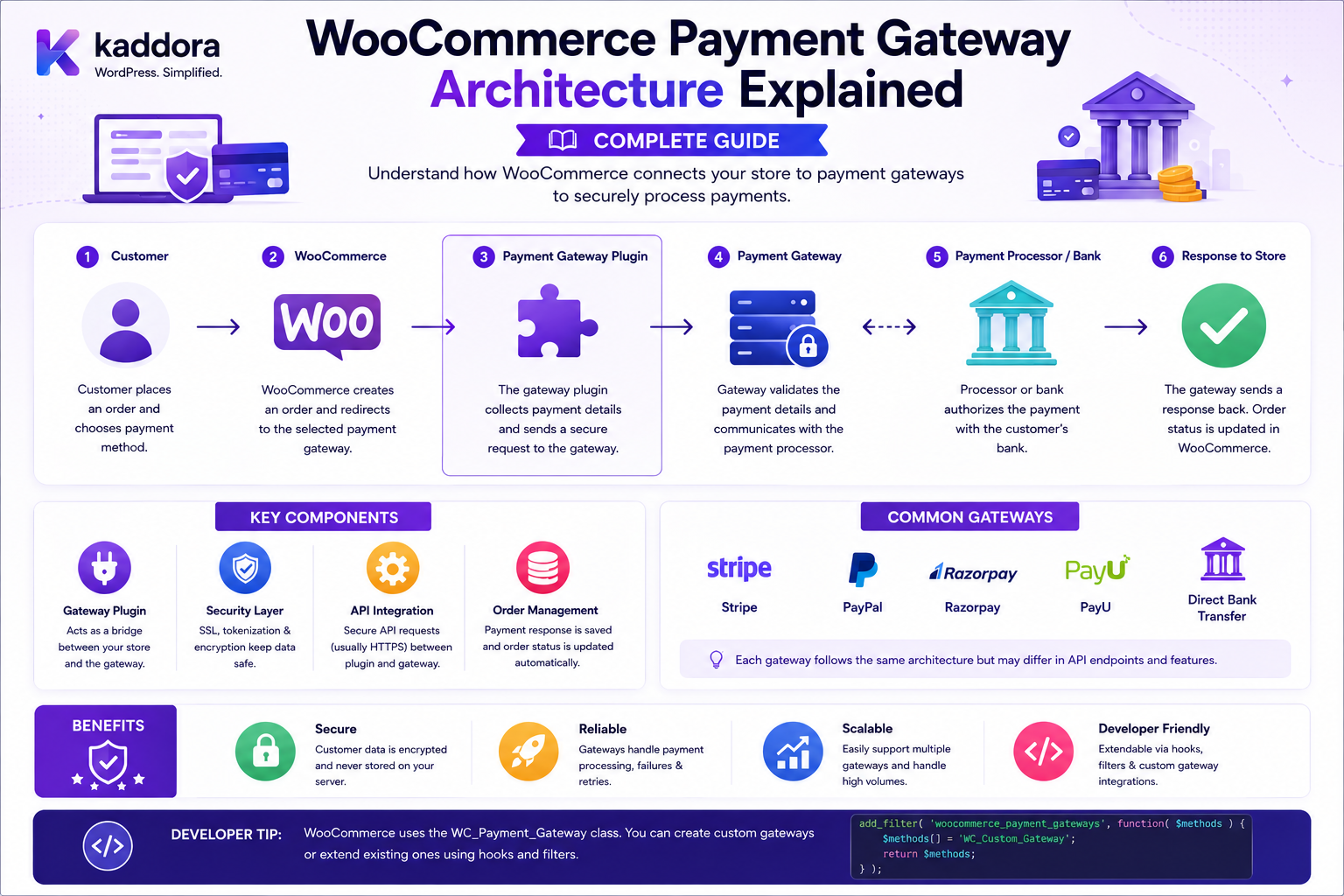
WooCommerce Payment Gateway Architecture Explained: Complete Guide
Introduction
A WooCommerce payment gateway is more than a button that says:
Pay Now
A production payment gateway may need to coordinate:
Checkout UI Payment Method Gateway Configuration Customer Data Order Payment Request Provider API Authorization Capture Webhooks Refunds Saved Payment Tokens Error Handling
A simplified architecture looks like:
Customer ↓ WooCommerce Checkout ↓ Payment Method ↓ Payment Gateway ↓ Provider API ↓ Payment Result ↓ WooCommerce Order ↓ Webhook / Reconciliation
The gateway acts as an adapter between WooCommerce and an external payment system.
WooCommerce's official Payment Gateway API describes gateways as class-based extensions and distinguishes several gateway models, including form/redirect, iframe, direct, and offline gateways.
Modern Checkout Blocks add another layer: payment methods are registered through the Blocks registry on the client side, while server-side payment processing continues through WooCommerce's payment gateway infrastructure or Store API-specific processing hooks.
This architecture is important when building:
Custom Payment Gateways Regional Payment Integrations Wallets BNPL Bank Payments Subscription Payments Saved Payment Methods ERP Reconciliation Payment Analytics Fraud Integrations
The key principle is:
A WooCommerce payment gateway should isolate provider-specific payment logic from checkout orchestration, expose only the information the checkout needs, and return verified payment results through WooCommerce's supported payment interfaces.
What Is a WooCommerce Payment Gateway?
A WooCommerce payment gateway is an integration that allows WooCommerce to communicate with a payment provider or payment-processing system.
It handles some combination of:
Payment UI Gateway Settings Payment Validation Provider Requests Transaction References Payment Result Refunds Saved Payment Methods Webhooks
Gateway vs Payment Method
These terms are related but represent different layers.
Payment Method
The customer-facing option shown during checkout.
For example:
Credit Card PayPal UPI Bank Transfer
Payment Gateway
The server-side integration responsible for turning that payment choice into a provider transaction.
Conceptually:
Checkout UI ↓ Payment Method ↓ Gateway ↓ Provider
Gateway vs Payment Provider
The gateway is the WooCommerce integration.
The provider is the external service.
For example:
WooCommerce ↓ Custom Gateway ↓ Payment Provider API ↓ Bank / Card Network / Wallet
The gateway translates between WooCommerce's payment model and the provider's API.
Why WooCommerce Uses a Gateway Abstraction
Without a gateway abstraction, every checkout implementation would need provider-specific logic.
Instead:
WooCommerce Checkout ↓ Gateway Interface ├── Provider A ├── Provider B ├── Provider C └── Provider D
This makes the payment layer modular.
WooCommerce Payment Gateway API
WooCommerce's Payment Gateway API provides the traditional server-side gateway architecture.
Gateways generally extend:
WC_Payment_Gateway
and register themselves through the WooCommerce payment gateway filter.
A simplified registration pattern is:
add_filter( 'woocommerce_payment_gateways', function ( $methods ) { $methods[] = 'WC_Gateway_Example'; return $methods; } );
Gateway Class Architecture
A typical gateway may contain:
Gateway Class ├── Configuration ├── Payment Fields ├── Validation ├── Payment Processing ├── Refunds ├── Saved Tokens └── Provider Communication
Do not put unrelated business functionality into the gateway class.
Gateway Configuration
Payment gateways commonly need settings such as:
Enabled Title Description Test Mode Merchant ID API Key Secret Key Webhook Secret
WooCommerce's Settings API provides the configuration infrastructure used by gateway classes.
Gateway Settings Architecture
A useful separation is:
WooCommerce Settings ↓ Gateway Configuration ↓ Provider Client ↓ Payment Operation
The provider client should not directly read arbitrary WordPress options throughout the codebase.
Keep Provider Logic Separate
Instead of:
WC_Gateway_Example └── 2,000 Lines of Provider API Code
prefer:
WC_Gateway_Example ↓ Payment Service ↓ Provider Client
This improves testing and maintainability.
Gateway Types
WooCommerce's official gateway documentation describes four main models:
Form / Redirect Iframe Direct Offline
Each has different implementation and security considerations.
Form / Redirect Gateway
The customer leaves the merchant site or is redirected to a provider-hosted payment page.
Conceptually:
Checkout ↓ Create Payment ↓ Redirect ↓ Provider ↓ Return ↓ Verify ↓ Order Result
Advantages of Redirect Architecture
A provider-hosted experience can reduce how much sensitive payment data touches the merchant application.
WooCommerce notes that form and iframe gateways generally have fewer direct security concerns than direct gateways.
This does not remove the need for secure WordPress and server infrastructure.
Redirect Gateway Return URL
A provider may redirect the customer back to:
/checkout/order-received/...
The gateway should not treat the return itself as definitive payment proof.
The transaction should be verified using provider-side status or a trusted callback/webhook.
Iframe Gateway
A payment provider can expose its payment interface inside an iframe.
Conceptually:
WooCommerce Checkout └── Provider Iframe ↓ Payment Provider
This can keep payment fields under provider control.
Direct Gateway
A direct gateway displays payment fields directly on the merchant checkout page.
WooCommerce's Payment Gateway API describes this model and notes that direct gateways require server security and may carry additional PCI compliance implications.
Direct Gateway Security
The architecture may look like:
Browser ↓ Payment Fields ↓ WooCommerce ↓ Gateway ↓ Provider
The more sensitive payment data touches your environment, the more carefully the entire processing path must be designed.
Offline Gateway
Offline gateways do not immediately process an online payment.
Examples:
Bank Transfer Cheque Cash on Delivery
The gateway may create the order and place it into an appropriate waiting state.
Gateway and Checkout Blocks
Modern WooCommerce stores may use Checkout Blocks instead of the classic shortcode checkout.
Payment methods have a dedicated client-side registration mechanism through the Blocks registry.
This means a modern payment integration may have:
Frontend Payment Method + Server Gateway
Client-Side Payment Registration
WooCommerce provides:
wc.wcBlocksRegistry
for payment method registration in a WooCommerce Blocks environment.
Extensions should use WooCommerce's dependency-extraction/build approach rather than treating WooCommerce's internal packages as standalone npm dependencies.
Standard Payment Method
A standard payment method can display:
Card
along with its fields, description, and payment-specific UI.
Express Payment Method
Express methods provide faster, often one-button flows.
Examples documented by WooCommerce include:
Apple Pay Google Pay
WooCommerce distinguishes these express payment methods from ordinary payment methods in its Blocks integration.
Payment Method UI vs Gateway Processing
Keep these concerns separate.
Frontend └── Payment UI Backend └── Gateway / Payment Service
The browser should collect or tokenize the required payment information, while the server handles trusted payment processing.
Legacy Payment Gateway Compatibility
WooCommerce's Checkout Block can bridge payment data to the traditional Payment Gateway API.
The official documentation states that the checkout block converts client-provided payment_data into $_POST data and calls the gateway's process_payment() method for legacy-compatible integrations.
This allows many existing gateway integrations to work with the modern checkout architecture.
Store API Payment Processing
For more advanced integrations, WooCommerce provides:
woocommerce_rest_checkout_process_payment_with_context
The official documentation identifies this hook as the preferred server-side processing location when Store API-specific context is required.
Why Store API Context Matters
Modern payment integrations may need additional contextual information related to:
Checkout Order Payment Method Customer Request
A dedicated Store API context can make this clearer than forcing every integration into a legacy form-processing model.
process_payment()
The traditional gateway API uses:
process_payment( $order_id )
to process payment.
WooCommerce's official gateway guide identifies it as the central payment-processing method for traditional gateways.
What process_payment() Should Do
Conceptually:
Load Order ↓ Validate Payment Context ↓ Send Provider Request ↓ Receive Result ↓ Update Order ↓ Return Result
It should not become a giant method containing every feature of the plugin.
Successful Payment
A successful server-side payment flow may include:
$order->payment_complete();
followed by an appropriate return result or redirect. WooCommerce's official gateway documentation shows this pattern for successful payment processing.
Failed Payment
A failed payment should return a failure result and communicate an appropriate customer-facing error.
WooCommerce's official gateway example uses an error notice and:
array( 'result' => 'failure', );
for a failed payment.
Don't Mark Orders Paid From the Browser
A client request such as:
payment_success=true
does not prove that the provider accepted the payment.
The gateway must obtain a trusted payment result.
Gateway Provider Client
A clean architecture might use:
WC_Gateway ↓ Payment Service ↓ Provider Client ↓ HTTP API
The Provider Client can encapsulate:
Authentication Request Building HTTP Transport Response Parsing Error Mapping
HTTP Client Separation
Do not mix:
Checkout UI + HTTP Request + Database + Provider Parsing
in one class.
Separate responsibilities.
Provider Request
A gateway might send:
Order Reference Amount Currency Customer Reference Return URL Webhook URL
Only send the minimum required information.
Provider Response
The provider might return:
Transaction ID Payment Status Redirect URL Authorization Code Error Code
The gateway converts these into WooCommerce-compatible results.
Status Mapping
Provider status:
CAPTURED
may map to:
WooCommerce: Paid / Processing
Provider status:
PENDING
may map to an order state appropriate to the gateway's workflow.
Define mappings explicitly.
Do Not Collapse Provider States
Avoid:
if success: paid else: failed
when the provider has meaningful intermediate states.
Examples:
Pending Authorized Captured Cancelled Requires Action Under Review
These may require different workflows.
Authorization vs Capture
Some gateways support separate authorization and capture.
Conceptually:
Customer ↓ Authorize ↓ Approved ↓ Capture ↓ Settled
A store may authorize first and capture later during fulfillment.
Order State vs Provider State
Keep these concepts separate.
Provider: Authorized WooCommerce: Processing Fulfillment: Not Yet Shipped
A single order-status field should not be forced to represent every external payment state.
Gateway Metadata
Useful gateway references can include:
Provider Transaction ID Payment Intent ID Authorization ID Attempt ID Event ID
Do not store unnecessary provider payloads.
Payment Attempt IDs
For retry-safe architecture, create or use a stable payment attempt reference:
Order #10542 Attempt: 1
A retried request can remain associated with the same logical payment attempt when appropriate.
Idempotency
The gateway should use provider-supported idempotency mechanisms whenever available.
A retry should not create:
Charge A + Charge B
for the same intended transaction.
Payment Timeouts
A provider request can time out after the provider has received the payment.
This creates:
Unknown Payment State
Do not automatically create another charge.
Instead:
Check Provider ↓ Determine State ↓ Continue
Gateway Webhooks
Webhooks can notify WooCommerce about:
Payment Success Payment Failure Refund Chargeback Subscription Renewal
WooCommerce's webhook system supports delivery URLs and optional HMAC-SHA256 secrets for verifying request authenticity.
Gateway-Specific Callback URLs
Traditional WooCommerce gateways can register callback handlers through WooCommerce API hooks.
The official Payment Gateway API documentation describes using wc-api callbacks for gateway notifications such as PayPal IPN.
Webhook Verification
A secure webhook flow is:
Incoming Request ↓ Verify Signature ↓ Validate Event ↓ Check Event ID ↓ Process ↓ Record
Do not trust the request merely because it came to the expected URL.
Webhook Replay
Payment providers may retry events.
A gateway should prevent duplicate processing:
Event ID: evt_123 Already Processed
No second business action should occur.
Webhook Ordering
Events may not always arrive in the expected sequence.
For example:
payment_pending
might arrive after:
payment_succeeded
The gateway should use provider event timestamps and state rules where appropriate.
Webhook Response
Return an appropriate response quickly.
Long-running operations should generally move into:
Queue
rather than blocking the webhook request unnecessarily.
Gateway Queues
Background processing is useful for:
Reconciliation Webhook Processing ERP Sync Fraud Analysis Notifications
Keep payment-critical confirmation paths reliable and appropriately bounded.
Payment Token API
WooCommerce provides a Payment Token API for storing and managing payment tokens associated with gateways.
This can support:
Saved Cards Saved Bank Methods Recurring Payments Faster Checkout
when the gateway/provider supports tokenization.
Payment Tokens vs Raw Credentials
A token might look conceptually like:
tok_abc123
while the actual sensitive payment information remains with the provider.
A gateway should follow the provider's tokenization architecture instead of creating an unofficial local substitute.
Saving a Payment Token
WooCommerce's Payment Token API documents saving tokens from process_payment() when a customer selects a "save payment method" option.
The gateway should store only the token and safe display information required by WooCommerce.
Retrieving a Payment Token
During checkout, a customer may select:
Use Saved Card
The gateway retrieves the relevant saved token through WooCommerce's Payment Token API and sends the token reference to the provider.
Payment Token Security
Do not expose:
Provider Secret Raw Card Number CVV
through payment-token metadata.
Customer Payment Methods
A customer can manage saved payment methods through their account, depending on the gateway's token support.
This keeps payment-method management separate from the general customer profile.
Refund Architecture
A gateway may support refunds.
Conceptually:
WooCommerce Refund ↓ Gateway ↓ Provider Refund API ↓ Refund Result
Partial Refunds
For example:
Order: ₹5,000 Refund: ₹1,500
The gateway must send the correct refund amount to the provider.
Refund Idempotency
Just like payments, refunds can be retried.
Prevent:
Refund ₹1,500 + Refund ₹1,500 again
for the same operation.
Chargebacks
Chargebacks may occur after a successful payment.
A gateway should be able to process relevant provider events without rewriting the entire order lifecycle incorrectly.
Gateway Security
Security depends on the gateway architecture.
WooCommerce states that direct gateways require additional server security and may involve greater PCI compliance responsibilities than redirect/iframe approaches.
HTTPS
Use HTTPS for:
Checkout Provider Requests Webhooks Admin Settings API Calls
Never Store Raw Card Data
Do not create custom fields such as:
_card_number _cvv _expiry_date
to retain card information.
Use provider-hosted fields or tokenization where appropriate.
Secret Management
Gateway credentials should remain server-side:
API Key Secret Key Webhook Secret Merchant Password Private Key
Never expose them through frontend JavaScript.
Gateway Test Mode
A gateway should support clear test/live separation where the provider offers sandboxing.
For example:
Test Mode: Enabled
should use:
Sandbox Credentials
rather than production credentials.
Gateway Settings Security
Admin settings should:
Require Appropriate Capability Mask Secrets Validate URLs Validate Credentials
where applicable.
Gateway Availability
A gateway may only work under certain conditions:
Country Currency Amount Product Type Customer Type
The payment method should be hidden or disabled when its prerequisites are not met.
Filtering Payment Methods
WooCommerce Blocks provides mechanisms for filtering available payment methods.
This can help implement rules such as:
Gateway A: USD only Gateway B: India only
Use documented Blocks filtering and registration APIs.
Gateway and Multi-Currency
Multi-currency stores can require:
Store Currency Order Currency Provider Currency Settlement Currency
The gateway should clearly define which currency is submitted to the provider.
Gateway and Multi-Tenant Commerce
For SaaS commerce:
Tenant A ↓ Gateway Account A Tenant B ↓ Gateway Account B
The integration must never send Tenant A's credentials when processing Tenant B's payment.
Credential Isolation
A tenant-specific provider configuration should be resolved from secure server-side tenant context:
Current Tenant ↓ Gateway Configuration ↓ Provider Credentials
Never trust a tenant_id supplied by the browser to choose payment credentials.
Gateway and B2B Payments
B2B commerce may add:
Purchase Order Credit Terms Approval Invoice Payment
The gateway should support the relevant order workflow without assuming every order must be immediately captured online.
Gateway and Subscription Payments
Recurring systems may use:
Initial Payment ↓ Token ↓ Scheduled Renewal ↓ Provider ↓ Webhook ↓ Subscription State
Payment-token and webhook architecture become especially important.
Gateway and ERP Reconciliation
A robust integration can track:
WooCommerce Order Provider Transaction ERP Transaction
using separate references.
Gateway and Analytics
Analytics should record safe payment events such as:
Gateway Currency Amount Status Timestamp
without sending raw payment credentials.
Gateway Observability
Useful logs include:
Request ID Order ID Gateway ID Payment Attempt ID Provider Event ID Result Error Code
Avoid sensitive payloads.
Gateway Error Handling
Map provider failures into safe WooCommerce-facing messages.
For example:
Provider: CARD_DECLINED Customer: "Your payment was declined. Please try another method."
Do not expose raw internal provider diagnostics unnecessarily.
Gateway Error Codes
Store provider-specific error codes where needed for troubleshooting.
A good internal record can contain:
Internal Code Provider Code Request ID
while customer-facing messages remain understandable.
Gateway Architecture Testing
Test:
Gateway Initialization Settings Payment Method Display Payment Validation Payment Processing Success Failure Timeout Redirect Webhook Refund Saved Token
Checkout Blocks Testing
For modern payment methods, test:
Payment Registration Payment Fields Validation Payment Processing Checkout API Success Failure
WooCommerce's payment-method documentation separates client registration from server-side processing and provides a Store API-specific processing hook for advanced integrations.
Classic Checkout Testing
If supporting classic checkout:
Payment Form Validation process_payment() Redirect Gateway Result
must also be tested.
Webhook Testing
Test:
Valid Signature Invalid Signature Duplicate Event Out-of-Order Event Unknown Event Malformed Payload
Payment Provider Mocking
During automated tests, mock provider responses for:
Success Failure Timeout Pending Authorization Capture Refund
This prevents automated tests from requiring real financial transactions.
Gateway Integration Tests
Use provider sandbox environments for end-to-end tests.
Never depend exclusively on unit tests for payment integrations.
Gateway Migration Testing
When changing gateway versions:
Existing Orders Saved Tokens Pending Payments Webhooks Refunds Subscriptions
should be tested.
Gateway Compatibility Testing
Test against supported WooCommerce environments.
Also test:
HPOS Checkout Blocks Classic Checkout PHP Versions WordPress Versions
where relevant to the extension.
Common WooCommerce Payment Gateway Mistakes
Mixing Gateway and UI Logic
Makes the integration difficult to maintain.
Trusting Browser Payment Status
The provider must verify payment.
No Idempotency
Retries can create duplicate charges.
No Webhook Verification
Attackers can forge payment events.
Logging Payment Payloads
Sensitive credentials can leak into logs.
Exposing Gateway Secrets
Frontend JavaScript is not secure storage.
Direct Card Storage
Creates unnecessary security and compliance risk.
Ignoring Checkout Blocks
Modern WooCommerce stores may not use only the classic checkout.
Hard-Coding Provider Statuses
Provider lifecycle states need explicit mapping.
Treating Every Timeout as a Failure
Payment state can remain unknown after a timeout.
Mixing Tenant Credentials
Multi-tenant systems must isolate provider accounts.
No Refund Testing
Payment integrations can fail even when checkout payments succeed.
WooCommerce Payment Gateway Architecture Checklist
- [ ] Define gateway type - [ ] Define payment method UI - [ ] Define server-side gateway - [ ] Register gateway - [ ] Define settings - [ ] Separate provider client - [ ] Validate configuration - [ ] Use HTTPS - [ ] Protect secrets - [ ] Define payment states - [ ] Define status mapping - [ ] Implement payment processing - [ ] Implement error handling - [ ] Implement idempotency - [ ] Implement webhooks - [ ] Validate webhook signatures - [ ] Prevent webhook replay - [ ] Support refunds where required - [ ] Support saved tokens where required - [ ] Support Checkout Blocks where required - [ ] Support Classic Checkout where required - [ ] Test guest checkout - [ ] Test registered checkout - [ ] Test success - [ ] Test failure - [ ] Test timeout - [ ] Test pending state - [ ] Test refund - [ ] Test duplicate request - [ ] Test duplicate webhook - [ ] Test sandbox - [ ] Test production configuration separately - [ ] Test multi-tenant credential isolation - [ ] Monitor gateway performance
Best Practices for WooCommerce Payment Gateway Architecture
A professional gateway should:
Treat the payment gateway as an adapter between WooCommerce and the external provider.
Keep payment-method UI, checkout orchestration, gateway logic, provider communication, webhooks, and reconciliation as separate concerns.
Use WC_Payment_Gateway and the official Payment Gateway API for supported traditional gateway functionality.
Use the WooCommerce Blocks payment-method registration interfaces for modern Checkout Block integrations.
Use Store API-specific payment processing hooks when the integration requires context beyond legacy process_payment() handling.
Keep provider-specific HTTP and response parsing inside a dedicated client/service layer.
Never trust browser-provided payment success, amount, transaction IDs, customer IDs, or tenant IDs.
Map provider states explicitly to WooCommerce business states instead of collapsing all states into success/failure.
Use provider-supported idempotency mechanisms for payments and refunds whenever available.
Treat unknown payment states caused by timeouts separately from confirmed payment failures.
Verify webhooks using the provider's authenticity mechanism and prevent replay or duplicate processing. WooCommerce's webhook infrastructure supports secrets for HMAC-SHA256 verification.
Keep API keys, secrets, merchant credentials, and webhook secrets server-side.
Avoid raw payment-card storage and understand the additional security/compliance requirements of direct gateways.
Use the Payment Token API for saved payment methods rather than inventing a separate token-storage architecture.
Support clear test/live environments and never mix sandbox credentials with production processing.
Keep tenant-specific provider credentials isolated in multi-tenant systems.
Make refunds, chargebacks, recurring payments, and reconciliation separate business flows rather than treating them as simple checkout outcomes.
Test both Classic Checkout and Checkout Blocks when the gateway supports both.
Monitor safe operational identifiers such as order ID, attempt ID, provider event ID, and error code without logging sensitive credentials.
Why choose ThemeKaddora?
ThemeKaddora provides WordPress plugins and digital products designed for website owners, developers, agencies, and businesses.
Its product categories include solutions for:
WooCommerce
AI
Analytics
Marketing
Automation
Productivity
Business growth
ThemeKaddora focuses on practical functionality, modern WordPress development, performance, compatibility, and professional website requirements.
When searching for a WordPress plugin alternative, businesses should evaluate the actual problem first and then choose a solution that provides long-term value.
Conclusion
A WooCommerce payment gateway is best understood as an integration architecture rather than a single PHP class.
A modern gateway can be represented as:
Checkout ↓ Payment Method UI ↓ Gateway Adapter ↓ Payment Service ↓ Provider Client ↓ External Provider ↓ Payment Result ↓ WooCommerce Order ↓ Webhook / Reconciliation
The first principle is separate payment UI from payment processing.
The customer-facing method should not contain the complete provider integration.
The second principle is keep checkout orchestration centralized.
WooCommerce's Checkout Blocks architecture is explicitly designed around a single source of truth and consistent extension interfaces that isolate payment-method logic from checkout logic.
The third principle is use the correct gateway API for the checkout architecture.
Traditional gateway processing can use WC_Payment_Gateway and process_payment(), while advanced Store API integrations can use the Store API-specific payment-processing hook.
The fourth principle is choose the gateway model carefully.
Redirect, iframe, direct, and offline architectures have different security and compliance implications.
The fifth principle is never trust the browser for payment truth.
A browser can display a successful payment page without proving that the provider actually completed the transaction.
The sixth principle is build around provider failure.
Timeouts, retries, pending states, duplicate webhooks, and asynchronous confirmations are normal distributed-system problems.
The seventh principle is make payment and refund operations idempotent.
This is essential for avoiding duplicate financial operations.
The eighth principle is keep secrets outside the frontend.
Payment provider credentials belong on the server.
The ninth principle is use tokenization rather than raw payment storage.
WooCommerce's Payment Token API provides a supported architecture for saved payment methods.
The tenth principle is test the complete lifecycle.
A payment gateway isn't finished when a successful test charge works. It must also handle failure, timeout, webhook replay, refunds, saved payment methods, Checkout Blocks, and production-like load.
For ThemeKaddora, this architecture can support:
Custom Payment Gateways Regional Payment Systems Wallets UPI BNPL Subscriptions B2B Payments Multi-Tenant Payments ERP Reconciliation Payment Analytics Fraud Workflows
The most important principle is:
A WooCommerce payment gateway should isolate provider-specific payment logic behind a secure, testable adapter while leaving checkout orchestration and order lifecycle control with WooCommerce.
A professional WooCommerce payment gateway should be:
Modular
→ Secure
→ API-Driven
→ Provider-Aware
→ Idempotent
→ Webhook-Secure
→ Tokenization-Friendly
→ Block-Compatible
→ Failure-Resilient
→ Multi-Tenant-Safe
→ Maintainable
When these principles are followed, developers can build payment integrations that remain easier to test, upgrade, secure, and extend across different providers, checkout architectures, currencies, countries, saved payment methods, refunds, and recurring-payment workflows.
Frequently Asked Questions
What is WooCommerce Payment Gateway Architecture?
It is the structure that connects WooCommerce checkout and payment methods to an external payment provider while handling configuration, validation, processing, webhooks, refunds, tokens, errors, and transaction state.
What is WC_Payment_Gateway?
WC_Payment_Gateway is the traditional WooCommerce base class used to create payment gateway integrations.
What is process_payment()?
It is a core server-side method used by traditional WooCommerce payment gateways to process an order's payment and return the appropriate checkout result.
How do payment gateways work with Checkout Blocks?
The payment method registers on the client through the WooCommerce Blocks registry, while the server continues to process payment through WooCommerce's payment gateway infrastructure or the Store API-specific payment-processing hook.
What is the difference between a payment method and a payment gateway?
The payment method is the checkout-facing user experience, while the gateway is the server-side integration that communicates with the payment provider.
What gateway types does WooCommerce support?
WooCommerce documents form/redirect, iframe, direct, and offline gateway types.
Which gateway type is safest?
There is no universal answer, but hosted or redirect approaches can reduce how much sensitive payment data directly touches the merchant environment. Direct gateways generally carry greater security and potential PCI compliance responsibilities.
Should gateway secrets be included in JavaScript?
No. API keys, private keys, merchant secrets, and webhook secrets should remain server-side.
What is a payment token?
A payment token represents a saved payment method reference and can allow customers to reuse payment methods without the merchant storing raw payment credentials. WooCommerce provides a Payment Token API for this functionality.
What is the Store API payment-processing hook?
woocommerce_rest_checkout_process_payment_with_context is the Store API-specific server-side processing hook that WooCommerce recommends for advanced payment integrations that need additional checkout context.
Why are webhooks important for payment gateways?
Webhooks allow payment providers to notify WooCommerce about transaction events asynchronously, including events that occur after the customer has left checkout.
How should webhooks be secured?
Validate the provider's signature or other authenticity mechanism, reject invalid events, and prevent duplicate processing. WooCommerce's webhook infrastructure supports HMAC-SHA256 signatures when a webhook secret is configured.
What happens when a payment request times out?
The transaction may be in an unknown state. The gateway should verify the provider-side status and use idempotency rather than blindly creating another charge.
Can a WooCommerce gateway support saved payment methods?
Yes. WooCommerce's Payment Token API supports storing and retrieving payment tokens for supported gateways.
Can payment gateways support refunds?
Yes. A gateway can implement refund processing through the provider's refund API and should make refund operations idempotent where possible.
Can payment gateways work in multi-tenant WooCommerce systems?
Yes, but tenant-specific provider credentials and payment configuration must be selected from trusted server-side tenant context and never from browser-supplied tenant IDs.
Why choose Themekaddora?
Themekaddora provides lightweight, responsive, SEO-friendly WordPress themes with fast performance, WooCommerce compatibility, flexible customization, accessibility-conscious design, modern templates, regular updates, and professional support—providing a strong foundation for businesses building digital products and product-focused websites.
Comments (0)