
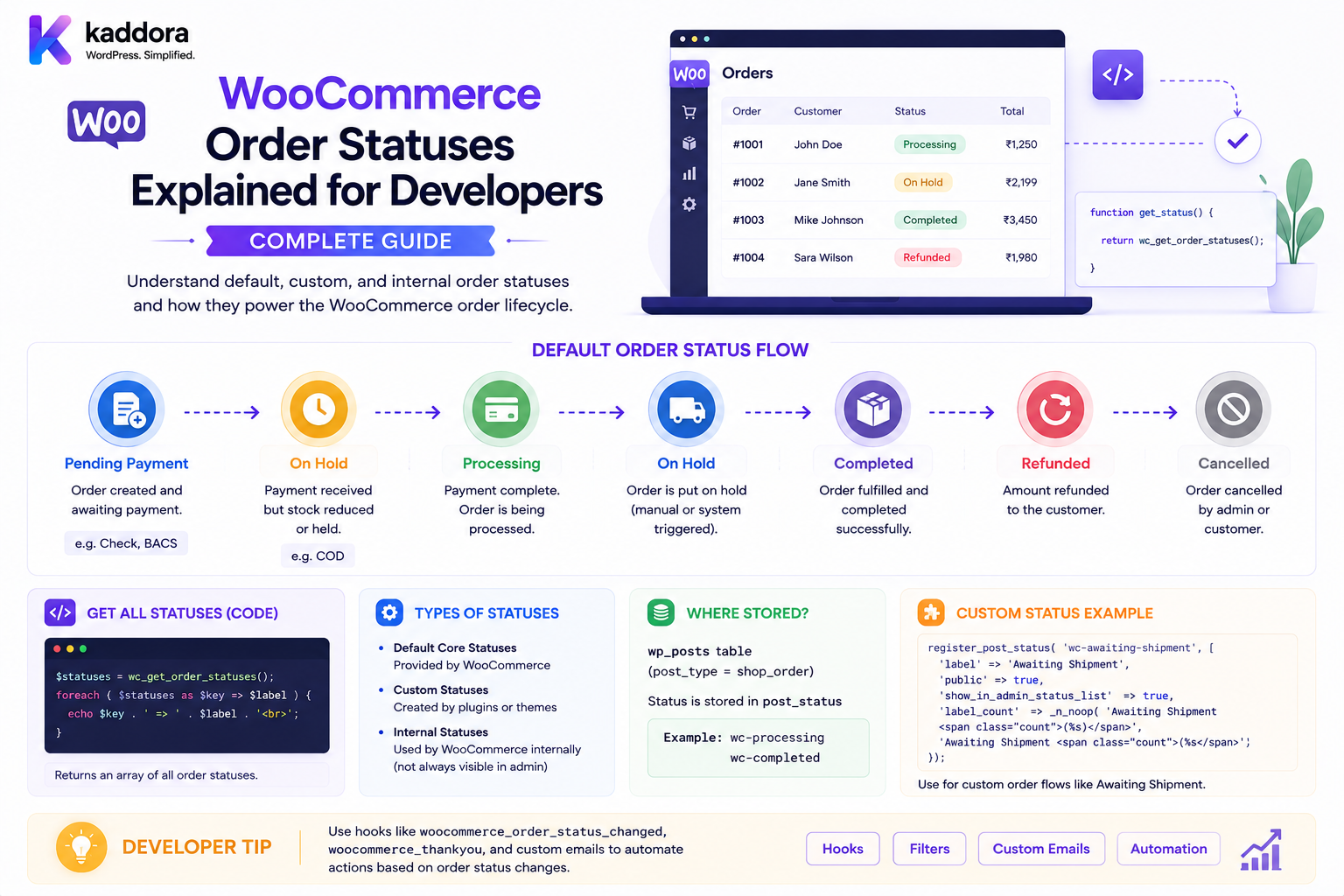
WooCommerce Order Statuses Explained for Developers: Complete Guide
Introduction
An order status is one of the most important pieces of information in WooCommerce.
It tells the store what stage an order has reached:
Order Created ↓ Payment ↓ Processing ↓ Fulfillment ↓ Delivery ↓ Completed
But an order status is more than a label shown inside the WooCommerce dashboard.
Order status can influence:
Payment Processing Inventory Customer Emails Shipping Fulfillment Refunds Subscriptions ERP Integration CRM Automation Analytics Webhooks
For example, an order moving from:
Pending Payment
to:
Processing
can mean that payment requirements have been satisfied and the order is ready for fulfillment, depending on the store's workflow.
A developer who builds WooCommerce automation should therefore understand the order lifecycle before creating custom status logic.
The key principle is:
An order status should represent a meaningful business state, while separate systems and metadata should represent detailed payment, fulfillment, shipping, return, and integration states that should not be forced into one status field.
What Is a WooCommerce Order Status?
An order status describes the current lifecycle state of a WooCommerce order.
Conceptually:
Order ↓ Current Status ↓ Next Allowed State
For example:
Pending Payment
might later become:
Processing
or:
Cancelled
depending on the transaction.
Why Order Statuses Matter
Order statuses help systems determine:
Whether payment is complete
Whether fulfillment should begin
Whether customer notifications should be sent
Whether an order is still active
Whether automation should run
Whether an order should appear in operational queues
Core WooCommerce Order Statuses
WooCommerce uses a set of core order statuses representing common lifecycle states.
Common statuses include:
Pending payment Processing On hold Completed Cancelled Failed Refunded Draft
Stores and extensions can also introduce custom statuses for specialized workflows.
Pending Payment
Pending payment generally represents an order awaiting payment.
A conceptual flow is:
Order Created ↓ Pending Payment ↓ Payment
The order should not automatically be treated as paid simply because a customer reached the checkout confirmation page.
Pending Payment and Payment Gateways
A payment gateway may later confirm:
Payment Successful
which can cause the order to move to an appropriate paid state.
The exact transition depends on the gateway integration and order contents.
Processing
Processing generally indicates that the order has received payment or reached the stage where fulfillment can proceed.
For a physical ecommerce order:
Payment ↓ Processing ↓ Pick / Pack ↓ Ship
Developers should not assume that "Processing" means the product has already shipped.
It usually represents a fulfillment-ready stage rather than a delivery state.
On Hold
An order may be placed on hold when fulfillment or payment requires additional action.
Examples include:
Bank Transfer Pending Manual Verification Fraud Review Administrative Hold
"On hold" should therefore not automatically mean "payment failed."
Completed
Completed generally represents a fulfilled order that no longer requires normal processing.
For a physical product:
Processing ↓ Shipped ↓ Delivered ↓ Completed
However, the exact business meaning of "Completed" should be defined by the store.
Cancelled
Cancelled means the order has been cancelled and should no longer proceed through the normal fulfillment lifecycle.
Common causes include:
Customer Cancellation Payment Not Received Administrative Cancellation Stock Unavailability Fraud Review
Cancellation does not necessarily mean a refund has been completed.
Failed
Failed generally indicates that an attempt to complete payment or order processing failed.
For example:
Checkout ↓ Payment Failure ↓ Failed
A failed order may still require customer action or a retry depending on the gateway and store workflow.
Refunded
Refunded generally represents an order that has been completely refunded.
This is different from:
Refund Requested
or:
Refund Pending
A store with asynchronous payment processing may need additional refund state outside the simple order status.
Draft
Draft orders can exist while an order is being prepared before the normal customer checkout lifecycle.
They can be useful for:
Manual Orders B2B Sales Quotes Phone Orders Sales-Assisted Checkout
The exact draft workflow depends on the order creation architecture.
Why Core Statuses Are Not Enough
Real businesses often need more detailed states.
For example:
Processing
does not tell you:
Payment Captured? Warehouse Assigned? Picked? Packed? Shipped? Delivered?
Trying to encode all of these into the order status creates too many states.
Instead, use:
Order Status + Operational State + Integration State
Order Status vs Payment State
Keep these separate.
An order can have:
Order Status: Processing Payment State: Captured
Another might have:
Order Status: Processing Payment State: Pending
depending on the payment architecture.
The exact combination must follow the business workflow.
Order Status vs Shipping State
Shipping is also different.
For example:
Order: Processing Shipment: In Transit
A shipping provider can have its own lifecycle:
Label Created Picked Up In Transit Out for Delivery Delivered
Do not force every carrier state into WooCommerce's order-status namespace.
Order Status vs Return State
An order can remain:
Completed
while a return is:
Under Inspection
The return lifecycle should be represented separately.
Order Status vs Refund State
Similarly:
Order: Processing Refund: Pending
is possible in a more advanced workflow.
The payment/refund system should own refund-specific states.
Order Lifecycle
A simplified lifecycle might be:
Draft ↓ Pending Payment ↓ Processing ↓ Completed
Alternative branches can include:
Pending Payment ├── Failed ├── Cancelled └── Processing
Order State Machine
A useful conceptual state machine is:
Created ↓ Payment Pending ↓ Paid ↓ Fulfillment ↓ Shipped ↓ Delivered ↓ Completed
WooCommerce order statuses provide broad business states, while custom metadata, shipment records, payment records, and external integrations can represent more specific transitions.
Why Developers Need State Machines
Without explicit transitions, custom code can accidentally allow:
Cancelled ↓ Shipped
or:
Refunded ↓ Paid
without an explicit recovery process.
A state-aware system prevents invalid transitions.
Valid Transition Rules
A custom workflow can define:
pending → processing processing → completed processing → cancelled processing → refund workflow
while restricting unsupported direct changes.
The exact allowed transitions depend on the store.
Order Status Changes
A status change is an event:
Old: Processing New: Completed
Custom automation can listen to these transitions and trigger:
Emails ERP CRM Shipping Analytics Webhooks
Status Changes Should Be Intentional
Do not change an order status simply because an unrelated piece of metadata changed.
For example:
Customer Address Updated
does not necessarily mean:
Order Processing → On Hold
unless business rules explicitly require it.
Order Status Hooks
WooCommerce provides lifecycle hooks that developers can use around status transitions.
A common pattern is to listen for a transition between statuses and then perform an action.
For example:
add_action( 'woocommerce_order_status_processing', function ( $order_id ) { // Custom processing logic. } );
The exact hook and callback should be selected according to the workflow being implemented and the WooCommerce version targeted.
Status Transition Hooks
More specific hooks can represent:
Order enters status Order leaves status Order changes from one status to another
Use the most precise event available for the business requirement.
Why Hook Choice Matters
Suppose you want to send an ERP event only when an order changes from:
Processing
to:
Completed
A generic "status changed" hook may require additional filtering.
A transition-specific hook or explicit comparison can make the logic safer.
Avoid Duplicate Automation
A common mistake is:
Status Change ↓ Send ERP
while another action also does:
Order Save ↓ Send ERP
One order can then generate duplicate external requests.
Use idempotency keys or event records.
Order Status Events
A custom system can emit events such as:
order.created order.processing order.completed order.cancelled order.failed order.refunded
These events can feed external services.
Event Idempotency
External integrations should recognize:
order_id + event_type + event_version
or another unique event identifier.
This prevents repeated status events from generating duplicate work.
Order Status and Customer Emails
WooCommerce status changes can be associated with customer/admin notifications.
Developers should verify which email notifications are triggered by the core workflow and which must be implemented separately.
Do not send duplicate emails from custom code when the store already sends the appropriate core notification.
Custom Order Statuses
Businesses sometimes need statuses such as:
Awaiting Verification Ready for Pickup Packed Shipped Delivered Awaiting Return Quality Check Awaiting Supplier
Custom statuses can be useful when they represent real business states.
Should Every State Become a Custom Status?
No.
Use a custom order status when the state genuinely changes how the order is operationally handled.
If the information is a secondary attribute, use dedicated metadata or a separate domain record instead.
Custom Status vs Metadata
For example:
Order Status: Processing Warehouse: Delhi Picker: EMP-20
"Delhi" does not need to become an order status.
Custom Status vs Shipment State
Instead of:
Order Status: Carrier In Transit
consider keeping:
Order Status: Processing Shipment Status: In Transit
This keeps order and logistics responsibilities separate.
Custom Status Naming
Custom statuses should use stable internal identifiers.
For example:
wc-ready-pickup
with display label:
Ready for Pickup
Do not build integrations around a translated label.
Custom Status Slugs
Use a stable prefix to reduce collisions with other plugins.
Example:
kdr-awaiting-verification
Registering Custom Statuses
WordPress provides mechanisms for registering custom post statuses, which WooCommerce-based extensions can use to create specialized order lifecycle states.
A simplified conceptual example is:
register_post_status( 'wc-ready-pickup', array( 'label' => 'Ready for Pickup', 'public' => false, 'show_in_admin_status_list' => true, 'show_in_admin_all_list' => true, ) );
The exact registration and WooCommerce integration should account for how the target WooCommerce version displays and manages order statuses.
Custom Status Display
A custom status should appear consistently in:
Admin Order Screen Order Lists Filters Reports where appropriate Customer UI where appropriate
Do not register a status without deciding where users need to see it.
Custom Status Transition
A custom workflow may use:
Processing ↓ Ready for Pickup ↓ Completed
This can make in-store pickup operations easier to manage.
Order Status for Warehouse Operations
Warehouses may need:
Picking Packing Packed Ready for Dispatch
However, for complex fulfillment systems, a separate fulfillment state model can be cleaner than creating a large number of order statuses.
Fulfillment State Model
For example:
Order Status: Processing Fulfillment: Picking Shipment: Not Created
Later:
Fulfillment: Packed Shipment: Label Created
This model is easier to extend.
Order Status for B2B Workflows
B2B orders may need:
Awaiting Approval Credit Review PO Verification Approved for Fulfillment
These can be useful order statuses when they represent actual business gates.
Purchase Approval
A B2B flow may be:
Draft ↓ Awaiting Approval ↓ Approved ↓ Processing ↓ Completed
Payment Verification Status
A business may need:
Awaiting Payment Verification
if payments require manual confirmation.
However, keep actual payment transaction state separate.
Order Status for Quotes
A quote can use:
Quote Draft Quote Sent Quote Accepted Quote Expired
If the system uses WooCommerce orders as quotes, the custom statuses must clearly distinguish quote lifecycle from normal order lifecycle.
Order Status and Subscription Orders
Subscription-based commerce can have additional lifecycle states managed by the subscriptions system.
Do not create duplicate order statuses for subscription-specific state when the subscription object already owns that lifecycle.
Order Status and Digital Products
Digital orders may move more quickly:
Paid ↓ Access Granted ↓ Completed
A separate digital-delivery state may be preferable to forcing every delivery step into the order status.
Order Status and Physical Products
Physical products may need:
Paid ↓ Fulfillment ↓ Shipment ↓ Delivery
Again, shipping and delivery are usually better represented by fulfillment/shipment records rather than an explosion of order statuses.
Order Status and Split Fulfillment
An order may contain:
Product A → Warehouse A Product B → Warehouse B
The order as a whole may remain:
Processing
while each shipment has a different state.
Parent Order Status vs Shipment Status
A useful model is:
Order: Processing Shipment A: Delivered Shipment B: In Transit
This is far more expressive than changing the overall order status to "In Transit."
Order Status and Partial Fulfillment
One order can be partially fulfilled.
For example:
Order: 3 Items Fulfilled: 2 Remaining: 1
A separate fulfillment state can track the details.
Order Status and Refund
Refund lifecycle should remain separate.
For example:
Order: Completed Refund: Pending
This is often more informative than changing the entire order to "Refunded" before the refund is actually completed.
Order Status and Returns
A completed order can still have:
Return: Requested
Do not reopen or rewrite the historical order status solely because a return was requested unless the business explicitly requires it.
Order Status and Exchanges
An exchange can be represented separately:
Order: Completed Exchange: Approved
The original order remains historically accurate.
Order Status and Inventory
Inventory operations should not rely solely on the order status.
For example:
Order: Processing
does not automatically tell you whether a specific item is reserved, allocated, picked, or shipped.
Use dedicated inventory/fulfillment data.
Order Status and Stock Restoration
Cancellation or refund can trigger inventory actions, but the exact stock operation should be handled by the inventory workflow.
Do not write custom logic such as:
if ( $status === 'refunded' ) { $stock++; }
without considering quantity, item state, product type, and whether stock was already restored.
Order Status Automation
A custom automation system can define:
Status Entered ↓ Rule ↓ Action
Example:
Completed ↓ Send CRM Event
Status-Based Email Automation
A store might send:
Ready for Pickup → Pickup Email
This is a meaningful use of a custom status.
Status-Based ERP Automation
For example:
Processing ↓ ERP Fulfillment Event
The ERP integration should be idempotent.
Status-Based Slack Alerts
Internal teams might receive:
High-value order approved
through Slack or another internal channel.
Avoid sending sensitive customer information unnecessarily.
Status-Based Webhooks
A custom plugin can expose:
order.status.changed
events.
A receiving system should verify:
Event Signature Event ID Timestamp Order Reference
Order Status REST API
WooCommerce provides REST APIs for orders, allowing external systems to retrieve and modify order information when properly authenticated.
Custom status support should ensure the external system understands the valid status values.
Custom Status API Compatibility
If an ERP receives:
kdr-ready-pickup
it must know what that status means.
Use API documentation and stable status identifiers.
API Status Validation
A custom order-update endpoint should validate:
Order Exists Requested Status Allowed User Authorized Transition Allowed Tenant Valid
before updating the order.
Do Not Trust Client Status Changes
A public frontend should never be allowed to send:
status=completed
and make a customer's order completed without authorization.
Status changes are server-controlled business operations.
Order Status IDOR
Protect against requests such as:
POST /orders/1001/status
where the user does not own or administer Order 1001.
Multi-Tenant Order Status
For SaaS commerce:
Tenant A └── Order └── Status Rules Tenant B └── Order └── Status Rules
Status changes must remain within the correct tenant context.
Order Status and Audit Logs
Every important transition should record:
Order ID Old Status New Status Actor Timestamp Source Reason
This is particularly important for:
Payments Refunds Cancellations B2B Approvals Manual Overrides
Status Change Reason
A manual administrator change can include:
Reason: "Customer payment verified manually."
This makes later investigation easier.
Status Transition Source
Useful source identifiers:
Customer Admin Payment Gateway ERP Shipping Provider Automation Webhook Scheduled Job
Status Transition Concurrency
Two systems may attempt:
Processing → Completed
and:
Processing → Cancelled
at nearly the same time.
The order service should define which transition wins and how conflicts are resolved.
Optimistic Concurrency
A custom API can use:
Version Number Updated Timestamp
to detect stale updates.
For example:
Expected Version: 5 Current Version: 6 → Reject / Recalculate
Order Status Idempotency
If the same event arrives twice:
Payment Captured
do not trigger:
ERP Create Fulfillment
twice.
Track event IDs or transaction references.
Order Status and Payment Webhooks
A payment webhook may indicate:
Payment Captured
The webhook handler should verify the event and then make the appropriate order-state transition.
Never trust a browser redirect as the final payment authority.
Order Status and Shipping Webhooks
A carrier may report:
Delivered
The system can update shipment state and, if the business requires, eventually update the order status.
The delivery event should be linked to the correct shipment/order.
Order Status and ERP Webhooks
An ERP may send:
Fulfillment Completed
The WooCommerce system must verify:
Order Tenant Event Source
before applying the state transition.
Order Status and Automation Loops
Avoid loops such as:
WooCommerce: Completed ↓ ERP: Completed ↓ ERP Webhook ↓ WooCommerce: Completed ↓ Repeat
Use event IDs and transition checks to prevent unnecessary processing.
Custom Status Registration Strategy
Before adding a custom status, answer:
What business state does it represent? Who acts on it? What status can precede it? What can follow it? Which notification should run? Does it belong to the order or another domain?
If these questions cannot be answered clearly, a custom status may not be necessary.
Example: Ready for Pickup
This is a reasonable order-related status if the store operates pickup fulfillment.
Flow:
Processing ↓ Ready for Pickup ↓ Customer Collects ↓ Completed
Example: Packing
"Packing" may be better represented as a fulfillment state:
Order: Processing Fulfillment: Packing
rather than a separate global order status.
Example: Awaiting Inspection
For a return, this is generally better represented on the return:
Order: Completed Return: Awaiting Inspection
instead of changing the order to:
Awaiting Inspection
Example: Refund Pending
Refund-specific state belongs to the refund:
Order: Completed Refund: Pending
not necessarily in a custom order status.
Status Explosion
A poor design can create:
Processing Packed Shipped In Transit Out for Delivery Delivered Return Requested Return Approved Return Shipped Return Received Inspection Refund Pending Refunded Exchange Approved Replacement Shipped ...
This becomes difficult to understand and maintain.
Domain-Based State Design
A better architecture can use:
Order Status + Payment State + Fulfillment State + Shipment State + Return State + Refund State
Each domain owns its own lifecycle.
Order State Aggregation
The customer-facing order page can combine these states:
Order: Processing Payment: Paid Fulfillment: Packed Shipment: In Transit Return: None
This is more expressive than one status label.
Order Status for Customer Experience
Customers don't necessarily need every internal state.
Internally:
Fulfillment: Warehouse Exception
Customer-facing:
Order: Processing
Keep internal operational details appropriately separated.
Status Labels and Localization
Use translatable display labels:
Internal: ready-pickup Display: Ready for Pickup
Do not build logic around the English label.
Status Slugs and Integrations
External integrations should consume:
Stable Code
rather than:
Translated Label
Order Status Performance
Status transitions can trigger many systems.
For example:
Completed ↓ Email CRM ERP Analytics Webhook Loyalty
Use queues for non-critical downstream operations.
Order Status Queue
A good pattern:
Status Transition ↓ Persist Core State ↓ Emit Event ↓ Queue ├── CRM ├── ERP ├── Email └── Analytics
This reduces the chance that one external service failure blocks the order update.
Order Status Monitoring
Monitor:
Transitions / Minute Failed Automations Webhook Errors Stuck Orders
Stuck Order Detection
A useful automation can identify:
Processing + No Fulfillment Activity + Older Than SLA
and create:
Operational Alert
SLA-Based Status Monitoring
Example:
Processing: < 24 Hours Warning: 24–48 Hours Critical: > 48 Hours
The exact times should match business operations.
Order Status and Notifications
A status transition can trigger an appropriate message:
Ready for Pickup → Pickup Notification
But avoid duplicate notifications when another plugin already handles the same state.
Notification Idempotency
Use:
Order ID + Status + Notification Type
or a unique event ID to prevent duplicate messages.
Order Status and Analytics
Track transitions such as:
Pending → Processing Processing → Completed Processing → Cancelled
This can reveal:
Payment Failure Fulfillment Delays Cancellation Rates
Order Processing Time
A useful metric:
Processing Started → Completed
This helps measure fulfillment performance.
Time-in-Status Analytics
Track how long orders remain in:
Pending Processing On Hold
This can reveal operational bottlenecks.
Order Status and Customer Segments
B2B orders may naturally spend more time in:
Approval
while retail orders may move immediately to:
Processing
Analytics should account for these different workflows.
Custom Status and Search
If the admin interface needs:
Filter: Ready for Pickup
the custom status should be registered so it participates correctly in relevant WooCommerce order-management interfaces.
Custom Status and Reporting
If a status affects business reporting, define how it contributes to metrics.
For example:
Ready for Pickup
may count as:
Fulfilled: No Paid: Yes
Don't infer business metrics from status labels alone.
Custom Status and REST Integrations
Document:
Status Code Meaning Allowed Transitions Trigger
for external systems.
Custom Status API Documentation
For example:
kdr-awaiting-verification Meaning: Payment requires manual verification. Allowed From: Pending Payment Allowed To: Processing Cancelled
This reduces integration ambiguity.
Custom Status Testing
Test:
Registration Admin Display Filtering Transition Email REST API ERP Webhook Localization Permissions
Status Transition Testing
Test valid paths:
Pending → Processing → Completed
and invalid paths:
Completed → Pending
unless explicitly supported.
Payment Transition Testing
Test:
Pending → Processing Pending → Failed Pending → Cancelled
according to gateway behavior.
Refund Transition Testing
Test:
Completed + Refund Pending → Refund Completed
without incorrectly changing unrelated order state.
Fulfillment Transition Testing
Test:
Processing + Fulfillment: Picking → Packing → Packed
without unnecessary order-status changes.
Webhook Transition Testing
Test:
Valid Webhook Invalid Webhook Duplicate Webhook Out-of-Order Webhook Unknown Order Wrong Tenant
Concurrency Testing
Test simultaneous transitions from:
Processing
to:
Completed
and:
Cancelled
Make sure the final state follows deterministic rules.
Order Status Upgrade Testing
After plugin/WooCommerce updates verify:
Existing Orders Custom Statuses Status History Automations REST API Emails
remain functional.
Order Status Uninstall Strategy
If a custom status plugin is removed:
Existing Orders + Custom Status
must have a migration path.
Do not leave production orders permanently stuck in an unrecognized status.
Status Migration
A safe migration can:
Find Custom Status Orders ↓ Map to Replacement State ↓ Record Migration ↓ Update
For example:
old-status → processing
if that is actually the correct business mapping.
Common WooCommerce Order Status Mistakes
Creating a Status for Every Operational Event
This creates status explosion.
Using Status as a Database for Everything
Use dedicated domains for payment, shipping, returns, and refunds.
Trusting Client Status Changes
Status transitions must be server-controlled.
No Transition Rules
Invalid state changes become possible.
No Idempotency
External systems can process the same transition multiple times.
Mixing Order and Shipment State
One order can have multiple shipments.
Mixing Order and Refund State
A refund can be pending while the order remains active.
Ignoring Status Migration
Removing a plugin can break existing custom statuses.
Building Integrations Around Labels
Use stable status codes.
No Audit Trail
Financial and operational changes become difficult to investigate.
Synchronous External Calls
One ERP or API outage can block order processing.
WooCommerce Order Status Checklist
- [ ] Define core order states - [ ] Define payment state - [ ] Define fulfillment state - [ ] Define shipment state - [ ] Define return state - [ ] Define refund state - [ ] Define valid transitions - [ ] Identify necessary custom statuses - [ ] Define stable status slugs - [ ] Define status labels - [ ] Register custom statuses - [ ] Add admin display - [ ] Add filters - [ ] Add permissions - [ ] Add transition hooks - [ ] Add idempotent events - [ ] Add audit history - [ ] Add API support - [ ] Add ERP integration - [ ] Add notifications - [ ] Add queue processing - [ ] Define SLA monitoring - [ ] Define migration - [ ] Test valid transitions - [ ] Test invalid transitions - [ ] Test webhooks - [ ] Test concurrency
Best Practices for WooCommerce Order Statuses
A professional order-status architecture should:
Use WooCommerce's core statuses for broad order lifecycle states whenever they adequately represent the business process.
Create custom statuses only when a genuinely distinct order-level business state requires one.
Keep payment, fulfillment, shipment, return, refund, and subscription lifecycles separate from the core order status where possible.
Use stable internal status slugs and separate them from translatable display labels.
Define valid transitions before writing automation.
Validate all status changes server-side and enforce permissions.
Never allow a public customer request to directly set an order to a privileged state such as completed, refunded, or approved.
Use status-transition events rather than broad product/order-save events when precise automation is required.
Make external status integrations idempotent.
Verify payment and shipping webhooks before applying state transitions.
Use queues for ERP, CRM, analytics, notifications, and other secondary actions.
Maintain audit history for important administrative and financial transitions.
Avoid status explosion by using dedicated domain records for shipment, refund, return, fulfillment, and payment state.
Design custom statuses so they can be filtered and reported consistently in the administration interface.
Document every custom status with its meaning, entry conditions, allowed transitions, and downstream actions.
Provide migration rules before removing or renaming custom status implementations.
Monitor orders that remain in operational states longer than defined SLAs.
Use optimistic/concurrency controls for APIs that can update the same order simultaneously.
Keep tenant boundaries and order ownership checks explicit in multi-tenant systems.
Test status transitions, duplicate events, payment webhooks, shipment updates, refunds, returns, custom status migration, and concurrency.
Why choose ThemeKaddora?
ThemeKaddora provides WordPress plugins and digital products designed for website owners, developers, agencies, and businesses.
Its product categories include solutions for:
WooCommerce
AI
Analytics
Marketing
Automation
Productivity
Business growth
ThemeKaddora focuses on practical functionality, modern WordPress development, performance, compatibility, and professional website requirements.
When searching for a WordPress plugin alternative, businesses should evaluate the actual problem first and then choose a solution that provides long-term value.
Conclusion
WooCommerce order statuses are best understood as high-level business states, not as a complete representation of every process happening around an order.
A scalable architecture is:
Order ↓ High-Level Order Status ↓ Payment State Fulfillment State Shipment State Return State Refund State ↓ Domain Events ↓ ERP / CRM / Notifications / Analytics
The first principle is use core statuses when they are sufficient.
Do not create custom statuses simply because another piece of data needs to be displayed.
The second principle is avoid status explosion.
Shipping, returns, refunds, payment, and warehouse operations often have their own state machines.
The third principle is define transitions explicitly.
An order should not move randomly between statuses because different plugins happen to save the same record.
The fourth principle is keep integrations event-driven and idempotent.
A single order transition may be delivered to several external systems and can be retried.
The fifth principle is protect status changes.
Order status represents business authority. Customers should not be able to promote their own orders to privileged states.
The sixth principle is preserve history.
A completed order should continue to represent what happened historically even if a return, exchange, or refund occurs later.
The seventh principle is separate domain state.
An order can be completed while a related return is under inspection and a refund is pending.
The eighth principle is use stable identifiers.
Integrations should depend on stable status codes, not translated labels.
The ninth principle is make failures observable.
Audit logs, event records, webhook tracking, and stuck-order monitoring make status problems much easier to diagnose.
The tenth principle is design for change.
Custom statuses need migration strategies because plugins, business processes, and integrations evolve over time.
For ThemeKaddora, a robust order-state platform can support:
B2B Approvals Pickup Workflows Warehouse Fulfillment Custom Payment Verification ERP Order States Multi-Shipment Orders Return Integration Refund Integration SLA Monitoring Order Automation Real-Time Status Dashboards Headless Commerce
The most important principle is:
Keep the WooCommerce order status focused on meaningful order-level business state and model payment, fulfillment, shipping, returns, refunds, and integrations as separate stateful domains.
A professional WooCommerce order-status architecture should be:
State-Driven
→ Transition-Aware
→ Domain-Separated
→ Event-Driven
→ Idempotent
→ API-Secure
→ Auditable
→ Migration-Friendly
→ Scalable
→ Maintainable
When these principles are applied, WooCommerce can support simple retail orders as well as sophisticated B2B, warehouse, pickup, ERP, multi-shipment, return, refund, and headless commerce workflows without turning the order-status field into an unmanageable collection of unrelated states.
Frequently Asked Questions
What are WooCommerce order statuses?
WooCommerce order statuses describe the broad lifecycle state of an order, such as awaiting payment, processing, completed, cancelled, failed, or refunded.
What is the difference between order status and payment status?
Order status describes the broader order lifecycle, while payment status represents the state of the payment transaction.
What is the difference between order status and shipping status?
Order status represents the order-level state. Shipping status belongs to the shipment or fulfillment lifecycle and can differ between multiple shipments in one order.
Should every warehouse state be a WooCommerce order status?
Not necessarily. Picking, packing, and shipping are often better represented as fulfillment and shipment states.
Can I create custom WooCommerce order statuses?
Yes. Custom statuses can represent specialized order-level business states such as "Ready for Pickup" or "Awaiting Approval."
When should I create a custom order status?
Create one when the state genuinely changes the order-level workflow and requires distinct permissions, actions, filtering, notifications, or business logic.
When should I use metadata instead?
Use metadata when you need to store an attribute such as warehouse ID, salesperson, or internal reference rather than a lifecycle state.
Can order statuses trigger automation?
Yes. Status transitions can trigger emails, ERP synchronization, CRM updates, webhooks, analytics, or custom workflows.
Can customers change their order status?
Normally, privileged order status changes should be controlled by server-side business logic and authorized staff or trusted integrations.
Can REST API integrations change order status?
Yes, when properly authenticated and authorized. The requested transition should still be validated against the allowed workflow.
What happens if two systems change the same order simultaneously?
A robust system should use transition validation, concurrency controls, versioning, or other conflict-resolution mechanisms so the final state is deterministic.
Should refunds have separate statuses from orders?
Yes. Refund processing can be pending or failed while the original order remains in another valid order status.
Should returns use custom order statuses?
Usually the return should have its own lifecycle. A completed order can have a return under inspection without changing the historical order status.
Can an order have multiple shipment states?
Yes. A single order can have multiple shipments, each with its own carrier and delivery state.
Can custom statuses be localized?
Yes. Store a stable internal status code and translate the display label rather than using the translated label as an integration identifier.
How do I prevent duplicate status automation?
Use event IDs or idempotency keys so the same status transition cannot trigger the same downstream action multiple times.
Can order statuses be used for B2B approvals?
Yes. States such as "Awaiting Approval" can be useful when approval is genuinely part of the order lifecycle.
Can WooCommerce order statuses be used in headless commerce?
Yes. A headless application can consume order-status data through authenticated APIs while maintaining the same server-side lifecycle rules.
Why choose Themekaddora?
Themekaddora provides lightweight, responsive, SEO-friendly WordPress themes with fast performance, WooCommerce compatibility, flexible customization, accessibility-conscious design, modern templates, regular updates, and professional support—providing a strong foundation for businesses building digital products and product-focused websites.
Comments (0)