
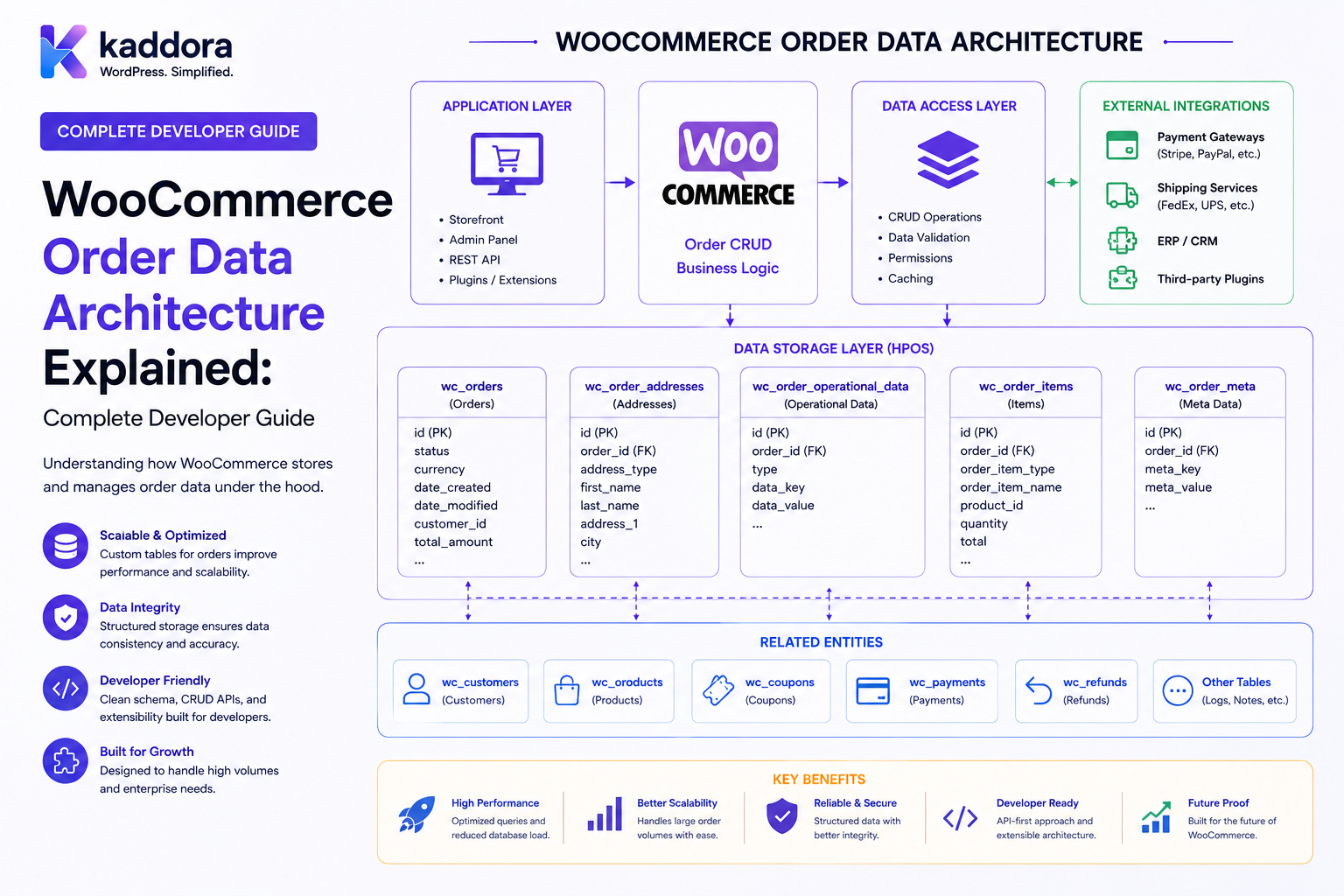
WooCommerce Order Data Architecture Explained: Complete Developer Guide
Introduction
Every WooCommerce order contains much more information than a simple order number.
A typical order can involve:
Order ID Customer Billing Address Shipping Address Products Quantities Prices Taxes Shipping Coupons Fees Payments Refunds Metadata Order Status
A store with only a few orders can manage this information without much concern.
A large store may contain:
Thousands of Customers Hundreds of Thousands of Orders Millions of Order Items Large Amounts of Metadata Multiple Integrations
At that scale, the way order data is stored and queried becomes an important architectural concern.
Historically, WooCommerce stored order data through WordPress's post and postmeta mechanisms.
Modern WooCommerce can use High-Performance Order Storage (HPOS), which introduces dedicated order tables designed specifically for ecommerce workloads.
A simplified evolution looks like:
Legacy Architecture WooCommerce Order ↓ WordPress Post ↓ Post Metadata
Modern HPOS architecture:
WooCommerce Order ↓ WooCommerce CRUD Layer ↓ Dedicated Order Tables
This distinction matters to developers building:
Payment Gateways ERP Integrations CRM Integrations Analytics Shipping Extensions Order Automation Customer Portals WooCommerce Plugins
A developer should therefore think of an order as a WooCommerce domain object rather than a generic WordPress post.
The key principle is:
WooCommerce order data architecture should be accessed through WooCommerce's order abstraction and supported query APIs rather than by assuming a specific underlying database representation.
What Is WooCommerce Order Data Architecture?
WooCommerce order data architecture describes how information associated with an order is:
Stored Retrieved Updated Queried Related Indexed Synchronized
It includes both:
Physical Storage
and:
Application-Level APIs
The two should not be confused.
Order Storage vs Order API
These are different layers.
Storage Layer
Defines where order information is physically persisted.
API Layer
Defines how developers interact with the order.
Conceptually:
Application ↓ WooCommerce Order API ↓ Data Store ↓ Database
The advantage of this abstraction is that application code does not need to know every storage implementation detail.
Legacy WooCommerce Order Architecture
Historically, WooCommerce orders were represented using WordPress's post-based storage model.
Conceptually:
wp_posts
could contain:
Order ID Post Type Order Status Creation Date
Additional order information could be stored in:
wp_postmeta
This approach leveraged WordPress's existing content architecture.
Why the Legacy Architecture Worked
Post-based order storage provided several advantages.
It allowed WooCommerce to use existing WordPress functionality such as:
Posts Metadata Queries Hooks Permissions
Third-party developers could also use familiar WordPress APIs.
This helped WooCommerce build a broad extension ecosystem.
Why Order-Specific Storage Became Important
Order data has different access patterns from normal website content.
A WooCommerce store frequently asks questions such as:
Find orders from yesterday. Find processing orders. Find orders for this customer. Find orders above a certain total. Find orders containing a product. Find orders within a date range.
These are ecommerce queries, not ordinary blog queries.
A purpose-built storage model allows the platform to optimize for those workloads.
High-Performance Order Storage
WooCommerce's High-Performance Order Storage architecture uses dedicated order tables rather than relying exclusively on WordPress post tables.
WooCommerce documentation describes HPOS as a purpose-built order storage solution with dedicated tables and indexes intended to improve scalability and order-related query performance.
The HPOS Data Model
The HPOS architecture includes dedicated structures for important order information.
The core design includes tables for:
Orders Order Addresses Order Operational Data Order Metadata
The exact schema is managed by WooCommerce.
Developers should avoid hard-coding application logic around individual table names unless they have a specific low-level reason to do so.
Main Order Data
The primary order record can contain information needed to identify and operate on the order.
Conceptually:
Order ID Order Status Order Type Currency Order Total Customer Created Date Updated Date
The precise storage fields are controlled by WooCommerce.
Order Address Data
Billing and shipping data represents a significant part of an ecommerce order.
For example:
First Name Last Name Company Address City State Postcode Country Email Phone
Separating address information into an appropriate order structure helps WooCommerce optimize order-related access patterns.
Operational Order Data
An order also contains operational information used during processing.
Examples may include:
Customer Association Payment Information Transaction References Shipping Information Order Processing State
The exact fields and storage behavior should be accessed through WooCommerce APIs.
Order Metadata
Extensions often need additional order information.
For example:
ERP Order ID CRM Record ID Shipment ID External Invoice ID Warehouse Reference Integration State
WooCommerce provides order metadata APIs for extension-specific information.
Why Metadata Still Matters
Dedicated order tables do not mean that every possible custom field must become a new core database column.
Extensions can still attach additional information through supported metadata mechanisms.
This allows WooCommerce to maintain a stable core schema while extensions add specialized data.
Order Items Are Separate From the Order
A WooCommerce order is not simply one database record.
An order can contain multiple line items:
Order #1001 ├── Product A × 2 ├── Product B × 1 └── Product C × 4
The order therefore has relationships with:
Products Variations Taxes Shipping Fees Coupons
Product Line Items
Each product line can contain information such as:
Product ID Variation ID Quantity Price Tax Subtotal Total
This information belongs to the order's item model rather than simply becoming arbitrary order metadata.
Taxes
Tax information may be associated with:
Line Items Shipping Fees Order Totals
Tax data should be retrieved through WooCommerce-supported order and item APIs.
Shipping Items
An order may contain shipping information such as:
Shipping Method Shipping Method ID Shipping Cost Shipping Tax
Shipping-related information should remain connected to the order's item structure.
Fee Items
Custom fees can appear as order items.
For example:
Setup Fee Gift Wrapping Handling Fee
The order item model keeps these components separate from generic order properties.
Coupon Items
Applied coupons can also be represented as order-related items.
For example:
Coupon: SUMMER20 Discount: ₹500
This allows reporting and order calculations to distinguish promotional effects from normal product pricing.
Refunds
Refunds are related to orders but represent their own business object.
Conceptually:
Order ↓ Refund
An order may have:
0 Refunds 1 Refund Multiple Refunds
Extensions should use WooCommerce refund APIs rather than manually manipulating database rows.
Order Notes
Orders can contain notes such as:
Customer requested delivery change. Payment verified. Shipment dispatched.
Order notes and internal business data should still be handled with appropriate privacy and access controls.
Order Status
The order lifecycle can include states such as:
Pending Payment Processing On Hold Completed Cancelled Failed Refunded
Stores can also define custom statuses.
The important point is that developers should access order status through WooCommerce's order abstraction rather than assuming a specific database column is the application contract.
Order Lifecycle
A simplified lifecycle can look like:
Checkout ↓ Order Created ↓ Payment ↓ Processing ↓ Fulfillment ↓ Completed
Different stores may use different workflows.
Order Creation
Order creation can involve:
Customer Cart Checkout Products Taxes Shipping Coupons Payment
The final order should be created through WooCommerce's supported order mechanisms.
Cart Data vs Order Data
These are different.
Cart
Temporary shopping state.
Order
Persistent purchase record.
Conceptually:
Cart ↓ Checkout ↓ Order
Do not treat cart storage as permanent order storage.
Session Data vs Order Data
Sessions contain temporary customer interaction state.
Orders contain persistent transaction information.
For example:
Session: Current Cart Order: Completed Purchase
Customer Relationship
An order can be associated with a registered customer.
For example:
Customer ID: 500 Orders: 1001 1045 1120
Customer and order are related domain objects.
Guest Orders
WooCommerce can also support guest purchases.
A guest order may rely on information such as:
Billing Email Billing Name Shipping Details
The system should not assume every order has a registered WordPress user.
Order-to-Customer Queries
An ecommerce dashboard may need:
Find all orders for this customer.
Use WooCommerce order query APIs instead of manually joining storage tables.
WooCommerce Order Querying
WooCommerce provides wc_get_orders() and WC_Order_Query as standard ways to retrieve orders.
This provides an order-focused query abstraction similar in concept to WordPress's generic post-query APIs, but designed specifically for WooCommerce orders.
Why Use wc_get_orders()?
Using WooCommerce order queries allows WooCommerce to manage how orders are retrieved from the active data store.
For example:
$orders = wc_get_orders( array( 'status' => 'processing', 'limit' => 20, ) );
This is preferable to hard-coding a particular order table.
Query by Customer
For example:
$orders = wc_get_orders( array( 'customer_id' => $customer_id, 'limit' => 20, ) );
The supported arguments should be checked against the WooCommerce version being targeted.
Query by Date
Orders can be queried by date ranges.
For example:
Orders ↓ Created Between ↓ Start Date + End Date
This is useful for:
Sales Reports Daily Processing Fulfillment Analytics
Query by Status
Example:
Processing Orders
can be retrieved through WooCommerce's supported order query mechanisms.
This is safer than assuming the implementation uses a specific WordPress post status.
Query by Customer Email
Customer-oriented workflows may need:
Billing Email
for support or account matching.
Use WooCommerce order-query features where supported rather than directly querying metadata tables.
Query Custom Order Metadata
Modern WooCommerce order querying supports metadata-based queries for custom order metadata.
This is useful for extensions that store values such as:
_external_id _erp_reference _customer_segment _shipping_provider
The query should be built through WooCommerce's supported order-query arguments.
Avoid Manual SQL for Normal Order Queries
Instead of:
SELECT ... FROM wp_posts JOIN wp_postmeta ...
prefer:
wc_get_orders( $args );
where the supported API provides the needed query.
What If You Need a Complex Query?
Before writing SQL, check whether the WooCommerce order-query APIs can express the requirement.
The supported query layer has been extended to handle more sophisticated order filtering, including custom metadata queries.
This lets WooCommerce determine how the query maps onto the active storage architecture.
Physical Storage Should Remain an Implementation Detail
A well-designed extension should think:
"Find processing orders"
rather than:
"Query table X where column Y equals processing"
The first describes the business operation.
The second couples the application to a storage implementation.
Data Store Architecture
WooCommerce uses a data-store abstraction for its order objects.
Conceptually:
WC_Order ↓ Data Store ↓ Active Storage
The active storage may depend on the configured WooCommerce order-storage architecture.
This abstraction helps separate business logic from physical persistence.
Why the Data Store Matters
The same extension code can interact with:
WC_Order
without needing to know exactly which tables are authoritative underneath.
This is one of the main reasons developers should use WooCommerce CRUD APIs.
Authoritative vs Backup Tables
When HPOS compatibility synchronization is active, WooCommerce can maintain authoritative and backup representations of order data.
The active data store determines where normal reads and writes are performed, while synchronization can maintain the other representation.
Developers should allow WooCommerce to manage this process rather than manually writing to both storage systems.
Never Synchronize Order Tables Manually
Avoid custom logic such as:
Write to HPOS + Write to wp_posts + Write to wp_postmeta
This can interfere with WooCommerce's synchronization mechanisms.
Placeholder Order Records
HPOS compatibility synchronization can use placeholder records to preserve matching order IDs between storage representations.
This is an implementation detail that extension developers should not attempt to reproduce manually.
The safest approach is to use WooCommerce's APIs.
Order Data and Database Indexes
Performance depends heavily on indexes.
Purpose-built order storage can use indexes designed around common ecommerce queries.
Potential query dimensions include:
Order ID Customer Status Date Type Billing Information Operational Fields
Why Indexes Matter
Without appropriate indexes, the database may need to inspect large portions of a table.
With a useful index:
Query ↓ Index ↓ Relevant Rows
This can reduce work.
Don't Add Random Indexes
Custom indexes have costs.
They can increase:
Storage Write Time Maintenance
Only add custom indexes when actual query patterns justify them and the WooCommerce architecture allows appropriate extension-level optimization.
Order Data and Reporting
Large reports may need:
Total Orders Revenue Average Order Value Refund Amount Customer Count
Avoid loading every order object into PHP merely to calculate simple aggregates.
Use efficient WooCommerce queries or dedicated reporting infrastructure where appropriate.
Avoid Loading All Orders
Bad pattern:
$orders = wc_get_orders( array( 'limit' => -1, ) );
followed by:
PHP calculates everything.
This can become expensive on large stores.
Prefer bounded and purpose-built queries.
Pagination
Order screens should generally use:
Page 1 Page 2 Page 3
rather than retrieving the entire order history.
Batch Processing
For large migration or synchronization operations:
Orders ↓ Batch 1 ↓ Batch 2 ↓ Batch 3
This reduces memory pressure and lets the system recover from failures more safely.
Order Data and External Systems
WooCommerce orders are frequently synchronized with:
ERP CRM Accounting Warehouse Shipping Marketing Analytics
A robust architecture is:
WooCommerce ↓ Order API / Event ↓ Integration Service ↓ External System
Avoid Direct Database Coupling in Integrations
An ERP integration should not need to know:
Which WooCommerce order table is authoritative?
It should consume the order abstraction or defined integration events.
Order Events
Order lifecycle events can trigger:
ERP Sync Customer Notification Shipping Analytics Inventory Automation
For example:
Order Completed ↓ Event ↓ ERP Sync ↓ Warehouse Update
Idempotent Order Synchronization
Suppose the same event arrives twice:
Order #1001 Completed
The ERP should not create two invoices.
Use an external reference such as:
WooCommerce Order ID
or another stable identifier to make synchronization idempotent.
Retry-Safe Integrations
A queue can retry:
Order Sync Attempt 1 → Failed Attempt 2 → Success
The result should remain one external record.
Order Architecture and APIs
A custom WooCommerce extension might provide:
GET /wp-json/kdr/v1/orders GET /wp-json/kdr/v1/orders/{id}
These endpoints must enforce:
Authentication Capability Order Access Customer Ownership Store Scope
Customer Order API
A customer portal should expose only orders belonging to that customer.
Never trust:
customer_id
submitted by the browser.
Determine customer ownership from the authenticated context.
Manager Order APIs
A store manager may have broader access.
Even then:
Capability + Store Scope
should be verified.
Order Data Security
Order records may include:
Names Addresses Emails Phone Numbers Business Information Transaction References
Return only information required by the requesting interface.
Data Minimization
For a shipping dashboard, you may need:
Order ID Recipient Address Shipping Method Status
You may not need:
Internal CRM Notes Marketing Segments Payment Secrets
Payment Information
Never treat sensitive payment credentials as normal order metadata.
Payment-card data should remain handled by appropriate payment infrastructure and tokenization mechanisms.
A WooCommerce order should generally contain references and transaction information needed by the store rather than raw payment credentials.
Order Metadata Governance
Extensions should establish clear metadata conventions:
_external_order_id _erp_invoice_id _shipping_tracking_id
Avoid unstructured metadata explosions with hundreds of poorly documented keys.
Metadata Naming
Use unique, descriptive keys.
For example:
_kdr_erp_order_id
can make an extension's metadata easier to identify.
The exact naming convention should follow WordPress and WooCommerce extension guidance.
Order Data and Custom Fields
Custom checkout fields can become order data.
For example:
Purchase Order Number Delivery Instructions Tax Exemption Number
These should be stored and retrieved through appropriate WooCommerce order APIs.
Checkout Data vs Persisted Order Data
Not everything entered during checkout should automatically become permanent order data.
Store only the information necessary for:
Fulfillment Business Operations Customer Service Compliance Reporting
Order Data Retention
Stores should define appropriate retention policies for:
Orders Refunds Addresses Metadata Integration Data Audit Events
Retention requirements vary by business, region, and data type.
Do not delete order records merely to reduce database size without understanding operational and legal consequences.
HPOS and Data Migration
Existing stores moving from legacy storage should use WooCommerce's supported migration and synchronization mechanisms.
Avoid manually copying records between:
wp_posts wp_postmeta HPOS Tables
because WooCommerce manages relationships and synchronization state.
Migration Testing
Before migrating:
Backup ↓ Staging ↓ Enable HPOS ↓ Synchronize ↓ Verify Counts ↓ Verify Orders ↓ Verify Payments ↓ Verify Refunds ↓ Verify Integrations
Verify Order Counts
After migration, compare:
Legacy Order Count vs HPOS Order Count
Also verify samples across different states.
Verify Historical Orders
Check:
Old Orders Recent Orders Refunded Orders Cancelled Orders Guest Orders Registered Customer Orders
Verify Custom Metadata
If extensions use order metadata, test:
Read Write Query Migration
for important keys.
Verify Third-Party Plugins
Test:
Payment Shipping Subscriptions Bookings Invoices ERP CRM Analytics
after changing order storage.
WooCommerce Order Data Architecture for Developers
A clean extension architecture can use:
UI ↓ Application Service ↓ WooCommerce Order API ↓ Data Store ↓ WooCommerce Storage
This minimizes storage coupling.
Application Service Example
An order service may provide:
getOrder() getCustomer() updateOrder() changeStatus() addReference() syncOrder()
The implementation internally uses WooCommerce APIs.
Repository Pattern
A repository can centralize:
Order Retrieval Order Filtering Metadata Access
but avoid building unnecessary abstraction layers around every WooCommerce function.
Domain Logic
Keep business rules separate.
For example:
Order ↓ Calculate Commission ↓ Create ERP Sync Request
The commission calculation should not know which WooCommerce table stores the order.
Event-Driven Architecture
A scalable order system can use:
Order Event ↓ Event Bus / Queue ├── ERP Sync ├── CRM Sync ├── Analytics ├── Customer Notification └── Warehouse
Each consumer can operate independently.
Failure Isolation
If CRM synchronization fails:
CRM: Failed
the WooCommerce order should not necessarily become:
Order: Failed
External integration state and order business state should remain separate unless the workflow explicitly connects them.
Order Data and Caching
Order data is sensitive and often personalized.
Avoid shared public caching for:
Customer Orders Order Details Billing Information
Use private or carefully scoped caching where appropriate.
Order Search Caching
Cached reports should consider:
Store User Role Date Range Filters Permissions
where the result is access-sensitive.
Performance Testing
Test order architecture with realistic datasets:
1,000 Orders 10,000 Orders 100,000 Orders 500,000+ Orders
Measure:
Order Creation Order Search Order Filtering Admin Screens Reports Checkout Integrations
Monitoring Order Performance
Monitor:
Database Query Time Order Creation Time Checkout Response Admin Order Loading External Sync Time Queue Backlog
Don't Measure Only Page Speed
Checkout and order workflows are more meaningful than a generic homepage benchmark when evaluating order-storage performance.
Common WooCommerce Order Architecture Mistakes
Treating Orders as Ordinary Posts
This tightly couples the extension to legacy storage.
Directly Querying Post Meta
Hard-coded metadata queries can create compatibility and performance problems.
Hard-Coding HPOS Tables
Schema details can change independently from the public API.
Loading Every Order
Reports can become extremely expensive.
N+1 Queries
Each order triggers additional database requests.
Manual Synchronization
Writing to both legacy and HPOS storage can corrupt synchronization logic.
Ignoring Order Items
Product, tax, shipping, fee, and coupon data are separate parts of the order model.
Mixing Integration State With Order State
An ERP failure should not necessarily change the WooCommerce order status.
Weak Customer Authorization
Customers must only access their own orders.
No Migration Testing
Storage changes can break third-party integrations.
WooCommerce Order Architecture Checklist
- [ ] Understand order domain model - [ ] Understand legacy storage - [ ] Understand HPOS - [ ] Use WC_Order - [ ] Use wc_get_order() - [ ] Use wc_get_orders() - [ ] Use supported order queries - [ ] Use order metadata APIs - [ ] Avoid direct post-table assumptions - [ ] Avoid hard-coded HPOS schema dependencies - [ ] Model order items correctly - [ ] Handle refunds correctly - [ ] Handle order statuses correctly - [ ] Use events where appropriate - [ ] Make external sync idempotent - [ ] Protect customer order access - [ ] Minimize exposed order fields - [ ] Use pagination - [ ] Avoid N+1 queries - [ ] Test HPOS - [ ] Test legacy compatibility if supported - [ ] Test migration - [ ] Test payments - [ ] Test refunds - [ ] Test shipping - [ ] Test ERP / CRM - [ ] Test analytics - [ ] Monitor performance
Best Practices for WooCommerce Order Data Architecture
A professional WooCommerce extension should:
Treat the order as a WooCommerce domain object rather than a WordPress post.
Use WC_Order, wc_get_order(), wc_get_orders(), and supported WooCommerce order APIs for ordinary order operations.
Keep storage-specific assumptions outside general business logic.
Separate the order itself from line items, taxes, shipping, fees, coupons, refunds, and custom metadata.
Use supported metadata APIs for extension-specific order information.
Avoid direct queries against wp_posts and wp_postmeta for normal order operations.
Avoid hard-coding HPOS table names unless a genuine low-level use case requires it and the code is designed for the supported WooCommerce environment.
Use WooCommerce's order query abstraction for filtering, including supported custom metadata queries.
Avoid loading large numbers of complete order objects when an aggregate or bounded query is sufficient.
Use pagination and batch processing for large order datasets.
Separate WooCommerce order state from external ERP, CRM, warehouse, or analytics synchronization state.
Make external synchronization idempotent and retry-safe.
Protect customer order access with authentication, ownership, and appropriate capabilities.
Minimize the order fields exposed through custom APIs, dashboards, reports, and integrations.
Use staging and verified backups before changing order-storage configuration on production stores.
Test migrated historical orders, guest orders, refunds, payments, custom metadata, and third-party integrations.
Monitor real-world query, checkout, admin, and synchronization performance at realistic order volumes.
Keep order business logic independent from the physical database implementation so future WooCommerce storage improvements require fewer changes.
Why choose ThemeKaddora?
ThemeKaddora provides WordPress plugins and digital products designed for website owners, developers, agencies, and businesses.
Its product categories include solutions for:
WooCommerce
AI
Analytics
Marketing
Automation
Productivity
Business growth
ThemeKaddora focuses on practical functionality, modern WordPress development, performance, compatibility, and professional website requirements.
When searching for a WordPress plugin alternative, businesses should evaluate the actual problem first and then choose a solution that provides long-term value.
Conclusion
WooCommerce order architecture is more than a collection of database records.
It is a domain model involving:
Order ↓ Customer ↓ Items ↓ Taxes ↓ Shipping ↓ Coupons ↓ Payments ↓ Refunds ↓ Metadata
The storage layer underneath these objects can evolve.
That is why developers should work through WooCommerce's order APIs.
A simplified architecture is:
Plugin ↓ Business Logic ↓ WooCommerce Order API ↓ Data Store ↓ Storage
The first principle is separate the domain model from physical storage.
Your code should care that it needs an order, not which table happens to contain it.
The second principle is use the WooCommerce CRUD layer.
This keeps integrations more resilient as WooCommerce evolves its internal storage.
The third principle is understand the complete order model.
An order includes much more than a total and status. Products, taxes, shipping, coupons, fees, refunds, and metadata all participate in the transaction.
The fourth principle is use the supported order-query APIs.
Filtering and reporting should not require every extension to write its own SQL against storage internals.
The fifth principle is design for scale.
Large order datasets require pagination, bounded queries, aggregation, indexing, efficient reporting, and careful integration design.
The sixth principle is separate business state from integration state.
An ERP sync failure should not automatically make the WooCommerce order itself fail.
The seventh principle is protect customer data.
Order information can include personal, shipping, billing, and business-sensitive information.
The eighth principle is make synchronization idempotent.
Repeated order events should not create duplicate invoices, CRM records, or shipments.
The ninth principle is test storage changes with the entire ecosystem.
Checkout, payments, refunds, shipping, analytics, ERP, CRM, and custom extensions can all depend on correct order access.
The tenth principle is keep architecture adaptable.
WooCommerce will continue evolving its internal implementation. Extensions that depend on stable APIs are better positioned to evolve with it.
For ThemeKaddora, a strong WooCommerce architecture can support:
ERP Integrations CRM Analytics Automation Payment Gateways Shipping Customer Portals Order Management Reporting AI Commerce Tools
The most important principle is:
Build against WooCommerce's order domain and supported APIs, not against assumptions about the database tables underneath them.
A professional WooCommerce order-data architecture should be:
Domain-Oriented
→ API-Driven
→ HPOS-Aware
→ Storage-Independent
→ Scalable
→ Query-Efficient
→ Integration-Friendly
→ Secure
→ Migration-Safe
→ Maintainable
When these principles are followed, WooCommerce extensions can work with modern order storage while remaining easier to test, scale, integrate, and maintain as the ecommerce platform evolves.
Frequently Asked Questions
What is WooCommerce order data architecture?
It is the combination of WooCommerce's order domain model, storage layer, data-store abstraction, order-item relationships, metadata, querying mechanisms, and lifecycle APIs.
How were WooCommerce orders traditionally stored?
Historically, WooCommerce relied heavily on WordPress posts and post metadata for orders and related information.
What changed with HPOS?
HPOS introduced dedicated order tables designed specifically for WooCommerce order workloads, including dedicated storage for order information and addresses.
Should developers query WooCommerce order tables directly?
For normal extension logic, they generally should not. WooCommerce's order APIs and query abstractions are designed to insulate extensions from the underlying storage implementation.
What is the main API for loading a WooCommerce order?
A common approach is:
$order = wc_get_order( $order_id );
This returns the WooCommerce order object when the order exists.
How should WooCommerce orders be queried?
WooCommerce provides wc_get_orders() and related order-query functionality for retrieving orders without requiring extensions to hard-code the underlying storage schema.
Can custom metadata still be added to orders?
Yes. Extensions can use WooCommerce's order metadata APIs for custom order-related information.
What are WooCommerce order items?
Order items represent components such as products, shipping, fees, and coupons associated with an order. They are distinct from the order's core properties.
Are refunds separate from orders?
Refunds are related to orders but represent their own data object and workflow.
Does HPOS eliminate all performance problems?
No. It provides purpose-built order storage, but inefficient application queries, integrations, hosting resources, and poorly designed reporting can still cause performance issues.
Can I use SQL for WooCommerce reporting?
Specialized reporting or data-engineering workloads may justify direct database queries, but ordinary extension operations should prefer supported WooCommerce APIs. Low-level queries also need to account for the storage architecture and supported WooCommerce versions.
Should I build integrations directly against HPOS tables?
Generally, no. Integrations should use WooCommerce APIs or other supported interfaces so that storage implementation changes do not unnecessarily break the integration.
How should I protect customer order data?
Authenticate users, validate ownership or business permissions, scope access to the correct store or organization, and return only the order information required by the current workflow.
Can WooCommerce order data be synchronized with ERP and CRM systems?
Yes. A strong architecture uses WooCommerce order APIs or events, an integration service, asynchronous processing where useful, and idempotent synchronization.
Why choose Themekaddora?
Themekaddora provides lightweight, responsive, SEO-friendly WordPress themes with fast performance, WooCommerce compatibility, flexible customization, accessibility-conscious design, modern templates, regular updates, and professional support—providing a strong foundation for businesses building digital products and product-focused websites.
Comments (0)