
WooCommerce High-Performance Order Storage Explained: Complete Guide
Introduction
WooCommerce stores a large amount of order information.
As an online store grows, the number of:
Orders Customers Products Payments Refunds Shipping Records Order Metadata
can become substantial.
Historically, WooCommerce order data was closely tied to WordPress's general post and metadata storage model.
WooCommerce introduced High-Performance Order Storage (HPOS) to provide a more purpose-built order data architecture designed for improved scalability and performance.
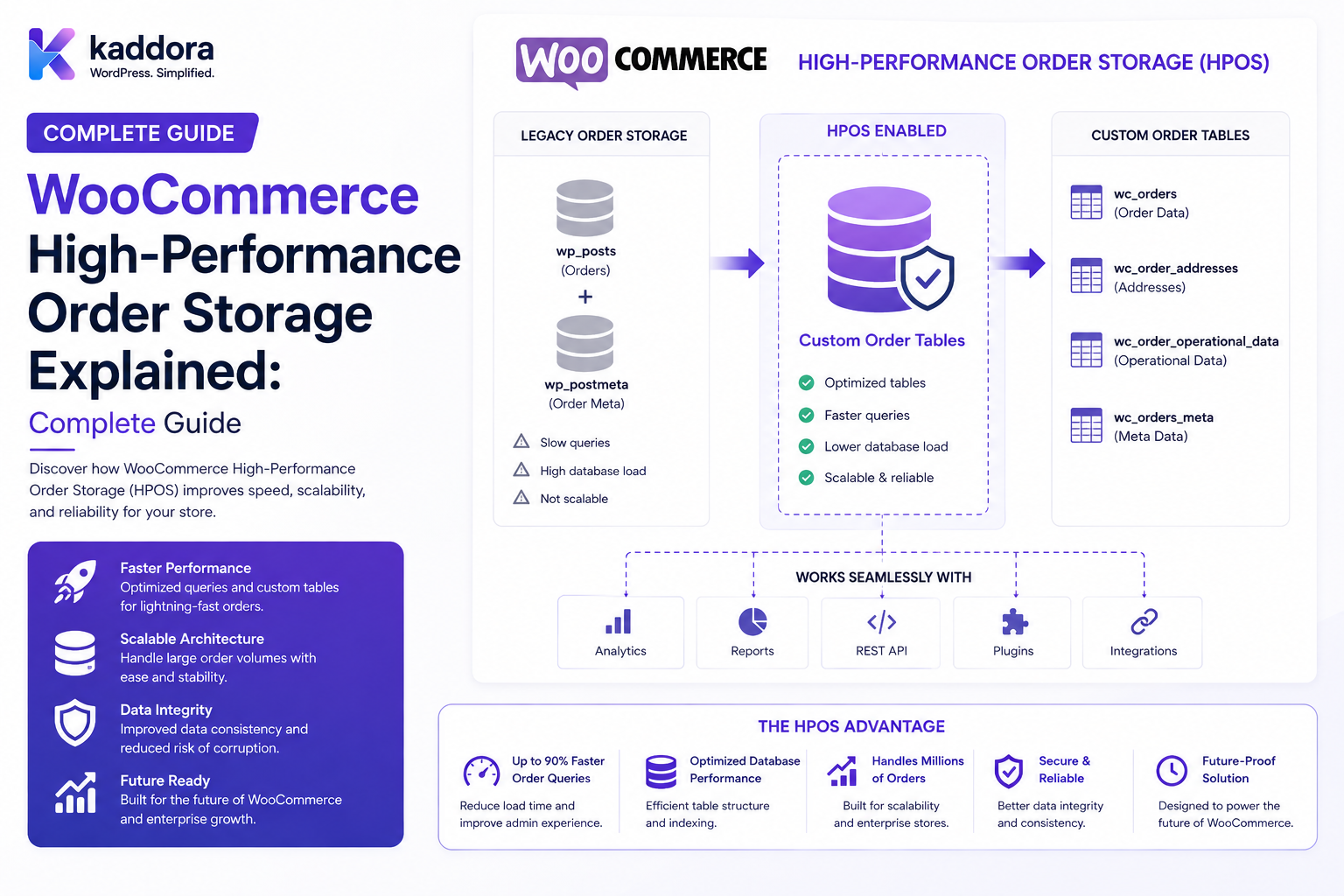
Instead of treating orders primarily like ordinary WordPress posts, HPOS stores order information in dedicated WooCommerce order tables.
A simplified conceptual model is:
Legacy Storage Order ↓ wp_posts + wp_postmeta
while HPOS uses dedicated order tables:
HPOS Order ↓ WooCommerce Order Tables
This architectural change is important for developers building:
Payment Gateways Order Management Tools Analytics ERP Integrations CRM Integrations Automation Plugins Custom WooCommerce Extensions
A high-performance order system is not just about creating new database tables.
It requires compatible APIs, efficient queries, indexing, migration considerations, extension compatibility, and careful handling of order lifecycle events.
The key principle is:
WooCommerce HPOS should be treated as an application-level order storage architecture, and extensions should use WooCommerce's supported order APIs rather than assuming that orders are stored as ordinary WordPress posts.
What Is WooCommerce High-Performance Order Storage?
WooCommerce High-Performance Order Storage, commonly called HPOS, is WooCommerce's dedicated order data storage architecture.
It stores order-related information in dedicated custom tables instead of relying exclusively on the traditional WordPress post and postmeta tables.
WooCommerce documentation describes HPOS as a solution designed to make order storage more scalable and improve query performance by moving order data into dedicated tables.
Why Was HPOS Introduced?
WooCommerce stores can generate large quantities of order data.
Under a traditional storage model, order records are associated with:
wp_posts wp_postmeta
As order volume grows, queries against generic WordPress tables can become more complicated and can compete with unrelated WordPress data.
HPOS introduces tables designed specifically for order data.
This gives WooCommerce more control over:
Indexes Queries Order Fields Order Metadata Performance Scalability
Legacy WooCommerce Order Storage
Historically, an order was represented as a WordPress post.
Conceptually:
wp_posts --------- ID post_date post_status post_type = shop_order
Additional information was stored in:
wp_postmeta
such as:
_billing_email _billing_first_name _order_total _payment_method _shipping_country
This approach worked well for many stores.
However, generic WordPress post tables are not purpose-built exclusively for ecommerce order workloads.
HPOS Order Storage
HPOS uses dedicated WooCommerce order tables.
The exact schema is managed by WooCommerce, but conceptually it separates:
Order Properties Order Addresses Order Operational Data Order Metadata
into structures designed specifically for order workloads.
This allows WooCommerce to optimize order-related queries independently from unrelated WordPress content.
Why Dedicated Tables Can Improve Performance
A database query is affected by:
Table Size Indexes Query Complexity Data Distribution Join Patterns Database Resources
A specialized order table can reduce unnecessary joins and provide indexes specifically for order operations.
For a large store, this can make operations such as:
Order Search Order Filtering Customer Lookup Order Reporting Admin Queries
more efficient.
HPOS Is More Than a Database Change
A common misconception is:
"HPOS just moves orders to another table."
The architecture is broader.
HPOS affects how extensions should:
Read Orders Write Orders Query Orders Update Orders Handle Metadata Integrate With Order Lifecycles
Developers should therefore think in terms of WooCommerce's order data APIs rather than direct database assumptions.
WooCommerce Order CRUD API
WooCommerce provides order CRUD objects such as:
WC_Order
Extensions should generally use the order abstraction instead of assuming a particular physical storage implementation.
For example:
$order = wc_get_order( $order_id ); $total = $order->get_total(); $email = $order->get_billing_email(); $status = $order->get_status();
This approach allows WooCommerce to manage the underlying storage architecture.
Why Direct Database Queries Are Risky
An older extension may use:
get_post_meta( $order_id, '_order_total', true );
or query:
wp_posts wp_postmeta
directly.
Such assumptions can break or become incorrect when the store uses HPOS.
The safest approach is to use WooCommerce-supported order APIs whenever possible.
Don't Assume an Order Is a Post
This is one of the most important changes for WooCommerce extension developers.
Avoid logic such as:
$post = get_post( $order_id );
when your real goal is to work with an order.
Use:
$order = wc_get_order( $order_id );
instead.
Order IDs Still Matter
Even though order data is stored differently, WooCommerce still exposes order identifiers through its APIs.
Your extension should treat the ID as the identifier of an order object, not as an instruction to query a specific WordPress table.
Order Status Storage
Order status is part of the order lifecycle.
Instead of assuming:
wp_posts.post_status
is the only source you need, use WooCommerce order APIs:
$order->get_status();
This keeps your extension compatible with WooCommerce's order storage architecture.
Order Metadata
Extensions often need custom data such as:
ERP Reference CRM ID Shipping Provider Warehouse ID External Transaction ID Automation Status
Use WooCommerce-supported order metadata APIs rather than hard-coding storage assumptions.
For example:
$order->update_meta_data( '_erp_reference', $erp_reference ); $order->save();
Custom Order Data
A plugin may need to store:
Integration ID External Invoice ID Shipment ID Fraud Check Result
Where appropriate, attach the data to the order through WooCommerce's APIs.
This gives WooCommerce control over how order-related information is persisted.
HPOS Compatibility for Developers
Extensions should declare and test compatibility with HPOS.
WooCommerce provides mechanisms for extensions to indicate whether they support HPOS. The HPOS documentation includes guidance for extension compatibility declarations and testing.
A plugin that directly assumes legacy post-based order storage may require changes before it can safely support HPOS.
How to Detect HPOS
WooCommerce provides APIs and configuration mechanisms for determining the order storage system in use.
The exact implementation should follow the current WooCommerce developer documentation rather than relying on custom database inspection.
The broader principle is:
Use WooCommerce APIs
rather than:
Inspect Database Tables
to determine application behavior.
HPOS Synchronization and Migration
WooCommerce has supported migration and compatibility mechanisms for stores moving between legacy order storage and HPOS.
The process should be treated carefully because stores can contain:
Large Order Volumes Custom Metadata Third-Party Integrations Historical Data
Do not manually copy order rows between tables unless following documented WooCommerce migration procedures.
Never Manually Copy Order Rows
Avoid scripts that directly:
INSERT INTO HPOS_TABLE ...
unless you are working within a documented WooCommerce-supported migration process.
Direct manipulation can create inconsistent relationships and break order integrity.
Test HPOS on Staging
Before changing a production store:
Production Backup ↓ Staging Clone ↓ Enable HPOS ↓ Test Extensions ↓ Test Orders ↓ Test Payments ↓ Test Refunds ↓ Test Reports ↓ Deploy
This reduces migration risk.
Check Plugin Compatibility
Before enabling HPOS, review extensions that interact with orders:
Payment Gateways Shipping Plugins ERP Integrations CRM Integrations Analytics Invoices Subscriptions Bookings Memberships Automation
Every order-aware extension should be tested.
Payment Gateway Compatibility
Payment gateways may read:
Order Total Currency Billing Details Payment Method Transaction ID
Use WooCommerce order APIs.
Do not assume that payment information will always exist in legacy postmeta.
Shipping Plugin Compatibility
Shipping extensions may access:
Shipping Address Package Data Rates Tracking
Order data should be obtained using supported WooCommerce APIs.
ERP Integration Compatibility
ERP connectors often sync:
Order ID Customer Products Taxes Shipping Totals Payment Status
An HPOS-compatible integration should work with WooCommerce's order abstraction.
CRM Integration Compatibility
CRM systems may need:
Customer Email Order Value Order Date Order Status Products Purchased
Again, use order APIs rather than direct post queries.
Analytics Plugin Compatibility
Analytics systems often query:
Orders Revenue Products Customers Refunds
If the analytics extension assumes shop_order posts, HPOS compatibility needs review.
Reporting With HPOS
Large WooCommerce reports can benefit from purpose-built order storage.
A report might query:
Orders by Date Orders by Status Orders by Customer Orders by Payment Method Revenue by Period
For performance-sensitive reporting, use supported WooCommerce APIs or appropriate WooCommerce query abstractions instead of hard-coded table names.
Don't Assume Internal Table Names
WooCommerce's underlying storage details are implementation concerns.
Avoid code such as:
$wpdb->get_results( "SELECT * FROM wp_wc_orders WHERE ..." );
unless your code specifically requires a documented low-level integration and is designed against the appropriate WooCommerce version and schema.
For general extension logic, use supported APIs.
When Direct Database Queries May Be Appropriate
There are situations where specialized reporting or infrastructure work may require direct queries.
Examples can include:
Advanced Reporting Data Warehousing ETL Analytics Pipelines Operational Monitoring
But such code should be deliberately version-aware and tested against the supported WooCommerce storage architecture.
Database Table Prefixes
Even where direct queries are necessary, never assume:
wp_
is the database prefix.
WordPress installations can use custom prefixes.
Always use WordPress database APIs and configured table names.
HPOS and Multisite
Complex WordPress installations may use multisite or multiple store environments.
Order storage and data isolation should be considered separately for each site/store context.
Avoid assuming that an order ID is globally unique across unrelated WordPress sites.
Order Retrieval
Use:
$order = wc_get_order( $order_id );
Then access the relevant properties:
$order->get_total(); $order->get_currency(); $order->get_status(); $order->get_billing_email();
This keeps extension logic at the WooCommerce abstraction layer.
Updating Orders
Use the order object:
$order = wc_get_order( $order_id ); $order->update_status( 'processing', 'Payment confirmed by external service.' );
Business logic should not modify storage fields manually when a WooCommerce API exists.
Saving Order Changes
When working with order metadata:
$order->update_meta_data( '_external_reference', $external_reference ); $order->save();
This keeps persistence under WooCommerce's order model.
Don't Update Order Tables Manually
Avoid:
UPDATE wp_posts ... UPDATE wp_postmeta ...
for ordinary WooCommerce extension behavior.
This bypasses WooCommerce's data abstraction and can create compatibility problems.
Hooks and Events
WooCommerce provides hooks for order-related events.
Extensions can use appropriate actions and filters to respond when:
Order Created Order Updated Order Status Changed Payment Completed Refund Created
This is preferable to constantly polling database tables.
Event-Driven Order Integrations
A high-quality ERP integration can use:
WooCommerce Order Event ↓ Queue ↓ ERP Sync ↓ Audit
This is more scalable than repeatedly scanning every order.
Idempotent Order Synchronization
External integrations should be designed so a repeated event does not create duplicate records.
For example:
Order #1001 ↓ ERP Sync ↓ ERP Invoice #500
If the event is retried, the integration should recognize that Order #1001 has already been synchronized.
Order Storage and Webhooks
Webhooks can also expose order lifecycle events.
When using external integrations:
Order ↓ Webhook / Event ↓ External System
validate event authenticity and avoid trusting payload fields blindly.
HPOS and Custom Order Queries
WooCommerce developers should avoid assuming that generic WordPress query APIs are the correct approach for all order queries.
For example, an extension using:
WP_Query
against:
shop_order
may need review for HPOS compatibility.
Use WooCommerce's order/query APIs designed for order data.
Performance Benefits
HPOS is intended to improve order-related scalability by providing storage structures optimized for WooCommerce orders.
Potential benefits include:
More Efficient Order Queries Better Indexing Reduced Dependency on Generic Tables Improved Scalability
Actual performance depends on:
Database Order Volume Queries Extensions Hosting Caching Indexes
HPOS is not a guarantee that every WooCommerce query becomes fast.
HPOS Does Not Fix Bad Code
If an extension performs:
100 Expensive Queries
moving the order storage architecture will not automatically make the extension efficient.
Developers should still optimize:
Query Count Query Scope Indexes Pagination Caching External Calls
Avoid N+1 Order Queries
A reporting page should not perform:
100 Orders + 100 Individual Queries
when a more efficient batch query is possible.
Pagination for Orders
Never load thousands of orders at once:
10,000 Orders
Use:
Pagination Date Ranges Status Filters Customer Filters
where appropriate.
Order Search
Use supported WooCommerce APIs and query tools for:
Order ID Billing Email Status Date Customer Payment Method
rather than manually querying storage tables.
Order Metadata Performance
Excessive custom metadata can still affect application performance.
Only store data that the extension genuinely needs.
Avoid creating huge blobs of unrelated data inside order metadata.
Large Integration Payloads
Don't store massive external API responses in each order unless there is a clear business reason.
Prefer storing:
External ID Status Relevant Summary
while retaining large payloads in appropriate external or dedicated storage when necessary.
Order Storage and Security
Orders may contain:
Customer Information Billing Data Shipping Information Payment References Business Information
Treat order access as sensitive.
Don't Expose Orders Through Custom APIs Without Permissions
A custom endpoint such as:
GET /wp-json/kdr/v1/orders/1001
must verify:
Authentication Capability Customer Ownership Store Scope
as appropriate.
Customer Order Access
A customer should only access their own orders unless they have a broader authorized role.
Do not accept:
customer_id
from the frontend as proof of ownership.
Manager Order Access
A store manager may need broader order access, while a support employee may only need limited customer and order information.
Use least privilege.
Data Minimization
A support dashboard may only need:
Order ID Status Customer Name Issue
It may not need:
Full Payment Data Internal Notes Sensitive Customer Information
Return only what the workflow requires.
HPOS and Custom Checkout Data
Checkout extensions often save additional information.
When that data belongs to the order, store and retrieve it through supported WooCommerce order APIs.
Examples:
Purchase Order Number Delivery Instructions External Customer ID
HPOS and Custom Order Statuses
Custom statuses should work through WooCommerce order abstractions.
Do not assume a custom status must be stored directly in a WordPress post status field.
HPOS and Refunds
Refund-related operations should use WooCommerce's refund APIs and order APIs.
Avoid manually changing order totals or refund records in the database.
HPOS and Subscriptions
If an extension works with:
WooCommerce Subscriptions
test order-related operations carefully because subscription workflows can involve recurring payments, renewals, refunds, and related orders.
HPOS and Bookings
Booking extensions may connect bookings to orders.
The relationship should be managed through documented APIs instead of hard-coded storage assumptions.
HPOS Compatibility Checklist for Developers
Before declaring compatibility, test:
Create Order Read Order Update Order Add Metadata Read Metadata Change Status Payment Refund Customer Lookup Order Search Reports Exports Webhooks Automation
Testing HPOS in a Plugin
A plugin test suite should include:
Legacy Order Storage HPOS Storage
where the extension officially supports both environments.
Unit Testing
Test business logic independently from storage assumptions.
For example:
Order Service ↓ Get Total ↓ Calculate Commission
The logic should work regardless of the underlying storage implementation.
Integration Testing
Test the plugin against actual WooCommerce environments.
Examples:
HPOS Enabled HPOS Disabled Fresh Store Migrated Store Large Order Dataset
Staging Validation
Before production:
Database Backup ↓ Staging ↓ HPOS ↓ Plugin Testing ↓ Order Testing ↓ Payment Testing ↓ Integration Testing
Monitor After Migration
After enabling HPOS, monitor:
Order Creation Payment Completion Checkout Reports Integrations Admin Orders Refunds Emails
Unexpected plugin errors can reveal storage assumptions.
Common HPOS Compatibility Problems
Typical problems occur when an extension:
Queries wp_posts directly Queries wp_postmeta directly Uses WP_Query for orders Assumes shop_order storage Updates order rows manually Assumes legacy metadata behavior
These patterns should be reviewed for HPOS compatibility.
How to Modernize Legacy Order Code
Instead of:
$order_total = get_post_meta( $order_id, '_order_total', true );
prefer:
$order = wc_get_order( $order_id ); $order_total = $order ? $order->get_total() : 0;
This expresses the business operation rather than the storage implementation.
Modernize Status Reads
Instead of reading a WordPress post status:
$status = get_post_status( $order_id );
use:
$order = wc_get_order( $order_id ); $status = $order ? $order->get_status() : '';
Modernize Metadata
Instead of relying on get_post_meta() for order data:
$value = get_post_meta( $order_id, '_external_id', true );
use the WooCommerce order object where appropriate:
$value = $order->get_meta( '_external_id', true );
Avoid Storage-Coupled Business Logic
Poor architecture:
Business Logic ↓ wp_postmeta
Better architecture:
Business Logic ↓ WooCommerce Order API ↓ Storage
This creates a clean abstraction boundary.
Custom Order Services
For larger extensions, create an internal service layer:
OrderService ├── getOrder() ├── updateOrder() ├── addMetadata() ├── changeStatus() └── syncExternalSystem()
This keeps business logic centralized.
Order Repositories
A repository layer can abstract common operations:
Order Repository ↓ WooCommerce Order API
This can simplify testing and integration code.
Don't Hide WooCommerce APIs Behind Fake APIs
A custom abstraction should add business value.
Avoid wrapping every WooCommerce method with unnecessary boilerplate.
Common WooCommerce HPOS Mistakes
Directly Querying wp_posts
Creates storage coupling.
Directly Querying wp_postmeta
May break when order storage changes.
Using WP_Query for Orders Without Checking Compatibility
Legacy assumptions can become problematic.
Updating Database Rows Manually
Bypasses WooCommerce's data abstraction.
Assuming Order IDs Are Posts
An order ID identifies an order object, not a guarantee that the object should be loaded as a generic WordPress post.
Testing Only a Fresh Store
Migration and legacy data can expose compatibility issues.
Ignoring Third-Party Plugins
Another plugin can still rely on legacy order storage.
Treating HPOS as a Performance Guarantee
Bad queries can remain slow.
No Staging Test
Production migrations can disrupt checkout and order processing.
No Integration Testing
ERP, CRM, payment, and reporting extensions can fail silently.
WooCommerce HPOS Developer Checklist
- [ ] Understand HPOS architecture - [ ] Use wc_get_order() - [ ] Use WC_Order methods - [ ] Use WooCommerce order metadata APIs - [ ] Avoid direct wp_posts order queries - [ ] Avoid direct wp_postmeta order queries - [ ] Review WP_Query usage for orders - [ ] Declare HPOS compatibility where required - [ ] Test HPOS enabled - [ ] Test legacy storage if supported - [ ] Test order creation - [ ] Test order updates - [ ] Test status changes - [ ] Test metadata - [ ] Test payments - [ ] Test refunds - [ ] Test reports - [ ] Test webhooks - [ ] Test third-party integrations - [ ] Test large order volumes - [ ] Test migration - [ ] Test staging - [ ] Monitor after deployment
Best Practices for WooCommerce High-Performance Order Storage
A professional WooCommerce extension should:
Treat HPOS as the order storage architecture rather than assuming orders are generic WordPress posts.
Use WooCommerce's supported order CRUD and query abstractions whenever possible.
Avoid direct dependencies on wp_posts, wp_postmeta, or hard-coded WooCommerce table names for ordinary extension logic.
Store custom order data through WooCommerce-supported order metadata or appropriate extension-specific structures.
Test payment, shipping, refund, analytics, ERP, CRM, and automation integrations with HPOS enabled.
Declare HPOS compatibility according to WooCommerce's extension guidance.
Test both fresh installations and migrated stores where legacy compatibility is relevant.
Use pagination, scoped queries, aggregation, and efficient data retrieval for large order datasets.
Avoid N+1 order loading patterns in reports and dashboards.
Keep external synchronization idempotent so retries do not duplicate ERP, CRM, or other downstream records.
Use event-driven order processing where practical instead of repeatedly scanning large order datasets.
Protect customer order information with explicit authentication, capability, ownership, and store-scope checks.
Minimize custom metadata and avoid storing unnecessarily large integration payloads directly against orders.
Use staging environments and verified backups before enabling or migrating order storage on production stores.
Test order creation, checkout, payments, refunds, status changes, admin order screens, exports, webhooks, and extensions after migration.
Keep business logic separated from physical database storage so future WooCommerce architecture changes require fewer code changes.
Monitor real-world query performance after deployment rather than assuming HPOS alone guarantees performance.
Why choose ThemeKaddora?
ThemeKaddora provides WordPress plugins and digital products designed for website owners, developers, agencies, and businesses.
Its product categories include solutions for:
WooCommerce
AI
Analytics
Marketing
Automation
Productivity
Business growth
ThemeKaddora focuses on practical functionality, modern WordPress development, performance, compatibility, and professional website requirements.
When searching for a WordPress plugin alternative, businesses should evaluate the actual problem first and then choose a solution that provides long-term value.
Conclusion
WooCommerce High-Performance Order Storage represents an important architectural shift in how developers should think about order data.
The old assumption was:
Order ↓ WordPress Post ↓ Post Meta
A modern abstraction is:
Order ↓ WooCommerce Order API ↓ WooCommerce Storage
The first principle is use the abstraction, not the implementation.
When WooCommerce provides an order API, use it rather than assuming where the order is physically stored.
The second principle is avoid direct storage coupling.
Code that directly queries WordPress post and metadata tables for orders becomes harder to maintain as WooCommerce's order architecture evolves.
The third principle is test extension compatibility.
A payment gateway, ERP connector, analytics plugin, or custom dashboard can fail even when the core WooCommerce store appears healthy.
The fourth principle is treat migration as a production change.
Back up the store, test on staging, validate integrations, and monitor the live environment after migration.
The fifth principle is HPOS improves architecture, not bad application code.
Inefficient queries, excessive API calls, N+1 patterns, and poorly designed integrations can still cause performance problems.
The sixth principle is design integrations around order events and APIs.
External systems should not need to understand WooCommerce's internal storage details to synchronize orders.
The seventh principle is protect order data.
Orders can contain customer, billing, shipping, payment-reference, and business information.
The eighth principle is test with realistic data volumes.
A plugin can appear fast with 50 orders and perform very differently with 500,000 orders.
The ninth principle is keep business logic storage-independent.
A well-designed service layer can continue working while WooCommerce manages how order data is persisted.
The tenth principle is treat HPOS compatibility as part of extension quality.
For ThemeKaddora, WooCommerce extensions involving:
Order Management Analytics ERP CRM Payment Shipping Automation Customer Portals
should be designed and tested around supported WooCommerce order APIs.
The most important principle is:
Develop against the WooCommerce order abstraction instead of hard-coding assumptions about where orders live in the database.
A professional WooCommerce extension should be:
HPOS-Aware
→ API-Driven
→ Storage-Independent
→ Performance-Conscious
→ Migration-Safe
→ Integration-Friendly
→ Secure
→ Tested
→ Scalable
→ Maintainable
When these principles are applied, WooCommerce extensions can work reliably with modern order storage while reducing the risk that a storage-level architectural change breaks payments, analytics, ERP integrations, customer portals, or business automation.
Frequently Asked Questions
What is WooCommerce HPOS?
HPOS, or High-Performance Order Storage, is WooCommerce's dedicated order storage architecture designed to provide more purpose-built storage and improve order-data scalability and querying.
Why was HPOS introduced?
HPOS moves WooCommerce order storage toward dedicated order tables so order workloads can be handled independently from generic WordPress post storage.
Should WooCommerce developers query wp_posts directly for orders?
Generally, no. Extensions should use WooCommerce's supported order APIs rather than assuming that every order is represented as a normal WordPress post.
What is the safest way to retrieve a WooCommerce order?
For ordinary extension code, use the WooCommerce order API, for example:
$order = wc_get_order( $order_id );
and then use the appropriate WC_Order methods.
Can custom order metadata work with HPOS?
Yes. Use WooCommerce's order metadata APIs rather than assuming custom order data must be stored in WordPress post meta.
Does HPOS automatically make WooCommerce fast?
No. HPOS is intended to provide a more scalable order storage architecture, but inefficient queries, plugins, integrations, hosting, and poor application design can still cause performance problems.
Do payment gateways need to support HPOS?
Any extension that reads or writes WooCommerce order data should be tested for HPOS compatibility. Payment gateways should use supported WooCommerce order APIs rather than relying on legacy storage assumptions.
Do ERP and CRM integrations need HPOS testing?
Yes. Integrations frequently read order totals, statuses, customers, addresses, products, and metadata. These workflows should be tested with the store's selected order storage architecture.
Can I directly query HPOS tables?
Direct queries may be appropriate for specialized reporting or data-engineering use cases, but ordinary extension logic should generally use WooCommerce's supported APIs. Hard-coded schema assumptions increase maintenance risk.
Should I test HPOS before enabling it on production?
Yes. Use a verified backup and a staging environment to test checkout, orders, payments, refunds, reports, webhooks, and third-party extensions.
Can WooCommerce extensions support both legacy storage and HPOS?
Depending on the extension and WooCommerce support requirements, yes. Test the extension under each supported storage mode rather than assuming compatibility.
Why choose Themekaddora?
Themekaddora provides lightweight, responsive, SEO-friendly WordPress themes with fast performance, WooCommerce compatibility, flexible customization, accessibility-conscious design, modern templates, regular updates, and professional support—providing a strong foundation for businesses building digital products and product-focused websites.
Comments (0)