
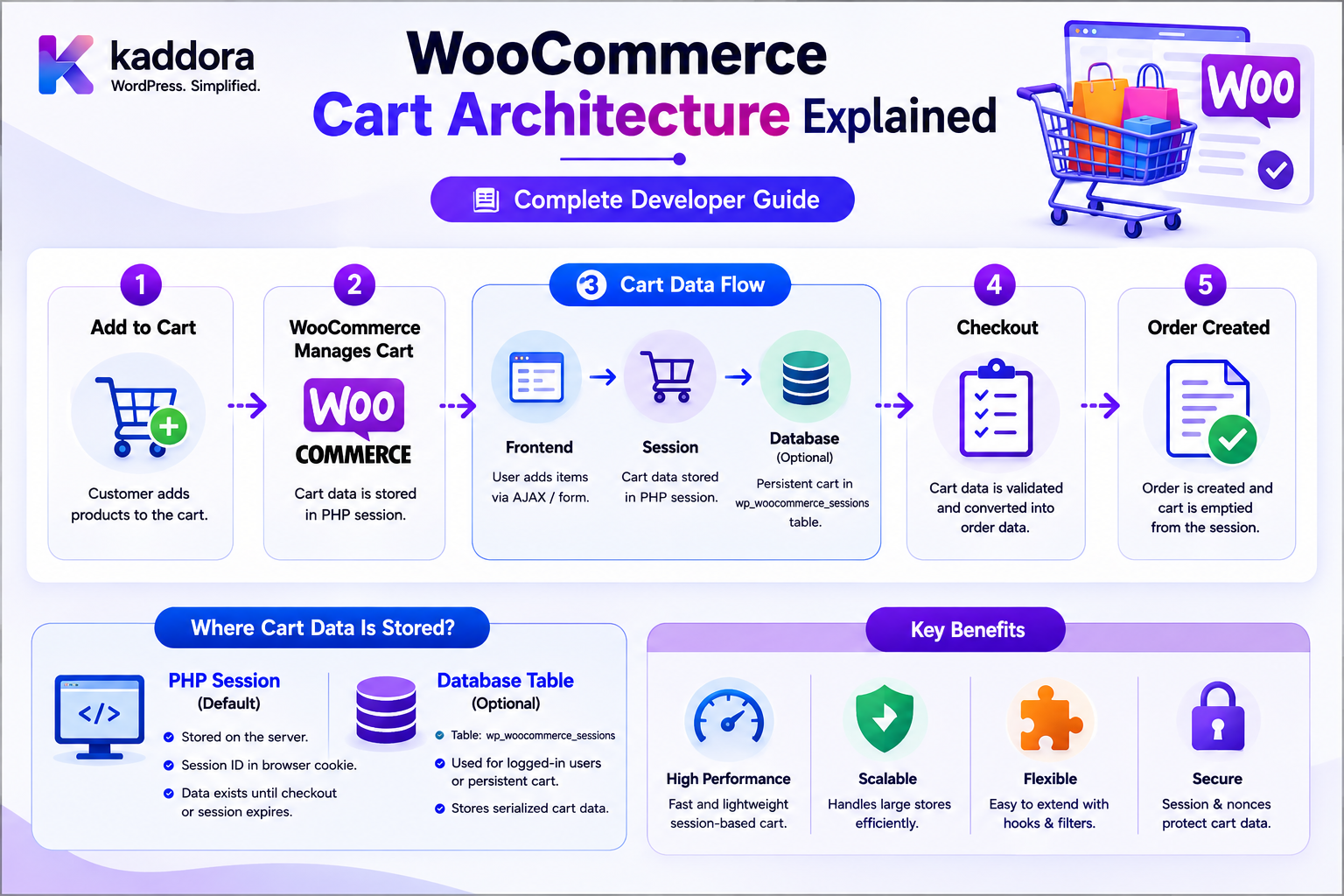
WooCommerce Cart Architecture Explained: Complete Developer Guide
Introduction
The WooCommerce cart looks simple from the customer's perspective:
Product ↓ Add to Cart ↓ Cart ↓ Checkout
Internally, however, the cart is a dynamic state-management system.
It must keep track of:
Products Quantities Variations Prices Discounts Coupons Shipping Taxes Customer Information Shipping Rates Fees Availability Session State
As the shopper changes the cart, WooCommerce may need to recalculate:
Subtotal Discounts Taxes Shipping Fees Total
The architecture also has to work for:
Guest Shoppers Registered Customers Classic Cart Cart Blocks Checkout Blocks Store API Headless Applications Mobile Experiences Custom Extensions
Modern WooCommerce Cart and Checkout Blocks use the Store API to communicate with the server, while the server remains the source of truth for critical cart and checkout data. WooCommerce specifically identifies cart items, quantities, prices, totals, customer information, shipping rates, and applied coupons as server-side data.
A simplified architecture is:
Shopper ↓ Cart UI ↓ WooCommerce Cart Layer ↓ Session / Server State ↓ Products / Pricing / Taxes / Shipping ↓ Cart Totals
The key principle is:
A WooCommerce cart is server-authoritative transactional state with a client-facing representation; extensions should modify cart behavior through WooCommerce APIs and supported Store API or Cart/Checkout extension points rather than treating browser state as the source of truth.
What Is the WooCommerce Cart?
The WooCommerce cart is the current collection of products and related purchase state that a shopper intends to buy.
A basic cart can contain:
Product A × 2 Product B × 1
But the effective cart state can also include:
Coupons Taxes Shipping Fees Customer Address Shipping Method Discounts Totals
Cart vs Order
These are different business objects.
Cart
Temporary shopping state.
Order
Persistent purchase record.
The basic flow is:
Cart ↓ Checkout ↓ Order
The cart may change repeatedly before checkout.
Once the order is created, the transaction becomes a persistent order.
Cart vs Product
A product is catalog data.
A cart item is a product currently selected by a shopper.
For example:
Product: Laptop Cart Item: Laptop Quantity: 2 Selected Variation: 16GB / 512GB
The cart therefore contains purchase context that is not the same as the product catalog record.
Cart vs Customer
A customer represents an account or shopper identity.
The cart represents current shopping state.
Conceptually:
Customer ↓ Current Session ↓ Cart
A guest shopper can have a cart without having a registered WooCommerce customer account.
Guest Cart Architecture
A guest shopper can follow:
Visitor ↓ Session Created ↓ Add Product ↓ Cart ↓ Checkout
No permanent account is necessarily required.
Registered Customer Cart
A registered customer can have:
WordPress Account ↓ WooCommerce Customer ↓ Session ↓ Cart
The customer identity and cart state remain related but distinct.
Why Sessions Matter
The cart must persist across multiple HTTP requests.
For example:
Request 1: Add Product Request 2: View Cart Request 3: Change Quantity Request 4: Apply Coupon Request 5: Checkout
The server needs a way to associate these requests with the same shopping context.
WooCommerce uses customer sessions for this purpose. Its cookie documentation identifies the wp_woocommerce_session_ cookie as a unique code used to locate a customer's cart data, with a default duration of two days.
WooCommerce Cart Session
WooCommerce includes a dedicated WC_Cart_Session class responsible for cart-session handling. The current WooCommerce code reference shows that it initializes cart-session hooks and retrieves the cart from session state.
Conceptually:
Browser ↓ WooCommerce Session Identifier ↓ Server-Side Cart State ↓ WC_Cart
Default Cart Session Duration
WooCommerce's current documentation states that when a visitor first adds a product to the cart, a session is started with a default lifetime of 48 hours. When the session expires, the cart items are forgotten. This cart-session duration is separate from WooCommerce's "Hold Stock" setting.
Cart Session vs Hold Stock
These two mechanisms are often confused.
Cart Session
Controls how long shopping-session data remains available.
Hold Stock
Controls inventory reservation behavior for certain unpaid orders.
WooCommerce explicitly documents that changing the cart session length does not change the inventory Hold Stock setting.
Cart State
A cart can contain:
Items Coupons Shipping Address Shipping Rates Customer Information Totals
The Store API's Cart endpoint returns the current cart state for the current session or logged-in user.
Cart Items
Each cart item represents a product selection.
Conceptually:
Cart ├── Product A × 2 ├── Product B × 1 └── Product C × 3
A cart item can also contain:
Variation Custom Options Quantity Price Context Product Information
Cart Item Key
WooCommerce internally needs to distinguish separate cart entries.
For example:
Product: T-Shirt Variation: Large / Black
and:
Product: T-Shirt Variation: Medium / White
should normally become separate cart items.
The Cart Store API response includes a cart-item key along with product ID and quantity.
Product ID vs Cart Item Key
These are not the same.
Product ID
Identifies the catalog product.
Cart Item Key
Identifies the specific entry in the current cart.
This distinction becomes important when:
Same Product + Different Variation
or custom cart-item data causes separate entries.
Cart Quantity
Every cart item has a quantity.
For example:
Product: Notebook Quantity: 4
The system must enforce appropriate quantity limits.
The Store API exposes quantity-limit information such as minimum, maximum, and multiples for cart items.
Quantity Validation
A custom cart endpoint should not simply trust:
quantity=999999
WooCommerce must validate:
Minimum Maximum Multiple Stock Purchasability
according to the product and store rules.
Sold Individually
Some products can be configured to allow only one unit per cart.
Conceptually:
Product: License Maximum Cart Quantity: 1
The cart layer must respect product configuration.
Product Availability
Adding a product to the cart does not mean the product is permanently reserved.
The system may need to verify:
Published Purchasable In Stock Allowed Quantity Variation Valid
Stock and Cart State
Stock availability can change after an item enters a cart.
For example:
10 Units Available Customer Adds: 5 Another Customer Buys: 7 Remaining: 3
The first cart may now require revalidation.
Therefore:
Cart state is not a permanent inventory guarantee.
Cart Totals
WooCommerce calculates several totals.
A conceptual model is:
Product Subtotal + Fees + Shipping + Tax - Discounts = Cart Total
The actual calculation can be more sophisticated depending on store configuration.
Why Cart Totals Must Be Server-Side
A malicious client could otherwise submit:
total = 10
for an item worth:
₹10,000
WooCommerce's Store API documentation explicitly identifies cart totals, taxes, fees, subtotals, and other critical transaction information as server-side data.
Client State vs Server State
The browser can display:
Quantity: 3
but the authoritative quantity is maintained by the server.
The browser is effectively a client of the cart system.
Store API
WooCommerce provides the Store API for customer-facing cart and checkout interactions.
The Cart API supports operations such as:
GET /cart
and related cart endpoints for modifying cart state.
Current Cart Endpoint
A request to:
/wp-json/wc/store/v1/cart
returns the current cart state for the current session or logged-in user.
Cart Store in JavaScript
WooCommerce Blocks also maintain client-side cart state through:
wc/store/cart
The WooCommerce documentation describes the Cart Store as managing and retrieving cart data, including items, customer information, coupons, and shipping-related interactions.
Client Cart Store Is Not the Source of Truth
The frontend store is useful for:
Rendering User Interaction Temporary UI State Optimistic Updates
But persistent transactional data remains server-authoritative.
Cart Block Architecture
The modern Cart and Checkout Blocks use the Store API to interact with the WooCommerce server.
WooCommerce describes the blocks as relying on server-fetched data and updating that data as shoppers interact with the interface.
A simplified flow is:
Cart Block ↓ Store API ↓ Server Cart ↓ WooCommerce
Page Load
When the Cart or Checkout block is loaded, WooCommerce hydrates the client-side data stores with server-provided state.
Conceptually:
Server Cart ↓ HTTP Response ↓ wc/store/cart ↓ UI
Shopper Changes Quantity
A quantity change follows the general architecture:
User ↓ Cart UI ↓ Client State ↓ Server Request ↓ WooCommerce Cart ↓ Recalculate ↓ Updated Cart ↓ Client State ↓ UI
The server response becomes the authoritative updated state.
Applying Coupons
Coupons are also cart state.
The Cart API supports applied coupons and related cart operations.
Conceptually:
Coupon Code ↓ Server Validation ↓ Discount Calculation ↓ Updated Cart
Why Coupon Validation Is Server-Side
A browser should never be trusted to declare:
coupon_valid = true discount = ₹2,000
WooCommerce must evaluate:
Coupon Eligibility Usage Rules Cart Contents Dates Customer Conditions
Shipping Address
Cart state can depend on shipping information.
For example:
Country State Postcode City
These values can influence:
Shipping Rates Tax Availability
Shipping Rates
A shopper may see:
Standard: ₹100 Express: ₹250
The available methods can change as destination or cart contents change.
Shipping Calculation
The server may need to evaluate:
Products Weight Dimensions Shipping Classes Destination Shipping Zones Methods
before returning valid rates.
Tax Calculation
Cart tax may depend on:
Customer Location Store Location Product Tax Class Shipping Cart Contents Tax Configuration
This is another reason totals must be calculated server-side.
Fees
Extensions can add cart fees when business rules require them.
For example:
Handling Fee: ₹50
A fee should be generated according to server-side rules rather than accepted from a browser.
Dynamic Pricing
Cart pricing can be affected by:
Quantity Customer Group Coupons Campaigns Membership B2B Rules
Custom pricing extensions must integrate with WooCommerce's cart calculation lifecycle.
Cart Calculation Lifecycle
Conceptually:
Cart Contents ↓ Product Validation ↓ Prices ↓ Discounts ↓ Fees ↓ Shipping ↓ Taxes ↓ Totals
Extensions can participate through WooCommerce's supported cart and checkout hooks or block extension APIs.
Custom Cart Item Data
Some extensions need additional information.
Examples:
Engraving Text Gift Message Custom Configuration Product Add-On Selected Service
This data may need to travel with the cart item into checkout and eventually the order.
Don't Trust Custom Cart Data
Suppose a shopper submits:
service_price = 100
while the actual service costs:
₹1,000
The server must derive price-related information from trusted product and business rules.
Cart Item Persistence
Cart item information can be persisted in the customer's server-side session.
WooCommerce's cart/session architecture handles loading cart contents from session state and saving changes back to that state.
Session-Based Cart Persistence
A simplified architecture is:
Cart ↓ WC_Cart_Session ↓ Customer Session ↓ Database / Session Storage
The exact persistence implementation is managed by WooCommerce.
Cart Hash
WooCommerce uses cart-related cookies including:
woocommerce_cart_hash woocommerce_items_in_cart
The cookie documentation identifies these as frontend cookies used to help WooCommerce determine when cart contents/data changes.
These cookies should not be confused with the complete cart itself.
Session Cookie
WooCommerce also uses a wp_woocommerce_session_ cookie containing a unique code used to locate the shopper's cart data.
The browser holds the identifier; the cart data is maintained server-side.
Cart Token Architecture
The Store API can also use a Cart Token for headless or session-oriented interactions.
WooCommerce documents Cart Tokens as an alternative to cookie-based sessions for identifying carts.
Cart Tokens
A request to the Cart API can return a:
Cart-Token
which can later be sent in the Cart-Token request header.
Conceptually:
Headless Client ↓ Cart API ↓ Cart Token ↓ Server Cart
Cart Token vs Nonce
For Cart API POST endpoints, WooCommerce documents that requests require either a Nonce Token or a Cart Token.
The exact choice depends on the architecture and client.
Headless Commerce
A headless frontend may use:
React Next.js Mobile App Custom Storefront
while WooCommerce remains the commerce backend.
A simplified flow:
Headless Client ↓ WooCommerce Store API ↓ Cart ↓ Checkout
Why Headless Cart Architecture Needs Care
The frontend may be completely separate from WordPress.
Therefore the cart identity must still be maintained securely through:
Cart Token Session Authentication
depending on the architecture.
Cart Persistence Across Devices
A guest cart normally belongs to its current session.
A registered customer's shopping context may involve logged-in customer state and session mechanisms.
Do not assume that every cart automatically follows a customer across every device.
Define the desired persistence behavior explicitly.
Cart and Login
A shopper may:
Add Items as Guest ↓ Log In ↓ Continue Shopping
A commerce implementation needs predictable rules for how session and account state are reconciled.
Extensions should not blindly overwrite cart state during authentication changes.
Cart Merging
Some custom commerce systems implement:
Guest Cart + Customer Cart = Merged Cart
If implementing such behavior, define:
Duplicate Items Quantities Coupons Shipping Custom Data
carefully.
Duplicate Cart Items
A product may appear multiple times if cart-item identity differs.
For example:
T-Shirt Large / Black T-Shirt Medium / Black
These are distinct configurations.
Cart Item Removal
Removing an item should be based on the cart item's valid key or supported cart APIs rather than trusting arbitrary product IDs.
Cart Item Update
An update should verify:
Item Exists Quantity Valid Product Available Variation Valid Cart Ownership
before updating.
Cart Ownership
A user should only be able to modify:
Their Current Cart
not another customer's cart.
Cart IDOR
Avoid APIs such as:
POST /cart/500/remove
where 500 can be manipulated to access another customer's shopping session.
The server should derive cart identity from the authenticated/session context or a securely validated cart token.
Cart API Security
Custom cart endpoints should enforce:
Authentication / Session Cart Ownership Nonce or Cart Token Input Validation Business Rules
depending on the endpoint and architecture.
Cart and CSRF
Browser-based state-changing requests need appropriate request-forgery protection.
For WooCommerce Store API cart POST requests, WooCommerce supports nonce or Cart Token mechanisms.
Cart and Product Visibility
A product being visible in the catalog does not automatically mean it can be added to every customer's cart.
Custom rules may restrict:
Customer Group Region Membership Stock Catalog
The server must enforce those rules during cart operations.
Cart and B2B Pricing
A B2B cart may depend on:
Company Customer Group Contract Quantity Product
The final price should be calculated by trusted server-side business logic.
Cart and Product Add-Ons
A product-add-on extension might store:
Engraving: "Kaddora"
with the cart item.
When creating the order, this information may need to be persisted appropriately.
Cart and Product Bundles
A bundle may contain:
Parent Bundle ├── Product A ├── Product B └── Product C
The cart architecture must preserve the relationship between parent and child selections.
Cart and Composite Products
Custom configuration products may involve:
Component A Component B Quantity Configuration
The cart item data should remain consistent through:
Cart ↓ Checkout ↓ Order
Cart and Subscription Products
Subscription products can introduce:
Recurring Price Billing Period Trial Sign-Up Fee
The cart may need to expose these values while the subscription system remains responsible for recurring billing behavior.
Cart and Coupons
Coupon application is part of cart state.
A coupon may depend on:
Products Quantity Customer Date Usage Limits Minimum Spend Maximum Spend
The server should evaluate eligibility.
Cart and Dynamic Discounts
Discount extensions may calculate:
Buy X Get Y Quantity Discount Customer Group Discount Bundle Discount Campaign Discount
These calculations should run on the server.
Cart and Taxes
Taxes can change when:
Shipping Address Changes Billing Address Changes Product Changes Shipping Method Changes
Therefore the cart needs recalculation after relevant state changes.
Cart and Shipping
Changing:
Country State Postcode
may change shipping methods and taxes.
Cart updates therefore can trigger multiple dependent calculations.
Cart Dependency Graph
A conceptual model is:
Products ↓ Quantity ↓ Pricing ↓ Discounts ↓ Shipping ↓ Taxes ↓ Totals
Changing an upstream value can require downstream recalculation.
Cart Recalculation
When cart state changes:
Quantity Changed ↓ Recalculate ↓ New Subtotal ↓ New Discounts ↓ New Shipping ↓ New Taxes ↓ New Total
The result should come from the server.
Cart Blocks and Server Truth
WooCommerce's Cart and Checkout architecture explicitly treats the server as the source of truth for critical cart data.
This protects the integrity of:
Prices Totals Taxes Shipping Coupons Customer Data
Cart Blocks Data Store
The wc/store/cart client-side data store tracks cart information for the block interface. WooCommerce documents selectors and actions for cart details, coupons, shipping, and other interactions.
The architecture is therefore:
Server Cart ↕ Store API ↕ wc/store/cart ↕ Cart UI
Checkout Store vs Cart Store
WooCommerce separates:
wc/store/cart
and:
wc/store/checkout
The Cart Store handles cart-related information and interactions, while the Checkout Store manages checkout-related state such as customer/order information and checkout status.
Cart vs Checkout Architecture
Cart:
Items Quantities Coupons Shipping Totals
Checkout:
Customer Data Payment Checkout Status Order Processing
The systems work together but have different responsibilities.
Checkout Starts From Cart
A simplified flow:
Cart ↓ Checkout ↓ Payment ↓ Order
The checkout processor packages relevant client state and sends it to the server checkout endpoint for order processing.
Cart API Response
The Store API cart response can contain:
Items Applied Coupons Shipping Addresses Shipping Rates Non-Sensitive Customer Data
WooCommerce documents these fields as part of the cart response.
Sensitive Cart Information
Not every server-side cart field should be exposed to the client.
Custom extensions should return only information needed by the storefront.
Cart API Extensibility
Extensions can add dynamic data to Store API responses when the client needs server-derived information.
WooCommerce's data-flow documentation explains that dynamic data can be added to cart API responses, which are used repeatedly during Cart and Checkout Block interactions.
Custom Cart Data in Blocks
Suppose a plugin needs to display:
Estimated Delivery: Tomorrow
The value should be calculated server-side and exposed through an appropriate Store API extension mechanism when it depends on current cart state.
Don't Calculate Sensitive Commerce Values Only in JavaScript
Avoid making the browser authoritative for:
Discount Tax Shipping Price Final Total
Those values should be generated by the server.
Cart Performance
Cart requests occur frequently.
A single shopper can cause multiple cart recalculations during:
Quantity Updates Coupon Changes Address Changes Shipping Changes Checkout
Poor cart extensions can therefore create noticeable performance problems.
Avoid Expensive Cart Hooks
A plugin that executes:
100 Database Queries
on every cart recalculation can significantly affect checkout performance.
Keep cart hooks efficient.
Avoid Remote API Calls During Every Cart Update
For example:
Cart Quantity Changed ↓ External API Call ↓ 5 Seconds
can produce a poor shopping experience.
Use caching or asynchronous architecture where business rules allow it.
Cart Calculation Caching
If an expensive calculation can be cached safely, consider:
Cart Context + Customer Context + Product Context = Cache Key
Never reuse customer-specific pricing results across customers.
Avoid Global Cart Caches
Do not globally cache:
My Cart My Totals My Discounts My Shipping
because cart state is user/session-specific.
Cart and Object Caching
WooCommerce and WordPress may use object caching internally.
Custom extensions should avoid assuming that cached objects can be modified without the proper WooCommerce save/update lifecycle.
Cart Data Consistency
A cart extension should always think about:
Add Update Remove Recalculate Checkout
If custom data is created during Add to Cart but not properly carried through to Checkout, the final order can become inconsistent.
Cart-to-Order Transfer
Custom cart information may need to become:
Order Metadata Order Item Metadata
when checkout creates the order.
For example:
Cart Item: Engraving = Kaddora Order Item: Engraving = Kaddora
The exact persistence mechanism depends on the extension.
Don't Trust Cart Data During Checkout
Checkout should revalidate important product, pricing, customer, tax, shipping, and eligibility information before creating the final order.
Cart state is a working state, not a substitute for final authorization and validation.
Cart and Inventory
A cart item does not necessarily mean inventory is permanently reserved.
A store may configure specific stock-holding behavior at the order stage.
Keep these concepts separate:
Cart Presence ≠ Inventory Reservation
Cart and Stock Race Conditions
Two shoppers may add the same limited-stock product to their carts.
The checkout process still needs to validate inventory.
The cart itself should not be treated as a guaranteed reservation unless a dedicated reservation system says so.
Custom Stock Reservation Systems
If building a stock-reservation extension:
Add to Cart ↓ Create Reservation ↓ Expiration ↓ Checkout ↓ Consume Reservation
you need careful handling of:
Concurrent Checkouts Expiration Payment Failure Cart Removal Order Cancellation Refunds
Cart and Customer Session Expiration
When the WooCommerce cart session expires:
Session Expired ↓ Cart Forgotten
WooCommerce's documentation states that the default cart session lasts 48 hours for a new visitor unless customized.
Persistent Cart Requirements
A business may want longer-lived carts.
If implementing this, distinguish:
Session Cart
from:
Persistent Saved Cart
A persistent saved-cart feature is a separate product decision from simply increasing the default session lifetime.
Shareable Cart Architecture
WooCommerce supports shareable checkout URLs that can populate a cart with specified products and a coupon, and the resulting session can persist future checkout changes.
This demonstrates that cart creation can be driven by controlled server-side parameters.
Validate Shareable Cart Inputs
Even with supported routes, custom extensions should validate:
Product Quantity Variation Coupon Eligibility
before modifying cart state.
Cart and Mobile Apps
Mobile applications can use the Store API and appropriate cart/session identification strategies.
Cart Tokens provide an alternative to cookie-based sessions for headless cart interactions.
Cart Token Security
A Cart Token identifies a cart.
Treat it as sensitive.
Do not:
Expose It in Logs Store It in Analytics Share It Unnecessarily
Cart Token vs User Authentication
A cart token identifies a cart context.
It is not automatically equivalent to a user's full account authorization.
Do not use a cart token as proof that the caller may access unrelated customer resources.
Cart and Multi-Tenant Stores
In a multi-tenant commerce application:
Tenant A ↓ Cart A
must remain isolated from:
Tenant B ↓ Cart B
Tenant context must be established server-side.
Cart IDOR in Multi-Tenant Systems
Never trust a browser parameter such as:
tenant_id cart_id
as proof of ownership.
The server should resolve the correct cart from trusted context.
Cart APIs and Authorization
Custom endpoints should enforce:
Session / Authentication Cart Ownership Nonce / Cart Token Tenant Product Eligibility Business Rules
Cart Event Architecture
Cart changes can trigger:
Analytics Recommendations Inventory Checks Shipping Recalculation Notifications
Do not make every event synchronous if the action is not required to complete the cart update.
Cart Event Idempotency
A repeated cart event should not create duplicate:
Reservations Notifications External API Calls
when those operations are meant to occur once.
Cart and Product Recommendations
A recommendation system can use:
Current Cart Product Catalog Customer Context
but must respect:
Catalog Visibility Customer Permissions B2B Pricing Inventory
AI Cart Recommendations
AI can suggest:
"Customers often buy a charger with this laptop."
But the recommendation system should not automatically modify:
Price Quantity Customer Data
without explicit business rules.
AI Cart Security
AI should receive only the cart information necessary for the recommendation.
Do not send:
Full Customer Database Private CRM Notes Internal Supplier Costs
to an AI provider merely because a cart recommendation needs product context.
Common WooCommerce Cart Architecture Mistakes
Treating Browser Cart State as Authoritative
The server must own critical transactional data.
Trusting Client Totals
Prices, taxes, discounts, shipping, and fees must be calculated server-side.
Confusing Cart Sessions With Inventory Reservations
A cart session does not automatically mean stock is reserved.
Using Global Caches
Personalized cart data can leak between customers.
Ignoring Guest Carts
Guest sessions are a normal WooCommerce workflow.
Using Product ID Instead of Cart Item Identity
Different variations or custom configurations can require different cart items.
Expensive Cart Hooks
Heavy database or API work can slow every cart interaction.
Ignoring Checkout Revalidation
Cart data can become stale before order creation.
Exposing Cart Tokens
Cart tokens should be treated as sensitive identifiers.
AI Receives Too Much Data
AI recommendations should use minimum necessary cart and product context.
WooCommerce Cart Architecture Checklist
- [ ] Understand WC_Cart - [ ] Understand cart sessions - [ ] Understand guest carts - [ ] Understand registered customer carts - [ ] Understand cart items - [ ] Understand cart item keys - [ ] Understand quantities - [ ] Understand coupons - [ ] Understand shipping - [ ] Understand taxes - [ ] Understand fees - [ ] Understand totals - [ ] Understand Store API - [ ] Understand Cart Store - [ ] Understand Checkout Store - [ ] Understand Cart Tokens - [ ] Validate cart mutations - [ ] Protect cart ownership - [ ] Protect customer data - [ ] Avoid client-side price authority - [ ] Avoid global cart caching - [ ] Optimize cart hooks - [ ] Avoid unnecessary remote calls - [ ] Handle stock changes - [ ] Revalidate during checkout - [ ] Persist custom cart data correctly - [ ] Transfer required data to orders - [ ] Test guest checkout - [ ] Test registered checkout - [ ] Test Cart Blocks - [ ] Test Store API - [ ] Test headless cart flows - [ ] Test concurrency
Best Practices for WooCommerce Cart Architecture
A professional cart implementation should:
Treat the server as the authoritative source for cart items, quantities, prices, taxes, shipping, fees, coupons, and other transactional state.
Use WooCommerce cart APIs and supported Cart/Checkout extension points rather than manipulating browser state as if it were authoritative.
Understand the distinction between the cart, customer, session, and order domains.
Support guest shoppers as well as registered customers.
Treat cart sessions as temporary shopping state and do not confuse them with inventory reservations.
Use supported Store API mechanisms for modern Cart and Checkout Blocks integrations.
Distinguish cart-item identity from product identity, especially for variations and custom configurations.
Validate every cart mutation against current product availability, quantity limits, pricing rules, customer eligibility, and business policies.
Never trust client-submitted totals, discounts, fees, taxes, shipping prices, or customer identifiers.
Keep personalized cart data out of shared global caches.
Treat Cart Tokens as sensitive identifiers and avoid unnecessarily exposing or logging them.
Keep custom cart calculations efficient because cart updates can occur frequently during the shopping journey.
Avoid synchronous calls to slow external services during every cart recalculation unless absolutely necessary.
Use caching only when the cache key safely represents the relevant product, customer, tenant, and pricing context.
Revalidate important cart state during checkout because inventory, prices, shipping, tax, and eligibility can change.
Ensure custom cart-item data survives the complete lifecycle when it needs to reach the final order.
Use queues and idempotent event processing for non-critical asynchronous integrations.
Keep customer, payment, pricing, inventory, and recommendation data scoped to the minimum necessary workflow.
Test classic cart flows, Cart Blocks, Store API interactions, guest shoppers, registered users, headless clients, and concurrency scenarios.
Treat cart performance as a checkout-quality concern, not merely a frontend optimization issue.
Why ThemeKaddora Is Worth Exploring
ThemeKaddora provides WordPress plugins and digital products designed for website owners, developers, agencies, and businesses.
Its product categories include solutions for:
WooCommerce
AI
Analytics
Marketing
Automation
Productivity
Business growth
ThemeKaddora focuses on practical functionality, modern WordPress development, performance, compatibility, and professional website requirements.
When searching for a WordPress plugin alternative, businesses should evaluate the actual problem first and then choose a solution that provides long-term value.
Conclusion
WooCommerce cart architecture is a dynamic state system.
A simplified model is:
Shopper ↓ Session / Cart Context ↓ Cart Items ↓ Pricing ↓ Discounts ↓ Shipping ↓ Taxes ↓ Totals ↓ Checkout ↓ Order
The first principle is the server is the source of truth.
WooCommerce explicitly identifies critical cart and checkout information as server-side data.
The second principle is separate cart state from order state.
The cart represents current shopping intent; the order represents the persisted transaction.
The third principle is understand sessions.
WooCommerce uses session mechanisms to maintain shopping state across requests, including a session identifier cookie that points WooCommerce toward the shopper's cart data.
The fourth principle is cart sessions are not inventory reservations.
WooCommerce explicitly separates cart-session expiration from its Hold Stock order setting.
The fifth principle is use Store API architecture for modern Blocks integrations.
Cart and Checkout Blocks communicate with WooCommerce through the Store API, while client-side stores represent server-provided state in the interface.
The sixth principle is do not trust the browser with transactional authority.
Prices, taxes, discounts, shipping, fees, quantities, and eligibility must be validated server-side.
The seventh principle is protect cart identity.
Whether the store uses cookies, sessions, or Cart Tokens, one shopper must not be able to manipulate another shopper's cart.
The eighth principle is keep cart extensions fast.
Cart operations happen frequently, so expensive queries and external API calls can directly affect shopping experience.
The ninth principle is revalidate during checkout.
A product can go out of stock, a price can change, or shipping availability can change between cart creation and final order creation.
The tenth principle is design the cart as a temporary but authoritative commerce state.
The cart can be short-lived, yet every server-side calculation within it must be trustworthy.
For ThemeKaddora, WooCommerce cart architecture can support:
Custom Cart Features Product Add-Ons Bundles Dynamic Pricing B2B Pricing Shipping Rules Tax Rules AI Recommendations Cart Recovery Stock Reservations Checkout Extensions Headless Commerce
The most important principle is:
The cart shown in the browser is a representation of server-side commerce state—not the authority for prices, discounts, inventory, customer identity, shipping, taxes, or final totals.
A professional WooCommerce cart architecture should be:
Server-Authoritative
→ Session-Aware
→ API-Driven
→ Secure
→ Performance-Conscious
→ Checkout-Ready
→ Guest-Compatible
→ Headless-Friendly
→ Scalable
→ Maintainable
When these principles are applied, WooCommerce can support sophisticated cart experiences while preserving pricing integrity, customer isolation, inventory accuracy, shipping correctness, and reliable checkout behavior.
Frequently Asked Questions
What is WooCommerce cart architecture?
It is the system that manages current shopping state, including cart items, quantities, coupons, customer context, shipping, taxes, fees, pricing, totals, and session persistence.
Where is WooCommerce cart data stored?
WooCommerce maintains cart-related data server-side through its customer/session mechanisms. The exact persistence mechanism is managed by WooCommerce rather than something extension code should hard-code.
How long does the WooCommerce cart session last?
WooCommerce's current documentation states that a new visitor's cart session defaults to 48 hours. When the session expires, the cart contents are forgotten.
Is a cart session the same as inventory reservation?
No. WooCommerce explicitly separates cart-session duration from the Hold Stock setting for pending-payment orders.
What is the WooCommerce Store API?
The Store API provides customer-facing endpoints for accessing and changing WooCommerce store state, including the current cart.
What is the WooCommerce Cart Store?
wc/store/cart is the client-side WooCommerce Blocks data store used to manage and retrieve cart-related state and interactions.
Can WooCommerce support headless carts?
Yes. WooCommerce provides Cart Tokens as an alternative to cookie-based sessions for headless cart interactions.
Can the browser control the final cart total?
No. Critical transactional data such as cart totals, taxes, fees, prices, and shipping information is server-authoritative.
What is a cart item key?
It identifies a specific cart entry. It is different from the catalog product ID and helps distinguish different variations or cart configurations.
Does adding an item to the cart reserve inventory?
Not necessarily. Cart presence and inventory reservation are separate concepts. Stores can have specific stock-holding workflows for orders.
Can custom data be added to WooCommerce cart items?
Yes. Extensions can associate custom data with cart items and carry required information through checkout into the resulting order.
Should cart data be globally cached?
No. Personalized cart state must not enter a shared cache where another shopper could receive it.
How should custom cart APIs be secured?
Validate the current session or authentication context, cart ownership, nonce or Cart Token requirements, input values, product eligibility, and business rules.
Can AI work with WooCommerce carts?
Yes. AI can provide product recommendations or cart assistance, but it should receive only the minimum cart and product information required and should not become an authority for pricing, authorization, or sensitive customer data.
Why choose Themekaddora?
Themekaddora provides lightweight, responsive, SEO-friendly WordPress themes with fast performance, WooCommerce compatibility, flexible customization, accessibility-conscious design, modern templates, regular updates, and professional support—providing a strong foundation for businesses building digital products and product-focused websites.
Comments (0)