
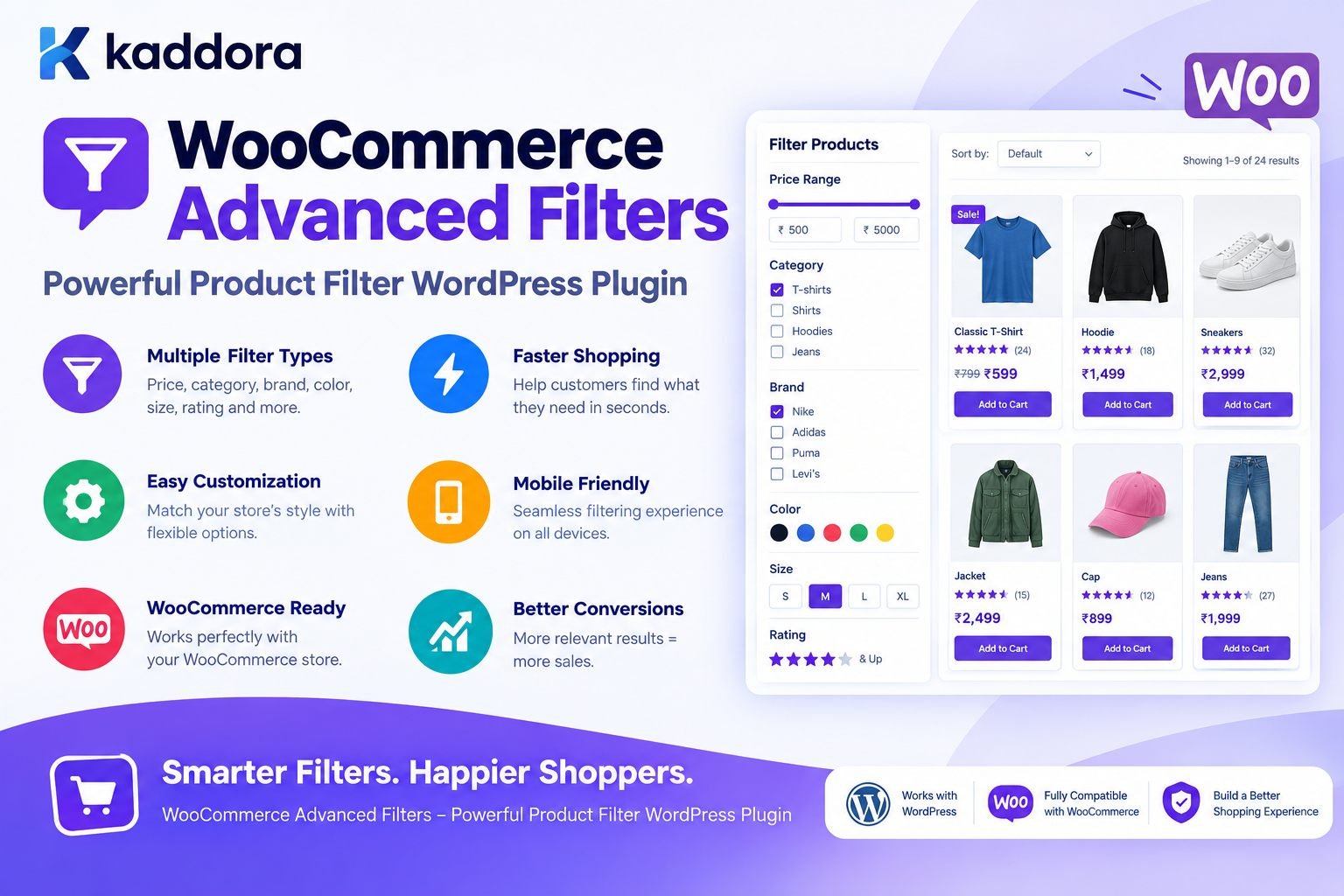
WooCommerce Advanced Filters – Powerful Product Filter WordPress Plugin
Introduction
Finding the right product should be easy.
As a WooCommerce store grows, however, shoppers can quickly become overwhelmed by large product catalogs.
A small store may contain:
20 Products
A growing ecommerce website might contain:
500 Products
A large store can contain:
5,000+ Products
or much more.
When visitors must browse page after page to find a suitable product, the shopping experience becomes slower and more frustrating.
For example, a customer may be looking for:
Black running shoes Price under ₹5,000 Size 9 Men's category Available in stock
Traditional category navigation may not make this process convenient.
This is where WooCommerce Advanced Filters – Kaddora WordPress Plugin can help.
The plugin is designed to provide a more flexible product filtering experience for WooCommerce stores, allowing shoppers to narrow product listings according to relevant criteria.
Instead of browsing hundreds of products manually, customers can combine filters and reach more relevant products faster.
The basic idea is:
WooCommerce Product Catalog ↓ Advanced Filters ↓ Narrow Results ↓ Relevant Products ↓ Better Shopping Experience
What Is WooCommerce Advanced Filters?
WooCommerce Advanced Filters is a WordPress plugin designed to help WooCommerce stores provide advanced product filtering functionality.
Depending on the store configuration and supported options, filters can be based on product information such as:
Categories
Tags
Attributes
Variations
Price
Product ratings
Stock status
Brands
Custom taxonomies
Other relevant product properties
A typical customer workflow can look like:
Open Shop ↓ Choose Category ↓ Choose Attributes ↓ Set Price Range ↓ Select Additional Filters ↓ View Matching Products
This gives shoppers more control over product discovery.
Why Product Filters Matter in WooCommerce
Product filtering becomes increasingly important as a catalog grows.
Imagine a store with:
500 Products
A customer may not want to see all 500 products.
They may only want:
Category: Laptops Brand: Example Brand RAM: 16 GB Storage: 512 GB Price: ₹50,000–₹80,000
Without filtering, the shopper has to inspect many products manually.
With filters:
500 Products ↓ Laptops ↓ 16 GB RAM ↓ 512 GB Storage ↓ ₹50,000–₹80,000 ↓ 8 Matching Products
The product discovery process becomes much more focused.
Key Benefits of WooCommerce Advanced Filters
A powerful filtering system can improve several parts of the ecommerce experience.
Faster Product Discovery
Customers can narrow large catalogs quickly.
Better Navigation
Filters provide another way to navigate products beyond categories and menus.
Flexible Shopping Experience
Visitors can combine multiple requirements.
Improved Product Discovery
Relevant products become easier to find.
Better Mobile Shopping
Well-designed filters can make large catalogs easier to browse on smaller screens.
Reduced Browsing Friction
Customers spend less time searching through irrelevant products.
Better Store Usability
A structured filtering system can make the shop easier to understand.
WooCommerce Filter by Product Category
Categories are one of the most common filtering methods.
For example, an electronics store may use:
Electronics ├── Laptops ├── Smartphones ├── Tablets ├── Headphones └── Accessories
A visitor can choose:
Category → Laptops
and narrow the catalog to relevant products.
Category filtering works particularly well when a store contains many unrelated product groups.
WooCommerce Filter by Attributes
WooCommerce attributes are powerful because they allow stores to describe product characteristics.
Examples include:
Color Size Material Storage RAM Weight Brand Capacity Style
A fashion store might use:
Color → Black Size → Large Material → Cotton
An electronics store could use:
RAM → 16 GB Storage → 512 GB Screen Size → 15.6"
Advanced filtering allows shoppers to combine these attributes.
WooCommerce Filter by Price
Price filtering is important for many ecommerce purchases.
A customer may already have a budget:
₹1,000 – ₹3,000
or:
₹10,000 – ₹25,000
A price filter can allow the customer to narrow the catalog without manually opening every product.
The workflow becomes:
All Products ↓ Set Price Range ↓ Show Matching Products
This is especially useful for large product catalogs.
WooCommerce Price Slider
A price slider can provide a more interactive experience.
For example:
₹500 ───────────── ₹10,000 [ Slider ]
The visitor can select the desired range visually.
A well-designed slider should remain:
Responsive
Accessible
Easy to operate
Accurate
Mobile-friendly
WooCommerce Filter by Tags
Product tags can provide another useful filtering dimension.
For example:
New Arrival Best Seller Summer Organic Premium Sale Limited Edition
Customers can use relevant tags to discover products matching their interests.
However, store owners should maintain a consistent tagging strategy.
Poorly managed tags can create a confusing filter interface.
WooCommerce Filter by Stock Status
Stock availability can also be useful.
A customer may only want products that can be purchased immediately.
For example:
✓ In Stock
rather than:
In Stock Out of Stock Backorder
Stock filtering can be especially useful for stores with large catalogs.
The filtering experience should reflect current WooCommerce product availability.
WooCommerce Filter by Rating
Product ratings can help customers narrow down a large selection.
For example:
★★★★★ ★★★★☆ ★★★☆☆
A shopper might choose:
4 stars and above
and focus on products with stronger customer ratings.
Ratings are particularly useful for marketplaces and stores with large numbers of customer-reviewed products.
WooCommerce Filter by Brand
Brand filtering can be valuable for stores that sell products from multiple manufacturers.
For example:
Brands □ Apple □ Samsung □ Lenovo □ Dell □ HP
A visitor looking specifically for Lenovo laptops can combine:
Brand → Lenovo
with:
RAM → 16 GB Price → ₹50,000–₹80,000
This creates a much more precise product search.
WooCommerce Filter by Custom Product Properties
Different stores have different product requirements.
A furniture store might need:
Material Color Room Style Width Height
A clothing store might need:
Size Color Fabric Fit Gender Collection
A grocery store might use:
Diet Organic Brand Weight Category
Advanced product filtering becomes more useful when it reflects the way customers actually compare products.
Multiple Filters at the Same Time
The biggest advantage of advanced filtering is the ability to combine criteria.
For example:
Category → Running Shoes Color → Black Size → 9 Price → ₹3,000–₹6,000 Rating → 4+ Stock → In Stock
The system can then display only products that match the selected criteria.
Conceptually:
Product Catalog ↓ Category ↓ Attribute ↓ Price ↓ Rating ↓ Stock ↓ Filtered Products
This can make large catalogs substantially easier to browse.
AJAX Product Filtering
A modern WooCommerce filtering experience can use AJAX to update product results without requiring a complete page reload.
The experience can look like:
Select Filter ↓ AJAX Request ↓ Update Product Results
Instead of:
Select Filter ↓ Full Page Reload ↓ New Product Page
The reduced navigation friction can create a smoother browsing experience when implemented efficiently.
The exact AJAX behavior depends on the plugin configuration.
Why AJAX Filters Can Improve User Experience
Consider a shopper changing these filters:
Color → Black Size → 9 Price → ₹3,000–₹5,000
If every change requires a complete page reload, the interaction can feel slow.
With an AJAX-based interface:
Filter Change ↓ Background Request ↓ Update Results
the customer can remain on the same page while the results update.
A good implementation should still provide:
Loading indicators
Clear result updates
Error handling
Keyboard accessibility
Mobile support
Mobile-Friendly WooCommerce Filters
Many ecommerce visitors use mobile devices.
Desktop filters often appear in a sidebar:
┌─────────────┬───────────────────────┐ │ Filters │ Products │ │ │ │ │ Category │ Product Product │ │ Price │ Product Product │ │ Brand │ Product Product │ └─────────────┴───────────────────────┘
On mobile, a better approach may be:
[ Filter Products ]
which opens a dedicated filter panel.
Mobile filters should avoid covering the entire shopping experience unnecessarily and should be easy to close.
Sidebar Product Filters
A sidebar is a popular desktop layout.
For example:
FILTERS Category □ Shoes □ Boots □ Sandals Price ₹500 ───── ₹5,000 Color □ Black □ White □ Blue Size □ 7 □ 8 □ 9
The product grid remains visible alongside the filter controls.
This works well for desktop ecommerce layouts with sufficient screen width.
Filter Drawer for Mobile
For smartphones, a filter drawer can be more practical.
Example:
Products [ Filter Products ] ------------------- Filter Panel Category Price Color Size Brand [ Apply Filters ]
The filter panel can then close after the customer applies the selection.
This keeps the product grid visible while still providing advanced search capabilities.
Filter by WooCommerce Variations
Variable products often have attributes such as:
Color Size Storage Capacity
For example:
T-Shirt ├── Small / Black ├── Medium / Black ├── Large / Black ├── Small / White └── Large / White
A filtering system can use these product characteristics to help customers identify relevant products.
The actual variation filtering behavior should be configured according to the store's product structure.
WooCommerce Filters and Product Attributes
Attributes are especially important because they allow store owners to create structured product information.
For example:
Attribute: Color Terms: Black White Blue Red
The filter system can then present:
Color □ Black □ White □ Blue □ Red
This gives customers a consistent way to navigate products.
Filter UX and Clear Selections
A good filtering interface should clearly communicate what the shopper has selected.
For example:
Active Filters: Category: Shoes × Color: Black × Size: 9 × Price: ₹3,000–₹5,000 × [ Clear All ]
This makes it easy to adjust the search.
Without visible selections, users may not understand why only certain products are displayed.
Result Counts
Filter result counts can provide useful feedback.
For example:
Black 42 White 31 Blue 18
or:
Running Shoes (125)
When accurate, result counts help visitors understand the size of each selection.
The underlying queries should be efficient enough to avoid making every filter change unnecessarily expensive.
Empty Filter Results
Sometimes a combination of filters produces no products.
For example:
Color: Black Size: 12 Price: ₹1,000–₹1,500
might return:
No products found.
A good UX should make recovery easy.
For example:
No products match your current filters. [ Clear Filters ]
or:
Try removing one or more filters.
This is better than leaving the shopper on a confusing blank page.
SEO and WooCommerce Product Filters
Filtering improves product discovery, but stores should be careful about creating thousands of crawlable filter URLs.
Dynamic filter combinations can potentially create many URL variations such as:
/shop/?color=black /shop/?color=black&size=9 /shop/?color=black&size=9&brand=example
Store owners should have a deliberate SEO strategy for filter URLs.
The filtering interface should primarily improve customer navigation rather than automatically creating large numbers of indexable pages.
Product Filters and SEO Strategy
A strong WooCommerce SEO strategy can combine:
Category Pages + Product Pages + Useful Landing Pages + Structured Product Data + Internal Linking + Advanced Filtering
Filters help users find products.
SEO landing pages can target intentionally selected, valuable search themes.
These are different functions and should not be confused.
Performance and WooCommerce Filters
Filtering can become expensive on large catalogs if the implementation performs inefficient database queries.
Performance considerations include:
Efficient product queries
Proper taxonomy usage
Pagination
Limited result sets
Optimized AJAX requests
Avoiding unnecessary repeated queries
Appropriate indexes where custom data requires them
Efficient count calculations
A good filter system should remain responsive as the catalog grows.
Do Not Query Every Product Into PHP
An inefficient implementation might:
Load Every Product ↓ Loop Through Products ↓ Apply Filters in PHP ↓ Display Results
This becomes increasingly expensive as the catalog grows.
A better approach is generally:
Filter Criteria ↓ WooCommerce / WordPress Query ↓ Database Filters Products ↓ Return Required Results
Filtering should be pushed into the query layer wherever practical.
Caching Filter Results
For stores with repeated filter combinations, caching can sometimes reduce repeated work.
For example:
Filter Combination ↓ Cache Check ┌────┴────┐ Hit Miss ↓ ↓ Results Database ↓ Cache
However, caching product results requires careful invalidation when:
Products change
Stock changes
Prices change
Categories change
Attributes change
Caching should be introduced only when it provides measurable value.
Product Filter and WooCommerce Catalog Structure
The quality of filtering depends partly on the quality of the underlying product data.
For example:
Product ├── Category ├── Brand ├── Color ├── Size ├── Material ├── Price └── Stock
If products have inconsistent attributes, filters will also become inconsistent.
Store owners should establish a clean product taxonomy strategy.
Kaddora WooCommerce Filters for Fashion Stores
Fashion ecommerce websites can benefit from filters such as:
Category Gender Size Color Fabric Fit Brand Price Collection Availability
A shopper could quickly find:
Men → Shirts → Cotton → Blue → Large → Under ₹2,000
This is much easier than browsing every shirt manually.
Kaddora WooCommerce Filters for Electronics Stores
Electronics stores can use filters such as:
Brand Price RAM Storage Screen Size Processor Battery Color Availability Rating
For example:
Laptops → Lenovo → 16 GB RAM → 512 GB SSD → Under ₹80,000
The result can be a much smaller and more relevant product set.
Kaddora WooCommerce Filters for Furniture Stores
Furniture stores may use:
Category Material Color Style Room Width Height Price Availability
A customer searching for a dining chair may choose:
Dining Chairs → Wooden → Brown → Modern → Under ₹5,000
Advanced filters can make these combinations easier to explore.
Kaddora WooCommerce Filters for Grocery Stores
Grocery websites may require:
Category Brand Diet Organic Weight Price Pack Size Availability
Customers could narrow results to:
Organic → Snacks → Under ₹500 → Available
The filter structure should match the products and shopping behavior of the store.
Advanced Filters for Large Product Catalogs
The larger the catalog, the more important filtering becomes.
A useful architecture might be:
Large Catalog ↓ Product Taxonomy ↓ Filter Configuration ↓ User Selections ↓ Optimized Query ↓ Filtered Product Grid
This turns filtering from a cosmetic feature into an important part of product discovery.
Accessibility Considerations
Filtering interfaces should work for as many users as possible.
Important considerations include:
Keyboard Navigation
Users should be able to navigate filters without requiring a mouse.
Labels
Checkboxes, sliders, buttons, and controls should have clear labels.
Focus States
Keyboard focus should remain visible.
Screen Reader Support
Dynamic filter updates should communicate relevant changes appropriately.
Mobile Controls
Touch controls should be sufficiently large and easy to operate.
Clear Feedback
Loading and result states should be understandable.
Accessibility should be considered throughout the design rather than added after implementation.
Security Considerations
WooCommerce filtering may look simple, but WordPress security practices still matter.
A professional implementation should:
Validate filter inputs.
Sanitize administrative settings.
Escape output.
Use capability checks for settings.
Use nonce protection for administrative actions.
Prevent arbitrary query fragments.
Validate pagination values.
Restrict dynamic sorting fields.
Avoid accepting raw SQL from frontend requests.
For example, never allow a visitor to submit something like:
order_by=RAW SQL
and place that value directly into a database query.
Filter Configuration Security
If administrators can configure:
Filter Labels Filter Values Display Rules Sort Options Taxonomies
those settings should be validated before being stored.
Frontend visitors should only be able to interact with approved filter options.
This creates a clean separation:
Administrator ↓ Filter Configuration ↓ Approved Options ↓ Visitor Interaction ↓ Validated Query
Installation of WooCommerce Advanced Filters
A typical WordPress installation workflow is:
Step 1: Upload the Plugin
Go to:
WordPress Dashboard → Plugins → Add New → Upload Plugin
Upload the WooCommerce Advanced Filters ZIP package.
Step 2: Install
Click:
Install Now
Step 3: Activate
Select:
Activate Plugin
Step 4: Configure Filters
Open the plugin settings area and configure the filter options supported by your store.
Step 5: Select Product Filters
Choose the attributes and product data that customers should be able to filter.
Step 6: Configure Display
Choose where filters should appear, such as:
Shop Sidebar Product Archive Filter Drawer Mobile Panel
Step 7: Test
Test the filtering experience across:
Desktop
Tablet
Mobile
Different product categories
Variable products
Large result sets
Recommended WooCommerce Filter Configuration
A typical store might use:
Category ✓ Price ✓ Brand ✓ Color ✓ Size ✓ Rating ✓ Stock Status ✓ Tags Optional
Not every store needs every available filter.
The best filter configuration depends on the products and the way customers shop.
WooCommerce Filters and Search Together
Filtering and search solve related but different problems.
Search:
"I need a black leather office chair"
Filters:
Category → Office Chairs Color → Black Material → Leather
A strong ecommerce experience can combine both.
For example:
Search + Filters ↓ Relevant Products
This gives customers multiple ways to reach the right product.
Product Filters and Sorting
Filtering determines:
Which products should be shown?
Sorting determines:
In what order should they appear?
Useful sorting options may include:
Price: Low to High Price: High to Low Newest Popularity Average Rating Featured
Sorting should remain separate from filtering while working alongside it.
Kaddora Advanced Filters and Product Discovery
The purpose of advanced filtering is not to make the store interface more complicated.
The purpose is to reduce complexity for the shopper.
Without filters:
Large Product Catalog ↓ Manual Browsing ↓ Many Product Pages
With effective filters:
Large Product Catalog ↓ Customer Requirements ↓ Filter ↓ Smaller Product Set
The interface becomes more useful precisely because the customer sees less irrelevant information.
Common WooCommerce Filter Mistakes
1. Too Many Filters
Displaying every possible attribute can overwhelm shoppers.
2. Inconsistent Attributes
Products must use structured and consistent attributes.
3. Poor Mobile Design
Desktop sidebars do not automatically translate well to mobile.
4. Slow AJAX Requests
Filtering should feel responsive.
5. No Clear All Option
Customers should be able to reset their selections easily.
6. No Empty-State Message
Zero-result searches need a clear recovery path.
7. Querying Excessive Data
Do not load the entire catalog into PHP unnecessarily.
8. Creating Indexable Filter URL Explosion
Store owners should carefully control the SEO strategy around dynamic filter URLs.
9. Ignoring Accessibility
Filters must be usable with keyboards and assistive technologies.
10. Using Filters That Customers Do Not Need
Filter design should be based on actual shopping behavior.
WooCommerce Advanced Filters Best Practices
Keep Filters Relevant
Only display filters that help customers make product decisions.
Use Consistent Product Data
Clean taxonomies create better filtering.
Support Multiple Criteria
Allow visitors to narrow results progressively.
Make Mobile a Priority
Provide a practical filter drawer or panel for smaller screens.
Use AJAX Carefully
Dynamic updates can improve UX when implemented efficiently.
Provide Clear Active Filters
Customers should always know what is selected.
Include a Reset Option
A simple clear-all action is important.
Handle Zero Results Properly
Give visitors an easy way to broaden the search.
Protect Performance
Use efficient queries and avoid unnecessary database work.
Consider SEO Separately
Improve navigation without generating uncontrolled search URL combinations.
WooCommerce Advanced Filters Checklist
Before launching a filter system, verify:
Product Data
Product attributes are consistent.
Categories are logically organized.
Brands are standardized where applicable.
Product prices are accurate.
Stock information is current.
Filter UX
Filters are easy to understand.
Multiple filters can be combined.
Active filters are visible.
Clear-all functionality exists.
Zero-result states are handled.
Mobile filtering is usable.
Performance
Product queries are optimized.
AJAX requests are efficient.
Large catalogs are paginated.
Excessive product data is not loaded into PHP.
Caching is used only where appropriate.
Accessibility
Filters are keyboard accessible.
Labels are clear.
Focus states are visible.
Dynamic updates are communicated appropriately.
Mobile controls are usable.
Security
Filter inputs are validated.
Settings are sanitized.
Output is escaped.
Administrative actions are protected.
Raw SQL is never accepted from users.
Why Choose ThemeKaddora?
ThemeKaddora focuses on practical WordPress and WooCommerce solutions designed around real website and ecommerce requirements.
For stores with large product catalogs, effective filtering is not simply a visual enhancement. It can become an important part of the shopping experience.
WooCommerce Advanced Filters can help businesses build a more organized product discovery workflow around:
Product categories
Product attributes
Price ranges
Brands
Ratings
Stock availability
Product tags
Custom product properties
The broader ThemeKaddora ecosystem is built around WordPress themes, plugins, templates, ecommerce tools, automation solutions, AI functionality, and other practical website technologies.
The goal is straightforward:
Build WordPress and WooCommerce solutions that make complex websites easier to use, manage, and grow.
For a store owner, that means helping shoppers find relevant products faster while giving administrators control over how the catalog is organized.
Conclusion
WooCommerce Advanced Filters – Kaddora WordPress Plugin provides a practical approach to improving product discovery in WooCommerce stores.
As product catalogs grow, customers need better ways to narrow down products without manually browsing hundreds or thousands of listings.
Advanced filters can help shoppers combine criteria such as:
Category + Attributes + Price + Brand + Rating + Stock
and reach more relevant products faster.
A strong filtering system should combine:
Clean product data
Relevant filters
Multiple filter support
Responsive design
Mobile usability
Efficient product queries
Accessible controls
Secure configuration
Clear active selections
Useful zero-result states
The objective is not to add every possible filter.
The objective is to make product discovery simpler.
With WooCommerce Advanced Filters, businesses can provide customers with a more structured way to browse large WooCommerce catalogs while maintaining a cleaner, more manageable shopping experience.
Frequently Asked Questions
What is WooCommerce Advanced Filters?
WooCommerce Advanced Filters is a WordPress plugin designed to help WooCommerce stores provide advanced product filtering so shoppers can narrow products based on relevant criteria.
Why should a WooCommerce store use product filters?
Product filters help customers reduce a large catalog to a smaller set of relevant products, making product discovery easier and reducing unnecessary browsing.
Can I use custom product properties as filters?
Yes, where the plugin and WooCommerce product structure support them. Custom taxonomies and structured product properties can provide additional filtering options.
Can I add a Clear All Filters button?
A clear-all option is recommended because it allows shoppers to quickly reset their search criteria.
How should product attributes be organized for better filtering?
Use consistent naming, standardized terms, logical categories, and structured product data. Inconsistent attributes can lead to confusing or incomplete filter results.
Can WooCommerce Advanced Filters work with product search?
Yes. Filtering and search can complement each other. Search can identify products by keywords while filters can further narrow results based on structured product characteristics.
Can filters be combined with product sorting?
Yes. Filtering determines which products appear, while sorting determines their order. Customers can use both together to refine product discovery.
Is WooCommerce Advanced Filters useful for large stores?
Yes. Advanced filtering becomes particularly useful as product catalogs become larger and customers need more efficient ways to narrow product choices.
Who should use WooCommerce Advanced Filters?
It can be useful for fashion stores, electronics stores, furniture stores, grocery stores, marketplaces, affiliate stores, B2B catalogs, and other WooCommerce websites with multiple product categories and attributes.
Why choose ThemeKaddora?
ThemeKaddora provides WordPress themes, plugins, templates, and practical website solutions for businesses, developers, agencies, and ecommerce owners. Its ecosystem focuses on WordPress, WooCommerce, AI, automation, performance, and other tools that can help businesses build and manage modern websites.
Comments (0)