
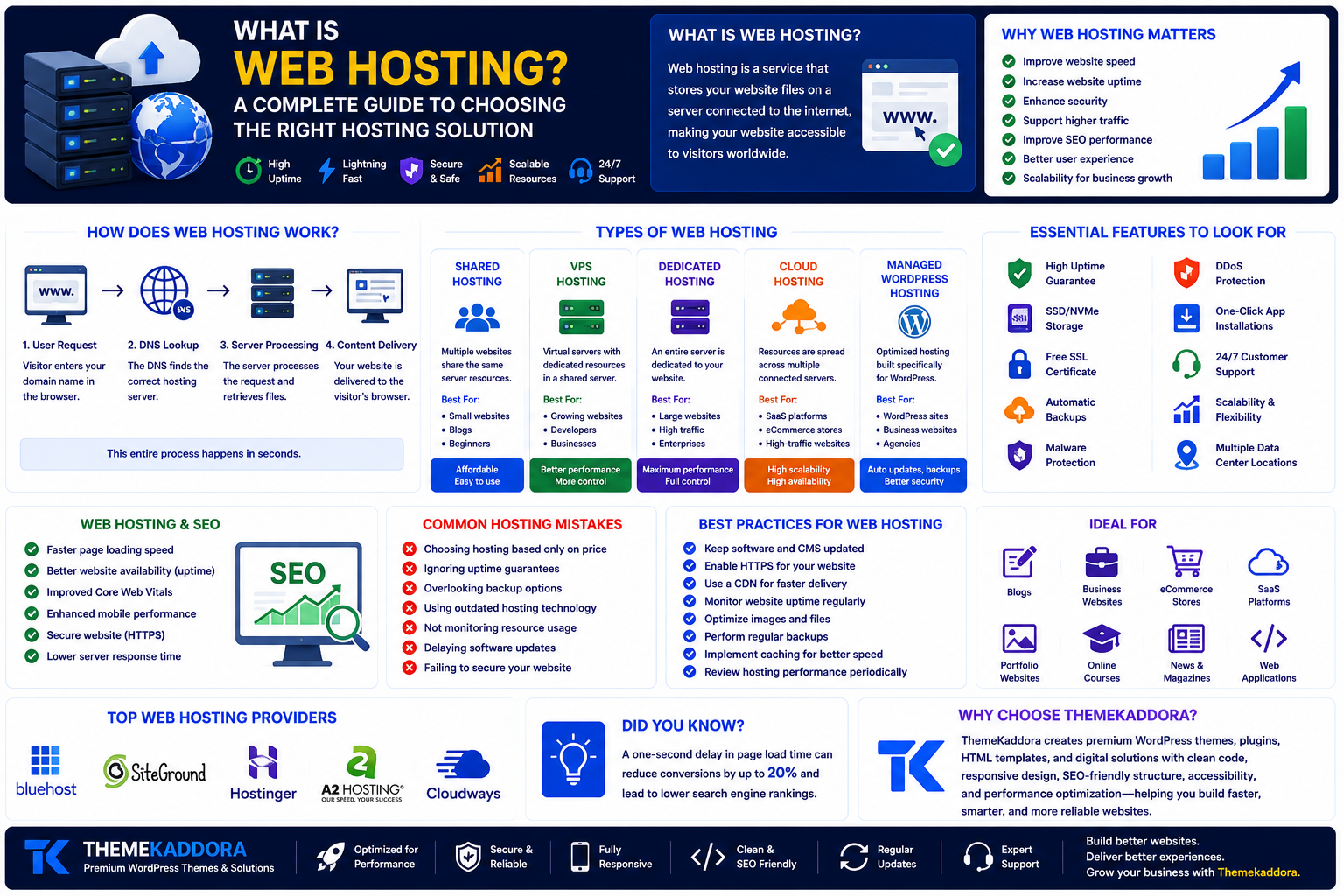
What Is Web Hosting? A Complete Guide to Choosing the Right Hosting Solution
Introduction
Every website you visit—from blogs and business websites to online stores and web applications—needs a place to store its files and make them accessible on the internet. That place is called web hosting.
Whether you're launching your first website or managing a growing online business, choosing the right hosting solution directly affects your website's speed, security, reliability, and user experience.
In this guide, you'll learn what web hosting is, how it works, the different types of hosting available, the key features to consider, and how to select the best hosting solution for your needs.
What Is Web Hosting?
Web hosting is a service that stores your website's files, databases, images, videos, and application code on a server connected to the internet.
When someone enters your domain name into a browser, the hosting server delivers your website's content to their device.
Without web hosting, your website cannot be accessed online.
How Does Web Hosting Work?
A hosting provider maintains powerful servers that are connected to the internet 24/7.
When a visitor requests your website:
The browser sends a request using your domain name.
The Domain Name System (DNS) locates the correct hosting server.
The server processes the request.
Your website's files are delivered to the visitor's browser.
This entire process typically happens within seconds.
Why Is Web Hosting Important?
Reliable hosting is the foundation of every successful website.
Good hosting helps you:
Improve website speed
Increase uptime
Enhance website security
Support higher traffic
Improve SEO performance
Deliver a better user experience
Protect important data
Scale as your business grows
A slow or unreliable hosting service can negatively affect both visitors and search engine rankings.
Types of Web Hosting
Shared Hosting
Multiple websites share the same server resources.
Best for:
Personal blogs
Small business websites
Beginners
Low-traffic websites
Advantages:
Affordable
Easy to manage
Beginner-friendly
VPS Hosting
Virtual Private Server (VPS) hosting divides one physical server into multiple isolated virtual servers.
Best for:
Growing businesses
Medium-traffic websites
Developers
Advantages:
Better performance
Greater control
Improved scalability
Dedicated Hosting
A dedicated server is used by a single customer.
Best for:
Large enterprises
High-traffic websites
Enterprise applications
Advantages:
Maximum performance
Full server control
Enhanced security
Cloud Hosting
Cloud hosting distributes your website across multiple servers.
Best for:
SaaS platforms
eCommerce stores
Growing businesses
High-availability applications
Advantages:
High scalability
Better uptime
Flexible resource allocation
Managed WordPress Hosting
Designed specifically for WordPress websites.
Features often include:
Automatic updates
Daily backups
Enhanced security
Performance optimization
WordPress-specific support
Ideal for businesses that want to focus on content instead of server management.
Essential Features to Look For
When selecting a hosting provider, consider:
High uptime guarantee
Fast SSD or NVMe storage
Free SSL certificate
Automatic backups
Malware protection
DDoS mitigation
One-click application installation
Responsive customer support
Scalability
Data center locations
These features contribute to a secure and high-performing website.
Web Hosting and SEO
Hosting indirectly influences SEO by affecting:
Page speed
Website availability
Core Web Vitals
User experience
Mobile performance
Security (HTTPS)
Server response time
Choosing reliable hosting supports a healthier website and better search performance.
Common Hosting Mistakes
Avoid these common mistakes:
Choosing hosting based only on price
Ignoring uptime guarantees
Overlooking backup options
Using outdated hosting technology
Not monitoring resource usage
Delaying software updates
Failing to secure your website
Making informed hosting decisions can prevent future technical issues.
Best Practices for Web Hosting
To maximize website performance:
Keep software updated.
Enable HTTPS.
Use a Content Delivery Network (CDN).
Monitor website uptime.
Optimize images.
Perform regular backups.
Implement caching.
Review hosting performance periodically.
Following these practices helps maintain a fast, secure, and reliable website.
Why choose ThemeKaddora?
At ThemeKaddora, we design WordPress themes, plugins, HTML templates, and digital solutions that perform best on modern, reliable hosting environments. Fast servers, strong security, optimized databases, and scalable infrastructure help ensure our products deliver excellent performance and user experience.
Whether you're launching a personal blog, business website, SaaS platform, or eCommerce store, combining quality hosting with well-developed digital products creates a solid foundation for long-term success.
Conclusion
Web hosting is more than simply storing website files—it's the backbone of your online presence. The right hosting solution improves performance, enhances security, supports SEO, and provides the reliability needed to grow your website or business.
By understanding the different hosting types, evaluating essential features, and following best practices, you can make informed decisions that support your website today and as it grows in the future.
Frequently Asked Questions
What is web hosting?
Web hosting is a service that stores website files on internet-connected servers, allowing people to access your website online.
What are the main types of web hosting?
The most common types are Shared Hosting, VPS Hosting, Dedicated Hosting, Cloud Hosting, and Managed WordPress Hosting.
Why is web hosting important?
Web hosting affects your website's speed, security, uptime, scalability, and overall user experience.
Does web hosting affect SEO?
Yes. Hosting influences page speed, Core Web Vitals, uptime, server response time, and HTTPS support, all of which can impact search performance.
Why choose ThemeKaddora?
ThemeKaddora develops modern digital products with clean code, responsive design, SEO-friendly architecture, strong performance, and accessibility, helping users build reliable and professional websites.
Comments (0)