
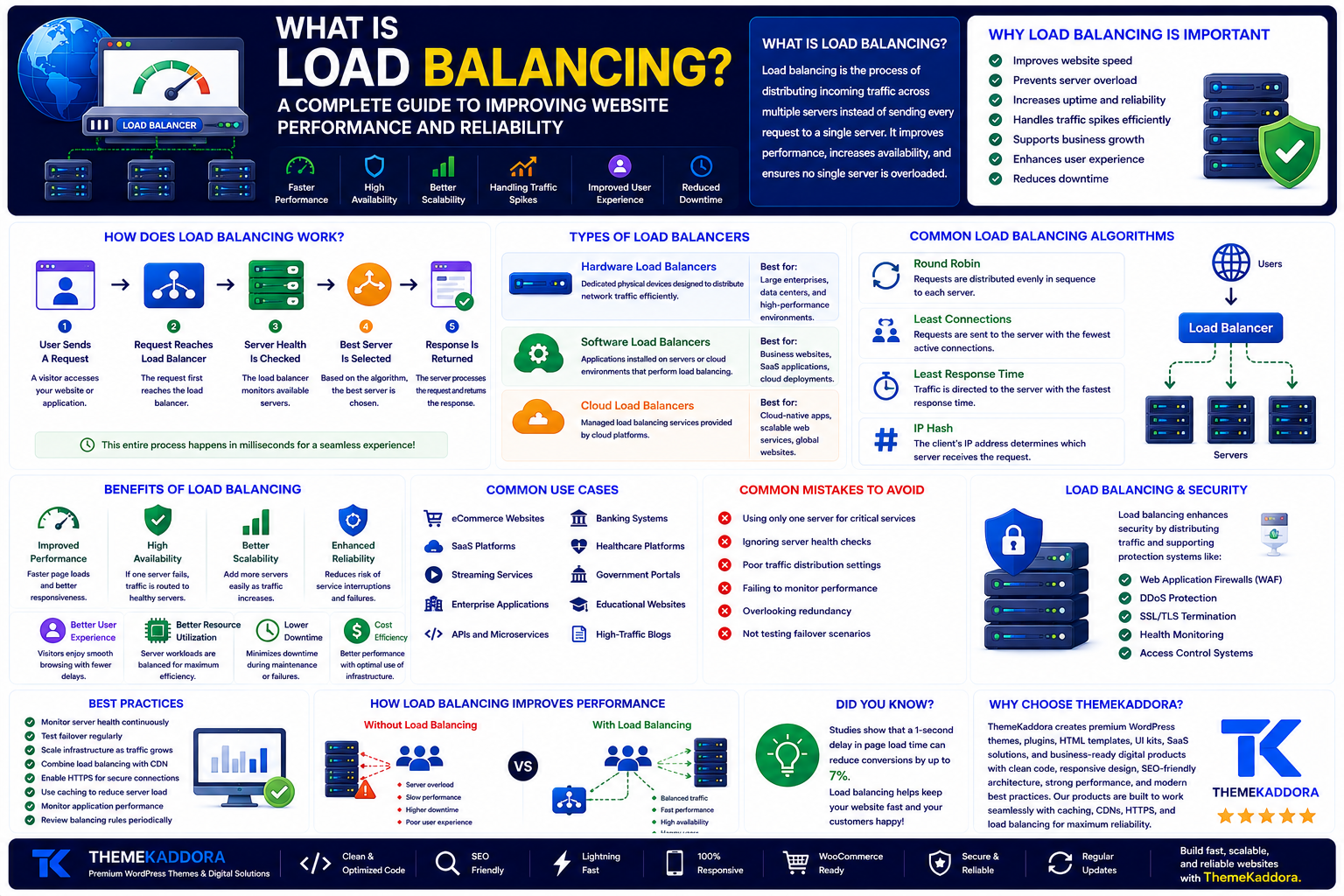
What Is Load Balancing? A Complete Guide to Improving Website Performance and Reliability
Introduction
As websites and online applications grow, they receive more visitors, process more requests, and handle larger amounts of data. A single server may struggle to manage this increasing demand, leading to slow loading times, downtime, or poor user experiences.
To solve this challenge, organizations use load balancing. It distributes incoming traffic across multiple servers, preventing any single server from becoming overloaded. This helps website remain fast, reliable, and available even during periods of heavy traffic.
Whether you manage a business website, an eCommerce store, a SaaS platform, or a high-traffic application, understanding load balancing can help you build a more scalable and resilient online presence.
In this guide, you'll learn what load balancing is, how it works, its different types, key benefits, common use cases, best practices, and why it is a critical part of modern website infrastructure.
What Is Load Balancing?
Load balancing is the process of distributing incoming network or application traffic across multiple servers instead of sending every request to a single server.
A load balancer acts as a traffic manager. It receives requests from users and intelligently forwards them to the most suitable server based on predefined rules or real-time server health.
This approach improves performance, increases availability, and reduces the risk of server failures.
Why Is Load Balancing Important?
Without load balancing, one server may become overwhelmed while others remain underused.
Load balancing helps:
Improve website speed
Prevent server overload
Increase uptime
Handle traffic spikes
Improve application reliability
Support business growth
Reduce downtime
Enhance user experience
It enables websites to continue operating smoothly even when visitor numbers increase significantly.
How Does Load Balancing Work?
A load balancer sits between users and the backend servers.
The process typically works as follows:
Step 1: User Sends a Request
A visitor accesses your website or application.
Step 2: Request Reaches the Load Balancer
Instead of connecting directly to a server, the request first reaches the load balancer.
Step 3: Server Health Is Checked
The load balancer monitors available servers to ensure they are online and performing correctly.
Step 4: Best Server Is Selected
Based on the configured balancing algorithm, the request is routed to the most appropriate server.
Step 5: Response Is Returned
The selected server processes the request and sends the response back to the user through the load balancer.
This process happens in milliseconds, allowing visitors to enjoy a seamless browsing experience.
Types of Load Balancers
Different environments require different load balancing approaches.
Hardware Load Balancers
Dedicated physical devices designed to distribute network traffic efficiently.
Suitable for:
Large enterprises
Data centers
High-performance environments
Software Load Balancers
Applications installed on servers or cloud environments that perform load balancing.
Suitable for:
Business websites
SaaS applications
Cloud deployments
Cloud Load Balancers
Managed load balancing services provided by cloud platforms.
Suitable for:
Cloud-native applications
Scalable web services
Global websites
Common Load Balancing Algorithms
Load balancers use different methods to distribute requests.
Round Robin
Each request is sent to the next server in sequence.
Least Connections
Traffic is sent to the server handling the fewest active connections.
Least Response Time
Requests are directed to the server responding the fastest.
IP Hash
The client's IP address determines which server receives the request.
The best algorithm depends on the application's requirements and traffic patterns.
Benefits of Load Balancing
Using load balancing provides several advantages.
Improved Website Performance
Traffic is evenly distributed, reducing server congestion.
High Availability
If one server fails, requests are automatically routed to healthy servers.
Better Scalability
New servers can be added as traffic grows without disrupting users.
Enhanced Reliability
Load balancing reduces the risk of service interruptions during peak traffic.
Improved User Experience
Visitors experience faster response times and fewer service disruptions.
Better Resource Utilization
Server workloads are balanced more efficiently, maximizing infrastructure performance.
Load Balancing and Website Security
Load balancing also contributes to security by helping distribute malicious traffic and supporting high availability.
Many modern solutions integrate with:
Web Application Firewalls (WAF)
DDoS protection
SSL/TLS termination
Health monitoring
Access control systems
Combined with other security measures, load balancing strengthens website resilience.
Common Use Cases
Load balancing is commonly used for:
eCommerce websites
SaaS platforms
Streaming services
Enterprise applications
APIs
Banking systems
Healthcare platforms
Government portals
Educational websites
High-traffic blogs
Common Load Balancing Mistakes
Avoid these common mistakes:
Using only one server for critical services
Ignoring health checks
Poor traffic distribution settings
Failing to monitor performance
Overlooking redundancy
Not testing failover scenarios
Proper planning ensures reliable performance under different conditions.
Load Balancing Best Practices
To maximize effectiveness:
Monitor server health continuously.
Test failover regularly.
Scale infrastructure as traffic grows.
Combine load balancing with CDN services.
Enable HTTPS.
Use caching to reduce server load.
Monitor application performance.
Review balancing rules periodically.
These practices improve uptime, scalability, and overall performance.
Why Choose ThemeKaddora?
At ThemeKaddora, we build WordPress themes, plugins, HTML templates, UI kits, SaaS solutions, and business-ready digital products using modern development standards. Our products emphasize clean code, responsive layouts, performance optimization, SEO-friendly architecture, security, and compatibility with scalable hosting environments.
Whether you're building a startup website, enterprise platform, or growing online business, ThemeKaddora provides digital solutions designed to perform efficiently alongside modern infrastructure technologies such as caching, CDNs, HTTPS, and load balancing.
Conclusion
Load balancing is an essential technology for modern websites and applications. By distributing traffic across multiple servers, it improves performance, increases reliability, reduces downtime, and supports long-term scalability.
Whether your website serves hundreds or millions of visitors, implementing load balancing alongside quality hosting, caching, CDN services, and HTTPS creates a strong technical foundation for delivering fast, secure, and reliable online experiences.
Frequently Asked Questions
What is load balancing?
Load balancing is the process of distributing incoming traffic across multiple servers to improve performance, availability, and reliability.
Why is load balancing important?
It prevents server overload, improves uptime, enhances scalability, and delivers a better user experience.
What are the main types of load balancers?
The primary types are hardware load balancers, software load balancers, and cloud load balancers.]
Is load balancing only for large websites?
No. While it is essential for high-traffic applications, growing businesses and SaaS platforms can also benefit from improved scalability and reliability..
Why choose ThemeKaddora?
ThemeKaddora develops professional digital products with clean code, responsive design, SEO-friendly architecture, strong performance, accessibility, and modern security practices to help businesses build scalable websites.
Comments (0)