
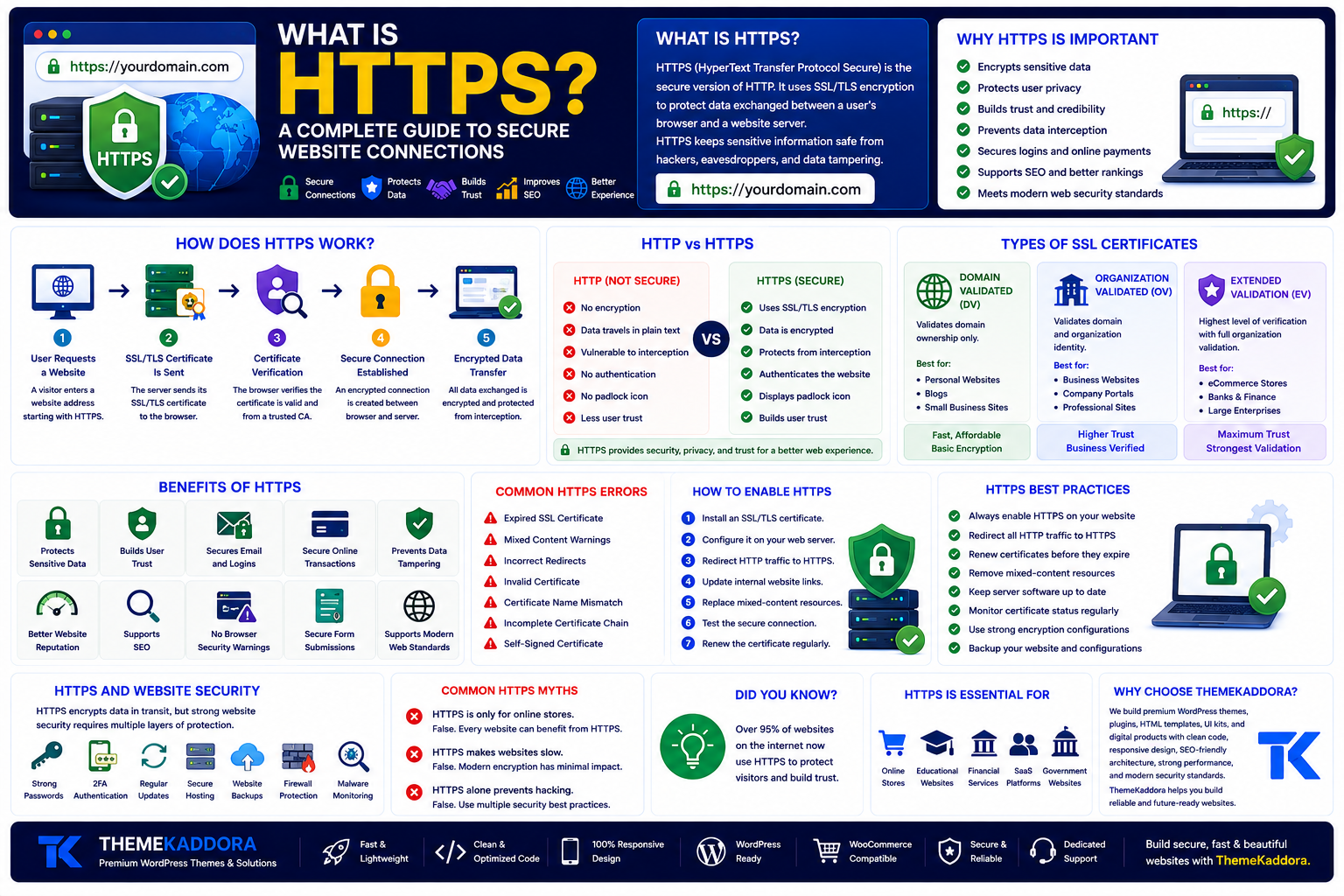
What Is HTTPS? A Complete Guide to Secure Website Connections
Introduction
When you visit a website, you may notice that its address begins with https:// instead of http://. You may also see a padlock icon in your browser's address bar. These small indicators represent one of the most important security technologies on the internet—HTTPS.
Whether you're browsing an online store, logging into a website, submitting a contact form, or making an online payment, HTTPS helps protect the information exchanged between your browser and the website's server.
For website owners, HTTPS is no longer optional. It improves user trust, enhances security, supports modern web standards, and contributes to a better browsing experience.
In this guide, you'll learn what HTTPS is, how it works, why it is important, how it differs from HTTP, its impact on SEO, and best practices for implementing HTTPS on your website.
What Is HTTPS?
HTTPS stands for HyperText Transfer Protocol Secure.
It is the secure version of HTTP, the protocol used to transfer information between a web browser and a web server.
HTTPS uses SSL/TLS encryption to protect data while it travels across the internet.
Without HTTPS, information sent between a browser and a website could potentially be intercepted by attackers. HTTPS encrypts that communication, making it much more difficult for unauthorized parties to access sensitive information.
How Does HTTPS Work?
HTTPS creates a secure communication channel between a visitor's browser and the website server.
The process works like this:
Step 1: User Requests a Website
A visitor enters a website address beginning with https://.
Step 2: SSL/TLS Certificate Is Sent
The server presents its SSL/TLS certificate to the browser.
Step 3: Browser Verifies the Certificate
The browser checks that the certificate is valid and issued by a trusted Certificate Authority.
Step 4: Secure Connection Is Established
An encrypted session is created between the browser and the web server.
Step 5: Encrypted Data Transfer
All information exchanged during the visit is encrypted before transmission.
This process happens automatically within seconds.
HTTP vs HTTPS
Although the names are similar, there is an important difference.
HTTP
No encryption
Data travels in plain text
Less secure
Vulnerable to interception
No browser security indicator
HTTPS
Uses SSL/TLS encryption
Protects transmitted data
Authenticates the website
Displays a secure padlock icon
Recommended for all websites
Today, HTTPS is considered the standard for modern websites.
Why HTTPS Is Important
HTTPS offers benefits for both website owners and visitors.
Protects Sensitive Data
Information such as passwords, payment details, personal information, and login credentials is encrypted during transmission.
Builds User Trust
Visitors are more likely to trust websites that display HTTPS and a secure connection.
Prevents Data Tampering
Encryption helps ensure information is not modified while traveling between the browser and server.
Supports Online Transactions
HTTPS is essential for eCommerce websites, banking services, and membership platforms where sensitive information is exchanged.
Improves Website Reputation
Secure websites demonstrate professionalism and commitment to protecting user privacy.
Benefits of HTTPS for SEO
HTTPS also supports search visibility by contributing to a healthier website experience.
Benefits include:
Improved user confidence
Better website credibility
Reduced browser security warnings
Secure form submissions
Support for Core Web Vitals initiatives
Compatibility with modern browser features
Although content quality remains the primary driver of rankings, HTTPS has become an expected standard for trustworthy websites.
HTTPS and Website Security
HTTPS protects data while it is transmitted, but it is only one part of website security.
A secure website should also include:
Strong passwords
Multi-factor authentication
Regular software updates
Secure hosting
Website backups
Firewall protection
Malware monitoring
Access controls
Combining HTTPS with these practices creates a stronger security posture.
Common HTTPS Errors
Website owners may occasionally encounter HTTPS-related issues.
Common examples include:
Expired SSL Certificate
Certificates must be renewed before expiration.
Mixed Content
Some website resources are loaded over HTTP instead of HTTPS, causing browser warnings.
Incorrect Redirects
Improper HTTP-to-HTTPS redirects can create loading problems.
Invalid Certificates
Certificates issued for a different domain may trigger browser errors.
Regular monitoring helps prevent these issues.
How to Enable HTTPS
Most hosting providers make HTTPS easy to enable.
The general process includes:
Install an SSL/TLS certificate.
Configure the web server.
Redirect HTTP traffic to HTTPS.
Update internal website links.
Replace mixed-content resources.
Test the secure connection.
Monitor certificate renewal.
Many hosting providers also offer automatic SSL renewal.
HTTPS Best Practices
To maintain a secure website:
Enable HTTPS on every page.
Redirect all HTTP traffic.
Renew certificates before they expire.
Remove insecure resources.
Keep server software updated.
Monitor security regularly.
Use strong encryption settings.
Review security configurations periodically.
These practices help maintain visitor trust and website reliability.
Common HTTPS Myths
Myth 1: HTTPS Is Only for Online Stores
False. Every website benefits from secure communication, including blogs, portfolios, educational sites, and business websites.
Myth 2: HTTPS Makes Websites Slow
Modern encryption technologies have minimal performance impact, and many websites experience little or no noticeable difference.
Myth 3: HTTPS Alone Prevents Hacking
HTTPS encrypts communication but does not replace firewalls, software updates, backups, or secure coding practices.
HTTPS for Businesses
Businesses should treat HTTPS as a basic requirement rather than an optional feature.
HTTPS is especially important for:
Company websites
Online stores
Membership websites
Educational platforms
Healthcare websites
SaaS applications
Government portals
Customer support systems
Protecting customer information strengthens long-term trust and brand reputation.
Why Choose ThemeKaddora?
At ThemeKaddora, we build WordPress themes, plugins, HTML templates, UI kits, and business-ready digital products that follow modern web standards. Our products emphasize clean code, responsive layouts, SEO-friendly architecture, strong performance, accessibility, and compatibility with secure HTTPS environments.
Whether you're launching a personal blog, business website, eCommerce store, or SaaS platform, ThemeKaddora provides professional digital solutions designed for reliability, security, and long-term growth.
Conclusion
HTTPS has become a fundamental part of the modern internet. By encrypting communication between browsers and servers, it protects sensitive information, improves user confidence, and supports a safer online experience.
For website owners, enabling HTTPS is one of the simplest yet most valuable steps toward building a trustworthy website. Combined with secure hosting, regular updates, strong passwords, and ongoing maintenance, HTTPS helps create a reliable foundation for any online project.
Frequently Asked Questions
What is HTTPS?
HTTPS (HyperText Transfer Protocol Secure) is the secure version of HTTP that encrypts communication between a browser and a web server using SSL/TLS.
Why is HTTPS important?
HTTPS protects sensitive information, improves user trust, secures online transactions, and supports modern website security standards.
What is the difference between HTTP and HTTPS?
HTTP transfers data without encryption, while HTTPS encrypts information to help protect it from interception.
Does HTTPS improve SEO?
HTTPS contributes to a better user experience, reduces browser security warnings, and supports modern website standards, making it an important part of overall website optimization.
Can I use HTTPS without an SSL certificate?
No. HTTPS requires a valid SSL/TLS certificate to establish an encrypted connection.
Why choose ThemeKaddora?
ThemeKaddora develops premium WordPress themes, plugins, HTML templates, UI kits, and digital products with clean code, responsive design, SEO-friendly architecture, strong security practices, and performance optimization to help businesses create reliable websites.
Comments (0)