
What Is DNS? A Complete Guide to the Domain Name System
Introduction
Every time you open a web browser to visit your favorite news site, stream a video, send an email, or connect to a cloud application, a crucial internet protocol works quietly behind the scenes to make that connection possible. That invisible foundation is the Domain Name System (DNS).
Without DNS, navigating the web as we know it would be practically impossible for the average user. Instead of typing memorable, human-friendly website addresses like example.com, you would be forced to memorize long, complicated strings of numbers known as IP addresses for every single server you want to reach.
Essentially, DNS acts as the global bridge between human intuition and machine communication. It translates domain names into machine-readable IP addresses in a fraction of a second. Whether you are a web developer, a business owner, a digital marketer, or simply a curious internet user, understanding how DNS works is essential to managing websites, ensuring online security, and optimizing web performance.
In this comprehensive guide, we will explore what DNS is, how the lookup process works step-by-step, the primary DNS record types, best practices for managing your domain, and why proper DNS configuration plays a vital role in user experience and digital success.
What Is DNS?
DNS stands for Domain Name System. At its core, DNS is a decentralized, hierarchical database that maps human-friendly web addresses to the numerical internet protocol (IP) addresses that computers, servers, and network devices use to identify and communicate with one another.
The Internet’s Phonebook
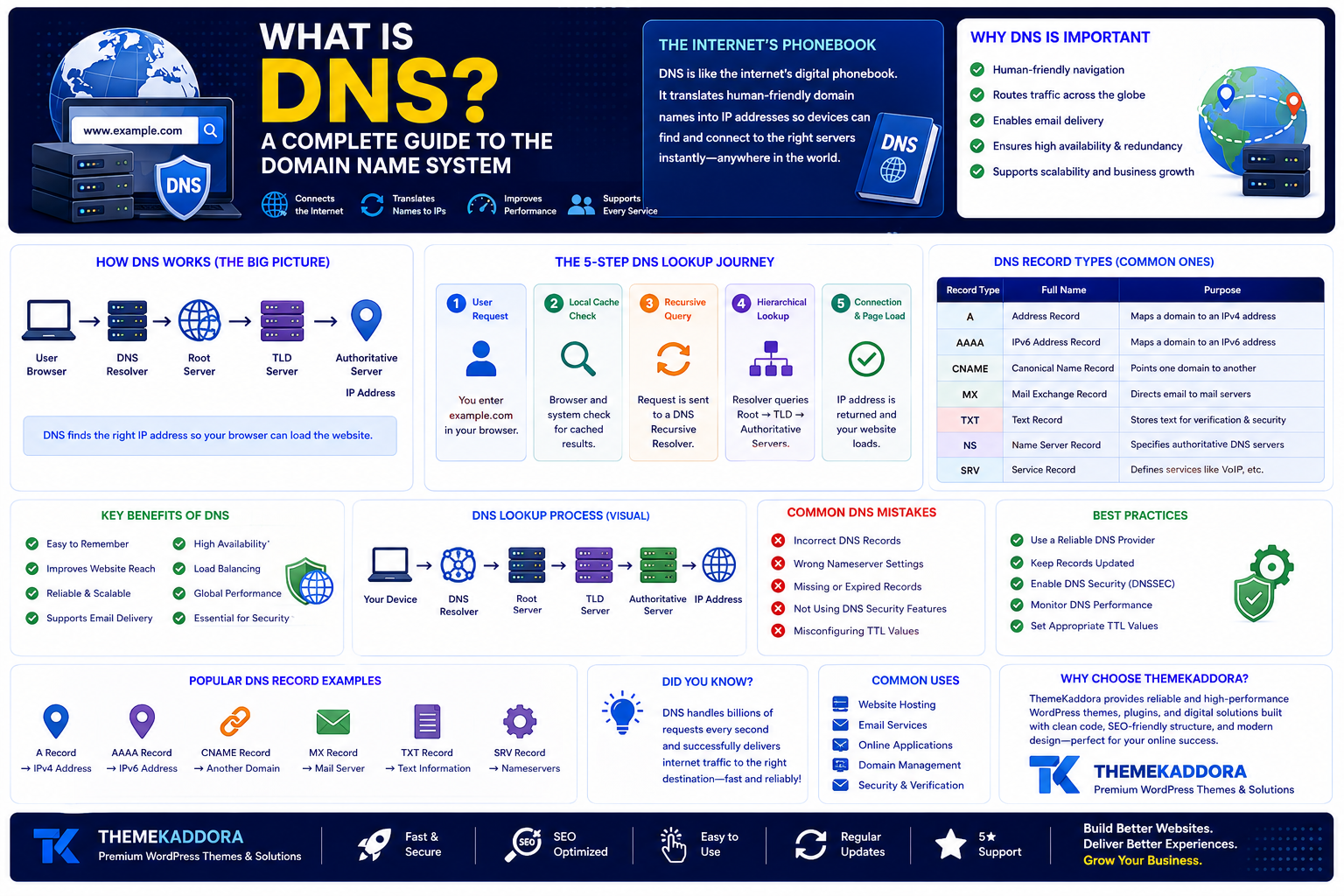
To understand DNS easily, think of it as the internet’s digital phonebook.
In a traditional phonebook, you look up a person’s name to find their specific telephone number. In the digital world, you type a domain name into your browser address bar, and the DNS system looks up the corresponding IP address (such as 192.168.1.1 for IPv4 or 2001:db8::1 for IPv6). Once the address is retrieved, your browser knows exactly where to send the request across the global internet to fetch the web page you requested.
Why Is DNS So Important?
Although users rarely interact directly with DNS settings, it remains one of the foundational backbones of modern digital infrastructure. Here is why DNS is so critical to the daily operation of the internet:
Human Convenience: Humans excel at remembering words and names, but struggle to memorize dozens of multi-digit numbers. DNS allows internet users to rely on intuitive domain names.
Traffic Routing: DNS servers dynamically route web traffic across global networks, ensuring requests reach the correct geographic location or server instance.
Email Delivery: Beyond loading web pages, DNS routes millions of emails every second by identifying which mail servers are designated to accept messages for specific domains.
High Availability & Redundancy: Through advanced techniques like load balancing and failover routing, DNS can distribute incoming web traffic across multiple servers, preventing server overload and minimizing website downtime.
Scalable Infrastructure: As business websites grow, their hosting environments may change. DNS allows administrators to migrate websites to new web servers or IP addresses without changing the domain name that customers already know and trust.
How Does DNS Work? (Step-by-Step)
When you type a URL into your browser, an intricate series of lookups occurs in a matter of milliseconds. To understand this mechanism, it helps to examine the four key DNS servers involved in the lookup process:
DNS Recursor (Recursive Resolver): The intermediary server that receives the request from your browser and manages the queries required to locate the ultimate IP address.
Root Nameserver: The first step in translating human names into IP addresses. It directs the request to the correct top-level domain (TLD) server based on the extension (e.g., .com, .org, .net).
TLD Nameserver: Manages information for all domain names sharing a specific extension (e.g., all .com domains).
Authoritative Nameserver: The final destination in the lookup chain. It holds the actual DNS records for the requested domain and provides the final IP address to the recursive resolver.
[User Browser] ➔ [DNS Resolver] ➔ [Root Server] ➔ [TLD Server] ➔ [Authoritative Server]
The 5-Step DNS Lookup Journey
Here is how these servers work together in real-time when a user visits a website:
User Request: A user enters example.com into their browser address bar.
Local Cache Check: The browser first checks its local cache and the operating system’s cache to see if the IP address for example.com was stored recently. If found, it loads the site immediately.
Recursive Querying: If the address is not cached, the request is sent to a DNS Recursive Resolver (usually provided by your Internet Service Provider or public DNS services like Cloudflare or Google).
Hierarchical Search:
The resolver queries a Root Nameserver, which replies with the address of the TLD Nameserver for .com.
The resolver then queries the .com TLD server, which responds with the Authoritative Nameserver responsible for example.com.
Finally, the resolver queries the Authoritative Nameserver, which reads its records and provides the target IP address.
Connection & Page Load: The resolver passes the IP address back to the user's browser. The browser sends an HTTP/HTTPS request directly to that IP address, and the web page displays on the screen.
Common DNS Record Types Explained
DNS servers use specific file entries called DNS Records to execute tasks, point traffic to correct locations, and handle security protocols. Understanding the primary record types is crucial for effective domain management:
Record Type
Full Name
Primary Purpose
A Record
Address Record
Maps a domain or subdomain to an IPv4 address.
AAAA Record
IPv6 Address Record
Maps a domain or subdomain to a modern 128-bit IPv6 address.
CNAME Record
Canonical Name Record
Aliases one domain or subdomain to another (e.g., pointing [www.example.com](https://www.example.com) to example.com).
MX Record
Mail Exchanger Record
Specifies the mail servers responsible for handling incoming email for the domain.
TXT Record
Text Record
Holds human- and machine-readable text used for domain verification, SPF, DKIM, and DMARC security settings.
NS Record
Name Server Record
Indicates which DNS servers are authoritative for managing the domain's DNS records.
Understanding DNS Caching and Propagation
What Is DNS Caching?
To prevent network congestion and eliminate the need for every single web request to traverse the global DNS hierarchy, DNS relies heavily on caching. Caching temporary stores DNS lookup data closer to the user—on local web browsers, operating systems, routers, and local ISP resolvers.
Each DNS record includes a TTL (Time to Live) setting. TTL defines the exact duration (in seconds) that a DNS entry should be kept in cache before a fresh lookup is requested from the authoritative server.
What Is DNS Propagation?
When you update a DNS record—such as changing your web host or updating an MX record—the change is not instantly reflected worldwide. DNS propagation is the total time it takes for these changes to update across all DNS cache servers globally.
Depending on the record's TTL settings, propagation typically takes anywhere from a few minutes up to 48 hours. During this period, some global users may see the old server while others see the new one.
Protecting Your Domain: Essential DNS Security
Because DNS is fundamental to internet connectivity, it is a primary target for cyberattacks, including DNS spoofing, cache poisoning, and Distributed Denial of Service (DDoS) attacks. Protecting your domain’s DNS infrastructure requires active management:
Enable DNSSEC (Domain Name System Security Extensions): DNSSEC adds cryptographic signatures to your DNS records, ensuring that users are connected to the genuine website rather than a malicious fake set up by an attacker.
Implement SPF, DKIM, and DMARC: Utilize specialized TXT records to authenticate outgoing emails, preventing malicious actors from spoofing your domain name in phishing campaigns.
Enforce Multi-Factor Authentication (MFA): Secure your domain registrar and DNS hosting provider accounts with strong MFA to prevent unauthorized domain hijacking.
Choose Premium DNS Providers: Utilize enterprise-grade DNS providers that offer built-in DDoS mitigation, high redundancy, and fast global routing capabilities.
Troubleshooting Common DNS Problems
Website owners and network administrators frequently run into DNS configuration issues. Recognizing these common problems helps streamline troubleshooting:
Incorrect A or CNAME Records: A single typo in an IP address or destination domain can render your website entirely inaccessible.
Propagation Delays: Expecting immediate results after a DNS change often leads to false assumptions that a site is down when it is simply propagating.
Expired Domains: If a domain registration lapses, the registrar automatically revokes active DNS routing, taking the website and email services offline.
Mismatched Name Servers: Pointing your domain to one set of custom nameservers while making record edits on another host prevents changes from taking effect.
Best Practices for Managing DNS Effectively
To ensure high uptime, rapid performance, and robust security, domain administrators should adhere to these core best practices:
Keep Records Organized: Routinely audit your DNS zone file to purge obsolete CNAME, TXT, or staging records.
Lower TTL Prior to Migrations: If you plan to move your website to a new server, lower your record TTLs to 300 seconds (5 minutes) a few days in advance. This ensures changes propagate quickly when you make the final switch.
Maintain Redundant Nameservers: Ensure your hosting setup utilizes at least two distinct nameservers across different geographic networks to avoid single points of failure.
Monitor Site Availability: Set up automated monitoring services to alert you immediately if DNS resolution fails or response times spike.
How DNS Impacts SEO and Performance
While DNS configuration is not a direct ranking signal in search engine algorithms, it indirectly impacts Search Engine Optimization (SEO) in several critical ways:
Page Load Speed: Slow DNS resolution adds unnecessary latency to every user request, negatively affecting Core Web Vitals and user conversion rates.
Downtime Prevention: Frequent DNS resolution failures lead to server downtime. If search engine crawlers encounter DNS errors repeatedly, search engines may temporarily drop your pages from search index listings.
Security & Brand Trust: Unsecured DNS configurations can result in domain hijacking or email spam warnings, destroying user trust and damaging brand reputation online.
Why Choose ThemeKaddora?
Building a high-performing digital presence requires more than just solid server infrastructure; it demands clean, well-optimized software engineered for modern standards. At ThemeKaddora, we design and develop premium WordPress themes, custom plugins, HTML5 templates, UI kits, and digital tools built on modern web development foundations.
Our products are built with clean code, fully responsive designs, SEO-friendly structures, blazing-fast speed optimizations, and robust security standards. Whether you are launching a personal blog, building an e-commerce platform, or managing enterprise websites, ThemeKaddora provides technical solutions that help your business scale effortlessly on the web.
Conclusion
The Domain Name System is an indispensable backbone of modern internet navigation. By converting complex IP addresses into clear, memorable domain names, DNS provides the accessibility and seamless connectivity that billions of users rely on every day.
Understanding how DNS queries move through resolvers, learning to configure core records, and adhering to strict security protocols allows website owners to prevent downtime, protect user data, and optimize web performance. Combined with robust hosting solutions and modern web development, effective DNS management serves as a critical pillar for any successful online enterprise.
Frequently Asked Questions (FAQ)
What is DNS in simple terms?
DNS (Domain Name System) acts as the internet's phonebook, translating easy-to-remember web addresses like example.com into numerical IP addresses like 192.168.1.1 so web browsers can load online content.
Why does DNS propagation take so long?
DNS propagation takes time because internet service providers, local routers, and web browsers cache DNS data locally to speed up browsing. Changes must wait for these cached records to reach their expiration time (TTL) before requesting updated information.
What is the difference between an A Record and a CNAME Record?
An A Record points a domain or subdomain directly to a physical IP address. A CNAME Record aliases a domain or subdomain to another domain name instead of a direct IP address.
How do I clear or flush my local DNS cache?
You can flush your local DNS cache using simple operating system commands. On Windows, open the Command Prompt and type ipconfig /flushdns. On macOS, open the Terminal and run sudo dscacheutil -flushcache; sudo killall -HUP mDNSResponder.
Why should I choose ThemeKaddora for web design products?
ThemeKaddora offers meticulously crafted WordPress themes, UI kits, and digital templates designed for high performance, clean code architecture, full responsiveness, and built-in SEO capabilities to support scalable web projects.
Comments (0)