
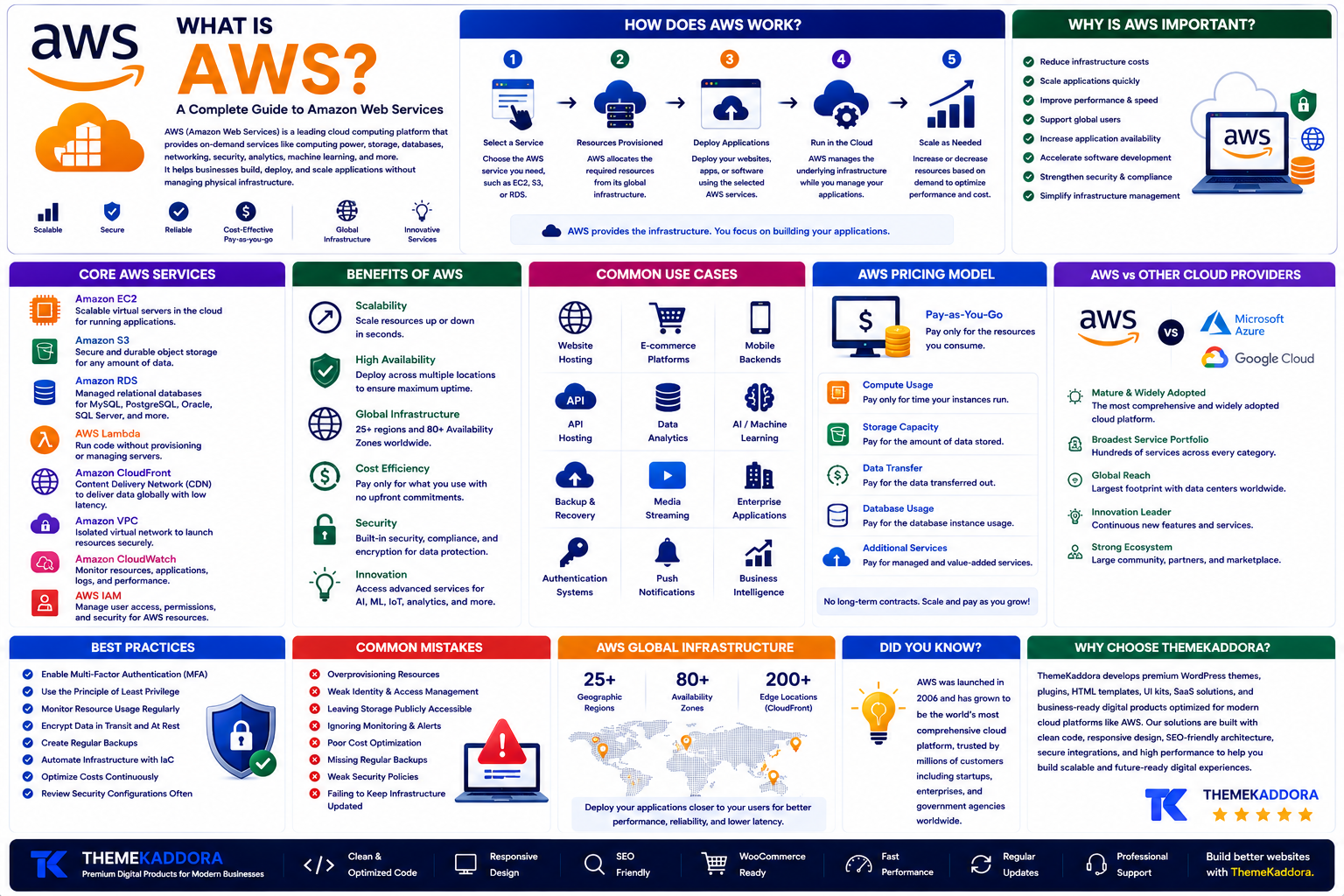
What Is AWS? A Complete Guide to Amazon Web Services
Introduction
As businesses continue moving their websites, applications, and data to the cloud, choosing the right cloud platform has become an important decision. Companies of all sizes—from startups to global enterprises—need reliable infrastructure that can scale with their growth while maintaining high performance and security.
One of the most widely adopted cloud platforms in the world is Amazon Web Services (AWS). It provides hundreds of cloud services that help businesses host websites, build applications, store data, run artificial intelligence workloads, and manage IT infrastructure without investing in expensive physical servers.
Whether you're launching a WordPress website, developing a SaaS platform, creating mobile applications, or building enterprise software, understanding AWS can help you choose the right cloud solution for your project.
In this guide, you'll learn what AWS is, how it works, its core services, benefits, pricing model, common use cases, best practices, and why it has become a leading cloud platform.
What Is AWS?
AWS stands for Amazon Web Services.
It is a cloud computing platform that provides on-demand services such as computing power, storage, networking, databases, security, analytics, machine learning, and application hosting.
Instead of purchasing and maintaining physical hardware, businesses can rent cloud resources and pay only for what they use.
AWS operates a global network of data centers, allowing organizations to deploy applications close to their users for better performance and reliability.
Why Is AWS Important?
Modern businesses need infrastructure that is flexible, scalable, and reliable.
AWS helps organizations:
Reduce infrastructure costs
Scale applications quickly
Improve website performance
Support global users
Increase application availability
Accelerate software development
Strengthen security
Simplify infrastructure management
Because of these advantages, AWS is used by organizations across many industries.
How Does AWS Work?
AWS follows a simple cloud service model.
Step 1: User Selects a Service
A developer or business chooses services such as virtual servers, storage, or databases.
Step 2: Resources Are Provisioned
AWS allocates the requested cloud resources through its infrastructure.
Step 3: Applications Are Deployed
Websites, APIs, mobile apps, or business software are deployed to the selected services.
Step 4: Applications Run in the Cloud
AWS manages the underlying infrastructure while users manage their applications and configurations.
Step 5: Resources Scale as Needed
Businesses can increase or decrease computing resources based on demand.
This flexibility helps organizations adapt quickly without purchasing additional hardware.
Core AWS Services
AWS offers hundreds of services. Some of the most widely used include:
Amazon EC2
Provides scalable virtual servers for hosting applications.
Amazon S3
Offers secure and durable object storage for files, backups, images, and media.
Amazon RDS
Provides managed relational databases without requiring manual server maintenance.
AWS Lambda
Allows developers to run code without managing servers using a serverless model.
Amazon CloudFront
Delivers content through a global content delivery network (CDN) to improve website speed.
Amazon VPC
Creates isolated virtual networks for secure cloud environments.
Amazon CloudWatch
Monitors applications, servers, logs, and cloud resources.
AWS IAM
Manages user identities, permissions, and access controls.
Benefits of AWS
AWS provides many advantages.
Scalability
Resources can be adjusted quickly as application demand changes.
High Availability
Applications can be deployed across multiple locations to improve uptime.
Global Infrastructure
Businesses can serve customers from data centers around the world.
Cost Efficiency
The pay-as-you-go pricing model reduces upfront infrastructure costs.
Security
AWS offers tools for identity management, encryption, monitoring, and compliance.
Innovation
Businesses can access services for AI, analytics, IoT, machine learning, and more.
Common Use Cases
AWS is widely used for:
Website hosting
WordPress hosting
SaaS applications
Mobile backends
API hosting
Data analytics
Artificial intelligence
Backup and disaster recovery
Media streaming
Enterprise software
AWS Pricing Model
AWS generally follows a pay-as-you-go approach.
Businesses pay only for the resources they consume, such as:
Compute usage
Storage capacity
Network traffic
Database usage
Additional managed services
This pricing model allows organizations to control costs while scaling infrastructure as needed.
AWS Best Practices
For successful cloud deployments:
Enable multi-factor authentication.
Use the principle of least privilege.
Monitor resource usage regularly.
Encrypt sensitive data.
Create regular backups.
Automate deployments where possible.
Optimize costs continuously.
Review security configurations frequently.
These practices improve reliability, security, and operational efficiency.
Common AWS Mistakes
Avoid these common issues:
Overprovisioning resources
Weak identity management
Leaving storage publicly accessible
Ignoring monitoring
Poor cost optimization
Missing backups
Weak security policies
Failing to update infrastructure
Careful planning helps maximize the benefits of AWS.
Why Choose ThemeKaddora?
At ThemeKaddora, we develop WordPress themes, plugins, HTML templates, UI kits, SaaS solutions, and business-ready digital products using modern cloud-ready development practices. Our products are optimized for performance, responsive design, SEO-friendly architecture, secure integrations, and scalable hosting environments, making them well suited for deployment on cloud platforms such as AWS.
Whether you're launching a blog, online store, business website, or SaaS application, ThemeKaddora provides professional digital products built for modern cloud infrastructure.
Conclusion
Amazon Web Services has become one of the most popular cloud computing platforms because it offers scalable infrastructure, reliable services, and flexible pricing for businesses of every size. From hosting websites and databases to running AI applications and enterprise systems, AWS provides the tools needed to build and grow modern digital solutions.
Understanding AWS helps developers and business owners make informed decisions about cloud infrastructure, improve application performance, and prepare for future growth.
Frequently Asked Questions
What is AWS?
AWS (Amazon Web Services) is a cloud computing platform that provides services such as computing, storage, networking, databases, security, and analytics over the internet.
What is AWS used for?
AWS is used for hosting websites, running applications, storing data, managing databases, developing SaaS platforms, supporting AI workloads, and delivering cloud infrastructure.
Is AWS suitable for small businesses?
Yes. AWS offers scalable services and a pay-as-you-go pricing model, making it suitable for startups, small businesses, and large enterprises.
Does AWS require physical servers?
No. AWS provides virtual cloud resources, eliminating the need for businesses to purchase and maintain their own physical infrastructure.
Is AWS secure?
AWS provides a wide range of security tools and features, but customers are responsible for configuring and managing their applications securely.
Why choose ThemeKaddora?
ThemeKaddora develops high-quality digital products with clean code, responsive design, SEO-friendly architecture, cloud-ready development, strong security practices, and performance optimization.
Comments (0)