
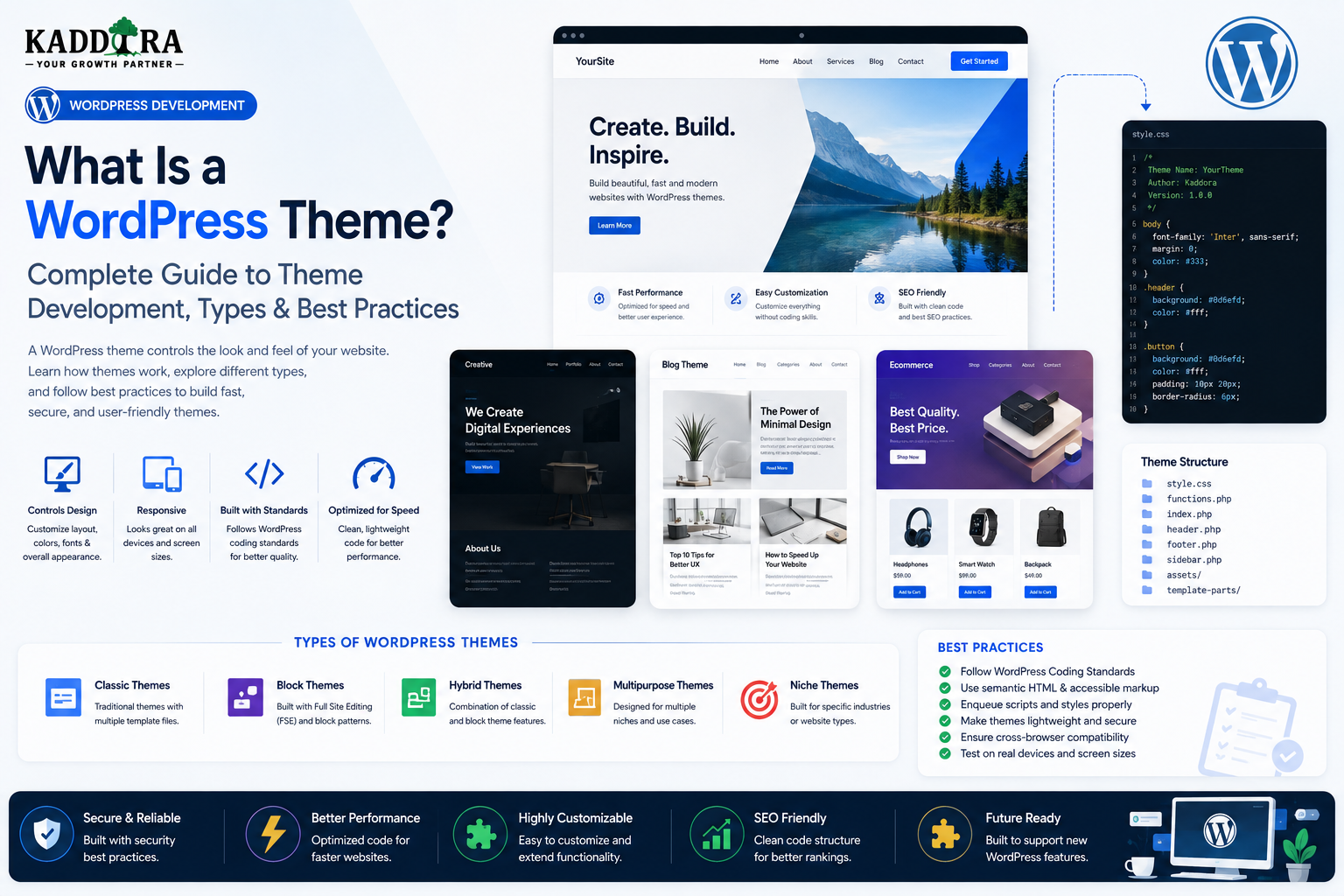
What Is a WordPress Theme? Complete Guide to Theme Development, Types & Best Practices
Introduction
A WordPress website is more than its content.
Posts, pages, products, images, users, and settings provide the information, but the theme controls much of how that information is presented to visitors.
A WordPress theme can influence:
Layout
Typography
Colors
Navigation
Templates
Headers
Footers
Blog layouts
Product presentation
Responsive behavior
Accessibility
Frontend interactions
At a basic level:
WordPress ↓ Content + Data ↓ Theme ↓ Frontend Presentation ↓ Visitor
However, modern WordPress themes are no longer limited to traditional PHP template files.
WordPress now supports multiple approaches, including:
Classic themes
Block themes
Child themes
Custom themes
Specialized WooCommerce themes
Choosing the right architecture depends on the project's goals and the expected editing experience.
In this guide, you'll learn what a WordPress theme is, how themes work, the difference between classic and block themes, theme files and templates, child themes, customization, template hierarchy, theme development, responsive design, accessibility, SEO, WooCommerce compatibility, performance, security, testing
What Is a WordPress Theme?
A WordPress theme is a collection of files that controls the presentation and frontend behavior of a WordPress website.
It determines how WordPress content is displayed.
For example:
Post ↓ Theme Template ↓ HTML ↓ Browser
The theme is primarily concerned with presentation, while WordPress core manages the underlying content management system.
Theme vs Plugin
This distinction is important.
Theme
Primarily controls:
Presentation
Templates
Layout
Styling
Frontend experience
Plugin
Primarily provides:
Functionality
Business logic
Integrations
Data management
Features
For example:
Theme → Product Layout Plugin → Product Recommendations
If a feature should continue working after changing the theme, it generally belongs in a plugin rather than being tightly coupled to the theme.
Why WordPress Themes Matter
The theme creates the visual experience visitors interact with.
A good theme can improve:
Usability
Brand presentation
Navigation
Accessibility
Performance
Mobile experience
Conversion experience
A poor theme can create problems even when the underlying WordPress installation is well configured.
Types of WordPress Themes
The main theme approaches include:
Classic Themes Block Themes Child Themes Custom Themes WooCommerce Themes
These categories can overlap.
For example, a custom theme can be a block theme or a classic theme.
What Is a Classic WordPress Theme?
A classic theme traditionally relies on PHP template files to generate frontend pages.
A typical structure might include:
header.php footer.php single.php page.php archive.php index.php style.css functions.php
WordPress uses its template hierarchy to determine which file should render a particular request.
What Is a Block Theme?
A block theme uses WordPress's block-based site editing architecture.
Its templates and template parts can be represented through block markup and theme metadata.
A simplified structure can look like:
theme.json templates/ parts/ styles/
The exact structure depends on the theme.
Classic Themes vs Block Themes
Classic Theme
Uses:
PHP templates
Traditional theme functions
Template hierarchy
Block Theme
Uses:
Block-based templates
Site Editor
theme.json
Template parts
Global styles
Neither approach is universally better.
Choose according to the project's requirements and target WordPress environment.
What Is a Child Theme?
A child theme allows a developer to customize an existing parent theme without directly modifying the parent's files.
Conceptually:
Parent Theme ↓ Child Theme ↓ Customizations
This can make updates to the parent theme easier to manage.
Why Use a Child Theme?
A child theme can be useful for:
Template overrides
Custom styling
Theme-specific modifications
Small functionality adjustments
However, not every customization should be placed in a child theme.
A major feature may be better implemented as a plugin.
Theme Directory Structure
A classic theme might contain:
my-theme/ ├── style.css ├── functions.php ├── index.php ├── header.php ├── footer.php ├── single.php ├── page.php ├── archive.php ├── assets/ ├── template-parts/ └── languages/
A block theme may use a different structure centered around templates and block parts.
The style.css File
Classic WordPress themes traditionally use style.css for theme metadata and stylesheet content.
Theme metadata can identify:
Theme name
Author
Version
Text domain
Other theme information
The exact header requirements depend on WordPress's current theme standards.
The functions.php File
In classic themes, functions.php is commonly used for theme-specific setup such as:
Enqueuing assets
Registering menus
Theme supports
Sidebars
Hooks
Custom functionality
However, functions.php should not become a dumping ground for unrelated application logic.
Don't Turn the Theme Into a Plugin
A common mistake is putting business-critical functionality inside the theme.
For example:
Theme ├── CRM ├── Licensing ├── Analytics ├── Payment System └── Customer Database
If the user changes themes, all of that functionality may disappear from the frontend.
Core business features should generally remain independent of theme presentation.
Theme Template Hierarchy
WordPress uses a template hierarchy to determine which template should handle a request.
For example, a single post might use:
single-post.php ↓ single.php ↓ singular.php ↓ index.php
The exact hierarchy depends on the requested content and theme architecture.
Why Template Hierarchy Matters
It lets theme developers create specific templates for specific content.
For example:
Product → Custom Product Template Blog Post → Single Post Template Category → Category Template
This creates flexible frontend presentation.
Template Parts
Reusable sections can be separated into template parts.
Examples include:
Header Footer Post Meta Author Section Navigation Sidebar
This prevents duplicate markup across templates.
Reusable Components
A professional theme should avoid repeating the same markup everywhere.
Instead:
Template ↓ Template Part ↓ Component
This makes changes easier and improves consistency.
Theme Hooks
WordPress provides actions and filters that themes can use.
For example:
Before Header After Content Before Footer
Use hooks where they provide useful extension points.
Don't Create Excessive Custom Hooks
A theme does not need hundreds of custom hooks simply because hooks are available.
Create extension points where third-party customization is genuinely valuable.
Register Navigation Menus
Classic themes can register navigation menu locations.
For example:
Primary Menu Footer Menu Mobile Menu
The exact implementation depends on the theme architecture.
Navigation Design
Good theme navigation should provide:
Clear hierarchy
Keyboard accessibility
Mobile support
Visible focus
Useful labels
Predictable interaction
Avoid overly complicated multi-level menus unless the content requires them.
Widget Areas
Classic themes can register widget areas such as:
Sidebar Footer 1 Footer 2 Footer 3
Modern block-based themes may use a different site-editing workflow.
Theme Sidebars
A sidebar should support:
Responsive layouts
Accessible headings
Flexible widgets or blocks
Theme-compatible spacing
Avoid fixed-width designs that break on smaller screens.
Theme Customization
Themes can provide customization through:
Customizer features where applicable
Site Editor
Block styles
Theme settings
Theme-specific options
The customization interface should remain understandable.
Avoid Excessive Theme Options
A theme with:
200 settings
can overwhelm users.
Whenever possible, use:
WordPress settings
Block editor controls
Global styles
Theme-aware configuration
rather than building a massive proprietary options system.
theme.json
Modern WordPress themes can use theme.json to define settings and styles.
It can help manage:
Typography
Colors
Spacing
Layout
Editor settings
Global styling
This creates a more structured relationship between the theme and WordPress's block editor.
Why theme.json Matters
Without a structured global style system, themes can accumulate scattered CSS rules.
theme.json provides a centralized approach for supported theme settings and styles.
Global Styles
Users can often customize global design properties such as:
Colors
Typography
Spacing
Layout
through WordPress's site-editing experience.
The theme should provide sensible defaults without making the interface unnecessarily complicated.
Typography
A professional theme should define a clear typography hierarchy:
Heading 1 Heading 2 Heading 3 Body Caption
Consider:
Readability
Line height
Font size
Contrast
Responsive behavior
Avoid Excessive Fonts
Loading many external fonts can affect:
Performance
Rendering
Privacy
Design consistency
Use only the fonts required by the design.
Color Systems
A theme can define a palette such as:
Primary Secondary Accent Background Text Muted
A consistent color system makes customization easier.
Contrast and Accessibility
Text should remain readable against its background.
Do not rely only on color to communicate:
Status
Errors
Success
Selection
Accessibility should be part of the theme design from the beginning.
Responsive Design
Modern websites must work across:
Desktop Tablet Mobile
Use flexible layouts rather than assuming fixed screen dimensions.
Mobile Navigation
A mobile menu should support:
Keyboard interaction
Focus management
Clear open/close controls
Screen-reader labels
Reasonable touch targets
A visually attractive menu is not enough.
Theme Performance
Theme performance depends on:
CSS
JavaScript
Images
Fonts
HTML
Queries
Third-party services
A beautiful theme can still be slow if it loads unnecessary resources.
Load Assets Efficiently
Use appropriate asset enqueueing mechanisms.
Avoid loading:
Slider.js Animation.js Chart.js
on every page when only a small subset of pages needs them.
Avoid Heavy Frontend Frameworks Without a Reason
A simple marketing page may not need a large JavaScript application.
Use JavaScript where it improves the user experience, not simply because the framework is available.
Image Optimization
Themes frequently control image presentation.
Use:
Responsive images
Appropriate sizes
Lazy loading where suitable
Optimized formats
Correct dimensions
Avoid loading full-resolution images when smaller versions are sufficient.
Theme and Core Web Vitals
Theme architecture can influence:
Largest Contentful Paint
Cumulative Layout Shift
Interaction responsiveness
Common improvements include:
Correct image dimensions
Reduced render-blocking assets
Efficient fonts
Smaller JavaScript
Stable layouts
Avoid Layout Shift
Reserve appropriate dimensions for:
Images
Embeds
Ads
Dynamic components
Unexpected movement creates poor user experiences.
Theme and SEO
A theme should provide a technically solid frontend structure.
Important areas include:
Semantic HTML
Heading hierarchy
Crawlable navigation
Performance
Mobile usability
Metadata compatibility
Structured data support where appropriate
Don't Duplicate SEO Plugin Features
A theme should generally avoid trying to become a complete SEO plugin.
SEO functionality that needs to survive theme changes should live in a plugin.
The theme should provide a clean technical foundation.
Semantic HTML
Prefer meaningful elements such as:
<header> <nav> <main> <article> <section> <footer>
over creating the entire page from anonymous <div> elements.
Semantic markup improves:
Accessibility
Maintainability
Document structure
Heading Hierarchy
Use headings according to document structure.
Avoid using heading tags simply because they provide a desired font size.
Visual styling should be separated from semantic hierarchy.
Theme Security
Themes can introduce security problems through:
Unsafe output
Dynamic URLs
Custom forms
File handling
Admin tools
AJAX
REST APIs
Escape dynamic output appropriately and validate theme-specific input.
Escaping Theme Output
For example:
Text → esc_html() Attribute → esc_attr() URL → esc_url()
Use the appropriate context.
Don't Trust Theme Options
Theme settings are stored data and should not automatically be treated as safe.
Validate and sanitize settings before storing and escape them when rendering.
Theme Localization
Themes should use WordPress internationalization practices for user-facing strings.
Examples:
Read More Search Next Previous Submit
Use a consistent text domain.
Theme Translation Files
A translation-ready theme can provide or participate in WordPress's localization workflow.
Text extraction and translation files should remain synchronized with source strings.
RTL Theme Support
Themes supporting international users should consider RTL languages such as Arabic and Hebrew.
RTL affects:
Layout
Spacing
Navigation
Icons
Tables
Forms
Directional interactions
Use Logical CSS Properties
Logical properties such as:
margin-inline-start padding-inline inset-inline
can make LTR and RTL support easier.
Theme and WooCommerce
A WooCommerce-compatible theme should handle:
Product archives
Product pages
Cart
Checkout
Account pages
Shop navigation
The exact integration should use WooCommerce-supported template and styling approaches.
Don't Override WooCommerce Templates Unnecessarily
Template overrides can become outdated when WooCommerce changes.
Use theme overrides only when necessary and monitor compatibility over time.
WooCommerce Theme Testing
Test:
Products Cart Checkout My Account Orders Coupons Variable Products Mobile
Don't assume the product grid is the only WooCommerce surface that matters.
Theme and Page Builders
Some users may use:
Gutenberg
Elementor
Other page builders
A theme should clearly define which builders it officially supports.
Avoid claiming universal compatibility without testing.
Theme and Child Themes
If customers are expected to customize PHP templates, hooks, or styling, document where a child theme may be useful.
For extensive application functionality, recommend plugin architecture instead.
Theme Updates
Themes should provide a predictable update workflow.
Before major updates:
Backup ↓ Test ↓ Update ↓ Verify
Child themes can help preserve certain customizations, but they do not protect against every type of breaking change.
Theme Versioning
Use clear versioning and document important changes.
For example:
New Features Bug Fixes Compatibility Deprecated Features
Theme Backward Compatibility
Avoid unexpectedly removing:
Template hooks
CSS classes
Customization options
Theme-specific APIs
when third parties may rely on them.
Treat established extension points as compatibility surfaces.
Theme Testing
A professional theme should be tested for:
Frontend rendering
Navigation
Templates
Responsive behavior
Accessibility
Internationalization
WooCommerce
Performance
Browser behavior
Test a Clean WordPress Installation
A clean test environment helps identify:
Missing dependencies
Incorrect assumptions
Required plugins
Theme setup problems
Test With Real Content
Also test realistic content:
Long Titles Large Images Multiple Categories Long Paragraphs Many Menu Items Products
Real content can expose layout bugs that placeholder content hides.
Test Different Screen Sizes
Verify:
Large Desktop Laptop Tablet Mobile
Don't test only the developer's monitor.
Test Accessibility
Check:
Keyboard navigation
Screen readers
Focus visibility
Form labels
Link names
Headings
Contrast
Error messages
Theme Performance Testing
Measure:
Initial load
CSS size
JavaScript size
Font loading
Image loading
Layout stability
Use realistic content and hosting.
Theme Compatibility Matrix
Document supported:
WordPress Versions PHP Versions WooCommerce Page Builders Browsers
Only claim versions actually tested.
Theme Documentation
Professional themes should document:
Installation
Setup
Customization
Widgets / blocks
Menus
Child themes
WooCommerce
Troubleshooting
Updates
Support
Good documentation reduces support load.
Theme Onboarding
A new theme should help users understand:
Activate ↓ Import / Configure ↓ Set Branding ↓ Create Menu ↓ Customize ↓ Publish
Don't make users guess how to get started.
Demo Import
Theme demos can help users see the intended design.
If a theme provides demo import functionality, it should clearly explain:
What is imported
Whether existing content is overwritten
What plugins are required
What happens after import
Avoid Destructive Demo Imports
Importing demo data should not unexpectedly delete user content.
Provide warnings and appropriate safeguards.
Theme Design System
A professional theme can define:
Colors Typography Spacing Buttons Forms Cards Layouts Tables Navigation
This creates visual consistency throughout the site.
Theme Components
Reusable components might include:
Hero Card Button Testimonial Pricing FAQ Post Meta Author Box
Reuse components instead of duplicating markup across templates.
Don't Over-Componentize
Not every <div> needs to become a component.
Components should represent meaningful reusable patterns.
Theme and Custom Post Types
A theme can display custom post types created by plugins.
For example:
Plugin: Event Theme: Event Template
The theme handles presentation while the plugin owns the functionality and data model.
Theme and Plugin Separation
A good architecture is:
Plugin → Data + Functionality Theme → Presentation
This allows users to change themes without losing business functionality.
Common WordPress Theme Mistakes
Putting Business Logic in the Theme
Features disappear when the theme changes.
Excessive JavaScript
Frontend performance suffers.
Global CSS
Other themes and plugins conflict.
Poor Responsive Design
Mobile users struggle.
Missing Accessibility
Some visitors cannot effectively use the site.
Hardcoded Content
Customization becomes difficult.
Huge Theme Options Panel
Users become overwhelmed.
Unnecessary Template Overrides
Updates become harder to maintain.
Best Practices for WordPress Theme Development
A professional theme should:
Separate presentation from business logic.
Use WordPress-supported APIs.
Keep templates modular.
Use semantic HTML.
Support responsive layouts.
Optimize assets and images.
Load resources conditionally.
Support accessibility.
Support internationalization.
Use secure output handling.
Test WooCommerce where claimed.
Minimize unnecessary dependencies.
Maintain backward compatibility.
Document customization.
Test real-world content.
Professional WordPress Theme Architecture
A scalable theme can use:
WordPress │ ▼ Theme │ ┌────────────┼────────────┐ ▼ ▼ ▼ Templates Components Styles │ │ │ └────────────┼────────────┘ ▼ Frontend Output │ ┌─────┼─────┐ ▼ ▼ ▼ Desktop Tablet Mobile
Business functionality should remain in plugins or services where appropriate.
Why choose ThemeKaddora?
ThemeKaddora provides WordPress plugins and digital products designed for website owners, developers, agencies, and businesses.
Its product categories include solutions for:
WooCommerce
AI
Analytics
Marketing
Automation
Productivity
Business growth
ThemeKaddora focuses on practical functionality, modern WordPress development, performance, compatibility, and professional website requirements.
When searching for a WordPress plugin alternative, businesses should evaluate the actual problem first and then choose a solution that provides long-term value.
Conclusion
A WordPress theme is responsible for much more than colors and typography.
It determines how content, functionality, and user interactions are presented to visitors.
The fundamental relationship is:
WordPress Data
→ Theme
→ Templates
→ Components
→ Frontend Experience
Modern WordPress provides multiple theme architectures.
Classic themes offer a familiar PHP-based template system.
Block themes provide deeper integration with the Block Editor and Site Editor.
Child themes can support certain customization workflows.
Custom themes can be designed specifically for a business, marketplace, SaaS product, or WooCommerce store.
The most important architectural principle is separation:
Themes should primarily control presentation. Plugins should own functionality that should survive a theme change.
For ThemeKaddora, this principle can create a stronger ecosystem.
Themes can focus on:
Design
Templates
Performance
Accessibility
Responsive behavior
WooCommerce presentation
while plugins provide:
AI
Analytics
Automation
CRM
Licensing
Marketing
Business functionality
This separation makes products easier to maintain and gives customers greater freedom to change their website's appearance without losing critical features.
A great theme should also be designed for real users.
That means considering:
Performance
→ Accessibility
→ SEO
→ Mobile
→ Customization
→ Compatibility
→ Maintainability
The goal is not to build the theme with the most features.
It is to build a theme that gives users a strong, flexible, fast, accessible, and maintainable foundation for their website.
Frequently Asked Questions
What is a WordPress theme?
A WordPress theme is a collection of files that controls the presentation, templates, layout, styling, and frontend experience of a WordPress website.
What is the difference between a WordPress theme and a plugin?
A theme primarily controls presentation, while plugins provide functionality and business features that should generally remain available even if the theme changes.
What is a classic WordPress theme?
A classic theme traditionally uses PHP templates such as single.php, page.php, archive.php, and header.php to render website content.
What is a WordPress block theme?
A block theme uses WordPress's block-based Site Editor and can define templates, template parts, global styles, and theme settings using modern WordPress capabilities.
What is a child theme?
A child theme is a theme that inherits from a parent theme and can provide customizations without directly modifying the parent theme's files.
Should I use a child theme for all WordPress customization?
No. Child themes can be useful for presentation-level customization, but features that should survive a theme change generally belong in plugins.
What is theme.json?
theme.json is a modern WordPress theme configuration and styling mechanism that helps define settings and global styles for supported block-based functionality.
Do WordPress themes affect SEO?
Yes. Theme structure can affect semantic markup, performance, mobile usability, navigation, headings, and how search engines access page content.
Can a WordPress theme improve website speed?
Yes, when it uses efficient assets, optimized images, lean JavaScript, proper CSS, stable layouts, and sensible rendering patterns. However, overall website performance also depends on hosting, plugins, content, and backend behavior.
What makes a WordPress theme accessible?
Accessible themes provide semantic HTML, keyboard navigation, visible focus states, proper labels, meaningful headings, sufficient contrast, and usable interactions for assistive technologies.
Why choose Themekaddora?
Themekaddora provides lightweight, responsive, SEO-friendly WordPress themes with fast performance, WooCommerce compatibility, flexible customization, accessibility-conscious design, modern templates, regular updates, and professional support—providing a strong foundation for businesses building digital products and product-focused websites.
Comments (0)