
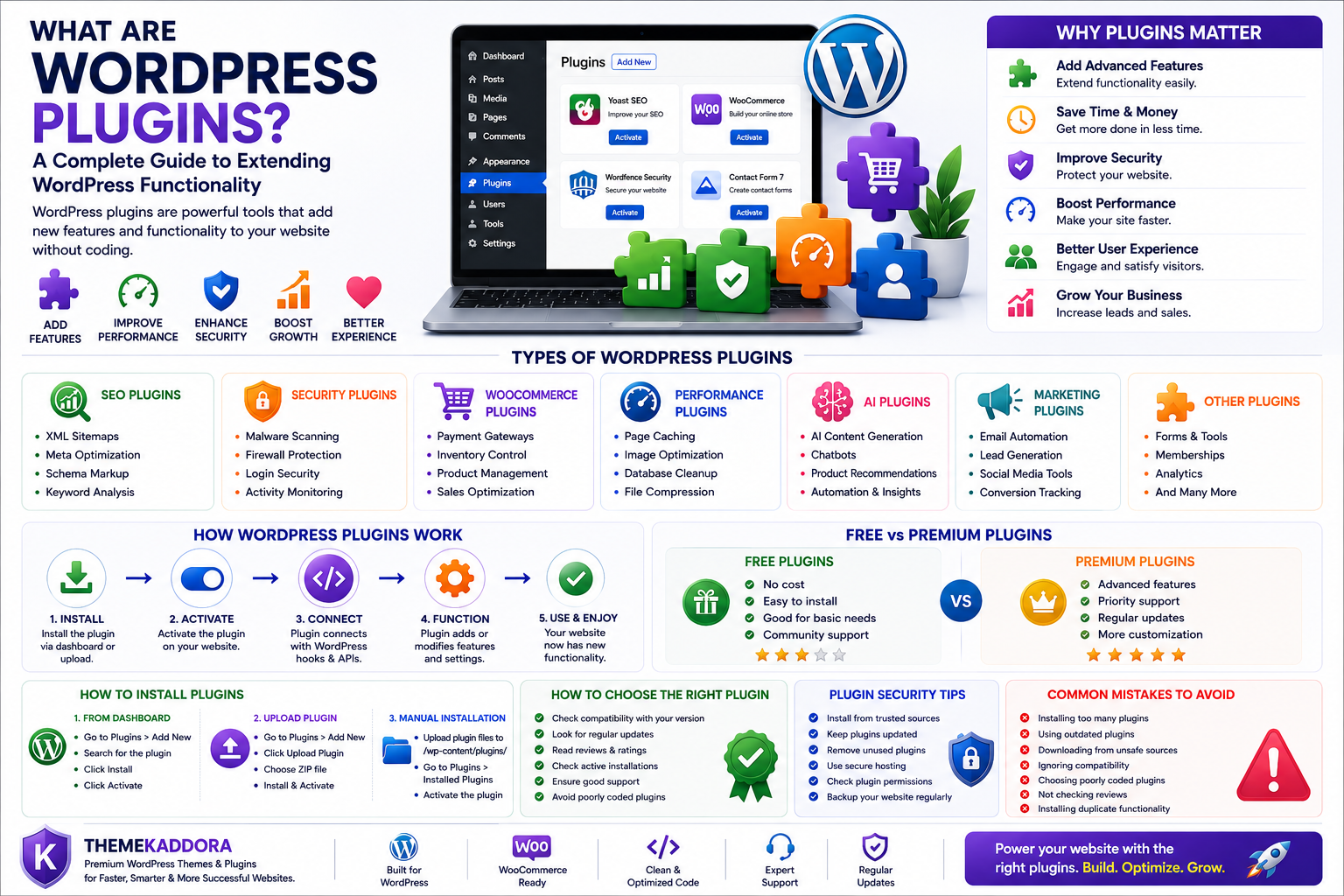
What Are WordPress Plugins? A Complete Guide to Extending WordPress Functionality
Introduction
WordPress powers millions of websites worldwide because of its flexibility, simplicity, and powerful customization options. One of the biggest reasons behind WordPress's popularity is its plugin ecosystem.
Whether you want to improve SEO, add an online store, create membership functionality, automate marketing, improve security, optimize performance, or add artificial intelligence features, WordPress plugins make it possible without rebuilding your entire website.
A WordPress plugin allows website owners and developers to add new features and capabilities to WordPress websites quickly and efficiently.
From small blogs to enterprise websites, plugins help transform a basic WordPress installation into a powerful digital platform.
In this complete guide, you will learn what WordPress plugins are, how they work, different types of plugins, benefits, installation methods, security considerations, and how to choose the right plugins for your website.
What Are WordPress Plugins?
A WordPress plugin is a software extension that adds new features or functionality to a WordPress website.
Plugins are written mainly using PHP, JavaScript, HTML, and CSS. They connect with WordPress through hooks and APIs, allowing developers to modify website behavior without changing the core WordPress files.
Simply put:
WordPress provides the foundation, while plugins add specialized features.
For example:
SEO plugins improve search visibility.
Security plugins protect websites.
WooCommerce plugins add eCommerce features.
Contact form plugins collect customer information.
AI plugins add automation and intelligent features.
Why Are WordPress Plugins Important?
Without plugins, WordPress websites would have limited functionality.
Plugins help businesses and developers:
Add advanced features
Customize websites
Automate tasks
Improve performance
Increase security
Enhance user experience
Reduce development time
Build professional websites faster
The plugin ecosystem is one of the biggest reasons WordPress remains the world's most popular website platform.
How Do WordPress Plugins Work?
WordPress plugins work by extending the existing functionality of WordPress.
The process generally works like this:
Step 1: Plugin Installation
A website owner installs a plugin from the WordPress dashboard or uploads a plugin package manually.
Step 2: Plugin Activation
After activation, WordPress loads the plugin files automatically.
Step 3: Plugin Connects With WordPress
The plugin uses WordPress hooks, filters, and APIs to add or modify functionality.
Step 4: Plugin Performs Its Function
The plugin adds features such as forms, analytics, automation, security, or design improvements.
Step 5: Website Uses New Features
Users interact with the newly added functionality on the website.
Types of WordPress Plugins
WordPress plugins are available for almost every website requirement.
SEO Plugins
SEO plugins help improve search engine visibility.
Common features include:
XML sitemaps
Meta optimization
Schema markup
Keyword analysis
Content optimization
Security Plugins
Security plugins protect websites from threats.
Features include:
Malware scanning
Firewall protection
Login security
Activity monitoring
Two-factor authentication
WooCommerce Plugins
WooCommerce plugins extend online store functionality.
They help with:
Product management
Payment options
Inventory control
Customer analytics
Sales optimization
Performance Optimization Plugins
These plugins improve website speed.
Features include:
Cache management
Image optimization
Database cleanup
File compression
Performance monitoring
AI WordPress Plugins
AI plugins bring automation and intelligent features.
Examples include:
AI content generation
Customer support chatbots
Product recommendations
SEO assistance
Workflow automation
Marketing Plugins
Marketing plugins help businesses grow.
They provide:
Email automation
Lead generation
Social media integration
Customer tracking
Conversion optimization
Benefits of WordPress Plugins
Extend Website Functionality
Plugins allow websites to add advanced features without custom development.
Save Development Time
Ready-made plugins reduce the need to build features from scratch.
Improve Business Operations
Automation plugins help businesses manage workflows efficiently.
Enhance User Experience
Plugins improve website interaction and customer engagement.
Support Website Growth
Businesses can add new features as their needs increase.
Free vs Premium WordPress Plugins
WordPress plugins are available in free and premium versions.
Free Plugins
Advantages:
No cost
Easy to install
Good for basic requirements
Limitations:
Limited features
Less customization
Sometimes limited support
Premium Plugins
Advantages:
Advanced features
Professional support
Regular updates
Better scalability
More customization options
For business websites, premium plugins often provide better long-term value.
How to Install a WordPress Plugin
There are several ways to install plugins.
Method 1: WordPress Dashboard
Steps:
Login to WordPress admin panel.
Go to Plugins.
Click Add New.
Search for the plugin.
Click Install.
Activate the plugin.
Method 2: Upload Plugin File
Steps:
Download the plugin ZIP file.
Open WordPress Dashboard.
Go to Plugins → Add New.
Upload the ZIP file.
Install and activate.
Method 3: Manual Installation
Advanced users can upload plugin files directly into:
wp-content/plugins/
Then activate the plugin from the dashboard.
How to Choose the Right WordPress Plugin
Before installing any plugin, consider:
Check Compatibility
Ensure the plugin supports your WordPress version.
Review Updates
Regular updates indicate active development.
Check Security Standards
Choose plugins from trusted developers.
Evaluate Performance
Avoid plugins that slow down your website.
Read Reviews
User feedback helps identify quality issues.
WordPress Plugin Security Best Practices
To keep your website secure:
Install plugins from trusted sources.
Keep plugins updated.
Remove unused plugins.
Use secure hosting.
Check plugin permissions.
Backup your website regularly.
Avoid outdated plugins.
A secure plugin ecosystem creates a safer website experience.
Common WordPress Plugin Mistakes
Avoid these problems:
Installing too many plugins
Using outdated plugins
Downloading plugins from unsafe sources
Ignoring compatibility issues
Choosing poorly coded plugins
Not checking reviews
Installing duplicate functionality
Quality matters more than quantity when selecting plugins.
Why Choose ThemeKaddora WordPress Plugins?
At ThemeKaddora, we create professional WordPress plugins designed for businesses, developers, agencies, and website owners.
Our plugins focus on:
Clean and optimized code
Modern WordPress standards
Responsive design
Performance optimization
Security best practices
Business automation
AI-powered functionality
From WooCommerce solutions and marketing tools to AI-powered plugins and productivity solutions, ThemeKaddora helps businesses build powerful WordPress websites.
Conclusion
WordPress plugins are one of the most powerful features of the WordPress ecosystem. They allow website owners to add advanced functionality, improve performance, automate business processes, and create professional digital experiences.
Whether you are building a blog, business website, online store, or SaaS platform, choosing the right WordPress plugins can significantly improve your website's capabilities.
A carefully selected plugin ecosystem helps create a secure, scalable, and successful WordPress website.
Frequently Asked Questions
What are WordPress plugins?
WordPress plugins are software extensions that add new features and functionality to WordPress websites.
Are WordPress plugins free?
Many WordPress plugins are free, while premium plugins offer advanced features, support, and customization options.
How many WordPress plugins should I install?
There is no fixed limit. The focus should be on installing quality plugins that are actively maintained and necessary for your website.
Are WordPress plugins safe?
Yes, plugins are safe when downloaded from trusted sources and kept updated with security best practices.
Can WordPress plugins slow down a website?
Poorly coded or excessive plugins can affect performance. Choosing optimized plugins helps maintain website speed.
Why choose ThemeKaddora plugins?
ThemeKaddora plugins are developed with clean code, modern WordPress standards, security practices, performance optimization, and business-focused features.
Does ThemeKaddora create custom WordPress plugins?
Yes. ThemeKaddora provides professional WordPress plugin solutions designed for business needs, automation workflows, WooCommerce enhancement, and digital growth.
Comments (0)