
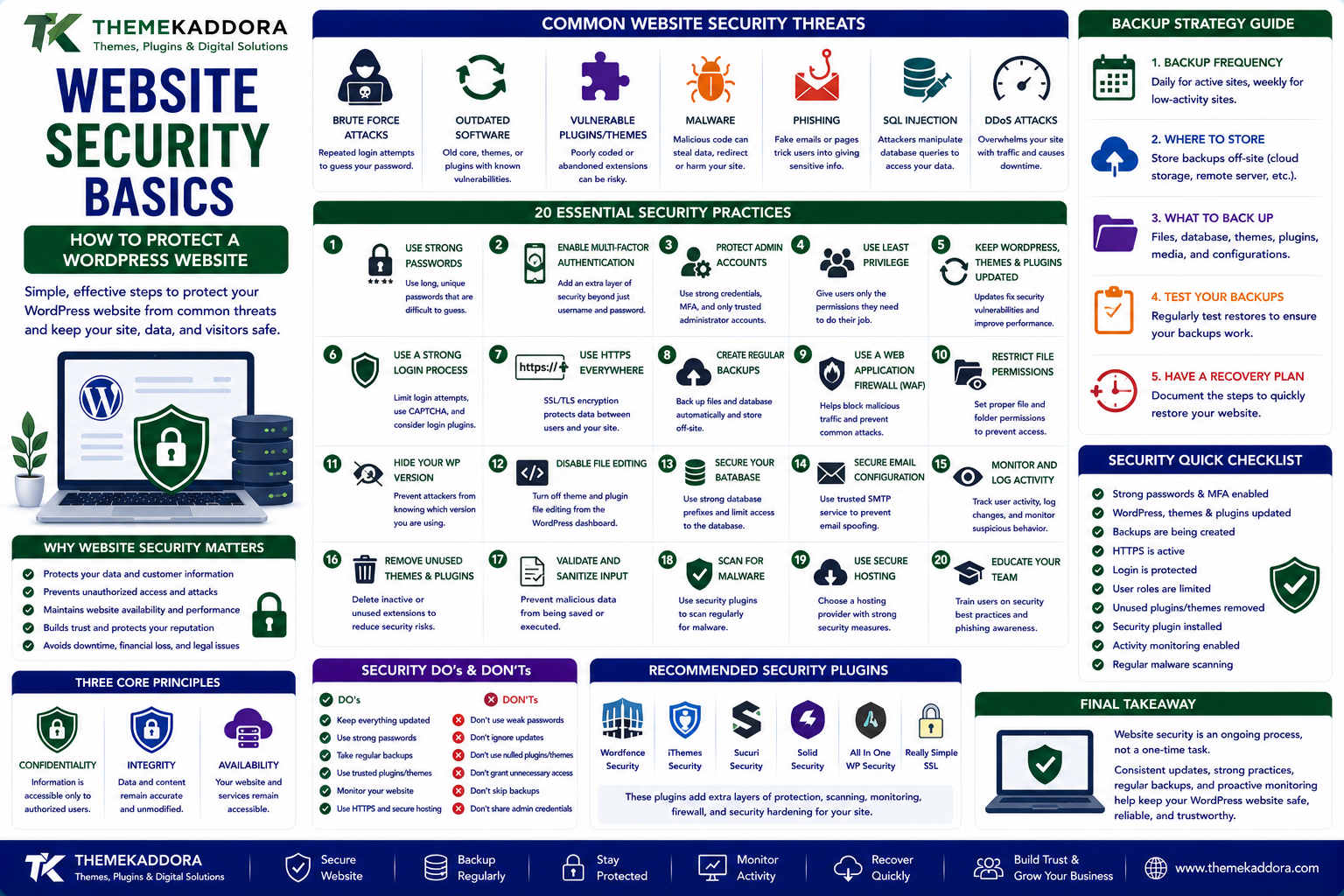
Website Security Basics: How to Protect a WordPress Website From Common Threats
Introduction
A website is more than a collection of pages.
It can contain customer information, administrator accounts, business data, payment integrations, forms, content, databases, and other important resources.
This makes website security an essential part of managing any modern website.
For WordPress websites, security becomes especially important because WordPress websites often use themes, plugins, third-party services, hosting platforms, databases, and administrative accounts.
A security problem in any one of these areas can affect the overall website.
The good news is that website security does not always require complicated technology.
Many security problems can be reduced through basic practices such as:
Keeping software updated
Using strong passwords
Limiting user permissions
Creating reliable backups
Protecting login pages
Monitoring website activity
Using HTTPS
Choosing trustworthy plugins and themes
This guide explains website security basics in simple terms and shows how website owners can build a stronger security foundation.
What Is Website Security?
Website security refers to the practices, technologies, and processes used to protect websites from unauthorized access, attacks, data loss, malware, and other threats.
A secure website should aim to protect:
Confidentiality
Sensitive information should only be accessible to authorized users.
Integrity
Website content and data should not be modified without permission.
Availability
The website should remain accessible and operational.
These three principles form an important foundation of information security.
Why Website Security Matters
A compromised website can create serious problems.
For example, attackers may:
Modify website content
Steal account credentials
Inject malicious code
Redirect visitors
Install malware
Access sensitive information
Abuse website resources
Damage a brand's reputation
For businesses, the consequences can extend beyond technical problems.
A security incident can affect:
Customer trust
Revenue
Search visibility
Business operations
Reputation
Recovery costs
Security should therefore be treated as part of normal website maintenance.
Common Website Security Threats
Websites can face many different types of threats.
Common examples include:
Weak passwords
Brute-force attacks
Outdated software
Vulnerable plugins
Malicious themes
Malware
Phishing
SQL injection
Cross-site scripting
Unauthorized access
Spam
Distributed denial-of-service attacks
Not every website faces the same level of risk.
The appropriate security strategy depends on the website's technology, data, users, traffic, and business requirements.
Weak Passwords
Weak passwords are one of the simplest security problems to avoid.
A password such as:
123456
or:
password
can be extremely easy to guess.
A strong password should generally be:
Long
Unique
Difficult to guess
Not reused across multiple accounts
Password managers can help users create and store strong credentials without requiring them to remember every password.
Use Multi-Factor Authentication
Multi-factor authentication, often called MFA, adds another verification step when users sign in.
Instead of relying only on:
Username + Password
MFA can require:
Username + Password + Additional Verification
The additional factor may involve an authentication app, security key, or another supported method.
MFA can reduce the risk associated with compromised passwords.
Protect WordPress Administrator Accounts
Administrator accounts have significant control over a WordPress website.
An attacker who gains administrator access may be able to:
Install plugins
Change themes
Modify content
Create users
Change settings
Access sensitive information
For this reason, administrator accounts should be protected carefully.
Use strong credentials, MFA where available, and only grant administrative access to people who genuinely need it.
Use the Principle of Least Privilege
Users should receive only the permissions they need.
For example:
Administrator
→ Full management access
Editor
→ Manage content
Author
→ Manage their own content
The exact roles depend on the WordPress configuration.
Limiting permissions reduces the potential impact of a compromised account.
Keep WordPress Updated
Software updates often include:
Security fixes
Bug fixes
Performance improvements
Compatibility improvements
New features
Running outdated WordPress software can increase security risk when known vulnerabilities are left unpatched.
Website owners should maintain supported versions of WordPress and monitor update requirements.
Keep Plugins Updated
Plugins add functionality to WordPress, but they also become part of the website's attack surface.
A plugin may contain:
PHP code
JavaScript
Database interactions
API connections
Administrative functionality
If a plugin has a security vulnerability, attackers may attempt to exploit it.
Keep plugins updated and remove plugins that are no longer needed.
Choose Themes Carefully
Themes can also contain code that affects website security.
When selecting a theme, consider:
Developer reputation
Update frequency
Support
Compatibility
Code quality
Security history
Avoid installing themes or plugins from untrusted sources.
A free download is not necessarily a safe download.
Remove Unused Plugins and Themes
Unused software can increase maintenance requirements and potentially expand the website's attack surface.
If a plugin is no longer required:
Deactivate
↓
Remove
Similarly, unused themes should generally be removed when they are not required.
Keeping only the software you actually need can simplify website management.
Use HTTPS
HTTPS encrypts communication between the visitor's browser and the website.
It helps protect information such as:
Login credentials
Form submissions
Account information
Other transmitted data
Modern websites should use HTTPS rather than sending sensitive information through unencrypted HTTP connections.
What Is an SSL/TLS Certificate?
HTTPS commonly relies on TLS certificates to establish encrypted communication.
People often refer to these as SSL certificates, although modern systems generally use TLS.
A certificate helps browsers establish that the website is communicating over a secure encrypted connection.
Browsers can display security indicators when HTTPS is properly configured.
Protect the WordPress Login Page
The WordPress login area is a common target for automated attacks.
Useful protections can include:
Strong passwords
MFA
Login rate limiting
Security monitoring
CAPTCHA where appropriate
Restricting unnecessary access
The goal is not simply to hide the login page.
It is to make unauthorized access significantly more difficult.
Brute-Force Attacks
A brute-force attack involves repeatedly attempting different credentials to gain access to an account.
For example:
Login Page
↓
Automated Attempts
↓
Username + Password Combinations
↓
Attempt to Gain Access
Security measures such as rate limiting, strong passwords, MFA, and monitoring can reduce this risk.
What Is Malware?
Malware is malicious software designed to perform unauthorized or harmful actions.
On a website, malware may:
Inject unwanted code
Redirect visitors
Create unauthorized accounts
Steal information
Modify files
Display malicious content
A compromised website may not always show obvious signs.
This is why monitoring and regular security checks are valuable.
Common Signs of a Hacked Website
Potential warning signs include:
Unexpected redirects
Unknown administrator accounts
Strange website content
Unfamiliar plugins
Sudden performance problems
Unexpected files
Search engine warnings
Unusual traffic
Security alerts
Emails sent without authorization
Not every unusual behavior means a website has been hacked, but suspicious changes should be investigated.
Website Backups
Backups are one of the most important parts of website security.
A backup provides a recovery option if something goes wrong.
Potential causes of problems include:
Malware
Hacking
Accidental deletion
Plugin conflicts
Server failures
Human mistakes
Database corruption
A reliable backup can significantly simplify recovery.
Follow the 3-2-1 Backup Principle
A common backup strategy is the 3-2-1 approach:
3 Copies of Data
↓
2 Different Storage Types
↓
1 Copy Stored Offsite
The exact implementation can vary depending on the website and business requirements.
The important idea is not to rely on a single copy stored in the same place as the website.
Test Your Backups
Creating backups is not enough.
You should also verify that they can actually be restored.
A backup that cannot be restored when needed provides limited protection.
Regularly test:
Backup availability
Backup integrity
Restoration process
Restoration time
Businesses should know how they would recover their website before an emergency occurs.
Database Security
WordPress websites often rely on databases to store important information.
This can include:
Content
Users
Settings
Comments
Product information
Orders
Plugin data
Database security practices can include:
Strong database credentials
Appropriate permissions
Regular backups
Secure hosting
Updated software
Monitoring
Avoiding unnecessary exposure
Database access should be limited to systems and users that require it.
Protect Against SQL Injection
SQL injection occurs when an attacker attempts to manipulate database queries through unsafe input.
Modern frameworks and applications use techniques such as prepared statements and parameterized queries to reduce this risk.
WordPress developers should use secure coding practices and trusted APIs rather than constructing unsafe database queries from untrusted input.
Protect Against Cross-Site Scripting
Cross-site scripting, commonly known as XSS, involves injecting malicious scripts into webpages or web applications.
Depending on the vulnerability, attackers may attempt to execute unwanted code in another user's browser.
Developers can reduce XSS risks through:
Proper input handling
Output escaping
Validation
Content security policies where appropriate
Secure development practices
Website owners should also keep plugins and themes updated because vulnerabilities can exist in third-party code.
Protect Forms From Spam and Abuse
Contact forms can attract automated spam.
Protection methods can include:
CAPTCHA
Rate limiting
Spam filtering
Honeypots
Input validation
Email verification
However, security measures should not make legitimate forms unnecessarily difficult to use.
WordPress Security Plugins
Security plugins can provide additional monitoring and protection features.
Depending on the solution, they may offer:
Malware scanning
Login protection
Firewall features
Security alerts
File monitoring
IP blocking
Activity logs
A security plugin should complement good security practices rather than replace them.
Using multiple overlapping security plugins can also create conflicts or unnecessary complexity.
Web Application Firewall
A Web Application Firewall, or WAF, can inspect incoming web traffic and block certain malicious requests.
A simplified process looks like:
Visitor Request
↓
WAF
↓
Security Check
↓
Allowed Request → Website
Blocked Request → Rejected
WAF protection can operate at different layers depending on the provider and architecture.
Hosting Security
Website security is not only about WordPress.
The hosting environment also matters.
A hosting provider may offer:
Server monitoring
Firewalls
Malware detection
Automated backups
Isolation
Secure infrastructure
DDoS protection
Before selecting hosting, understand what security features are actually included.
DDoS Attacks
A Distributed Denial-of-Service attack attempts to overwhelm a service with large amounts of traffic or requests.
The objective may be to make the website difficult or impossible for legitimate visitors to access.
DDoS protection can involve:
Traffic filtering
Rate limiting
CDN infrastructure
Network-level protection
Specialized security services
The appropriate protection depends on the website's risk and infrastructure.
Website Security and WordPress Performance
Security tools can affect website performance.
For example, aggressive scanning or excessive security rules may consume server resources.
The goal should be to create a balanced system:
Security
Performance
Reliability
Security should protect the website without unnecessarily creating a poor user experience.
Security Monitoring
Security monitoring helps identify unusual activity.
Useful things to monitor include:
Login attempts
New administrator accounts
Plugin changes
Theme changes
File modifications
Unexpected traffic
Server errors
Security alerts
Monitoring can help website owners identify potential problems earlier.
Security Headers
Websites can use HTTP security headers to improve browser-side security controls.
Depending on the website, useful headers may include:
Content-Security-Policy
Strict-Transport-Security
X-Content-Type-Options
Referrer-Policy
Security headers should be configured carefully because incorrect settings can break legitimate website functionality.
Secure WordPress Development
Developers play an important role in website security.
Secure development practices include:
Validating input
Escaping output
Using prepared database queries
Checking permissions
Using nonces where appropriate
Avoiding unsafe functions
Keeping dependencies updated
Reviewing third-party code
Security should be considered during development rather than added only after a website is attacked.
Security for WooCommerce Websites
WooCommerce websites can require additional attention because they may handle:
Customer accounts
Orders
Payment integrations
Shipping information
Personal data
Product information
Businesses should carefully protect administrative accounts, payment integrations, customer information, and order data.
Payment processing should use trusted and appropriately secured payment providers.
Security for Business Websites
A business website may collect information through:
Contact forms
Newsletter subscriptions
Quote requests
Customer accounts
Booking systems
Support forms
Businesses should understand what data they collect and protect it appropriately.
They should also avoid collecting information they do not actually need.
Website Security Checklist
Account Security
Use strong unique passwords
Enable MFA where available
Limit administrator accounts
Use appropriate user roles
Remove inactive accounts
Software Security
Keep WordPress updated
Update plugins
Update themes
Remove unused software
Use trusted sources
Server Security
Use HTTPS
Secure hosting
Configure appropriate permissions
Monitor server activity
Use suitable firewall protection
Backup Security
Maintain regular backups
Store backups separately
Protect backup access
Test restoration
Monitoring
Monitor login activity
Check unexpected changes
Review security alerts
Investigate suspicious behavior
How to Secure a WordPress Website Step by Step
Step 1: Create a Backup
Make sure a recent working backup exists before changing security settings.
Step 2: Update WordPress
Use a supported version of WordPress.
Step 3: Update Plugins and Themes
Review available updates and remove software that is no longer needed.
Step 4: Protect Administrator Accounts
Use strong passwords, appropriate permissions, and MFA where possible.
Step 5: Enable HTTPS
Make sure the website uses a properly configured secure connection.
Step 6: Add Appropriate Security Controls
Consider login protection, malware scanning, WAF protection, and monitoring based on the website's requirements.
Step 7: Review Users
Remove unnecessary accounts and reduce excessive permissions.
Step 8: Check Backups
Confirm that backups are being created successfully.
Step 9: Monitor the Website
Watch for unexpected changes, suspicious logins, and unusual activity.
Step 10: Test Security and Recovery
Verify that important security controls work and that the website can be restored if necessary.
Common Website Security Mistakes
1. Using Weak Passwords
Simple credentials can make accounts easier to compromise.
2. Ignoring Updates
Outdated software may contain known vulnerabilities.
3. Installing Untrusted Plugins
Third-party code can introduce security risks.
4. Keeping Unused Plugins
Unused software increases maintenance requirements.
5. Having No Backup
Without backups, recovery can become much harder.
6. Giving Everyone Administrator Access
Excessive permissions increase potential damage from compromised accounts.
7. Ignoring Security Alerts
Warnings should be investigated rather than ignored.
8. Using Security Tools Without Configuration
Installing a security plugin or firewall does not automatically guarantee protection.
9. Forgetting Hosting Security
The server environment is part of the security system.
10. Never Testing Recovery
A security strategy should include a practical recovery plan.
Website Security and SEO
Website security can indirectly affect search visibility and user trust.
A compromised website may:
Display unwanted content
Redirect visitors
Become inaccessible
Receive browser warnings
Experience downtime
Search engines and browsers can also respond to compromised or unsafe websites in ways that negatively affect users.
Security should therefore be considered part of overall technical website quality.
However, security alone does not guarantee better search rankings.
Website Security and User Trust
Visitors expect websites to protect their information.
Trust can be affected by:
HTTPS warnings
Suspicious redirects
Broken pages
Unexpected downloads
Poor privacy practices
Security incidents
A secure website supports a more trustworthy digital experience.
For businesses, security is therefore not only a technical responsibility.
It is also part of customer experience and brand reputation.
How AI Is Changing Website Security
AI is increasingly being used to assist cybersecurity teams.
Potential applications include:
Anomaly detection
Automated log analysis
Threat detection
Malware classification
Suspicious behavior analysis
Security alert prioritization
For example, an AI system may identify unusual login patterns that deserve investigation.
However, AI-based security systems can produce false positives and should be used as part of a broader security strategy.
How Themekaddora Fits Into Website Security
Themekaddora focuses on WordPress, themes, plugins, technology, AI, SEO, digital marketing, business, and website development.
Security connects all of these areas.
A WordPress website depends on:
Themes
Plugins
Hosting
Database
User Accounts
APIs
Website Code
Every layer can introduce security considerations.
Understanding website security helps WordPress users make better decisions when choosing themes, plugins, hosting, integrations, and development practices.
Why Choose Themekaddora?
ThemeKaddora provides WordPress plugins and digital products designed for website owners, developers, agencies, and businesses.
Its product categories include solutions for:
WooCommerce
AI
Analytics
Marketing
Automation
Productivity
Business growth
ThemeKaddora focuses on practical functionality, modern WordPress development, performance, compatibility, and professional website requirements.
When searching for a WordPress plugin alternative, businesses should evaluate the actual problem first and then choose a solution that provides long-term value.
The Future of Website Security
Website security will continue to evolve as websites become more connected.
Modern websites increasingly use:
- WordPress
- Cloud Hosting
- APIs
- AI
- Third-Party Services
- Analytics
- Automation
Every additional integration can introduce new security considerations.
Future security systems may increasingly use:
AI-powered monitoring
Automated threat detection
Zero-trust approaches
Stronger authentication
Automated vulnerability management
Cloud security controls
Continuous monitoring
The goal will remain the same:
Protect data.
Protect users.
Protect the website.
Maintain availability.
Conclusion
Website security is not a single plugin or setting.
It is a continuous process involving accounts, software, hosting, databases, code, backups, monitoring, and user behavior.
For WordPress websites, a strong security foundation begins with simple practices:
Keep software updated
Use strong passwords
Enable MFA
Limit permissions
Use HTTPS
Remove unnecessary plugins and themes
Maintain reliable backups
Monitor suspicious activity
Choose trustworthy hosting and software
Prepare a recovery plan
No security strategy can guarantee that a website will never experience an attack.
However, good security practices can reduce risk and make recovery easier when something goes wrong.
A secure website is ultimately a combination of good technology, responsible maintenance, careful configuration, and continuous monitoring.
Frequently Asked Questions
1. What is website security?
Website security involves protecting websites, users, data, applications, and infrastructure from unauthorized access, attacks, malware, data loss, and other threats.
2. How can I secure a WordPress website?
Keep WordPress, plugins, and themes updated, use strong passwords and MFA, limit user permissions, enable HTTPS, maintain backups, remove unused software, and monitor the website.
3. Is WordPress secure?
WordPress can be operated securely, but security depends on the core software, plugins, themes, hosting, configuration, accounts, and ongoing maintenance.
4. Are WordPress plugins a security risk?
Plugins are not automatically unsafe, but vulnerable, outdated, poorly developed, or untrusted plugins can create security risks.
5. Do I need a security plugin?
A security plugin can provide useful protection and monitoring features, but it should complement broader security practices rather than replace them.
6. What is HTTPS?
HTTPS is the secure version of HTTP that uses TLS to help protect information exchanged between a browser and website.
7. What is a brute-force attack?
A brute-force attack involves repeatedly attempting different credentials to gain unauthorized access to an account.
8. What is website malware?
Website malware is malicious code or software that can perform unauthorized actions such as modifying files, redirecting visitors, stealing information, or creating unauthorized access.
9. How often should I back up my WordPress website?
The appropriate frequency depends on how often the website changes. Websites with frequent content, customer, or transaction activity generally need more frequent backups.
10. Can website security improve SEO?
Security is not a direct SEO ranking strategy, but compromised websites can create technical and user-experience problems that may negatively affect visibility and trust.
11. How can I protect a WooCommerce website?
Use secure hosting, HTTPS, strong administrator security, updated software, trusted payment integrations, regular backups, appropriate permissions, and ongoing monitoring.
12. Why Choose Themekaddora?
Themekaddora combines WordPress, technology, AI, SEO, security, digital marketing, and business knowledge to help readers understand and improve their websites.
Comments (0)