
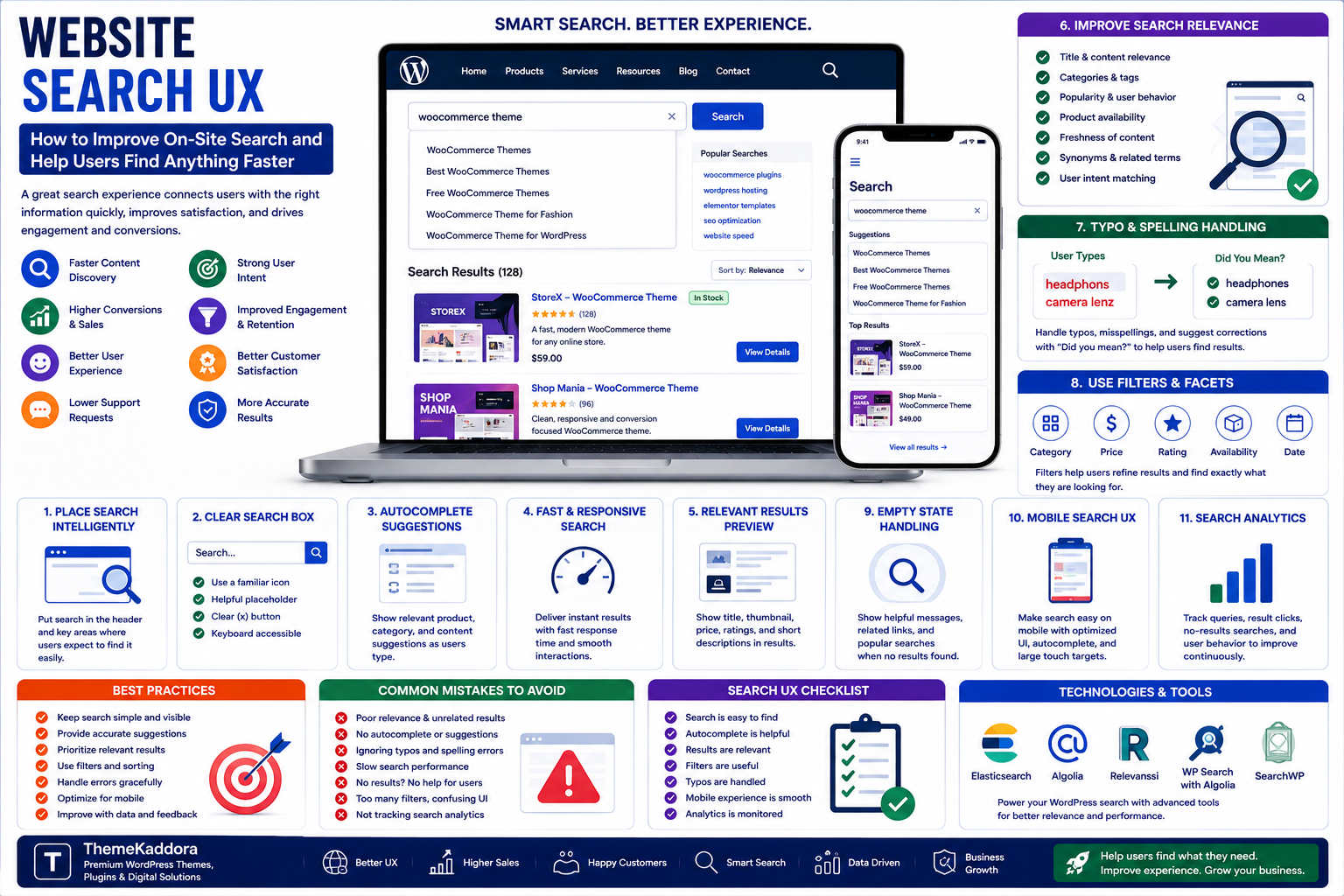
Website Search UX: How to Improve On-Site Search and Help Users Find Anything Faster
Introduction
A website can contain hundreds, thousands, or even millions of pages, products, documents, and resources.
As the amount of content grows, navigation menus alone may no longer be enough to help visitors find what they need.
This is where website search becomes important.
A well-designed search experience allows users to move directly from a question or product requirement to relevant information.
A poor search experience does the opposite.
Users may encounter:
- Irrelevant results
- Empty result pages
- Slow responses
- Poor autocomplete suggestions
- Incorrect spelling problems
- Difficult filters
- Confusing interfaces
Results that are technically correct but practically useless
For e-commerce businesses, these problems can directly affect conversions.
For content websites, poor search can reduce engagement and make valuable information difficult to discover.
This is why search should not be treated as just another input field.
It should be designed as a complete user experience.
In this guide, you'll learn how website search works, what makes search useful, how to improve search relevance, design better search interfaces, handle errors, optimize mobile search, and use search analytics to continuously improve the experience.
1. What Is Website Search UX?
Website Search UX refers to the design and optimization of the experience users have when searching for information, products, services, or content on a website.
It includes everything from:
Search box placement
Search suggestions
Autocomplete
Search results
Filters
Sorting
Error handling
Loading states
Mobile interactions
Result relevance
A good search experience answers a simple question:
Can the user find what they need quickly and confidently?
2. Why On-Site Search Matters
Search users often have stronger intent than visitors who simply browse.
Someone searching for:
"wireless noise cancelling headphones"
has already expressed a specific need.
Similarly, someone searching a business website for:
"WooCommerce migration guide"
may be looking for a specific resource.
This makes search an important part of the customer journey.
Benefits of effective search include:
Faster content discovery
Better user experience
Higher product discovery
Improved conversions
Increased engagement
Lower frustration
Better customer satisfaction
3. Place Search Where Users Expect It
The search function should be easy to discover.
Common locations include:
Website header
Main navigation
E-commerce storefront
Mobile navigation
Resource libraries
Documentation portals
The search field should be visually identifiable.
Avoid hiding essential search functionality behind several clicks when users are likely to need it frequently.
4. Design a Clear Search Box
A search box should immediately communicate what users can do.
Useful elements include:
Search Icon
A familiar search icon helps users recognize the function.
Placeholder Text
Examples:
Search products...
Search articles...
Search documentation...
Specific placeholder text can communicate the expected content.
Clear Button
When a query has been entered, provide an easy way to clear it.
Keyboard Support
Users should be able to activate search using the keyboard.
5. Add Autocomplete and Suggestions
Autocomplete can help users find results faster.
As users type, the system can suggest:
Products
Categories
Articles
Brands
Popular queries
Previous searches
For example:
User types:
woo
Suggestions:
WooCommerce Themes
WooCommerce Plugins
WooCommerce SEO
WooCommerce Analytics
Autocomplete can reduce typing effort and help users discover available content.
However, suggestions should remain relevant.
Displaying too many unrelated suggestions can make search more confusing.
6. Improve Search Relevance
A technically functioning search engine is not necessarily a useful one.
Search results should prioritize the information most likely to satisfy the user's intent.
Ranking signals may include:
Title relevance
Product name
Description
Category
Tags
Popularity
Availability
Freshness
User behavior
Query intent
For e-commerce, product availability may also matter.
There is little value in ranking an unavailable product above relevant products that can actually be purchased.
7. Handle Typos and Spelling Mistakes
Users frequently make spelling mistakes.
For example:
"headphons"
instead of:
"headphones"
A good search system can recognize likely errors and provide useful results.
Possible approaches include:
Spell correction
Fuzzy matching
Typo tolerance
Query suggestions
Instead of displaying:
No results found
the system could suggest:
Did you mean "headphones"?
This small improvement can prevent users from abandoning the search.
8. Create Useful Search Result Pages
The search results page should provide enough information to help users evaluate options.
For products, useful information may include:
Product image
Product name
Price
Rating
Availability
Category
Key attributes
For content, results might include:
Title
Short description
Content type
Publication date
Category
Search results should be easy to scan.
9. Add Filters for Large Websites
Filters become increasingly important as the number of results grows.
E-commerce websites may allow filtering by:
Category
Price
Brand
Size
Color
Rating
Availability
Material
Content websites may allow filtering by:
Category
Author
Date
Topic
Content type
Filters help users reduce large result sets without repeatedly modifying their search query.
10. Use Sorting Carefully
Sorting allows users to change the order of results.
Common options include:
Relevance
Price: Low to High
Price: High to Low
Newest
Most Popular
Highest Rated
For most search experiences, relevance should remain the default.
Users generally want the best matches before they want results ordered by another attribute.
11. Design a Helpful Zero-Results Page
A zero-results page is an important part of search UX.
Avoid simply displaying:
No results found.
Instead provide alternatives.
For example:
No results found for "wireles heaphones."
Try:
Checking your spelling
Using fewer words
Searching a broader category
Browsing popular products
You can also show:
Popular products
Popular articles
Categories
Related searches
The goal is to keep users moving rather than ending their journey.
12. Search on Mobile Devices
Mobile search requires special attention.
Search fields should be:
Large enough to tap
Easy to focus
Clearly visible
Keyboard-friendly
Fast to use
Search suggestions should not occupy the entire screen unnecessarily.
Results and filters should also be easy to interact with using touch.
A search interface designed for desktop may become frustrating on smaller screens if these details are ignored.
13. Search Filters on Mobile
Mobile screens have limited space.
Instead of displaying dozens of filters permanently, use:
Filters
↓
Category
Price
Brand
Rating
This keeps the interface cleaner.
Show the number of active filters so users understand how their results are being restricted.
For example:
Filters (3)
This small detail can improve usability.
14. Search Speed Matters
Users expect search results quickly.
Slow search creates frustration and can reduce engagement.
Performance depends on:
Search engine architecture
Database queries
Indexing
API response time
Server resources
Caching
Query complexity
Large websites may need dedicated search technologies rather than relying entirely on basic database queries.
The technical solution should be selected based on website size and search complexity.
15. Search Indexing
A search engine typically creates an index containing information about searchable content.
Instead of scanning every page for every query, the system can search the index.
This can dramatically improve response time.
An index may contain:
Titles
Descriptions
Categories
Tags
Attributes
Metadata
Content
The index should be updated when important content changes.
16. Search Analytics
Search analytics can reveal what users actually want.
Track information such as:
Most common searches
Searches with no results
Searches producing low engagement
Search-to-purchase rate
Search-to-conversion rate
Search abandonment
Popular filters
Search refinements
For example, if thousands of visitors search for a product that does not exist, that may reveal a new product opportunity.
Search data can therefore become a valuable source of business intelligence.
17. Use Search Data to Improve Content
Internal search can reveal gaps in website content.
Suppose users repeatedly search for:
"WooCommerce invoice plugin"
but your website has no dedicated resource covering it.
This may indicate an opportunity to:
Create an article
Add a product
Improve navigation
Create a category
Add a FAQ
Search behavior can therefore influence both content strategy and product strategy.
18. Personalization in Search
Advanced search systems can personalize results based on available context.
Potential signals include:
Previous searches
Purchase history
Browsing behavior
Location
Preferences
Customer segment
For example, returning customers might see products related to previous purchases.
However, personalization should be transparent and should not make search results unpredictable.
Relevance should remain the primary objective.
19. AI-Powered Website Search
Artificial Intelligence can extend traditional keyword search.
AI-powered search may understand concepts rather than simply matching exact words.
For example, a user might search:
"comfortable shoes for rainy weather"
Instead of requiring an exact product keyword, an intelligent search system could interpret:
Product type
Comfort requirement
Weather condition
and return relevant products.
Other AI search capabilities may include:
Natural-language queries
Semantic search
Query understanding
Personalized recommendations
Conversational search
Automatic query expansion
AI search can be powerful, but it should still be tested against real user queries.
20. Search Accessibility
Search functionality should be accessible to as many users as possible.
Consider:
Keyboard navigation
Visible focus states
Accessible labels
Screen-reader compatibility
Sufficient color contrast
Clear error messages
Logical heading structure
Search suggestions should also be usable with keyboard and assistive technologies.
Accessibility should be part of search design from the beginning.
21. Common Website Search Mistakes
Hiding Search
If users cannot easily find search, they may struggle to discover content.
Returning Irrelevant Results
A technically correct result can still be useless if it does not match user intent.
Ignoring Typos
Spelling mistakes are normal user behavior.
Poor Zero-Results Experience
A dead-end message can cause users to leave.
Too Many Filters
Excessive filtering can make the interface complicated.
Slow Search
Users expect fast responses.
Ignoring Mobile
Search should work naturally on smartphones and tablets.
Not Reviewing Search Analytics
Search data contains valuable information about user needs.
22. How to Improve Website Search Step by Step
Step 1: Analyze Existing Search Behavior
Review:
Popular queries
Failed searches
Search abandonment
Conversion rates
Step 2: Identify Problems
Find queries producing:
No results
Poor results
Too many results
Slow responses
Step 3: Improve Relevance
Adjust ranking and searchable fields.
Step 4: Add Suggestions
Implement autocomplete and query suggestions.
Step 5: Improve Filters
Add only filters that help users make meaningful decisions.
Step 6: Improve Zero-Result Pages
Provide alternative actions and related content.
Step 7: Optimize Mobile Search
Test the entire search journey on smartphones.
Step 8: Monitor Continuously
Search optimization should be an ongoing process.
23. Measuring Search UX Success
Useful metrics include:
Search usage rate
Search conversion rate
Search exit rate
Zero-result rate
Query refinement rate
Search response time
Product discovery rate
Revenue from search users
For e-commerce, one particularly useful metric is whether users who search are more likely to purchase.
The goal is not simply to increase searches.
The goal is to help users find the right thing faster.
24. Why Choose ThemeKaddora?
ThemeKaddora is a digital marketplace focused on practical digital products and solutions for website owners, developers, freelancers, agencies, entrepreneurs, and online businesses.
Its ecosystem can include:
WordPress themes
WordPress plugins
WooCommerce solutions
SaaS products
AI-powered tools
Business automation solutions
Website templates
Digital products
When selecting search, e-commerce, analytics, or website solutions, consider relevance, performance, accessibility, security, compatibility, documentation, updates, and long-term maintainability.
Conclusion
Website search is often treated as a small feature, but it can have a major impact on user experience and business performance.
A strong search experience helps visitors:
Find information faster
Discover relevant products
Navigate large websites
Complete purchases
Explore content
Reduce frustration
The most effective search systems combine:
Good UX + Relevant Results + Fast Performance + Helpful Suggestions + Strong Analytics
Businesses should continuously analyze what users search for and use that information to improve products, content, navigation, and customer experiences.
AI and semantic search are creating new possibilities, but the fundamentals remain important.
The best website search experience is not the one with the most advanced technology. It is the one that helps users find what they need with the least effort.
Frequently Asked Questions
1. What is website search UX?
Website search UX is the design of the search experience, including the search box, suggestions, results, filters, error handling, mobile experience, and overall usability.
2. Why is on-site search important?
It helps users quickly find products, services, content, or information, particularly on large websites.
3. What is search autocomplete?
Autocomplete displays suggested queries or content while users type, helping them search faster.
4. How can I improve search relevance?
Improve searchable fields, ranking signals, query understanding, product metadata, categories, and search analytics.
5. Should websites support typo tolerance?
Yes. Typo tolerance and spelling suggestions can prevent users from receiving unnecessary zero-result pages.
6. What should a zero-results page contain?
It should explain the problem and provide useful alternatives such as related searches, categories, popular content, or product suggestions.
7. Is AI search better than keyword search?
Not automatically. AI can improve natural-language understanding, but search quality depends on implementation, data, relevance, speed, and user intent.
8. How does search analytics help businesses?
Search analytics reveals what users want, which queries fail, what products or content are difficult to find, and where new opportunities may exist.
9. Should website search be optimized for mobile?
Yes. Mobile users need search interfaces that are easy to tap, fast, readable, and simple to navigate.
10. Why choose ThemeKaddora?
ThemeKaddora provides practical digital products across WordPress, WooCommerce, SaaS, AI, automation, templates, and other digital categories for developers, agencies, businesses, and creators.
Comments (0)