
Website Quality Assurance (QA): The Complete Guide to Building Reliable and High-Quality Websites
Introduction
Launching a website is a significant milestone, but it does not guarantee long-term quality. Websites are updated regularly with new content, features, integrations, and design improvements. Without structured testing and review processes, even small changes can introduce bugs, reduce performance, or create accessibility and security issues.
Website Quality Assurance (QA) is the practice of verifying that a website meets defined standards before and after deployment. It combines testing, reviews, monitoring, and continuous improvement to deliver a reliable user experience.
Whether you're managing a WordPress website, an ecommerce store, a SaaS platform, or a corporate website, a strong QA process helps reduce errors, improve customer satisfaction, and support long-term website success.
What Is Website Quality Assurance?
Website Quality Assurance is a systematic process used to evaluate the quality of a website throughout its lifecycle.
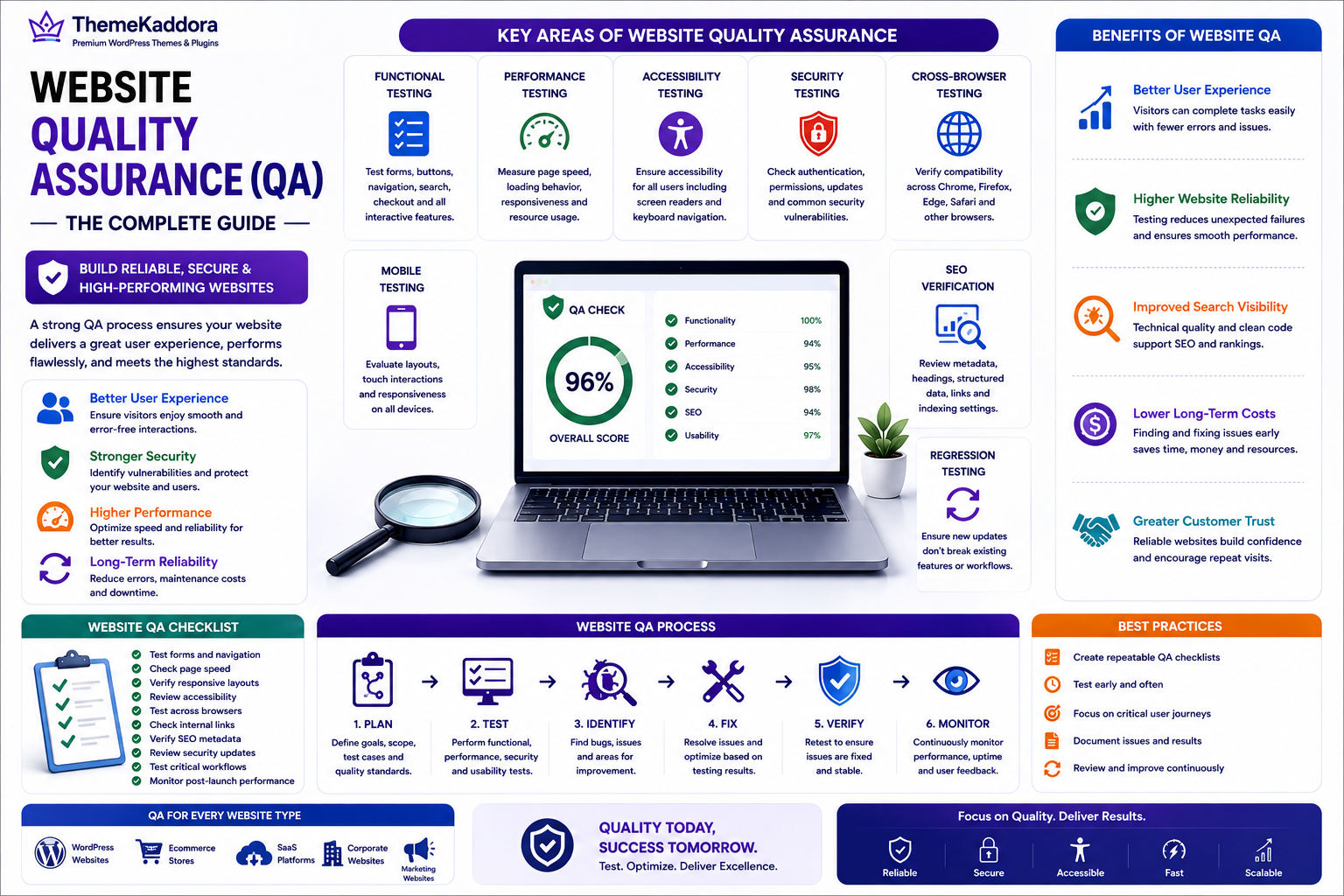
A comprehensive QA process may include:
Functional testing
Usability testing
Accessibility testing
Performance testing
Security testing
Cross-browser testing
Mobile testing
Content review
SEO verification
Regression testing
The objective is to identify and resolve issues before they affect users.
Why Website QA Matters
Organizations invest in Website QA to:
Improve user experience
Reduce website errors
Protect business reputation
Strengthen security
Improve accessibility
Support SEO
Reduce maintenance costs
Consistent quality assurance creates more dependable digital experiences.
Key Areas of Website Quality Assurance
Functional Testing
Verify that forms, buttons, navigation, search, checkout, and interactive features work correctly.
Performance Testing
Measure page speed, loading behavior, responsiveness, and resource usage.
Accessibility Testing
Ensure the website supports keyboard navigation, screen readers, color contrast, and accessible content structures.
Security Testing
Review authentication, permissions, updates, and common security vulnerabilities.
Cross-Browser Testing
Confirm that the website works consistently across modern browsers.
Mobile Testing
Evaluate layouts, touch interactions, and responsiveness on different screen sizes.
Content Review
Check grammar, links, images, metadata, and overall content accuracy.
SEO Verification
Review title tags, meta descriptions, headings, structured data, internal links, and indexing settings.
Benefits of Website Quality Assurance
Better User Experience
Visitors can complete tasks with fewer errors and less frustration.
Higher Website Reliability
Testing reduces unexpected failures and broken functionality.
Improved Search Visibility
Technical quality supports a stronger SEO foundation.
Lower Long-Term Costs
Finding issues early is often less expensive than fixing them after launch.
Greater Customer Trust
Reliable websites encourage confidence and repeat visits.
Website QA for Different Organizations
Startups
Launch products with greater confidence by identifying critical issues early.
Marketing Agencies
Standardize testing before delivering websites to clients.
Ecommerce Businesses
Verify product pages, checkout, payment systems, and customer accounts.
SaaS Companies
Test onboarding, dashboards, subscriptions, and feature updates before release.
WordPress Websites
Review themes, plugins, forms, WooCommerce functionality, content, SEO, accessibility, security, and performance after every significant update.
Best Practices
Create QA Checklists
Use repeatable checklists for launches, updates, and maintenance.
Test Early and Often
Integrate QA throughout development instead of waiting until the end.
Prioritize Critical User Journeys
Test the pages and workflows that matter most to users and business goals.
Document Issues
Track bugs, improvements, and testing results in a structured way.
Review Regularly
Continue testing after launch as content and features evolve.
Common Mistakes to Avoid
Avoid these common challenges:
Testing only before launch
Ignoring mobile devices
Overlooking accessibility
Failing to verify SEO settings
Skipping regression testing
Assuming plugins never introduce issues
Website QA Checklist
Before publishing updates, make sure you:
✅ Test forms and navigation
✅ Check page speed
✅ Verify responsive layouts
✅ Review accessibility
✅ Test across browsers
✅ Check internal links
✅ Verify SEO metadata
✅ Review security updates
✅ Test critical workflows
✅ Monitor post-launch performance
Why Choose Themekaddora?
Themekaddora develops WordPress themes that support modern quality standards and long-term maintainability.
Our themes provide:
Lightweight architecture
Clean, standards-based code
SEO-friendly development
Responsive layouts
WooCommerce compatibility
Accessibility-conscious design
Fast loading performance
Flexible customization
Cross-browser compatibility
Regular updates
Professional support
These features help businesses create WordPress websites that are easier to test, maintain, and improve over time.
Conclusion
Website Quality Assurance is an ongoing commitment to reliability, usability, performance, accessibility, and security. By adopting structured testing processes, organizations can identify problems early, improve user experiences, and reduce long-term maintenance costs.
Whether you're managing a WordPress website, an ecommerce platform, or a SaaS application, integrating QA into every stage of the website lifecycle creates more dependable digital experiences. Combined with Themekaddora's lightweight WordPress themes, a strong QA strategy helps businesses deliver websites that remain reliable, scalable, and ready for future growth.
Frequently Asked Questions (FAQs)
What is Website Quality Assurance?
Website Quality Assurance (QA) is the process of testing and reviewing a website to ensure it meets standards for functionality, performance, security, accessibility, usability, and overall quality.
Why is Website QA important?
It helps identify issues before users encounter them, improving reliability, customer satisfaction, SEO foundations, and long-term maintainability.
What should a Website QA checklist include?
A QA checklist typically covers functionality, performance, accessibility, security, mobile responsiveness, browser compatibility, SEO verification, and content accuracy.
Is QA only needed before launch?
No. Quality assurance should continue throughout the website lifecycle whenever content, features, themes, plugins, or integrations are updated.
Why choose Themekaddora?
Themekaddora provides lightweight, SEO-friendly WordPress themes with clean code, responsive layouts, WooCommerce compatibility, accessibility-conscious design, fast performance, regular updates, and professional support—helping businesses build websites that are easier to test, maintain, and scale.
Comments (0)