
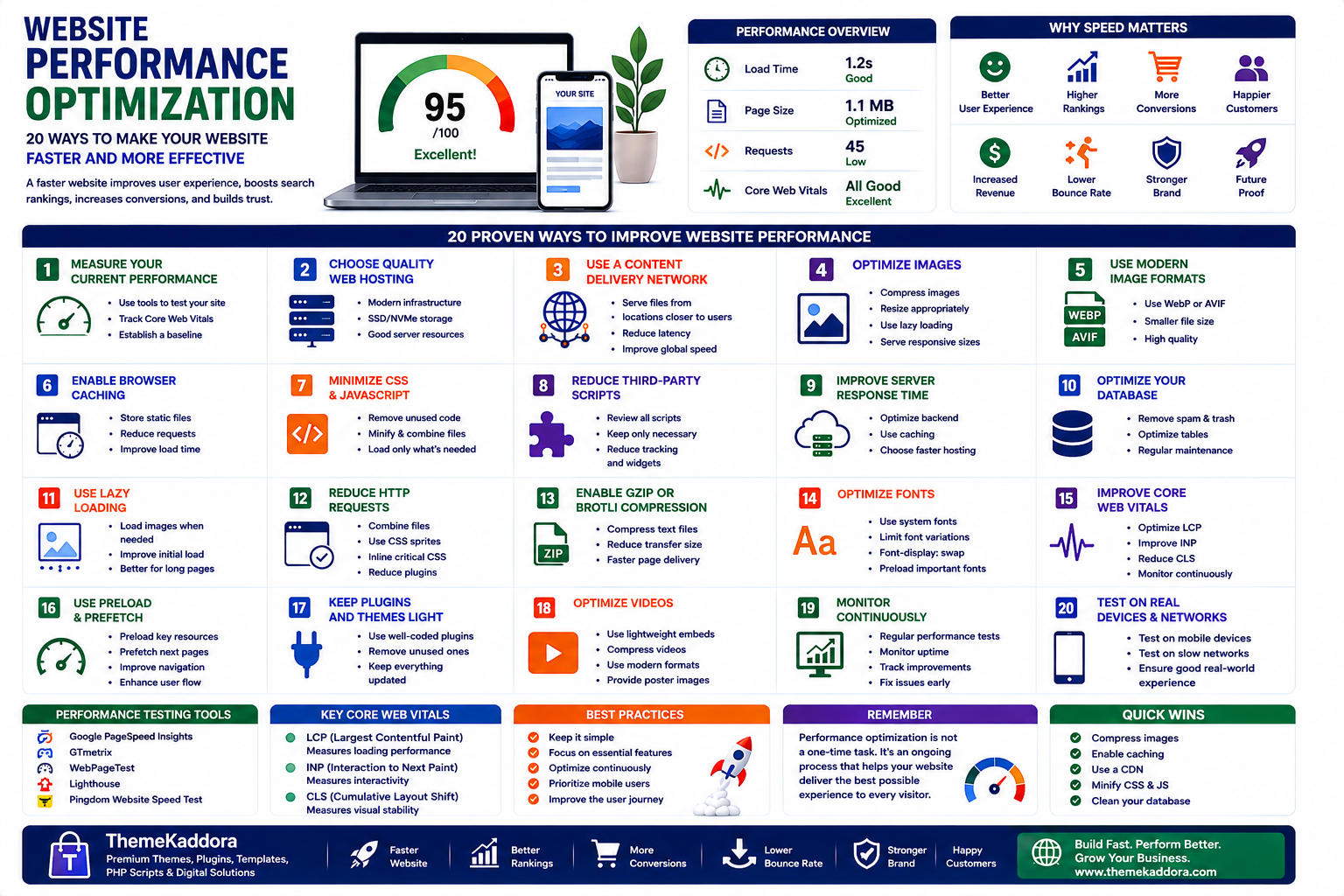
Website Performance Optimization: 20 Ways to Make Your Website Faster and More Effective
Introduction
A website can have excellent content, attractive design, and powerful features, but if it loads slowly, visitors may leave before they ever see them.
Website performance affects almost every part of an online business.
It can influence:
User experience
Search visibility
Conversion rates
Customer satisfaction
Engagement
Revenue
Brand perception
Modern visitors expect websites to respond quickly, particularly when browsing on mobile devices.
Performance optimization is therefore not simply a technical task for developers.
It is a business strategy.
A faster website can make it easier for visitors to discover content, browse products, complete forms, and purchase services or products.
In this guide, we'll explore 20 practical ways to improve website performance, reduce unnecessary loading time, improve the user experience, and create a stronger foundation for long-term online growth.
1. Measure Your Current Performance
Before optimizing a website, establish a baseline.
Measure:
Page loading time
Core Web Vitals
Time to First Byte
Largest Contentful Paint
Interaction to Next Paint
Cumulative Layout Shift
Total page size
Number of requests
Testing before making changes helps you understand which improvements actually produce results.
Don't optimize based on assumptions.
Measure first.
2. Choose Quality Web Hosting
Hosting has a major impact on website performance.
A low-quality server can create slow response times even when the website itself is well optimized.
Consider hosting that provides:
Modern server infrastructure
Adequate CPU and memory
SSD or NVMe storage
Reliable networking
Server-side caching
Database optimization
Monitoring
Scalable resources
The right hosting environment provides a strong foundation for performance.
3. Use a Content Delivery Network
A Content Delivery Network, or CDN, distributes website assets across multiple locations.
When visitors access your website, static files can often be delivered from a location closer to them.
CDNs can improve delivery of:
Images
CSS
JavaScript
Fonts
Videos
Static files
This is particularly useful when serving customers across multiple geographic regions.
4. Optimize Images
Images are often among the largest files on a website.
Large images can significantly increase page weight.
Optimize images by:
Compressing files
Resizing images appropriately
Using modern formats
Removing unnecessary metadata
Serving responsive image sizes
Using lazy loading where appropriate
Don't upload a huge image when a smaller version is sufficient.
5. Use Modern Image Formats
Modern formats can provide better compression than older image formats.
Depending on your browser and implementation, consider formats such as:
WebP
AVIF
However, always test image quality and browser compatibility for your particular implementation.
The goal is to reduce file size without noticeably reducing visual quality.
6. Enable Browser Caching
Browser caching allows returning visitors to reuse files that have already been downloaded.
Instead of downloading the same resources repeatedly, browsers can store them for a defined period.
Caching can reduce:
Server requests
Data transfer
Loading time
Server workload
Configure cache policies carefully so updated assets are delivered when necessary.
7. Minimize CSS and JavaScript
Websites often load more code than visitors actually need.
Reduce unnecessary CSS and JavaScript by:
Removing unused code
Minifying files
Combining files where appropriate
Loading scripts conditionally
Deferring non-critical JavaScript
Avoiding unnecessary libraries
Don't blindly combine every file.
Modern websites may benefit more from intelligently loading only what each page requires.
8. Reduce Third-Party Scripts
Third-party tools can add significant performance overhead.
Examples include:
Analytics
Advertising
Chat widgets
Social media integrations
Tracking tools
Heatmaps
Review third-party scripts regularly.
Ask:
Does this script provide enough business value to justify its performance cost?
If not, consider removing it.
9. Improve Server Response Time
Server response time affects how quickly the browser can begin receiving a page.
Improve server performance through:
Better hosting
Database optimization
Server-side caching
Efficient application code
CDN usage
Reduced backend processing
For dynamic websites, backend optimization can have a major impact on perceived performance.
10. Optimize Your Database
Websites that rely on databases can accumulate unnecessary information over time.
Depending on the platform, review:
Old revisions
Temporary data
Expired sessions
Unused metadata
Large logs
Unnecessary records
Always create backups before performing database cleanup.
Database optimization should be performed carefully rather than deleting information without understanding its purpose.
11. Use Page Caching
Page caching stores generated pages so they don't need to be rebuilt for every visitor.
Caching is particularly useful for websites where many pages contain content that doesn't change frequently.
It can reduce server processing and improve response times.
For dynamic systems such as shopping carts, dashboards, and account pages, caching must be configured carefully.
12. Optimize Fonts
Fonts can affect page rendering and loading performance.
Improve font performance by:
Limiting the number of font families
Reducing unnecessary font weights
Using modern font formats
Preloading critical fonts where appropriate
Considering system fonts
Avoiding excessive custom font files
A visually attractive website doesn't need dozens of font variations.
13. Use Lazy Loading
Lazy loading delays loading certain resources until they're needed.
This can be useful for:
Images below the fold
Videos
Embedded content
Heavy components
Instead of loading everything immediately, the browser can prioritize content the visitor is currently viewing.
Don't lazy-load critical above-the-fold resources unnecessarily.
14. Optimize Mobile Performance
A website that performs well on desktop may still perform poorly on smartphones.
Mobile devices often have:
Smaller screens
Slower networks
Limited resources
Higher latency
Test your website on realistic mobile connections and devices.
Pay particular attention to:
Navigation
Images
JavaScript
Checkout
Forms
Interactive components
Mobile performance should be treated as a core requirement.
15. Improve Core Web Vitals
Core Web Vitals are important user-experience metrics.
They focus on areas such as:
Largest Contentful Paint
Measures how quickly the main content becomes visible.
Interaction to Next Paint
Measures responsiveness to user interactions.
Cumulative Layout Shift
Measures unexpected movement of page elements.
Improving these areas can make websites feel faster and more stable.
16. Optimize Above-the-Fold Content
The content visible immediately after a page loads deserves special attention.
Prioritize:
Main heading
Primary image
Navigation
Important content
Main call to action
Avoid forcing visitors to wait for unnecessary resources before they can understand the page.
17. Reduce Page Weight
A heavy webpage requires more data to download and process.
Reduce page weight by reviewing:
Images
Videos
Scripts
Fonts
CSS
Tracking tools
Embedded content
Every unnecessary asset adds complexity.
A simpler website is often easier to optimize.
18. Keep Plugins and Extensions Under Control
For CMS-based websites, plugins and extensions can add significant overhead.
Regularly review installed software.
Remove:
Unused plugins
Duplicate functionality
Abandoned extensions
Unnecessary tracking tools
Keep necessary software updated and verify compatibility after major changes.
Quality is more important than quantity.
19. Test Every Major Change
Performance optimization should be treated as an ongoing process.
After making changes, test:
Homepage
Important landing pages
Product pages
Blog pages
Checkout
Forms
Mobile experience
Compare the results with your baseline.
A change that improves one page could unintentionally hurt another.
20. Monitor Performance Continuously
Performance can degrade over time.
New plugins, images, scripts, campaigns, and content can gradually increase page weight.
Set up regular monitoring.
Track:
Loading performance
Core Web Vitals
Server response time
Error rates
Page size
Mobile performance
Continuous monitoring helps prevent performance problems from becoming serious.
Website Performance and SEO
Website performance can support SEO by improving the user experience and making pages easier to access.
However, speed isn't the only ranking consideration.
Successful SEO also requires:
Useful content
Search intent alignment
Strong technical SEO
Internal linking
Quality backlinks
Good site architecture
Mobile usability
Performance should therefore be part of a broader SEO strategy.
Website Performance and Conversions
Performance can also affect sales.
Consider a visitor who clicks:
Product → Add to Cart → Checkout
If every stage responds quickly, the buying process feels smooth.
If every interaction takes several seconds, frustration can increase.
A fast website reduces unnecessary friction and gives customers more confidence in the experience.
Common Website Performance Mistakes
Installing Too Many Tools
Every plugin, script, and integration can add overhead.
Uploading Huge Images
High-resolution images should still be appropriately compressed and sized.
Ignoring Mobile Devices
Desktop performance doesn't guarantee mobile performance.
Using Excessive Animations
Animations can consume resources and distract visitors.
Loading Everything Immediately
Critical resources should receive priority.
Ignoring Third-Party Scripts
External tools can become major performance bottlenecks.
Never Measuring Performance
Without testing, you can't know whether optimization efforts actually worked.
Website Performance Optimization Checklist
Before publishing a website, check:
Hosting
Reliable server
Adequate resources
Server caching
Monitoring
Images
Compressed
Correct dimensions
Modern formats
Lazy loading where appropriate
Code
Minified assets
Unused code removed
Scripts loaded efficiently
Mobile
Responsive design
Fast loading
Touch-friendly navigation
Mobile checkout
SEO
Search-friendly structure
Optimized metadata
Internal links
Mobile usability
Monitoring
Core Web Vitals
Server response time
Page size
Error monitoring
Why Choose ThemeKaddora?
ThemeKaddora is a digital marketplace focused on practical digital products and solutions for website owners, developers, freelancers, agencies, entrepreneurs, and online businesses.
ThemeKaddora's ecosystem can include:
WordPress themes
WordPress plugins
WooCommerce solutions
SaaS products
AI-powered tools
Business automation solutions
Website templates
Digital assets
Conclusion
Website performance is no longer simply a technical concern.
It affects how customers experience your brand, how search engines access your website, and how effectively visitors can complete important actions.
Start by measuring your current performance.
Improve your hosting.
Optimize images.
Reduce unnecessary scripts.
Use caching carefully.
Optimize mobile experiences.
Improve Core Web Vitals.
Reduce page weight.
Keep plugins and extensions under control.
And continuously monitor performance.
Don't try to make every page technically perfect at the expense of usability.
The real goal is simple:
Make your website fast, stable, useful, and easy to use.
ThemeKaddora's broader ecosystem of themes, plugins, WooCommerce solutions, SaaS products, AI tools, templates, and business solutions can support businesses looking to build and improve their digital presence.
Ultimately, performance optimization isn't about chasing a perfect score.
It's about creating a better experience for real users.
Frequently Asked Questions
1. What is website performance optimization?
Website performance optimization is the process of improving how quickly, efficiently, and reliably a website loads and responds to visitors.
2. Why is website speed important?
Fast websites generally provide a better user experience and can reduce friction during browsing, purchasing, and other interactions.
3. What are Core Web Vitals?
Core Web Vitals are user-experience metrics used to evaluate aspects of loading performance, responsiveness, and visual stability.
4. How can I make my website load faster?
Optimize images, improve hosting, use caching, reduce unnecessary scripts, optimize code, use a CDN where appropriate, and improve backend performance.
5. Do images affect website speed?
Yes. Large and poorly optimized images can significantly increase page size and loading time.
6. Does mobile performance matter?
Yes. Mobile users may experience slower networks and limited device resources, making mobile performance particularly important.
7. Can plugins slow down a website?
Yes. Plugins can add scripts, database queries, styles, and other processing requirements. Use only necessary, well-maintained extensions.
8. Should every website use a CDN?
Not necessarily. A CDN can be particularly useful for websites serving geographically distributed visitors or large amounts of static content.
9. Why choose ThemeKaddora?
ThemeKaddora provides practical digital products and solutions across WordPress, WooCommerce, SaaS, AI, templates, business automation, and other digital categories.
10. How often should I test website performance?
Test regularly and after major changes such as installing plugins, changing themes, adding large media files, launching campaigns, or modifying infrastructure.
Comments (0)