
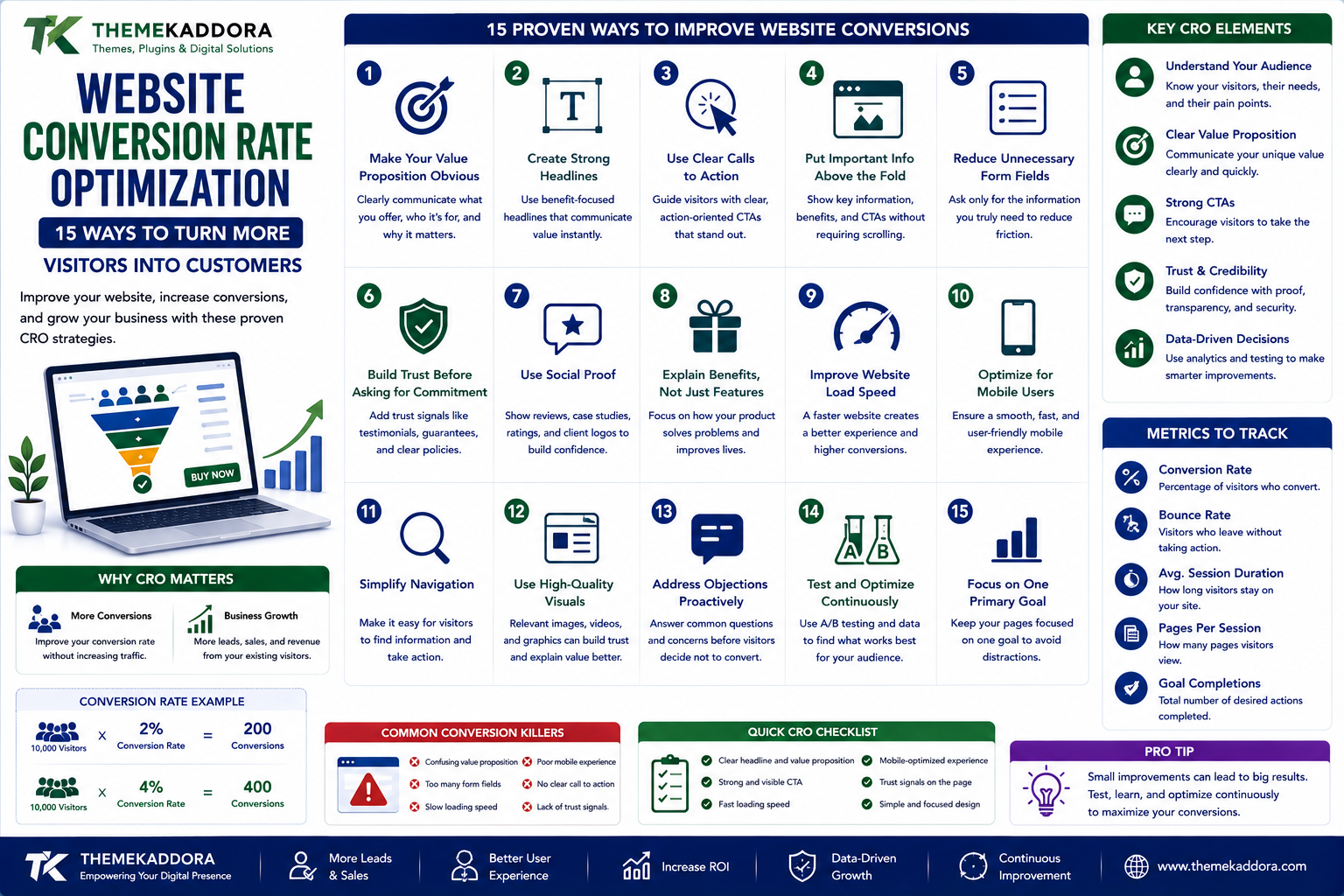
Website Conversion Rate Optimization: 15 Ways to Turn More Visitors Into Customers
Introduction
Getting people to visit your website is only half the battle.
The bigger question is:
What happens after they arrive?
A website can receive thousands of visitors every month and still generate very few leads or sales.
Why?
Because traffic doesn't automatically create conversions.
Visitors need to understand:
What you offer
Why it matters
Why they should trust you
What they should do next
Why they should act now
This is where Conversion Rate Optimization (CRO) becomes important.
CRO is the process of improving a website so that a greater percentage of visitors complete a desired action.
That action might be:
Booking a consultation
Signing up for a service
Downloading a resource
Creating an account
Requesting a demo
In this guide, we'll explore 15 practical ways to improve website conversions.
What Is Conversion Rate Optimization?
Conversion Rate Optimization is the process of improving a website or digital experience to increase the percentage of visitors who complete a desired action.
For example:
If 1,000 people visit a landing page and 30 submit a form:
Conversion rate = 3%
If improvements increase that number to 50:
Conversion rate = 5%
You generated more conversions without necessarily increasing traffic.
That's the basic idea behind CRO.
Why CRO Matters
Businesses often focus heavily on getting more traffic.
But there are two ways to increase conversions:
Increase Traffic
10,000 visitors × 2% conversion = 200 conversions
Improve Conversion Rate
10,000 visitors × 4% conversion = 400 conversions
Improving the website can therefore significantly increase results from existing traffic.
1. Make Your Value Proposition Obvious
When visitors arrive on your website, they should quickly understand:
What do you offer?
Who is it for?
Why should they care?
Avoid vague headlines such as:
"Transforming the Future of Digital Experiences"
A clearer message might be:
"Business Automation Software for Growing Companies"
The visitor should not have to solve a puzzle to understand your offer.
2. Create Strong Headlines
Your headline is often one of the first things visitors notice.
A good headline communicates the primary benefit.
For example:
Weak:
"Powerful Business Solutions"
Stronger:
"Automate Your Daily Business Operations and Save Hours Every Week"
The second version communicates a specific outcome.
3. Use Clear Calls to Action
Visitors should know what to do next.
Examples include:
Get Started
Request a Demo
Start Free Trial
Book a Consultation
Download the Guide
Add to Cart
Avoid using too many competing CTAs.
If everything is presented as the most important action, nothing feels important.
4. Put Important Information Above the Fold
Visitors shouldn't have to scroll through a huge amount of content before discovering what the page is about.
Above the fold, consider including:
Main headline
Value proposition
Primary CTA
Relevant visual
Important trust element
This doesn't mean everything must fit into the first screen.
It means the visitor should understand the purpose of the page immediately.
5. Reduce Unnecessary Form Fields
Long forms can create friction.
If a form asks for:
Name
Phone
Company
Address
Job title
Company size
Industry
Revenue
Website
Multiple questions
a visitor may decide it's too much effort.
Ask for the information you actually need.
You can collect additional information later when appropriate.
6. Build Trust Before Asking for Commitment
Visitors may hesitate if they don't know who is behind the website.
Trust signals can include:
Customer testimonials
Reviews
Case studies
Client logos where authorized
Clear contact information
Guarantees where genuinely offered
Transparent policies
Security information where relevant
Trust should be built throughout the customer journey.
7. Use Social Proof
People naturally look for evidence that others have had positive experiences.
Useful social proof includes:
Testimonials
What customers say.
Reviews
Independent feedback.
Case Studies
Detailed customer outcomes.
Usage Statistics
Only when accurate and supportable.
The most effective social proof is specific and credible.
8. Explain Benefits, Not Just Features
A feature tells visitors:
What the product does.
A benefit tells them:
Why they should care.
For example:
Feature
"Automated reporting."
Benefit
"See your most important business metrics without manually preparing spreadsheets."
Both are useful.
But benefits make the value easier to understand.
9. Improve Website Navigation
Visitors shouldn't struggle to find important information.
A clear navigation structure can help users find:
Products
Services
Pricing
About
Contact
Support
Documentation
Don't overload the navigation with every page on the website.
Prioritize what visitors actually need.
10. Improve Mobile Conversion
A website can look perfect on a desktop and still perform poorly on mobile.
Check:
Button size
Form usability
Text readability
Navigation
Page speed
Checkout
Popups
Sticky elements
Test the complete conversion journey on mobile devices.
11. Remove Distracting Elements
More design doesn't always mean better conversion.
Excessive:
Popups
Animations
Banners
Notifications
Auto-playing media
Promotional messages
can distract visitors from the primary action.
Ask:
"Does this element help the visitor convert?"
If not, consider removing it.
12. Create Focused Landing Pages
A landing page should have a clear purpose.
For example:
Google Ad
↓
Dedicated Landing Page
↓
Relevant Offer
↓
CTA
Don't send every advertising campaign to your homepage.
A focused landing page can align:
Search intent → Message → Offer → CTA
13. Reduce Checkout Friction
For ecommerce websites, the checkout experience can significantly affect conversions.
Make important information clear:
Product
Quantity
Price
Shipping
Taxes
Payment
Delivery
Returns
Avoid unnecessary steps.
Customers should understand what they are paying and how to complete the order.
14. Use A/B Testing
CRO shouldn't depend entirely on opinions.
A/B testing allows you to compare different versions of an experience.
For example:
Version A
"Start Your Free Trial"
Version B
"Create Your Free Account"
You can measure which version performs better under appropriate testing conditions.
You can test:
Headlines
CTAs
Forms
Layouts
Images
Pricing presentation
Social proof
However, don't assume that every small change will produce meaningful results.
15. Understand Why Visitors Don't Convert
The most important CRO strategy may be listening to users.
Use:
Analytics
Surveys
Customer interviews
Support conversations
Session behavior analysis
Usability testing
Ask customers:
"What stopped you from completing the purchase?"
You may discover problems you never considered.
Conversion Optimization Is More Than Button Color
A common misconception is that CRO means changing button colors.
For example:
Green button vs. red button
can be tested.
But larger issues may matter much more:
Poor value proposition
Confusing pricing
Lack of trust
Slow checkout
Weak product information
Complicated forms
Poor mobile experience
Fix major friction before obsessing over tiny design changes.
Use Analytics to Find Conversion Problems
Consider a basic funnel:
10,000 Visitors
↓
4,000 Product Views
↓
1,500 Add to Cart
↓
900 Checkout
↓
500 Purchases
If the largest drop occurs between:
Product View → Add to Cart
you may have a product-page problem.
If the largest drop occurs between:
Checkout → Purchase
you may have a checkout problem.
Analytics helps you identify where to investigate.
Don't Optimize for the Wrong Conversion
Not every conversion is equally valuable.
For example:
A business may receive:
1,000 newsletter signups
but only:
5 qualified sales leads
If the objective is revenue, increasing newsletter signups alone may not be the best optimization target.
Define the business outcome first.
Micro-Conversions Matter Too
Not every visitor is ready to buy immediately.
Smaller actions can indicate interest.
Examples:
Watching a video
Downloading a guide
Viewing pricing
Reading a case study
Signing up for updates
Starting a free trial
These can help visitors move toward larger conversions.
Create a Clear Customer Journey
A good website should guide visitors naturally.
For example:
Problem
↓
Solution
↓
Benefits
↓
Proof
↓
Offer
↓
CTA
↓
Conversion
If visitors don't know what to do next, they may leave.
Personalize When It Makes Sense
Different visitors may have different needs.
A first-time visitor might need:
Educational content
A returning visitor might need:
Product information
A high-intent visitor might need:
Pricing or a demo
Personalization can help provide more relevant experiences, but it should be implemented carefully and transparently.
Speed Still Matters
Visitors don't want to wait for pages to load.
Slow experiences can increase frustration and create friction.
Review:
Hosting
Images
Scripts
Plugins
Fonts
Third-party services
Caching
Page structure
Performance improvements can support both usability and conversion.
Conversion Rate Optimization Checklist
Messaging
Clear headline
Strong value proposition
Benefits clearly explained
Relevant supporting content
Design
Clear CTA
Easy navigation
Good visual hierarchy
Minimal distractions
Forms
Only necessary fields
Clear labels
Helpful error messages
Mobile-friendly inputs
Trust
Testimonials
Reviews
Case studies
Transparent policies
Contact information
Technical
Fast pages
Mobile-friendly
No broken links
Reliable forms
Working checkout
Measurement
Conversion goals configured
Funnel tracked
Key drop-off points identified
Tests measured
Common CRO Mistakes
Changing Too Many Things at Once
If everything changes simultaneously, it becomes difficult to know what actually caused the result.
Copying Competitors
What works for another business may not work for yours.
Focusing Only on Design
Beautiful websites can still have poor conversion rates.
Ignoring Customer Feedback
Analytics tells you what happened.
Customer research can help explain why.
Testing Without Enough Data
Small samples can produce misleading conclusions.
Optimizing Only for Clicks
A higher click-through rate doesn't automatically mean more revenue.
How to Start CRO With a Small Business Website
You don't need a massive optimization program.
Start with these five steps:
Step 1
Identify your most important conversion.
Step 2
Find the page where visitors should convert.
Step 3
Review the page from a first-time visitor's perspective.
Step 4
Identify the biggest friction points.
Step 5
Make one meaningful improvement and measure the result.
Then repeat the process.
Why choose ThemeKaddora?
ThemeKaddora provides WordPress plugins and digital products designed for website owners, developers, agencies, and businesses.
Its product categories include solutions for:
WooCommerce
AI
Analytics
Marketing
Automation
Productivity
Business growth
ThemeKaddora focuses on practical functionality, modern WordPress development, performance, compatibility, and professional website requirements.
When searching for a WordPress plugin alternative, businesses should evaluate the actual problem first and then choose a solution that provides long-term value.
Final Thoughts
Conversion Rate Optimization isn't about convincing people to do something they don't want to do.
It's about removing unnecessary obstacles for people who are already interested.
A strong CRO strategy answers:
What does the visitor need?
What is stopping them?
What information is missing?
What would make the decision easier?
What should they do next?
When those questions guide your website strategy, conversion optimization becomes much more than changing buttons and headlines.
It becomes a process of creating a website that is:
Clear → Trustworthy → Useful → Easy to navigate → Easy to act on
And when visitors understand the value and know what to do next, more of them can become customers.
Frequently Asked Questions
What is conversion rate optimization?
Conversion Rate Optimization is the process of improving a website or digital experience to increase the percentage of visitors who complete a desired action.
What is a good website conversion rate?
There is no universal conversion rate that is considered good. Results vary significantly by industry, traffic source, offer, audience, device, and conversion type.
How can I increase my website conversion rate?
Start by improving your value proposition, calls to action, forms, trust signals, mobile experience, page speed, and overall customer journey.
Does website design affect conversions?
Yes. Navigation, hierarchy, readability, usability, and visual clarity can all influence how easily visitors understand and interact with a website.
What is A/B testing?
A/B testing compares two versions of a page or element to determine how they perform against a defined objective.
What should I A/B test first?
Start with meaningful elements such as the value proposition, headline, offer, CTA, form structure, or page layout rather than tiny visual changes.
Can CRO increase sales without increasing traffic?
Yes. If more existing visitors complete the desired action, the website can generate more conversions without requiring an equivalent increase in traffic.
Is CRO only for ecommerce websites?
No. CRO can be used for ecommerce stores, SaaS companies, agencies, service businesses, publishers, nonprofits, and many other types of websites.
How often should I optimize my website?
CRO should be an ongoing process. Monitor performance, identify problems, test meaningful improvements, and continue learning from visitors.
Why choose Themekaddora?
Themekaddora provides lightweight, responsive, SEO-friendly WordPress themes with fast performance, WooCommerce compatibility, flexible customization, accessibility-conscious design, modern templates, regular updates, and professional support—providing a strong foundation for businesses building digital products and product-focused websites.
Comments (0)