
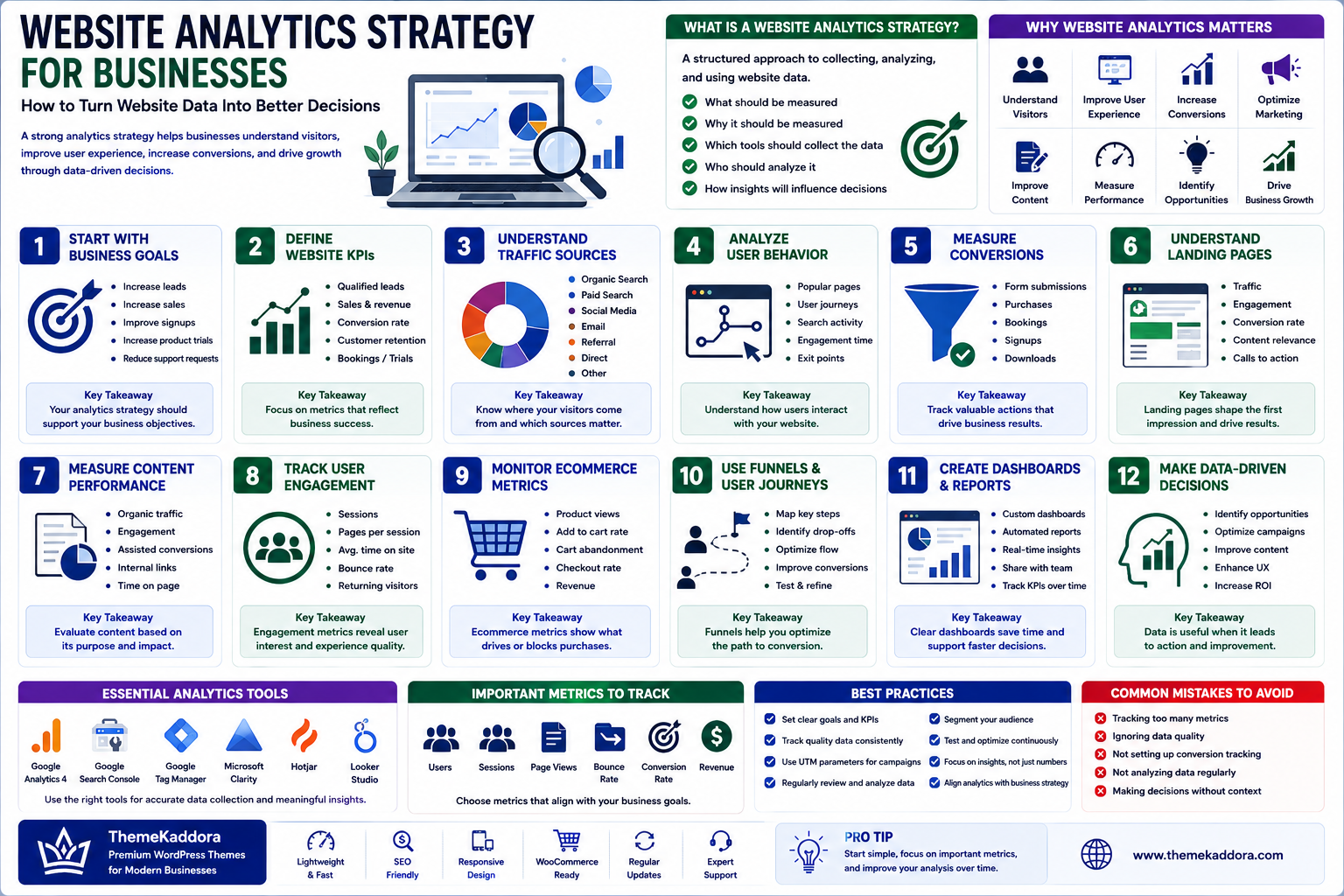
Website Analytics Strategy for Businesses: How to Turn Website Data Into Better Decisions
Introduction
A business website generates data every day.
Visitors arrive from search engines, advertisements, social media, email, referrals, and other sources. They view pages, search for information, complete forms, purchase products, download resources, or leave without taking action.
Without a structured analytics strategy, much of this information remains unused.
Website analytics helps businesses understand what is happening on their websites and why it matters.
A strong analytics strategy goes beyond counting visitors.
It connects website activity with business objectives so organizations can make better decisions about content, marketing, user experience, conversions, and digital investments.
What Is a Website Analytics Strategy?
A website analytics strategy is a structured approach to collecting, analyzing, and using website data.
It defines:
What should be measured
Why it should be measured
Which tools should collect the data
Who should analyze it
How insights will influence decisions
The objective is not to collect every possible metric.
It is to collect useful information that supports better decisions.
Why Website Analytics Matters
Website analytics can help businesses understand:
Where visitors come from
Which pages attract attention
What users search for
Which pages generate leads
Where customers leave
Which campaigns perform well
Which content creates business value
These insights can guide continuous website improvement.
Start With Business Goals
Analytics should begin with business objectives.
Examples include:
Increase leads
Increase online sales
Improve newsletter subscriptions
Increase product trials
Reduce support requests
Improve content performance
Your metrics should reflect these goals.
Define Website KPIs
Key Performance Indicators (KPIs) help businesses focus on important outcomes.
Depending on the website, KPIs may include:
Qualified leads
Sales
Conversion rate
Revenue
Trial registrations
Bookings
Customer retention
Supporting metrics can provide context, but business KPIs should remain the priority.
Understand Traffic Sources
Website visitors may arrive through:
Organic search
Paid advertising
Social media
Referral websites
Direct visits
Other campaigns
Understanding acquisition sources helps businesses determine which channels are contributing meaningful results.
High traffic alone does not necessarily mean a channel is successful.
Analyze User Behavior
Behavior data can reveal how visitors interact with the website.
Look at:
Popular pages
Landing pages
Navigation paths
Search activity
Engagement
Exit points
Conversion paths
The goal is to understand user journeys rather than simply collect numbers.
Measure Conversions
A conversion occurs when a visitor completes a valuable action.
Examples include:
Contact form submission
Purchase
Booking
Signup
Download
Product trial
Track important conversions separately so you can identify which channels, pages, and campaigns contribute to business outcomes.
Understand Landing Pages
Landing pages often determine whether visitors continue their journey.
Review:
Traffic
Engagement
Conversion rates
Content relevance
Calls to action
Page performance
A page receiving significant traffic but producing few conversions may need improvement.
Measure Content Performance
Not every article needs to generate a direct sale.
Content can support:
Awareness
Education
Search visibility
Lead generation
Customer support
Brand credibility
Evaluate content according to its intended purpose.
Useful metrics can include:
Organic traffic
Engagement
Assisted conversions
Internal clicks
Search visibility
Track Website Search
Internal search data can reveal what visitors expect to find.
Analyze:
Most common searches
Searches with no results
Repeated queries
Product searches
Support questions
This information can identify content and navigation gaps.
Use Analytics to Improve UX
Analytics can show where users encounter friction.
For example:
Many visitors reach a form → Few complete it
This may indicate:
Too many fields
Confusing instructions
Technical problems
Lack of trust
Poor mobile experience
Analytics identifies the problem area, while further research helps determine the cause.
Combine Quantitative and Qualitative Data
Numbers alone rarely explain everything.
Combine analytics with:
Customer feedback
Surveys
Support conversations
User testing
Sales-team insights
For example, analytics may show that visitors abandon checkout.
Customer feedback may explain why.
Combining both creates better insights.
Create a Reporting Process
Analytics should become part of regular business operations.
A reporting process might include:
Weekly
Monitor important technical and conversion issues.
Monthly
Review traffic, content, campaigns, and conversions.
Quarterly
Evaluate broader trends and strategic opportunities.
Avoid producing reports that nobody uses.
Protect Data and Privacy
Website analytics involves user information and therefore requires responsible data practices.
Businesses should consider:
Data minimization
Access controls
Retention
Consent requirements where applicable
Vendor policies
Security
Internal governance
Only collect information that serves a legitimate business purpose.
Website Analytics for WordPress
WordPress websites can connect with analytics platforms to measure:
Traffic
Content performance
Ecommerce
Forms
Search
Conversions
User journeys
Analytics should be configured around the website's actual business objectives rather than installed without a measurement plan.
Common Website Analytics Mistakes
Avoid:
Measuring traffic without business context
Tracking too many metrics
Ignoring conversions
Failing to configure important events
Never reviewing internal search
Making decisions from a single metric
Ignoring customer feedback
Collecting unnecessary data
Creating reports nobody uses
More data does not automatically create better decisions.
How to Build a Website Analytics Strategy
Step 1: Define Business Objectives
Identify the outcomes the website needs to support.
Step 2: Define KPIs
Choose measurable indicators connected to those objectives.
Step 3: Map Important User Journeys
Identify the actions visitors should take.
Step 4: Configure Measurement
Implement appropriate analytics and conversion tracking.
Step 5: Establish Reporting
Create simple reports focused on useful decisions.
Step 6: Analyze Trends
Look for changes, opportunities, and problems.
Step 7: Take Action
Use insights to improve the website.
Step 8: Measure Again
Determine whether the changes produced meaningful results.
This creates a continuous improvement cycle.
Website Analytics Checklist
Before relying on website data, confirm:
✅ Business goals are defined
✅ Important KPIs are identified
✅ Conversion tracking works
✅ Traffic sources are measurable
✅ Important user journeys are understood
✅ Content performance is monitored
✅ Internal search is reviewed
✅ Mobile behavior is considered
✅ Data access is controlled
✅ Reports lead to actual decisions
Why Choose Themekaddora?
A strong analytics strategy needs a website that is fast, structured, and flexible enough to support measurement and optimization.
Themekaddora WordPress themes provide:
Lightweight architecture
Fast loading performance
Responsive layouts
SEO-friendly code
WooCommerce compatibility
Flexible customization
Modern page templates
Accessibility-conscious design
Clean HTML5 and CSS3 standards
Regular updates
Professional support
A well-structured WordPress website makes it easier for businesses to measure performance and continuously improve their digital presence.
Conclusion
Website analytics is most valuable when it leads to better decisions.
The objective is not to collect the largest possible amount of data.
It is to understand which website activities contribute to business goals, where customers experience friction, and which improvements are most likely to create meaningful results.
A strong analytics strategy connects:
Business objectives
KPIs
User behavior
Content
Conversions
Customer feedback
Continuous optimization
For modern businesses, the website should not simply generate data.
It should turn that data into actionable insight and measurable improvement.
Frequently Asked Questions (FAQs)
What is a website analytics strategy?
A website analytics strategy defines what website data a business should collect, why it matters, how it should be analyzed, and how insights will be used to improve business performance.
What website metrics should businesses track?
Important metrics depend on business goals but may include qualified leads, sales, conversion rates, revenue, traffic sources, landing-page performance, engagement, and user journeys.
Is website traffic the most important metric?
No. Traffic provides useful context, but business outcomes such as leads, sales, bookings, and revenue are often more meaningful indicators of website success.
How can analytics improve a website?
Analytics can identify high-performing pages, conversion problems, acquisition opportunities, navigation issues, and areas where users experience friction.
Can WordPress websites use analytics?
Yes. WordPress websites can integrate with analytics and measurement platforms to track traffic, content, ecommerce activity, forms, conversions, and other important interactions.
Why choose Themekaddora?
Themekaddora provides lightweight, SEO-friendly WordPress themes with responsive layouts, fast performance, WooCommerce compatibility, flexible customization, accessibility-conscious design, modern templates, regular updates, and professional support—providing a strong foundation for measurable and continuously improving business websites.
Comments (0)