
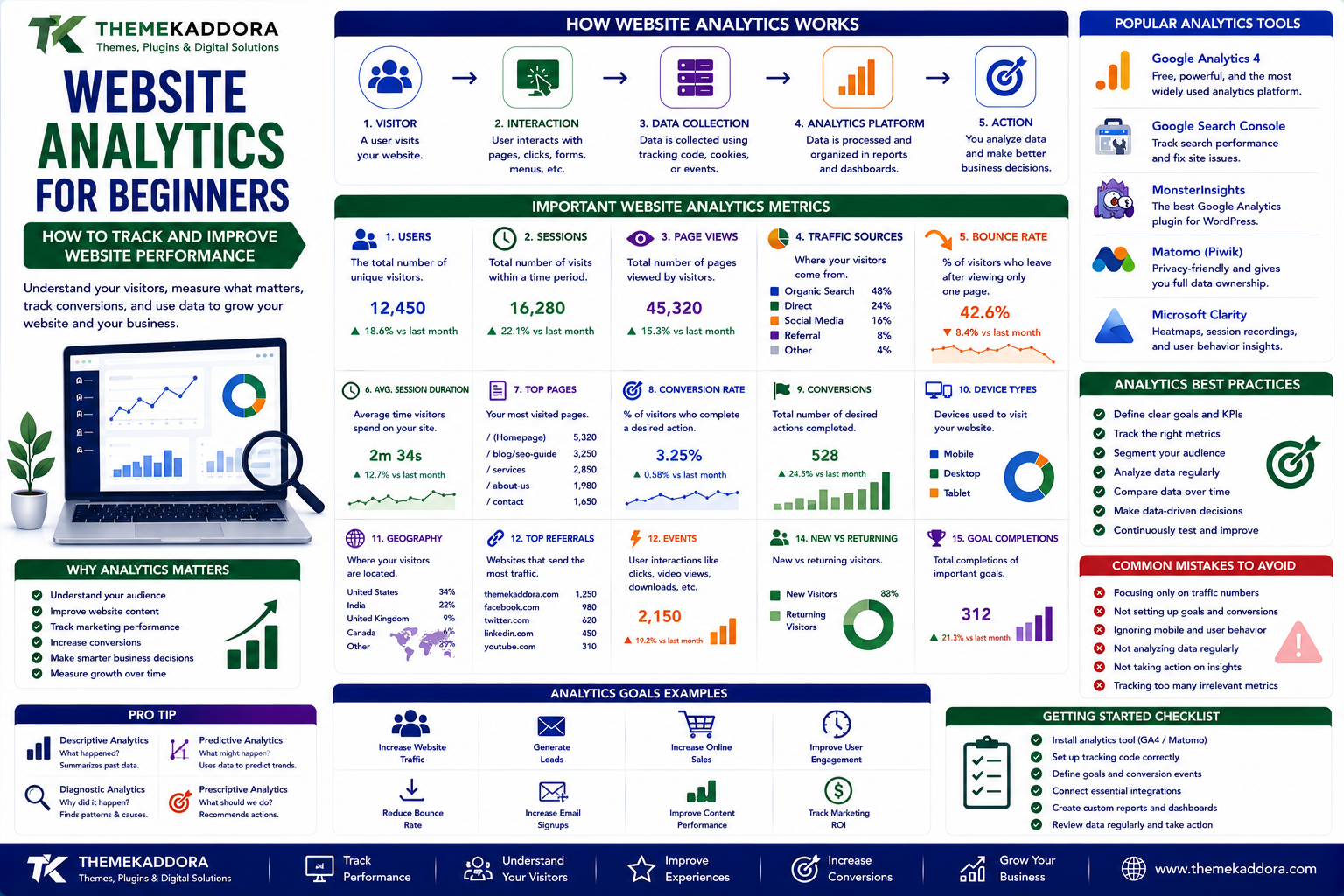
Website Analytics for Beginners: How to Track and Improve Website Performance
Introduction
Building a website is only the beginning of creating a successful digital presence.
After a website goes live, an important question remains:
Is the website actually performing well?
How many people are visiting?
Where are they coming from?
Which pages are they reading?
What are they searching for?
Which pages generate leads or sales?
Where do visitors leave?
Without reliable data, website owners often make decisions based on assumptions.
This is where website analytics becomes important.
Website analytics helps businesses understand how visitors interact with a website and how those interactions contribute to business goals.
Instead of simply looking at the number of visitors, analytics can help answer more useful questions about traffic, engagement, conversions, content, and customer behavior.
For WordPress websites, , business websites, blogs, digital businesses, and eCommerce stores analytics can become an important part of long-term growth.
What Is Website Analytics?
Website analytics is the process of collecting, measuring, analyzing, and interpreting data about website activity.
Depending on the analytics setup, businesses may collect information about:
Website visitors
Traffic sources
Page views
Landing pages
User interactions
Conversions
Device types
Geographic locations
Search behavior
Referral sources
Marketing campaigns
A simplified process looks like:
Visitor
↓
Website Interaction
↓
Data Collection
↓
Analytics Platform
↓
Data Analysis
↓
Business Decision
The purpose is not simply to collect more data.
The real value comes from turning data into useful decisions.
Why Is Website Analytics Important?
A website can receive thousands of visitors and still fail to generate meaningful business results.
For example:
10,000 visitors
may sound impressive.
But if only a few visitors contact the business, purchase a product, or subscribe to a service, traffic alone does not tell the complete story.
Analytics helps businesses understand what happens after visitors arrive.
It can help answer:
Which pages attract visitors?
Which channels generate valuable traffic?
Which pages lose visitors?
Which content performs best?
Which campaigns generate conversions?
Which devices do visitors use?
Which actions are most common?
This information can improve website strategy.
Website Analytics vs Website Traffic
Website traffic refers primarily to visitors and visits.
Website analytics goes much further.
Traffic tells you:
How many people came to the website?
Analytics can help tell you:
Who came, where they came from, what they did, what they found useful, and whether they completed an important action.
For this reason, businesses should avoid judging website performance using traffic numbers alone.
Important Website Analytics Metrics
There are many analytics metrics available.
However, not every metric is equally important for every website.
The most useful metrics usually depend on business objectives.
Users
Users represent visitors interacting with a website according to the measurement system being used.
This can help provide an overview of audience size.
However, user counts should be interpreted carefully because analytics platforms use different methods to identify users.
Sessions
A session represents a period of interaction with a website.
Sessions can help businesses understand how frequently visitors interact with the site.
For example:
1,000 users
could generate more than:
1,000 sessions
if some visitors return multiple times.
Page Views
Page views measure views of website pages.
This can help identify which content receives the most attention.
For example:
Homepage → 5,000 views
Services → 3,200 views
Blog → 8,500 views
This information can help identify popular sections of a website.
Traffic Sources
Traffic sources show where visitors come from.
Common sources include:
Organic search
Direct traffic
Social media
Referral websites
Paid advertising
Understanding traffic sources helps businesses identify which marketing channels are working.
Organic Search Traffic
Organic search traffic comes from unpaid search engine results.
This is particularly important for SEO-focused websites.
Analytics can help show how much website activity comes from search engines.
However, analytics platforms and search performance platforms may provide different types of search information.
Businesses should use the appropriate tools for traffic and search-specific analysis.
Referral Traffic
Referral traffic comes from links on other websites.
For example:
Industry Website
↓
Link to Your Website
↓
Visitor
Referral traffic can help identify valuable partnerships, publications, directories, and external websites.
Social Media Traffic
Social media can send visitors to websites through:
Posts
Profiles
Advertisements
Videos
Stories
Community discussions
Analytics can help businesses determine whether social traffic contributes to meaningful website activity.
Landing Pages
A landing page is a page where visitors enter a website or campaign.
A visitor may not always enter through the homepage.
For example:
Google Search
↓
Blog Article
↓
Product Page
↓
Contact Form
Understanding landing pages can help businesses optimize the first experience visitors receive.
Exit Pages
An exit page is the page from which a visitor leaves the website during a session.
A high number of exits is not automatically a problem.
For example, a visitor may:
Read a blog article
↓
Find the information they needed
↓
Leave
That can be a successful interaction.
Exit data becomes more meaningful when combined with the purpose of the page.
Engagement
Engagement metrics help businesses understand whether visitors meaningfully interact with content.
Depending on the analytics platform, engagement can include activities such as:
Reading content
Clicking links
Watching videos
Using forms
Downloading resources
Interacting with tools
Spending meaningful time on pages
Engagement should always be interpreted in context.
Conversion Tracking
Conversions are actions that matter to the business.
Examples include:
Purchases
Contact form submissions
Newsletter subscriptions
Account registrations
Demo requests
Phone calls
Downloads
Appointment requests
A website should ideally define its important conversions before building detailed analytics reports.
Macro and Micro Conversions
Not every useful action immediately produces revenue.
Macro Conversion
A major business goal.
For example:
Completed purchase
Micro Conversion
A smaller action that can indicate progress.
For example:
Added product to cart
or:
Downloaded product guide
Micro conversions can help businesses understand the customer journey before the final conversion.
Conversion Rate
Conversion rate helps measure the percentage of visitors or sessions that complete a desired action, depending on the measurement method.
For example:
1,000 visits
↓
50 form submissions
↓
5% conversion rate
Conversion rates are more useful when measured against a defined business goal.
Analytics for eCommerce Websites
Online stores require more advanced measurement.
Businesses may want to understand:
Product views
Add-to-cart actions
Checkout activity
Purchases
Revenue
Product performance
Customer journeys
Campaign performance
A simplified eCommerce journey looks like:
Visitor
↓
Product View
↓
Add to Cart
↓
Checkout
↓
Purchase
Analytics can help identify where customers leave this journey.
Analytics for Lead Generation Websites
A service business may focus on generating leads instead of direct online purchases.
Important conversions may include:
Contact forms
Phone calls
Consultation requests
Demo requests
Quote requests
Appointment bookings
For these websites, traffic quality and lead quality may matter more than raw visitor numbers.
Analytics for Blogs
Blogs can use analytics to understand:
Most-read articles
Popular topics
Traffic sources
Landing pages
Internal link activity
Returning visitors
Content engagement
This information can help publishers decide what content to create next.
For example:
If several articles about WordPress performance consistently attract visitors, the website could create related content around:
WordPress speed
Hosting
Caching
Database optimization
Core Web Vitals
Performance plugins
Analytics can therefore influence content strategy.
Analytics for WordPress Websites
WordPress websites can use different analytics solutions depending on their needs.
Analytics can help WordPress owners understand:
Visitor activity
Popular content
Traffic sources
Conversion behavior
Website performance
Marketing results
The key is choosing a measurement approach that provides useful information without unnecessarily complicating the website.
Website Analytics and SEO
Analytics can support SEO strategy by showing what happens after visitors arrive through search.
For example, businesses can analyze:
Organic landing pages
Engagement
Conversions
Returning visitors
Content performance
However, analytics should be combined with search-specific data when evaluating SEO.
Search performance tools can provide information about:
Search queries
Impressions
Clicks
Search positions
Indexed pages
Together, these data sources provide a more complete picture.
Analytics and Content Strategy
Content should not be created only because a topic seems popular.
Analytics can reveal which existing topics generate meaningful results.
For example:
Article A
→ High traffic
→ Low engagement
Article B
→ Moderate traffic
→ High engagement
Article C
→ Lower traffic
→ High conversion rate
Article C may actually provide more business value than Article A.
This is why content strategy should consider quality and business outcomes rather than traffic alone.
Analytics and User Behavior
Understanding user behavior can reveal how visitors move through a website.
For example:
Homepage
↓
Services
↓
Case Study
↓
Contact
This may indicate a common customer journey.
Another visitor may follow:
↓
Blog Article
↓
Related Article
↓
Exit
These patterns can help businesses improve navigation, internal linking, calls to action, and content strategy.
Analytics for Marketing Campaigns
Marketing campaigns should be measurable whenever possible.
For example:
Social Media Campaign
↓
Website Landing Page
↓
Lead Form
↓
Sales Team
Analytics can help determine whether the campaign generates useful results.
Campaign tracking can also help compare different channels and campaigns.
Use UTM Parameters for Campaign Tracking
UTM parameters can help identify traffic associated with specific campaigns.
For example, a campaign URL can include information about:
Source
Medium
Campaign
Content
Term
This makes campaign performance easier to analyze.
Businesses should use consistent naming conventions so reports remain organized.
Analytics and Conversion Funnels
A funnel represents the stages visitors move through before completing a goal.
For example:
Website Visitor
↓
Product Page
↓
Add to Cart
↓
Checkout
↓
Purchase
If many visitors reach the product page but very few reach checkout, the business can investigate the product or cart experience.
Analytics can therefore help identify opportunities for conversion optimization.
How to Create a Website Analytics Strategy
Installing analytics is only the first step.
A better process is:
Step 1: Define Business Goals
Determine what the website is supposed to achieve.
Step 2: Define Conversions
Identify the actions that represent success.
Step 3: Identify Important User Journeys
Understand how visitors are expected to move through the website.
Step 4: Select Relevant Metrics
Track metrics connected to those goals.
Step 5: Configure Tracking
Implement appropriate measurement and event tracking.
Step 6: Test the Data
Make sure important events and conversions are being recorded correctly.
Step 7: Create Reports
Build reports around useful business questions.
Step 8: Analyze Patterns
Look for changes, opportunities, and problems.
Step 9: Take Action
Use the findings to improve the website.
Step 10: Measure Again
Analytics becomes valuable through continuous improvement.
Common Website Analytics Mistakes
Tracking Everything
More data does not automatically mean better decisions.
Track information that supports meaningful questions.
Focusing Only on Traffic
High traffic does not necessarily mean high business value.
Ignoring Conversions
Businesses should measure actions that contribute to their goals.
Making Decisions From Small Data Sets
Small amounts of data can produce misleading conclusions.
Ignoring Context
Seasonality, campaigns, promotions, industry changes, and external events can affect results.
Changing Too Many Things at Once
If everything changes simultaneously, it becomes difficult to determine what caused an improvement or decline.
Never Reviewing Analytics
Installing analytics without reviewing the data provides little value.
How to Use Analytics Without Becoming Overwhelmed
Analytics platforms can contain hundreds of reports and metrics.
You do not need to monitor everything.
Start with a simple dashboard containing:
Users
Sessions
Main traffic sources
Top landing pages
Key conversions
Conversion rate
Top-performing content
Then expand measurement as your needs become more advanced.
Website Analytics and Privacy
Website analytics involves collecting information about website activity.
Businesses should understand:
What data is collected
Why it is collected
How long it is retained
Who can access it
How tracking technologies are used
What legal requirements apply to their audience and location
Privacy should be considered when designing an analytics strategy.
Analytics should provide useful insights while respecting user privacy and applicable laws.
First-Party Data and Website Analytics
First-party data refers to information collected directly through interactions with your own digital properties.
Examples can include:
Website interactions
Customer forms
Purchases
Account activity
Email engagement
As digital privacy expectations evolve, businesses increasingly need to think carefully about how they collect and use first-party data.
Analytics and Website Performance
Analytics can also help identify performance-related patterns.
For example, businesses may compare:
Page Performance
with:
User Engagement
or:
Mobile Experience
with:
Conversion Rate
If mobile visitors consistently convert at a much lower rate, the business may investigate the mobile website experience.
Analytics does not necessarily identify the exact technical problem, but it can help identify where further investigation is needed.
Analytics and A/B Testing
A/B testing compares different versions of a website element.
For example:
Version A
→ Blue call-to-action button
Version B
→ Different button design
The objective is to determine whether one version produces better results under controlled testing conditions.
A/B testing can be useful for:
Headlines
Landing pages
Calls to action
Forms
Product pages
Pricing presentations
Testing should be planned carefully and evaluated using appropriate data.
How AI Is Changing Website Analytics
AI is making analytics more accessible.
AI-powered systems can potentially help businesses:
Summarize reports
Identify unusual changes
Detect patterns
Segment audiences
Predict trends
Generate insights
Explain complex data
Recommend areas for investigation
For example, instead of manually reviewing multiple reports, a business owner may ask:
"Why did website conversions decline this month?"
An AI-assisted analytics system could help identify relevant patterns for further investigation.
However, AI-generated conclusions should be verified against the underlying data.
Website Analytics for Small Businesses
Small businesses do not need complex enterprise analytics systems to get started.
A simple strategy can focus on:
Website visitors
Traffic sources
Top pages
Leads
Sales
Conversion rate
Marketing performance
The important thing is to connect analytics with business goals.
A small business may learn more from five meaningful metrics than from hundreds of disconnected reports.
Website Analytics for Agencies
Agencies managing multiple websites can create standardized analytics frameworks.
A basic agency reporting process might look like:
Website Setup
↓
Tracking Configuration
↓
Conversion Setup
↓
Performance Monitoring
↓
Monthly Analysis
↓
Client Report
↓
Optimization Recommendations
Standardization can make reporting more consistent across clients.
A Simple Website Analytics Dashboard
A practical dashboard could include:
Traffic
Users
Sessions
Traffic sources
Content
Top pages
Landing pages
Most engaging content
Conversions
Leads
Purchases
Sign-ups
Conversion rate
Marketing
Organic traffic
Social traffic
Referral traffic
Campaign performance
Performance
Device breakdown
Important page performance indicators
Conversion differences by device
The dashboard should remain focused on useful business questions.
Website Analytics Checklist
Before relying on your analytics data, check:
Analytics tracking is installed correctly
Important pages are being measured
Key conversions are configured
Forms are tracked
eCommerce events are configured where necessary
Campaigns use consistent tracking
Reports are reviewed regularly
Data quality is monitored
Privacy requirements are considered
Important business questions have defined metrics
Decisions are based on meaningful data
Changes are measured after implementation
Why choose ThemeKaddora?
ThemeKaddora provides WordPress plugins and digital products designed for website owners, developers, agencies, and businesses.
Its product categories include solutions for:
WooCommerce
AI
Analytics
Marketing
Automation
Productivity
Business growth
ThemeKaddora focuses on practical functionality, modern WordPress development, performance, compatibility, and professional website requirements.
When searching for a WordPress plugin alternative, businesses should evaluate the actual problem first and then choose a solution that provides long-term value.
Conclusion
Website analytics is one of the most useful tools for understanding digital performance.
It can show where visitors come from, which pages they visit, how they interact with content, and whether they complete important actions.
However, successful analytics is not about collecting the largest possible amount of data.
It is about collecting the right data and using it to answer meaningful business questions.
Start by defining your goals.
Identify important conversions.
Track the customer journey.
Monitor useful metrics.
Analyze patterns.
Then use those insights to improve the website.
For WordPress websites, businesses, blogs, eCommerce stores, and digital agencies, analytics can become an important part of continuous improvement.
The real value of website analytics is not the dashboard itself.
The value comes from turning website data into better decisions, better experiences, and better business results.
Frequently Asked Questions
1. What is website analytics?
Website analytics is the process of collecting and analyzing data about website visitors, traffic, interactions, conversions, and user behavior.
2. Why is website analytics important?
It helps website owners understand what visitors do and use that information to improve content, marketing, user experience, and business performance.
3. What are the most important website analytics metrics?
Important metrics can include users, sessions, traffic sources, landing pages, engagement, conversions, conversion rate, and revenue for eCommerce websites.
4. Is website traffic the same as website analytics?
No. Traffic is one part of analytics. Analytics provides a broader view of visitor behavior, sources, interactions, conversions, and website performance.
5. What is conversion tracking?
Conversion tracking measures important actions such as purchases, form submissions, registrations, downloads, or appointment requests.
6. Can website analytics improve SEO?
Analytics can help businesses understand what happens after visitors arrive from search. It can support content and SEO decisions when combined with search-specific performance data.
7. Can analytics track WordPress websites?
Yes. WordPress websites can use analytics solutions to measure visitor activity, content performance, conversions, and other important interactions.
8. Can website analytics improve conversions?
Analytics can help identify where visitors leave or where important actions perform poorly. Businesses can then investigate and optimize those areas.
9. How often should website analytics be reviewed?
The frequency depends on the website and business. High-traffic businesses may review data frequently, while smaller websites may benefit from weekly or monthly analysis.
10. Can AI be used for website analytics?
Yes. AI can help summarize reports, identify patterns, detect unusual changes, and support data analysis, although important conclusions should be verified.
11. Why Choose Themekaddora?
Themekaddora combines WordPress, technology, AI, SEO, digital marketing, analytics, and business knowledge to help readers understand and improve their digital presence.
Comments (0)