
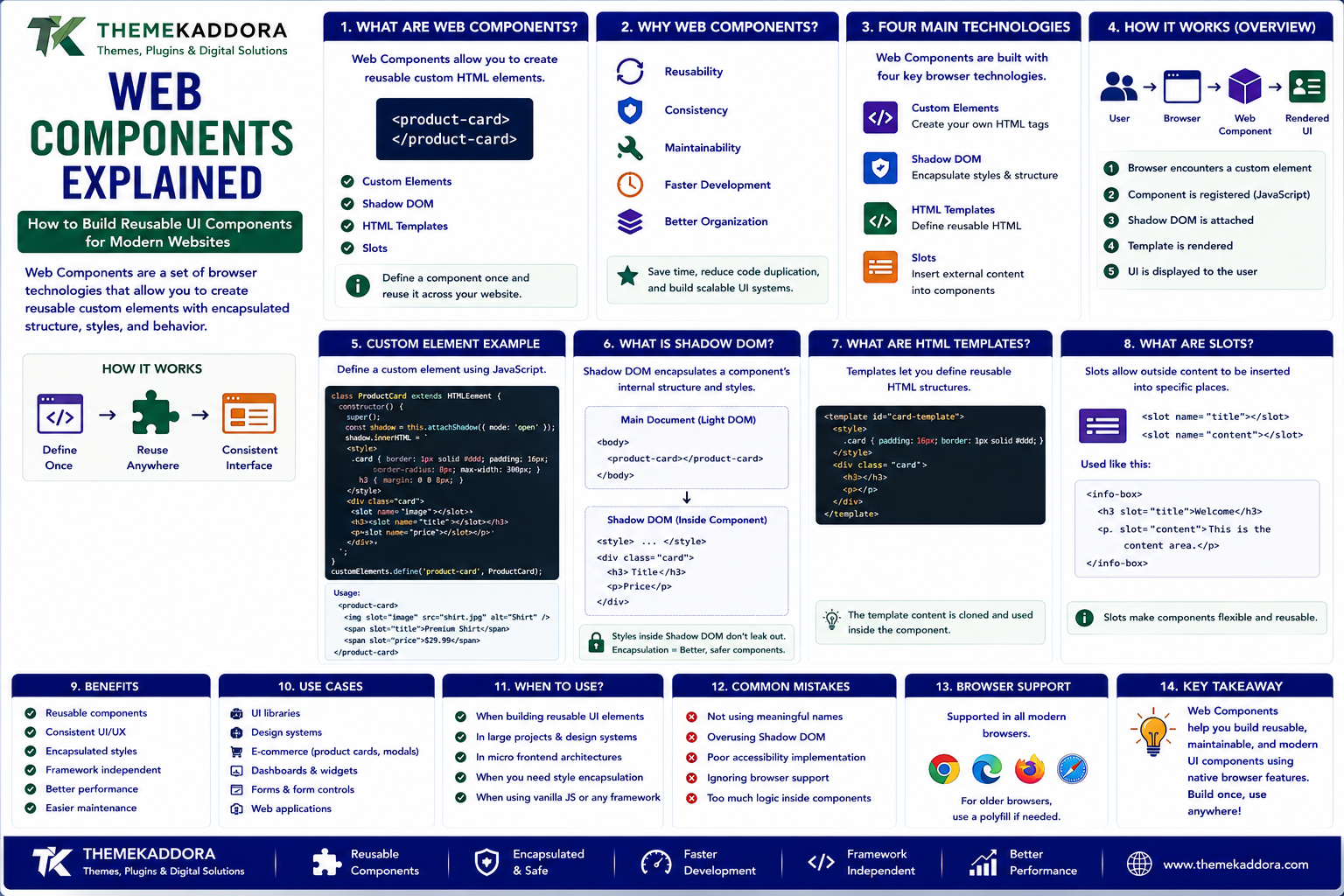
Web Components Explained: How to Build Reusable UI Components for Modern Websites
Modern websites are becoming increasingly interactive.
A typical web application may contain:
Navigation menus
Buttons
Search interfaces
Product cards
Dialog boxes
Forms
Tabs
Notifications
Sliders
Interactive dashboards
Building every interface element from scratch can create unnecessary development work.
Developers often need components that can be reused across different pages and projects.
This is where Web Components become useful.
Web Components provide a set of web platform technologies that allow developers to create reusable custom HTML elements.
Instead of repeatedly building the same interface pattern, developers can create a component once and reuse it wherever needed.
For example:
Custom Component
↓
Define Once
↓
Reuse Across Pages
↓
Consistent Interface
This approach can make frontend development more modular and easier to maintain.
What Are Web Components?
Web Components are a collection of browser technologies that allow developers to create reusable custom elements.
They can be used to build components such as:
Custom buttons
Product cards
Pricing tables
Search boxes
Dialogs
Navigation elements
Interactive widgets
Form controls
A developer can create an element with a custom name and define how it behaves.
For example:
<product-card></product-card>
The browser can then render the custom component according to the functionality defined by the developer.
The major technologies behind Web Components include:
Custom Elements
Shadow DOM
HTML Templates
Slots
Together, these technologies provide a native approach to reusable web components.
Why Are Web Components Important?
Traditional web development can become difficult to maintain when the same interface patterns are repeated throughout a project.
Imagine a website with 50 product cards.
If every card is created independently, changing the design may require editing many different pieces of code.
A reusable component provides another approach:
Product Card Component
↓
Product Page
Category Page
Search Page
Homepage
Recommendation Section
The component can provide consistent structure and behavior across the website.
This can improve:
Reusability
Consistency
Maintainability
Development efficiency
Component organization
The Four Main Web Component Technologies
Web Components are commonly associated with four major browser technologies.
1. Custom Elements
Allow developers to create their own HTML elements.
2. Shadow DOM
Provides encapsulation for a component's internal structure and styles.
3. HTML Templates
Allow developers to define reusable HTML structures.
4. Slots
Allow external content to be inserted into specific areas of a component.
These technologies can be used independently or together.
What Are Custom Elements?
Custom Elements allow developers to define new HTML elements.
For example:
<user-profile></user-profile>
The developer can define what the element should display and how it should behave.
A custom element can contain:
HTML
CSS
JavaScript
Event handling
Component-specific behavior
Once registered, the custom element can be used throughout the website.
This creates a reusable building block.
Custom Element Naming Rules
Custom element names generally need to contain a hyphen.
Examples include:
<product-card> <site-header> <user-profile> <pricing-table>
The naming requirement helps distinguish custom elements from standard HTML elements.
Clear names also make component-based code easier to understand.
What Is the Shadow DOM?
The Shadow DOM allows a component to have its own isolated DOM structure.
This can help prevent internal styles and markup from interfering with the rest of the webpage.
For example:
Main Website
↓
Custom Component
↓
Shadow DOM
↓
Component HTML + CSS
The component can maintain its internal structure separately from the main document.
This is particularly useful for reusable UI components.
Why Shadow DOM Matters
Without isolation, CSS from one part of a website can sometimes affect another part.
Imagine a global stylesheet contains:
button { font-size: 20px; }
A reusable component may require a completely different button style.
Shadow DOM can help isolate the component's internal styling.
This makes components more predictable.
However, developers still need to understand how styles, inheritance, events, and accessibility behave across the Shadow DOM boundary.
What Are HTML Templates?
HTML templates provide a way to define markup that can be reused.
A basic template might look like:
<template id="card-template"> <article class="card"> <h2></h2> <p></p> </article> </template>
The template itself does not immediately become visible content.
JavaScript can use it when creating components.
This separates reusable markup from the logic that activates it.
What Are Slots?
Slots provide placeholders inside a Web Component.
For example:
<product-card> <span slot="title">WordPress Theme</span> </product-card>
The component can define where the title should appear.
Slots are useful because they allow developers to create reusable component structures while still allowing users to provide different content.
Web Components and Reusability
One of the biggest advantages of Web Components is reusability.
Imagine creating a:
Product Card
The same component can appear on:
Homepage
Search results
Product categories
Recommendation sections
Related-product areas
The content changes, but the underlying component structure remains consistent.
This reduces repetitive development work.
Web Components and Design Systems
Design systems contain reusable visual and interaction patterns.
They may define:
Buttons
Cards
Forms
Modals
Navigation
Alerts
Typography
Spacing
Web Components can be used to implement parts of a design system.
For example:
<primary-button> <alert-message> <modal-dialog>
This can create consistent interfaces across applications.
Web Components and JavaScript
Web Components can use JavaScript to provide interactive behavior.
For example, a custom component could:
Open a menu
Validate a form
Load data
Display notifications
Filter products
Switch tabs
Update content
The JavaScript logic can remain associated with the component rather than being spread across unrelated pages.
This supports modular development.
Web Components Without a JavaScript Framework
One interesting feature of Web Components is that they are based on browser-native technologies.
Developers can create components without requiring a large frontend framework.
This can be useful when a project needs reusable UI elements but does not require an entire framework architecture.
However, Web Components do not necessarily replace frameworks.
They can also be used alongside frameworks depending on the project.
Web Components vs JavaScript Frameworks
Web Components and frontend frameworks solve related but different problems.
Web Components
Provide browser-native component technologies.
Frameworks
Often provide broader application development features.
Frameworks may include:
State management
Routing
Rendering systems
Data fetching
Development tooling
Application architecture
Web Components focus more directly on reusable elements.
The right choice depends on project requirements.
Web Components With React
Web Components can potentially be used inside React applications.
A project may use a custom element such as:
<product-card>
alongside React components.
However, developers need to consider differences in:
Properties
Attributes
Events
Lifecycle
Data flow
Integration should be tested carefully.
Web Components can be valuable when a component needs to be shared across multiple technology environments.
Web Components With Vue
Web Components can also be integrated with Vue applications.
A custom element can serve as a reusable component that is consumed by a Vue application.
This can be particularly useful when teams want certain UI elements to work across multiple projects.
Again, developers should understand how data and events move between the systems.
Web Components and WordPress
Web Components can also be used in WordPress development.
A WordPress website can potentially use custom elements for interactive features such as:
Product cards
Pricing calculators
Search interfaces
Tabs
FAQ sections
Interactive forms
Content widgets
Custom dashboards
For example:
<pricing-calculator></pricing-calculator>
JavaScript can define how the component behaves.
This can add modern interactive functionality without requiring every feature to be built as a traditional WordPress plugin interface.
Web Components and WordPress Themes
Themes control much of the presentation of a WordPress website.
Web Components can provide reusable interactive elements that operate within the theme.
For example:
WordPress Theme
↓
Custom Web Components
↓
Interactive UI
This can help separate visual page structure from reusable interface functionality.
Developers should still test compatibility with the theme, plugins, caching systems, and accessibility requirements.
Web Components and WordPress Plugins
Plugins can also use Web Components for specialized functionality.
For example, a plugin might provide:
<advanced-search></advanced-search>
or:
<product-comparison></product-comparison>
The component can encapsulate its own interface and behavior.
This can make plugin interfaces more modular.
However, plugin developers should carefully manage scripts, styles, dependencies, accessibility, and performance.
Web Components and Accessibility
Reusable components should be accessible by design.
Important considerations include:
Keyboard navigation
Focus management
Semantic HTML
Accessible names
ARIA where appropriate
Screen reader behavior
Color contrast
Error handling
For example, a custom button should behave like a button rather than simply looking like one.
Developers should prefer native HTML semantics whenever possible.
A reusable component is only useful if people can actually use it.
Web Components and Performance
Web Components can support modular development, but they are not automatically faster.
Performance depends on:
JavaScript size
Component complexity
Rendering behavior
Network requests
DOM operations
Third-party dependencies
Developers should avoid creating unnecessarily complex components.
A small reusable component can be efficient.
A component that loads large amounts of unnecessary JavaScript can create performance problems.
Lazy Loading Components
Some components may not be needed immediately.
For example:
Chat widgets
Reviews
Recommendation sections
Advanced filters
Interactive charts
These components can potentially be loaded when needed.
Lazy loading can reduce the amount of work performed during the initial page load.
The implementation depends on the component and application architecture.
Web Components and Progressive Enhancement
Progressive enhancement is a useful web development strategy.
The basic content should remain usable first.
Additional JavaScript can then enhance the experience.
For example:
Basic HTML
↓
Content Available
↓
Web Component Loads
↓
Interactive Features Added
This approach can make websites more resilient.
If JavaScript fails or is delayed, important content can remain available where the component is designed appropriately.
Web Components and Reusable APIs
Components can expose properties, attributes, methods, and events.
For example:
<product-card product-id="123" featured> </product-card>
The component can use these attributes to determine how it behaves.
A well-designed component API should be:
Clear
Predictable
Documented
Consistent
Good component APIs make reusable elements easier for other developers to consume.
Web Components and Events
Components often need to communicate with the rest of the application.
For example, a custom component may dispatch an event when a user clicks a button.
The surrounding application can listen for that event.
This creates a communication pattern:
User Interaction
↓
Web Component
↓
Custom Event
↓
Application
This can help keep component logic separated from application logic.
Web Components and Micro Frontends
Large organizations sometimes divide frontend applications into independently developed sections.
This architecture is often called micro frontends.
Web Components can be useful in such environments because they can provide technology-independent UI elements.
For example:
Team A
→ Product Component
Team B
→ Account Component
Team C
→ Checkout Component
Shared Web Components can help maintain consistent interfaces across different applications.
When Should You Use Web Components?
Web Components can be useful when:
Components need to be reused
Multiple applications need the same UI
Teams use different frontend technologies
A design system needs portable components
A project wants browser-native custom elements
A plugin needs isolated interactive functionality
They may be less useful when a simple static page requires only a few basic interactions.
The technology should match the project.
Common Web Components Mistakes
1. Creating Components for Everything
Not every small HTML element needs to become a custom component.
2. Ignoring Accessibility
Custom interfaces must remain usable.
3. Creating Poor Component APIs
Unclear properties and events make components difficult to reuse.
4. Overusing Shadow DOM
Encapsulation is useful, but unnecessary complexity can make styling and integration harder.
5. Loading Too Much JavaScript
Reusable does not automatically mean lightweight.
6. Ignoring Browser Behavior
Components should be tested across supported browsers and environments.
7. Mixing Responsibilities
A component should have a clear purpose.
8. Failing to Document Components
Reusable components need documentation so other developers understand how to use them.
How to Build a Web Component
A basic development process can look like this.
Step 1: Define the Purpose
Decide what the component should do.
Step 2: Design the Interface
Determine its HTML structure and user interaction.
Step 3: Create the Custom Element
Define a custom element with a meaningful name.
Step 4: Build the Internal Structure
Use HTML and JavaScript to create the component.
Step 5: Add Styling
Use appropriate CSS and consider whether Shadow DOM is useful.
Step 6: Define Component Inputs
Determine which attributes or properties the component accepts.
Step 7: Add Events
Create clear events for communication with the surrounding application.
Step 8: Test Accessibility
Check keyboard navigation, focus, semantics, and assistive technology behavior.
Step 9: Test Performance
Measure loading and rendering behavior.
Step 10: Document the Component
Explain how developers should use it.
Web Components Development Workflow
A professional workflow might look like:
Requirement
↓
Component Design
↓
HTML Structure
↓
JavaScript Behavior
↓
CSS
↓
Accessibility Testing
↓
Browser Testing
↓
Performance Testing
↓
Documentation
↓
Deployment
This helps prevent reusable components from becoming difficult to maintain.
Testing Web Components
Testing should cover both functionality and user experience.
Check:
Functional Testing
Does the component behave correctly?
Browser Testing
Does it work in supported browsers?
Keyboard Testing
Can users operate it without a mouse?
Screen Reader Testing
Can assistive technology understand it?
Responsive Testing
Does it work across screen sizes?
Performance Testing
Does it introduce unnecessary overhead?
Integration Testing
Does it work correctly inside the target application?
Web Components and Modern Web Development
Modern web development increasingly emphasizes reusable architecture.
Instead of treating every webpage as a separate project, developers can create reusable building blocks.
This approach can support:
Design systems
Component libraries
Enterprise applications
WordPress plugins
SaaS interfaces
eCommerce platforms
Marketing websites
Internal dashboards
Web Components provide one standards-based way to build those reusable pieces.
Why Choose Themekaddora?
ThemeKaddora provides WordPress plugins and digital products designed for website owners, developers, agencies, and businesses.
Its product categories include solutions for:
WooCommerce
AI
Analytics
Marketing
Automation
Productivity
Business growth
ThemeKaddora focuses on practical functionality, modern WordPress development, performance, compatibility, and professional website requirements.
When searching for a WordPress plugin alternative, businesses should evaluate the actual problem first and then choose a solution that provides long-term value.
The Future of Web Components
Web development is moving toward increasingly modular architectures.
Future websites may combine:
Reusable Components
Design Systems
Web APIs
AI-Assisted Development
Modern JavaScript
WordPress
Cloud Services
Developers may increasingly create components that can be reused across websites, applications, and platforms.
AI coding tools may also make component creation faster by helping developers generate initial structures, tests, documentation, and implementation ideas.
However, developers will still need to review generated code for:
Security
Accessibility
Performance
Browser compatibility
Maintainability
The future of web development is not simply about writing more code.
It is about creating reusable, reliable, maintainable building blocks.
Conclusion
Web Components provide a standards-based approach to creating reusable elements for modern websites and web applications.
Through technologies such as:
Custom Elements
Shadow DOM
HTML Templates
Slots
developers can create components that combine structure, styling, and behavior.
These components can be useful for WordPress websites, plugins, design systems, SaaS applications, eCommerce platforms, and larger web applications.
However, Web Components should not be used simply because they are modern.
The technology should solve a real development problem.
A well-designed component should be:
Reusable
Accessible
Performant
Well documented
Easy to integrate
For Themekaddora, Web Components represent another valuable area within modern web development.
WordPress provides a powerful content foundation.
Plugins provide functionality.
Modern frontend technologies provide interactive experiences.
Reusable components connect these elements into more modular digital systems.
The future of web development will increasingly depend on building websites from reliable, reusable, and maintainable components.
Frequently Asked Questions
1. What are Web Components?
Web Components are browser-based technologies that allow developers to create reusable custom HTML elements.
2. What technologies make up Web Components?
The main technologies include Custom Elements, Shadow DOM, HTML Templates, and Slots.
3. Do Web Components require React?
No. Web Components use browser-native technologies and can be created without React or another frontend framework.
4. Can Web Components be used with React?
Yes. Web Components can be integrated with React applications, although developers need to handle properties, events, and lifecycle behavior appropriately.
5. Can Web Components be used with WordPress?
Yes. They can be used in WordPress themes, plugins, custom blocks, and frontend interfaces.
6. Are Web Components good for performance?
They can be efficient, but performance depends on how the components are designed and implemented. Large JavaScript bundles and complex components can still create performance problems.
7. What is Shadow DOM?
Shadow DOM provides an encapsulated DOM structure that can isolate a component's internal markup and styles from the main document.
8. Are Web Components accessible?
They can be accessible when they are built correctly. Developers should use semantic HTML, keyboard navigation, proper focus management, accessible names, and appropriate ARIA where necessary.
9. When should I use Web Components?
They are particularly useful when UI elements need to be reused across pages, projects, applications, or different frontend technologies.
10. Why Choose Themekaddora?
Themekaddora provides educational resources covering WordPress, web development, themes, plugins, AI, SEO, performance, eCommerce, and modern website technologies.
Comments (0)